
Ad Hoc Commands, Modules and Local Documentation
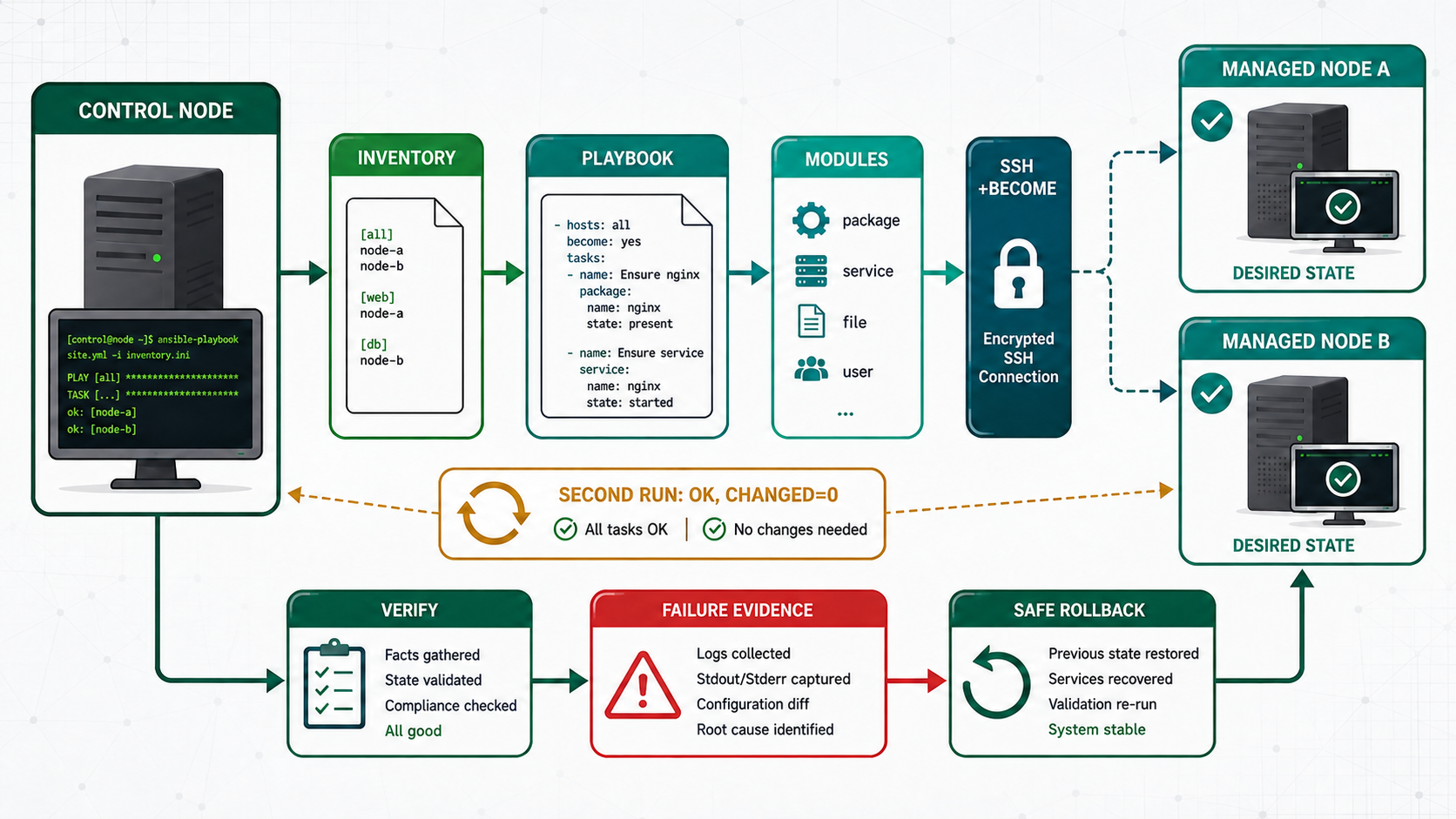
Ad hoc commands are useful for observation and one-time bounded actions, while repeatable desired state belongs in reviewed playbooks. The useful question is not whether the playbook finished; it is whether another operator can explain the selected hosts, inputs, module decisions, changes, failures and rollback from retained evidence.
Inherited lab checkpoint and starting evidence
Begin with the accepted checkpoint from the preceding lesson. Confirm both managed nodes answer the inventory and preserve the current project commit before changing this layer.
pwd
ansible --version
ansible-config dump --only-changed
ansible-inventory --graph
git status --short
Capture this output before changing the module discovery and bounded ad hoc work. Keep host keys, vault passwords, private keys and tokens out of terminal transcripts and Git. The examples use control.example.test, nodea.example.test and nodeb.example.test; replace them only with identities verified in your own inventory.
Understand the module discovery and bounded ad hoc work
| Question | Operator decision | Evidence |
|---|---|---|
| Scope | Which hosts and groups should receive the change? | Inventory graph and explicit limit |
| Input | Where does each value originate? | Variable inspection without secret disclosure |
| State | Which module expresses the required result? | Module documentation and diff |
| Failure | What must stop, continue or recover? | Recap, registered result and managed-node logs |
| Persistence | Does the result survive service restart or reboot? | Second run and client-side acceptance |
Prepare the project safely
cd ~/ansible-lab
git status --short
ansible-inventory -i inventories/lab.ini --graph
ansible all -i inventories/lab.ini -m ansible.builtin.ping --limit nodea.example.test
Work in a dedicated Git repository, inspect configuration precedence and commit no generated secrets. Use a named inventory and an explicit limit until host selection is proven.
Build the complete working example
ansible web -i inventories/lab.yml --list-hosts
ansible web -i inventories/lab.yml -m ansible.builtin.command -a 'uptime' -o
ansible web -i inventories/lab.yml -m ansible.builtin.package -a 'name=httpd state=present' --check --diff
ansible-doc ansible.builtin.package
ansible-doc -t inventory -l
The command module does not invoke a shell. State modules can predict and report change, but check support must be verified in module documentation.
Run, inspect and repeat
ansible-playbook --syntax-check -i inventories/lab.ini playbooks/site.yml
ansible-playbook --check --diff -i inventories/lab.ini playbooks/site.yml
ansible-playbook -i inventories/lab.ini playbooks/site.yml
ansible-playbook -i inventories/lab.ini playbooks/site.yml
The first run may report a controlled change. The second run should normally report changed=0 for the same desired state. If it changes again, identify the non-idempotent task rather than accepting noisy automation as normal.
Interpret the execution result
| Signal | Healthy meaning | What a different result means |
|---|---|---|
| ok | Task inspected state and required no change | Confirm this was the intended host and state |
| changed | Module made a declared change | Review diff and handler notification |
| failed | Task could not establish its contract | Read module message and managed-node evidence |
| unreachable | Connection or transport failed before task execution | Check inventory, SSH, host key, route and Python |
| rescued or ignored | Play continued under explicit failure policy | Ensure the exception is visible and owned |
Read the recap as a starting point, not as the acceptance test. A green play can still select the wrong host, install an unintended version, expose a service on the wrong interface or leave a change that disappears after reboot. Tie each requirement to evidence from the managed node and, where practical, to a client-side test. Keep the command, relevant output, inventory limit and Git revision together so another administrator can reproduce the decision.
When a run fails, resist changing several layers at once. First confirm inventory selection and transport, then privilege, input data, module arguments, managed-node state and finally the application response. Make one attributable correction and rerun the smallest safe scope. This preserves the causal evidence that disappears when shell commands, manual edits and repeated full-fleet runs are mixed together.
Practical use cases
| Use case | Implementation choice | Acceptance |
|---|---|---|
| Fleet observation | Use command with changed_when only in a playbook | Output is gathered without claiming configuration change |
| Emergency bounded change | Record exact limit and command, then convert to code | The repository becomes the continuing source of truth |
| Narrow rollout | Use --limit and serial execution before the complete group | Only intended hosts change and availability remains inside its budget |
| Dependency outage | Stop the named lab dependency and retain the failed result | Failure is visible, bounded and recoverable without manual drift |
A shell one-liner succeeds on half the fleet
An operator uses shell syntax through the command module; some hosts fail and others use stale local state. Local ansible-doc reveals the semantic mismatch. A purpose-built module or explicit shell task with validation and idempotence replaces the one-liner.
Troubleshoot by symptom
| Symptom | Inspect first | Correction |
|---|---|---|
| Pipe is treated as an argument | Selected command module | Use a module or explicit shell only when syntax is required |
| Module missing | FQCN and installed collection list | Install the pinned owning collection |
| Host is unreachable | Inventory variables, DNS, SSH host key and Python | Repair connection ownership before changing the play |
| Second run changes again | Diff, volatile input and task semantics | Replace imperative work with a stable desired-state test |
Unsafe shortcuts and recovery boundaries
- Unsafe: using shell when a state module exists increases injection and idempotence risk.
- Unsafe: running an ad hoc mutation with an unreviewed all pattern creates undocumented drift.
- Unsafe: treating check mode as universal simulation ignores modules that do not support it fully.
Production operation and rollback
Store the reviewed project in Git, pin external content, separate inventory data from secrets and promote the same commit through environments. Monitor unreachable, failed, rescued, ignored and changed results separately.
ansible-playbook --syntax-check -i inventories/lab.ini playbooks/rollback.yml
ansible-playbook --check --diff --limit nodea.example.test -i inventories/lab.ini playbooks/rollback.yml
ansible-playbook --limit nodea.example.test -i inventories/lab.ini playbooks/rollback.yml
Rollback is an automation path with its own test, not a promise to edit hosts manually after failure. Preserve the previous artifact, limit the host pattern, execute serially where availability requires it and verify the restored service from the client side.
Knowledge checks with explained answers
Guided lab and independent challenge
- Recreate the starting state on nodea and nodeb and record the inventory graph.
- Run syntax and check mode against nodea only; explain every predicted change.
- Run the play against both nodes and verify the result from the service or client side.
- Run it again and investigate any unexplained change.
- Inject the lesson-specific failure, capture the failed layer and execute the reviewed recovery.
- Complete the same end state from a fresh Git checkout without copying commands from the article.
Repeat the challenge against fresh nodes. The completed state, not a remembered command sequence, is the assessment target. Save syntax output, first and second recaps, a negative test and the rollback result.