
AWS 072: Launch and connect to EC2 with a role, user data, and IMDSv2
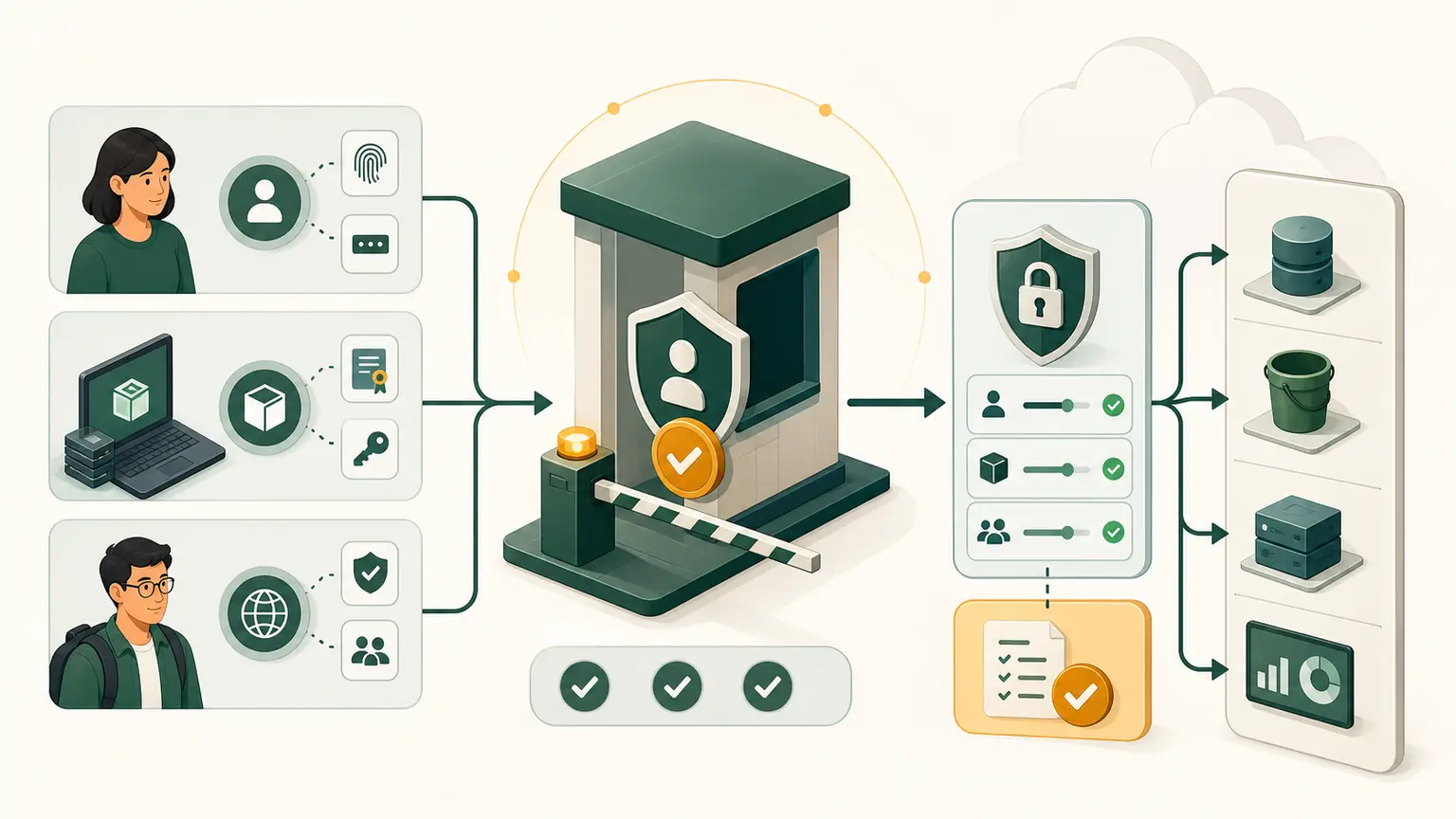
1. Real-world scenario
A small operations team needs a Linux application server in AWS. The server must:
- launch in the VPC and public subnet built earlier in Project P04;
- receive temporary AWS permissions through an IAM role;
- configure itself at first boot with user data;
- require IMDSv2 for instance metadata;
- support administration through AWS Systems Manager Session Manager;
- have no inbound SSH or RDP rule;
- prove that the operating system, bootstrap process, web service, role, and metadata controls are working;
- be removed safely when the lab ends.
This is a learning server, not a production design. A production workload would normally add a launch template, multiple instances across Availability Zones, load balancing, monitoring, backup, patching, vulnerability management, and a controlled deployment process.
2. Learning objective and final outcome
By the end of this lesson, the student can:
- explain every important EC2 launch input;
- create an EC2 service role and instance profile;
- launch one Amazon Linux 2023 instance with exact network, storage, identity, tag, user-data, and metadata settings;
- connect through Session Manager without opening inbound TCP 22;
- verify cloud-init, Apache, SSM Agent, the instance profile, and IMDSv2;
- diagnose the most common launch and connection failures;
- either preserve the instance briefly for AWS 073 or remove all chargeable resources.
The lab is complete only when the student produces both technical evidence and cleanup evidence.
3. Final architecture
 Student
   |
   | AWS Console and pre-authenticated AWS CloudShell
   v
 AWS APIs: EC2, IAM and Systems Manager
   |
   +---------------- IAM control -------------------+
   |                                                |
   |  Instance profile: nw-p04-ec2-ssm              |
   |  Role: nw-p04-ec2-ssm                          |
   |  Policy: AmazonSSMManagedInstanceCore           |
   |                                                |
   +-----------------------+------------------------+
                           |
                           v
 VPC: nw-p04-vpc, 10.42.0.0/16
   |
   +-- Public subnet: nw-p04-public-a, 10.42.10.0/24
       |
       +-- Route 0.0.0.0/0 -> Internet gateway
       |
       +-- Security group: nw-p04-ec2-sg
       |     Inbound: none
       |     Outbound: allowed for this learning lab
       |
       +-- EC2: nw-p04-web-1
             Amazon Linux 2023, x86_64
             t3.micro
             Temporary public IPv4 for outbound connectivity
             8 GiB encrypted gp3 root volume
             SSM Agent -> Systems Manager over outbound HTTPS
             cloud-init -> installs and starts Apache
             IMDS endpoint -> IMDSv2 token required
The public IPv4 address is not an administration path. There is no inbound SSH rule. The address gives the instance an inexpensive, short-lived outbound path through the internet gateway so that SSM Agent and the package manager can reach their service endpoints. A private production instance would normally use an approved egress path or interface VPC endpoints instead.
4. Prerequisites, permissions, Region, and cost warning
Required prior work
The student must already have:
- completed the account, billing, Console, CloudShell, CLI, IAM, VPC, EC2, user-data, IMDSv2, EBS, and snapshot concept lessons;
- created the Project P04 VPC and public subnet;
- created a security group with no inbound rules;
- verified that the public subnet has a route to an internet gateway;
- configured a budget alert;
- signed in with an administrative learning identity, not the AWS account root user.
Required permissions
The learning identity needs the relevant permissions for:
- EC2 describe, run, tag, wait, connect, stop and terminate operations;
- IAM role, managed-policy attachment, instance-profile, and cleanup operations;
iam:PassRolefor the specificnw-p04-ec2-ssmrole;- Systems Manager managed-node discovery and starting a session.
If an organization supplies the account, the instructor should provide a scoped lab policy. Do not solve AccessDenied by using the root user.
Exact values for this sample
| Setting | Lab value | Why |
|---|---|---|
| Region | ap-south-1 | One fixed Region prevents accidental cross-Region resources |
| VPC | nw-p04-vpc | Existing Project P04 network |
| VPC CIDR | 10.42.0.0/16 | Existing Project P04 address range |
| Subnet | nw-p04-public-a | Short-lived outbound path without a NAT gateway |
| Subnet CIDR | 10.42.10.0/24 | Existing Project P04 public subnet |
| Security group | nw-p04-ec2-sg | No inbound rules; outbound access for the lab |
| Instance name | nw-p04-web-1 | Predictable evidence and cleanup |
| AMI | Latest AWS-provided Amazon Linux 2023 x86_64 AMI | Current AWS image with cloud-init and normally preinstalled SSM Agent |
| Instance type | t3.micro | Small learning instance; verify availability and current price |
| Key pair | None | Session Manager is the administration path |
| IAM role and profile | nw-p04-ec2-ssm | Temporary permissions for SSM Agent |
| Root volume | 8 GiB, gp3, encrypted, delete on termination | Small encrypted root device with explicit cleanup behavior |
| Public IPv4 | Enabled temporarily | Short-lived outbound connectivity; it can create a charge |
| IMDS endpoint | Enabled | The instance uses metadata and its role |
| Metadata version | V2 only, token required | Reject tokenless IMDSv1 requests |
| Metadata hop limit | 1 | Appropriate for this non-container host |
| Tags in metadata | Disabled | Not required for this lab |
| Detailed monitoring | Disabled | Avoid unnecessary lab cost |
| Termination protection | Disabled | The cleanup exercise must be possible |
If t3.micro is unavailable in the selected Availability Zone, choose another small current type that is compatible with the x86_64 AMI. Record the substitution and explain it.
Cost gate
Before clicking Launch instance:
- Open AWS Pricing Calculator or the EC2 pricing page for
ap-south-1. - Estimate 60 minutes of active EC2 for this lesson, the planned active intervals through AWS 079, 8 GiB of gp3 EBS retained through AWS 080, and a public IPv4 address during every running interval.
- Record the per-lesson estimate and the maximum Project P04 cost envelope.
- Set a 60-minute running-resource timer.
Free Tier eligibility and credits differ by account and date. Never promise that this lab is free.
Potential charges include:
- EC2 while the instance is running;
- EBS until the volume is deleted;
- the public IPv4 address while assigned;
- data transfer or additional services if the student changes the design.
IAM roles, instance profiles, security groups, and this small amount of user data do not have an hourly resource charge. A budget alert reports spend but does not stop resources automatically.
Preflight in CloudShell
Open AWS CloudShell from the AWS Console. CloudShell already has AWS CLI v2 and uses the signed-in Console identity.
NW_REGION="ap-south-1"
NW_VPC_NAME="nw-p04-vpc"
NW_SUBNET_NAME="nw-p04-public-a"
NW_SG_NAME="nw-p04-ec2-sg"

aws --version

aws sts get-caller-identity \
  --region "$NW_REGION" \
  --query 'Arn' \
  --output text
Expected result:
aws --versionreports AWS CLI version 2.- The second command returns the ARN of the signed-in learning identity.
- Do not publish the account ID from that ARN.
Discover the resources created in AWS 060:
NW_VPC_ID=$(
  aws ec2 describe-vpcs \
    --region "$NW_REGION" \
    --filters "Name=tag:Name,Values=$NW_VPC_NAME" \
    --query 'Vpcs[0].VpcId' \
    --output text
)

NW_SUBNET_ID=$(
  aws ec2 describe-subnets \
    --region "$NW_REGION" \
    --filters \
      "Name=vpc-id,Values=$NW_VPC_ID" \
      "Name=tag:Name,Values=$NW_SUBNET_NAME" \
    --query 'Subnets[0].SubnetId' \
    --output text
)

NW_SG_ID=$(
  aws ec2 describe-security-groups \
    --region "$NW_REGION" \
    --filters \
      "Name=vpc-id,Values=$NW_VPC_ID" \
      "Name=group-name,Values=$NW_SG_NAME" \
    --query 'SecurityGroups[0].GroupId' \
    --output text
)

printf 'VPC=%s\nSubnet=%s\nSecurityGroup=%s\n' \
  "$NW_VPC_ID" "$NW_SUBNET_ID" "$NW_SG_ID"
Expected result: one ID beginning with vpc-, one with subnet-, and one with sg-.
If any value is None, empty, or from another VPC, stop. Correct AWS 060 before launching an instance.
Inspect the subnet and security group:
aws ec2 describe-subnets \
  --region "$NW_REGION" \
  --subnet-ids "$NW_SUBNET_ID" \
  --query 'Subnets[0].{VpcId:VpcId,AZ:AvailabilityZone,CIDR:CidrBlock,AvailableIPs:AvailableIpAddressCount,AutoPublicIPv4:MapPublicIpOnLaunch}' \
  --output table

aws ec2 describe-security-groups \
  --region "$NW_REGION" \
  --group-ids "$NW_SG_ID" \
  --query 'SecurityGroups[0].{VpcId:VpcId,Inbound:IpPermissions,Outbound:IpPermissionsEgress}' \
  --output json
Required interpretation:
- The VPC IDs must match.
- The subnet must have available IPv4 addresses.
- An empty
Inboundlist is correct for this lab. - The lab needs outbound DNS and HTTPS access.
AutoPublicIPv4does not control the explicit per-instance choice used below.
In the VPC Console, also verify that the subnet's effective route table has 0.0.0.0/0 targeting the Project P04 internet gateway.
5. AWS Management Console lab
Use this as the primary beginner path.
Part A: Create the EC2 role
- Open IAM.
- Choose Roles, then Create role.
- For trusted entity type, choose AWS service.
- For service or use case, choose EC2.
- Add the AWS managed policy AmazonSSMManagedInstanceCore.
- Set the role name to
nw-p04-ec2-ssm. - Add these tags:
Project=NitWings-P04Environment=Lab
- Review the trust relationship. Its service principal must be
ec2.amazonaws.com. - Create the role.
The IAM Console creates an instance profile with the same name and places the role in it. The instance profile is the object selected during EC2 launch.
Part B: Prepare the user-data script
Copy this exact script. It contains no password, access key, token, account ID, or other secret.
#!/bin/bash
set -euxo pipefail

dnf install -y httpd

cat > /var/www/html/index.html <<'HTML'
<!doctype html>
<html lang="en">
<head>
  <meta charset="utf-8">
  <meta name="viewport" content="width=device-width, initial-scale=1">
  <title>NitWings EC2 Lab</title>
</head>
<body>
  <h1>NitWings EC2 lab is ready</h1>
  <p>Amazon Linux 2023 completed the AWS 072 bootstrap.</p>
</body>
</html>
HTML

systemctl enable --now httpd
printf 'AWS 072 bootstrap complete\n' > /var/lib/nitwings-aws-072-ready
User data is not a secret store. Encoding performed by the Console or CLI is not encryption.
Part C: Launch the instance
- Open EC2, select
ap-south-1, choose Instances, then Launch instances. - Under Name and tags:
- Name:
nw-p04-web-1 - Add
Project=NitWings-P04 - Add
Environment=Lab - Add
DeleteAfterLesson=AWS080 - Apply the project tags to the instance and volume.
- Under Application and OS Images:
- Choose Quick Start
- Choose Amazon Linux
- Select the latest AWS-provided Amazon Linux 2023 AMI
- Confirm architecture
64-bit (x86)
- Under Instance type, choose
t3.micro. - Under Key pair, choose Proceed without a key pair.
- Under Network settings, choose Edit:
- VPC:
nw-p04-vpc - Subnet:
nw-p04-public-a - Auto-assign public IP: Enable
- Firewall: Select existing security group
- Security group:
nw-p04-ec2-sg - Confirm there are no inbound rules.
- Under Configure storage:
- Size:
8 GiB - Type:
gp3 - Encrypted: enabled
- Delete on termination: enabled
- Expand Advanced details:
- IAM instance profile:
nw-p04-ec2-ssm - Shutdown behavior:
Stop - Termination protection: disabled
- Detailed CloudWatch monitoring: disabled
- Tenancy: shared
- Metadata accessible: enabled
- Metadata version: V2 only (token required)
- Metadata response hop limit:
1 - Allow tags in instance metadata: disabled
- User data: paste the script exactly as plain text
- Review the Summary. Confirm that only one instance will launch.
- Choose Launch instance.
- Open the instance details and privately record its instance ID.
The DeleteAfterLesson=AWS080 tag is a label, not automation. The learner must still stop the instance between study sessions and complete the deletion workflow in AWS 080.
Part D: Wait for readiness
Wait for:
- instance state:
Running; - system status check: passed;
- instance status check: passed.
Then open Systems Manager, choose Fleet Manager, and verify that the instance appears as an online managed node. Registration can take several minutes after EC2 reports Running.
Part E: Connect without SSH
- In Systems Manager, choose Session Manager.
- Choose Start session.
- Select
nw-p04-web-1. - Enter the reason
AWS 072 verification. - Start the session.
Do not add inbound TCP 22 merely because the instance takes time to appear.
6. Matching CloudShell and AWS CLI build
This is the equivalent CLI path. It is not an instruction to create a second simultaneous instance.
Choose one:
- build through the Console and use CLI for inspection; or
- terminate the Console-built instance, then repeat the build with CLI.
Part A: Create the role and instance profile
If the Console path already created nw-p04-ec2-ssm, reuse it and skip this part.
Create nw-p04-ec2-trust.json in CloudShell:
{
  "Version": "2012-10-17",
  "Statement": [
    {
      "Effect": "Allow",
      "Principal": {
        "Service": "ec2.amazonaws.com"
      },
      "Action": "sts:AssumeRole"
    }
  ]
}
Run:
aws iam create-role \
  --role-name nw-p04-ec2-ssm \
  --assume-role-policy-document file://nw-p04-ec2-trust.json \
  --tags Key=Project,Value=NitWings-P04 Key=Environment,Value=Lab

aws iam attach-role-policy \
  --role-name nw-p04-ec2-ssm \
  --policy-arn arn:aws:iam::aws:policy/AmazonSSMManagedInstanceCore

aws iam create-instance-profile \
  --instance-profile-name nw-p04-ec2-ssm

aws iam add-role-to-instance-profile \
  --instance-profile-name nw-p04-ec2-ssm \
  --role-name nw-p04-ec2-ssm

aws iam get-instance-profile \
  --instance-profile-name nw-p04-ec2-ssm \
  --query 'InstanceProfile.{Name:InstanceProfileName,Role:Roles[0].RoleName}' \
  --output table
Expected result: both the instance profile and contained role are named nw-p04-ec2-ssm.
IAM changes can take a short time to propagate. If EC2 reports that the profile is invalid immediately after creation, verify the profile again and retry after it becomes visible. Do not create duplicate roles.
Part B: Save the user-data script
Save the Part B script as nw-p04-user-data.sh in CloudShell. Confirm its first line and size:
head -n 1 nw-p04-user-data.sh
wc -c nw-p04-user-data.sh
Expected result:
- first line:
#!/bin/bash; - size: far below the EC2 Linux raw user-data limit.
Part C: Resolve the current AMI and root device
NW_AMI_ID=$(
  aws ssm get-parameter \
    --region "$NW_REGION" \
    --name /aws/service/ami-amazon-linux-latest/al2023-ami-kernel-default-x86_64 \
    --query 'Parameter.Value' \
    --output text
)

NW_ROOT_DEVICE=$(
  aws ec2 describe-images \
    --region "$NW_REGION" \
    --image-ids "$NW_AMI_ID" \
    --query 'Images[0].RootDeviceName' \
    --output text
)

NW_BLOCK_DEVICE="DeviceName=${NW_ROOT_DEVICE},Ebs={VolumeSize=8,VolumeType=gp3,Encrypted=true,DeleteOnTermination=true}"

printf 'AMI=%s\nRootDevice=%s\n' "$NW_AMI_ID" "$NW_ROOT_DEVICE"
Expected result: an AMI ID beginning with ami- and a valid root-device name. Resolving the AWS public parameter avoids placing a soon-obsolete AMI ID in the lesson.
Part D: Test authorization
Run the launch with --dry-run first:
aws ec2 run-instances \
  --region "$NW_REGION" \
  --image-id "$NW_AMI_ID" \
  --instance-type t3.micro \
  --subnet-id "$NW_SUBNET_ID" \
  --security-group-ids "$NW_SG_ID" \
  --associate-public-ip-address \
  --iam-instance-profile Name=nw-p04-ec2-ssm \
  --metadata-options "HttpEndpoint=enabled,HttpTokens=required,HttpPutResponseHopLimit=1,InstanceMetadataTags=disabled" \
  --block-device-mappings "$NW_BLOCK_DEVICE" \
  --user-data file://nw-p04-user-data.sh \
  --count 1 \
  --dry-run
Expected result: DryRunOperation. AWS intentionally returns it as an error-shaped response to say that the caller appears authorized.
UnauthorizedOperation means the learning identity lacks a required permission. A dry run does not prove that capacity, quota, bootstrap, network connectivity, or runtime health will succeed.
Part E: Launch exactly one instance
NW_INSTANCE_ID=$(
  aws ec2 run-instances \
    --region "$NW_REGION" \
    --image-id "$NW_AMI_ID" \
    --instance-type t3.micro \
    --subnet-id "$NW_SUBNET_ID" \
    --security-group-ids "$NW_SG_ID" \
    --associate-public-ip-address \
    --iam-instance-profile Name=nw-p04-ec2-ssm \
    --metadata-options "HttpEndpoint=enabled,HttpTokens=required,HttpPutResponseHopLimit=1,InstanceMetadataTags=disabled" \
    --block-device-mappings "$NW_BLOCK_DEVICE" \
    --user-data file://nw-p04-user-data.sh \
    --instance-initiated-shutdown-behavior stop \
    --tag-specifications \
      'ResourceType=instance,Tags=[{Key=Name,Value=nw-p04-web-1},{Key=Project,Value=NitWings-P04},{Key=Environment,Value=Lab},{Key=DeleteAfterLesson,Value=AWS080}]' \
      'ResourceType=volume,Tags=[{Key=Name,Value=nw-p04-web-1-root},{Key=Project,Value=NitWings-P04},{Key=Environment,Value=Lab},{Key=DeleteAfterLesson,Value=AWS080}]' \
    --count 1 \
    --query 'Instances[0].InstanceId' \
    --output text
)

printf 'InstanceId=%s\n' "$NW_INSTANCE_ID"
Immediately start the 60-minute running-resource timer.
Wait for the instance and both EC2 status checks:
aws ec2 wait instance-running \
  --region "$NW_REGION" \
  --instance-ids "$NW_INSTANCE_ID"

aws ec2 wait instance-status-ok \
  --region "$NW_REGION" \
  --instance-ids "$NW_INSTANCE_ID"
The waiters print no output when the target state is reached. A nonzero exit requires inspection rather than blind repetition.
Console-to-CLI mapping
| Console choice | CLI parameter |
|---|---|
| Amazon Linux 2023 AMI | --image-id "$NW_AMI_ID" |
t3.micro | --instance-type t3.micro |
| Public subnet | --subnet-id "$NW_SUBNET_ID" |
| Existing security group | --security-group-ids "$NW_SG_ID" |
| Enable public IPv4 | --associate-public-ip-address |
| IAM instance profile | --iam-instance-profile Name=nw-p04-ec2-ssm |
| IMDSv2 required | HttpTokens=required |
| Metadata endpoint enabled | HttpEndpoint=enabled |
| Hop limit 1 | HttpPutResponseHopLimit=1 |
| User-data text box | --user-data file://nw-p04-user-data.sh |
| Encrypted 8 GiB gp3 root | --block-device-mappings "$NW_BLOCK_DEVICE" |
| Instance and volume tags | --tag-specifications |
7. Verification and expected output
Verify launch settings from CloudShell
aws ec2 describe-instances \
  --region "$NW_REGION" \
  --instance-ids "$NW_INSTANCE_ID" \
  --query 'Reservations[0].Instances[0].{State:State.Name,AZ:Placement.AvailabilityZone,Type:InstanceType,Subnet:SubnetId,Profile:IamInstanceProfile.Arn,HttpTokens:MetadataOptions.HttpTokens,HopLimit:MetadataOptions.HttpPutResponseHopLimit,MetadataTags:MetadataOptions.InstanceMetadataTags,RootDevice:RootDeviceName}' \
  --output table
Required values:
State:running;Type:t3.micro, unless an approved substitute was recorded;Subnet: the Project P04 public subnet;Profile: an ARN ending ininstance-profile/nw-p04-ec2-ssm;HttpTokens:required;HopLimit:1;MetadataTags:disabled.
Verify the root EBS deletion setting:
aws ec2 describe-instances \
  --region "$NW_REGION" \
  --instance-ids "$NW_INSTANCE_ID" \
  --query 'Reservations[0].Instances[0].BlockDeviceMappings[].Ebs.{VolumeId:VolumeId,Status:Status,DeleteOnTermination:DeleteOnTermination}' \
  --output table
Required value: DeleteOnTermination is True.
Check Systems Manager registration:
aws ssm describe-instance-information \
  --region "$NW_REGION" \
  --filters "Key=InstanceIds,Values=$NW_INSTANCE_ID" \
  --query 'InstanceInformationList[0].{PingStatus:PingStatus,Platform:PlatformName,AgentVersion:AgentVersion}' \
  --output table
Expected result: PingStatus becomes Online. If no row appears immediately, use the troubleshooting section.
Verify inside the Session Manager shell
Run:
whoami
hostnamectl
sudo systemctl is-active amazon-ssm-agent
sudo cloud-init status --wait
sudo systemctl is-active httpd
curl -sS http://127.0.0.1/
sudo cat /var/lib/nitwings-aws-072-ready
Expected evidence:
- the session normally starts as
ssm-user; - the operating system identifies as Amazon Linux 2023;
- SSM Agent is
active; - cloud-init reports
status: done; - Apache is
active; - the local HTTP request contains
NitWings EC2 lab is ready; - the marker file contains
AWS 072 bootstrap complete.
If cloud-init did not finish successfully:
sudo tail -n 80 /var/log/cloud-init-output.log
sudo journalctl -u cloud-init -u cloud-final --no-pager -n 80
Do not rerun the entire user-data script blindly. Identify the failed command first.
Verify IMDSv2
Inside the instance:
NW_IMDS_TOKEN=$(
  curl -sS -X PUT \
    -H 'X-aws-ec2-metadata-token-ttl-seconds: 60' \
    http://169.254.169.254/latest/api/token
)

NW_METADATA_INSTANCE_ID=$(
  curl -sS \
    -H "X-aws-ec2-metadata-token: $NW_IMDS_TOKEN" \
    http://169.254.169.254/latest/meta-data/instance-id
)

printf 'MetadataInstanceId=%s\n' "$NW_METADATA_INSTANCE_ID"

curl -sS -o /dev/null -w 'TokenlessHTTP=%{http_code}\n' \
  http://169.254.169.254/latest/meta-data/instance-id
Required result:
- the token-authenticated request returns the current instance ID;
- the tokenless request returns HTTP
401.
Never retrieve or publish the values under the metadata role-credential path.
Verify only the attached role name:
curl -sS \
  -H "X-aws-ec2-metadata-token: $NW_IMDS_TOKEN" \
  http://169.254.169.254/latest/meta-data/iam/security-credentials/
Expected result: nw-p04-ec2-ssm.
8. Why the design works
AMI and instance type
The AMI supplies the bootable operating-system image. The instance type supplies a compatible compute, memory, network, and EBS performance profile. The x86_64 AMI and t3.micro type are compatible.
Subnet and public IPv4
The selected subnet fixes the Availability Zone and route-table context. The public IPv4 address is mapped to the instance's primary private IPv4 address. Together with the internet-gateway route and outbound security-group rules, it provides returnable outbound connectivity.
The existence of a public IPv4 address does not create an inbound path by itself. The route, security group, NACL, host firewall, and listening application all matter.
Security group
The security group has no inbound rules, so the lab does not expose SSH, RDP, or Apache to the internet. Session Manager uses an agent-initiated outbound managed channel.
IAM role and instance profile
The role defines the temporary permissions. The instance profile is the EC2 container that carries the role during launch. SSM Agent obtains rotating role credentials through the instance metadata service. No long-lived AWS access key is stored on the server.
The operator also needs iam:PassRole to launch EC2 with that role. Being allowed to create an EC2 instance does not automatically grant permission to pass every IAM role.
User data and cloud-init
EC2 makes the user data available during launch. Amazon Linux 2023 uses cloud-init to process the shell script. The script installs Apache, creates a deterministic page, starts the service, and writes a completion marker.
Linux user data normally runs during the first boot cycle. It should be short, versioned, idempotent where possible, observable, and free of secrets.
IMDSv2
The client first sends an HTTP PUT request for a time-limited token. It then supplies the token in metadata GET requests. Setting HttpTokens=required rejects tokenless IMDSv1 calls.
IMDSv2 protects the credential-delivery path, but it does not reduce the permissions in the role. Least-privilege IAM is still required.
Session Manager
Session Manager requires:
- a supported and running SSM Agent;
- instance permissions, supplied here by
AmazonSSMManagedInstanceCore; - outbound HTTPS connectivity to the required Systems Manager endpoints;
- operator permission to start the session;
- matching Region and managed-node status.
It does not require an inbound TCP 22 rule, an SSH key pair, a bastion host, or a public SSH service.
9. Common failures and troubleshooting
| Symptom | Likely cause | Evidence to check | Correct action |
|---|---|---|---|
| Role does not appear in EC2 | Missing instance profile, wrong name, missing iam:ListInstanceProfiles, or IAM propagation | IAM role and instance-profile details | Create or correct the profile, add the role, verify permission, then wait for propagation |
UnauthorizedOperation at launch | Missing EC2 permission or iam:PassRole | CloudTrail event and encoded authorization message where available | Grant only the required action and exact pass-role resource |
Invalid IAM Instance Profile | Profile is absent, empty, misspelled, or not propagated | aws iam get-instance-profile | Correct the profile and retry after it contains the role |
| No instance capacity | Selected type is temporarily unavailable in that AZ | EC2 launch error | Use an approved compatible type or another project subnet/AZ |
| EC2 running but no SSM node | Wrong Region, missing role, stopped agent, no DNS/outbound HTTPS, no public IPv4/IGW path, or service endpoint problem | Instance profile, route table, public address, SG egress, agent log | Fix the failed prerequisite; do not open SSH as the first response |
| Only one status check passes | Guest OS, network, or underlying host problem | System versus instance status check | Follow the matching EC2 status-check branch |
| cloud-init failed | Script syntax, repository access, package failure, or service error | /var/log/cloud-init-output.log and journal | Correct the specific command and relaunch a clean disposable instance |
| Apache inactive | User data incomplete or package/service failure | systemctl status httpd and cloud-init log | Correct bootstrap logic; do not expose port 80 to hide the failure |
Tokenless metadata returns 200 | IMDSv2 is optional | EC2 metadata options | Set HttpTokens to required, then retest compatibility |
| Metadata request times out | Endpoint disabled, local firewall, bad address, or proxy behavior | EC2 metadata options and local route | Use 169.254.169.254, bypass external proxies, and verify endpoint state |
| Unexpected duplicate charges | Both Console and CLI tracks were launched together | EC2 Global View, tags, Billing | Terminate the unneeded instance and delete retained volumes |
Troubleshooting order
Use this order to avoid random changes:
- Confirm account and Region.
- Read the exact API or Console error.
- Confirm instance state and both status checks.
- Confirm the attached instance profile.
- Confirm SSM Agent state.
- Confirm DNS and outbound HTTPS path.
- Inspect cloud-init and service logs.
- Change one control at a time.
- Retest and record the evidence.
10. Cleanup procedure
Option A: Retain the controlled project through AWS 079
AWS 073 attaches, formats, snapshots, and restores an EBS data volume.
If continuing with the linear Project P04 path:
- Keep only this instance, its root volume, its instance profile, and the Project P04 network.
- Do not allocate an Elastic IP except for the timed AWS 075 lab, where it is released immediately.
- Close the Session Manager session when it is not being used.
- Keep the running-resource timer active whenever the instance is running.
- If AWS 073 does not start immediately, stop the instance, wait for
stopped, and record that the root EBS volume continues to incur storage cost. - Restart the instance only for a later lesson that requires live evidence, then stop it again when that lesson ends.
- Delete temporary data volumes, snapshots, logs, and the AWS 075 Elastic IP in the lesson that creates them.
- Complete final dependency-aware project cleanup in AWS 080.
Do not leave the instance running between study sessions or overnight.
Option B: End the lab now
From CloudShell:
aws ec2 terminate-instances \
  --region "$NW_REGION" \
  --instance-ids "$NW_INSTANCE_ID" \
  --query 'TerminatingInstances[0].{InstanceId:InstanceId,Previous:PreviousState.Name,Current:CurrentState.Name}' \
  --output table

aws ec2 wait instance-terminated \
  --region "$NW_REGION" \
  --instance-ids "$NW_INSTANCE_ID"
Confirm that no Project P04 EBS volume from this instance remains:
aws ec2 describe-volumes \
  --region "$NW_REGION" \
  --filters "Name=tag:Project,Values=NitWings-P04" \
  --query 'Volumes[?State!=`deleted`].{VolumeId:VolumeId,State:State,SizeGiB:Size,Attachments:Attachments[].InstanceId}' \
  --output table
If the project contains no deliberately retained EBS volume, the table should be empty. Investigate before deleting any volume whose ownership is uncertain.
Remove the lab role and instance profile:
aws iam remove-role-from-instance-profile \
  --instance-profile-name nw-p04-ec2-ssm \
  --role-name nw-p04-ec2-ssm

aws iam delete-instance-profile \
  --instance-profile-name nw-p04-ec2-ssm

aws iam detach-role-policy \
  --role-name nw-p04-ec2-ssm \
  --policy-arn arn:aws:iam::aws:policy/AmazonSSMManagedInstanceCore

aws iam delete-role \
  --role-name nw-p04-ec2-ssm
Keep the Project P04 VPC, subnet, route table, internet gateway, NACL, and security group only if the next project lesson requires them. These particular VPC components have no hourly charge by themselves, but always verify that the project does not contain a NAT gateway, interface endpoint, Elastic IP, load balancer, or another billed resource.
Final cleanup evidence
Record:
- the terminated instance ID;
- no unexpected available EBS volume;
- no allocated Elastic IP;
- the deleted instance profile and role, unless continuing immediately;
- the EC2 Console showing no running Project P04 instance;
- the Region checked;
- the time cleanup completed.
Billing data can be delayed. An empty Cost Explorer result immediately after cleanup is not proof that no charge occurred.
11. Architecture and certification decision points
- What determines the instance Availability Zone?
The subnet.
- Why does the instance need an instance profile?
EC2 uses the profile to attach the IAM role and deliver rotating temporary credentials.
- Why is
iam:PassRoleimportant?
It controls which roles a launcher may attach. Without it, EC2 creation permission could become a privilege-escalation path.
- Does a security group create a route?
No. Security groups filter traffic. Route tables choose network targets.
- Does Session Manager work with no inbound rules?
Yes, when the agent, instance role, operator permissions, Region, DNS, and outbound endpoint connectivity are correct.
- Does a public subnet automatically give every instance a public IPv4 address?
No. Address assignment is a separate subnet or network-interface launch choice.
- Why require IMDSv2?
It requires a session token for metadata requests and rejects tokenless IMDSv1 calls.
- Does IMDSv2 make an overpowered role safe?
No. IAM policy still defines what stolen or misused credentials can do.
- Where should an application password go?
Not in user data. Use an appropriate secret service and retrieve it with a scoped role at runtime.
- What happens to the root volume at termination?
It is deleted only when DeleteOnTermination is enabled for that mapping.
Short scenarios
Scenario 1: Security policy prohibits inbound SSH and public bastions, but operators need a shell. Decision: Use Session Manager with managed-node prerequisites and scoped operator IAM.
Scenario 2: The instance launches, but Session Manager does not list it. Decision: Inspect the instance profile, SSM Agent, Region, DNS, and outbound endpoint path before changing inbound rules.
Scenario 3: An application inside a container cannot reach IMDSv2 when the host hop limit is 1. Decision: Test the container path and deliberately choose the documented hop limit. Do not make IMDSv1 optional as a shortcut.
Scenario 4: Auto Scaling must reproduce the same instance configuration. Decision: Move the reviewed settings into a versioned launch template and automate bootstrap.
Scenario 5: The web service is active locally but users cannot reach it. Decision: This lab intentionally has no inbound rule. For a real service, evaluate load balancer, route, SG, NACL, host firewall, listener, TLS, health, and DNS together.
Scenario 6: The instance is terminated, but the bill continues. Decision: Check retained EBS volumes, snapshots, Elastic IPs, NAT gateways, endpoints, load balancers, other Regions, and billing-data delay.
Student submission
Submit one short evidence package:
- the architecture diagram annotated in the student's own words;
- the EC2 configuration table showing instance type, subnet, profile, IMDSv2, hop limit, and root-volume cleanup behavior;
- SSM managed-node
Onlineevidence; - Session Manager output for SSM Agent, cloud-init, Apache, local HTTP, and IMDSv2;
- a two-paragraph explanation of role versus instance profile and route versus security group;
- one diagnosed failure or a written diagnosis of a supplied failure;
- cleanup evidence.
Redact account IDs, public IP addresses, session IDs, credential material, and any personally identifying information.
Instructor mastery rubric
| Area | Points | Pass evidence |
|---|---|---|
| Architecture and prerequisites | 10 | Student explains the control and data paths before launch |
| Account, Region, and cost gate | 10 | Correct identity, Region, estimate, and timer |
| EC2 configuration | 20 | Correct AMI/type, subnet, SG, encrypted root, tags and deletion setting |
| IAM and Session Manager | 15 | Correct role/profile and connection without inbound SSH |
| User data and verification | 15 | cloud-init complete, Apache active, deterministic local page |
| IMDSv2 | 10 | Token request succeeds and tokenless request returns 401 |
| Troubleshooting | 10 | Evidence-led diagnosis without random permission or firewall expansion |
| Cleanup | 10 | Instance and unintended storage removed; retained items justified |
Pass mark: 80 out of 100, with no critical safety failure.
Automatic failure conditions:
- using the root user for the lab;
- publishing credentials or metadata role-credential values;
- opening SSH or RDP to
0.0.0.0/0or::/0; - leaving an unplanned billed resource running;
- claiming completion without verification or cleanup evidence.
30-second recap
- An EC2 launch combines image, compute, network, storage, identity, bootstrap, metadata, and tags.
- The subnet determines the Availability Zone.
- An instance profile carries the IAM role to EC2.
- Session Manager can provide shell access without inbound SSH.
- User data bootstraps the server but must not contain secrets.
- IMDSv2 requires a token but does not replace least-privilege IAM.
- Cleanup and cost verification are part of the technical result.
Official sources
- AWS CloudShell overview
- Launch an EC2 instance
- EC2 launch configuration parameters
- Reference the latest AMIs with Systems Manager public parameters
- IAM roles and instance profiles for EC2
- Permission to pass an IAM role to EC2
- Run commands with EC2 user data
- Amazon Linux 2023 cloud-init
- Configure IMDS for new instances
- Session Manager prerequisites
- Start a Session Manager session
- Find AMIs with SSM Agent preinstalled
- VPC IP addressing and public IPv4 behavior
- Amazon VPC pricing
Completion gate
Pass at 80 out of 100 with no critical safety failure. Required evidence includes the reviewed architecture and cost gate, correct EC2 and IAM configuration, an Online Systems Manager node, Session Manager verification, successful cloud-init and local HTTP evidence, an IMDSv2 token test with tokenless rejection, one diagnosed failure, and cleanup or the approved AWS 073 retention record.