
AWS 106: Deploy a Multi-AZ load-balanced Auto Scaling application
The real problem
A team recognizes the name Deploy a Multi-AZ load-balanced Auto Scaling application but has not connected the feature to a real requirement, identity boundary, network or data path, failure mode, price dimension, and cleanup owner. A plausible configuration could still fail the workload.
Final outcome
The learner will produce a requirement-led artifact for Deploy a Multi-AZ load-balanced Auto Scaling application, inspect the matching AWS control plane in the Management Console, run a matching CloudShell or AWS CLI query, interpret the output, diagnose one failure, defend one architecture choice, and prove cleanup or approved retained state.
The practical outcome is not a command transcript. It must show what was expected, what happened, what the result proves, what it does not prove, and which evidence would change the decision.
Learning objectives
By the end of this lesson, the learner can:
- explain paid lab boundary;
- explain exact network;
- explain security path;
- explain private bootstrap;
- explain resilient serving;
- connect control-plane state to the real data, network, identity, or application behavior;
- identify cost and cleanup ownership before any optional mutation;
- troubleshoot from evidence without opening broad access or adding broad permissions.
Relationship model
Requirement
   |
   v
Identity and policy -> AWS configuration -> network or data path -> workload behavior
        |                    |                      |                    |
        +--------------------+----------------------+--------------------+
                                      |
                                      v
                         monitoring, cost, recovery, cleanup
Use this model to separate an AWS object that exists from a result that actually works. Every arrow is a verification boundary.
Prerequisites, permissions, Region, and safety
- Learning baseline: This sequence assumes practical Linux knowledge but no prior cloud-computing or AWS knowledge. Cloud, networking, security, data, automation, and architecture concepts must come from completed earlier lessons. If a prerequisite checkpoint is incomplete, return to its linked lesson before continuing.
- Confirm a non-root caller with
aws sts get-caller-identityand keep the account number private. - Use
ap-south-1unless this lesson explicitly names a second Region. - Confirm the intended profile and Region with
aws configure listbefore interpreting an empty result. - The live track requires only the named create, describe, tag, test, and delete actions for the lab resources. If the personal-account identity lacks them, use the instructor evidence track. Do not attach AdministratorAccess as a shortcut.
- This lesson has an optional paid live track. Record current prices, obtain owner approval, set a hard timer, tag every resource, and finish same-session cleanup. The supplied-evidence track is a complete no-create alternative.
- Never publish account IDs, public addresses, ARNs containing private account data, session IDs, presigned URLs, object data, credentials, or KMS material.
- Do not use root, world-open SSH or RDP, disabled TLS verification, unowned resources, or irreversible retention controls in a training exercise.
Core model
| Concept | What the learner must understand |
|---|---|
| Paid lab boundary | This optional build creates an Application Load Balancer, public IPv4 use by the load balancer, two EC2 instances, and EBS volumes. Current price evidence, approval, a 90-minute timer, and same-session AWS 107 cleanup are mandatory. |
| Exact network | Use nw-p05-vpc 10.50.0.0/16, public A 10.50.10.0/24, public B 10.50.20.0/24, private A 10.50.110.0/24, and private B 10.50.120.0/24 across two account-visible AZs. |
| Security path | The ALB security group accepts TCP 80 from the test client scope and sends TCP 8080 to the application security group. The application group accepts 8080 only from the ALB group and has no inbound management rule. |
| Private bootstrap | The launch template uses current Amazon Linux 2023, no public IP, no key pair, IMDSv2 required, encrypted gp3 root storage, and deterministic local user data that starts the preinstalled Python runtime on port 8080. Python is chosen because it is already in the image and needs no repository egress, not because the learner lacks Apache or Nginx skills. |
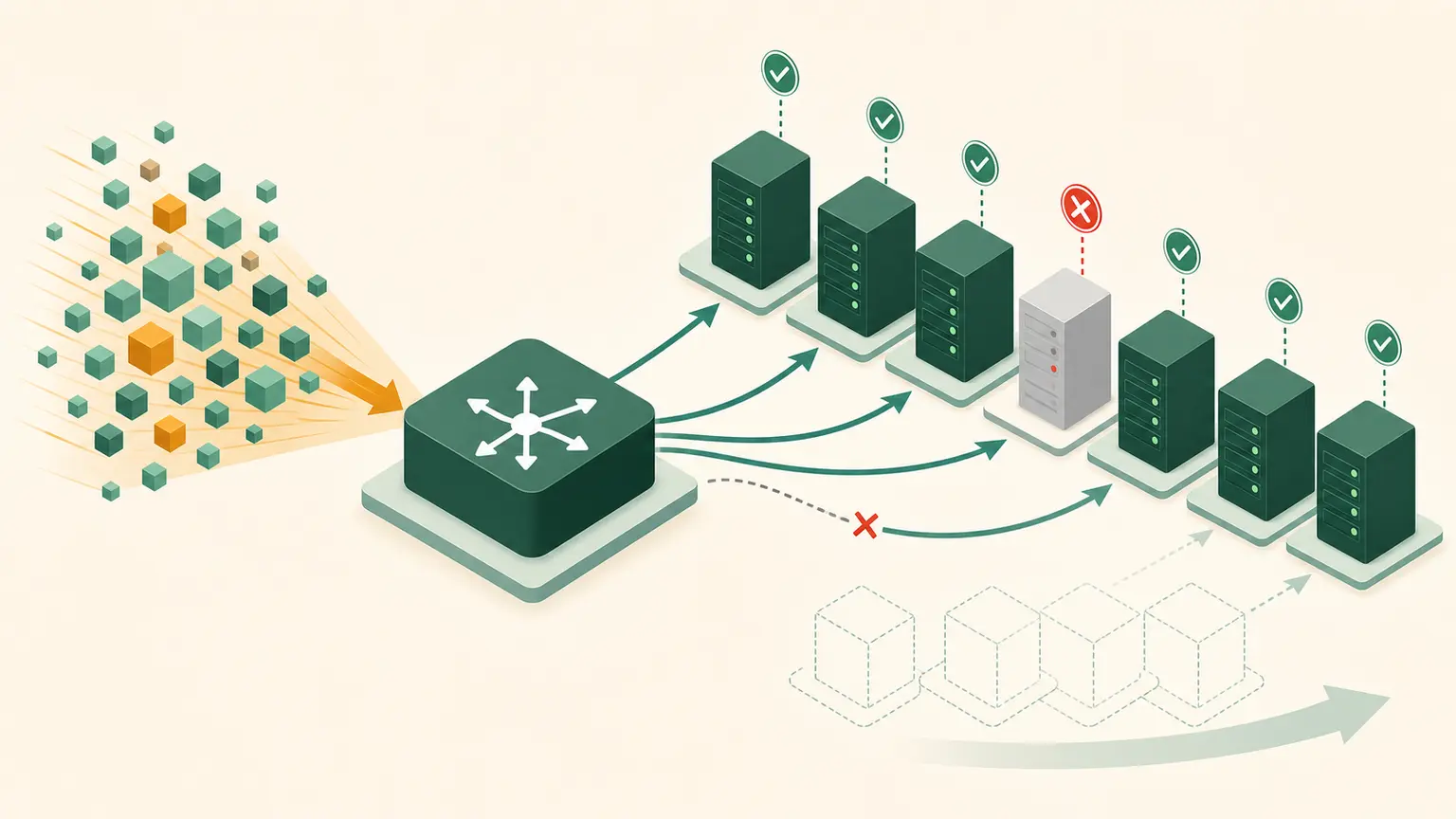
| Resilient serving | The internet-facing ALB spans both public subnets. The ASG maintains two targets across private subnets and attaches them to the target group with ELB health checks. |
| Retained state | Retain the complete owned P05 stack only for immediate AWS 107 break-fix. Stop if cost or ownership becomes uncertain; AWS 107 performs final reverse cleanup. |
How it works
Build in dependency order and pause at each gate. Network and security precede target group, launch template, load balancer, and Auto Scaling group. Verification covers DNS, HTTP responses from multiple instance IDs, target health, zonal placement, ASG activity, one replacement, and the resource ledger. The learner applies existing Bash, systemd, web-service, and log-reading skills when diagnosing guest bootstrap or application faults.
Read the result in layers:
- Scope: account, Region, VPC, bucket, AZ, endpoint, principal, object version, or resource ARN.
- Control plane: the requested configuration exists and reached an expected state.
- Behavior: the request, connection, health check, replication, restore, or application result meets the requirement.
- Operations: monitoring, failure owner, cost, retention, rollback, and cleanup are known.
Control-plane success is necessary but not sufficient. A resource can be available while policy, routing, DNS, health, data, or application behavior remains wrong.
Architecture decision table
| Requirement | Preferred direction | Why |
|---|---|---|
| No owned domain for the lab | HTTP listener only | AWS 102 documents the production HTTPS design without fake validation. |
| Avoid NAT and endpoint hourly costs | Self-contained private bootstrap | The sample server starts without external package or API access. |
| Need administration access | Do not add SSH | Use designed Session Manager connectivity in production; this lab verifies through ALB and control-plane evidence. |
| Cannot approve paid resources | Use supplied instructor evidence track | The optional build is never required to learn or pass the architecture assessment. |
Professional questions normally contain several valid services. State the requirement that selects one option, why the nearest alternative fails it, and what changed requirement would reverse the choice.
AWS Management Console guided practice
Before opening a service page, write the expected account, Region, starting state, and evidence. Do not choose Create, Save, Purchase, Lock, or Delete unless the lesson explicitly authorizes the live track.
- Create the approved VPC, four subnets, public and private route tables, internet gateway, and two security groups. Confirm private subnets have no default internet route and no public-IP mapping.
- Create
nw-p05-web-tg,nw-p05-web-lt, and internet-facingnw-p05-alb, then createnw-p05-web-asgwith min 2, desired 2, max 4 across both private subnets. - Wait for active, InService, and healthy states; test the ALB DNS name, capture two target identities, perform one controlled target replacement, and retain only for immediate AWS 107.
For each step, capture the field name and value in text. A screenshot may support the record but does not replace the explanation. Console labels can evolve, so use the service search and current documentation if a navigation label differs.
CloudShell and AWS CLI practice
CloudShell is the default browser-based command environment taught in AWS 028. AWS 029 and AWS 030 cover local CLI installation and authentication. This lesson therefore does not assume that an unconfigured local shell is ready.
Start every session with:
export AWS_DEFAULT_REGION="ap-south-1"
aws sts get-caller-identity --query Arn --output text
aws configure list
Redact the account portion of the ARN before sharing. Then perform the topic query:
Verify load balancer state, target health, ASG placement, and repeated HTTP responses before fault injection.
NW_TG_ARN="$(aws elbv2 describe-target-groups --names nw-p05-web-tg --query 'TargetGroups[0].TargetGroupArn' --output text)"
NW_ALB_DNS="$(aws elbv2 describe-load-balancers --names nw-p05-alb --query 'LoadBalancers[0].DNSName' --output text)"
aws elbv2 describe-load-balancers --names nw-p05-alb --query 'LoadBalancers[0].{State:State.Code,DNS:DNSName,Zones:AvailabilityZones[].ZoneName}' --output json
aws autoscaling describe-auto-scaling-groups --auto-scaling-group-names nw-p05-web-asg --query 'AutoScalingGroups[0].Instances[].{Id:InstanceId,AZ:AvailabilityZone,State:LifecycleState,Health:HealthStatus}' --output table
aws elbv2 describe-target-health --target-group-arn "$NW_TG_ARN" --output table
curl --fail --max-time 10 "http://$NW_ALB_DNS/"
Expected interpretation:
The ALB must be active, two ASG instances should be InService across the selected AZs, targets must be healthy, and HTTP must show the deterministic P05 page. Repeat requests should eventually show both instance identities.
Replace every replace-with-... sample value before running its command, and use only an explicitly owned resource. Explain each option first. These queries are read-only; a successful response does not authorize a later create or delete operation.
Practical work
Choose either the required instructor-evidence track or the owner-approved live build. For live work, execute p05-final-build-plan.md exactly in ap-south-1, tag every supported resource Project=NitWings-P05, maintain p05-resource-ledger.md, and never add SSH, a NAT gateway, or an unreviewed endpoint. Save before/after inventory, exact IDs privately, HTTP output, target-health reasons, ASG activity, replacement timing, running cost estimate, and the AWS 107 retention record.
Exact live-build runbook
Use this runbook only after AWS 105 approval. It creates paid resources. The required instructor-evidence track can be used instead.
1. Resolve two AZs and create the network
export AWS_DEFAULT_REGION="ap-south-1"
NW_AZ_A="$(aws ec2 describe-availability-zones --filters Name=state,Values=available --query 'AvailabilityZones[0].ZoneName' --output text)"
NW_AZ_B="$(aws ec2 describe-availability-zones --filters Name=state,Values=available --query 'AvailabilityZones[1].ZoneName' --output text)"

NW_VPC_ID="$(aws ec2 create-vpc --cidr-block 10.50.0.0/16 --tag-specifications 'ResourceType=vpc,Tags=[{Key=Name,Value=nw-p05-vpc},{Key=Project,Value=NitWings-P05}]' --query Vpc.VpcId --output text)"
aws ec2 modify-vpc-attribute --vpc-id "$NW_VPC_ID" --enable-dns-support Value=true
aws ec2 modify-vpc-attribute --vpc-id "$NW_VPC_ID" --enable-dns-hostnames Value=true

NW_PUBLIC_A_ID="$(aws ec2 create-subnet --vpc-id "$NW_VPC_ID" --availability-zone "$NW_AZ_A" --cidr-block 10.50.10.0/24 --tag-specifications 'ResourceType=subnet,Tags=[{Key=Name,Value=nw-p05-public-a},{Key=Project,Value=NitWings-P05}]' --query Subnet.SubnetId --output text)"
NW_PUBLIC_B_ID="$(aws ec2 create-subnet --vpc-id "$NW_VPC_ID" --availability-zone "$NW_AZ_B" --cidr-block 10.50.20.0/24 --tag-specifications 'ResourceType=subnet,Tags=[{Key=Name,Value=nw-p05-public-b},{Key=Project,Value=NitWings-P05}]' --query Subnet.SubnetId --output text)"
NW_PRIVATE_A_ID="$(aws ec2 create-subnet --vpc-id "$NW_VPC_ID" --availability-zone "$NW_AZ_A" --cidr-block 10.50.110.0/24 --tag-specifications 'ResourceType=subnet,Tags=[{Key=Name,Value=nw-p05-private-a},{Key=Project,Value=NitWings-P05}]' --query Subnet.SubnetId --output text)"
NW_PRIVATE_B_ID="$(aws ec2 create-subnet --vpc-id "$NW_VPC_ID" --availability-zone "$NW_AZ_B" --cidr-block 10.50.120.0/24 --tag-specifications 'ResourceType=subnet,Tags=[{Key=Name,Value=nw-p05-private-b},{Key=Project,Value=NitWings-P05}]' --query Subnet.SubnetId --output text)"

NW_IGW_ID="$(aws ec2 create-internet-gateway --tag-specifications 'ResourceType=internet-gateway,Tags=[{Key=Name,Value=nw-p05-igw},{Key=Project,Value=NitWings-P05}]' --query InternetGateway.InternetGatewayId --output text)"
aws ec2 attach-internet-gateway --vpc-id "$NW_VPC_ID" --internet-gateway-id "$NW_IGW_ID"

NW_PUBLIC_RT_ID="$(aws ec2 create-route-table --vpc-id "$NW_VPC_ID" --tag-specifications 'ResourceType=route-table,Tags=[{Key=Name,Value=nw-p05-public-rt},{Key=Project,Value=NitWings-P05}]' --query RouteTable.RouteTableId --output text)"
NW_PRIVATE_RT_ID="$(aws ec2 create-route-table --vpc-id "$NW_VPC_ID" --tag-specifications 'ResourceType=route-table,Tags=[{Key=Name,Value=nw-p05-private-rt},{Key=Project,Value=NitWings-P05}]' --query RouteTable.RouteTableId --output text)"
aws ec2 create-route --route-table-id "$NW_PUBLIC_RT_ID" --destination-cidr-block 0.0.0.0/0 --gateway-id "$NW_IGW_ID"
NW_PUBLIC_A_ASSOC="$(aws ec2 associate-route-table --route-table-id "$NW_PUBLIC_RT_ID" --subnet-id "$NW_PUBLIC_A_ID" --query AssociationId --output text)"
NW_PUBLIC_B_ASSOC="$(aws ec2 associate-route-table --route-table-id "$NW_PUBLIC_RT_ID" --subnet-id "$NW_PUBLIC_B_ID" --query AssociationId --output text)"
NW_PRIVATE_A_ASSOC="$(aws ec2 associate-route-table --route-table-id "$NW_PRIVATE_RT_ID" --subnet-id "$NW_PRIVATE_A_ID" --query AssociationId --output text)"
NW_PRIVATE_B_ASSOC="$(aws ec2 associate-route-table --route-table-id "$NW_PRIVATE_RT_ID" --subnet-id "$NW_PRIVATE_B_ID" --query AssociationId --output text)"
The private route table intentionally has only the local route. Do not add NAT or public-IP mapping.
2. Create the two security groups
NW_ALB_SG_ID="$(aws ec2 create-security-group --group-name nw-p05-alb-sg --description 'Public HTTP to P05 ALB' --vpc-id "$NW_VPC_ID" --tag-specifications 'ResourceType=security-group,Tags=[{Key=Name,Value=nw-p05-alb-sg},{Key=Project,Value=NitWings-P05}]' --query GroupId --output text)"
NW_APP_SG_ID="$(aws ec2 create-security-group --group-name nw-p05-app-sg --description 'ALB to private P05 targets' --vpc-id "$NW_VPC_ID" --tag-specifications 'ResourceType=security-group,Tags=[{Key=Name,Value=nw-p05-app-sg},{Key=Project,Value=NitWings-P05}]' --query GroupId --output text)"

aws ec2 authorize-security-group-ingress --group-id "$NW_ALB_SG_ID" --ip-permissions 'IpProtocol=tcp,FromPort=80,ToPort=80,IpRanges=[{CidrIp=0.0.0.0/0,Description=Public-HTTP-lab-only}]'
aws ec2 revoke-security-group-egress --group-id "$NW_ALB_SG_ID" --ip-permissions 'IpProtocol=-1,IpRanges=[{CidrIp=0.0.0.0/0}]'
aws ec2 authorize-security-group-egress --group-id "$NW_ALB_SG_ID" --ip-permissions "IpProtocol=tcp,FromPort=8080,ToPort=8080,UserIdGroupPairs=[{GroupId=$NW_APP_SG_ID,Description=ALB-to-app}]"

aws ec2 authorize-security-group-ingress --group-id "$NW_APP_SG_ID" --ip-permissions "IpProtocol=tcp,FromPort=8080,ToPort=8080,UserIdGroupPairs=[{GroupId=$NW_ALB_SG_ID,Description=ALB-health-and-traffic}]"
aws ec2 revoke-security-group-egress --group-id "$NW_APP_SG_ID" --ip-permissions 'IpProtocol=-1,IpRanges=[{CidrIp=0.0.0.0/0}]'
TCP 80 is an application port, not an administration port. The application group has no SSH or RDP rule.
3. Create user data and launch template
Save the following reviewed script as nw-p05-user-data.sh in CloudShell:
#!/bin/bash
set -euo pipefail
exec > >(tee -a /var/log/nw-p05-bootstrap.log) 2>&1

install -d -m 0755 /opt/nw-p05-web
TOKEN="$(curl --fail --silent --show-error --max-time 2 -X PUT -H 'X-aws-ec2-metadata-token-ttl-seconds: 60' http://169.254.169.254/latest/api/token)"
INSTANCE_ID="$(curl --fail --silent --show-error --max-time 2 -H "X-aws-ec2-metadata-token: ${TOKEN}" http://169.254.169.254/latest/meta-data/instance-id)"
AZ="$(curl --fail --silent --show-error --max-time 2 -H "X-aws-ec2-metadata-token: ${TOKEN}" http://169.254.169.254/latest/meta-data/placement/availability-zone)"
printf '<!doctype html><html><body><h1>NitWings P05</h1><p>Instance %s</p><p>AZ %s</p></body></html>\n' "$INSTANCE_ID" "$AZ" > /opt/nw-p05-web/index.html

cat > /etc/systemd/system/nw-p05-web.service <<'UNIT'
[Unit]
Description=NitWings P05 local training web service
After=network.target

[Service]
Type=simple
ExecStart=/usr/bin/python3 -m http.server 8080 --directory /opt/nw-p05-web
Restart=always
RestartSec=2

[Install]
WantedBy=multi-user.target
UNIT

systemctl daemon-reload
systemctl enable --now nw-p05-web.service
curl --fail --max-time 5 http://127.0.0.1:8080/
Syntax-check and encode it:
bash -n nw-p05-user-data.sh
NW_USER_DATA="$(base64 -w 0 nw-p05-user-data.sh)"
NW_AMI_ID="$(aws ssm get-parameter --name /aws/service/ami-amazon-linux-latest/al2023-ami-kernel-default-x86_64 --query Parameter.Value --output text)"

cat > nw-p05-launch-template.json <<JSON
{
  "ImageId": "${NW_AMI_ID}",
  "InstanceType": "t3.micro",
  "SecurityGroupIds": ["${NW_APP_SG_ID}"],
  "UserData": "${NW_USER_DATA}",
  "MetadataOptions": {"HttpEndpoint":"enabled","HttpTokens":"required","HttpPutResponseHopLimit":1,"InstanceMetadataTags":"disabled"},
  "Monitoring": {"Enabled": false},
  "BlockDeviceMappings": [{"DeviceName":"/dev/xvda","Ebs":{"VolumeSize":8,"VolumeType":"gp3","Encrypted":true,"DeleteOnTermination":true}}],
  "TagSpecifications": [
    {"ResourceType":"instance","Tags":[{"Key":"Name","Value":"nw-p05-web"},{"Key":"Project","Value":"NitWings-P05"},{"Key":"DeleteAfterLesson","Value":"AWS107"}]},
    {"ResourceType":"volume","Tags":[{"Key":"Name","Value":"nw-p05-web-root"},{"Key":"Project","Value":"NitWings-P05"},{"Key":"DeleteAfterLesson","Value":"AWS107"}]}
  ]
}
JSON

aws ec2 create-launch-template --launch-template-name nw-p05-web-lt --version-description p05-v1 --launch-template-data file://nw-p05-launch-template.json --tag-specifications 'ResourceType=launch-template,Tags=[{Key=Project,Value=NitWings-P05}]'
The SSM parameter is resolved by CloudShell before launch. The private instances need no repository or public service connection during bootstrap.
The Python service is the deterministic reference implementation because its runtime is already present in Amazon Linux 2023. An instructor-approved Linux-service variant may instead use a previously tested golden AMI containing Apache or Nginx. Record the owned AMI ID, image recipe or build evidence, patch date, systemd unit, TCP 8080 listener configuration, / health path, and rollback AMI in the ledger. Do not add a live dnf installation to this no-egress user data, and do not use an unexplained public image.
4. Create target group, ALB, listener, and ASG
NW_TG_ARN="$(aws elbv2 create-target-group --name nw-p05-web-tg --protocol HTTP --port 8080 --vpc-id "$NW_VPC_ID" --target-type instance --health-check-protocol HTTP --health-check-port traffic-port --health-check-path / --matcher HttpCode=200 --tags Key=Project,Value=NitWings-P05 --query 'TargetGroups[0].TargetGroupArn' --output text)"

NW_ALB_ARN="$(aws elbv2 create-load-balancer --name nw-p05-alb --type application --scheme internet-facing --ip-address-type ipv4 --subnets "$NW_PUBLIC_A_ID" "$NW_PUBLIC_B_ID" --security-groups "$NW_ALB_SG_ID" --tags Key=Project,Value=NitWings-P05 Key=DeleteAfterLesson,Value=AWS107 --query 'LoadBalancers[0].LoadBalancerArn' --output text)"
aws elbv2 wait load-balancer-available --load-balancer-arns "$NW_ALB_ARN"
NW_ALB_DNS="$(aws elbv2 describe-load-balancers --load-balancer-arns "$NW_ALB_ARN" --query 'LoadBalancers[0].DNSName' --output text)"

NW_LISTENER_ARN="$(aws elbv2 create-listener --load-balancer-arn "$NW_ALB_ARN" --protocol HTTP --port 80 --default-actions Type=forward,TargetGroupArn="$NW_TG_ARN" --query 'Listeners[0].ListenerArn' --output text)"

aws autoscaling create-auto-scaling-group \
  --auto-scaling-group-name nw-p05-web-asg \
  --launch-template LaunchTemplateName=nw-p05-web-lt,Version=1 \
  --min-size 2 --desired-capacity 2 --max-size 4 \
  --vpc-zone-identifier "$NW_PRIVATE_A_ID,$NW_PRIVATE_B_ID" \
  --target-group-arns "$NW_TG_ARN" \
  --health-check-type ELB \
  --health-check-grace-period 180 \
  --default-instance-warmup 180 \
  --tags Key=Project,Value=NitWings-P05,PropagateAtLaunch=true Key=Name,Value=nw-p05-web-asg,PropagateAtLaunch=false

for NW_ATTEMPT in $(seq 1 30); do
  NW_ASG_STATE="$(aws autoscaling describe-auto-scaling-groups --auto-scaling-group-names nw-p05-web-asg --query 'AutoScalingGroups[0].[DesiredCapacity,length(Instances[?LifecycleState==`InService` && HealthStatus==`Healthy`])]' --output text)"
  set -- $NW_ASG_STATE
  printf 'attempt=%s desired=%s healthy-in-service=%s\n' "$NW_ATTEMPT" "${1:-missing}" "${2:-missing}"
  if [ "${1:-0}" -ge 2 ] && [ "${1:-0}" = "${2:-missing}" ]; then break; fi
  sleep 10
done
If t3.micro is unavailable or inappropriate for the account, stop and record one instructor-approved small x86 substitution in both the price estimate and launch-template evidence.
5. Verify and demonstrate replacement
aws elbv2 describe-target-health --target-group-arn "$NW_TG_ARN" --output table
curl --fail --max-time 10 "http://${NW_ALB_DNS}/"
curl --fail --max-time 10 "http://${NW_ALB_DNS}/"

NW_OLD_INSTANCE_ID="$(aws autoscaling describe-auto-scaling-groups --auto-scaling-group-names nw-p05-web-asg --query 'AutoScalingGroups[0].Instances[0].InstanceId' --output text)"
aws autoscaling terminate-instance-in-auto-scaling-group --instance-id "$NW_OLD_INSTANCE_ID" --no-should-decrement-desired-capacity
for NW_ATTEMPT in $(seq 1 30); do
  NW_ASG_STATE="$(aws autoscaling describe-auto-scaling-groups --auto-scaling-group-names nw-p05-web-asg --query 'AutoScalingGroups[0].[DesiredCapacity,length(Instances[?LifecycleState==`InService` && HealthStatus==`Healthy`])]' --output text)"
  set -- $NW_ASG_STATE
  if [ "${1:-0}" -ge 2 ] && [ "${1:-0}" = "${2:-missing}" ]; then break; fi
  sleep 10
done
aws autoscaling describe-scaling-activities --auto-scaling-group-name nw-p05-web-asg --max-items 10 --output table
curl --fail --max-time 10 "http://${NW_ALB_DNS}/"
The service should remain reachable while the ASG returns to two InService instances. Record the target-health transition and replacement instance ID privately. Retain the stack only for immediate AWS 107.
6. Add target tracking and prove scale-out and scale-in
Replacement proves self-healing, but it does not prove elasticity. A scaling policy changes desired capacity in response to a demand signal. This lab uses Application Load Balancer requests per target because CloudShell can generate HTTP requests without management access to the private instances.
Derive the exact metric resource label. ALBRequestCountPerTarget needs the final portions of both the load-balancer ARN and target-group ARN joined by /:
NW_ALB_FULL_NAME="${NW_ALB_ARN#*:loadbalancer/}"
NW_TG_FULL_NAME="targetgroup/${NW_TG_ARN#*:targetgroup/}"
NW_RESOURCE_LABEL="${NW_ALB_FULL_NAME}/${NW_TG_FULL_NAME}"
printf 'resource-label=%s\n' "$NW_RESOURCE_LABEL"
Expected shape:
app/nw-p05-alb/<load-balancer-id>/targetgroup/nw-p05-web-tg/<target-group-id>Create the policy configuration locally, enable one-minute group metrics, and create one target-tracking policy:
cat > nw-p05-target-tracking.json <<JSON
{
  "PredefinedMetricSpecification": {
    "PredefinedMetricType": "ALBRequestCountPerTarget",
    "ResourceLabel": "${NW_RESOURCE_LABEL}"
  },
  "TargetValue": 30.0,
  "DisableScaleIn": false
}
JSON

aws autoscaling enable-metrics-collection \
  --auto-scaling-group-name nw-p05-web-asg \
  --granularity 1Minute

NW_POLICY_ARN="$(aws autoscaling put-scaling-policy \
  --auto-scaling-group-name nw-p05-web-asg \
  --policy-name nw-p05-requests-per-target \
  --policy-type TargetTrackingScaling \
  --estimated-instance-warmup 180 \
  --target-tracking-configuration file://nw-p05-target-tracking.json \
  --query PolicyARN --output text)"
printf 'policy-created=%s\n' "$NW_POLICY_ARN"
TargetValue is the average request count per target that the policy tries to maintain for the metric period. Thirty is intentionally low for this controlled lab; it is not a production recommendation. A production target comes from load testing, latency and error objectives, instance capacity, startup time, and cost limits.
Inspect the policy and its automatically managed CloudWatch alarms:
aws autoscaling describe-policies \
  --auto-scaling-group-name nw-p05-web-asg \
  --policy-names nw-p05-requests-per-target --output json
aws cloudwatch describe-alarms \
  --alarm-name-prefix TargetTracking-nw-p05-web-asg \
  --query 'MetricAlarms[].{Name:AlarmName,State:StateValue,Metric:MetricName,Threshold:Threshold,Comparison:ComparisonOperator}' \
  --output table
Open a second CloudShell tab and generate bounded HTTP load for six minutes. Stop immediately with Ctrl+C if errors rise, desired capacity reaches 4, or the approved cost timer expires:
NW_LOAD_END=$((SECONDS + 360))
NW_REQUESTS=0
NW_ERRORS=0
while (( SECONDS < NW_LOAD_END )); do
  for NW_BATCH_ITEM in $(seq 1 100); do
    if curl --silent --show-error --fail --max-time 5 \
      --output /dev/null "http://${NW_ALB_DNS}/"; then
      NW_REQUESTS=$((NW_REQUESTS + 1))
    else
      NW_ERRORS=$((NW_ERRORS + 1))
    fi
  done
  printf 'elapsed=%ss requests=%s errors=%s\n' \
    "$SECONDS" "$NW_REQUESTS" "$NW_ERRORS"
done
In the observation tab, poll for at most 15 minutes:
NW_SCALED_OUT=0
for NW_ATTEMPT in $(seq 1 30); do
  NW_STATE="$(aws autoscaling describe-auto-scaling-groups \
    --auto-scaling-group-names nw-p05-web-asg \
    --query 'AutoScalingGroups[0].[DesiredCapacity,length(Instances[?LifecycleState==`InService`])]' \
    --output text)"
  set -- $NW_STATE
  printf 'attempt=%s desired=%s in-service=%s\n' \
    "$NW_ATTEMPT" "${1:-missing}" "${2:-missing}"
  if [ "${1:-0}" -gt 2 ]; then NW_SCALED_OUT=1; break; fi
  sleep 30
done
if [ "$NW_SCALED_OUT" != "1" ]; then
  printf 'No scale-out observed: preserve metrics, alarms and activities; do not create another policy.\n' >&2
fi
aws autoscaling describe-scaling-activities \
  --auto-scaling-group-name nw-p05-web-asg --max-items 20 --output table
Success requires a policy and alarm transition that increases desired capacity above 2, followed by healthy target registration. If scale-out does not occur, inspect request metrics, alarm state, policy configuration, warmup, maximum capacity, suspended processes, and scaling activities. Do not lower thresholds or duplicate policies until evidence identifies the failed boundary.
After load stops, observe scale-in for at most 20 minutes. Target tracking deliberately scales in more conservatively than it scales out:
NW_SCALED_IN=0
for NW_ATTEMPT in $(seq 1 40); do
  NW_STATE="$(aws autoscaling describe-auto-scaling-groups \
    --auto-scaling-group-names nw-p05-web-asg \
    --query 'AutoScalingGroups[0].[DesiredCapacity,length(Instances[?LifecycleState==`InService`])]' \
    --output text)"
  set -- $NW_STATE
  printf 'attempt=%s desired=%s in-service=%s\n' \
    "$NW_ATTEMPT" "${1:-missing}" "${2:-missing}"
  if [ "${1:-0}" = "2" ] && [ "${2:-0}" = "2" ]; then NW_SCALED_IN=1; break; fi
  sleep 30
done
if [ "$NW_SCALED_IN" != "1" ]; then
  printf 'Scale-in did not return to baseline inside the observation window; inspect before continuing.\n' >&2
fi
Do not proceed until the group has two healthy InService instances or the instructor has accepted supplied evidence.
7. Create launch-template version 2 and perform an instance refresh
Changing a launch template does not alter running instances. Create a new immutable version, refresh the fleet to that exact version, and verify the application through the load balancer.
sed 's/NitWings P05/NitWings P05 v2/' \
  nw-p05-user-data.sh > nw-p05-user-data-v2.sh
bash -n nw-p05-user-data-v2.sh
NW_USER_DATA_V2="$(base64 -w 0 nw-p05-user-data-v2.sh)"

cat > nw-p05-launch-template-v2.json <<JSON
{"UserData":"${NW_USER_DATA_V2}"}
JSON

NW_LT_VERSION="$(aws ec2 create-launch-template-version \
  --launch-template-name nw-p05-web-lt \
  --source-version 1 \
  --version-description p05-v2 \
  --launch-template-data file://nw-p05-launch-template-v2.json \
  --query 'LaunchTemplateVersion.VersionNumber' --output text)"

aws ec2 describe-launch-template-versions \
  --launch-template-name nw-p05-web-lt \
  --versions 1 "$NW_LT_VERSION" \
  --query 'LaunchTemplateVersions[].{Version:VersionNumber,Description:VersionDescription,Default:DefaultVersion}' \
  --output table
Start a rolling refresh. The explicit template version makes the deployment and rollback target unambiguous:
cat > nw-p05-refresh-preferences.json <<'JSON'
{
  "MinHealthyPercentage": 50,
  "MaxHealthyPercentage": 100,
  "InstanceWarmup": 180,
  "CheckpointPercentages": [50, 100],
  "CheckpointDelay": 60,
  "BakeTime": 60,
  "SkipMatching": true,
  "AutoRollback": true
}
JSON

cat > nw-p05-refresh-configuration.json <<JSON
{
  "LaunchTemplate": {
    "LaunchTemplateName": "nw-p05-web-lt",
    "Version": "${NW_LT_VERSION}"
  }
}
JSON

NW_REFRESH_ID="$(aws autoscaling start-instance-refresh \
  --auto-scaling-group-name nw-p05-web-asg \
  --strategy Rolling \
  --desired-configuration file://nw-p05-refresh-configuration.json \
  --preferences file://nw-p05-refresh-preferences.json \
  --query InstanceRefreshId --output text)"
printf 'instance-refresh=%s\n' "$NW_REFRESH_ID"
Poll for at most 30 minutes and stop on a terminal state:
NW_REFRESH_STATUS=Pending
for NW_ATTEMPT in $(seq 1 60); do
  NW_REFRESH_STATUS="$(aws autoscaling describe-instance-refreshes \
    --auto-scaling-group-name nw-p05-web-asg \
    --instance-refresh-ids "$NW_REFRESH_ID" \
    --query 'InstanceRefreshes[0].Status' --output text)"
  NW_REFRESH_PERCENT="$(aws autoscaling describe-instance-refreshes \
    --auto-scaling-group-name nw-p05-web-asg \
    --instance-refresh-ids "$NW_REFRESH_ID" \
    --query 'InstanceRefreshes[0].PercentageComplete' --output text)"
  printf 'attempt=%s status=%s complete=%s%%\n' \
    "$NW_ATTEMPT" "$NW_REFRESH_STATUS" "$NW_REFRESH_PERCENT"
  case "$NW_REFRESH_STATUS" in
    Successful|Failed|Cancelled|RollbackSuccessful|RollbackFailed) break ;;
  esac
  sleep 30
done

aws autoscaling describe-instance-refreshes \
  --auto-scaling-group-name nw-p05-web-asg \
  --instance-refresh-ids "$NW_REFRESH_ID" --output json
test "$NW_REFRESH_STATUS" = "Successful"
On success, verify template versions in the group and make ten independent requests. Every observed body must contain NitWings P05 v2:
aws autoscaling describe-auto-scaling-groups \
  --auto-scaling-group-names nw-p05-web-asg \
  --query 'AutoScalingGroups[0].Instances[].{Id:InstanceId,AZ:AvailabilityZone,TemplateVersion:LaunchTemplate.Version,Health:HealthStatus,State:LifecycleState}' \
  --output table

NW_VERSION_FAILURES=0
for NW_REQUEST in $(seq 1 10); do
  NW_BODY="$(curl --silent --show-error --fail --max-time 10 "http://${NW_ALB_DNS}/")" || {
    NW_VERSION_FAILURES=$((NW_VERSION_FAILURES + 1))
    continue
  }
  printf '%s\n' "$NW_BODY" | grep -F 'NitWings P05 v2' >/dev/null || \
    NW_VERSION_FAILURES=$((NW_VERSION_FAILURES + 1))
done
printf 'version-verification-failures=%s\n' "$NW_VERSION_FAILURES"
test "$NW_VERSION_FAILURES" -eq 0
The refresh state proves the replacement workflow completed. The HTTP test adds data-plane evidence that the load balancer serves the changed application. Neither proves long-term latency or error objectives; those require continued monitoring.
Retain launch-template versions 1 and 2 through AWS 107. Version 1 is the known rollback target. If refresh fails, preserve its status and reason and continue with the AWS 107 diagnosis instead of repairing instances individually.
The evidence package must contain:
- the problem and final requirement in the learner's own words;
- caller type and Region with private identifiers redacted;
- exact planned values, ownership, and cost class;
- one Console observation and matching CLI or API evidence;
- one behavior result or supplied data-plane record;
- one denied, failed, or counterexample result and evidence-led diagnosis;
- one architecture choice plus the rejected alternative;
- cleanup proof or explicit retained-state owner, expiry, and next lesson.
Verification standard
Use expected state before observed state. Record timestamps in UTC and preserve the original failure before changing anything. A passing submission answers all four questions:
- What exact requirement was tested?
- Which evidence proves the AWS configuration?
- Which evidence proves the workload behavior?
- What remains unproven or requires later monitoring?
If AWS returns no rows, verify account, Region, permission, filters, pagination, resource type, and deletion state before concluding that nothing exists.
Common failures and troubleshooting
| Symptom | Evidence first | Likely boundary | Smallest safe response |
|---|---|---|---|
| object appears missing | caller, Region, filters, pagination, tags | scope or read permission | align scope before creating a duplicate |
| state remains pending or unavailable | service state, events, dependencies, quotas | dependency or capacity | correct the named dependency and wait with a bound |
| AccessDenied | principal, action, resource, explicit-deny context | identity, resource, endpoint, organization, or KMS policy | change only the proven policy layer |
| configuration exists but behavior fails | route, DNS, security, listener, health, logs, object version | data path or application | test the next boundary and change one control |
| bill is higher than expected | hours, bytes, requests, AZs, addresses, retention | cost model or retained resource | stop optional work and reconcile the ledger |
| cleanup is blocked | dependency inventory and owning service | deletion order or immutable state | remove owned dependants in reviewed reverse order |
Do not troubleshoot by attaching administrator access, opening administration ports to the internet, disabling encryption, retrying uncontrolled creation, deleting unknown resources, or weakening retention.
Cost, cleanup, and retained state
Retain the explicitly owned P05 stack only for immediate AWS 107. Keep the paid-resource timer running.
Cleanup evidence requires terminal state and an after-inventory. Search related ENIs, public IPv4 addresses, EBS volumes and snapshots, load balancers, target groups, Auto Scaling instances, endpoints, logs, S3 versions and delete markers, backup recovery points, and global IAM roles when they apply. Billing data can lag, so schedule a later review.
Architecture and certification decisions
- Certification coverage: SAA-C03; SOA-C03; SAP-C02; DOP-C02.
- Exam mapping: SAA D2-D4.
- Explain service scope, failure boundary, consistency, recovery, security, operations, and price rather than matching a keyword.
- Treat availability and durability, encryption and authorization, routing and filtering, health and lifecycle, backup and replication, and discount and capacity as separate concepts.
- Do not reproduce protected certification questions.
Knowledge check
- Why can the ALB reach private instances?
Expected direction: They share routable VPC address space and the security groups permit the flow.
- Why does the launch template omit a subnet?
Expected direction: The ASG selects the two private subnets.
- What proves self-healing?
Expected direction: A controlled unhealthy or terminated target is replaced and the service remains available.
- Why is the lab retained only through AWS 107?
Expected direction: The next lesson needs live failure evidence, after which all paid resources are removed.
Completion gate and assessment
| Area | Points | Passing evidence |
|---|---|---|
| Requirement and model | 15 | Correct scope, terminology, and final outcome |
| Console evidence | 15 | Current path and interpreted fields |
| CLI or API evidence | 15 | Scoped command, expected result, and limitations |
| Behavior or decision exercise | 20 | Reproducible result or defensible architecture reasoning |
| Troubleshooting | 15 | Original symptom, hypothesis, one change, retest, rollback |
| Security and cost | 10 | Least privilege, data protection, current price dimensions |
| Cleanup and handoff | 10 | Terminal-state proof or approved retained-state record |
Pass at 80 out of 100 with no critical safety failure. A missing practical artifact, unexplained output, unsafe access, destructive action outside the owned scope, unplanned billed resource, or false cleanup claim requires remediation and a changed retest.