
AWS 132: DynamoDB capacity modes and auto scaling
Why this lesson matters
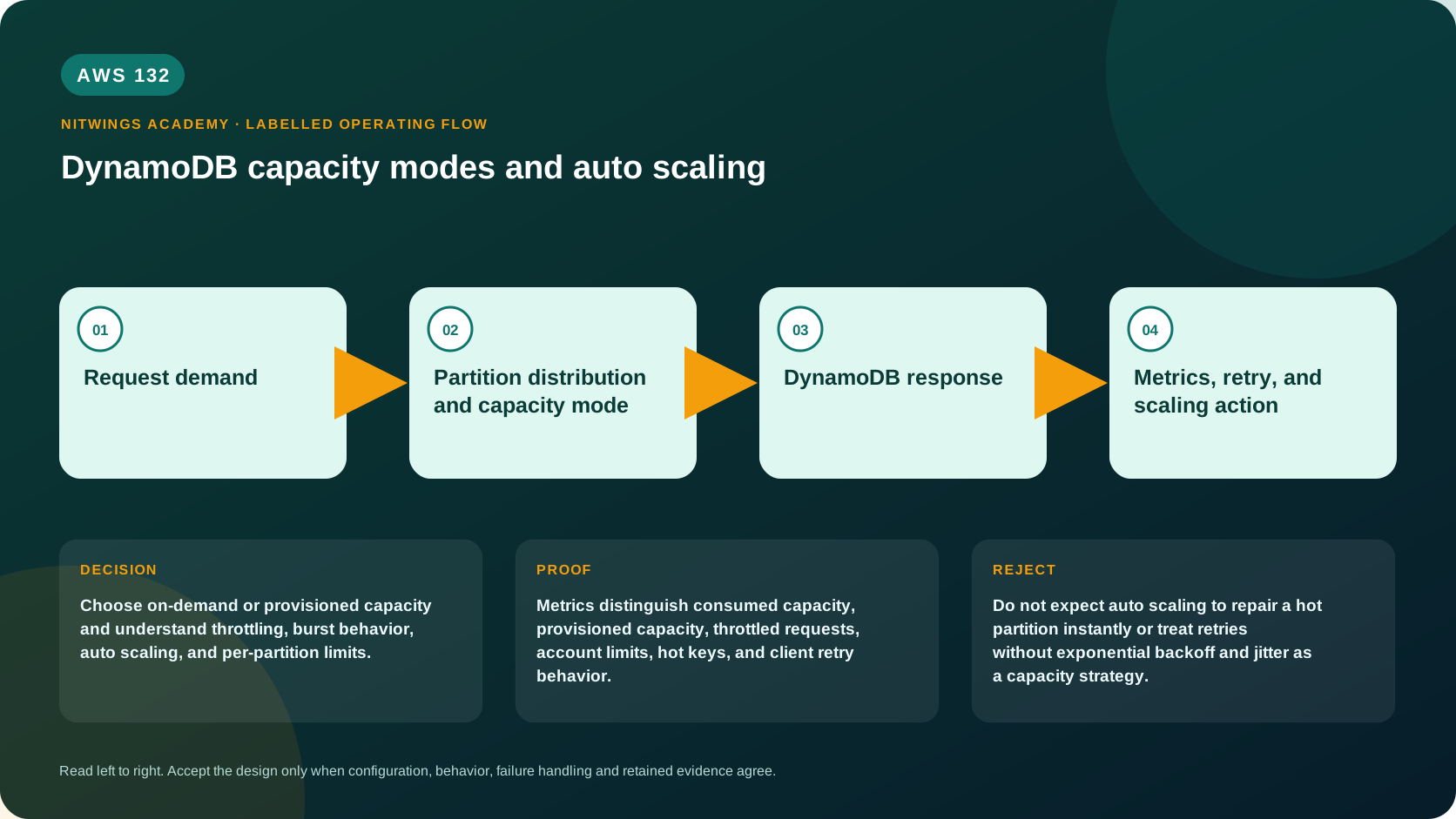
Choose on-demand or provisioned capacity and understand throttling, burst behavior, auto scaling, and per-partition limits.
DynamoDB capacity is calculated from item size, operation type, consistency, transactions, indexes, traffic distribution, and current warm throughput. On-demand and provisioned modes change purchasing/scaling - not physical partition limits or the need for retry and hot-key design.
What you will be able to do
By the end, you can:
- explain dynamodb capacity modes and auto scaling in plain language;
- locate the current service controls in the AWS Management Console;
- run the matching CloudShell or AWS CLI queries and explain every important field;
- draw the identity, network, data, failure, and monitoring path;
- choose the service from requirements and reject it when those requirements are absent;
- diagnose a failed or misleading result from evidence;
- state the cost owner and prove cleanup or a no-create result.
Before you start
- Use a personal AWS account only when its owner has approved the lesson. Do not use the root user for daily work.
- CloudShell is the default command environment. AWS028 explains CloudShell; AWS029 and AWS030 explain local AWS CLI installation and profiles.
- The course example Region is
ap-south-1. Global services and services with a required control Region are called out in their commands. - Run
aws sts get-caller-identityprivately. Redact the account number before sharing evidence. - Never paste access keys, passwords, secret values, private object data, presigned URLs, or full account-specific ARNs into a submission.
- This is a no-create lesson. Every Console action and AWS CLI command is read-only. Create the practical artifact locally.
- Console wording can change. Use the Console service search if a menu label has moved, then confirm the current field in the official documentation.
The core model
| Question | What it means in this lesson |
|---|---|
| Purpose | Choose on-demand or provisioned capacity and understand throttling, burst behavior, auto scaling, and per-partition limits. |
| Scope and boundary | On-demand charges per request and adapts to traffic. Provisioned mode sets read and write capacity, optionally managed by Application Auto Scaling. Both remain subject to service design and partition behavior. |
| Evidence of success | Metrics distinguish consumed capacity, provisioned capacity, throttled requests, account limits, hot keys, and client retry behavior. |
| Cost model | On-demand requests, provisioned RCU/WCU hours, reserved capacity, global tables, indexes, backups, and data transfer affect the bill. |
| Safe rejection rule | Do not expect auto scaling to repair a hot partition instantly or treat retries without exponential backoff and jitter as a capacity strategy. |
How the request flows
+----------------------+
|    Request demand    |
+----------------------+
           |
           v
+--------------------------------------------+
|  Partition distribution and capacity mode  |
+--------------------------------------------+
                      |
                      v
+----------------------+
|  DynamoDB response   |
+----------------------+
           |
           v
+--------------------------------------+
|  Metrics, retry, and scaling action  |
+--------------------------------------+
For DynamoDB capacity, the important boundary is this: On-demand charges per request and adapts to traffic. Provisioned mode sets read and write capacity, optionally managed by Application Auto Scaling. Both remain subject to service design and partition behavior. Metrics distinguish consumed capacity, provisioned capacity, throttled requests, account limits, hot keys, and client retry behavior. That is why the lesson pairs the Console with CLI output and a practical artifact. One interface may hide a field, use a cached view, or be scoped differently. Matching evidence is stronger than a screenshot alone.
Architecture decision table
| Situation | Direction | Reason |
|---|---|---|
| Requirement matches | Use on-demand for unknown or spiky demand; evaluate provisioned with auto scaling for predictable sustained workloads and cost control. | Select only after scope, behavior, security, recovery, operations, and price evidence agree. |
| Requirement does not match | Do not expect auto scaling to repair a hot partition instantly or treat retries without exponential backoff and jitter as a capacity strategy. | Rejecting an attractive service is a valid architecture result. |
| No create permission or cost approval | Use supplied evidence and local design work | Learning does not depend on creating an hourly resource. |
| Existing resource is unknown or unowned | Inspect only, then stop | Never change or delete a resource merely because it resembles a course example. |
Capacity calculations
Round each item before multiplying by rate:
WCU/s = writes/s × ceil(item KB / 1 KB) × transaction factor
RCU/s = strong reads/s × ceil(item KB / 4 KB) × transaction factor
eventual reads use half the strong-read units for eligible operations
A 1.2-KB standard write rounds to 2 WCUs. At 2,000 writes/s it needs about 4,000 WCUs before indexes. If two GSIs each receive a projected entry under 1 KB, each adds about 2,000 write units: total write work is about 8,000 units/s. Batch operations sum item work; Query/Scan charge items evaluated before filtering; transactions have higher unit factors. Verify exact current formulas and request ReturnConsumedCapacity in tests.
On-demand mode and warm throughput
On-demand charges per request unit and fits new, unpredictable, spiky, or low-utilization tables. Request-throughput cost can fall to zero while idle, but storage, indexes, backups, streams/CDC, global replicas, and monitoring still charge.
On-demand tables expose warm throughput - the read/write rate immediately supportable based on table history and configuration. A sudden jump far beyond it can throttle while capacity adapts. AWS supports deliberate warm-throughput settings and per-table on-demand maximum throughput in current configurations. A maximum is a cost/downstream safety cap and intentionally throttles demand above it even if warm capacity is higher. Old guidance that on-demand “cannot throttle” is incorrect.
Prepare known events by pre-warming/provisioning supported throughput, ramping load, distributing keys, and adding queue/backpressure. None makes one hot key unlimited.
Provisioned mode and auto scaling
Provisioned mode assigns RCU/WCU to the table and every GSI. Application Auto Scaling target tracking adjusts capacity between minimum and maximum based on utilization alarms. It reacts after measurements; it does not predict an instantaneous event.
Set minimum for baseline plus reaction time, maximum for tested peak and cost/downstream limits, target utilization with variance headroom, and separate policies for table/GSI reads/writes. Use scheduled scaling before known peaks. Alarm on consumed/provisioned utilization, throttled requests, latency, errors, hot keys, and saturation at maximum.
Reserved Capacity can reduce eligible stable provisioned cost, but it is a billing commitment - not a physical partition reservation and not protection from hot-key throttling.
Throttling diagnosis
Use returned throttling reason/resource plus metrics to distinguish:
- one key/partition reached its finite limit;
- table or GSI provisioned capacity was consumed;
- configured auto-scaling/on-demand maximum blocked growth;
- sudden traffic exceeded current warm throughput;
- account/service quota was reached;
- control-plane operation limits were reached.
Current per-partition ceilings include 1,000 write units/s and 3,000 read units/s. Adaptive capacity can rebalance/isolate hot items within table and partition limits, not scale one item infinitely. Correct with higher-cardinality keys, write sharding, time buckets, distributed counters, caching, or queue smoothing. Every shard adds fan-out, ordering, transaction, and reconciliation work.
Clients use bounded exponential backoff with jitter and an overall deadline. Retry only UnprocessedKeys/UnprocessedItems, preserve idempotency, and shed/queue load when the database or downstream is at its safety cap. Immediate whole-batch retry creates a storm.
Worked decisions
- Unknown startup: begin on-demand, set a cap only with an accepted throttling/degradation path, observe distribution, then compare provisioned after stable history.
- Steady 24×7: provisioned auto scaling plus Reserved Capacity may win; scheduled peaks and minimum headroom prevent reactive lag.
- Ticket sale: pre-warm, shard hot inventory/counters, use idempotent transactions and queue/backpressure; auto scaling alone is insufficient.
- Cost cap: maximum throughput protects spending but converts excess load to throttling; alarm and define business priority.
Required lab
- Create a small owned table and GSI; calculate units for variable-sized items and reconcile
ReturnConsumedCapacity. - Trigger bounded provisioned target tracking and capture alarm, scale-out/in time, maximum, and GSI behavior.
- Produce hot-key throttling below total table capacity, identify it, shard it, and measure added read fan-out.
- Compare on-demand warm/maximum throughput and generate an expected above-cap throttle.
- Implement retry for only unprocessed batch work with jitter and idempotency.
- Calculate normal/peak/idle table, index, global replica, stream, backup, KMS, and retry cost.
- Remove scaling targets/policies, alarms, backups/consumers, and owned table in dependency order.
AWS Management Console, step by step
Sign in with the normal non-root learning identity. Write the expected starting state before opening the service.
- Open DynamoDB Tables, choose a supplied table, and open Additional settings then Read/write capacity.
- Record billing mode, table and GSI capacity, auto scaling targets, minimum, maximum, and status.
- Open Monitoring and compare consumed capacity, throttled requests, and latency in the same time window.
CloudShell and AWS CLI, step by step
Start with a known caller and Region:
export AWS_DEFAULT_REGION="ap-south-1"
aws sts get-caller-identity --query Arn --output text
aws configure list
Redact the account part of the ARN in shared evidence. Now run the topic queries:
aws dynamodb describe-table --table-name replace-with-table-name --query 'Table.{Billing:BillingModeSummary.BillingMode,TableCapacity:ProvisionedThroughput,GSICapacity:GlobalSecondaryIndexes[].{Name:IndexName,Capacity:ProvisionedThroughput}}' --output json
aws application-autoscaling describe-scalable-targets --service-namespace dynamodb --output table
aws application-autoscaling describe-scaling-policies --service-namespace dynamodb --output table
Expected interpretation
Configured capacity and scaling targets are control-plane evidence. They do not prove balanced keys or that scaling can react before a sudden burst is throttled.
Practical work
Given three traffic graphs, choose capacity mode, min/max, target utilization, alarms, retry policy, and a test for hot-key versus table-level shortage.
Diagnose this topic from its own evidence
Use the request exception's ThrottlingReasons, resource ARN, consumed capacity and CloudWatch table/index metrics. Separate account/table throughput ceilings, provisioned capacity, GSI throttling and partition/key-range concentration. Auto Scaling reacts to sustained utilization and is not instantaneous protection for a sudden spike; retries without exponential backoff and jitter can amplify overload. Compare average metrics with percentile latency and per-key traffic because an acceptable table average can hide one hot key.
Negative test: model a tenfold one-minute burst against provisioned mode. Show why the target-tracking delay can throttle, then compare pre-scaling, on-demand mode, buffering and key-distribution remedies. Include maximum-throughput/warm-throughput settings where applicable and reject unlimited retry loops.
Cost and cleanup
On-demand requests, provisioned RCU/WCU hours, reserved capacity, global tables, indexes, backups, and data transfer affect the bill.
Knowledge check
- What operational purpose is this lesson solving?
Expected direction: Choose on-demand or provisioned capacity and understand throttling, burst behavior, auto scaling, and per-partition limits.
- Which scope or ownership boundary must be proved first?
Expected direction: On-demand charges per request and adapts to traffic. Provisioned mode sets read and write capacity, optionally managed by Application Auto Scaling. Both remain subject to service design and partition behavior.
- What evidence is strong enough to accept the result?
Expected direction: Metrics distinguish consumed capacity, provisioned capacity, throttled requests, account limits, hot keys, and client retry behavior.
- Which tempting design or shortcut must be rejected?
Expected direction: Do not expect auto scaling to repair a hot partition instantly or treat retries without exponential backoff and jitter as a capacity strategy.
- Which cost dimensions and retained resources need an owner?
Expected direction: On-demand requests, provisioned RCU/WCU hours, reserved capacity, global tables, indexes, backups, and data transfer affect the bill.
Lesson acceptance
Pass when capacity arithmetic is correct for item size, consistency, transactional operations and reads/writes; the learner can choose on-demand versus provisioned plus Auto Scaling from a numeric traffic model; and burst, ramp-down, GSI and hot-key behavior are covered. Evidence must include throttling attribution, retry/idempotency design, alarms, quota/current-setting checks, cost sensitivity and cleanup. Fail if “serverless” is interpreted as infinite capacity, average utilization is the only signal, or all throttling is treated as the same problem.