
AWS 155: Amazon ECS
Why this lesson matters
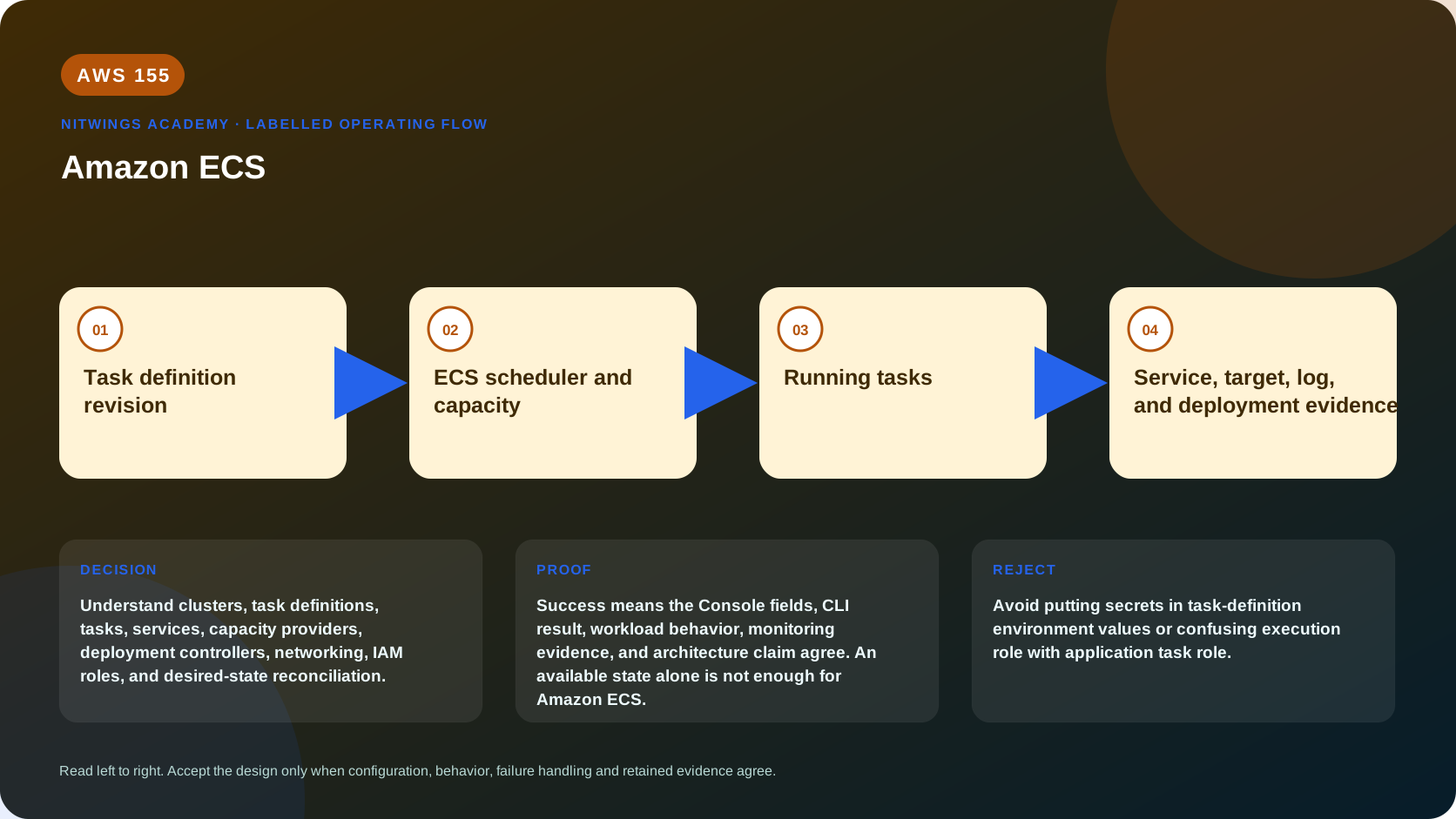
Understand clusters, task definitions, tasks, services, capacity providers, deployment controllers, networking, IAM roles, and desired-state reconciliation.
Amazon ECS provides AWS-native desired-state scheduling without requiring the Kubernetes API. The key architecture choice is not merely “ECS”: it includes launch/capacity provider, network mode, deployment strategy, identity, service discovery/load balancing, storage and operational ownership.
What you will be able to do
By the end, you can:
- explain amazon ecs in plain language;
- locate the current service controls in the AWS Management Console;
- run the matching CloudShell or AWS CLI queries and explain every important field;
- draw the identity, network, data, failure, and monitoring path;
- choose the service from requirements and reject it when those requirements are absent;
- diagnose a failed or misleading result from evidence;
- state the cost owner and prove cleanup or a no-create result.
Before you start
- Use a personal AWS account only when its owner has approved the lesson. Do not use the root user for daily work.
- CloudShell is the default command environment. AWS028 explains CloudShell; AWS029 and AWS030 explain local AWS CLI installation and profiles.
- The course example Region is
ap-south-1. Global services and services with a required control Region are called out in their commands. - Run
aws sts get-caller-identityprivately. Redact the account number before sharing evidence. - Never paste access keys, passwords, secret values, private object data, presigned URLs, or full account-specific ARNs into a submission.
- This is a no-create lesson. Every Console action and AWS CLI command is read-only. Create the practical artifact locally.
- Console wording can change. Use the Console service search if a menu label has moved, then confirm the current field in the official documentation.
The core model
| Question | What it means in this lesson |
|---|---|
| Purpose | Understand clusters, task definitions, tasks, services, capacity providers, deployment controllers, networking, IAM roles, and desired-state reconciliation. |
| Scope and boundary | The learner must identify the account and Region scope, resource boundary, identity path, data or network path, failure behavior, observability, and cleanup ownership for Amazon ECS. |
| Evidence of success | Success means the Console fields, CLI result, workload behavior, monitoring evidence, and architecture claim agree. An available state alone is not enough for Amazon ECS. |
| Cost model | Requests, running capacity, storage, logs, data transfer, retained state, and optional features must be priced for the exact design. |
| Safe rejection rule | Avoid putting secrets in task-definition environment values or confusing execution role with application task role. |
How the request flows
+----------------------------+
|  Task definition revision  |
+----------------------------+
              |
              v
+------------------------------+
|  ECS scheduler and capacity  |
+------------------------------+
               |
               v
+----------------------+
|    Running tasks     |
+----------------------+
           |
           v
+-------------------------------------------------+
|  Service, target, log, and deployment evidence  |
+-------------------------------------------------+
For Amazon ECS, the important boundary is this: The learner must identify the account and Region scope, resource boundary, identity path, data or network path, failure behavior, observability, and cleanup ownership for Amazon ECS. Success means the Console fields, CLI result, workload behavior, monitoring evidence, and architecture claim agree. An available state alone is not enough for Amazon ECS. That is why the lesson pairs the Console with CLI output and a practical artifact. One interface may hide a field, use a cached view, or be scoped differently. Matching evidence is stronger than a screenshot alone.
Architecture decision table
| Situation | Direction | Reason |
|---|---|---|
| Requirement matches | Use ECS when AWS-native container orchestration meets the application and team needs without a Kubernetes API requirement. | Select only after scope, behavior, security, recovery, operations, and price evidence agree. |
| Requirement does not match | Avoid putting secrets in task-definition environment values or confusing execution role with application task role. | Rejecting an attractive service is a valid architecture result. |
| No create permission or cost approval | Use supplied evidence and local design work | Learning does not depend on creating an hourly resource. |
| Existing resource is unknown or unowned | Inspect only, then stop | Never change or delete a resource merely because it resembles a course example. |
ECS resource and reconciliation model
A cluster groups scheduling capacity and services. A versioned task definition describes one or more containers, image digests, CPU/memory, ports, commands, environment/secrets, logging, roles, health and volumes. A task is one running copy. A service maintains desired task count, replaces unhealthy tasks and deploys new task-definition revisions; a standalone task is not replaced after exit unless another scheduler launches it.
Capacity providers connect placement to Fargate/Fargate Spot, Auto Scaling groups, ECS Managed Instances or other current supported capacity. A capacity-provider strategy has base and weights; it is not an availability guarantee if subnets, instance types or providers cannot supply capacity. EC2-backed ECS still requires AMI/agent/runtime patching, instance capacity, draining, scaling and bin-packing. Fargate changes that boundary, not the task model.
With awsvpc, each task receives an ENI/IP and security groups; target groups use IP targets for Fargate/awsvpc. Bridge/host modes have port-mapping and instance-bound behavior. Service Connect/Cloud Map provide service discovery/connectivity features but do not replace application auth, timeout/retry or network policy. Image pull, secrets and log delivery occur during startup and need execution-role plus ECR/S3/Logs/Secrets/KMS network paths.
The task execution role is used by ECS/Fargate agent for pull/log/secret startup actions. The task role credentials are delivered to application containers for AWS API calls. The EC2 container-instance role serves agent/node needs. Never give applications the broad instance role or confuse execution-role pull success with downstream authorization.
Deployment and health
Rolling deployments use minimum healthy and maximum percent to control stop/start surge. Deployment circuit breaker with rollback can return to the last completed deployment when tasks fail to stabilize. Blue/green or external controllers add target groups, test listener, traffic shift and cleanup. Pin image digest and task definition; forcing deployment of a mutable tag harms rollback evidence.
Container health, essential-container exit, ECS task state, target-group health and application business health are different. Configure start period/retries, load-balancer health grace and graceful stop/deregistration. Spread across AZs and enable AZ rebalancing/current strategies where appropriate. ECS Exec is audited break-glass access requiring SSM/KMS/IAM/network controls, not routine configuration management.
Autoscale service desired count from demand per task, queue backlog or validated utilization; separately scale EC2 capacity-provider instances. Service scale-out without host capacity leaves tasks pending; host scale-out without task demand wastes money. Monitor deployments/events, desired/running/pending, task stop reasons, CPU/memory, Container Insights/logs, target health, application SLIs and provider reservation.
AWS Management Console, step by step
Sign in with the normal non-root learning identity. Write the expected starting state before opening the service.
- Use the Console service search and open Elastic Container Service, Clusters; confirm the account and Region before reading the page.
- Inspect the supplied or owned resource's status, configuration, permissions, networking, encryption, monitoring, tags, and dependencies without changing it.
- Open the related metrics, logs, events, or history view and record one timestamped signal that would prove or disprove the expected behavior.
- Return to the resource list, clear filters, and record the final inventory. On the read-only track, do not choose Create, Save, or Delete.
CloudShell and AWS CLI, step by step
Start with a known caller and Region:
export AWS_DEFAULT_REGION="ap-south-1"
aws sts get-caller-identity --query Arn --output text
aws configure list
Redact the account part of the ARN in shared evidence. Now run the topic queries:
aws ecs list-clusters --output table
aws ecs list-services --cluster replace-with-cluster --output table
aws ecs list-tasks --cluster replace-with-cluster --output table
aws ecs list-task-definitions --sort DESC --max-items 20 --output table
Expected interpretation
A service's desired and running counts must be read with deployments, stopped-task reasons, target health, logs, capacity, and network evidence.
Practical work
Design nw-p08-web: task definition, container port, task and execution roles, awsvpc subnets and SGs, service desired count, capacity provider, ALB target, deployment circuit breaker, logs, and rollback.
Specify sidecar/essential behavior, architecture, digest, secrets, health, stop timeout, deployment min/max, AZ spread, autoscaling and capacity. Test missing pull permission, secret/KMS denial, no endpoint/NAT, port mismatch, OOM, failing readiness, insufficient capacity, one-AZ loss, bad revision/circuit-breaker rollback and task-role downstream denial. Compare Fargate, EC2 ASG and ECS Managed Instances with numeric steady/burst cost and responsibility.
Diagnose this topic from its own evidence
Read service events and task stopCode/stoppedReason first. PROVISIONING/PENDING indicates placement, quota, subnet IP or capacity; CannotPullContainerError indicates digest/registry/role/network; ResourceInitializationError commonly indicates secrets/logs/ENI dependencies; repeated stopped tasks require container exit/OOM/health logs; running tasks with unhealthy targets require target port/path/SG/response. Separate desired task shortage from container-instance shortage before scaling.
Cost and cleanup
Requests, running capacity, storage, logs, data transfer, retained state, and optional features must be priced for the exact design.
Knowledge check
- What operational purpose is this lesson solving?
Expected direction: Understand clusters, task definitions, tasks, services, capacity providers, deployment controllers, networking, IAM roles, and desired-state reconciliation.
- Which scope or ownership boundary must be proved first?
Expected direction: The learner must identify the account and Region scope, resource boundary, identity path, data or network path, failure behavior, observability, and cleanup ownership for Amazon ECS.
- What evidence is strong enough to accept the result?
Expected direction: Success means the Console fields, CLI result, workload behavior, monitoring evidence, and architecture claim agree. An available state alone is not enough for Amazon ECS.
- Which tempting design or shortcut must be rejected?
Expected direction: Avoid putting secrets in task-definition environment values or confusing execution role with application task role.
- Which cost dimensions and retained resources need an owner?
Expected direction: Requests, running capacity, storage, logs, data transfer, retained state, and optional features must be priced for the exact design.
Lesson acceptance
Pass when the learner explains cluster/task definition/task/service/capacity provider, separates three identity roles, traces startup and data paths, and designs health, deployment rollback, AZ placement, two-layer scaling, storage, observability and cost. Fail if standalone tasks are assumed self-healing, mutable tags define releases, task role and execution role are merged, or running count substitutes for user health.