
AWS 228: OpsCenter, Explorer, and operational work items
Why this lesson matters
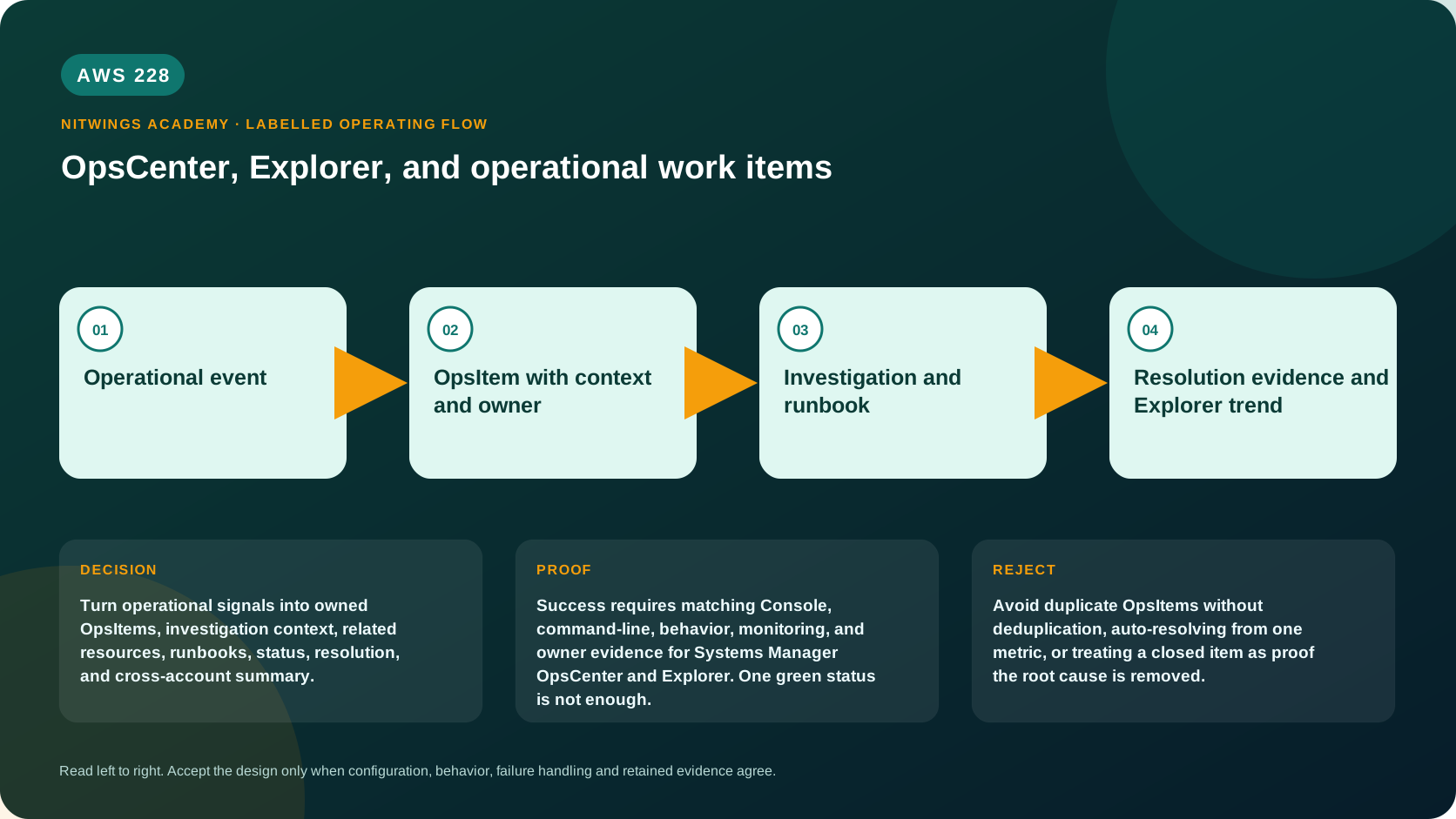
An alarm says a condition crossed a threshold; an OpsItem is owned operational work with context, priority, related resources, evidence and resolution. Explorer aggregates OpsData for patterns across accounts and Regions. Neither tool replaces an incident response process, ticketing ownership, real-time monitoring or direct service evidence.
What you will be able to do
By the end, you can:
- distinguish event/alarm, OpsItem, incident, problem, change and Automation execution;
- read OpsItem source, status, priority, severity, category and operational data;
- design useful deduplication that suppresses repeats without merging unrelated failures;
- attach related resources/OpsItems and safe diagnostic evidence;
- select a runbook only after reviewing version, role, parameters and rollback;
- explain Explorer OpsData, widgets, filters, reporting tags and resource data sync;
- identify multi-account/Region setup, delegated administration and freshness gaps;
- define evidence-based resolution and recurrence ownership.
Operational flow
service event / alarm / Config or security finding
                    |
           EventBridge/integration
                    |
                    v
OpsItem: identity + owner + priority + context + dedup
                    |
      investigate related resource/direct evidence
                    |
      run approved Automation or manual runbook
                    |
                    v
verify recovery + record cause/change/evidence
                    |
              resolve or escalate

Explorer <- resource data sync <- OpsData/OpsItems across selected accounts/Regions
OpsCenter is Regional. Explorer's default view is single-account/single-Region. A resource data sync can aggregate selected Regions and, with AWS Organizations all-features setup, selected accounts/OUs. Always display source account/Region beside an aggregated count.
Work-item distinctions
| Object | Purpose | Closure evidence |
|---|---|---|
| CloudWatch alarm/event | machine signal/state change | condition state and action history |
| OpsItem | investigate and resolve operational work | resource recovered, evidence and owner recorded |
| Incident | coordinated response to material impact | incident timeline, recovery and follow-up |
| Problem | remove recurring underlying cause | root-cause/corrective action verification |
| Change | approved modification | implementation, health gate and rollback result |
| Automation execution | workflow run | per-step/output plus actual resource behavior |
One event can create or update operational work, but severity and priority are not interchangeable. Severity describes impact; priority (1 highest to 5 lowest in OpsCenter) expresses work order/SLA. OpsCenter severity uses 1 critical through 4 low. Define an organizational mapping and escalation clock.
OpsItem data contract
An actionable OpsItem contains:
- immutable ID plus source and creation/update times;
- concise symptom-based title and non-secret description;
- status, category, severity and priority;
- exact related-resource ARN(s), account and Region;
- operational data: alarm/event IDs, dashboard/log-query links, runbook and evidence references;
- owner/team, SLA, acknowledgement and escalation;
- related OpsItems and duplicate/parent relationship;
- actual start/end and planned times where used;
- resolution summary, verified recovery and follow-up task.
Operational data can be searchable or non-searchable string data and may be shown to many operators. Never store passwords, access keys, tokens, customer payloads, presigned URLs or unrestricted log extracts.
Deduplication behavior
OpsCenter hashes a deduplication string together with the initiating resource. When the same hash matches an existing Open/InProgress OpsItem, a duplicate OpsItem is not created. If the prior item is Resolved, a new one can be created. The stored deduplication string cannot be edited after creation.
A useful key represents one actionable failure identity, for example:
source + account + Region + resource ARN + alarm/rule + failure classToo broad - such as only HighCPU - merges unrelated resources and hides scope. Too narrow - such as event ID/timestamp - creates a new work item for every repeat. Test open-repeat, different-resource, changed-failure-class and post-resolution recurrence.
Fix noisy source rules only after proving why events are duplicates. Bulk resolution makes a dashboard green but does not fix detection or the resource.
Status and resolution
Use the current API's valid statuses for the OpsItem type and organizational workflow. For normal operational work:
- Open: triage has not established active ownership;
- InProgress: an owner is investigating/remediating;
- Resolved: technical recovery and required evidence are complete.
Do not resolve because an alarm returned OK once. Require a stable observation window, direct application/resource test, no hidden backlog, approved change/Automation result, customer-impact assessment and follow-up owner. If accepted risk remains, record exception and expiry.
Related resources and runbooks
Related resource details can surface CloudWatch, CloudTrail, Config and service information, but cached/aggregated context must be verified in the source service and correct time range.
OpsCenter can show/run Automation runbooks. Before execution apply AWS227:
- exact runbook owner/name/version/hash;
- Automation role and caller/approver separation;
- parameters/target constrained to related resource;
- prechecks, timeout/retry, output and alarm;
- mutation, compensation and application health gate;
- execution ID written back to the OpsItem.
The presence of a suggested runbook is not authorization to execute it.
Explorer and OpsData
Explorer is a customizable operations dashboard over OpsData and OpsItems. It can group/filter by account, Region and configured reporting tag keys, show trends/operational insights, and export reports to S3. It is for fleet prioritization, not a low-latency page or sole compliance record.
A resource data sync defines aggregation scope. Important boundaries:
- local integrated setup synchronizes the account/Region where it was completed;
- Organizations aggregation needs all-features mode and approved management/delegated administration;
- selecting Organizations scope can enable OpsData sources in selected accounts/Regions;
- sync population takes time, so freshness and source coverage must be reported;
- delegated-admin and opt-in Region capabilities have current restrictions;
- deleting a resource data sync does not itself disable underlying OpsData sources;
- a sync created in delegated admin is viewed/managed in that account according to the documented model.
Broad “all current and future Regions/accounts” scope is a governance and data-access decision, not a harmless dashboard option.
Read-only inspection
export AWS_DEFAULT_REGION="ap-south-1"
aws sts get-caller-identity --query Arn --output text
aws ssm describe-ops-items --max-results 20 \
  --query 'OpsItemSummaries[].{Id:OpsItemId,Title:Title,Source:Source,Status:Status,Priority:Priority,Severity:Severity,Created:CreatedTime,Updated:LastModifiedTime}' \
  --output table
aws ssm list-resource-data-sync --output json
aws ssm get-ops-summary --max-results 20 --output json
Choose one approved non-sensitive OpsItem:
ops_item_id="exact-approved-ops-item-id"
aws ssm get-ops-item --ops-item-id "$ops_item_id" --output json
Inspect OperationalData in get-ops-item for the primary context. OpsMetadata is a separate Systems Manager resource model and must not be inferred from an OpsItem ID. Redact account IDs, ARNs, internal URLs and descriptions before sharing.
Console review
In the correct account/Region:
- Open Systems Manager > OpsCenter > OpsItems and select one approved item.
- Record source, status, age, category, severity, priority and related resource.
- Verify alarm/metrics/logs/CloudTrail/Config in their source services over the same UTC window.
- Inspect operational data, related/similar OpsItems and dedup behavior.
- Inspect recent Automation executions and suggested runbooks without running them.
- Open Explorer, record selected resource data sync and every account/Region/tag filter.
- Compare widget totals with a direct OpsItem query and report data age/coverage.
- Do not edit, resolve, bulk update, configure sources or create/delete a sync.
P11 operational-work exercise
Design an OpsItem contract for “P11 application log ingestion absent”:
| Field | Proposed value |
|---|---|
| source | owned EventBridge rule from CloudWatch alarm |
| related resource | exact P11 log-group ARN |
| dedup identity | account + Region + log-group ARN + alarm name + NoIngestion |
| severity/priority | based on environment and user impact, not alarm name alone |
| evidence | alarm history, metric identity/window, last log event/ingestion time |
| first runbook | read-only diagnosis; mutation requires separate approval |
| resolution | changed fake event arrives, alarm stable OK for defined window, cause recorded |
| follow-up | owner/date for producer, permission or endpoint prevention |
Test mentally: same alarm repeat deduplicates; another Region/resource does not; a recurrence after resolution creates new work.
Diagnose misleading work queues
| Symptom | First evidence | Correction |
|---|---|---|
| duplicate flood | source rule, resource, dedup hash inputs and prior status | design stable bounded dedup key |
| unrelated failures merged | over-broad dedup fields | add resource/failure identity |
| OpsItem has no resource | EventBridge input transformer/operational data | attach exact ARN/account/Region |
| status Resolved, issue active | source metrics/logs and resolution evidence | reopen/new item per workflow and fix closure gate |
| Automation listed but unsafe | document version/role/parameters/rollback | do not run; review first |
| Explorer count differs | sync selection, filters, account/Region coverage and age | align scope and wait/verify direct source |
| child account missing | Organizations/integrated setup/sync scope/Region | repair governance setup, not item itself |
| deleted sync but collection continues | OpsData source configuration | disable source separately after impact review |
Cost and cleanup
OpsCenter integrations, Explorer data syncs, exported reports, S3/KMS, SNS, EventBridge, Config, CloudWatch and Automation can have separate costs. Duplicate work also has human operational cost. Define retention and access for descriptions/operational data.
AWS228 performs only read calls. Do not create/update/resolve OpsItems, run Automation, change EventBridge rules or alter resource data syncs. Delete only local redacted exports according to the evidence policy.
Knowledge check
- Is an OpsItem the same as an alarm?
No; it is tracked operational work with context, ownership and resolution.
- What happens when a matching dedup key finds an open item?
OpsCenter suppresses creation of another duplicate for that resource/hash.
- Does Explorer provide real-time authoritative service state?
No; it aggregates OpsData and must be checked for scope/freshness.
- Does deleting a resource data sync disable OpsData sources?
No; those sources require separate governance.
- What is sufficient to resolve an OpsItem?
Stable direct recovery evidence, cause/change record and follow-up ownership - not one green signal.
Lesson acceptance
- Alarm/event, OpsItem, incident, problem, change and Automation are distinguished.
- OpsItem identity, classification, ownership, evidence and resolution fields are complete.
- Dedup design passes repeat, distinct-resource, distinct-failure and recurrence tests.
- Suggested Automation is reviewed with AWS227 controls before use.
- Explorer sync scope, filters, delegated administration, freshness and gaps are reported.
- No work item, rule, execution or sync is changed; evidence is redacted.