
AWS 178: Amazon Macie
Why this lesson matters
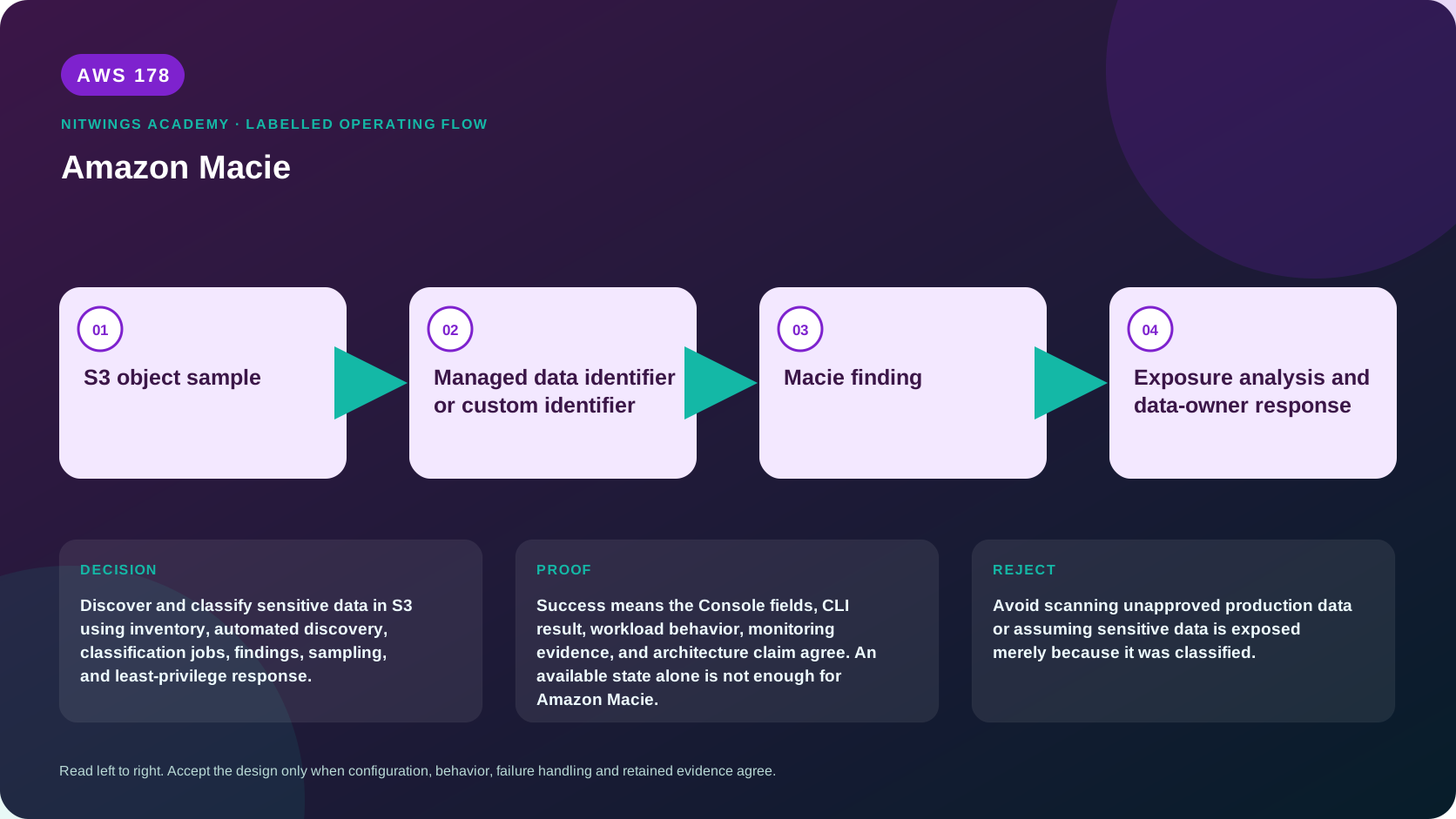
Discover and classify sensitive data in S3 using inventory, automated discovery, classification jobs, findings, sampling, and least-privilege response.
What you will be able to do
By the end, you can:
- explain amazon macie in plain language;
- locate the current service controls in the AWS Management Console;
- run the matching CloudShell or AWS CLI queries and explain every important field;
- draw the identity, network, data, failure, and monitoring path;
- choose the service from requirements and reject it when those requirements are absent;
- diagnose a failed or misleading result from evidence;
- state the cost owner and prove cleanup or a no-create result.
Before you start
- Use a personal AWS account only when its owner has approved the lesson. Do not use the root user for daily work.
- CloudShell is the default command environment. AWS028 explains CloudShell; AWS029 and AWS030 explain local AWS CLI installation and profiles.
- The course example Region is
ap-south-1. Global services and services with a required control Region are called out in their commands. - Run
aws sts get-caller-identityprivately. Redact the account number before sharing evidence. - Never paste access keys, passwords, secret values, private object data, presigned URLs, or full account-specific ARNs into a submission.
- This is a no-create lesson. Every Console action and AWS CLI command is read-only. Create the practical artifact locally.
- Console wording can change. Use the Console service search if a menu label has moved, then confirm the current field in the official documentation.
The core model
| Question | What it means in this lesson |
|---|---|
| Purpose | Discover and classify sensitive data in S3 using inventory, automated discovery, classification jobs, findings, sampling, and least-privilege response. |
| Scope and boundary | The learner must identify the account and Region scope, resource boundary, identity path, data or network path, failure behavior, observability, and cleanup ownership for Amazon Macie. |
| Evidence of success | Success means the Console fields, CLI result, workload behavior, monitoring evidence, and architecture claim agree. An available state alone is not enough for Amazon Macie. |
| Cost model | Automated discovery, classification jobs, object monitoring, and S3 request costs can charge. Use supplied findings in this T0 lesson. |
| Safe rejection rule | Avoid scanning unapproved production data or assuming sensitive data is exposed merely because it was classified. |
How the request flows
+----------------------+
|   S3 object sample   |
+----------------------+
           |
           v
+------------------------------------------------+
|  Managed data identifier or custom identifier  |
+------------------------------------------------+
                        |
                        v
+----------------------+
|    Macie finding     |
+----------------------+
           |
           v
+---------------------------------------------+
|  Exposure analysis and data-owner response  |
+---------------------------------------------+
Macie has two related jobs
Macie is regional S3 security posture and sensitive-data discovery. It inventories general purpose S3 buckets and evaluates settings such as public accessibility, encryption and sharing. It can inspect eligible object content using managed data identifiers, custom data identifiers and allow lists. It does not scan arbitrary EBS, EFS, RDS or application traffic, and a finding does not remove or redact data.
| Mode | Scope and behavior | Best use |
|---|---|---|
| Bucket inventory and posture | Represents S3 bucket security and access characteristics in the Region | Find public, shared or encryption risk and choose discovery scope |
| Automated sensitive data discovery | Continually evaluates inventory and samples representative eligible objects; scope can exclude buckets and tune identifiers | Broad ongoing visibility without defining every job |
| Sensitive data discovery job | One-time or scheduled analysis of selected buckets or criteria, object filters, sampling and identifiers | Evidence-driven scan for a dataset, migration, control or investigation |
Automated-discovery sampling is not proof every object was inspected. A job provides deliberately defined breadth and depth, but unsupported, inaccessible, encrypted or excluded objects remain coverage gaps. Store job scope, completion state, statistics and result location with compliance evidence.
Identifiers, findings and result records
Managed identifiers detect defined categories such as credentials, financial, health and personal information. Custom identifiers combine a regular expression with optional keywords, proximity and ignore words. Test representative positive and negative data: broad expressions create costly false positives while narrow expressions miss variants. Allow lists suppress known-safe text or regex patterns and require owner/review dates.
Macie creates policy findings for bucket risk and sensitive-data findings for discovery results. Severity and sampled occurrences guide triage but are not a complete copy of sensitive content. Detailed results can be written to S3 encrypted with a customer managed KMS key. The service-linked role, bucket policy, key policy, Region and ownership must align. Never paste samples containing real sensitive data into tickets or learning evidence.
Design the discovery workflow
- Define data owner, Region, buckets, prefixes, object age/type/size and legal authorization.
- Estimate eligible bytes and current price before starting a job.
- Configure identifiers, allow lists, sampling and schedule.
- Prove source read and encrypted result write; record skipped/error reasons.
- Route findings through EventBridge or Security Hub to an owner with an SLA.
- Remediate exposure or data placement, then rescan.
- Retain or delete detailed results under evidence and privacy policy.
Organization administration uses a delegated administrator and members, but enablement and discovery remain regional. Automated discovery can include member buckets according to administrator settings. New accounts and Regions need explicit coverage evidence.
Architecture decision table
| Situation | Direction | Reason |
|---|---|---|
| Requirement matches | Use Macie when S3 sensitive-data visibility and policy findings support a governed data-protection program. | Select only after scope, behavior, security, recovery, operations, and price evidence agree. |
| Requirement does not match | Avoid scanning unapproved production data or assuming sensitive data is exposed merely because it was classified. | Rejecting an attractive service is a valid architecture result. |
| No create permission or cost approval | Use supplied evidence and local design work | Learning does not depend on creating an hourly resource. |
| Existing resource is unknown or unowned | Inspect only, then stop | Never change or delete a resource merely because it resembles a course example. |
AWS Management Console, step by step
Sign in with the normal non-root learning identity. Write the expected starting state before opening the service.
- Use the Console service search and open Macie, Summary, S3 buckets, Discovery results, Jobs, and Findings; confirm the account and Region before reading the page.
- Inspect the supplied or owned resource's status, configuration, permissions, networking, encryption, monitoring, tags, and dependencies without changing it.
- Open the related metrics, logs, events, or history view and record one timestamped signal that would prove or disprove the expected behavior.
- Return to the resource list, clear filters, and record the final inventory. On the read-only track, do not choose Create, Save, or Delete.
CloudShell and AWS CLI, step by step
Start with a known caller and Region:
export AWS_DEFAULT_REGION="ap-south-1"
aws sts get-caller-identity --query Arn --output text
aws configure list
Redact the account part of the ARN in shared evidence. Now run the topic queries:
aws macie2 get-macie-session --output json
aws macie2 list-classification-jobs --query 'items[].{Name:name,Status:jobStatus,Created:createdAt}' --output table
aws macie2 list-findings --max-results 20 --output table
Expected interpretation
A finding indicates matched sensitive-data evidence and location under the job or discovery context. It does not by itself prove public exposure or malicious access.
Practical work
Review a supplied S3 sensitive-data finding. Separate classification, bucket policy and public access, object encryption, access history, business owner, retention, remediation, and re-scan evidence.
Diagnose this topic from its own evidence
- Empty results can mean no match, sampling, exclusion, unsupported type, access denial, KMS denial or job failure. Inspect job statistics and skipped/error counts.
- Stale inventory requires Region, member relationship, service-linked role and bucket eligibility checks.
- Result-export failure requires destination Region, bucket policy, key policy and Macie service authorization, not broader user access.
- Unexpected spend requires automated scope, job bytes, recurring schedules, duplicate jobs and member-account review.
- A resolved finding needs proof of changed S3 access or data placement plus a new inventory/discovery result.
Cost and cleanup
Automated discovery, classification jobs, object monitoring, and S3 request costs can charge. Use supplied findings in this T0 lesson.
Knowledge check
- What operational purpose is this lesson solving?
Expected direction: Discover and classify sensitive data in S3 using inventory, automated discovery, classification jobs, findings, sampling, and least-privilege response.
- Which scope or ownership boundary must be proved first?
Expected direction: The learner must identify the account and Region scope, resource boundary, identity path, data or network path, failure behavior, observability, and cleanup ownership for Amazon Macie.
- What evidence is strong enough to accept the result?
Expected direction: Success means the Console fields, CLI result, workload behavior, monitoring evidence, and architecture claim agree. An available state alone is not enough for Amazon Macie.
- Which tempting design or shortcut must be rejected?
Expected direction: Avoid scanning unapproved production data or assuming sensitive data is exposed merely because it was classified.
- Which cost dimensions and retained resources need an owner?
Expected direction: Automated discovery, classification jobs, object monitoring, and S3 request costs can charge. Use supplied findings in this T0 lesson.
Lesson acceptance
- Distinguish posture inventory, automated discovery and discovery jobs.
- Explain sampling and coverage gaps without claiming every object was scanned.
- Design and test managed/custom identifiers and allow lists safely.
- Trace Macie permissions to source objects and encrypted result storage.
- Triage without exposing sensitive samples and prove remediation through rescan evidence.