
AWS 239: GuardDuty, Inspector, Security Hub, and Macie operational findings
Why this lesson matters
AWS security services produce findings for different reasons. GuardDuty detects threat behavior. Amazon Inspector reports vulnerabilities and exposure. Security Hub CSPM evaluates controls and normalizes findings from many providers. Amazon Macie identifies S3 policy risk and sensitive data. A shared severity label does not make these signals equivalent.
An operator must first prove detector and scan coverage, then preserve evidence, understand the native finding, correlate it with identity/network/workload/data events, assess business impact, contain safely, remediate root cause, and verify closure at the source. Suppression and workflow labels reduce noise; they do not remove malware, patch a package or protect an S3 object.
Outcomes
You will be able to:
- distinguish threat, vulnerability, posture-control and sensitive-data findings;
- prove accounts, Regions, telemetry, resource scanning and discovery coverage;
- interpret GuardDuty finding type, resource, actor, action, count and lifecycle;
- prioritize Inspector findings with reachability, exploit, EPSS, fix and runtime use;
- read Security Hub's AWS Security Finding Format (ASFF) and aggregation behavior;
- separate provider
RecordStatefrom analystWorkflow.Status; - distinguish Macie policy and sensitive-data findings, jobs and sampled discovery;
- normalize evidence without discarding service-specific fields;
- design deduplication, correlation, triage SLA, containment and root-cause repair;
- explain archive/suppression effects on EventBridge and downstream systems;
- close a case from rescan/detection/data evidence rather than a status dropdown;
- calculate service, ingestion, automation, storage and response costs.
Safety boundary and workbook
- This lesson is read-only. Do not enable/disable services, generate sample
findings, archive/suppress/update findings, start scans/jobs or change resources.
- Do not retrieve Macie sensitive-data samples, download suspicious objects, run
malware, exploit a CVE or connect to a suspected compromised host.
- Preserve raw finding JSON, CloudTrail/log evidence and UTC time before containment.
- Containment can destroy volatile evidence or interrupt customers. It needs the
incident commander, resource owner, security owner and rollback plan.
- Redact account IDs, ARNs, IPs, DNS names, object keys, package/image names,
credentials, sensitive-data values and customer information.
Download the security finding triage workbook or complete archive.
Four services, four questions
| Service | Primary question | Typical evidence | Not proved by a finding |
|---|---|---|---|
| GuardDuty | does telemetry resemble malicious/anomalous behavior? | API, DNS, flow, runtime, malware and protection-plan context | compromise with certainty or complete scope |
| Inspector | is a covered resource vulnerable/exposed? | package/CVE, image/function/code, reachability and fix intelligence | active exploitation or safe patch deployment |
| Security Hub CSPM | which control/provider findings need centralized workflow? | ASFF controls, integrations, aggregation and automation | source remediation merely from workflow status |
| Macie | does S3 posture or analyzed object data create privacy risk? | bucket policy/configuration or sensitive-data classification | all objects scanned or legal impact by severity alone |
Begin every investigation with two questions:
- Was the relevant account, Region, resource and telemetry covered at that time?
- What exactly does this native finding type assert and omit?
A zero count without coverage evidence is “unknown,” not secure.
Common operating workflow
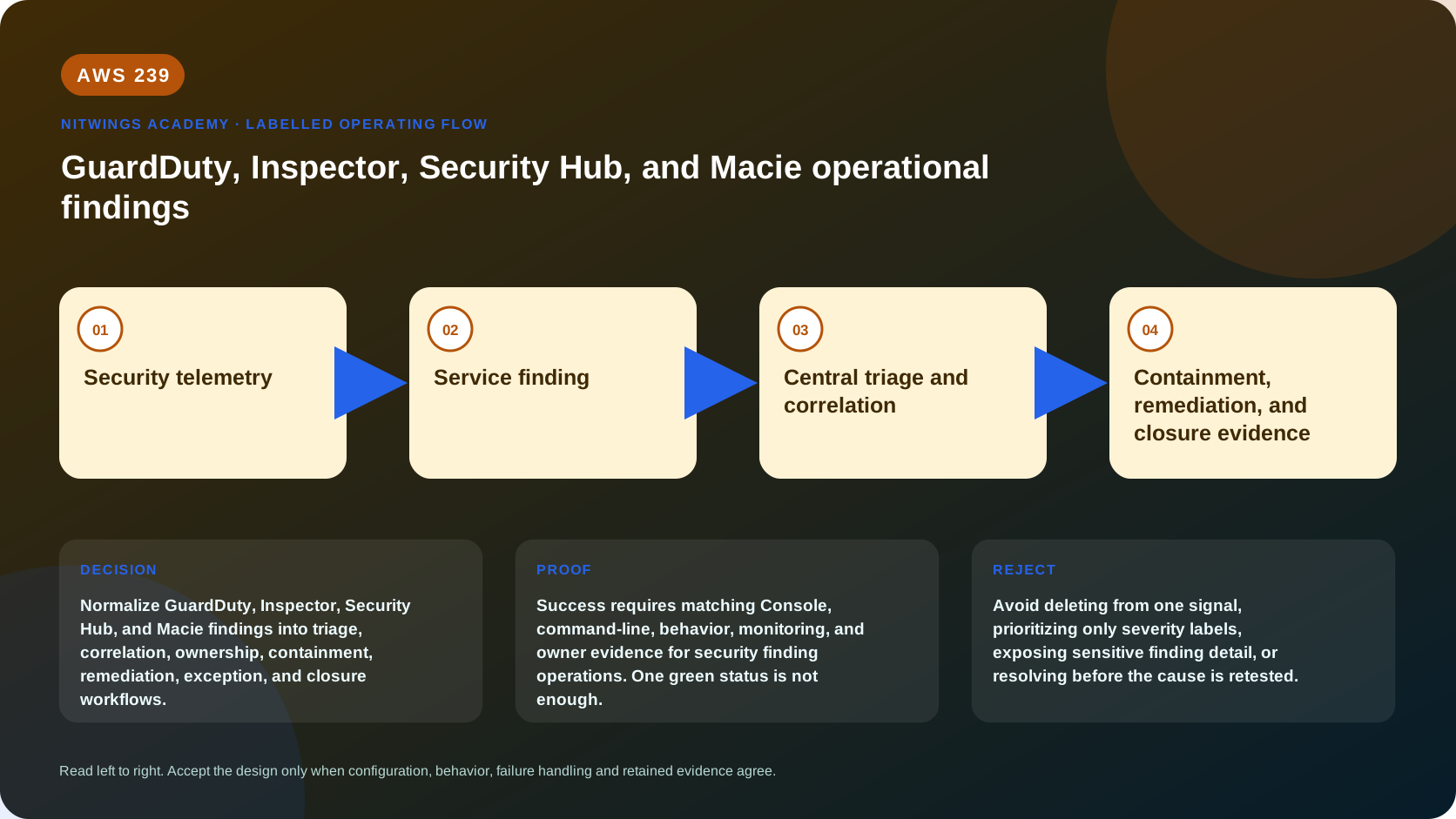
coverage/health -> native finding preserved -> canonical case ID
      -> validate asset owner and service-specific evidence
      -> correlate identity + network + workload + data timeline
      -> business risk and incident/SLA decision
      -> approved preserve/contain/eradicate/recover actions
      -> source rescan or new telemetry verifies root-cause removal
      -> reconcile downstream status, exception, retention and lessons learned
Keep the native finding ID and, when imported, Security Hub ProductArn + Id. Deduplicate repeated updates, but do not merge unrelated occurrences simply because title, CVE or resource is similar. One asset can have several independent causes and one attack can span many assets.
GuardDuty: threat detection
GuardDuty's foundational detection analyzes CloudTrail management activity, VPC Flow Logs and Route 53 Resolver DNS query logs directly from AWS sources. You do not need to create those logs for GuardDuty's service analysis. Protection plans add coverage such as S3 data events, EKS audit/runtime, EC2 runtime/malware, RDS, Lambda, S3/backup malware and AI workloads according to current Region support.
Enabling a detector in one Region does not prove all Regions/accounts or plans are covered. Record delegated administrator, member status, detector ID/status, auto- enable policy, every protection plan, runtime agent/coverage health, excluded resources and estimated usage.
Read a GuardDuty finding
Trace:
- finding type/category, severity, confidence-relevant details and description;
- account/Region, resource role (target or actor), instance/container/database/
identity/S3/Lambda attributes and tags;
- action, remote/local actor, IP/domain/port/API, user agent and access-key details;
createdAt,updatedAt, findingcountand service archived state;- data source/protection plan, malware/runtime scan and extended attack-sequence
relationship where present;
- recommended response and related CloudTrail, DNS, flow, EDR and workload logs.
GuardDuty aggregates repeated occurrences of the same finding ID and updates its count/time. New findings reach EventBridge near real time; subsequent occurrence notifications use a configured frequency (default can be six hours). Do not infer the attack ended from fewer notifications.
GuardDuty retains findings for 90 days. Export to encrypted S3/EventBridge/SIEM when longer evidence is required. Manual archive hides a finding from the default view but later occurrences can still be exported. A suppression rule auto-archives matching findings and prevents delivery to Security Hub CSPM, S3, Detective and EventBridge; it can also prevent a suppressed trigger from initiating a malware scan. Only the multi-account administrator controls suppression organization-wide.
Treat suppression as a detection-engine change with peer review, tests, expiry and compensating visibility - not a ticket-closing shortcut.
Amazon Inspector: vulnerability management
Inspector continually assesses enabled, eligible EC2 instances, ECR container images, Lambda functions and supported code repositories/scanning modes. Coverage depends on service enablement, account/Region, resource eligibility, agentless or SSM/agent status, image scan configuration/age, function/code mode and scan health.
Finding types include package vulnerability, code vulnerability and network reachability. A finding normally contains resource, package/component, CVE or rule, source severity/CVSS, Inspector score/vector, remediation, exploit/fix availability and exposure details where applicable.
Prioritize beyond CVSS:
- internet/VPC/Direct Connect/peering reachability and path;
- known exploit and exploit prediction (EPSS) context;
- fix availability and vendor-specific severity;
- whether image/function/package is deployed, invoked or business critical;
- privilege, reachable data, compensating controls and attack correlation;
- patch compatibility, maintenance window, rollback and immutable-image rebuild.
Statuses are Active, Suppressed and Closed. Suppression filters hide findings but do not remediate them; delegated administrators/standalone accounts manage rules, and applying them can take time. Inspector closes after remediation or loss of scan eligibility. Resource deletion closes findings but does not prove root-cause repair. Closed findings are retained for limited periods depending on reason, and a remediated issue can reopen if it reappears shortly after closure.
Strong closure evidence is a patched/rebuilt deployment plus Inspector rescan, package/image/function identity, application test and no active equivalent finding.
Security Hub CSPM: normalization and workflow
Security Hub CSPM receives control findings, AWS service/partner integrations and custom findings, normalizing them into AWS Security Finding Format (ASFF). Cross-Region aggregation can copy new/updated findings from linked Regions into a chosen aggregation Region. Central configuration governs standards/controls and member accounts, but coverage still requires account/Region/status proof.
Important ASFF fields include AwsAccountId, Region, ProductArn, Id, Types, Title, Description, Resources, Severity, FirstObservedAt, LastObservedAt, CreatedAt, UpdatedAt, Compliance, FindingProviderFields, ProductFields, RecordState, Workflow, RelatedFindings and remediation data. Normalization can lose native detail; always retain and query the source finding.
Record state is not workflow status
| Field | Owner/purpose | Values |
|---|---|---|
RecordState | finding provider says record is current | ACTIVE, ARCHIVED |
Workflow.Status | analyst tracks investigation | NEW, NOTIFIED, RESOLVED, SUPPRESSED |
Compliance.Status | control check result where applicable | PASSED, FAILED, WARNING, NOT_AVAILABLE |
Analysts use workflow - not provider record state - to track response. Marking RESOLVED does not stop a provider from creating/updating a finding. A finding can return to NEW when record/compliance becomes active/failing again; a workflow-suppressed finding behaves differently and can remain suppressed.
Automation rules update/suppress ASFF findings in near real time. They run before EventBridge receives the finding, so downstream automation sees modified fields. Use stable control/product IDs instead of mutable titles. EventBridge response can invoke powerful containment workflows; require idempotency, dry-run/canary, approval for destructive actions, current-state checks and rollback.
If a control is irrelevant, centrally disable it with documented rationale rather than suppressing every result and paying for unnecessary checks. Do not resolve a Security Hub copy until the native source and root cause are verified.
Amazon Macie: S3 security and sensitive data
Macie continuously inventories/evaluates S3 general purpose bucket security and can discover sensitive data through daily automated sampling or targeted one-time/ scheduled jobs. A policy finding reports a bucket policy/privacy posture issue. A sensitive-data finding reports identifiers detected in an analyzed object.
Severity reflects finding characteristics - not asset/business criticality. Policy severity depends on issue type; sensitive-data severity depends on identifier type and occurrence count. Validate bucket owner, public/external access, encryption, object/data owner, identifier accuracy, regulatory context and real exposure.
Automated discovery samples representative objects; it does not scan every object. Targeted jobs provide explicit scope but can skip unsupported formats/classes, objects without permission or failures. Every analyzed/attempted object produces a separate discovery result, including no-match/error cases, while sensitive-data findings exist only for detected data. Repeated discovery of the same object creates a new unique sensitive-data finding.
Macie retains findings and discovery results for 90 days. Discovery results are not directly available through the console/API; configure a Regional SSE-KMS S3 repository for long retention/query. Results contain locations - not the sensitive values. Revealing samples extracts actual data under additional permissions/KMS controls and is prohibited in this lesson; use privacy-approved validation.
Macie suppression auto-archives matching findings and stops EventBridge/Security Hub publishing, while discovery results continue. Organization administrator and member authority differs for policy versus job findings. Review filters, owner, expiry and downstream blind spots before suppressing.
Risk triage and correlation
Native severity is one input. Re-rank with asset criticality, exposure, privilege, active exploitation, exploit/fix maturity, sensitive-data type/volume, persistence, lateral movement, customer impact, confidence and compensating controls.
Example correlations:
- GuardDuty credential anomaly + CloudTrail role changes + Macie public sensitive
object is a possible incident chain, not three unrelated tickets;
- Inspector critical CVE on an unreachable stopped development image may rank
below a high finding on an internet-facing production path with active exploit;
- Security Hub failed S3 control + Macie sensitive-data finding needs both posture
correction and privacy/data-owner response;
- a Macie secret-key finding should trigger credential investigation/rotation,
not only object encryption.
Correlate by resource/identity, account/Region, source/destination, finding times, CloudTrail, DNS/flow/runtime/application logs, deployment history and data access. Preserve alternative explanations and confidence; a detector signal is not proof of attacker intent.
Response and closure
- preserve raw findings and volatile evidence;
- classify incident, vulnerability or privacy case and set SLA/commander;
- contain the smallest safe scope - credentials, network, workload or object access;
- eradicate root cause: revoke persistence, patch/rebuild, correct policy, remove
exposed data/secret, and fix deployment/governance path;
- recover service/data with owner validation and monitoring;
- rescan/requery the native source, search related indicators and verify new
configuration/runtime/data evidence;
- update Security Hub workflow and downstream tickets only after source proof;
- time-bound accepted risk/suppression and assign preventive actions.
Never delete an instance or object solely from one finding. Snapshot/isolate only when forensically and operationally approved. Rotate exposed credentials even if the object is later made private; copying/deleting does not revoke a secret.
Read-only Console walkthrough
- Confirm account/Region and delegated administrator/member relationship in each
service. Record complete enabled/coverage/health status before viewing counts.
- In GuardDuty, inspect detector, protection plans, usage and one owned historical
finding's resource/action/count/times; review suppression filters without edits.
- In Inspector, inspect account/resource coverage and an active finding's package,
CVSS/Inspector score, exploit/fix/reachability and scan time.
- In Security Hub CSPM, inspect central/cross-Region configuration and the ASFF
copy. Compare provider record state, workflow, compliance, automation history and native source finding.
- In Macie, inspect account/bucket/discovery coverage, job status, result repository
configuration and one redacted policy/sensitive finding. Do not reveal samples.
- Build one UTC correlation timeline and prove no status/configuration changed.
Read-only CLI inventory
export AWS_DEFAULT_REGION="ap-south-1"
aws sts get-caller-identity --output json

aws guardduty list-detectors --output json
aws inspector2 batch-get-account-status --account-ids "replace-with-owned-account-id" --output json
aws inspector2 list-coverage --max-results 50 --output json
aws inspector2 list-findings --max-results 50 --output json
aws securityhub describe-hub --output json
aws securityhub get-findings --max-results 50 --output json
aws macie2 get-macie-session --output json
aws macie2 get-automated-discovery-configuration --output json
aws macie2 get-classification-export-configuration --output json
aws macie2 list-findings --max-results 50 --output json
For redacted owned IDs:
export DETECTOR_ID="replace-with-detector-id"
aws guardduty get-detector --detector-id "$DETECTOR_ID" --output json
aws guardduty list-findings --detector-id "$DETECTOR_ID" --max-results 50 --output json
aws guardduty get-findings --detector-id "$DETECTOR_ID" \
  --finding-ids "replace-with-finding-id" --output json

aws inspector2 batch-get-account-status --output json
aws inspector2 list-coverage-statistics --output json
aws macie2 get-findings --finding-ids "replace-with-finding-id" --output json
List APIs often return IDs/summaries, while get returns native detail. Follow pagination, repeat every governed Region, and redact before sharing. Commands that update/archive findings, filters, automations, membership or service status are excluded from this lesson.
Troubleshooting from service-specific evidence
| Symptom | Likely cause | Evidence/response |
|---|---|---|
| zero findings | disabled account/Region/plan, unsupported resource, telemetry/agent gap | service coverage/health and source freshness |
| Security Hub copy differs | normalization, automation rule or update/aggregation delay | ASFF history, rule order and native JSON |
| archived signal absent downstream | suppression prevents export/integration | source suppression rule and archived query |
| GuardDuty count rises without new ticket | recurring occurrences aggregated under same ID/frequency | count, first/last update and EventBridge archive |
| Inspector finding closes after deletion | resource ineligible/deleted, not necessarily patched | deployment/image lineage and replacement rescan |
| critical CVE has no fix | vendor status; mitigation/containment needed | exploit/reachability/runtime and exception owner |
| Macie found nothing | sampling/scope/format/storage class/permission/job error | discovery result and job statistics, not finding count |
| Macie result unavailable | no/incorrect Regional S3/KMS repository or expired 90 days | export configuration, bucket/KMS and retention |
| resolved workflow becomes NEW | provider record/compliance became active/failing | ASFF history and native source recurrence |
| automation contained wrong asset | title/severity-only filter, stale state or non-idempotent action | rule criteria, event payload, execution and rollback |
Diagnose coverage → native finding → export/integration → ASFF automation → case correlation → response execution → native verification. Do not “fix” disagreement by suppressing or manually resolving it.
Cost and retention
- GuardDuty bills by analyzed foundational event/log volume and enabled protection-
plan units such as events, vCPU/resource/runtime or scanned data depending on plan.
- Inspector pricing varies by average covered EC2 instances, ECR images, Lambda
functions/code and repository scanning mode/Region.
- Security Hub CSPM bills security checks, finding ingestion events and automation-
rule evaluations, with current free/tier rules; Config dependencies can add cost.
- Macie bills bucket inventory/monitoring, objects monitored for automated discovery,
and bytes inspected by automated/targeted discovery; jobs also incur S3 requests.
Each service has trial details and exceptions. Free trials end automatically into paid use. Add EventBridge, Lambda/Step Functions, Detective, CloudTrail data events, SIEM, S3, KMS, logs, data transfer, snapshots and response capacity. Estimate by account and Region from actual usage pages and current pricing.
This lesson creates nothing. Preserve evidence to policy, remove only temporary local unredacted copies, and prove detector/scanner/hub/Macie settings plus finding states are unchanged. Never disable coverage or delete evidence as “cleanup.”
Practical triage
Use supplied sanitized course findings and complete one workbook row per service.
- Prove detection/scan/discovery/aggregation coverage and list every blind spot.
- Preserve native ID/JSON and map the Security Hub product ARN/ID where present.
- Interpret native details without copying severity; calculate business priority.
- Correlate all four signals in one UTC identity/network/workload/data timeline.
- Define false-positive alternatives and the evidence that would distinguish them.
- Design preserve, contain, remediate, recover and source-verification actions.
- Compare manual archive, source suppression and Security Hub workflow suppression,
including what disappears from EventBridge/downstream integrations.
- Define closure, accepted-risk expiry, cost and exact no-create proof.
Knowledge check
- Does high native severity always mean highest business priority?
No; exposure, asset/data value, exploit activity, confidence and controls matter.
- Does GuardDuty require customers to enable VPC Flow Logs for foundational use?
No; GuardDuty consumes the underlying AWS data source directly for its analysis.
- What does an Inspector suppression rule do?
Hides matching findings; it does not patch or close them.
- What is the difference between ASFF record state and workflow?
Provider currency (ACTIVE/ARCHIVED) versus analyst investigation status.
- Do Security Hub automation rules run before EventBridge rules?
Yes; EventBridge sees the finding after automation-rule updates.
- Does Macie automated discovery scan every object?
No; it uses daily sampling. Targeted jobs define deeper explicit scope.
- Does a Macie discovery result contain the sensitive value?
No; it records analysis/location metadata. Sample retrieval is a separate control.
- What can source suppression remove from downstream visibility?
Depending on service, EventBridge, Security Hub, S3/Detective and malware triggers.
- When is a case ready for
RESOLVED?
After root-cause remediation and native rescan/telemetry plus business validation.
- What must precede interpreting zero findings?
Complete account/Region/resource/telemetry coverage and service-health proof.
Lesson acceptance
The learner submits:
- complete four-service coverage/administrator/Region/health matrix;
- native finding records and correct ASFF identity/status mapping;
- service-specific evidence and a justified business-priority assessment;
- correlated UTC timeline with alternative explanations;
- approved preserve/contain/remediate/recover and rollback design;
- source rescan/detection/data closure evidence plan;
- suppression/archive/workflow comparison with downstream effects and expiry;
- current cost dimensions, retention and no-create proof;
- no secrets, full account IDs, internal assets, vulnerable component identifiers or
sensitive/customer data.
Official sources
- GuardDuty findings
- GuardDuty data sources
- GuardDuty EventBridge and retention
- GuardDuty suppression
- Inspector findings
- Inspector finding details
- Inspector suppression
- Security Hub CSPM findings and ASFF
- Security Hub workflow status
- Security Hub automations
- Macie finding types
- Macie discovery results and retention
- Macie suppression
- GuardDuty pricing
- Inspector pricing
- Security Hub CSPM pricing
- Macie pricing