
AWS 238: Config conformance packs, aggregators, and automated remediation
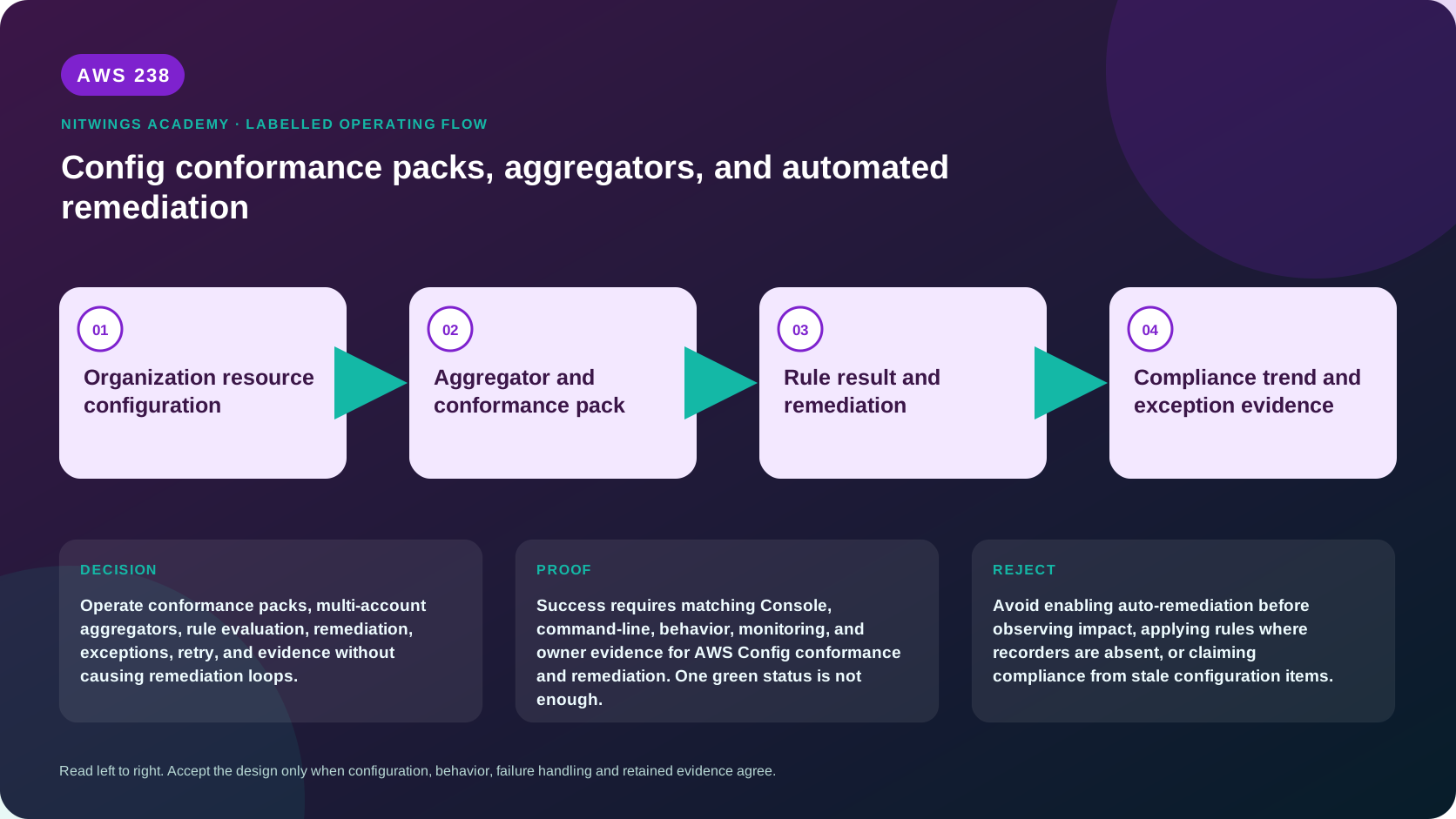
Why this lesson matters
AWS Config turns changing resource configuration into inventory and compliance evidence. A conformance pack groups rules and remediation actions. An aggregator centralizes read-only data from accounts and Regions. Systems Manager Automation can remediate noncompliance. These capabilities are useful only when their scope, freshness and side effects are understood.
A dashboard showing 100% can still omit an account whose recorder never started, a Region not aggregated, a resource type not recorded, a rule with insufficient data, or a newly changed resource waiting for evaluation. Automatic remediation can also act on stale compliance data. Governance must prove the evidence pipeline before trusting the result or changing a workload.
Outcomes
You will be able to:
- explain configuration recorders, configuration items and delivery channels;
- choose recording strategy/frequency and handle global-resource home Regions;
- distinguish managed, custom Lambda, custom Guard and process-check rules;
- explain change, periodic and hybrid triggers plus detective/proactive modes;
- interpret compliant, noncompliant, error, not applicable and insufficient data;
- design account/organization conformance packs and deployment prerequisites;
- calculate and challenge conformance-pack compliance scores;
- operate individual/organization aggregators without confusing view and control;
- distinguish manual and automatic SSM remediation;
- design idempotency, current-state checks, retries, execution controls and rollback;
- govern planned and failure-generated remediation exceptions;
- diagnose missing/stale data, failed deployment, evaluation and remediation loops;
- calculate Config, rule, pack, storage, notification and automation costs.
Safety boundary and workbook
- This lesson is read-only. Do not start/stop a recorder, deploy/update/delete a
pack, create a rule/aggregator, re-evaluate rules or execute/configure remediation.
- Inspect only explicitly owned resources. Config data reveals architecture, tags,
relationships, policy posture and historical changes across accounts.
- Never enable automatic remediation until the exact SSM document version, role,
preconditions, idempotency, concurrency, blast radius and rollback are tested.
- Redact account IDs, ARNs, resource names, configuration details and findings.
Download the Config governance workbook or complete archive.
The evidence pipeline
AWS resource change/current state
       |
       v
configuration recorder -> configuration item (CI) -> S3/SNS delivery
       |
       v
Config rule evaluation -> compliance result -> optional SSM remediation
       |
       +--> conformance pack groups controls and results
       |
       +--> aggregator replicates read-only data from accounts/Regions
       |
       v
freshness + coverage + exception + execution evidence -> governance conclusion
AWS Config records configuration, not runtime health, packet flow, customer transactions or every API event. Pair it with CloudTrail, CloudWatch, security services, application evidence and human process controls.
Recorder and configuration item foundations
A configuration item (CI) is a point-in-time representation of a supported resource's configuration, relationships and metadata. A customer-managed configuration recorder records the resource types and frequency you choose; there can be one per account per Region. A service-linked recorder is owned by an integrated AWS service and controls its own scope.
A delivery channel sends configuration snapshots/history to S3 and notifications through SNS according to configuration. Recording and delivery are different: prove recorder status, role, scope, delivery status and newest CI timestamp.
Recording strategies
- all current and future supported resource types with optional overrides;
- all except named exclusions;
- only named resource types;
- continuous or daily recording where supported.
“All” can increase cost and automatically include newly supported types. Excluding high-churn ephemeral resources lowers volume but creates an explicit evidence gap. Choose from control requirements, churn, incident/audit retention and cost - not from the desire for a green dashboard.
Regional and global resources
Most resource CIs are Regional. Global IAM users, groups, roles and customer managed policies predate the February 2022 recording change and can be recorded only in older supported Regions; AWS recommends considering one Region to avoid duplicate CIs/evaluations. They are excluded from the modern default recorder.
Newer global types are recorded only in their documented home Region - for example, Route 53/CloudFront/WAF global resources in us-east-1 and Global Accelerator in us-west-2. Aurora global cluster recording has distinct behavior across enabled Regions. Maintain a resource-type/home-Region matrix; one ap-south-1 check is not complete organization evidence.
AWS Config rules
A rule evaluates resource configuration against desired conditions.
| Result | Meaning |
|---|---|
COMPLIANT | evaluated configuration meets the rule |
NON_COMPLIANT | evaluated configuration violates the rule |
ERROR | parameters/logic/evaluation failed; not a pass |
NOT_APPLICABLE | rule logic does not apply to that resource |
INSUFFICIENT_DATA | pack/rule lacks enough evaluated results |
Read the ordering timestamp, result annotation and underlying CI. A compliant result proves only the rule logic and captured configuration at that time.
Rule implementations
- managed rules are maintained by AWS and configured with scope/parameters;
- custom Lambda rules run owner-maintained code and execution permissions;
- custom policy rules use CloudFormation Guard policy logic;
- process checks represent external/manual verification inside a pack.
Pin managed identifiers, input parameters and custom code/policy versions. A sample rule/pack is a starting point, not legal or regulatory certification.
Triggers and modes
Configuration-change rules evaluate when a matching recorded CI changes. Periodic rules evaluate at a configured frequency, commonly 1, 3, 6, 12 or 24 hours. Hybrid rules use both. Scope may be resource type, ID, tags or any recorded change; an omitted scope can trigger more evaluations and cost than expected.
Detective evaluation checks deployed resources. Proactive evaluation tests supplied resource properties before deployment for supported managed rules/types. Proactive evaluation neither blocks provisioning nor automatically remediates. Enforcement requires pipeline/CloudFormation hooks or another approved gate.
Conformance packs
A conformance pack is a YAML-defined collection of managed/custom Config rules, remediation actions and optionally process checks, deployed as one entity in an account/Region or across AWS Organizations. It standardizes control definitions and parameters; it does not guarantee complete recording, legal compliance or safe remediation.
Deployment prerequisites and ownership
- recording must be enabled in every target account/Region;
- custom Lambda/Guard dependencies and execution roles must already exist;
- SSM documents, exact automation roles and other remediation dependencies must
exist with least privilege;
- organization deployment requires all features/service access and management or
registered delegated-administrator authority;
- organization auto-remediation roles must exist consistently in member accounts;
- cross-account delivery buckets have documented naming/policy requirements;
- excluded accounts and newly joined accounts need governed lifecycle evidence.
Organization deployment uses service-linked roles including AWSServiceRoleForConfigConforms. Member-account policy controls do not behave like a simple local PutConfigRule denial; inspect the current organization API and service-linked-role authority before promising local prevention.
Deployed rule names can be generated/prefixed rather than equal to the template's logical ID. Map control → source template/version → deployed pack/rule name before querying remediation or compliance.
Compliance and score
The score is the percentage of compliant rule-resource combinations divided by total possible combinations and includes LastUpdatedTime. A pack with no results reports INSUFFICIENT_DATA. One high-volume rule/resource class can dominate the percentage, so report critical controls and counts separately.
A pack is noncompliant if any rule is noncompliant. If some rules are compliant and others have insufficient data, the pack can still display compliant; only when all rules lack data does the pack become insufficient-data. Rules evaluate in stages rather than one atomic instant. Always inspect rule/resource details, recording coverage and timestamps instead of accepting one score.
Aggregators: centralized view, not centralized mutation
A configuration aggregator replicates configuration and compliance data from authorized source accounts/Regions into an aggregator account/Region. It supports inventory, compliance summaries, relationships and advanced queries. Creating an aggregator has no additional Config aggregator charge.
It does not enable Config in source accounts and does not let operators deploy rules, push snapshots or remediate source resources. Treat deployment and aggregation as separate control planes.
| Type | Authorization model |
|---|---|
| individual-account aggregator | every source account authorizes aggregator account and Region |
| organization aggregator | Organizations integration/role supplies member-account authority |
| service-linked aggregator | linked service determines scope |
For every expected account/Region prove recorder enabled, authorization or valid organization role, aggregated source status, last update and query coverage. Aggregation is eventually updated; sample critical results directly in source accounts. A long-invalid organization role can lead to removal of organization data, so monitor source and role status rather than only query output.
Remediation: Config decides when, SSM changes the resource
Config remediation targets an SSM Automation document with a specific version, parameters and an AutomationAssumeRole. A parameter can receive the noncompliant resource ID dynamically; other values are static. Review the document's exact steps and IAM side effects, not just its friendly name.
Manual-first progression
- observe noncompliance without remediation and validate rule accuracy;
- run the pinned Automation manually on one sandbox/canary resource;
- test success, no-op/already-compliant, stale-input, partial failure, retry,
rollback and unsupported-state paths;
- verify current-state preconditions inside Automation immediately before mutate;
- deploy manual remediation to canary accounts/Regions and observe;
- enable automatic mode only after owner approval, with bounded concurrency,
error threshold, attempts/time window and a documented kill path;
- expand progressively and monitor Config, SSM, CloudTrail and workload evidence.
Idempotency means rerunning converges safely. It is essential because evaluation, delivery and remediation are asynchronous.
Stale compliance hazard
When auto-remediation is enabled, Config bootstraps from a periodically captured compliance snapshot. A resource changed to compliant after that snapshot can still be sent to remediation. Therefore the SSM Automation must retrieve current state and exit without mutation when the resource is already compliant. Destructive remediation without this guard can change or delete a healthy resource.
Retry and execution controls
MaximumAutomaticAttempts defaults to 5 and supports 1–25. RetryAttemptSeconds defaults to 60 and defines the window for those failed attempts. Reaching the attempt limit in the window causes Config to add a remediation exception, blocking further auto-remediation for that rule/resource. Retries incur SSM cost.
SSM execution controls can bound concurrent percentage/count and error percentage. They limit rollout but do not replace idempotency, stop monitoring or rollback. Pin TargetVersion; after backward-incompatible document changes, update the remediation configuration explicitly.
Remediation exceptions
An exception makes a named noncompliant resource ineligible for auto-remediation. It records reason and optional expiry. Exceptions may be approved intentionally or generated after repeated failures; both require an owner and review.
Planned exceptions can be created only for NON_COMPLIANT resources. AWS advises keeping remediation manual until the result exists, adding the exception, then considering automatic mode. Otherwise automation can run before the exception and even delete resources. Exceptions cannot be placed on some service-linked remediation actions, including organization-pack-managed cases.
An exception is not compliance. Dashboards must show it as accepted risk with expiry. Before clearing a failure exception, correct root cause, re-evaluate, verify current CI, and test one manual execution.
Read-only Console walkthrough
- Confirm account/Region. Open AWS Config → Settings and record customer and
service-linked recorder status, role, resource strategy/frequency and delivery.
- Open Resource inventory and inspect one owned resource's newest CI and
timeline. Do not confuse last captured time with current state.
- Open Rules. Inspect source, scope, parameters, trigger/mode, compliance,
annotation and remediation without choosing Re-evaluate or Manage remediation.
- Open Conformance packs. Record template/version source, deployment status,
parameters, generated rules, score/time, timeline and every insufficient/error or noncompliant result.
- Open Aggregators. Record type/source accounts/Regions/status and compare
expected coverage. Use read-only advanced query, then sample source evidence.
- Inspect remediation document/version, role, parameters, attempts/window,
execution controls, exceptions and historical execution status.
- Return to all inventories and prove no setting/resource changed.
Read-only CLI inventory
export AWS_DEFAULT_REGION="ap-south-1"
aws sts get-caller-identity --output json

aws configservice describe-configuration-recorders --output json
aws configservice describe-configuration-recorder-status --output json
aws configservice describe-delivery-channels --output json
aws configservice describe-delivery-channel-status --output json
aws configservice describe-config-rules --output json
aws configservice describe-conformance-packs --output json
aws configservice describe-conformance-pack-status --output json
aws configservice list-conformance-pack-compliance-scores --output json
aws configservice describe-organization-conformance-packs --output json
aws configservice describe-organization-conformance-pack-statuses --output json
aws configservice describe-configuration-aggregators --output json
For owned names from inventory:
export PACK_NAME="replace-with-pack-name"
export RULE_NAME="replace-with-deployed-rule-name"
export AGGREGATOR_NAME="replace-with-aggregator-name"

aws configservice describe-configuration-aggregator-sources-status \
  --configuration-aggregator-name "$AGGREGATOR_NAME" --output json
aws configservice get-conformance-pack-compliance-summary \
  --conformance-pack-names "$PACK_NAME" --output json
aws configservice describe-conformance-pack-compliance \
  --conformance-pack-name "$PACK_NAME" --output json
aws configservice get-conformance-pack-compliance-details \
  --conformance-pack-name "$PACK_NAME" --output json
aws configservice get-compliance-details-by-config-rule \
  --config-rule-name "$RULE_NAME" --output json
aws configservice describe-remediation-configurations \
  --config-rule-names "$RULE_NAME" --output json
aws configservice describe-remediation-exceptions \
  --config-rule-name "$RULE_NAME" --output json
aws configservice describe-remediation-execution-status \
  --config-rule-name "$RULE_NAME" --output json
Follow pagination. No put, delete, start, stop, re-evaluate or remediation execution command belongs in this lesson.
Troubleshooting by pipeline layer
| Symptom | Likely cause | Proof/correction |
|---|---|---|
| no resources/results | recorder stopped, wrong Region/type, unsupported type | recorder status/scope and current support matrix |
| pack deployment failed | recorder/prerequisite role, S3, SSM or custom-rule dependency | deployment status/error and CloudTrail |
| organization accounts missing | service access/features/delegated role/exclusions/new account | org pack/source status and role validity |
| aggregator empty/stale | source Config disabled, missing authorization, delay or invalid org role | source recorder, authorization and source-status time |
rule ERROR | bad parameter/custom code/permission | evaluation annotation, Lambda/Guard logs and version |
unexpected NOT_APPLICABLE | wrong type/scope/logic or deleted resource | rule logic and captured CI status |
| high score despite critical gap | insufficient data, weighting or omitted coverage | combination counts, rule detail, recorder matrix |
| remediation fails repeatedly | role/document parameter/version, unsupported state or throttling | SSM step errors and CloudTrail; inspect exception |
| compliant resource changed | stale bootstrap snapshot and missing current-state check | CI/evaluation/remediation timeline |
| remediation loop | rule/remediation disagreement, non-idempotent action or external controller | repeated CIs/evaluations/SSM executions and controller logs |
| exception never remediates | exception blocks auto mode until clear/expiry | exception message/expiry and corrected manual test |
Start at recorder coverage/freshness, then CI → rule scope/version/evaluation → pack deployment/name → aggregator source/time → remediation config/role/document → SSM step and resulting new CI. Random re-evaluation or repeated Automation can amplify cost and damage.
Cost, retention and cleanup
AWS Config charges for recorded configuration items, standalone rule evaluations and conformance-pack rule-resource evaluations. Recording frequency and resource churn matter. A rule in both proactive and detective modes has current pricing nuances; calculate from the live pricing page rather than assuming every evaluation is charged identically.
Add S3 snapshot/history, SNS, KMS, custom Lambda, CloudWatch logs and SSM Automation including retries. Aggregation itself has no additional charge, but source recording and evaluations remain billable. Organization-wide “all resources/all Regions” can multiply both coverage and cost; forecast new accounts/types and set anomaly alerts.
This lesson creates nothing. In real rollout, do not delete compliance history, delivery data, exceptions, packs or roles until audit and resource owners approve. Remove only temporary canary resources and obsolete custom-rule/remediation assets after dependency and retention evidence.
Practical governance design
Complete every workbook section for a pack covering encrypted storage, public- access prevention and approved tags.
- Define control intent, resources, accounts/Regions, owners and exceptions.
- Prove recorder/delivery/global-resource coverage and freshness in every scope.
- Choose managed/custom/process rules, parameters, scope, trigger and mode; explain
NOT_APPLICABLE, ERROR and insufficient-data handling.
- Design versioned account/organization deployment prerequisites and rollback.
- Explain the pack score calculation and how a serious gap could be hidden.
- Build aggregator source/authorization/status proof and state what it cannot do.
- Design one manual-first SSM remediation with current-state guard, idempotency,
role, version, attempts/window, concurrency/error threshold and rollback.
- Model a stale snapshot and repeated failure; show no-op behavior and exception
workflow. Include a planned exception owner/expiry.
- Calculate configuration-item, evaluation, automation and evidence-storage costs.
Knowledge check
- Does an aggregator enable Config in source accounts?
No; each source account/Region must generate data with an enabled recorder.
- Can an aggregator deploy rules or remediate source resources?
No; it is a replicated read-only view.
- What does proactive evaluation do?
Evaluates supplied pre-deployment properties; it does not block or remediate.
- Why can a compliant pack contain insufficient-data rules?
If some rules are compliant, the pack may show compliant despite other rules lacking data; inspect every rule/result.
- What does the compliance score count?
Compliant rule-resource combinations divided by total possible combinations.
- Why must remediation re-read current state?
Auto-remediation can use a stale compliance snapshot and target a now-compliant resource.
- What happens after too many failures inside the retry window?
Config creates a remediation exception that blocks further automatic attempts.
- When should a planned exception be added?
After the resource is NON_COMPLIANT, while remediation remains manual.
- Why pin the SSM document version?
Behavior can change; incompatible updates require an updated remediation config.
- What proves a green result is trustworthy?
Complete/fresh recorder, CI, rule, pack, account/Region and exception evidence.
Lesson acceptance
The learner submits:
- complete account/Region/recorder/delivery/global-resource coverage matrix;
- versioned control/rule/pack design with parameters, modes and result semantics;
- deployment prerequisites, exclusions, ownership and rollback;
- score calculation plus rule/resource/insufficient-data detail;
- aggregator authorization/source/freshness evidence and limitation statement;
- manual-first idempotent remediation with stale-input and failure tests;
- bounded retry/execution controls and governed exception workflow;
- troubleshooting timeline, current pricing inputs and no-create proof;
- no secrets, account IDs, internal resources or sensitive configuration.
Official sources
- AWS Config concepts
- Recording AWS resources
- Working with configuration recorders
- Components of an AWS Config rule
- Conformance packs
- Conformance pack prerequisites
- Conformance pack compliance dashboard
- Multi-account, multi-Region aggregation
- Aggregator authorization
- Automatic remediation
- Remediation configuration API semantics
- Remediation exception safety
- AWS Config pricing