Lesson 020 · Jenkins Learning Path

Complete Jenkins CI/CD Capstone from Commit to Recovery

· Published · 6 min read

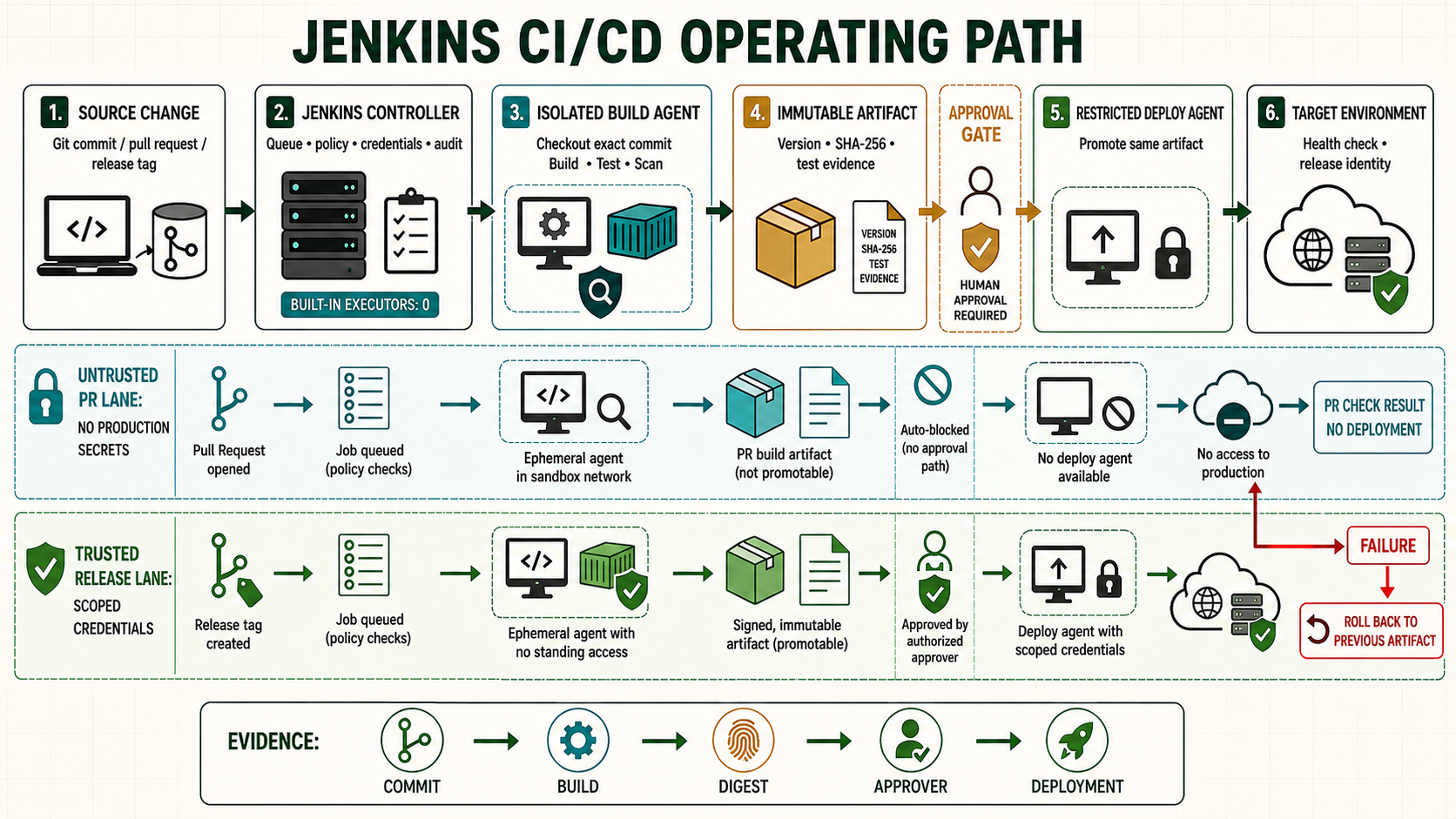
Labelled Jenkins CI/CD path separating untrusted pull request validation from trusted immutable artifact approval deployment monitoring and rollback

This final guide assembles the series into one delivery path. A GitHub change is discovered by a Multibranch Pipeline, validated on an isolated agent, packaged once, fingerprinted, approved by immutable identity, deployed through a restricted account, tested for health and rolled back when acceptance fails.

Define the delivery contract

GateInputEvidence
SourceReviewed commitCommit SHA and pull request
ValidationClean checkoutTests, lint, security results
PackageValidated treeImmutable artifact and SHA-256
ApprovalArtifact digest and staging resultApprover and time
ProductionSame artifactRelease ID, health and rollback state

Required Jenkins configuration

  • Multibranch project with GitHub App credential and webhook.
  • linux nodejs build agents isolated from deployment agents.
  • Folder-scoped myapp-staging-ssh and myapp-production-ssh credentials.
  • Verified known_hosts entries on the deployment agent.
  • Artifact repository or Jenkins artifact retention sized for promotion and rollback.
  • Protected main branch and separate policy for untrusted pull requests.

Repository layout

Jenkinsfile
package.json
package-lock.json
ci/
  preflight.sh
  test.sh
  package.sh
  deploy-over-ssh.sh
  health-check.sh
  rollback.sh

Complete Declarative Pipeline

pipeline {
  agent none
  options {
    timestamps()
    timeout(time: 60, unit: 'MINUTES')
    disableConcurrentBuilds(abortPrevious: false)
    preserveStashes(buildCount: 3)
  }
  stages {
    stage('Checkout') {
      agent { label 'linux nodejs' }
      steps {
        deleteDir()
        checkout scm
        sh 'set -eu; git rev-parse HEAD | tee GIT_COMMIT.txt'
        stash name: 'source', includes: '**', useDefaultExcludes: true
      }
    }
    stage('Validate') {
      agent { label 'linux nodejs' }
      steps {
        deleteDir(); unstash 'source'
        sh '''set -euo pipefail
          ./ci/preflight.sh
          npm ci --no-audit
          npm run lint
          npm run test:ci
        '''
      }
      post { always { junit testResults: 'junit.xml', allowEmptyResults: true } }
    }
    stage('Package once') {
      agent { label 'linux nodejs' }
      steps {
        deleteDir(); unstash 'source'
        sh '''set -euo pipefail
          npm ci --no-audit
          npm run build
          ./ci/package.sh "${BUILD_NUMBER}"
          sha256sum "dist/myapp-${BUILD_NUMBER}.tgz" \
            > "dist/myapp-${BUILD_NUMBER}.tgz.sha256"
        '''
        archiveArtifacts artifacts: 'dist/myapp-*.tgz*', fingerprint: true
        stash name: 'release', includes: 'dist/myapp-*.tgz*'
      }
    }
    stage('Deploy staging') {
      when { branch 'main' }
      agent { label 'deploy staging' }
      steps {
        deleteDir(); unstash 'release'
        withCredentials([sshUserPrivateKey(credentialsId: 'myapp-staging-ssh', keyFileVariable: 'SSH_KEY', usernameVariable: 'SSH_USER')]) {
          sh 'set -euo pipefail; ./ci/deploy-over-ssh.sh staging "$BUILD_NUMBER"'
        }
        sh 'set -euo pipefail; ./ci/health-check.sh https://staging.example.com/health'
      }
    }
    stage('Approve production') {
      when { branch 'main' }
      options { timeout(time: 30, unit: 'MINUTES') }
      input { message 'Promote this tested artifact to production?' }
      steps { echo "Approved artifact from build ${BUILD_NUMBER}" }
    }
    stage('Deploy production') {
      when { branch 'main' }
      agent { label 'deploy production' }
      steps {
        deleteDir(); unstash 'release'
        withCredentials([sshUserPrivateKey(credentialsId: 'myapp-production-ssh', keyFileVariable: 'SSH_KEY', usernameVariable: 'SSH_USER')]) {
          sh 'set -euo pipefail; ./ci/deploy-over-ssh.sh production "$BUILD_NUMBER"'
        }
        sh 'set -euo pipefail; ./ci/health-check.sh https://www.example.com/health'
      }
      post {
        failure {
          withCredentials([sshUserPrivateKey(credentialsId: 'myapp-production-ssh', keyFileVariable: 'SSH_KEY', usernameVariable: 'SSH_USER')]) {
            sh 'set +e; ./ci/rollback.sh production'
          }
        }
      }
    }
  }
  post {
    always { archiveArtifacts artifacts: 'diagnostics/**', allowEmptyArchive: true }
    cleanup { deleteDir() }
  }
}

Make deployment scripts environment-aware

#!/usr/bin/env bash
set -euo pipefail
environment="${1:?environment required}"
build_id="${2:?build id required}"
case "$environment" in
  staging) host=staging-deploy.example.com ;;
  production) host=production-deploy.example.com ;;
  *) echo 'invalid environment' >&2; exit 2 ;;
esac
case "$build_id" in (*[!0-9]*) echo 'invalid build id' >&2; exit 2;; esac
artifact="dist/myapp-${build_id}.tgz"
sha256sum -c "${artifact}.sha256"
scp -i "$SSH_KEY" -o IdentitiesOnly=yes -o StrictHostKeyChecking=yes \
  "$artifact" "${artifact}.sha256" "$SSH_USER@$host:/tmp/"
ssh -i "$SSH_KEY" -o IdentitiesOnly=yes -o StrictHostKeyChecking=yes \
  "$SSH_USER@$host" "/usr/local/sbin/deploy-myapp '$build_id'"

Test failure scenarios before production

ScenarioExpected resultProof
Unit test failsNo artifact or deploymentFailed validation stage
Checksum differsDeployment stops before extractionChecksum failure
Staging health failsNo production approvalHealth log and staging rollback
Approval expiresNo production changeTimed-out input stage
Production health failsPrior release restoredSymlink, service and health evidence
Agent disappearsBuild fails or resumes only at safe boundaryQueue and Pipeline log

Security and operating controls

  • Untrusted pull requests run validation without publish or deploy credentials.
  • Production deploy keys cannot log into unrelated hosts and cannot run arbitrary privileged commands.
  • Approval shows commit, build, artifact checksum and staging result.
  • Logs do not echo secrets; artifact and release retention meet rollback needs.
  • Controller, plugins, credentials, agents, backups and restore tests have named owners.

Unsafe shortcuts

Unsafe: rebuilding after production approval breaks the evidence chain. Promote the archived digest. Unsafe: deploying with scp directly into the live directory exposes partial files. Transfer to a temporary location and switch an atomic release link. Unsafe: suppressing a failed health check with || true records a false success.

Production acceptance checklist

  • GitHub event, commit, tests, artifact checksum, approval, release and health result are linked.
  • The same artifact passes staging and reaches production.
  • Credentials and agents are separated by trust and environment.
  • Timeout, failure, rollback and notification paths have been exercised.
  • A controller restore and agent replacement rehearsal has passed.

Choose a Pipeline topology before combining everything

TopologyUseTrade-off
Single repository PipelineOne application and one release artifactSimple traceability; can grow large
Build Pipeline plus promotion PipelineBuild once, deploy the same digest many timesRequires durable release manifest and authorization between jobs
Monorepo orchestrator plus component PipelinesIndependent components in one repositoryMust aggregate downstream status and pass exact commit
Shared Library with thin JenkinsfilesGoverned behavior across many repositoriesLibrary becomes trusted release software requiring versioning

Separate CI, release and deployment responsibilities

  1. CI: every branch and pull request checks out the exact revision, installs dependencies, tests and scans without production credentials.
  2. Release: protected main or tag builds the artifact once, generates SBOM/provenance where required, fingerprints it and writes the release manifest.
  3. Promotion: staging and production resolve the immutable digest, obtain environment approval, deploy and record health.
  4. Rollback: the environment record supplies the prior digest; Jenkins redeploys it without rebuilding source.

Pass artifacts between jobs by identity

{
  "application": "example-api",
  "version": "v2.8.1",
  "commit": "4b21e90",
  "artifact": "registry.example.com/example/api",
  "digest": "sha256:VERIFIED_DIGEST",
  "source_build": "example-api/main/1842",
  "tests": {"unit": "passed", "security": "passed"}
}

A downstream deployment job receives the manifest location or digest, not a workspace path and not “last successful build.” “Last successful” can change between approval and execution.

Handle partial failure explicitly

Failure pointSystem stateNext action
Checkout/testNo releaseFix source and rerun
Artifact uploadPossibly incomplete releaseVerify repository; never publish manifest until digest exists
Staging deploymentStaging may be partialReconcile or rollback staging; block production
Approval timeoutProduction unchangedCreate new approval against same valid digest or expire release
Production healthNew release may be activeRedeploy recorded previous digest and keep build failed
NotificationDeployment result already decidedRecord notification failure without changing deployment truth

Operational evidence for every deployment

  • Repository, branch/tag, commit and Jenkinsfile/library version
  • Build URL, agent image, dependency lockfiles and test/security reports
  • Artifact URI, checksum/digest and signature/provenance status
  • Environment, approver, deployment identity, start/end time and change record
  • Health checks, monitoring window, current release and previous release
  • Rollback execution and final environment state

Capstone exercises

  1. Convert the example to a Multibranch Pipeline and prove pull requests cannot access deployment credentials.
  2. Move build and deploy to different labeled agents and transfer only the release manifest.
  3. Trigger a tag build, deploy it to staging, approve the digest and promote it to production.
  4. Break the production health endpoint and verify automatic redeployment of the recorded previous digest.
  5. Restart Jenkins after packaging and confirm the Pipeline can continue from durable artifacts.
  6. Trigger two production requests concurrently and prove the environment lock serializes them.

Official references

Advertisement