
Deploy Git Tags and Roll Back to a Previous Release
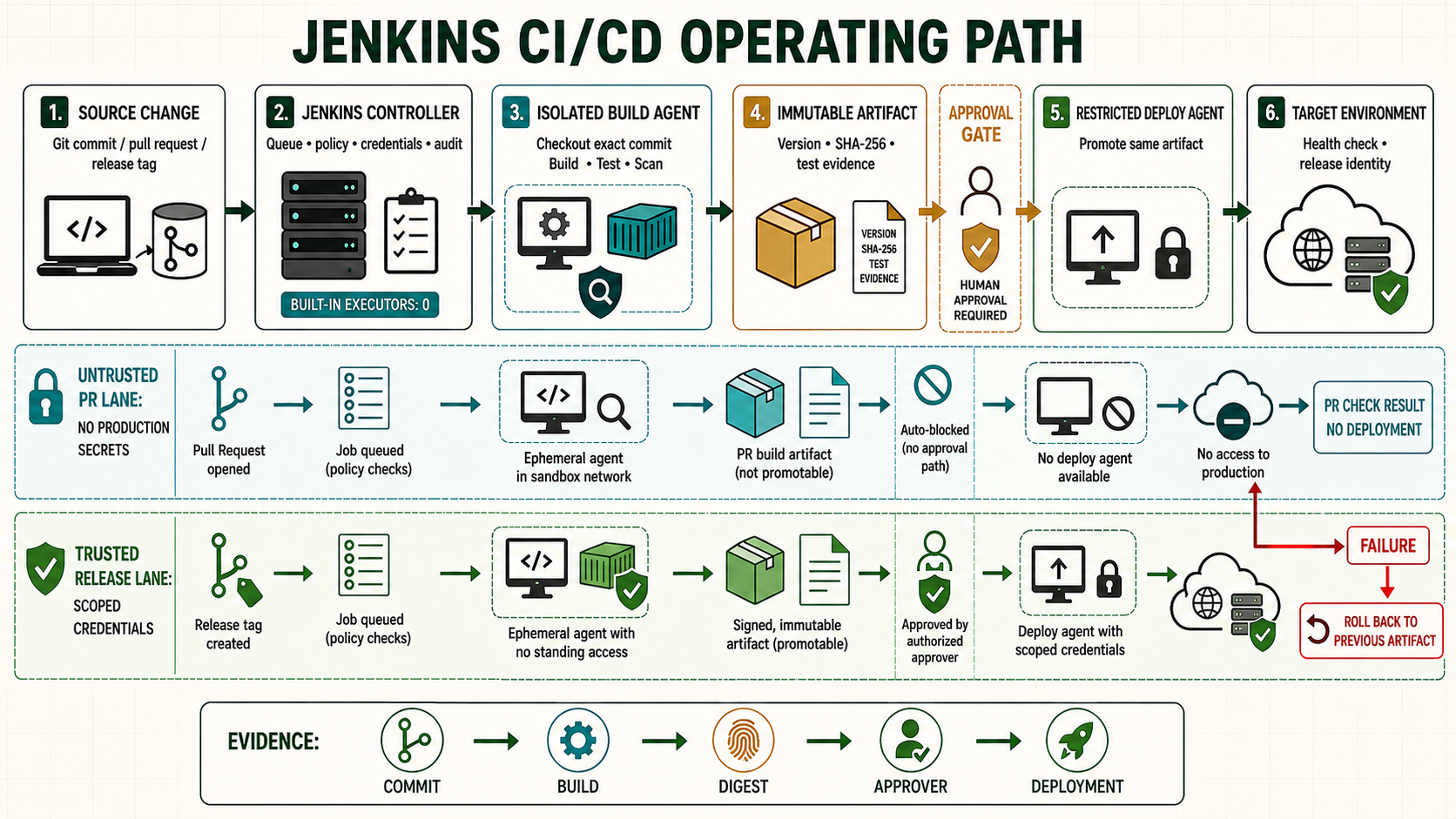
A tag-based release gives an operator a human-readable version such as v2.8.1, but a Git tag alone is not a deployable artifact. A safe Pipeline resolves the tag to a commit, verifies the release policy, builds once, records the artifact digest, and deploys that exact digest to every environment.
Understand the release identities
| Identity | Example | Purpose | Can it change? |
|---|---|---|---|
| Git tag | v2.8.1 | Human release version | Policy must forbid moving a released tag. |
| Commit | 4b21...e90 | Exact source tree | Immutable object identity |
| Artifact digest | sha256:98ab... | Exact deployable bytes | Immutable |
| Deployment record | production release 2841 | Environment, time, approver and result | Append-only evidence |
The release registry should map tag -> commit -> artifact digest. Deployment selects the digest. Never resolve a floating container tag such as latest during production promotion.
Create and push an annotated release tag
git switch main
git pull --ff-only
git status --short
git tag -a v2.8.1 -m 'Release v2.8.1'
git show --no-patch --decorate v2.8.1
git push origin v2.8.1
Protect release tags in the source-control platform. Restrict creation and deletion to the release role. Signed tags can add author authenticity where the organization manages signing identities and verification.
Discover tags in a Multibranch Pipeline
Configure the branch source to discover tags. In Declarative Pipeline, buildingTag() checks whether the current run is for a tag and env.TAG_NAME contains its name.
stage('Validate release tag') {
  when { buildingTag() }
  steps {
    sh '''set -euo pipefail
      case "$TAG_NAME" in
        v[0-9]*.[0-9]*.[0-9]*) ;;
        *) echo "Tag does not match vMAJOR.MINOR.PATCH" >&2; exit 2 ;;
      esac
      test "$(git rev-parse HEAD)" = "$(git rev-list -n 1 "$TAG_NAME")"
      git show --no-patch --format='%H %D' "$TAG_NAME"
    '''
  }
}
A shell pattern is not a complete semantic-version parser, but it rejects obvious invalid input. Use a reviewed version tool when prerelease/build metadata and ordering matter.
Build the tag once and publish a manifest
stage('Build release') {
  when { buildingTag() }
  agent { label 'linux nodejs' }
  steps {
    sh '''set -euo pipefail
      npm ci --no-audit
      npm run test:ci
      npm run build
      tar -czf "app-${TAG_NAME}.tgz" dist package.json package-lock.json
      sha256sum "app-${TAG_NAME}.tgz" > "app-${TAG_NAME}.tgz.sha256"
      printf '{"tag":"%s","commit":"%s","build":"%s"}\n' \
        "$TAG_NAME" "$GIT_COMMIT" "$BUILD_URL" > release.json
    '''
    archiveArtifacts artifacts: 'app-*.tgz,app-*.sha256,release.json', fingerprint: true
  }
}
Upload the artifact and manifest to an immutable repository keyed by tag and digest. If that tag already has a different digest, fail the Pipeline and investigate rather than overwriting the release.
Deploy an existing tag without rebuilding
pipeline {
  agent { label 'deploy production' }
  parameters {
    string(name: 'RELEASE_TAG', description: 'Existing tag, for example v2.8.1')
  }
  options { timestamps(); disableConcurrentBuilds(); timeout(time: 30, unit: 'MINUTES') }
  stages {
    stage('Resolve release') {
      steps {
        sh '''set -euo pipefail
          case "$RELEASE_TAG" in
            v[0-9]*.[0-9]*.[0-9]*) ;;
            *) echo 'Invalid release tag' >&2; exit 2 ;;
          esac
          ./ci/download-release-manifest.sh "$RELEASE_TAG"
          ./ci/download-release-artifact.sh release.json
          sha256sum -c "app-${RELEASE_TAG}.tgz.sha256"
        '''
      }
    }
    stage('Approval') {
      input { message 'Deploy the resolved digest to production?' }
      steps { sh './ci/show-release.sh release.json' }
    }
    stage('Deploy') {
      steps { sh 'set -euo pipefail; ./ci/deploy-existing-release.sh release.json' }
    }
  }
}
Use a controlled choice parameter populated from the release registry when possible. Do not let free-form input become an unquoted path, URL or shell fragment.
Find the previous semantic-version tag
The previous release is not reliably git describe HEAD^: merge history, prerelease tags and non-release tags can produce an unintended answer. Filter to the release pattern and version-sort the candidates.
current_tag="${1:?current tag required}"
git fetch --force --tags origin
previous_tag="$({
  git tag --list 'v[0-9]*.[0-9]*.[0-9]*' --sort=-version:refname
} | awk -v current="$current_tag" '
  $0 == current {seen=1; next}
  seen {print; exit}
')"
test -n "$previous_tag"
printf '%s\n' "$previous_tag"
If releases have channels such as v2.9.0-rc.1, use a semantic-version tool and channel policy. The safest rollback input is often the environment's recorded previous deployed digest, not a freshly calculated Git tag.
Record current and previous deployment
{
  "environment": "production",
  "current": {"tag": "v2.8.1", "digest": "sha256:CURRENT", "commit": "COMMIT_A"},
  "previous": {"tag": "v2.8.0", "digest": "sha256:PREVIOUS", "commit": "COMMIT_B"},
  "jenkins_build": "https://jenkins.example.com/job/release/2841/"
}
Store this record in an authorized deployment system or append-only release log. A rollback reads previous.digest, confirms the artifact exists, deploys it, checks health and creates a new deployment record. Rollback is itself a deployment, not deletion of history.
Automatic health failure rollback
stage('Production') {
  steps {
    script {
      def previous = sh(script: './ci/current-release.sh production', returnStdout: true).trim()
      try {
        sh './ci/deploy-existing-release.sh release.json'
        sh './ci/health-check.sh https://www.example.com/health'
      } catch (err) {
        sh "./ci/deploy-digest.sh production '${previous}'"
        sh './ci/health-check.sh https://www.example.com/health'
        throw err
      }
    }
  }
}
Only interpolate a digest obtained from a trusted system after validating its exact format. Prefer passing it through an environment variable or script argument array where supported.
Database compatibility during rollback
- Use expand-and-contract schema changes so current and preceding application versions can run during rollout.
- Do not automatically reverse a destructive migration merely because application health failed.
- Back up and test restore for data migrations; define whether rollback is application-only, forward-fix, or full data recovery.
- Record the application/database compatibility window with each release.
Unsafe tag operations
Unsafe: git tag -f v2.8.1 NEW_COMMIT && git push --force origin v2.8.1 changes the meaning of a released version and breaks auditability. Unsafe: checking out a user-supplied value with git checkout "$TAG" before validating that it is an allowed release tag can select an unintended ref. Unsafe: rebuilding an old tag with current dependencies or base images can produce different bytes; redeploy the preserved artifact digest.
Practice failure scenarios
| Scenario | Expected result |
|---|---|
| Malformed tag | Stops before build or credential allocation |
| Tag moved after release | Manifest conflict; release is blocked |
| Artifact checksum mismatch | Stops before target mutation |
| Production health failure | Recorded previous digest is redeployed and failure remains visible |
| Previous application cannot use database | Automated rollback stops and invokes the documented recovery path |