
Build, Test and Package Node.js with Jenkins
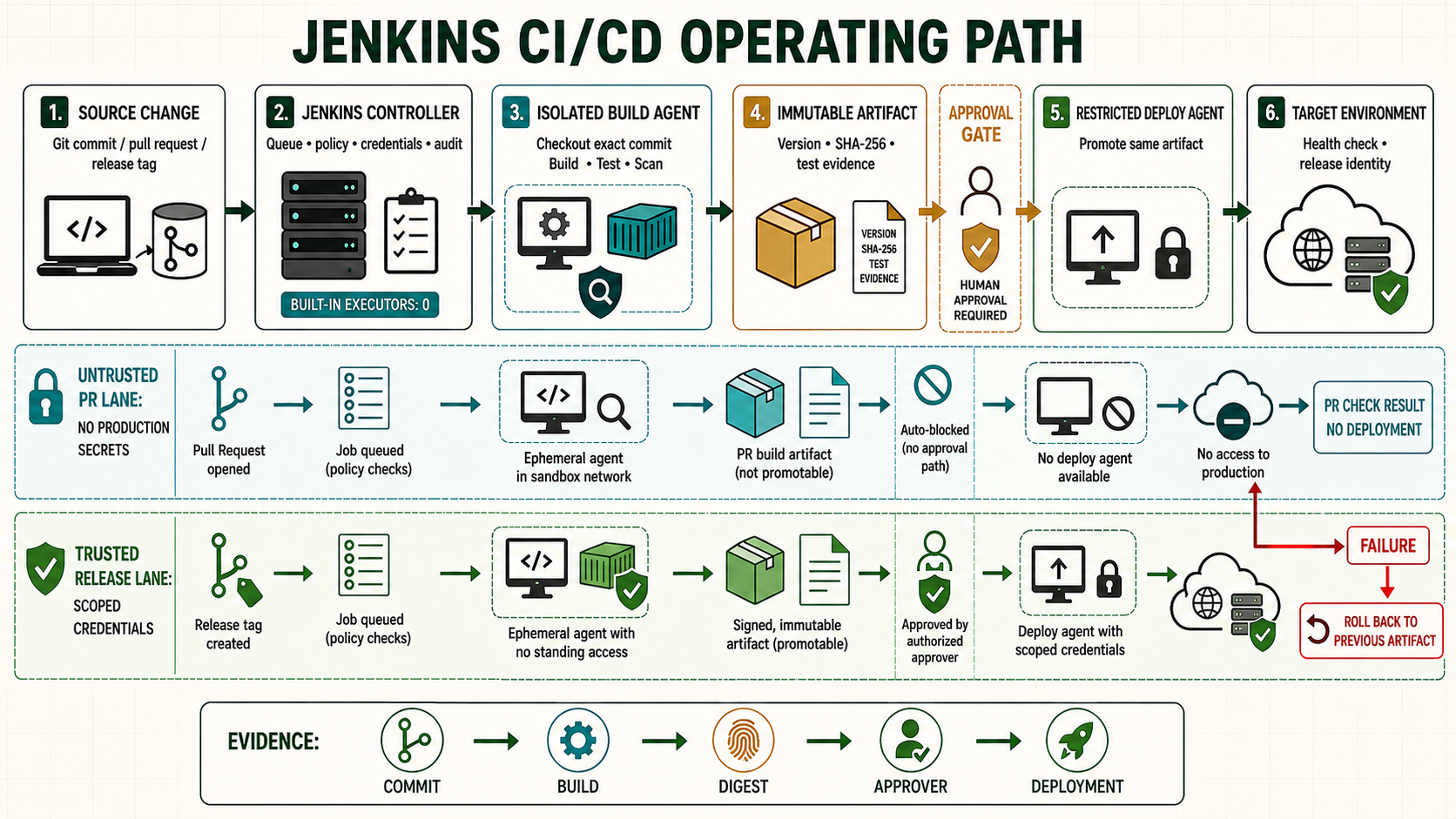
A reproducible Node.js Pipeline pins the runtime, installs exactly what the lockfile describes, runs tests in a clean workspace and produces one traceable artifact. Jenkins can supply Node through a managed tool or a pinned container image; the repository still owns its package and test commands.
Choose how Jenkins supplies Node
| Method | Best fit | Version control |
|---|---|---|
| NodeJS plugin tool | Persistent Linux or Windows agents | Named Jenkins installation, selected in Pipeline |
| Container agent | Ephemeral Linux agents with container runtime | Immutable image tag, preferably digest |
| Prebuilt agent image | Controlled enterprise fleet | Image/configuration manifest and label |
Do not depend on whichever node happens to be first in an agent's PATH. Align the supported Node release with the application and dependencies; update it through a tested change.
Prepare the repository
node --version
npm --version
npm install
git add package.json package-lock.json
git commit -m 'Record reproducible Node dependencies'
Commit package-lock.json. Define repository scripts such as lint, test:ci and build. Jenkins should call those reviewed scripts instead of duplicating application logic in Groovy.
{
  "scripts": {
    "lint": "eslint .",
    "test:ci": "jest --ci --coverage --reporters=default --reporters=jest-junit",
    "build": "node scripts/build.js"
  }
}
Configure the NodeJS plugin tool
- Install and approve the NodeJS plugin.
- Open Manage Jenkins > Tools > NodeJS installations.
- Create a named installation such as
node-24for the current LTS version, or another supported LTS version required by your application. - Use the same name in the Jenkinsfile and verify the runtime at the start of every build.
pipeline {
  agent { label 'linux nodejs' }
  tools { nodejs 'node-24' }
  options { timestamps(); disableConcurrentBuilds() }
  stages {
    stage('Runtime') {
      steps { sh 'set -eu; node --version; npm --version' }
    }
    stage('Install') {
      steps { sh 'set -euo pipefail; npm ci --no-audit' }
    }
    stage('Quality') {
      steps { sh 'set -euo pipefail; npm run lint; npm run test:ci' }
    }
    stage('Build') {
      steps { sh 'set -euo pipefail; npm run build; npm pack' }
    }
  }
  post {
    always {
      junit testResults: 'junit.xml', allowEmptyResults: true
      archiveArtifacts artifacts: '*.tgz,coverage/**', fingerprint: true,
        allowEmptyArchive: true
    }
    cleanup { deleteDir() }
  }
}
Use a pinned container agent
pipeline {
  agent {
    docker {
      image 'node:24-bookworm-slim'
      args '--read-only --tmpfs /tmp:rw,noexec,nosuid,size=512m'
      reuseNode false
    }
  }
  stages {
    stage('Test and build') {
      steps {
        sh '''set -euo pipefail
          node --version
          npm ci --no-audit
          npm run lint
          npm run test:ci
          npm run build
        '''
      }
    }
  }
}
For stricter reproducibility, pin the reviewed container by digest and update it deliberately. Confirm the image supports your agent architecture and native dependencies.
Handle npm credentials safely
withCredentials([string(credentialsId: 'npm-read-token', variable: 'NPM_TOKEN')]) {
  sh '''set -euo pipefail
    tmp_npmrc="$(mktemp)"
    trap 'rm -f "$tmp_npmrc"' EXIT
    printf '//registry.npmjs.org/:_authToken=%s\n' "$NPM_TOKEN" >"$tmp_npmrc"
    NPM_CONFIG_USERCONFIG="$tmp_npmrc" npm ci --no-audit
  '''
}
Use a read-only token for installation and a separate tightly controlled publishing credential. Do not archive .npmrc, environment dumps or the npm cache after authenticated operations.
Cache without sacrificing correctness
- Cache the npm download cache, not writable
node_modules. - Include operating system, CPU architecture, Node major version and lockfile hash in a cache key.
- Run
npm cifor every build; it removes an existingnode_modulesand follows the lockfile. - Make a cold-cache run part of troubleshooting and periodic validation.
Separate build and publish
stage('Publish package') {
  when { buildingTag() }
  steps {
    input message: 'Publish the tested npm package?'
    withCredentials([string(credentialsId: 'npm-publish-token', variable: 'NPM_TOKEN')]) {
      sh 'set -euo pipefail; ./ci/npm-publish-tested-package.sh'
    }
  }
}
Publish the tested package, not a rebuilt directory. Validate tag, package version and artifact checksum in the publishing script.
Unsafe commands and options
Unsafe: npm install --force or npm install --legacy-peer-deps can conceal dependency incompatibility. They are useful diagnostic options and sometimes application policy, but must be reviewed, documented and tested rather than added automatically.
Unsafe: curl ... | bash for runtime installation executes remote content directly. Use the managed tool, a verified package repository or an approved pinned image.
Troubleshoot
| Failure | Check | Fix |
|---|---|---|
| Lockfile mismatch | package.json and lockfile diff | Regenerate locally with the approved npm version and commit both. |
| Native module build fails | Compiler, libc, Python, architecture | Use a documented agent image containing required build dependencies. |
| Works locally only | Node/npm versions and untracked files | Match pinned versions and test a clean checkout. |
| Agent disk grows | npm cache and workspaces | Apply cache retention and workspace cleanup. |
Make the Node.js build reproducible and publishable
Pin the supported Node major version through a reviewed agent image or named Jenkins tool, and commit the lockfile. Use npm ci for a clean dependency tree rather than allowing CI to rewrite it. Cache is disposable acceleration: key it by operating system, architecture, Node version and lockfile digest, and test cold-cache builds. Publish unit-test and coverage reports before workspace cleanup. Package one versioned artifact, calculate its digest and promote those bytes; do not run npm install again on each deployment target.
node --version
npm --version
npm ci --ignore-scripts
# Enable lifecycle scripts only when dependencies and policy require them
npm test -- --ci
npm run build
tar -C dist -czf "app-${BUILD_NUMBER}.tgz" .
sha256sum "app-${BUILD_NUMBER}.tgz" | tee "app-${BUILD_NUMBER}.tgz.sha256"
Evidence and failure exercise
| Layer | Evidence | Failure response |
|---|---|---|
| Runtime | Node and npm versions in console | Unexpected PATH version fails preflight |
| Dependencies | Lockfile digest and npm ci result | Lockfile mismatch or install script is investigated |
| Tests | JUnit/coverage with explicit totals | Missing report is not treated as zero failures |
| Package | Artifact digest mapped to commit | Environment must not rebuild it |
Run the Pipeline with an empty cache, warm cache and one intentionally corrupt cache entry. The first two must produce the accepted dependency state; the third must fail safely or discard the cache. Then inject a failing unit test and ensure reports remain visible.
Independent operating checks
- Prove pull-request builds cannot publish to the release registry.
- Inspect package contents for source maps, secrets and unnecessary files.
- Abort during npm ci and verify workspace cleanup.
- Deploy the archived digest to staging without contacting npm.