
Monitor Jenkins, Audit Changes and Plan Build Capacity
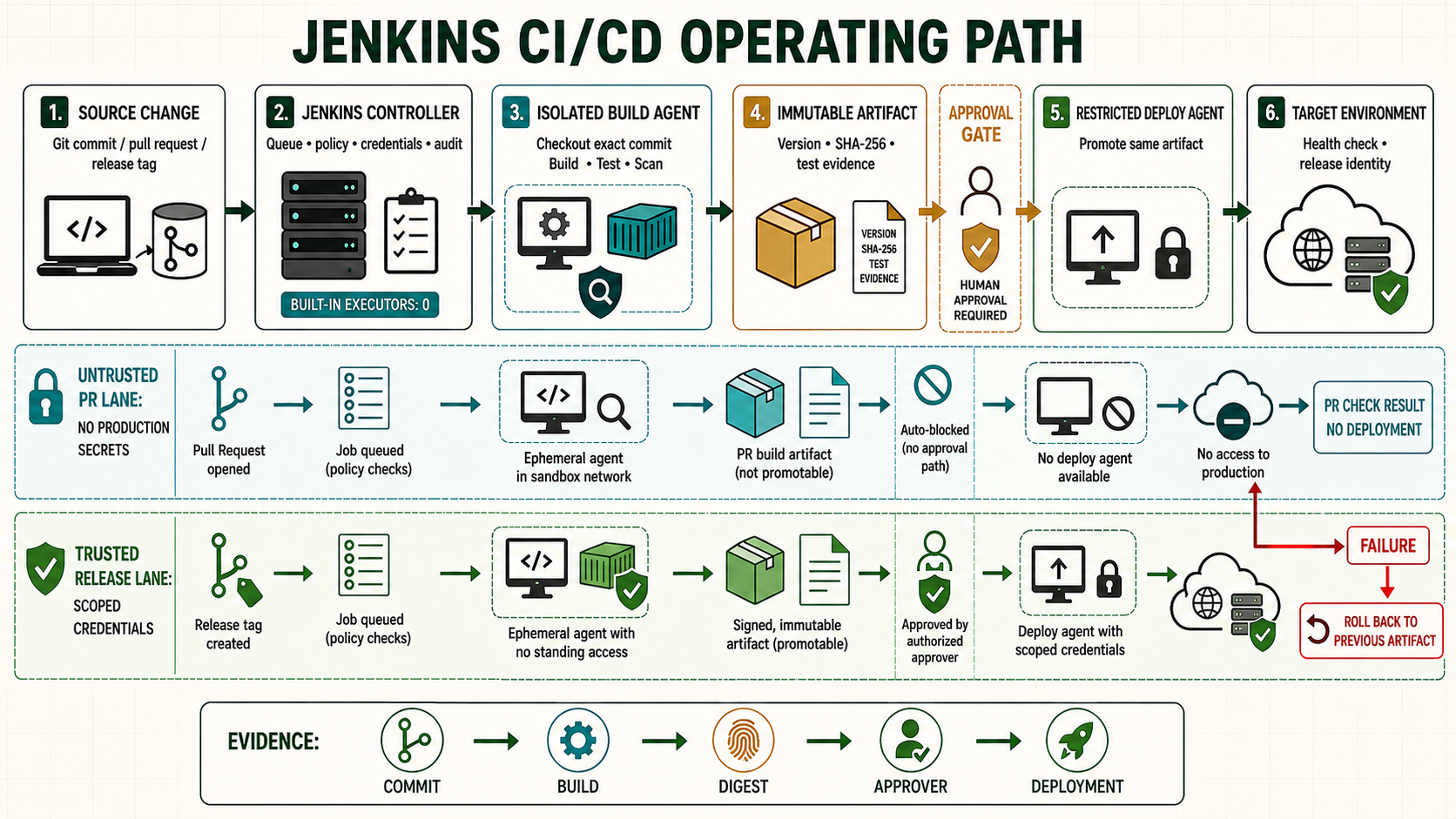
Jenkins performance is a queueing and control-plane problem before it is a CPU graph. Operators must separate demand waiting in the queue, agent provisioning, executor occupancy, controller responsiveness, storage latency, plugin failures and downstream service time.
Start from a known controller checkpoint
Use the accepted controller and agent checkpoint from the prior lesson. Record the Jenkins version, Java runtime, active configuration, plugin inventory and current Git revision before changing this boundary.
java -version
sudo systemctl is-active jenkins
sudo journalctl -u jenkins -n 50 --no-pager
curl -fsS http://127.0.0.1:8080/login >/dev/null
Understand the operating boundary
| Decision | Implementation | Evidence |
|---|---|---|
| Scope | Name the controller, folder, job, node and environment | The selected boundary is visible |
| Input | Use reviewed source and scoped credentials | Revision and credential ID are attributable |
| Execution | Set label, timeout and concurrency policy | Queue and node evidence match intent |
| Recovery | Preserve the last known working state | Rollback is rehearsed before promotion |
Prepare the lab
Record a normal-hour baseline and a known busy period. Identify controller, static agents, cloud agents, storage and reverse proxy separately. Define service objectives for UI/API availability, queue delay and critical Pipeline completion.
uptime
free -h
df -hT /var/lib/jenkins
df -ih /var/lib/jenkins
sudo systemctl status jenkins --no-pager
sudo journalctl -u jenkins --since '-1 hour' --no-pager
curl -fsS http://127.0.0.1:8080/login >/dev/null
Implement it step by step
- Measure queue length and age by required label, not only total count.
- Track online/offline agents, executor occupancy, provisioning delay and failed launches.
- Observe controller JVM heap, garbage collection, threads, HTTP latency and restart causes.
- Alert on JENKINS_HOME space and inode headroom before writes fail.
- Retain job configuration, credential, security, plugin and node changes with actor and time through an approved audit mechanism.
- Correlate Pipeline stage duration with external SCM, registry, test and deployment services.
Adding executors does not create CPU, memory, disk bandwidth or license capacity. It may increase contention and make every build slower. A label-specific queue with idle executors often means the idle nodes do not satisfy the label, are reserved by trust policy or cannot provision the required environment.
# Read-only API samples with a scoped user token
curl --fail --user 'observer:API_TOKEN' \
 'https://jenkins.example.test/queue/api/json?tree=items[id,inQueueSince,why,task[name,url]]'
curl --fail --user 'observer:API_TOKEN' \
 'https://jenkins.example.test/computer/api/json?tree=computer[displayName,offline,temporarilyOffline,numExecutors,busyExecutors]'
# Host evidence
pid=$(systemctl show -p MainPID --value jenkins)
ps -p "$pid" -o pid,etimes,%cpu,%mem,rss,vsz,cmd
sudo ls -l /proc/"$pid"/fd | wc -l
Capacity decisions start with a workload model: arrival rate, typical and high-percentile duration, label, concurrency safety, resource request and time waiting for external systems. Separate trusted deployment executors from elastic test capacity. Keep controller executors at zero and give ephemeral agents startup-time and failure metrics so provisioning delay is visible rather than charged to the build stage.
Audit data needs a retention and access policy. Console logs show job execution but may not explain who changed authorization, a credential, a plugin or a node. Use supported audit logging or external identity/proxy events, synchronize time and protect logs from the administrators whose actions they record where separation of duties requires it.
Verify the positive path
Inject one bounded queue condition by taking the lab agent temporarily offline, one disk threshold alert with a small test filesystem or synthetic metric, and one failed agent launch. Confirm each alert identifies the layer and clears after recovery.
date -u
curl --fail --user 'observer:API_TOKEN' 'https://jenkins.example.test/queue/api/json'
curl --fail --user 'observer:API_TOKEN' 'https://jenkins.example.test/computer/api/json'
sudo journalctl -u jenkins --since '-15 minutes' --no-pager
findmnt -T /var/lib/jenkins
df -h /var/lib/jenkins; df -i /var/lib/jenkins| Check | Expected evidence | Reject when |
|---|---|---|
| Configuration | Matches reviewed source | UI drift or unresolved placeholder remains |
| Execution | Runs on the intended isolated node | Controller or wrong trust zone executes code |
| Evidence | Revision, result and outputs are retained | Green status has no attributable output |
| Recovery | Known state can be restored and verified | Recovery depends on an improvised manual edit |
A long queue appears while total executors are idle
Create a job requiring linux-deploy while only linux-build nodes are online. The correct diagnosis is capability or trust mismatch, not more global executors. Retain the queue reason, bring the approved deploy node online and prove the item schedules there.
# Pipeline lab stage
agent { label 'linux-deploy' }
options { timeout(time: 5, unit: 'MINUTES') }
# Observe queue why field; do not relax the label to an untrusted node
Troubleshoot by failed layer
| Symptom | Inspect | Correction |
|---|---|---|
| Queued or unavailable | Label, executor, node and network | Repair the failed scheduling or transport layer |
| Configuration rejected | Controller log, syntax and plugin ownership | Correct source; do not bypass validation |
| Job fails unexpectedly | First causal console error and agent logs | Fix one layer and rerun the smallest scope |
| Second run differs | Mutable dependency, workspace or UI drift | Pin inputs and remove hidden retained state |
Unsafe shortcuts
- Unsafe: granting administrator access to avoid designing a narrow permission removes accountability.
- Unsafe: binding protected secrets around untrusted repository code permits exfiltration despite masking.
- Unsafe: changing controller state without a verified backup and rollback turns a small error into an outage.
Operate, recover and retain evidence
Own the configuration, plugin and credential dependencies explicitly. Record the controller version, Git revision, immutable tool or artifact identity, initiator, approver and acceptance result. Rehearse the failure path on a disposable controller before adopting it as production procedure.
sudo systemctl stop jenkins
sudo rsync -aHAX --numeric-ids /backup/jenkins-known-good/ /var/lib/jenkins/
sudo restorecon -RF /var/lib/jenkins 2>/dev/null || true
sudo systemctl start jenkins
sudo journalctl -u jenkins -n 150 --no-pager
Worked use cases
| Situation | Design choice | Acceptance |
|---|---|---|
| Lab rollout | Apply to one disposable controller or folder | Positive, negative and recovery results are retained |
| Team rollout | Promote the same reviewed revision | Permissions and behavior remain consistent |
| Production change | Use backup, change window and acceptance | Failure stays bounded and rollback is tested |
Knowledge checks
Independent lab
- Capture the starting version, configuration and plugin evidence.
- Implement the change on a disposable controller or folder.
- Run one successful case and one controlled failure.
- Restore the accepted state and prove service behavior, not only process state.
- Repeat from a clean source checkout without relying on remembered UI actions.