
Manage Plugins, Dependencies and Safe Upgrades
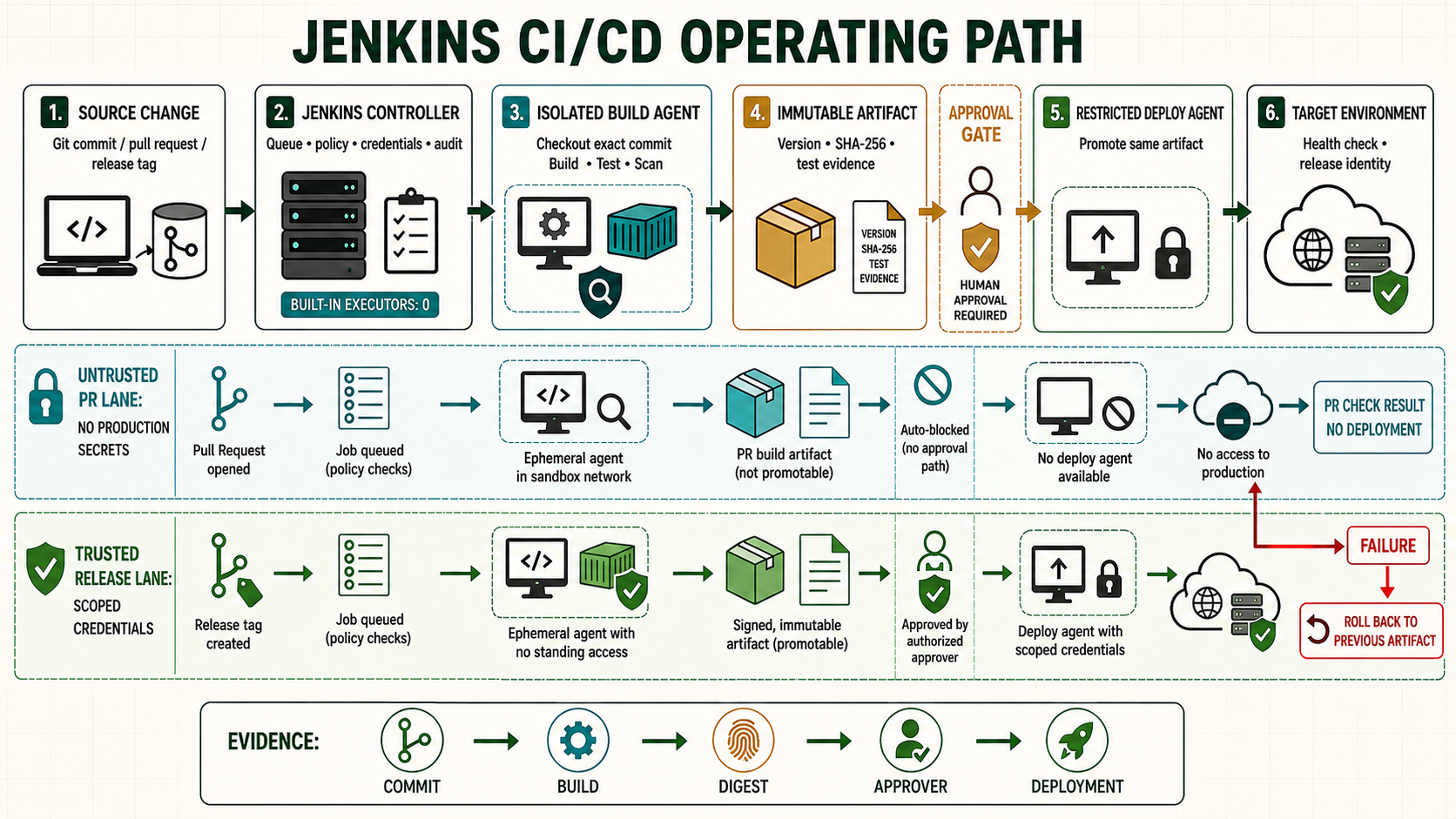
Every Jenkins plugin adds features, dependencies, upgrade constraints and security exposure to the controller. Treat the plugin set like an application dependency manifest: keep it small, record versions and owners, test changes, and retain a recovery path.
Start with a plugin policy
| Decision | Required evidence | Owner |
|---|---|---|
| Install | Use case, maintained release, compatible core, security status | Platform owner |
| Update | Release notes, dependency changes, test result, backup | Change owner |
| Remove | Dependency and configuration usage check | Job and platform owners |
Prefer Pipeline capabilities already supplied by the approved baseline. Do not install multiple overlapping plugins merely to experiment on the production controller.
Inventory installed plugins
Use Manage Jenkins > Plugins > Installed for the supported administrative view. An administrator can also list short names and versions in the Script Console:
Jenkins.instance.pluginManager.plugins
  .sort { it.shortName }
  .each { println("${it.shortName}: ${it.version}") }
Export the output into a controlled change record. Script Console access is equivalent to controller administration and must remain tightly restricted.
Evaluate before installation
- Check the plugin page for current Jenkins core requirement, release activity, adoption, dependencies and security warnings.
- Confirm the feature cannot be implemented safely with existing approved components.
- Test the plugin with a representative copy of jobs and Configuration as Code, if used.
- Plan the restart and rollback before changing the controller.
Back up and install
sudo systemctl stop jenkins
sudo rsync -aHAX --numeric-ids /var/lib/jenkins/ \
  /backup/jenkins-before-plugin-change/
sudo sha256sum /backup/jenkins-before-plugin-change/config.xml
sudo systemctl start jenkins
In Manage Jenkins > Plugins > Available plugins, choose the approved plugin from the configured Update Center. Install it, complete the controlled restart if required, then check controller startup and a representative Pipeline.
sudo systemctl status jenkins --no-pager
sudo journalctl -u jenkins -b --no-pager | tail -n 200
curl --fail --silent http://127.0.0.1:8080/login >/dev/null
Update in controlled batches
- Review Jenkins core and plugin compatibility. Upgrade the LTS core according to its upgrade guide before plugins that require it.
- Snapshot the inventory and take a tested backup.
- Update a small dependency-aware batch.
- Restart rather than leaving a long-running mixed plugin state.
- Test login, authorization, credentials, agents, webhooks and representative Pipelines.
- Observe logs and performance before the next batch.
Disable or uninstall carefully
The Installed view identifies plugins that can be removed. Search jobs and Configuration as Code for the plugin's steps or classes, disable it first, restart and test. Uninstall only when required dependents and configuration usage are understood. Removing a .jpi file without dependency analysis can prevent Jenkins from starting.
Recover from a failed plugin change
sudo systemctl stop jenkins
sudo cp -a /var/lib/jenkins/plugins /var/lib/jenkins/plugins.failed-change
sudo rsync -aHAX --delete /backup/jenkins-before-plugin-change/ \
  /var/lib/jenkins/
sudo chown -R jenkins:jenkins /var/lib/jenkins
sudo systemctl start jenkins
sudo journalctl -u jenkins -b -n 200 --no-pager
Unsafe: --delete removes destination files absent from the backup. It is necessary for an exact restore but unsafe without a validated source, stopped service and separate copy of the failed state. Test the command in recovery rehearsal.
Manual plugin commands
The Jenkins CLI can install a named Update Center plugin:
java -jar jenkins-cli.jar -s https://jenkins.example.com/ \
  -auth @/secure/jenkins-cli.auth install-plugin PLUGIN_SHORT_NAME -restart
Unsafe: manually copying an arbitrary .hpi or .jpi into JENKINS_HOME/plugins bypasses the normal selection workflow and may introduce an incompatible or tampered binary. If an approved offline install requires it, verify source and checksum, preserve ownership, record dependencies, restart and test.
Troubleshooting
| Symptom | Likely cause | Action |
|---|---|---|
| Available list empty | Update Center metadata, proxy or TLS failure | Use Check now and inspect controller networking/logs. |
| Jenkins will not start | Core requirement or dependency mismatch | Read the first plugin load error and restore the tested set. |
| Pipeline step missing | Plugin disabled, failed or incompatible | Check Installed state and boot log before reinstalling. |
| Configuration cannot load | Referenced plugin absent | Restore the compatible plugin; do not overwrite affected configuration. |
Rehearse core and plugin upgrades on a copied controller
Core, Java and plugin versions form one compatibility set. Before changing it, export installed short names and versions, read the Jenkins upgrade guide across every skipped baseline, review security advisories and take a consistent backup. Restore that backup into an isolated rehearsal controller, prevent schedules and webhooks from reaching production, then update the proposed plugin set. Test login, authorization, agents, credentials, representative Pipelines and JCasC before scheduling the real restart. A plugin downgrade is not automatically safe because persisted configuration may have been migrated by the newer version.
# Record RPM/core and Java baseline
rpm -q jenkins || dpkg-query -W jenkins
java -version
# Record plugins through an approved administrative export
# shortName:version -> plugins-before.txt
sha256sum plugins-before.txt
sudo systemctl stop jenkins
sudo rsync -aHAX --numeric-ids /var/lib/jenkins/ /backup/jenkins-pre-upgrade/
sudo systemctl start jenkins
Evidence and failure exercise
| Layer | Evidence | Failure response |
|---|---|---|
| Compatibility | Core, Java and plugin requirements | Change proposal resolves every minimum version |
| Rehearsal | Copied controller and representative jobs | No production webhook or credential side effect |
| Restart | Journal, login and initialization milestones | Rollback if startup or security acceptance fails |
| Post-change | Plugin inventory and job canaries | No disabled dependency or configuration loss |
In the isolated lab, remove a nonessential plugin that another plugin depends on. Observe the dependency warning or disabled behavior, restore the accepted plugin set and document which configuration objects required it. This teaches dependency recovery without experimenting on production.
Independent operating checks
- Compare plugin inventory before and after with an explained change list.
- Test one Pipeline step owned by every changed plugin.
- Confirm backup restore, not a guessed JPI copy, is the rollback boundary.
- Check update-center and security-warning reachability through the configured proxy.