
Create Tested and Versioned Jenkins Shared Libraries
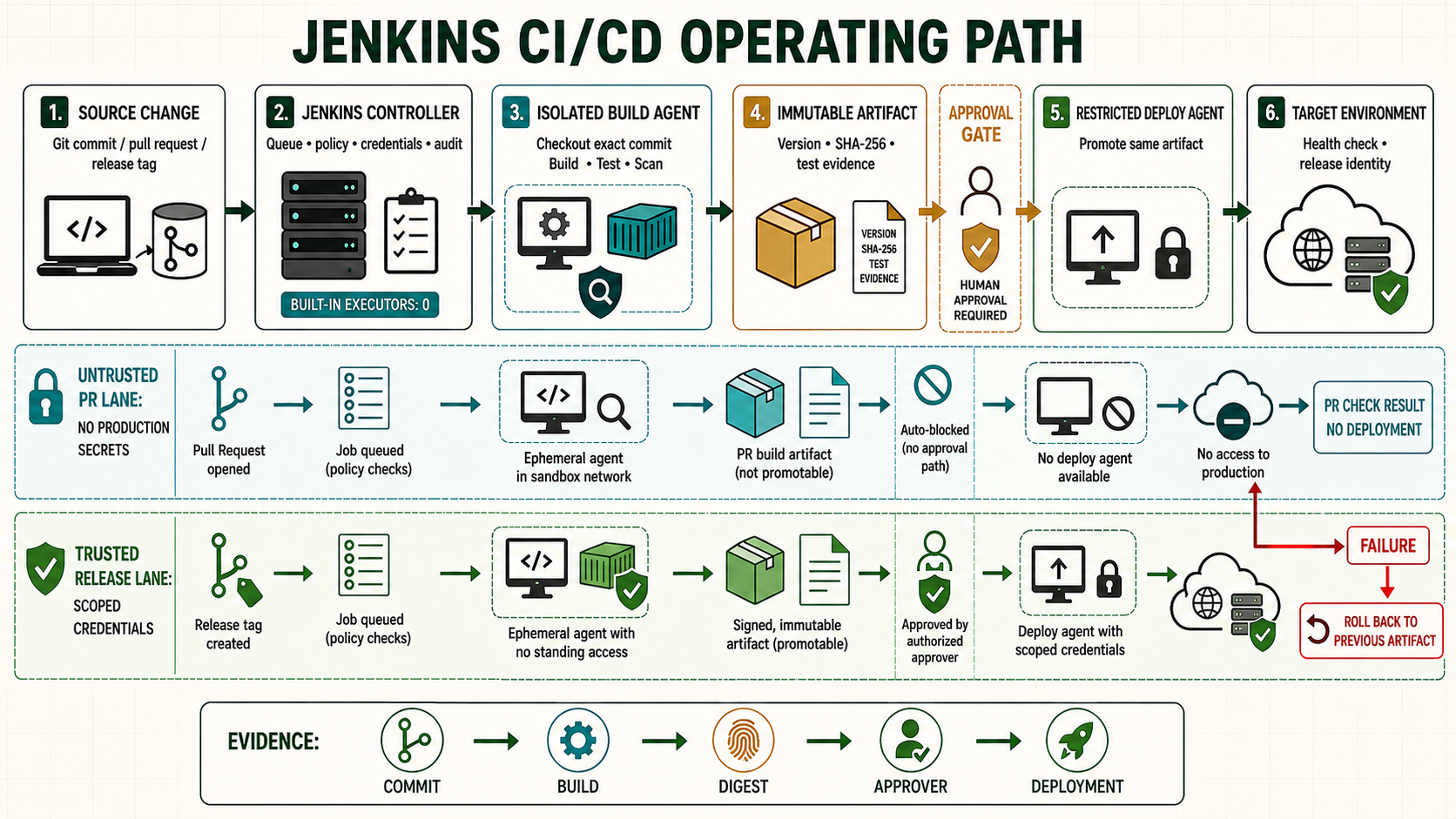
A Shared Library can remove duplicated Pipeline code, but a globally trusted library also concentrates execution authority. Good libraries expose small stable delivery functions, keep application decisions visible, pin release versions and test behavior before hundreds of repositories consume a change.
Start from a known controller checkpoint
Use the accepted controller and agent checkpoint from the prior lesson. Record the Jenkins version, Java runtime, active configuration, plugin inventory and current Git revision before changing this boundary.
java -version
sudo systemctl is-active jenkins
sudo journalctl -u jenkins -n 50 --no-pager
curl -fsS http://127.0.0.1:8080/login >/dev/null
Understand the operating boundary
| Decision | Implementation | Evidence |
|---|---|---|
| Scope | Name the controller, folder, job, node and environment | The selected boundary is visible |
| Input | Use reviewed source and scoped credentials | Revision and credential ID are attributable |
| Execution | Set label, timeout and concurrency policy | Queue and node evidence match intent |
| Recovery | Preserve the last known working state | Rollback is rehearsed before promotion |
Prepare the lab
Create a separate Git repository with CODEOWNERS for the platform team. Decide whether it must be trusted; prefer untrusted or folder-scoped libraries when their features are sufficient. Define a semantic release and compatibility policy before consumers depend on it.
mkdir -p jenkins-library/{vars,src/org/nitwings/pipeline,resources,test}
cd jenkins-library
git init
printf 'Library behavior and compatibility contract\n' > README.md
printf '/vars/ @platform-team\n/src/ @platform-team\n' > CODEOWNERS
git add . && git commit -m 'Create Shared Library skeleton'
Implement it step by step
- Place global steps in
vars/name.groovyand their help in matchingvars/name.txt. - Place namespaced Groovy classes under
src/; keep serializable Pipeline state in mind. - Put non-Groovy templates under
resources/and load them throughlibraryResource. - Pass the Pipeline script or steps deliberately to helper classes rather than hiding global state.
- Test functions with mocked Pipeline steps, then run integration Pipelines on a disposable controller.
- Release an immutable tag and update consumers in a controlled cohort.
Keep stage structure and application-specific decisions in the Jenkinsfile when they help reviewers understand delivery. A library is valuable for governed mechanics such as standardized checkout, evidence publication and deployment wrappers. It becomes harmful when one opaque call hides every gate, credential and environment decision.
// vars/standardMavenBuild.groovy
def call(Map cfg = [:]) {
  def label = cfg.get('label', 'linux && java21')
  node(label) {
    deleteDir()
    checkout scm
    timeout(time: 30, unit: 'MINUTES') {
      sh './mvnw -B -ntp clean verify'
    }
    junit testResults: 'target/*-reports/*.xml', allowEmptyResults: false
    archiveArtifacts artifacts: 'target/*.jar', fingerprint: true
  }
}

// consumer Jenkinsfile
@Library('[email protected]') _
standardMavenBuild(label: 'linux && java21')
Library source under src and vars is CPS-transformed like Pipeline code. Objects retained across a Pipeline suspension must be serializable; methods annotated @NonCPS cannot call Pipeline steps. Diagnose serialization errors by reducing retained object state rather than wrapping arbitrary behavior in @NonCPS.
A global trusted library can call powerful Jenkins and Java APIs outside the Groovy sandbox. Anyone who can change its trusted revision effectively gains controller authority. Protect the repository, pin the configured default, restrict override behavior where necessary and keep review independent. Dynamic loading from the same untrusted branch is convenient but inappropriate for protected deployment logic.
Verify the positive path
Run unit tests for argument validation and called steps, then integration jobs for success, test failure, timeout, agent loss and missing report. Inspect which exact library revision Jenkins loaded and ensure documentation is generated after a successful run.
git tag -s v1.3.0 -m 'Shared Library v1.3.0'
git show --verify-signatures v1.3.0
git rev-parse v1.3.0^{commit}
# In consumer console, retain the resolved library revision
# Test current and candidate versions in separate jobs before promotion| Check | Expected evidence | Reject when |
|---|---|---|
| Configuration | Matches reviewed source | UI drift or unresolved placeholder remains |
| Execution | Runs on the intended isolated node | Controller or wrong trust zone executes code |
| Evidence | Revision, result and outputs are retained | Green status has no attributable output |
| Recovery | Known state can be restored and verified | Recovery depends on an improvised manual edit |
Roll back an incompatible library change
Release a lab version that renames a required argument. One canary consumer should fail before fleet rollout. Pin that consumer back to the last accepted tag, restore service, add a compatibility test and issue a corrected forward release. Never move the failed tag to new code.
git switch -c lab-breaking-change
# rename the public argument and run library tests
git diff --check
git tag -a v2.0.0-rc.1 -m 'Breaking lab candidate'
# consumer loads only the release candidate in a disposable folder
Troubleshoot by failed layer
| Symptom | Inspect | Correction |
|---|---|---|
| Queued or unavailable | Label, executor, node and network | Repair the failed scheduling or transport layer |
| Configuration rejected | Controller log, syntax and plugin ownership | Correct source; do not bypass validation |
| Job fails unexpectedly | First causal console error and agent logs | Fix one layer and rerun the smallest scope |
| Second run differs | Mutable dependency, workspace or UI drift | Pin inputs and remove hidden retained state |
Unsafe shortcuts
- Unsafe: granting administrator access to avoid designing a narrow permission removes accountability.
- Unsafe: binding protected secrets around untrusted repository code permits exfiltration despite masking.
- Unsafe: changing controller state without a verified backup and rollback turns a small error into an outage.
Operate, recover and retain evidence
Own the configuration, plugin and credential dependencies explicitly. Record the controller version, Git revision, immutable tool or artifact identity, initiator, approver and acceptance result. Rehearse the failure path on a disposable controller before adopting it as production procedure.
sudo systemctl stop jenkins
sudo rsync -aHAX --numeric-ids /backup/jenkins-known-good/ /var/lib/jenkins/
sudo restorecon -RF /var/lib/jenkins 2>/dev/null || true
sudo systemctl start jenkins
sudo journalctl -u jenkins -n 150 --no-pager
Worked use cases
| Situation | Design choice | Acceptance |
|---|---|---|
| Lab rollout | Apply to one disposable controller or folder | Positive, negative and recovery results are retained |
| Team rollout | Promote the same reviewed revision | Permissions and behavior remain consistent |
| Production change | Use backup, change window and acceptance | Failure stays bounded and rollback is tested |
Knowledge checks
Independent lab
- Capture the starting version, configuration and plugin evidence.
- Implement the change on a disposable controller or folder.
- Run one successful case and one controlled failure.
- Restore the accepted state and prove service behavior, not only process state.
- Repeat from a clean source checkout without relying on remembered UI actions.