
Run Kubernetes Agents and Safe Terraform Pipelines
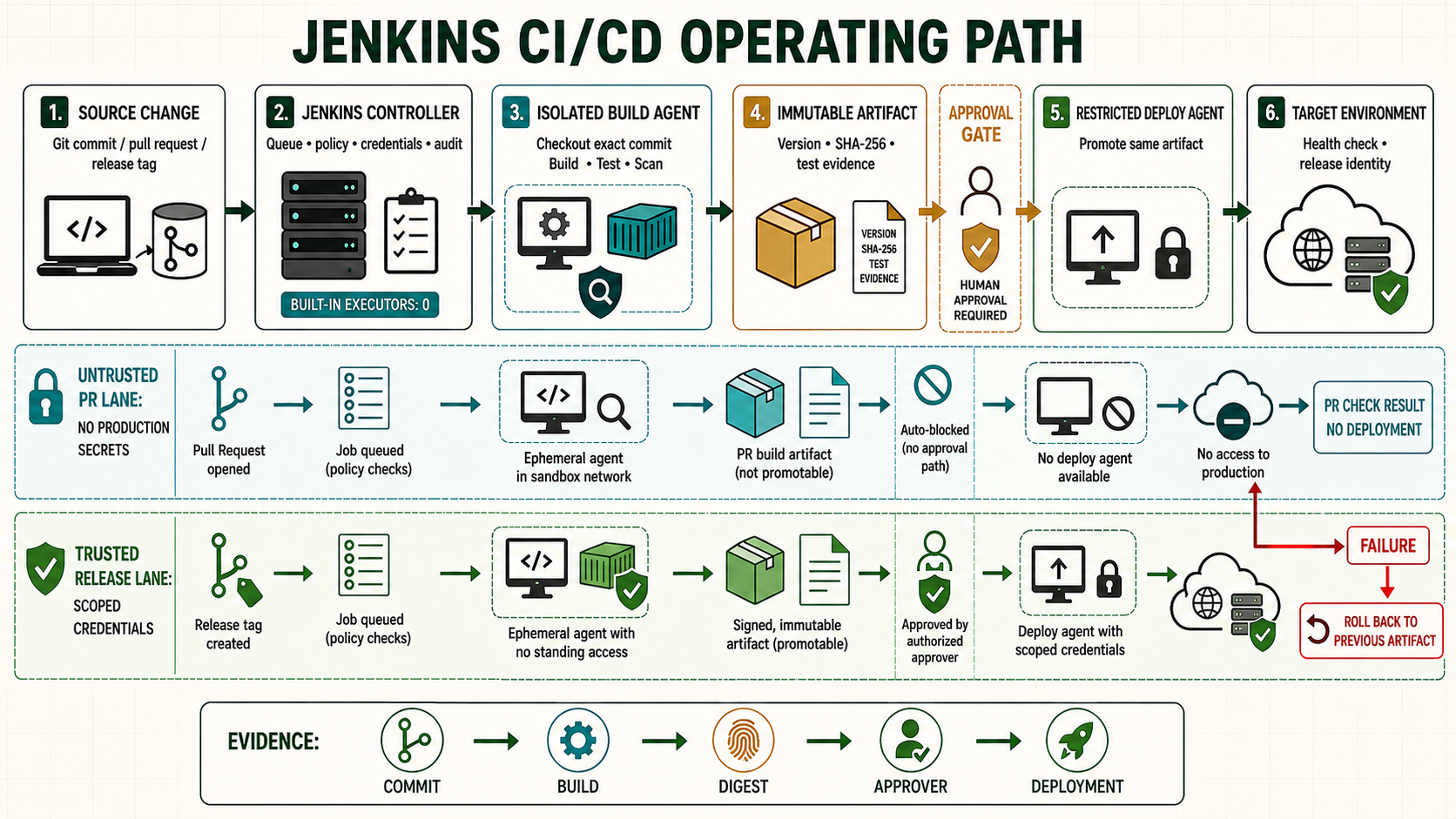
Ephemeral Kubernetes agents give each build a disposable pod with known tools and resource limits. Terraform adds state, plan and approval concerns: the applied plan must be the reviewed plan, state access must be serialized, and production identity must not be available to pull-request code.
Architecture and trust boundaries
| Component | Responsibility | Boundary |
|---|---|---|
| Jenkins controller | Schedules pod and stores Pipeline state | Does not run Terraform |
| Kubernetes cloud | Creates one agent pod per run | Namespace, network policy and service account limit reach |
| Tool container | Terraform, lint and policy tools | Image pinned and scanned; non-root where possible |
| Remote state backend | State, locking and recovery | Separate access by environment |
| Artifact store | Plan, JSON, checksum and reports | Only trusted plan is promoted |
Define a restricted Kubernetes agent
pipeline {
  agent {
    kubernetes {
      defaultContainer 'terraform'
      yaml '''
apiVersion: v1
kind: Pod
spec:
  serviceAccountName: jenkins-terraform-plan
  securityContext:
    runAsNonRoot: true
    seccompProfile:
      type: RuntimeDefault
  containers:
  - name: terraform
    image: registry.example.com/ci/terraform@sha256:VERIFIED_DIGEST
    command: ["sleep"]
    args: ["99d"]
    resources:
      requests: {cpu: "500m", memory: "1Gi"}
      limits: {cpu: "2", memory: "3Gi"}
    securityContext:
      allowPrivilegeEscalation: false
      readOnlyRootFilesystem: true
      capabilities: {drop: ["ALL"]}
    volumeMounts:
    - {name: tmp, mountPath: /tmp}
  volumes:
  - name: tmp
    emptyDir: {}
'''
    }
  }
  stages { /* stages follow */ }
}
The local files often run the pod as UID 0 with privileged: true. Unsafe: a privileged build container can reach host-level capabilities and magnifies malicious repository code. Use it only when a documented workload truly requires it; prefer a purpose-built unprivileged tool image.
Validate and create one saved plan
stage('Checkout') {
  steps { deleteDir(); checkout scm }
}
stage('Format and validate') {
  steps {
    dir('environments/staging/network') {
      sh '''set -euo pipefail
        terraform fmt -check -recursive
        terraform init -input=false -no-color
        terraform validate -no-color
      '''
    }
  }
}
stage('Plan') {
  steps {
    dir('environments/staging/network') {
      sh '''set -euo pipefail
        terraform plan -input=false -no-color -out=tfplan
        terraform show -json tfplan > tfplan.json
        sha256sum tfplan tfplan.json > tfplan.sha256
      '''
      stash name: 'approved-plan', includes: 'environments/staging/network/tfplan*'
      archiveArtifacts artifacts: 'environments/staging/network/tfplan.json,environments/staging/network/tfplan.sha256', fingerprint: true
    }
  }
}
A plan file can contain sensitive values. Restrict artifact access and retention. Do not publish plan JSON to an open report server.
Run security and policy checks against the plan
stage('Policy') {
  steps {
    dir('environments/staging/network') {
      sh '''set -euo pipefail
        tfsec . --no-colour
        checkov -f tfplan.json --output cli --output junitxml \
          --output-file-path console,reports
      '''
    }
  }
  post {
    always { junit testResults: 'environments/staging/network/reports/*.xml', allowEmptyResults: true }
  }
}
A skipped check must include owner, risk reason, compensating control and expiry. A permanent anonymous --skip-check turns a policy gate into decoration.
Approve and apply the exact plan
stage('Approval') {
  options { timeout(time: 30, unit: 'MINUTES') }
  input { message 'Apply the saved and scanned Terraform plan?' }
  steps { echo "Approved build ${BUILD_NUMBER}, commit ${GIT_COMMIT}" }
}
stage('Apply') {
  options { lock(resource: 'terraform-staging-network') }
  steps {
    deleteDir(); checkout scm; unstash 'approved-plan'
    dir('environments/staging/network') {
      sh '''set -euo pipefail
        sha256sum -c tfplan.sha256
        terraform init -input=false -no-color
        terraform apply -input=false -no-color tfplan
      '''
    }
  }
}
Applying terraform apply -auto-approve without the saved plan recalculates changes after approval. Unsafe: the approver may see one plan while Jenkins applies another. Apply the exact plan produced from the same revision and configuration.
Use separate plan and apply identities
- Pull requests receive read-only state/plan permissions and no apply identity.
- The protected main branch produces the signed or checksummed plan.
- Apply runs on a trusted agent/service account after approval.
- Production has its own backend, lock, Jenkins folder and service account.
- Cloud audit logs connect the apply identity to Jenkins build and commit.
Route a monorepo without losing child status
stage('Changed components') {
  parallel {
    stage('Network') {
      when { changeset 'environments/staging/network/**' }
      steps {
        build job: 'terraform/staging/network', wait: true, propagate: true,
          parameters: [string(name: 'SOURCE_COMMIT', value: env.GIT_COMMIT)]
      }
    }
    stage('Database') {
      when { changeset 'environments/staging/database/**' }
      steps {
        build job: 'terraform/staging/database', wait: true, propagate: true,
          parameters: [string(name: 'SOURCE_COMMIT', value: env.GIT_COMMIT)]
      }
    }
  }
}
The reviewed root Pipelines use wait: false. That is valid for asynchronous fan-out, but the parent result cannot prove its downstream deployments succeeded. Choose deliberately: wait and propagate for a delivery gate; asynchronous dispatch for a notification-style orchestrator with separate status aggregation.
Workspace and state rules
dir()changes the working directory inside the agent workspace; it does not isolate permissions or concurrency.- Never store Terraform state in a Jenkins workspace. Use a remote backend with locking, encryption and recovery.
- Do not share
.terraformdirectories between concurrent environments. - Clean ephemeral workspaces and ensure provider caches cannot alter correctness.
- Record Terraform and provider lockfile versions in source control.
Failure and recovery scenarios
| Failure | Response | Evidence |
|---|---|---|
| Pod disappears before plan | Rerun from clean checkout | No state mutation |
| Pod disappears during apply | Inspect remote state and cloud API before retry | Lock and audit logs |
| State lock remains | Prove no apply is running; use backend-specific unlock procedure | Owner and lock identifier |
| Policy scan fails | Fix configuration or approve a time-bounded exception | Report and exception record |
| Plan expires | Create, scan and approve a new plan | New checksum and approval |