
Install Jenkins LTS on RHEL or Ubuntu and Complete First-Start Setup
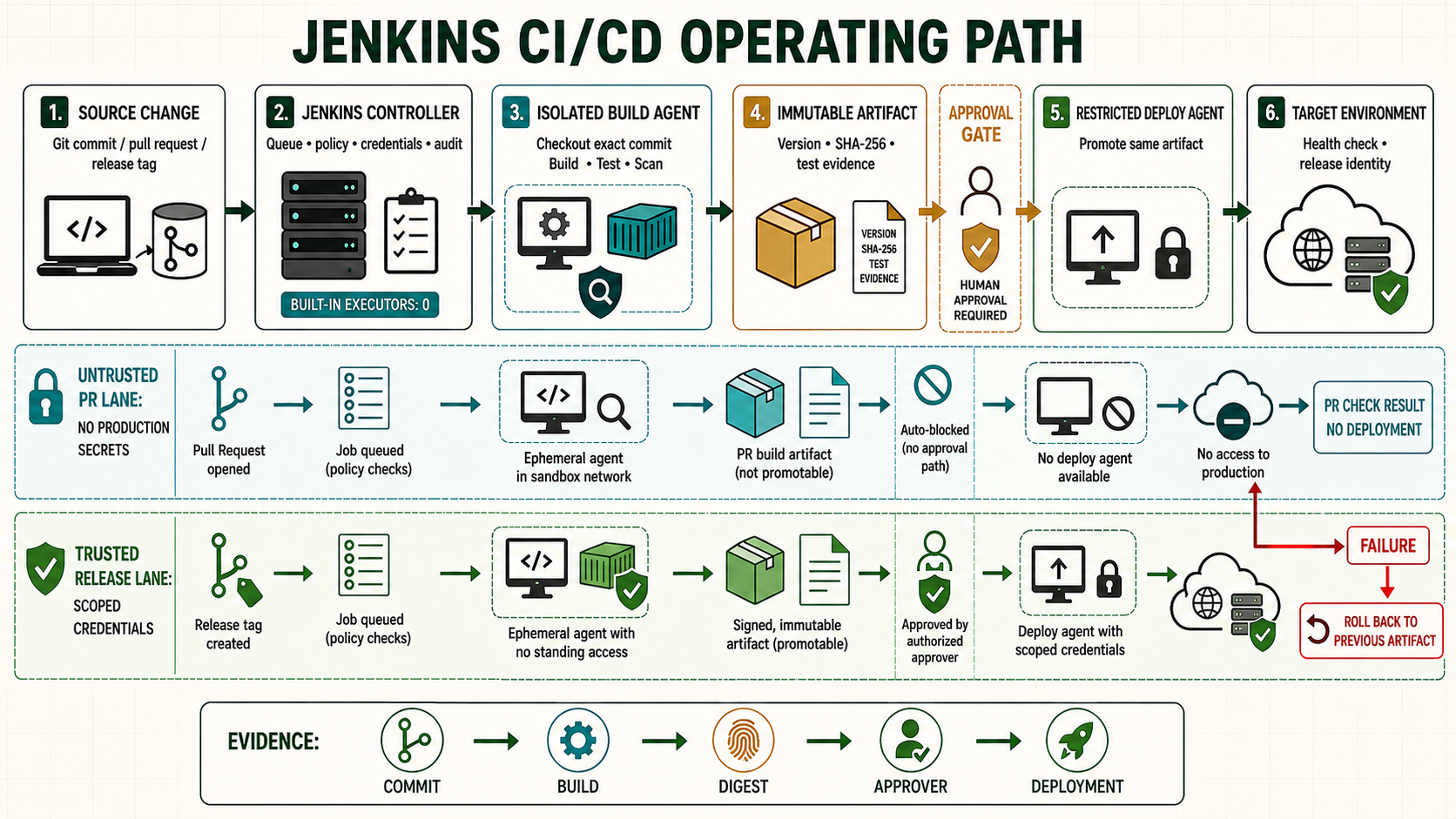
Jenkins is a Java-based automation server for continuous integration and delivery. It can receive a source change, schedule work on an isolated agent, build and test the exact revision, publish an immutable artifact, require approval, deploy that artifact, and record the outcome. This guide builds that path from a new Linux controller through a practical Pipeline, security controls, agents, backup, upgrades, and troubleshooting.
Understand the Jenkins delivery model
The controller stores configuration, schedules work, provides the user interface and API, and coordinates agents. Agents provide executors that run build steps. Source control, build tools, test frameworks, code-quality systems, artifact repositories, deployment targets, and monitoring systems integrate around that control plane.
| Component | Responsibility | Boundary |
|---|---|---|
| Controller | Jobs, Pipeline state, queue, credentials, plugins, authorization, scheduling | Do not run ordinary builds on it after agents are available. |
| Agent | Workspace, tools, builds, tests, packaging and approved deployment steps | Assume repository code can be hostile; isolate agents by trust and workload. |
| Source repository | Application code, tests, build files and reviewed Jenkinsfile | A webhook is a trigger, not authorization to deploy untrusted changes. |
| Artifact repository | Versioned packages, images, checksums, provenance and retention | Promote one immutable artifact instead of rebuilding per environment. |
| Deployment target | Development, test, staging and production runtime | Use separate credentials, approvals, policy and rollback. |
Continuous integration builds and tests changes frequently. Continuous delivery keeps a validated release deployable through controlled promotion. Continuous deployment automatically releases every qualifying change. Jenkins can support each model, but installing it does not create a safe delivery process by itself.
Plan the controller before installation
- Choose the Jenkins LTS stream and a Java version supported by that exact release. Current installation guidance requires Java 21 or later.
- Allocate persistent storage for
JENKINS_HOME, logs, plugin downloads, build records and temporary growth. Keep agent workspaces and large artifacts elsewhere. - Place the controller on an administered network behind HTTPS and an identity-aware access boundary. Do not expose port 8080 directly to the internet.
- Define controller, agent and deployment trust zones; inbound webhook controls; outbound repository and update-center access; DNS, NTP, proxy and certificate requirements.
- Record backup, restore, upgrade, rollback, plugin approval, administrator recovery and incident procedures before production jobs depend on the service.
Step 1: inspect and back up the host
cat /etc/os-release
uname -m
free -h
df -hT
timedatectl status
ss -lntp

sudo install -d -m 0700 /root/jenkins-change-backup
if sudo test -d /etc/yum.repos.d; then
  sudo cp -a /etc/yum.repos.d /root/jenkins-change-backup/
fi
sudo systemctl list-unit-files 'jenkins*'
java -version 2>&1 || true
The conditional commands are discovery on a new host: absence is expected. If Jenkins already exists, stop and capture JENKINS_HOME, package and plugin versions, service overrides, proxy configuration, credentials recovery material and a tested backup before changing Java or packages.
Step 2: install Jenkins LTS on RHEL-compatible Linux
Install Java and font support first, verify the selected runtime, add the Jenkins LTS repository, inspect package trust, install Jenkins, then enable and start the service.
sudo dnf install -y wget fontconfig java-21-openjdk
java -version
sudo alternatives --config java
readlink -f "$(command -v java)"

sudo wget -O /etc/yum.repos.d/jenkins.repo \
  https://pkg.jenkins.io/rpm-stable/jenkins.repo

sudo dnf clean expire-cache
sudo dnf makecache
dnf repolist --enabled | grep -i jenkins
dnf info jenkins
sudo dnf install -y jenkins
rpm -qi jenkins
rpm -q --qf '%{NAME} %{VERSION}-%{RELEASE} %{SIGPGP:pgpsig}\n' jenkins

sudo systemctl daemon-reload
sudo systemctl enable --now jenkins
sudo systemctl status jenkins --no-pager
sudo journalctl -u jenkins -n 100 --no-pager
Do not append guessed JAVA_HOME or JRE_HOME values to /etc/profile. The packaged service discovers a supported Java runtime. If an environment requires an explicit path, use systemctl edit jenkins, set a verified service-specific value, run systemctl daemon-reload, and restart during a controlled change.
Ubuntu and Debian installation path
sudo apt update
sudo apt install -y wget fontconfig openjdk-21-jre
java -version

sudo install -d -m 0755 /etc/apt/keyrings
sudo wget -O /etc/apt/keyrings/jenkins-keyring.asc \
  https://pkg.jenkins.io/debian-stable/jenkins.io-2026.key
echo "deb [signed-by=/etc/apt/keyrings/jenkins-keyring.asc] https://pkg.jenkins.io/debian-stable binary/" \
  | sudo tee /etc/apt/sources.list.d/jenkins.list >/dev/null
sudo apt update
apt-cache policy jenkins
sudo apt install -y jenkins
sudo systemctl enable --now jenkins
sudo systemctl status jenkins --no-pager
Step 3: expose Jenkins through a controlled HTTPS path
Prefer a reverse proxy or load balancer that terminates a valid certificate, preserves the original host and scheme, enforces the intended source or identity policy, and forwards only to the controller. Configure the Jenkins URL to the external HTTPS address. Keep the backend listener private.
ss -lntp | grep ':8080'
curl -sSIL http://127.0.0.1:8080/login
sudo systemctl cat jenkins
sudo systemctl edit jenkins
A systemd override can change a conflicting port without editing the vendor unit:
[Service]
Environment="JENKINS_PORT=8081"
sudo systemctl daemon-reload
sudo systemctl restart jenkins
sudo systemctl status jenkins --no-pager
sudo journalctl -u jenkins -n 100 --no-pagerStep 4: complete the setup wizard safely
sudo test -r /var/lib/jenkins/secrets/initialAdminPassword
sudo cat /var/lib/jenkins/secrets/initialAdminPassword
Read the one-time password only from an authorized administrative session, use it over the protected URL, install the minimum approved plugin set, and create a named administrator. Remove screenshots, terminals and ticket text containing the secret. Disable anonymous permissions, disable public signup unless explicitly required, and test a nonadministrator role before onboarding users.
Step 5: secure identities, permissions and credentials
| Control | Implementation | Verification |
|---|---|---|
| Authentication | Enterprise identity provider or controlled local accounts with recovery | Test login, logout, disabled user and emergency administrator. |
| Authorization | Least privilege by team, folder and job | Test read, build, configure, credential and administrator boundaries. |
| Credentials | Folder-scoped credential IDs; separate SCM, artifact and environment secrets | Confirm jobs outside the folder cannot select them. |
| Administration | Very small named group; audited Script Console and plugin rights | Treat unexpected Overall/Administer access as compromise. |
| Plugins | Minimum approved inventory with compatibility and security review | Record core dependency, owner, use, version and rollback. |
Never hard-code passwords, tokens or private keys in a Jenkinsfile, repository, job parameter, shell trace or artifact. Secret masking reduces accidental display but does not make an untrusted Pipeline safe: code running with a credential can transmit it. Do not grant production credentials to pull-request jobs from untrusted contributors.
Step 6: create isolated agents and labels
Set the built-in node executor count to zero after at least one agent is working. Use separate ephemeral or well-controlled agents for Linux, Windows, container builds, code signing, untrusted changes and production deployment. Labels describe capabilities such as linux, windows, docker or high-memory; they are scheduling selectors, not security boundaries.
# Run on an approved Linux agent host.
sudo useradd --create-home --shell /bin/bash jenkins-agent
sudo install -d -o jenkins-agent -g jenkins-agent -m 0700 \
  /home/jenkins-agent/.ssh /srv/jenkins-agent
java -version
git --version
df -h /srv/jenkins-agent
Use a dedicated SSH key or an inbound WebSocket agent according to the network model. Pin host identity, scope credentials, deny access to controller storage, and do not give the agent user unrestricted sudo or a shared container socket without accepting root-equivalent risk.
Step 7: create a first Pipeline as code
pipeline {
  agent { label 'linux' }

  options {
    timestamps()
    timeout(time: 30, unit: 'MINUTES')
    disableConcurrentBuilds()
    buildDiscarder(logRotator(numToKeepStr: '30'))
  }

  stages {
    stage('Checkout') {
      steps { checkout scm }
    }
    stage('Build and unit test') {
      steps { sh './mvnw --batch-mode clean verify' }
      post { always { junit testResults: '**/target/surefire-reports/*.xml', allowEmptyResults: false } }
    }
    stage('Package') {
      steps {
        sh 'sha256sum target/*.jar > target/SHA256SUMS'
        archiveArtifacts artifacts: 'target/*.jar,target/SHA256SUMS', fingerprint: true
      }
    }
  }

  post {
    success { echo 'Validated artifact is ready for controlled promotion.' }
    failure { echo 'Inspect the failed stage and evidence before retrying.' }
    always { deleteDir() }
  }
}
Commit the Jenkinsfile beside the application. Protect its review path because changing it changes code execution. Use the Maven Wrapper or a managed tool version, pin dependencies where the ecosystem permits, preserve test evidence, and publish an immutable artifact with a checksum and source revision.
Add credentials without exposing them
stage('Publish artifact') {
  steps {
    withCredentials([usernamePassword(
      credentialsId: 'artifact-repository-writer',
      usernameVariable: 'REPO_USER',
      passwordVariable: 'REPO_PASSWORD'
    )]) {
      sh '''
        set +x
        curl --fail-with-body --user "$REPO_USER:$REPO_PASSWORD" \
          --upload-file target/app.jar \
          https://artifacts.example.invalid/releases/app.jar
      '''
    }
  }
}
Replace the documentation domain with an authorized repository. Folder-scope the credential, restrict overwrite, rotate it, and ensure command arguments and process listings do not expose secrets. Prefer short-lived workload identity where supported.
Add parallel tests, conditions and approval
stage('Verification') {
  parallel {
    stage('Unit') { steps { sh './mvnw --batch-mode test' } }
    stage('Security') { steps { sh './ci/security-scan.sh' } }
    stage('Browser') { steps { sh './ci/selenium-test.sh' } }
  }
}

stage('Production approval') {
  when { branch 'main' }
  options { timeout(time: 20, unit: 'MINUTES') }
  input { message 'Promote the tested artifact to production?' }
  steps { sh './ci/promote.sh --artifact "$BUILD_TAG"' }
}
The approval should identify the artifact, evidence, environment, change owner and rollback. Jenkins UI approval is not a substitute for separation of duties when the same person can edit the Pipeline, approve it and change deployment credentials.
Triggers, parameters and scheduled work
Prefer authenticated repository webhooks for ordinary changes and multibranch Pipelines for branch and pull-request discovery. Validate webhook secrets and repository identity. Use polling only when webhooks are unavailable. Use Jenkins scheduling for Jenkins-owned automation, not as an unquestioned replacement for every operating-system or platform scheduler.
Artifacts, deployment and rollback
- Build once from an identified commit on an approved agent.
- Run unit, integration, security and functional tests appropriate to risk.
- Publish the artifact, checksum, dependency/provenance evidence and test reports.
- Promote the same digest through test, staging and production.
- Run health checks and observe service and business signals.
- Roll back to a known artifact or execute the approved forward-fix when acceptance fails.
Do not deploy from a mutable workspace. Do not rebuild after approval. A rollback should be tested, permissioned, observable and compatible with database or state changes.
Plugins, upgrades and change control
Inventory plugins and remove unused ones after dependency review. Read the Jenkins LTS upgrade guide and plugin security advisories. Back up before changing core, Java or plugins. Upgrade in a representative test instance, validate authentication, agents, Pipelines, credentials, webhooks, artifact publication, deployment and restore, then apply the controlled production change.
java -version
rpm -q jenkins 2>/dev/null || dpkg-query -W jenkins
sudo systemctl status jenkins --no-pager
sudo journalctl -u jenkins --since '-30 minutes' --no-pager
sudo systemctl cat jenkins
Do not downgrade the package blindly after Jenkins or plugins have migrated data. Use the documented rollback compatibility for the versions involved or restore the tested pre-change state.
Back up and prove restore
JENKINS_HOME contains jobs, configuration, build records, plugins and encrypted credentials. The encryption material under its secrets area is highly sensitive and necessary to recover protected values. Store application data and secret recovery material according to Jenkins guidance and organizational policy, with separate access controls so one ordinary backup reader cannot obtain both.
sudo systemctl stop jenkins
sudo rsync -aHAX --numeric-ids /var/lib/jenkins/ /backup/jenkins-home/
sudo sha256sum /backup/jenkins-home/config.xml
sudo systemctl start jenkins
sudo systemctl status jenkins --no-pagerMonitoring and operating signals
| Signal | Why it matters | Response |
|---|---|---|
| Queue age and length | Agent capacity, label or connectivity failure | Inspect why items are waiting before adding executors. |
| Controller CPU, heap, disk and pauses | Availability and Pipeline state risk | Correlate workload, plugins, logs and storage latency. |
| Agent offline and executor use | Build capacity and trust-zone availability | Check transport, Java, time, workspace and image health. |
| Failure and duration by stage | Regression, dependency or environment drift | Compare the exact revision, artifact and agent. |
| Credential and admin changes | Privilege and supply-chain risk | Review actor, ticket, scope and affected builds. |
| Backup and restore test age | Recoverability cannot be inferred from file creation | Run isolated restores on a defined schedule. |
Troubleshooting workflow
| Symptom | Evidence | Likely boundary |
|---|---|---|
| Service will not start | systemctl status, journal, Java version, port and disk | Unsupported Java, bad override, occupied port, permissions or full storage |
| Job remains queued | Queue reason, label expression, agent state and executors | No matching online capacity or restricted node usage |
| Checkout fails | Repository URL, host key, credential scope, DNS/TLS | SCM identity, network or expired credential |
| Works manually, fails in Jenkins | Agent user, environment, workspace, tool and filesystem permissions | Interactive-shell assumptions or unpinned dependency |
| Webhook does not trigger | Delivery record, response code, secret, repository and branch discovery | Proxy, authentication, endpoint or multibranch indexing |
| Agent disconnects | Controller and agent logs, Java, time, network and resource pressure | Transport interruption, incompatible runtime or exhausted host |
sudo systemctl status jenkins --no-pager
sudo journalctl -u jenkins -n 200 --no-pager
java -version
df -hT /var/lib/jenkins
df -ih /var/lib/jenkins
ss -lntp | grep -E ':8080|:8081'
curl -sSIL http://127.0.0.1:8080/login
Production acceptance checklist
- Supported Jenkins LTS and Java versions are recorded and update ownership is assigned.
- The controller is behind approved HTTPS and network/identity controls; the backend port is private.
- Anonymous access, signup, administrator, folder, job and credential permissions have been tested.
- Built-in executors are zero and isolated agents exist for each workload and trust class.
- Jenkinsfiles are reviewed as executable code; untrusted changes cannot obtain protected credentials.
- Build, test, scan, artifact, approval, deployment, monitoring and rollback evidence is linked to one revision and digest.
- Plugins are minimized, owned, monitored and tested with core upgrades.
- Queue, controller, agent, Pipeline, security and backup signals have actionable alerts.
- An isolated restore and representative Pipeline have passed from the current backup procedure.
How to use this Jenkins Academy path
This lesson installs and operates the controller. Continue through the curriculum in order for Pipeline syntax, agents, source integration, credentials, workspaces, plugins, application builds, lifecycle scripts, Kubernetes and Terraform, deployment, tag releases, rollback and the capstone Pipeline.