
Create the First Jenkins Job and Read Build Evidence
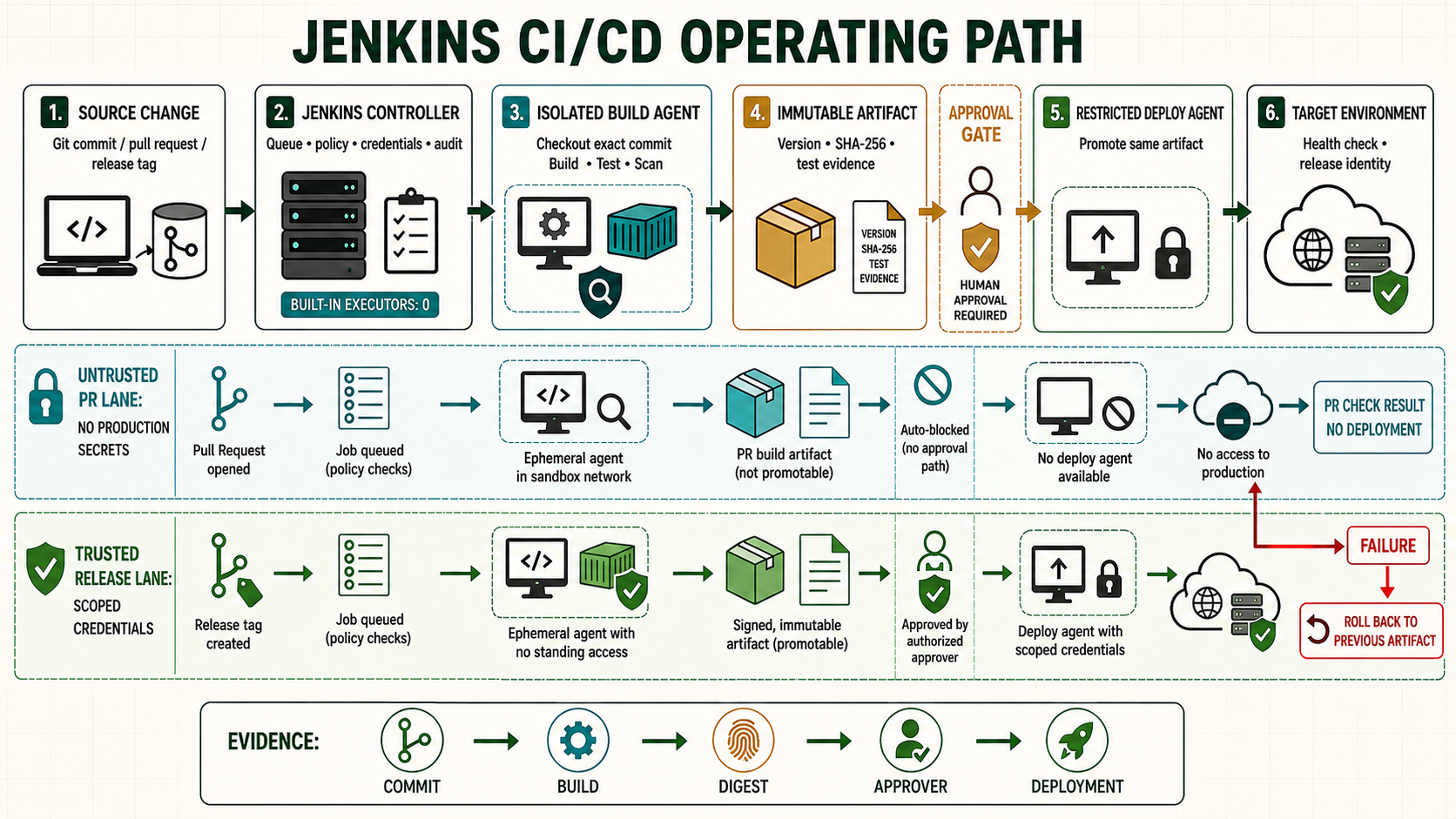
The first job should teach the complete Jenkins execution loop: queue, executor, workspace, exit status, console log, artifact, test result and retention. A green ball alone does not prove that the intended revision was tested.
Start from a known controller checkpoint
Use the disposable controller from the installation lesson. Confirm the Jenkins service, controller URL, administrator access and at least one isolated build agent. Take a configuration backup before changing controller-wide state.
java -version
sudo systemctl is-active jenkins
sudo systemctl --no-pager --full status jenkins
curl -fsS http://127.0.0.1:8080/login >/dev/null
Understand the operating boundary
| Decision | Implementation | Evidence |
|---|---|---|
| Source revision | Use a local training repository first | Console records the exact commit SHA |
| Execution | Run on a labelled agent, not the controller | Node name, executor and workspace are visible |
| Result | Use process exit code plus published evidence | Failure is attributable to one command |
| Output | Archive only the intended package and test report | Fingerprint and retention policy are visible |
Prepare the lab
Create a tiny repository whose success and failure are deterministic. This avoids blaming GitHub, credentials or a large application while learning the Jenkins execution model.
mkdir -p ~/jenkins-first-job && cd ~/jenkins-first-job
git init
printf '#!/usr/bin/env bash\nset -euo pipefail\nmkdir -p dist reports\nprintf ok > dist/result.txt\nprintf "<testsuite tests=\"1\" failures=\"0\"><testcase name=\"smoke\"/></testsuite>" > reports/junit.xml\n' > build.sh
chmod 0755 build.sh
git add . && git commit -m 'Add deterministic first build'
git rev-parse HEAD
Implement it step by step
- Create a Freestyle project named
training-first-job, restrict it to the lab agent label and select the repository. - Add one shell step:
./build.sh. - Add JUnit publication for
reports/junit.xmland archivedist/result.txtwith fingerprinting. - Set build retention to ten builds and run it manually.
- Create a Pipeline item from SCM so the same behavior becomes reviewable.
Follow one run through Jenkins internally. The trigger creates a queue item. The scheduler compares its label expression with online nodes and waits for a free executor. After assignment, Jenkins allocates a workspace, performs checkout and starts each configured step as the agent identity. A non-zero process status fails the step unless Pipeline code deliberately changes that interpretation. Publishers then copy selected reports or artifacts out of disposable workspace storage into retained build records.
This separation matters during diagnosis. A long queue duration is not a slow build. A checkout failure occurs before application compilation. A missing report may mean the test command never ran, wrote elsewhere or was incorrectly optional. An archived artifact proves that Jenkins retained a file, but its fingerprint and recorded source revision are needed to identify what it represents. Read timestamps and the first causal error before the cascade of skipped stages or post-action messages.
pipeline {
  agent { label 'linux-lab' }
  options { timestamps(); timeout(time: 10, unit: 'MINUTES'); buildDiscarder(logRotator(numToKeepStr: '10')) }
  stages {
    stage('Checkout') { steps { checkout scm; sh 'git rev-parse HEAD' } }
    stage('Build') { steps { sh './build.sh' } }
  }
  post {
    always { junit testResults: 'reports/junit.xml', allowEmptyResults: false }
    success { archiveArtifacts artifacts: 'dist/result.txt', fingerprint: true }
    cleanup { deleteDir() }
  }
}
Verify the positive path
Open the build page and trace it rather than reading only the final color. Match the commit in the checkout log to the repository, locate the assigned agent, inspect stage duration, open the test result and download the fingerprinted artifact.
# On the agent while a controlled build runs
ps -ef | grep -E '[j]ava|[b]uild.sh'
df -hT
# In the repository
git show --no-patch --format='%H %cI %s' HEAD
# Jenkins API with a personal API token
curl --fail --user 'learner:API_TOKEN' 'http://jenkins.example.test/job/training-first-job/lastBuild/api/json?tree=number,result,builtOn,duration,url'| Check | Expected evidence | Reject when |
|---|---|---|
| Revision | Console SHA equals the intended commit | A floating or unexpected revision ran |
| Test | One test and zero failures are published | The report is missing or silently optional |
| Artifact | result.txt downloads and has a fingerprint | Workspace is the only copy |
| Second build | New build has independent evidence | Old workspace output is reused |
Make one build fail on purpose
Change the script to exit with code 23 after writing a diagnostic line. Jenkins should mark the shell step and build failed, still publish the test evidence in post always, skip the success-only artifact and clean the workspace. Restore the previous commit and confirm recovery in a new build rather than changing the failed build record.
printf '\necho controlled-failure >&2\nexit 23\n' >> build.sh
git add build.sh && git commit -m 'Lab: inject exit 23'
# run the job, retain its number, then recover
git revert --no-edit HEAD
git push origin HEAD
Troubleshoot by failed layer
| Symptom | Inspect | Correction |
|---|---|---|
| Queued forever | Label expression, offline nodes and executor count | Bring up the intended agent or correct the capability label |
| Checkout fails | Repository URL, ref and checkout credential | Test the same identity without weakening TLS or host keys |
| Shell says permission denied | Executable bit, mount options and agent identity | Commit mode 0755 or invoke the correct interpreter |
| Build green without tests | JUnit pattern and allowEmptyResults | Require the report and fail on absence |
Unsafe shortcuts
- Unsafe: enabling executors on the controller merely to clear a queue runs repository code in the control plane.
- Unsafe: using a shell step that ends with
|| trueconverts real test failures into green builds. - Unsafe: retaining unlimited workspaces and artifacts eventually exhausts disk and can expose old data.
Operate, recover and retain evidence
Record job owner, repository, credential scope, agent label, timeout and retention. The queue explains waiting work; executor utilization explains capacity; console logs explain command flow; reports and fingerprints explain what the run produced. Do not edit history after an incident.
sudo journalctl -u jenkins --since '-15 minutes' --no-pager
# Safely cancel only the identified stuck build in the UI/API
# Preserve console, test and artifact evidence before deleting a lab job
curl --fail --user 'learner:API_TOKEN' 'http://jenkins.example.test/job/training-first-job/lastBuild/consoleText'
Worked use cases
| Situation | Design choice | Acceptance |
|---|---|---|
| Documentation build | Build static HTML and archive it | Exact commit and artifact fingerprint are recorded |
| Unit-test job | Publish JUnit even after test failure | Failed test name and duration remain visible |
| Scheduled inventory | Run read-only script on a timer | Owner, last success and stale-result alarm are defined |
Knowledge checks
Independent lab
- Build the repository successfully in Freestyle and identify its queue time, node and workspace.
- Recreate it as Pipeline from SCM and prove the exact commit.
- Inject exit code 23 and explain every post action.
- Recover through Git, rerun, download the artifact and compare fingerprints.
- Reduce the agent executors to zero temporarily and diagnose the queued reason before restoring them.