
AWS 095: Savings Plans and Capacity Reservations
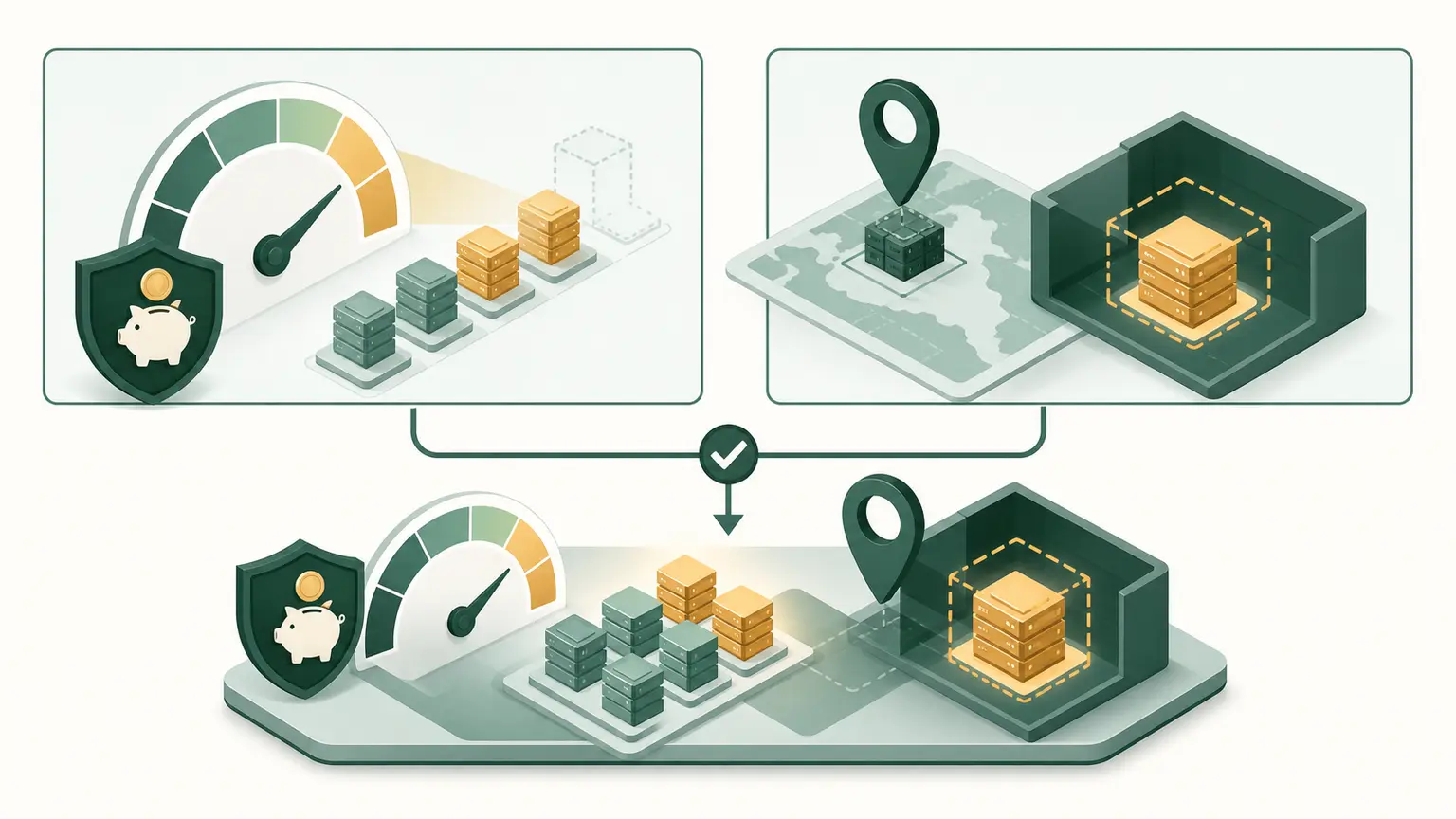
The real problem
A team recognizes the name Savings Plans and Capacity Reservations but has not connected the feature to a real requirement, identity boundary, network or data path, failure mode, price dimension, and cleanup owner. A plausible configuration could still fail the workload.
Final outcome
The learner will produce a requirement-led artifact for Savings Plans and Capacity Reservations, inspect the matching AWS control plane in the Management Console, run a matching CloudShell or AWS CLI query, interpret the output, diagnose one failure, defend one architecture choice, and prove cleanup or approved retained state.
The practical outcome is not a command transcript. It must show what was expected, what happened, what the result proves, what it does not prove, and which evidence would change the decision.
Learning objectives
By the end of this lesson, the learner can:
- explain savings plans provide usage discounts;
- explain compute savings plans are more flexible;
- explain ec2 instance savings plans are more specific;
- explain capacity reservations hold ec2 capacity;
- explain discount and capacity are independent;
- connect control-plane state to the real data, network, identity, or application behavior;
- identify cost and cleanup ownership before any optional mutation;
- troubleshoot from evidence without opening broad access or adding broad permissions.
Relationship model
Requirement
   |
   v
Identity and policy -> AWS configuration -> network or data path -> workload behavior
        |                    |                      |                    |
        +--------------------+----------------------+--------------------+
                                      |
                                      v
                         monitoring, cost, recovery, cleanup
Use this model to separate an AWS object that exists from a result that actually works. Every arrow is a verification boundary.
Prerequisites, permissions, Region, and safety
- Learning baseline: This sequence assumes practical Linux knowledge but no prior cloud-computing or AWS knowledge. Cloud, networking, security, data, automation, and architecture concepts must come from completed earlier lessons. If a prerequisite checkpoint is incomplete, return to its linked lesson before continuing.
- Confirm a non-root caller with
aws sts get-caller-identityand keep the account number private. - Use
ap-south-1unless this lesson explicitly names a second Region. - Confirm the intended profile and Region with
aws configure listbefore interpreting an empty result. - Use read-only List, Get, and Describe permissions for the named services. Design exercises run locally and require no resource-creation permission.
- This is a no-create lesson. Console and CLI work is read-only, and every design artifact is created locally.
- Never publish account IDs, public addresses, ARNs containing private account data, session IDs, presigned URLs, object data, credentials, or KMS material.
- Do not use root, world-open SSH or RDP, disabled TLS verification, unowned resources, or irreversible retention controls in a training exercise.
Core model
| Concept | What the learner must understand |
|---|---|
| Savings Plans provide usage discounts | A one-year or three-year commitment to a consistent USD-per-hour amount applies discounted rates to eligible compute usage. Usage beyond the commitment receives normal rates. |
| Compute Savings Plans are more flexible | They can apply across EC2 instance families, sizes, operating systems, tenancy, and Regions, and also to eligible Fargate and Lambda usage under current terms. |
| EC2 Instance Savings Plans are more specific | They commit to an instance family in a Region and normally provide a larger discount in exchange for less flexibility across family and Region. |
| Capacity Reservations hold EC2 capacity | An On-Demand Capacity Reservation reserves matching capacity in one Availability Zone for selected attributes and charges at the On-Demand rate while active, whether fully used or not. |
| Discount and capacity are independent | Savings Plans do not reserve capacity. An open Capacity Reservation can be used automatically by matching instances, and a Savings Plan or matching RI discount can apply to eligible usage. |
| Targeted reservations need explicit matching | A targeted Capacity Reservation is consumed only by instances launched to target it or its group. Open reservations match eligible instances automatically. |
How it works
Use two separate questions: how will usage be discounted, and where must physical capacity be guaranteed? Apply Savings Plans or RIs to stable measured spend, and Capacity Reservations only where AZ-level launch assurance justifies paying for unused capacity.
Read the result in layers:
- Scope: account, Region, VPC, bucket, AZ, endpoint, principal, object version, or resource ARN.
- Control plane: the requested configuration exists and reached an expected state.
- Behavior: the request, connection, health check, replication, restore, or application result meets the requirement.
- Operations: monitoring, failure owner, cost, retention, rollback, and cleanup are known.
Control-plane success is necessary but not sufficient. A resource can be available while policy, routing, DNS, health, data, or application behavior remains wrong.
Architecture decision table
| Requirement | Preferred direction | Why |
|---|---|---|
| Stable compute may move across Regions and services | Compute Savings Plans | The broader commitment follows more eligible compute changes. |
| Stable EC2 family in one Region | EC2 Instance Savings Plans | Less flexibility can produce a stronger discount. |
| Disaster recovery needs guaranteed AZ capacity | On-Demand Capacity Reservation in recovery AZ | The reservation holds matching capacity before failover. |
| Need both discount and guaranteed capacity | Combine eligible discount with Capacity Reservation | Billing benefit and capacity assurance solve separate requirements. |
Professional questions normally contain several valid services. State the requirement that selects one option, why the nearest alternative fails it, and what changed requirement would reverse the choice.
AWS Management Console guided practice
Before opening a service page, write the expected account, Region, starting state, and evidence. Do not choose Create, Save, Purchase, Lock, or Delete unless the lesson explicitly authorizes the live track.
- Open Savings Plans and inspect Inventory, Utilization report, Coverage report, and Recommendations without purchasing.
- Open EC2 Capacity Reservations and inspect Availability Zone, instance attributes, total capacity, available capacity, and open or targeted matching.
- Compare discount coverage with capacity coverage as two separate reports.
For each step, capture the field name and value in text. A screenshot may support the record but does not replace the explanation. Console labels can evolve, so use the service search and current documentation if a navigation label differs.
CloudShell and AWS CLI practice
CloudShell is the default browser-based command environment taught in AWS 028. AWS 029 and AWS 030 cover local CLI installation and authentication. This lesson therefore does not assume that an unconfigured local shell is ready.
Start every session with:
export AWS_DEFAULT_REGION="ap-south-1"
aws sts get-caller-identity --query Arn --output text
aws configure list
Redact the account portion of the ARN before sharing. Then perform the topic query:
Inspect active Capacity Reservations and matching attributes.
aws ec2 describe-capacity-reservations --filters Name=state,Values=active --query 'CapacityReservations[].{Id:CapacityReservationId,AZ:AvailabilityZone,Type:InstanceType,Tenancy:Tenancy,Platform:InstancePlatform,Total:TotalInstanceCount,Available:AvailableInstanceCount,Preference:InstanceMatchCriteria}' --output tableExpected interpretation:
Available capacity means paid reserved units are not currently consumed. Confirm that launch attributes and open or targeted preference match the intended instances.
Replace every replace-with-... sample value before running its command, and use only an explicitly owned resource. Explain each option first. These queries are read-only; a successful response does not authorize a later create or delete operation.
Practical work
Create p05-commitment-capacity-plan.md. Separate Compute Savings Plans, EC2 Instance Savings Plans, zonal Reserved Instance capacity benefit, On-Demand Capacity Reservations, Capacity Reservation Fleets, and Capacity Blocks. Map discount coverage and physical capacity coverage independently, then model utilization and unused-commitment risk. Do not purchase or reserve.
The evidence package must contain:
- the problem and final requirement in the learner's own words;
- caller type and Region with private identifiers redacted;
- exact planned values, ownership, and cost class;
- one Console observation and matching CLI or API evidence;
- one behavior result or supplied data-plane record;
- one denied, failed, or counterexample result and evidence-led diagnosis;
- one architecture choice plus the rejected alternative;
- cleanup proof or explicit retained-state owner, expiry, and next lesson.
Verification standard
Use expected state before observed state. Record timestamps in UTC and preserve the original failure before changing anything. A passing submission answers all four questions:
- What exact requirement was tested?
- Which evidence proves the AWS configuration?
- Which evidence proves the workload behavior?
- What remains unproven or requires later monitoring?
If AWS returns no rows, verify account, Region, permission, filters, pagination, resource type, and deletion state before concluding that nothing exists.
Common failures and troubleshooting
| Symptom | Evidence first | Likely boundary | Smallest safe response |
|---|---|---|---|
| object appears missing | caller, Region, filters, pagination, tags | scope or read permission | align scope before creating a duplicate |
| state remains pending or unavailable | service state, events, dependencies, quotas | dependency or capacity | correct the named dependency and wait with a bound |
| AccessDenied | principal, action, resource, explicit-deny context | identity, resource, endpoint, organization, or KMS policy | change only the proven policy layer |
| configuration exists but behavior fails | route, DNS, security, listener, health, logs, object version | data path or application | test the next boundary and change one control |
| bill is higher than expected | hours, bytes, requests, AZs, addresses, retention | cost model or retained resource | stop optional work and reconcile the ledger |
| cleanup is blocked | dependency inventory and owning service | deletion order or immutable state | remove owned dependants in reviewed reverse order |
Do not troubleshoot by attaching administrator access, opening administration ports to the internet, disabling encryption, retrying uncontrolled creation, deleting unknown resources, or weakening retention.
Cost, cleanup, and retained state
No AWS resource is created. Close CloudShell and remove or redact downloaded evidence.
Cleanup evidence requires terminal state and an after-inventory. Search related ENIs, public IPv4 addresses, EBS volumes and snapshots, load balancers, target groups, Auto Scaling instances, endpoints, logs, S3 versions and delete markers, backup recovery points, and global IAM roles when they apply. Billing data can lag, so schedule a later review.
Architecture and certification decisions
- Certification coverage: SAA-C03; SOA-C03; SAP-C02; DOP-C02.
- Exam mapping: SAA D2-D4.
- Explain service scope, failure boundary, consistency, recovery, security, operations, and price rather than matching a keyword.
- Treat availability and durability, encryption and authorization, routing and filtering, health and lifecycle, backup and replication, and discount and capacity as separate concepts.
- Do not reproduce protected certification questions.
Knowledge check
- Does a Savings Plan guarantee an instance launches in one AZ?
Expected direction: No. Use a Capacity Reservation or applicable zonal RI.
- Can one workload receive both Savings Plan discount and Capacity Reservation benefit?
Expected direction: Yes when the usage and reservation match the applicable rules.
- Which Savings Plan is more flexible across Regions?
Expected direction: Compute Savings Plans.
- What happens financially to an unused active Capacity Reservation?
Expected direction: It continues to incur the equivalent On-Demand capacity charge.
Completion gate and assessment
| Area | Points | Passing evidence |
|---|---|---|
| Requirement and model | 15 | Correct scope, terminology, and final outcome |
| Console evidence | 15 | Current path and interpreted fields |
| CLI or API evidence | 15 | Scoped command, expected result, and limitations |
| Behavior or decision exercise | 20 | Reproducible result or defensible architecture reasoning |
| Troubleshooting | 15 | Original symptom, hypothesis, one change, retest, rollback |
| Security and cost | 10 | Least privilege, data protection, current price dimensions |
| Cleanup and handoff | 10 | Terminal-state proof or approved retained-state record |
Pass at 80 out of 100 with no critical safety failure. A missing practical artifact, unexplained output, unsafe access, destructive action outside the owned scope, unplanned billed resource, or false cleanup claim requires remediation and a changed retest.