
AWS 225: Patch Manager baselines, maintenance windows, and compliance
Why this lesson matters
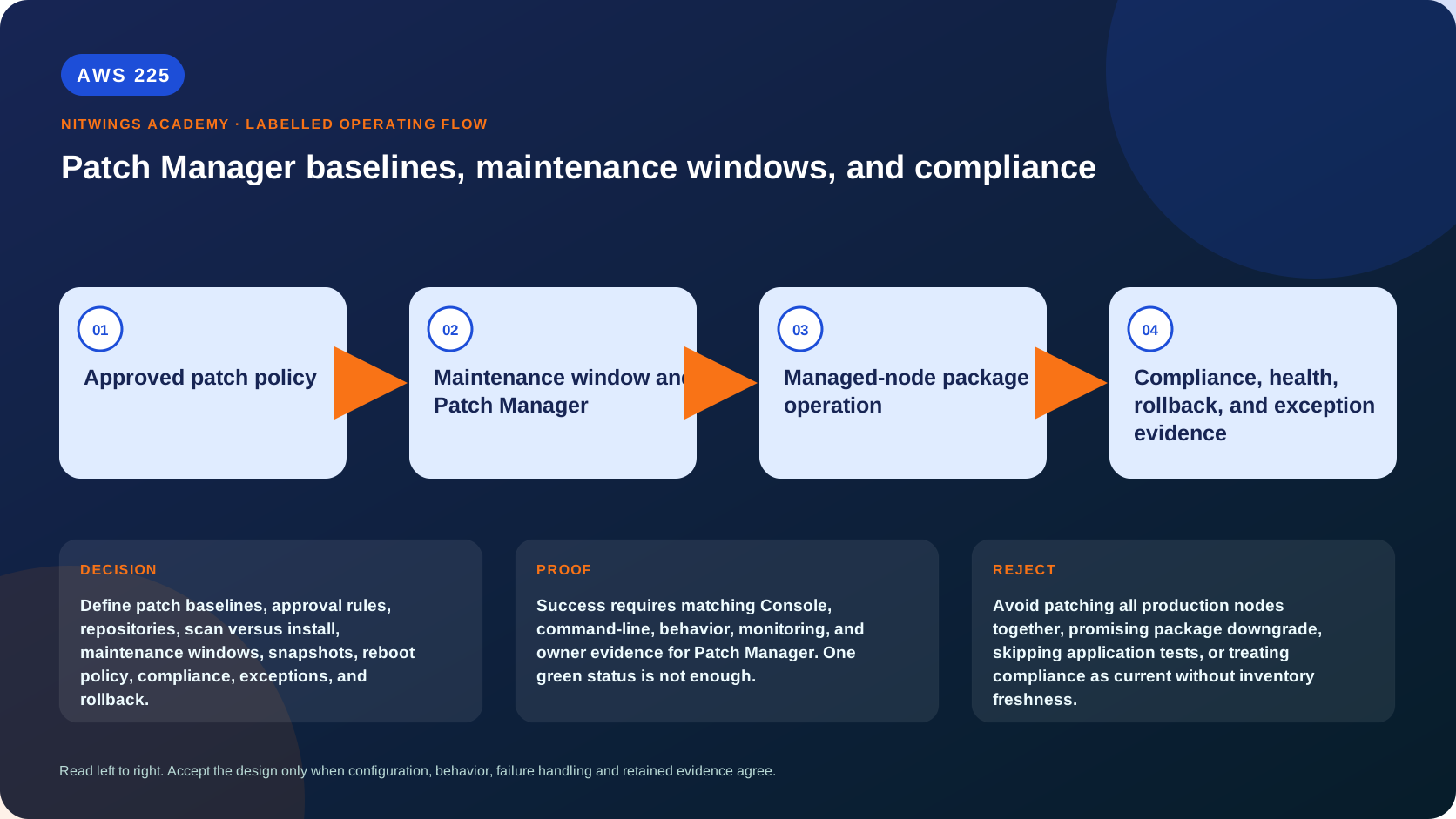
Patching is a controlled production change, not a “fully updated” button. A patch baseline defines which applicable patches count as approved; a scan measures against that policy; an install changes the node; a maintenance window controls timing and fleet rate; a reboot activates some changes; and application tests determine whether the service still works. Baseline compliance alone does not mean a node is secure.
What you will be able to do
By the end, you can:
- distinguish predefined/custom baselines, patch policies, patch groups and maintenance windows;
- explain approval rules, delays/cutoff dates, explicit approvals/rejections and compliance severity;
- trace
AWS-RunPatchBaselineScan and Install behavior on Linux and Windows; - explain snapshot IDs, repository reachability and package-manager prerequisites;
- choose
RebootIfNeededorNoRebootwith explicit availability consequences; - design canary waves, concurrency, error thresholds, health gates and rollback/recovery;
- interpret missing/failed/pending-reboot/not-applicable states without overclaiming security;
- produce a read-only patch posture report without installing anything.
The patching control chain
OS/product identity + repositories + patch source
                    |
                    v
baseline: rules + delay/cutoff + approve/reject lists
                    |
         patch policy / patch group selection
                    |
                    v
schedule or maintenance window -> targets -> AWS-RunPatchBaseline
                    |
             Scan OR Install
                    |
                    v
package manager + optional reboot + application validation
                    |
                    v
new Scan -> compliance record -> exception/remediation owner
Every boundary is account/Region/platform specific. The node must already pass AWS223 readiness, have trusted repositories, disk space, working package-manager locks and network access to required Systems Manager/S3/vendor endpoints.
Baselines define organizational compliance
A baseline contains:
- one operating-system family;
- approval rules filtered by product, classification, severity and optional source repository;
- approval delay in days or an approval cutoff date;
- optional explicitly approved patches;
- explicitly rejected patches and rejected-patch action;
- compliance severity assigned to approved patches;
- optional approved-patch compliance behavior.
The rejected list overrides both approval rules and explicit approved entries. An approved patch is installed only when it is applicable to that node. A delay is measured from release/last-update data; for some Linux repositories where that date is unavailable, build/default-date behavior can affect approval, so test the exact repository metadata.
AWS predefined baselines are maintained but cannot be edited. Their selection rules and Unspecified compliance severity might not satisfy business policy. Copy into a custom baseline when the organization needs controlled classification, delay, exception or severity rules. Never silently redefine “compliant” to hide a critical exception.
Patch policy, patch group, and maintenance window
| Mechanism | Selection/scale | Best fit |
|---|---|---|
| Quick Setup patch policy | centralized account/OU/Region targets and baseline list by OS; no patch-group requirement | AWS-recommended fleet/Organizations governance |
| Patch group | node tag maps a group to one baseline per OS in classic workflows | existing account/Region group model |
| Maintenance window | schedule, duration, cutoff, targets, tasks, priority, concurrency/errors and role | high-priority timed disruptive operations |
| On-demand Run Command | explicit immediate target/document parameters | exceptional approved canary or incident work |
A patch policy can schedule scans separately from installs. A maintenance window has schedule/time zone/active dates, duration and cutoff; registered targets do nothing until a task references them. Multiple tasks run by priority, but same-priority ordering should not be relied upon.
Patch Manager supports Patch Group and PatchGroup tag-key conventions in relevant workflows; standardize one approved key and preserve exact case. Prove baseline registration rather than assuming a tag selects it.
Scan versus Install
AWS-RunPatchBaseline is the cross-platform SSM Command document:
- Scan determines approved/applicable patch states and reports compliance; it does not install or reboot.
- Install attempts approved/applicable missing patches, reports resulting compliance and normally reboots under the default
RebootIfNeeded. - Linux uses the platform package manager (for example DNF on Amazon Linux 2023); package-manager/Python requirements vary by OS.
- Windows uses Windows Update interfaces and the applicable source configuration.
- Patch Manager is not the recommended patching path for every managed service or clustered product; use service-specific image/rolling-upgrade procedures where documented.
An install can restart dependent services even with NoReboot because package scripts may restart them. A successful SSM invocation is not proof that the application passed health checks.
Snapshot consistency
The baseline snapshot is specific to account, patch group, operating system and snapshot ID. It freezes the approved set used by one operation so nodes in a wave evaluate the same patches.
- Inside a maintenance window, let Patch Manager derive the snapshot ID from the window execution.
- Outside a window, generate one GUID and supply it to every node in that coordinated operation.
- Omitting it outside a window can give each node a different snapshot if baseline/repository state changes.
- Snapshot delivery uses a time-limited presigned S3 path; expiry and the documented regeneration window matter for delayed waves.
Do not reuse one snapshot forever. Record baseline ID/version-equivalent evidence, snapshot ID, generation time and wave.
Reboot decisions
| Option | Behavior | Operational requirement |
|---|---|---|
RebootIfNeeded (default) | reboots after installing one or more patches or finding pending-reboot state | capacity/drain/failover, startup and application health validation |
NoReboot | Patch Manager does not reboot | explicit later reboot owner/window; node can remain InstalledPendingReboot and noncompliant |
RebootIfNeeded can reboot even when the individual package would not normally require it. NoReboot is postponement, not completion. Coordinate load-balancer deregistration, connection draining, quorum, replicas, Auto Scaling replacement protection and user communication before patching.
Maintenance-window design
For a production-shaped fleet specify:
- IANA time zone, cron/rate, start/end date;
- duration and cutoff - the time before window end when new tasks stop starting;
- exact tag/resource-group targets plus expected count;
- task type/document/version and parameters;
- service role and node role separation;
- task priority;
- canary
max-concurrency=1,max-errors=0, then approved percentages; - CloudWatch Logs/S3 output and EventBridge/SNS/ticket routing;
- precheck, drain, snapshot/backup, scan/install, reboot, health test and re-enable sequence;
- abort and recovery authority.
Cutoff does not terminate work already running. max-errors=0 stops new dispatch after failure evidence but does not guarantee zero total failures because operations can already be in flight.
Read-only posture inspection
export AWS_DEFAULT_REGION="ap-south-1"
aws sts get-caller-identity --query Arn --output text

aws ssm describe-patch-baselines --output table
aws ssm describe-maintenance-windows \
  --filters Key=Enabled,Values=true --output table
aws ssm list-associations \
  --association-filter-list key=Name,value=AWS-RunPatchBaseline \
  --output table
aws ssm describe-instance-information \
  --query 'InstanceInformationList[].{Id:InstanceId,Ping:PingStatus,Platform:PlatformName,Version:PlatformVersion,LastPing:LastPingDateTime}' \
  --output table
Choose only an approved managed node:
node_id="exact-approved-managed-node-id"
aws ssm describe-instance-patch-states --instance-ids "$node_id" --output json
aws ssm describe-instance-patches --instance-id "$node_id" \
  --filters Key=State,Values=Missing,Failed,InstalledPendingReboot \
  --output json
aws ssm list-compliance-items --resource-ids "$node_id" \
  --resource-types ManagedInstance --filters Key=ComplianceType,Values=Patch \
  --output json
Empty patch state usually means no successful report exists, not “zero missing.” Record OperationStartTime, OperationEndTime, SnapshotId, baseline ID, reboot option where available, counts and last execution type.
Console review
In Systems Manager > Patch Manager:
- confirm account/Region and review the current patch-policy configuration;
- inspect baseline OS, owner, rules, delays/cutoff, approved/rejected entries and default/group mappings;
- inspect node patch state and the scan timestamp;
- open Maintenance Windows and map schedule → registered target → task → role → concurrency/errors;
- inspect one historical execution per target and its Run Command invocation;
- compare patch compliance with EC2/Inspector/application health separately;
- do not choose Patch now, edit a baseline or enable a policy in this lesson.
Patch rollout worksheet
| Gate | Required evidence |
|---|---|
| scope | owner, OS/support status, account/Region, baseline and exact target count |
| backup/recovery | tested restore or immutable replacement path; data owner |
| canary | representative nonproduction/low-risk node, one-at-a-time |
| capacity | service remains available during drain/reboot |
| precheck | disk, repositories, package lock, agent, current health and pending reboot |
| installation | common snapshot ID, exact document/version, bounded timeout/rate |
| health | process, port, dependency, synthetic transaction, logs/metrics |
| promotion | explicit approval based on canary evidence |
| rollback | package rollback where supported, image/volume restore or node replacement |
| final scan | fresh compliance plus unresolved exception owner/expiry |
Package downgrade is not universally safe or available. For immutable fleets, replacing nodes from a tested patched image is often safer than in-place rollback.
Diagnose failures
| Symptom | First evidence | Correction |
|---|---|---|
| wrong baseline | OS, patch-policy/group mapping and default baseline | repair mapping before install |
| approved patch missing | applicability, repository metadata/reachability and delay/cutoff | fix source/policy; do not force unrelated package |
| invocation succeeds, patch fails | per-patch/package-manager logs and response code | repair lock/disk/dependency/repository |
| nodes receive different patches | snapshot IDs and start times | use one operation snapshot |
| node remains noncompliant | missing/failed/pending-reboot counts and fresh scan | finish reboot/remediation and scan again |
| application fails after patch | package/service/reboot timeline and health checks | stop promotion; execute tested recovery |
| window ends with unfinished nodes | cutoff, duration, queue/concurrency | redesign duration/waves; do not expand blindly |
| “compliant” but vulnerable | baseline approval scope and Inspector/vendor evidence | fix baseline/exception; compliance is policy-relative |
Cost and cleanup
Patching can incur running compute, snapshots/backups, NAT/VPC endpoint traffic, S3/log output, KMS, repository transfer, monitoring and operational downtime. Patch policies, maintenance windows and retained compliance evidence also need owners.
AWS225 runs only read APIs. Do not create/delete baselines, patch groups, policies, associations or windows, and do not run Scan/Install. Redact host/account details from evidence. The planning worksheet is the local deliverable.
Knowledge check
- What does baseline compliance mean?
Approved and applicable patches under that baseline are in compliant states; it does not prove overall security.
- Does Scan install patches?
No; it reports state and does not reboot.
- Why use one snapshot ID outside a maintenance window?
It keeps the approved patch set consistent across the operation's nodes.
- Is
NoRebootcompletion?
No; installed patches can remain pending reboot and the node noncompliant.
- Does window cutoff kill running tasks?
No; it prevents new task starts near the window end.
Lesson acceptance
- Baseline rules, precedence, OS scope, approvals/rejections and compliance severity are explained.
- Patch policy, patch group, maintenance window and on-demand paths are distinguished.
- Scan, Install, snapshot and reboot behavior are correct for the chosen platform.
- Canary/concurrency/error controls and application health gates are measurable.
- Compliance age, baseline, snapshot and unresolved states are reported without overclaiming security.
- No patch or control-plane resource is changed; a complete rollout/recovery worksheet is produced.