
AWS 237: IAM Access Analyzer, policy simulator, and CloudTrail access investigation
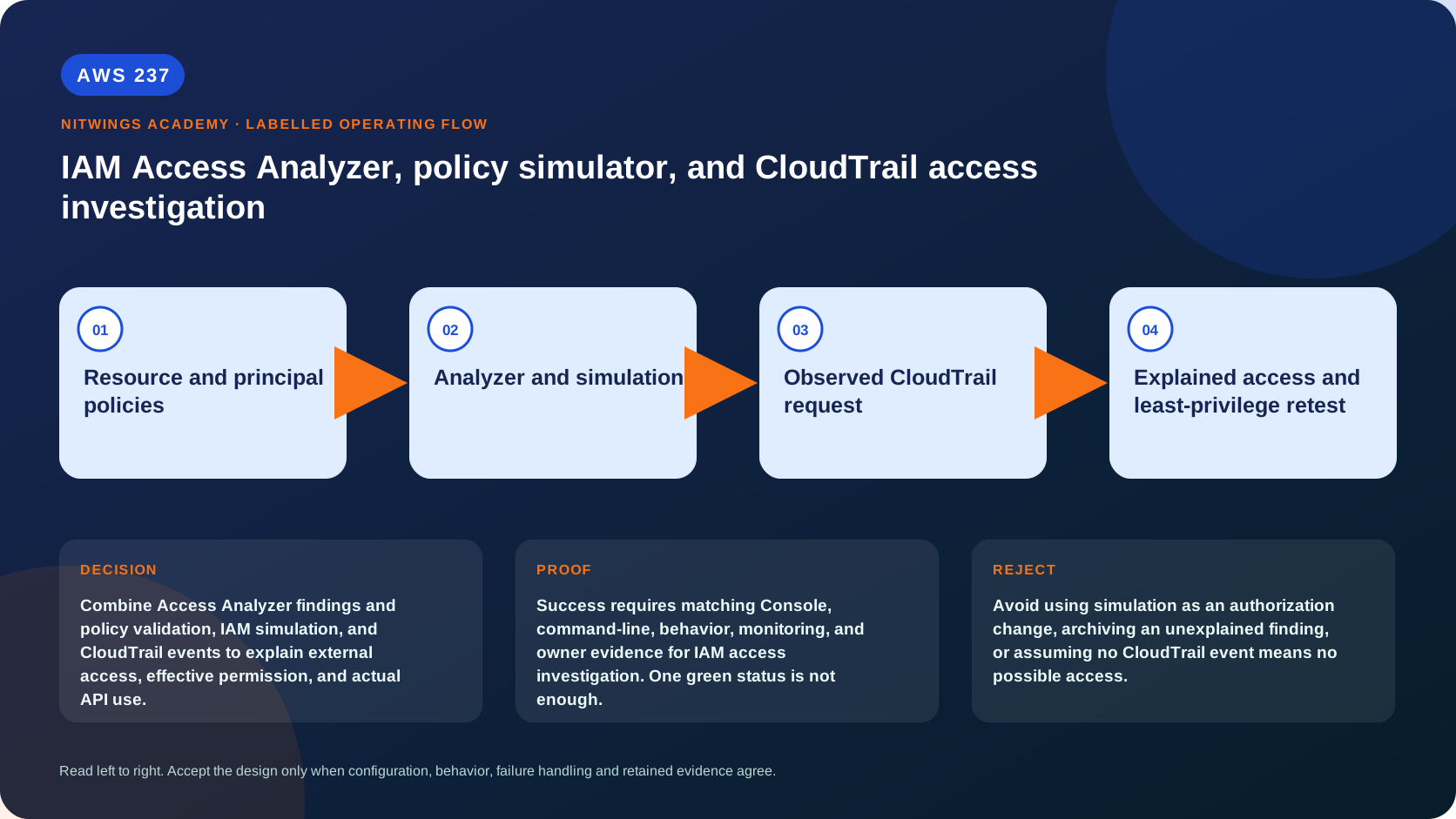
Why this lesson matters
“The role has S3 access” is not a complete authorization statement. Access depends on a specific principal/session, action, resource and request context evaluated through identity and resource policies, boundaries, session policies, organization guardrails, endpoint policy, encryption policy and service-specific controls.
Three AWS tools answer different questions:
- IAM Access Analyzer uses automated reasoning to identify possible access;
- policy validation checks policy grammar and security practice, while the IAM
policy simulator predicts an authorization decision for supplied inputs;
- CloudTrail records observed API activity only when that event type, account,
Region and time are covered.
No single green result proves least privilege, and no single missing event proves that access was impossible. An architect must reconcile all three evidence types.
Outcomes
You will be able to:
- build the full IAM request tuple and policy-evaluation map;
- distinguish implicit deny, explicit deny and absent/mismatched allow;
- explain external, internal and unused Access Analyzer types and costs;
- define the zone of trust and interpret ACTIVE, ARCHIVED and RESOLVED findings;
- explain analyzer supported-resource, latency and external-account limitations;
- run basic validation and distinguish error, security warning, warning and suggestion;
- explain custom policy checks and access previews without confusing them;
- simulate principal/custom policies with resources, context, boundaries and SCPs;
- identify simulator gaps including RCPs, live context and service behavior;
- correlate role assumption and service events in CloudTrail;
- distinguish Event history, trails and CloudTrail Lake coverage;
- diagnose cross-account S3/KMS access and produce least-privilege retest evidence.
Safety boundary and case pack
- This lesson is read-only. Do not edit policies, archive findings, create analyzers,
change trails/selectors, assume roles or make test data requests.
- Treat policies, finding details and CloudTrail events as sensitive. Redact account
IDs, ARNs, IPs, endpoints, object keys, session names and business data.
- Preserve original JSON and UTC timestamps. Analyze a copy; do not reformat away
duplicate keys, encoded fields or evidence needed for forensics.
- A remediation needs the resource and principal owners, blast-radius analysis,
rollback and a separately approved test.
Download the investigation workbook, the supplied S3 case, or the complete archive.
First principle: ask one exact question
Authorization evaluates a request, not a job title. Record:
principal/session + action + resource + account/Region
+ source network + time + MFA/TLS + tags + service-specific context
For an assumed role, distinguish the IAM role ARN from the STS role-session ARN, session name, source identity, session tags, external ID and original caller. For S3, distinguish bucket-level actions/resources from object actions/resources. For SSE-KMS data, S3 permission and KMS key use are separate authorization paths.
Then classify the question:
| Question | Strongest starting evidence |
|---|---|
| could a principal access a supported resource? | Access Analyzer finding/details |
| is a policy syntactically and structurally sound? | Access Analyzer policy validation |
| would supplied policies/context allow this tuple? | IAM policy simulator |
| did a request occur and what did AWS return? | covered CloudTrail event plus service evidence |
| is permission unused and removable? | unused-access finding plus business/exception evidence |
Effective permission model
AWS begins with implicit deny. An applicable explicit deny wins. Otherwise the request needs the required allow across relevant policy layers.
authenticate principal -> construct request context
  -> check explicit denies
  -> identity/resource/trust allows
  -> permissions boundary + session policy limits
  -> SCP limits principal account + RCP limits resource account
  -> endpoint, KMS and service-specific authorization
  -> allow or deny + service response
Within one account, identity- and resource-based allows often form a union, then boundaries and organization controls limit the result. Details differ when a resource policy grants directly to an IAM user, role ARN or role-session ARN. KMS key policies and IAM role trust policies have special required-resource-policy semantics. Do not memorize “union” as a universal rule.
Cross-account access generally needs a caller-side identity allow and a resource-owner-side resource allow, with both accounts' organization controls and all conditions satisfied. A bucket policy naming an external role makes an access path possible; it cannot prove that the external account's role/session/SCP allows the call or that the role was assumed.
Inspect these layers when applicable:
- identity inline/managed policies and policy versions;
- resource policies, ACLs, access points and role trust policy;
- IAM permissions boundary and STS session policy;
- Organizations service control policy (SCP) and resource control policy (RCP);
- VPC endpoint policy and network path;
- KMS key policy, grants and encryption context;
- Block Public Access, object ownership and service-specific authorization;
- request context keys and principal/resource/request/session tags.
IAM Access Analyzer: possible access
Access Analyzer translates supported policies into logic and uses automated reasoning rather than searching activity logs. An analyzer has an account or organization scope, Region, type and status. The service-linked role is AWSServiceRoleForAccessAnalyzer.
External access
The chosen account or organization is the zone of trust. A supported resource policy that permits a principal outside it generates an external finding. Sharing between two accounts inside an organization-wide trust zone is intentionally not an external finding. Define trust from governance requirements rather than using the largest zone merely to reduce findings.
External analyzers cover supported resource types such as S3 buckets/directory buckets, IAM roles, KMS keys, Lambda functions/layers, SQS, Secrets Manager, SNS, EBS/RDS snapshots, ECR, EFS and DynamoDB tables/streams. The exact list changes. No finding for an unsupported mechanism/resource is not evidence of no access.
An external finding describes what the resource owner's policy permits. If it reports that another account can access an S3 bucket, it does not know that account's users, roles, SCPs or other configuration. It does not prove use. It also does not currently report AWS service principals/internal service accounts. When reasoning is uncertain in rare cases, it favors a possible false positive to minimize false negatives.
Internal access
An internal analyzer identifies which users/roles inside the chosen account or organization can reach selected supported resources. It evaluates relevant identity/resource policies, SCPs, RCPs and permissions boundaries to express effective paths. It requires a separate analyzer and selected resources; support is narrower than external analysis. Internal findings are available through ListFindingsV2, and organization analysis has documented principal-count limits.
Unused access
An unused analyzer monitors IAM users and roles against a configured usage window and can report unused roles, user passwords/access keys, and service/action-level permissions. “Not observed during window” is not “never needed”: account for rare DR, quarter-end and emergency work, incomplete action-level support and retention. Remove access through reviewed changes and monitor the result.
External findings are offered without analyzer charges. Internal analysis is priced by monitored resource; unused analysis by analyzed user/role per month. Verify current pricing and count scope before organization rollout.
Findings, lifecycle and response
| Status | Meaning | Required response |
|---|---|---|
| ACTIVE | analyzed access currently exists or remains relevant | validate intent, conditions and owner |
| ARCHIVED | deliberately suppressed/accepted by action or rule | preserve rationale, owner and exception expiry |
| RESOLVED | analyzed access was removed/changed | verify replacement finding and intended behavior |
A changed policy can resolve one finding and create another for changed principal, permission or condition. Analysis after a policy change is not instantaneous; external updates can take documented time. Check analyzer ACTIVE, CREATING, DISABLED or FAILED state and finding updatedAt before claiming remediation.
Archive rules automatically archive matching findings. They are suppression logic, not remediation. Review filter breadth, owner and exception expiry; never archive an unexplained public or cross-account finding just to clear a dashboard.
An access preview predicts external findings from a proposed resource policy before deployment using an external analyzer. It differs from a custom policy check for public/new access and from a request-level simulator decision.
Policy validation and custom checks
Basic validate-policy checks JSON/IAM grammar and AWS best practices without attaching the policy. Findings have four severities:
- ERROR: policy cannot function as intended, such as invalid action/element;
- SECURITY_WARNING: AWS identifies potentially risky overbroad behavior;
- WARNING: best-practice issue not classified as a security risk;
- SUGGESTION: improvement that does not change permission intent.
Zero findings does not mean least privilege or business approval. Validation does not know the workload's intended principal/action/resource/context.
Custom policy checks use automated reasoning to detect new access versus a reference policy, access to specified actions/resources, or possible public access. They support identity and resource policies and incur per-check charges. Pin the reference policy version and interpret “new” relative to that baseline.
Read-only local policy validation example:
aws accessanalyzer validate-policy \
  --policy-document file://policy.json \
  --policy-type IDENTITY_POLICY \
  --locale EN --output json
This sends policy content to the AWS API but does not create or attach policy. Use only approved, non-sensitive supplied content in this lesson.
IAM policy simulator: a prediction from supplied inputs
The simulator does not make the requested service call or alter attached policies. It returns allowed/denied per action/resource and identifies matched statements. Principal mode loads identity policies for a user/role; custom mode evaluates supplied policy documents. Provide exact resources and context keys such as IP, time, MFA, tags and organization ID.
It can evaluate identity policies, one permissions boundary, SCPs and resource policies you provide. Outside some console behavior, it does not automatically retrieve the live resource policy. It does not support RCPs, use actual live context, test network reachability, call KMS/S3, enforce quotas or return a service response. Missing context can make a condition fail and produce misleading deny.
Read-only principal simulation example:
export ROLE_ARN="replace-with-owned-role-arn"
export OBJECT_ARN="arn:aws:s3:::example-bucket/reports/example.csv"

aws iam get-context-keys-for-principal-policy \
  --policy-source-arn "$ROLE_ARN" --output json
aws iam simulate-principal-policy \
  --policy-source-arn "$ROLE_ARN" \
  --action-names s3:GetObject \
  --resource-arns "$OBJECT_ARN" \
  --output json
Inspect EvalDecision, matched statements, missing context values, boundary and organization details. Do not paste another account's role ARN unless authorized; simulation itself requires permission. A simulated allow is a test hypothesis, not permission to make a live request.
CloudTrail: observed events within configured coverage
Event history
CloudTrail Event history is enabled automatically and provides a free, immutable, searchable view of the previous 90 days of management events in one account and one Region. It is separate from trails and event data stores. It excludes data, Insights and network-activity events, has no organization aggregation and supports only one attribute filter plus time range per search.
s3:GetObject is an object-level data event, so it will not appear in Event history. “No GetObject in Event history” proves nothing about object reads. A trail or CloudTrail Lake event data store must have selected the relevant S3 bucket/prefix and data-event type at the event time.
Trails and CloudTrail Lake
A trail delivers selected events to S3, optionally CloudWatch Logs/EventBridge, with chosen management/data/network selectors, Regions and organization scope. Validate log-file integrity, KMS access, lifecycle and delivery monitoring where required. Changing selectors today cannot reconstruct events never recorded.
CloudTrail Lake event data stores can retain/query management, data, Insights, network activity, Config, Audit Manager and non-AWS events according to setup. They support richer multi-attribute, Region and organization queries but incur ingestion/retention/query costs.
Read the event, not only its name
Correlate eventTime, eventSource, eventName, awsRegion, eventID, userIdentity, session issuer/name/source identity, source IP/user agent, request parameters/resources, readOnly, response elements and errorCode/ errorMessage. Follow AssumeRole into the resulting role session and then the service request. Account for retries, duplicate delivery and service-specific recording behavior.
Absence is meaningful only after proving correct event class was enabled for the resource, account, Region and complete time window, logs arrived, query matched the right identity/resource, and retention/integrity are intact.
Read-only Console investigation
- Confirm caller/account/Region and UTC range. Open **IAM → Access Analyzer →
Analyzer settings**; record each analyzer's type, scope, Region and status.
- Open findings for the relevant analyzer. Record finding ID/type/status,
resource, principal, action, conditions, creation/update time and archive rule. For internal access, use the current internal analyzer view/API evidence.
- In the IAM JSON policy editor, inspect validation tabs without saving changes.
- Open Policy Simulator and reproduce the exact tuple on supplied evidence;
inventory context, resource policy, boundary and SCP inputs plus known gaps.
- Open CloudTrail → Event history, clear the default read-only filter, set
Region/time and search one attribute. Inspect raw JSON, not just the table.
- Inspect owned trail/event-data-store selectors read-only to determine whether
the required data event was recorded. Do not change logging during investigation.
- Reconcile possible, predicted and observed evidence in one UTC timeline.
Read-only CLI investigation
export AWS_DEFAULT_REGION="ap-south-1"
aws sts get-caller-identity --output json
aws organizations describe-organization --output json
aws accessanalyzer list-analyzers --output json
aws cloudtrail describe-trails --include-shadow-trails --output json
aws cloudtrail get-event-selectors --trail-name "replace-with-owned-trail" --output json
aws cloudtrail list-event-data-stores --output json
For an analyzer ARN from owned/redacted inventory:
export ANALYZER_ARN="replace-with-analyzer-arn"
aws accessanalyzer list-findings-v2 \
  --analyzer-arn "$ANALYZER_ARN" --max-results 50 --output json
aws accessanalyzer list-archive-rules \
  --analyzer-name "replace-with-analyzer-name" --output json
Recent management events only:
aws cloudtrail lookup-events \
  --lookup-attributes AttributeKey=EventName,AttributeValue=AssumeRole \
  --start-time "2026-09-15T09:00:00Z" \
  --end-time "2026-09-15T11:00:00Z" --output json
Follow pagination and decode each CloudTrailEvent JSON string safely. IAM and Organizations are global services with recorded event Region behavior; search the appropriate Region(s), commonly including us-east-1 for global-service events, rather than assuming the workload Region alone is complete.
Troubleshooting and evidence conflicts
| Evidence conflict | Likely explanation | Next proof |
|---|---|---|
| analyzer finding, simulator deny | resource policy/context not supplied; caller-side deny; simulator gap | full inputs, RCP/KMS/endpoint review |
| simulator allow, live deny | RCP, resource/KMS/endpoint/service control, wrong live context | denied event and every policy layer |
| no analyzer finding, live allow | unsupported resource/path, trusted-zone access, stale/failed analyzer | support matrix, analyzer state, raw policies/event |
| archived finding still permits access | archive is suppression, not policy removal | resource policy and exception owner |
| resolved finding but access remains | changed access generated another finding/path | new findings and effective policy diff |
| AssumeRole exists, no service event | session may not call; data event not enabled; wrong Region/time | trail/Lake selectors and role-session correlation |
| no Event history object read | GetObject is a data event | selected trail/Lake data-event query |
| unused finding for DR role | usage window excludes rare valid need | DR evidence, tighter break-glass design/exception |
| AccessDenied lacks detail | service/account/org support or multiple policy layers | CloudTrail event, simulator and administrators |
Investigate in order: exact request → caller/session → resource/account/Region → all policy versions/context → analyzer scope/type/time → complete simulator inputs and gaps → CloudTrail coverage/query → service/KMS/network evidence. Do not change policy until the first divergence is understood.
Cost, retention and cleanup
External Access Analyzer and basic policy validation have no additional analyzer charge. Internal and unused analyzers and custom policy checks are paid features. CloudTrail Event history viewing is free; trails, Lake ingestion/retention/query, CloudWatch Logs, S3, KMS and data-event recording can charge. Use current pricing.
This lesson creates nothing. Cleanup proof is unchanged analyzer/trail/policy inventory and deletion of only local unredacted temporary copies according to evidence policy. In production, never disable audit coverage to reduce an active incident bill, and never delete/shorten retention without the evidence owner.
Practical investigation
Complete the workbook using the supplied S3 case:
- Build the exact request tuple and both account sides of authorization.
- Explain what the external finding proves and what it cannot see/prove.
- Inventory missing identity, SCP/RCP, session, endpoint, condition and KMS evidence.
- Explain why the supplied simulation's implicit deny is inconclusive; design a
complete simulation and list remaining simulator gaps.
- Explain why Event history cannot answer
GetObject; define the exact selector,
account, Region, time and role-session query needed in trail/Lake evidence.
- Produce separate conclusions for possible access, predicted authorization and
observed use. Do not collapse unknown into yes or no.
- Propose least-privilege remediation or a time-bounded exception, then define
policy validation, access analysis, simulation and approved live retest.
Knowledge check
- What is an analyzer's zone of trust?
The selected account or organization whose principals are treated as trusted.
- Does an external finding prove the outside role can and did access the resource?
No; it proves a supported resource-side policy can grant the described path.
- Why can an archived finding still represent active risk?
Archiving suppresses the finding; it does not remove the permission.
- Which API is required for internal findings?
ListFindingsV2/aws accessanalyzer list-findings-v2.
- Does zero validation finding prove least privilege?
No; validation checks grammar/practices, not business intent.
- Which organization policy type does the simulator not support?
Resource control policies (RCPs).
- Why can missing simulation context cause a misleading deny?
A policy condition may fail because its real request value was not supplied.
- What does Event history retain?
90 days of management events in one account and Region, not data events.
- Is
s3:GetObjectvisible in Event history?
No; it is a data event requiring appropriate trail/Lake selectors.
- What must an access conclusion state separately?
Possible path, simulated decision and observed use, including unknowns/gaps.
Lesson acceptance
The learner submits:
- exact request tuple, owners, zone of trust, account/Region and UTC scope;
- effective-permission matrix covering every applicable policy/control layer;
- analyzer type/status/finding interpretation with support and latency limits;
- policy-validation severity disposition and complete simulation inputs/gaps;
- CloudTrail source/selector/retention proof and correlated event timeline;
- separate possible, predicted and observed conclusions with confidence;
- least-privilege remediation/exception, rollback and four-part retest plan;
- current cost ownership and no-create/retention evidence;
- no secrets, complete account IDs, internal endpoints, object names or customer data.
Official sources
- IAM Access Analyzer findings
- How Access Analyzer findings work
- Supported resource types
- Resolve findings
- Policy validation
- Custom policy checks
- IAM policy simulator
- IAM policy evaluation logic
- Detailed deny/allow evaluation
- Troubleshoot access denied
- CloudTrail Event history and limitations
- CloudTrail concepts: history, trails and Lake
- IAM Access Analyzer pricing
- AWS CloudTrail pricing