Email Complaint Feedback Loops: FBL Enrollment, Processing, and Suppression
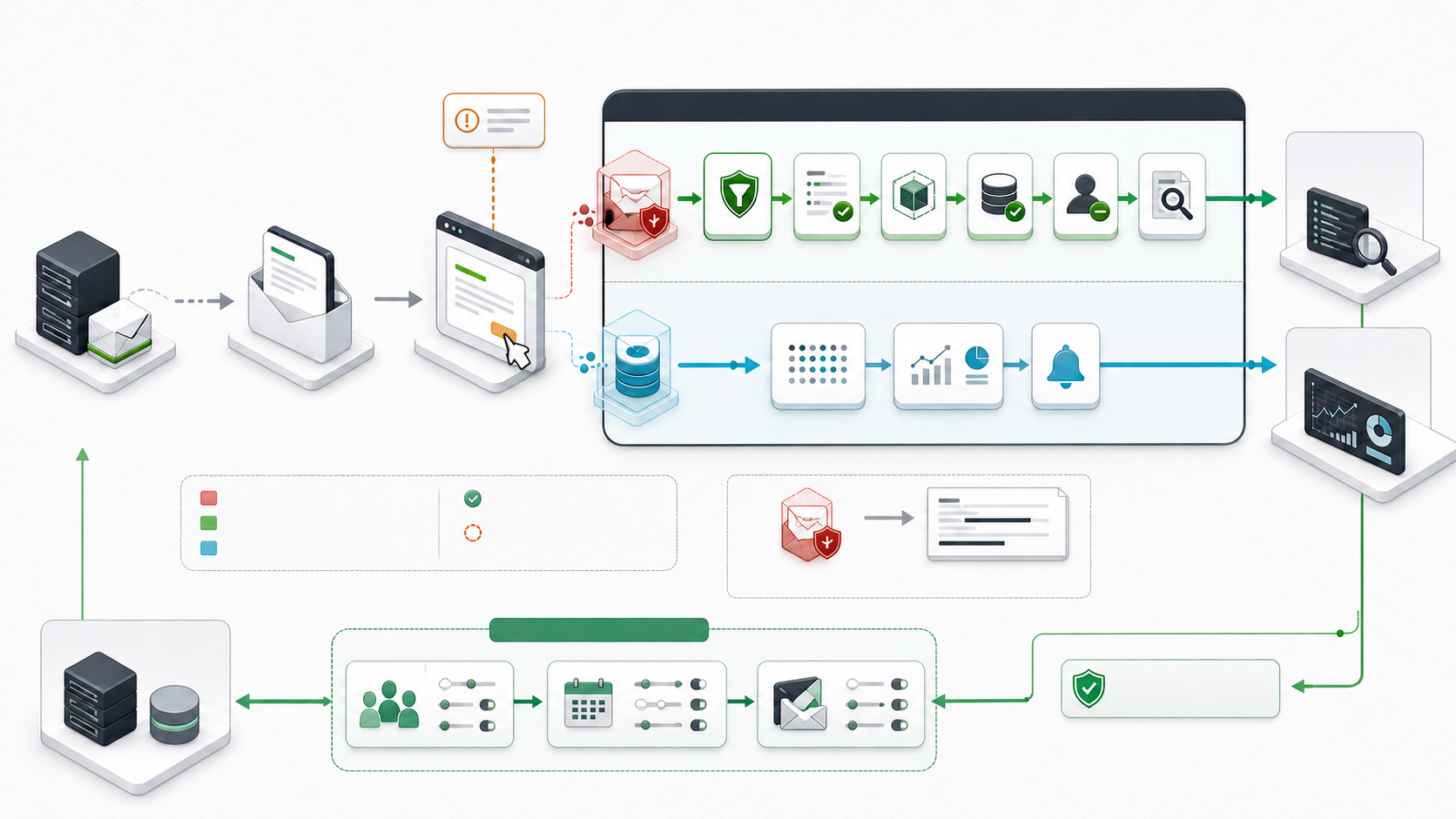
A complaint feedback loop tells a verified sender that a recipient marked a delivered message as spam or junk. The useful response is immediate suppression plus a wider investigation into consent, audience, frequency, content, and tenant behavior. Enrollment alone does not improve inbox placement.
Feedback arrives in several forms. Yahoo can send recipient-level ARF reports for enrolled DKIM domains. Microsoft JMRP provides complaint reports for approved sending IPs. Gmail provides aggregate campaign data through Postmaster Tools rather than recipient-level reports. ESPs and cloud senders often normalize several provider loops into webhooks or events. Your processing design must know which signal it received.
Separate complaints from other delivery signals
| Signal | What happened | Immediate action | What it does not prove |
|---|---|---|---|
| Complaint or junk report | A recipient used a spam or junk control, or a provider generated equivalent feedback. | Suppress the identified recipient where permitted, record the event, and investigate the sending program. | It does not prove that every message in the campaign was unwanted. |
| Unsubscribe | A recipient requested that a list or message stream stop. | Honor the request within the applicable policy and legal deadline. | It is not a complaint unless the provider also reports one. |
| Hard bounce | The receiving system permanently rejected an address or message. | Classify the DSN and suppress an invalid address or remediate the policy cause. | It does not mean the recipient clicked spam. |
| Temporary deferral | The receiving system asked the sender to retry later. | Use bounded retry and investigate rate, reputation, authentication, or capacity. | It is not permission to retry forever. |
| Blocklist or trap signal | An IP or domain was listed, or mail reached an address associated with abuse detection. | Contain the affected stream, preserve evidence, find acquisition or compromise causes. | It does not identify every complaining recipient. |
| Aggregate spam rate | A provider reports grouped complaint behavior for a domain, IP, or campaign identifier. | Compare by stream and time, then pause or correct the responsible segment. | It may not expose recipient identity or every complaint. |
Keep these event types separate in storage. A complaint suppression, invalid-address suppression, legal unsubscribe, account block, and temporary pause can have different scope, retention, appeal, and reactivation rules.
Understand the four feedback models
| Model | Enrollment key | Typical output | Can identify a recipient? | Operating use |
|---|---|---|---|---|
| Traditional IP-based loop | Approved sending IP or range | One ARF message per complaint | Often, subject to provider redaction | Suppress and investigate self-hosted or dedicated-IP traffic |
| DKIM domain-based loop | DKIM signing domain and sometimes selector | ARF complaint report | Often, subject to provider policy | Separate brands or tenants even when IPs are shared |
| Aggregate loop | Verified domain, IP, or sender-supplied identifier | Counts, rates, or campaign-level dashboard data | No | Find problematic campaigns, tenants, or streams |
| ESP or cloud event | Sending account, verified identity, webhook, event destination, or configuration set | Provider-normalized JSON or webhook event | Sometimes | Centralize complaints already received by the sending platform |
ARF is a MIME report format, not proof that the message is authentic. RFC 5965 warns that assertions in an unvetted report can be wrong or malicious. Validate the report source and enrollment path before an automated suppression changes customer data.
Decide who owns enrollment and processing
| Sending model | Likely owner | Questions to resolve |
|---|---|---|
| Marketing platform or ESP shared pool | The ESP normally enrolls its IPs and processes reports. | Are complaints exposed by webhook? Which recipient and campaign fields survive redaction? Is suppression global, tenant-scoped, or list-scoped? |
| ESP dedicated IP with customer DKIM | Shared responsibility between ESP and customer. | Who proves IP control, enrolls the DKIM domain, receives ARF, and owns the master suppression? |
| Self-hosted MTA | The sending organization. | Are IP ownership, rDNS, DKIM, abuse roles, secure ingestion, parsing, suppression, and monitoring operational? |
| Cloud sending service | The cloud account owner configures events; the service participates in provider loops. | Which regions, identities, configuration sets, topics, webhooks, retries, and dead-letter paths carry complaints? |
| Multi-tenant sending platform | Central deliverability team with tenant-level enforcement. | Can every complaint map to tenant, stream, campaign, recipient, consent evidence, and credential? |
Never enroll the same stream into two pipelines that independently suppress or notify without deduplication. Duplicate ARF mailboxes, ESP webhooks, and data-warehouse imports can otherwise create repeated actions and misleading complaint counts.
Inventory every sending stream first
# Replace every example with a domain or IP you control.
dig +short TXT example.com
dig +short TXT _dmarc.example.com
dig +short TXT selector1._domainkey.example.com
dig +short -x 192.0.2.25
dig +short A mailout.example.com
dig +short AAAA mailout.example.com

# Inspect one saved message produced by the real sending path.
grep -iE '^(From|Return-Path|Message-ID|List-ID|Feedback-ID|DKIM-Signature|Authentication-Results):' sample-message.eml
Create one row per transactional, marketing, lifecycle, support, and tenant stream. Record the visible From domain, DKIM d= and s=, envelope domain, sending IPs, provider or MTA, list ID, feedback identifier, complaint destination, suppression authority, and on-call owner. Shared DKIM keys and generic campaign identifiers make later attribution harder.
Use the current enrollment map
| Program | Format | Enrollment or setup | Important boundary |
|---|---|---|---|
| Yahoo Sender Hub Complaint Feedback Loop | DKIM domain-based ARF | Create a Sender Hub profile, verify the domain, and enroll the DKIM domain. | Yahoo no longer offers IP or CIDR-based CFL reporting. Its reports can cover AOL and other Yahoo-hosted domains. |
| Microsoft JMRP | Traditional complaint reports | Use the Junk Email Reporting Program inside the current Microsoft SNDS portal. | Keep JMRP complaint reports distinct from SNDS aggregate IP telemetry. |
| Gmail Feedback Loop | Aggregate Postmaster Tools data | Verify the DKIM domain in Postmaster Tools and add one valid Feedback-ID before DKIM signing. | Gmail does not provide recipient-level ARF for this workflow. |
| Validity Universal Feedback Loop | Multi-provider aggregate data; plan-dependent ARF access | Enroll controlled IPs or domains through the current Validity portal. | Provider membership and product access can change. Confirm the live catalog and plan during enrollment. |
| Amazon SES complaint events | Amazon SNS, event publishing, or feedback forwarding | Configure each verified identity or configuration set and subscribe a working destination. | SES only reports complaints it receives. Region, identity, topic policy, subscription, retry, and redaction matter. |
| M3AAWG current resource list | Directory of IP, domain, and aggregate programs | Use it as the current cross-provider starting point. | It is an industry resource, not a certification or guarantee of acceptance. |
Currently available complaint feedback loop directory
This directory follows the current M3AAWG classification. Validity's Universal Feedback Loop powers most of the provider entries that share its enrollment link. A directory entry means that an enrollment route is listed; it does not guarantee acceptance, recipient visibility, report volume, or inbox placement. Confirm the provider and IP or DKIM-domain scope during enrollment.
| Format | Service or provider | Enrollment or information link | Operational information |
|---|---|---|---|
| Traditional, IP-based | BlueTie / Excite | Validity uFBL | Enroll sending IPs through the shared Validity portal and verify current provider coverage. |
| Traditional, IP-based | Comcast | Validity uFBL | IP-based enrollment is listed here; Comcast also appears in the domain-based section. |
| Traditional, IP-based | Cox | Validity uFBL | Register controlled sending IPs and route reports to a monitored complaint processor. |
| Traditional, IP-based | EarthLink | FBL request address | M3AAWG currently lists this direct role address. Send only the ownership and enrollment information requested by the provider. |
| Traditional, IP-based | Fastmail | Validity uFBL | Enroll the applicable sending IPs through Validity. |
| Traditional, IP-based | Gandi | Validity uFBL | IP-based enrollment is listed here; Gandi also appears in the domain-based section. |
| Traditional, IP-based | Italiaonline, including Libero and Virgilio | Validity uFBL | One Validity enrollment route covers the listed Italiaonline mailbox brands. |
| Traditional, IP-based | La Poste | Validity uFBL | IP-based enrollment is listed here; La Poste also appears in the domain-based section. |
| Traditional, IP-based | Locaweb | Validity uFBL | Enroll controlled IPs and verify that the selected provider is included in the active account. |
| Traditional, IP-based | Mail.ru | Validity uFBL | Use Validity for the currently listed complaint-report route. |
| Traditional, IP-based | Microsoft JMRP | Microsoft SNDS portal | The current SNDS portal includes the Junk Email Reporting Program and IP-data access. |
| Traditional, IP-based | OpenSRS / Tucows | Validity uFBL | Use the shared Validity enrollment route for the applicable sending IPs. |
| Traditional, IP-based | QQ.com | M3AAWG provider route | M3AAWG lists a Chinese-language provider portal. Verify its availability and instructions before submitting data. |
| Traditional, IP-based | Rackspace, formerly Mailtrust | Validity uFBL | Enroll through Validity and map complaints to the correct Rackspace-hosted stream. |
| Traditional, IP-based | Seznam | Validity uFBL | Use the shared Validity portal and confirm active provider coverage. |
| Traditional, IP-based | SFR | Validity uFBL | IP-based enrollment is listed here; SFR also appears in the domain-based section. |
| Traditional, IP-based | SilverSky, formerly USA.NET | Validity uFBL | Use the current provider name when mapping reports, while retaining the former name for recognition. |
| Traditional, IP-based | Swisscom | Validity uFBL | Enroll the controlled sending IPs through Validity. |
| Traditional, IP-based | Synacor | Validity uFBL | Synacor can host multiple mailbox brands, so retain the actual recipient domain in attribution. |
| Traditional, IP-based | Telecom Italia | Validity uFBL | Use the Validity route and verify the active provider selection during enrollment. |
| Traditional, IP-based | Telenet | Validity uFBL | Register only IPs that the organization is authorized to manage. |
| Traditional, IP-based | Telenor | Validity uFBL | Use the shared Validity portal and confirm report routing after approval. |
| Traditional, IP-based | Terra | Validity uFBL | Enroll through Validity and monitor the destination mailbox or event pipeline. |
| Traditional, IP-based | United Online / Juno / NetZero | United Online Postmaster | The current destination is the provider's trusted-list and postmaster page; verify its complaint-report instructions before applying. |
| Traditional, IP-based | UOL | Validity uFBL | Use the shared Validity enrollment route for controlled sending IPs. |
| Traditional, IP-based | Virgin Media | Validity uFBL | Enroll through Validity and keep the recipient mailbox brand in event records. |
| Traditional, IP-based | Ziggo | Validity uFBL | Use the current Validity route and verify report receipt after enrollment. |
| Aggregated | Gmail Feedback Loop | Gmail FBL setup | Uses a DKIM-protected Feedback-ID and reports aggregate identifier data in Postmaster Tools, not recipient-level ARF. |
| Aggregated | Microsoft SNDS | Microsoft SNDS portal | Provides IP-level reputation and traffic data; the same current portal also manages JMRP settings. |
| Aggregated | Signal Spam | Signal Spam | M3AAWG notes that access requires paid Signal Spam membership. |
| Domain-based | Comcast | Validity uFBL | DKIM-domain enrollment can attribute reports when sending infrastructure is shared. |
| Domain-based | Gandi | Validity uFBL | Enroll the DKIM signing domain and selector requested by the current form. |
| Domain-based | La Poste | Validity uFBL | Use the DKIM d= domain and s= selector from production mail. |
| Domain-based | SFR | Validity uFBL | Verify the production DKIM signature before submitting the domain-based enrollment. |
| Domain-based | Yahoo, including applicable AOL and hosted domains | Yahoo Sender Hub CFL | Verify and enroll the DKIM signing domain. Yahoo does not offer IP or CIDR-based CFL enrollment. |
Review the M3AAWG Feedback Loop Resources directory during each quarterly ownership check because provider participation, portal ownership, eligibility, and report format can change.
Route familiar provider names correctly
Mailbox brands, access providers, sending platforms, and feedback operators are not interchangeable. Route by the system that currently hosts the mailbox and the mechanism that carries your mail, not by a remembered consumer brand.
| Names you may encounter | Current operating action |
|---|---|
| AOL, Yahoo, and Yahoo-hosted domains | Use Yahoo Sender Hub CFL for the DKIM domain. Yahoo states that enrolled reports can include AOL and thousands of hosted domains. |
| Hotmail, Outlook.com, and Microsoft consumer mail | Use Microsoft JMRP for complaint reports and SNDS for IP-level telemetry. |
| Amazon SES | Configure complaint events in the sending account. It is a sending platform notification path, not a mailbox-provider signup for your private IP range. |
| BlueTie/Excite, Comcast, Cox, Fastmail, Gandi, Italiaonline, La Poste, Locaweb, Mail.ru, OpenSRS/Tucows, Rackspace, Seznam, SFR, SilverSky, Swisscom, Synacor, Telecom Italia, Telenet, Telenor, Terra, UOL, Virgin Media, and Ziggo | M3AAWG currently routes these through the Validity portal in one or more IP or domain-based categories. Confirm exact coverage in the live portal. |
| EarthLink | M3AAWG currently lists a direct feedback-loop request role address. Verify instructions from the current resource page before sending account or IP evidence. |
| QQ.com and United Online/Juno/NetZero | Use the current provider-specific route linked by M3AAWG and verify that its domain, TLS, and instructions are still valid. |
| AT&T, Charter, DreamHost, iCloud, Orange, Road Runner, SpamCop, Verizon, Yandex, and Zoho | Do not assume a separate public enrollment from the brand name. Identify the actual mailbox host, ask the ESP what it already processes, and check the current M3AAWG and Validity catalogs. |
This approach retains useful coverage without presenting a stale form as a live program. Recheck the map during quarterly ownership review and whenever a provider migrates mailboxes, changes portal ownership, or changes from IP to DKIM-domain enrollment.
Prepare the identities and role accounts
- Use stable forward-confirmed rDNS for every dedicated sending IP.
- Publish SPF for the real envelope domain and sign every eligible message with DKIM.
- Align the visible From domain through SPF or DKIM under DMARC.
- Keep
abuse@andpostmaster@working for every relevant domain. - Create a dedicated FBL role mailbox that reaches more than one trained operator and a monitored processing system.
- Protect portal accounts with organization-owned identities, MFA, recovery contacts, and an access review.
- Document IP allocation evidence, DKIM selectors, domain verification, enrollment dates, report destinations, and renewal owners.
Do not use one employee's mailbox as the only enrollment address. Staff changes, vacation, disabled accounts, and aggressive mailbox filtering can silently stop complaint processing.
Configure Yahoo CFL
- Create the organization profile in Yahoo Sender Hub.
- Add and verify each sending domain.
- Enroll the DKIM signing domain used in the
d=value. - Route the report address to the controlled FBL ingestion mailbox.
- Send a real production-shaped test message to a controlled Yahoo mailbox and verify its DKIM signature.
- Confirm that a complaint report can be authenticated, parsed, deduplicated, mapped, and suppressed in a non-customer test path.
dig +short TXT selector1._domainkey.example.com
opendkim-testkey -d example.com -s selector1 -vvv

# Inspect the received copy, not only the outbound queue copy.
grep -iE '^(Authentication-Results|DKIM-Signature|From|Message-ID|List-ID):' yahoo-test.eml
Yahoo enrollment is domain-based and requires DKIM. A passing signature on a test generator does not prove the production message survives rewriting. Inspect the message as received. Keep selector rotation synchronized with enrollment and test both selectors during overlap.
Configure Gmail aggregate feedback
Gmail's header has four colon-separated positions:
Feedback-ID: campaign42:tenant7:newsletter:NWMAILThe first three identifiers are optional. The rightmost SenderId is mandatory, must be 5 to 15 characters, and should stay consistent across the mail stream. Use identifiers that aggregate enough volume to be useful. Do not put an email address, customer name, order number, message ID, or other per-recipient value in the header.
# Useful campaign grouping
Feedback-ID: spring26:tenant7:newsletter:NWMAIL

# Empty optional positions are allowed when separators remain
Feedback-ID: campaign42:::NWMAIL

# Unsafe: unique per recipient and contains personal data
Feedback-ID: [email protected]:order-83912:message-unique:NWMAIL
Add exactly one Feedback-ID before DKIM signing. Sign with a domain you control, verify that domain in Postmaster Tools, publish the sending IPs in its SPF record, and maintain valid PTR records. Gmail applies volume and distinct-complaint thresholds, so a blank dashboard does not prove zero complaints.
Configure Microsoft JMRP and SNDS
Use organization-owned Microsoft sender-support access. Request access only for IPs your organization or ESP is authorized to manage. Keep the two outputs separate:
| Microsoft signal | Use | Processing path |
|---|---|---|
| JMRP | Complaint feedback when users mark messages as junk | Authenticate report source, parse the reported message, map the recipient or campaign, suppress, and investigate. |
| SNDS | IP-level traffic, complaint, filtering, and status telemetry | Ingest as aggregate time-series evidence and correlate with IP, tenant, stream, authentication, and delivery logs. |
An SNDS complaint metric is not a recipient-level suppression event. A JMRP message should not be counted twice if an ESP webhook already represents the same complaint. Track source, event fingerprint, and ingestion time.
Configure a sending platform such as Amazon SES
aws sesv2 get-email-identity \
  --email-identity example.com \
  --region us-east-1

aws sns get-topic-attributes \
  --topic-arn arn:aws:sns:us-east-1:111122223333:ses-feedback \
  --region us-east-1

aws sns list-subscriptions-by-topic \
  --topic-arn arn:aws:sns:us-east-1:111122223333:ses-feedback \
  --region us-east-1
For SES identity notifications, the SNS topic must be in the same Region, its policy must allow SES to publish from the intended account and identity, and at least one endpoint must have a confirmed subscription. If email feedback forwarding is disabled, keep SNS or event publishing active. Test retries, endpoint authentication, dead-letter handling, and alarms without generating complaints against uninvolved recipients.
Unsafe: changing topic policy to allow any principal or any source ARN can turn the complaint pipeline into an event-injection path. Scope the service principal, account, identity, Region, endpoint authentication, and decryption permissions.
Know what an ARF report contains
Content-Type: multipart/report; report-type=feedback-report

--boundary
Content-Type: text/plain

[human-readable explanation]

--boundary
Content-Type: message/feedback-report

Feedback-Type: abuse
User-Agent: provider-example
Version: 1
Original-Mail-From: <[email protected]>
Source-IP: 192.0.2.25

--boundary
Content-Type: message/rfc822

[reported message or headers, possibly redacted]
The first part is for people, the second carries machine-readable report fields, and the third carries the reported message or headers. Providers may redact the recipient or body. Use a real MIME parser with size, nesting, decompression, attachment, character-set, and time limits. Never execute an attachment, follow a reported URL, render remote content, or trust HTML from a complaint.
Build a safe ingestion pipeline
| Stage | Required control | Failure behavior |
|---|---|---|
| Receive | Dedicated mailbox or authenticated webhook, bounded size, rate limit, provider-specific route | Quarantine or dead-letter; never discard silently. |
| Authenticate | Known enrollment, transport evidence, DKIM/SPF where applicable, webhook signature or mTLS | Keep untrusted and block automatic suppression. |
| Parse | Hardened MIME or JSON parser with no code execution or remote fetch | Store a minimal diagnostic reason and alert on sustained failure. |
| Normalize | Provider, report type, event fingerprint, recipient token, tenant, stream, campaign, timestamps | Route incomplete events to review. |
| Deduplicate | Unique provider plus stable event fingerprint | Return success for a known retry without repeating actions. |
| Suppress | Transaction, correct scope, reason, source, timestamp, policy version | Fail closed for the affected recipient while preserving unrelated sending. |
| Analyze | Rates by delivered volume, tenant, source, stream, campaign, acquisition cohort, and time | Alert when attribution is missing or the denominator is unreliable. |
| Retain | Minimal encrypted evidence with access, deletion, and legal policy | Do not keep full message bodies indefinitely. |
Do not pipe an Internet-facing mailbox directly into a privileged shell parser. Receive to a restricted queue, scan, authenticate, parse in an isolated unprivileged worker, and write through a narrow API or database role.
Make suppression idempotent and auditable
START TRANSACTION;

INSERT IGNORE INTO complaint_events
  (provider, event_fingerprint, tenant_id, recipient_id,
   campaign_id, received_at)
VALUES
  ('provider-key', 'sha256:event', 42, 9172,
   'spring26', UTC_TIMESTAMP());

INSERT INTO suppressions
  (tenant_id, recipient_id, reason, source, created_at)
VALUES
  (42, 9172, 'complaint', 'provider-key', UTC_TIMESTAMP())
ON DUPLICATE KEY UPDATE
  reason = VALUES(reason),
  source = VALUES(source);

COMMIT;
The schema is illustrative. Enforce a unique event fingerprint and a unique suppression key that matches business policy. A brand complaint will often suppress future marketing for that recipient across the brand, while legally required transactional messages may follow a separate documented policy. Never send a “you complained” confirmation message.
Unsafe: suppressing from any unauthenticated email that resembles ARF lets an attacker remove recipients. Authenticate the feedback stream, verify the report type, map it to a message actually sent by your system, and use review mode for unknown sources or missing identifiers.
Map complaints back to the responsible stream
Recipient suppression is only containment. Root-cause work needs stable attribution embedded before send and retained in delivery logs:
- tenant and brand;
- transactional, lifecycle, marketing, or support stream;
- campaign and template revision;
- list and acquisition source;
- consent timestamp, method, source, terms, and confirmation evidence;
- sending IP, DKIM domain and selector, envelope domain, and visible From domain;
- message ID or privacy-safe internal event token;
- send time, delivered estimate, complaint time, and processing time.
Do not place sensitive personal data in public message headers merely to simplify matching. Use an opaque signed token or protected internal identifier, keep the lookup table access-controlled, and define expiry.
Measure rates with a defensible denominator
SELECT
  tenant_id,
  campaign_id,
  SUM(complaints) AS complaints,
  SUM(delivered_estimate) AS delivered,
  SUM(complaints) / NULLIF(SUM(delivered_estimate), 0) AS complaint_rate
FROM daily_mail_signals
WHERE event_date >= UTC_DATE() - INTERVAL 14 DAY
GROUP BY tenant_id, campaign_id
ORDER BY complaint_rate DESC;
Use a provider-appropriate delivered or inbox-exposed denominator and label estimates honestly. Gmail's displayed spam rate reflects user reports among messages delivered to engaged users' inboxes and can look low when much of the mail already goes to spam. Compare provider dashboards with ESP events, delivery logs, unsubscribes, acquisition cohorts, and historical baselines.
Set internal warning, containment, and suspension levels below provider enforcement points, but do not publish one universal percentage as safe. Small denominators are noisy. Evaluate both count and rate, require minimum volume for automated campaign comparisons, and respond faster when complaints coincide with authentication failures, unknown list growth, or a compromised tenant.
Control multi-tenant and shared-IP risk
| Control | Why it matters | Enforcement example |
|---|---|---|
| Tenant-specific DKIM and identifiers | Provides attribution on shared infrastructure. | Pause one tenant without suppressing all customers. |
| Per-stream credentials and rate limits | Limits compromise and sudden volume. | Revoke a marketing credential while transactional mail continues. |
| Complaint and unknown-attribution budgets | Stops noisy neighbors before pool reputation collapses. | Move from warning to hold to suspension based on reviewed evidence. |
| Consent evidence requirement | Prevents imported, purchased, scraped, or unexplained audiences. | Reject a campaign when acquisition provenance is missing. |
| Pool segmentation | Separates risk by traffic purpose and maturity. | Keep prospecting experiments away from critical account messages. |
| Fast global suppression propagation | Prevents repeat sending from another campaign or worker. | Publish suppression changes to every sender before the next batch. |
Test without harming real recipients
- Build sanitized ARF and webhook fixtures from provider documentation or your own redacted reports.
- Test valid, duplicate, malformed, oversized, nested, redacted, unknown-provider, and missing-recipient cases.
- Run the parser in shadow mode and compare its proposed actions with trained review.
- Use controlled seed accounts only where the mailbox provider permits a complaint-path test.
- Confirm one event produces one suppression, one audit record, the correct tenant action, and no outbound confirmation.
- Test queue retry, dead-letter replay, database outage, delayed event, key rotation, and provider format variation.
Unsafe: asking employees or customers to mark ordinary production mail as spam can damage reputation and contaminate provider models. Use an approved bounded test, synthetic fixtures, and provider guidance.
Protect privacy and evidence
Complaint reports can contain recipient addresses, message headers, content, tracking tokens, URLs, and personal data. Encrypt storage and transport, restrict raw access, redact logs and tickets, prevent remote image loading, and define a short evidence-retention window. Store hashes or internal IDs for long-term trend analysis where possible.
Do not paste raw ARF messages into public tickets, chat rooms, or third-party analyzers. If an incident requires sharing, remove recipient data, authentication tokens, personalized links, customer content, and internal infrastructure details while retaining the minimum evidence needed.
Monitor the pipeline itself
| Monitor | Failure signal | Response |
|---|---|---|
| Last event by provider | A historically active source becomes silent. | Check enrollment, role mailbox, portal access, DNS, authentication, and ESP changes. |
| Parse success | Unknown format or malformed rate rises. | Quarantine samples, compare provider notice, update parser safely. |
| Suppression latency | Complaint remains sendable after the service objective. | Stop the affected stream and repair propagation. |
| Unknown attribution | Recipient, tenant, or campaign cannot be mapped. | Contain the responsible shared stream and repair identifiers. |
| Duplicate rate | Same event arrives through multiple channels or retries indefinitely. | Fix fingerprinting, acknowledgement, and webhook retry behavior. |
| Complaint trend | Count or rate rises by provider, tenant, list, campaign, or acquisition cohort. | Pause, inspect consent and content, reduce frequency, and remediate root cause. |
| Dead-letter depth | Events accumulate without review. | Assign an owner, preserve order where needed, and replay only after correction. |
Troubleshoot common failures
| Symptom | Evidence | Likely cause |
|---|---|---|
| No Yahoo reports | Sender Hub enrollment, DKIM d=/s=, received signature, report mailbox logs | Wrong domain or selector, failed DKIM, enrollment incomplete, no qualifying complaints, or mailbox filtering |
| Gmail FBL dashboard blank | Verified domain, one Feedback-ID, DKIM after header insertion, identifier volume | Invalid format, missing SenderId, per-message identifier, insufficient volume, insufficient distinct complaints, or wrong domain view |
| JMRP or uFBL events duplicate ESP webhooks | Message fingerprint, provider event ID, timestamps, recipient token | Two ingestion paths represent one complaint |
| ARF has no recipient | Redaction policy, reported headers, opaque token, campaign and tenant identifiers | Provider privacy redaction or missing sender attribution |
| Valid event does not suppress | Transaction logs, unique keys, replication, cache, sender lookup | Write failure, scope mismatch, stale cache, delayed propagation, or identifier mismatch |
| Complaint count suddenly becomes zero | Delivered volume, inbox placement, provider dashboard, pipeline health | No qualifying reports, traffic stopped, inbox exposure fell, enrollment broke, or ingestion failed |
| Unexpected suppression spike | Authentication, source, parser release, event samples, tenant/campaign trend | Real incident, duplicate replay, malicious injection, parser bug, or wrong mapping |
Respond to a complaint spike
- Confirm the signal source, time window, denominator, and pipeline health.
- Identify the tenant, stream, campaign, template, acquisition source, IP, DKIM domain, and recent change.
- Pause the narrowest unsafe stream. Use a wider hold if attribution is unreliable or credentials may be compromised.
- Ensure new complaints and all existing suppressions have reached every sender.
- Inspect consent evidence, audience age, frequency, expectation, sender identity, content, links, unsubscribe, and account access.
- Revoke compromised credentials and quarantine unauthorized lists or templates.
- Resume with an approved audience, corrected controls, small volume, real-time monitoring, and a rollback threshold.
Do not solve a complaint incident by merely deleting complainers and continuing unchanged. The reported recipients are a sample of broader dissatisfaction or abuse. Correct the acquisition, authorization, expectation, content, cadence, or account-control problem.
Completion checklist
- Every sending stream has an owner, IPs, domains, selectors, identifiers, report source, and suppression authority.
- Yahoo, Microsoft, Gmail, Validity, ESP, and cloud paths are treated according to their actual report model.
- Role mailboxes and portals use organization ownership, MFA, monitored routing, and recovery contacts.
- Reports are authenticated, parsed without active content, normalized, deduplicated, and retained minimally.
- Recipient suppression is transactional, idempotent, fast, auditable, and propagated to every sender.
- Aggregate data drives tenant, stream, campaign, list, acquisition, and change analysis.
- Tests cover redaction, duplicates, malformed input, injection, queue failure, database failure, and replay.
- Complaint spikes trigger containment and root-cause correction, not only address removal.
Primary references
- M3AAWG current Feedback Loop Resources
- Yahoo Sender Hub Complaint Feedback Loop
- Gmail Feedback Loop and Feedback-ID format
- Gmail Postmaster Tools dashboards
- Microsoft SNDS portal with Junk Email Reporting Program
- Validity Universal Feedback Loop portal
- Amazon SES complaint notifications through Amazon SNS
- RFC 5965: Abuse Reporting Format
- RFC 6449: Complaint Feedback Loop operational recommendations
- RFC 6650: Creation and use of ARF reports