Gmail Feedback Loop Setup: A Practical Operations Guide

Gmail’s Feedback Loop can show which campaigns, customers, or mail streams are generating unusual user-reported spam. It does not return the recipient who complained, deliver an ARF report, or prove where every message was placed. The useful output is privacy-protected, aggregate evidence that helps a sender find the traffic behind a complaint problem.
A reliable setup needs more than adding one header. The identifier design must survive real campaign operations, the header must exist before the controlling DKIM signature is created, the signing domain must be verified in Postmaster Tools, the sending infrastructure must meet Gmail’s DNS requirements, and the resulting data needs an owner who can investigate it. This guide covers that complete path.
Current workflow: Gmail now exposes Feedback Loop data in the Postmaster Tools dashboard and the generally available Postmaster Tools API v2. The legacy enrollment form and emailed CSV report process described in early pilot material is no longer the operating model.
Know what the Gmail Feedback Loop reports
Gmail describes its Feedback Loop as a way for large-volume senders to identify campaigns with an unusual amount of user-reported spam. The sender places a Feedback-ID header on a message. Gmail then aggregates complaint information by the identifiers inside that header and makes qualifying data available through Postmaster Tools.
| The Feedback Loop provides | It does not provide |
|---|---|
| Aggregate spam-rate evidence for qualifying identifiers | The Gmail address of the person who marked a message as spam |
| Campaign, customer, stream, or sender-level segmentation chosen by the sender | A traditional per-recipient ARF complaint report |
| Daily trends, identifier volume, and provider-specific evidence | Real-time event delivery or a guaranteed row for every identifier |
| A starting point for abuse, consent, frequency, and content investigations | Proof that a message reached Primary, Promotions, or any particular folder |
Data for qualifying traffic sent to @gmail.com recipients | Feedback for Google Workspace recipients or every domain hosted by Google |
That distinction matters operationally. A missing identifier can mean that Gmail’s privacy and volume thresholds were not met. A zero or very low displayed rate can coexist with poor reputation if Gmail is already placing much of the traffic in spam, where fewer inbox recipients can report it. Treat the Feedback Loop as one provider signal, not as a complete complaint ledger.
Decide whether the implementation has enough volume to help
The Feedback Loop is most useful when the sender has enough Gmail traffic for aggregate reporting and enough control over the message pipeline to set stable identifiers. It is especially valuable for an ESP, a marketplace, a multi-tenant platform, or a brand running several distinct programs from shared infrastructure.
Before changing production mail, write down:
- the domains and subdomains used in the visible From address;
- the DKIM domains and selectors applied by each ESP or MTA;
- the SPF Mail From domains and sending IPs;
- the marketing, lifecycle, triggered, transactional, and operational streams;
- the campaign, account, or tenant keys available when the message is assembled;
- where an untrusted incoming
Feedback-IDcould enter the system; - who owns Postmaster Tools, DNS, DKIM, data pipelines, alerts, and abuse decisions.
If a platform sends only small batches, a very granular identifier design can suppress nearly all useful data. Start with identifiers that answer a real operating question and represent enough messages to qualify. Do not create a unique identifier for every recipient or message.
Design the four identifier positions deliberately
The supported header shape contains up to three optional identifiers followed by one required sender identifier:
Feedback-ID: <CampaignID>:<CustomerID>:<MailTypeID>:SenderIdApply the length rule to each field before the header is written. <CampaignID>, <CustomerID>, and <MailTypeID> can each contain no more than 64 characters. The final SenderId is mandatory, must contain 5 to 15 characters, and should remain consistent across the mail stream. The value nitwings contains eight characters, so it meets Google’s SenderId length requirement.
Use the current Feedback-ID field name. Do not use the early experimental X-Feedback-ID name.
A practical synthetic example is:
Feedback-ID: cmp_spring26:acct_0042:type_promo:nitwings| Field and example | Length rule | Purpose | Ownership rule |
|---|---|---|---|
<CampaignID>cmp_spring26 | Maximum 64 characters | Campaign or automation identifier | Campaign operations can map it back to the exact release and audience. |
<CustomerID>acct_0042 | Maximum 64 characters | Opaque account or tenant key | The platform can identify the responsible account without placing a client name or email address in the header. |
<MailTypeID>type_promo | Maximum 64 characters | Stable stream or message classification | Deliverability and compliance teams agree on the classification before it reaches the MTA. |
SenderIdnitwings | 5 to 15 characters; nitwings is 8 | Stable sender identifier | The infrastructure owner keeps it consistent across the intended traffic. |
Use opaque values rather than client names, email addresses, recipient IDs, order numbers, or other personal data. The header is visible in the message source and can travel through intermediaries. Keep the private lookup from an opaque key to an internal account in a controlled system.
Keep every identifier namespace unique
Gmail aggregates each identifier independently. It does not preserve the four values as one relational tuple. If the same token appears in two fields, unrelated traffic can be combined under that token.
For example, this is a poor design:
Feedback-ID: 42:campaign_42:promo:nitwingsThe value 42 is too ambiguous. A safer design prefixes the type:
Feedback-ID: cmp_0042:acct_0147:type_promo:nitwings- Give campaign values a
cmp_prefix. - Give opaque account values an
acct_prefix. - Give message classifications a
type_prefix. - Reserve the rightmost value for the stable sender identifier.
- Use a conservative character set such as letters, numbers, underscores, hyphens, and periods.
- Never use a colon inside a value because the colon separates fields.
- Keep a versioned mapping so an identifier can still be explained months later.
If the business needs a campaign-within-account view, create one opaque combined key such as cmpacct_7f3a91 and retain its mapping. Do not assume that Gmail will join a campaign field to an account field for you.
Read campaign, customer, mail-type, and ESP rates separately
Gmail calculates complaint rates independently for each available Feedback-ID parameter during the daily reporting window. The position gives the identifier its operational scope:
| Feedback-ID position | Example | Daily rate represents |
|---|---|---|
CampaignID | cmp_promo_01 | Inbox-delivered messages and user complaints carrying that campaign value |
CustomerID | cust_demo | Inbox-delivered volume across every campaign carrying that opaque customer value |
MailTypeID | type_promo | Inbox-delivered volume across every message carrying that mail-type value |
SenderId | nitwings | Inbox-delivered volume across the qualifying tagged stream carrying the ESP’s stable sender value |
For example, one promotional campaign and one transactional campaign from the same customer could carry these headers during the same UTC day:
Feedback-ID: cmp_promo_01:cust_demo:type_promo:nitwings
Feedback-ID: cmp_trans_01:cust_demo:type_trans:nitwings
The campaign value changes for every campaign. The customer value remains the same across that customer’s campaigns. The mail-type value is reused across campaigns of the same type, and the SenderId remains stable across the ESP stream. Gmail can therefore publish a narrow campaign rate, a broader customer rate, a mail-type rate, and an ESP rate from the same day’s traffic.
Consider a synthetic customer that sends ten campaigns in one day: five promotional campaigns with 100,000 messages in total and five transactional campaigns with 900,000 messages in total. One promotional campaign has a clear complaint problem. The following raw counts are invented to show the volume weighting; Postmaster Tools does not expose these complaint counts:
| Reported parameter | Synthetic daily Gmail-inboxed volume carrying it | Synthetic user complaints | Resulting complaint rate | What the operator learns |
|---|---|---|---|---|
cmp_promo_01 | 20,000 | 140 | 0.70% | This specific promotional campaign has the sharpest problem. |
type_promo | 100,000 | 500 | 0.50% | The combined promotional rate is lower than the problem campaign because the other promotional volume performs better. |
type_trans | 900,000 | 900 | 0.10% | The five transactional campaigns have a much lower combined rate. |
cust_demo | 1,000,000 | 1,400 | 0.14% | The customer’s overall rate stays below 0.20% because most of its daily volume is transactional. |
nitwings | 5,000,000 | 4,000 | 0.08% | The ESP rate includes this customer plus every other qualifying customer carrying the same SenderId. |
The customer rate is not the simple average of 0.50% promotional and 0.10% transactional. It reflects their different daily volumes:
((0.50% × 100,000) + (0.10% × 900,000))
÷ 1,000,000 = 0.14%
The complaint signals overlap. The 140 complaints for cmp_promo_01 are included in the type_promo, cust_demo, and nitwings populations. Do not add the campaign, customer, type, and ESP values as separate complaint totals.
The selected domain view is applied around this identifier logic. FROM_HEADER limits traffic by visible From domain, while ALL_DKIM limits traffic by a successful signing domain. Gmail then calculates each available parameter against the daily inboxed-message population carrying that parameter inside the selected view.
“Volume sent to Gmail” is useful operational shorthand, but it is not the exact published denominator. Google’s official FeedbackLoop definition specifies user-marked-spam messages carrying the identifier divided by total inboxed messages carrying the identifier. Sender-side attempted, SMTP-accepted, or ESP-delivered volume can include messages outside that Gmail inbox population.
Google’s Feedback Loop dashboard documentation separately defines identifier volume as the number of unique campaign identifiers reported per day. Google reports a given identifier only when it meets the required message-volume and distinct-spam-report thresholds and has an unusual spam rate, so operators should not expect a row for every campaign, customer, mail type, or SenderId every day.
Set exactly one header at the trusted assembly point
The safest place to create Feedback-ID is the final trusted layer that knows the campaign or tenant context and runs before DKIM signing. That might be the application, a message orchestration service, an ESP template pipeline, or the MTA policy layer.
- Remove any pre-existing
Feedback-IDreceived from an untrusted customer, application, relay, or message import. - Look up the approved opaque identifiers from controlled metadata.
- Validate field count, length, characters, and the mandatory sender identifier.
- Write one header only.
- Log the identifier values, internal message key, stream, sending domain, and timestamp without storing recipient data in the identifier itself.
- Apply the controlling DKIM signature after the header is present.
If a customer can supply arbitrary values, one tenant can poison another tenant’s aggregation or imitate a trusted identifier. Treat the header as an infrastructure-owned field, not as free-form campaign content.
Apply the controlling DKIM signature after tagging
Google requires traffic to be DKIM signed by a domain the sender owns or controls after Feedback-ID is added. That signing domain must also be added and verified in Postmaster Tools. This prevents another sender from attaching your identifier values to unrelated traffic.
A received message should show the Feedback Loop header and a successful signature from the controlled domain. The relevant part may resemble this synthetic example:
Feedback-ID: cmp_0042:acct_0147:type_promo:nitwings
DKIM-Signature: v=1; a=rsa-sha256; d=fbl.example;
 s=mail2026;
 h=from:to:subject:date:message-id:feedback-id;
 bh=...; b=...
The h= list in this example includes feedback-id, which makes the header part of the signed header set. Do not copy the example domain, selector, or placeholder hashes. Inspect the real received message and verify that Gmail reports the expected DKIM result.
If the platform already applies an appropriate controlled DKIM signature after the header is added, a second signature may not be necessary. A multi-tenant ESP, however, often needs both customer-domain authentication and provider-wide operational visibility. That is where dual DKIM becomes useful.
Use dual DKIM for customer alignment and ESP visibility
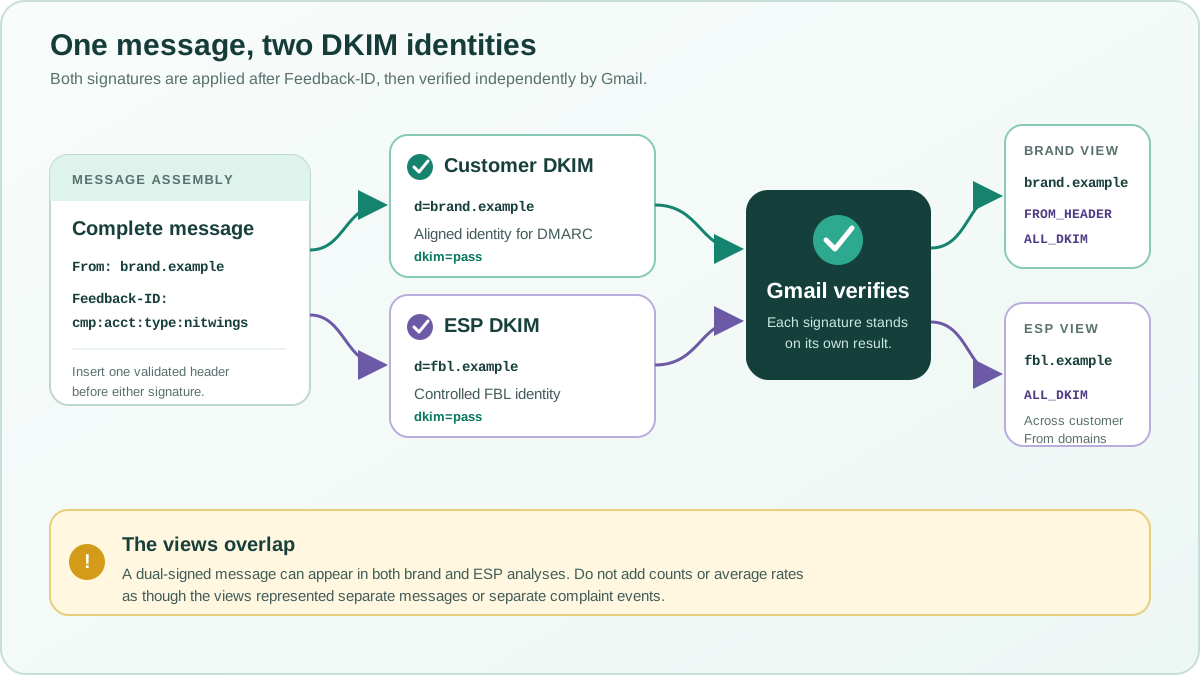
Dual DKIM means that the same message carries two independently verifiable DKIM-Signature fields. One normally uses the customer or brand domain shown in the visible From address. The other uses a stable domain controlled by the ESP or sending platform. DKIM permits multiple signatures, and receivers evaluate each signature on its own merits.
| Signature | Typical example | Primary operational purpose | Ownership |
|---|---|---|---|
| Customer-aligned DKIM | d=brand.example | Provides a DKIM identity aligned with From: [email protected], allowing a passing signature to satisfy the DKIM path for DMARC. | The brand owns the domain and authorizes the selector or delegates its DNS setup to the ESP. |
| ESP-controlled DKIM | d=fbl.example | Gives the platform one controlled signing identity for Feedback Loop ownership, cross-customer monitoring, and infrastructure accountability. | The ESP controls the domain, selector, private key, signing policy, Postmaster access, and rotation process. |
A simplified received-message check might show this evidence:
From: Brand Updates <[email protected]>
Feedback-ID: cmp_0042:acct_0147:type_promo:nitwings
DKIM-Signature: v=1; a=rsa-sha256; d=brand.example;
 s=customer2026; h=from:to:subject:date:feedback-id; ...
DKIM-Signature: v=1; a=rsa-sha256; d=fbl.example;
 s=platform2026; h=from:to:subject:date:feedback-id; ...

Authentication-Results: mx.google.com;
 dkim=pass header.d=brand.example;
 dkim=pass header.d=fbl.example;
 dmarc=pass header.from=brand.example
The example is intentionally synthetic. In production, the selectors, header lists, canonicalization, and ordering depend on the signing system. Do not infer success from the presence of two signature fields. Confirm two separate dkim=pass results and the expected header.d value for each one.
Build the message completely, insert exactly one validated Feedback-ID, and then create both signatures before transmission. Both intended FBL signatures should be created after the Feedback-ID exists and should include feedback-id in their signed header lists. A footer service, relay, tracking system, or MIME rewriter that changes signed content afterward can break one or both signatures. Run the received-message test through each real route, including failover pools and secondary regions.
Keep the two responsibilities separate. The customer-aligned signature can make DMARC pass through DKIM alignment. The ESP signature does not make DMARC pass when its d= domain is unrelated to the visible From domain, although an aligned SPF identity or the customer signature may still satisfy DMARC. Conversely, a passing customer signature does not prove that the ESP-controlled domain will qualify for the provider’s ALL_DKIM Feedback Loop view.
Add and verify each domain in the Postmaster account that is supposed to inspect it. Customer teams normally control access to their domain data. The ESP controls its infrastructure-domain data. For any domain used as the Feedback Loop signing identity, also satisfy Google’s stated SPF, PTR, and hostname requirements for the real sending path. Dual signing is not a substitute for those controls.
Use these failure clues during rollout:
- If
brand.examplepasses andfbl.examplefails, DMARC can still pass through the brand signature, but the ESP’s signed-domain FBL coverage can be missing or incomplete. - If
fbl.examplepasses andbrand.examplefails, ESP-level signed-domain visibility may remain, but DMARC still needs an aligned passing SPF or DKIM identity. - If both signatures pass but one was created before
Feedback-IDwas inserted, that earlier signature does not protect the Feedback-ID field. Correct the assembly order. - If both signatures pass but the ESP domain is not verified in Postmaster Tools, the cryptographic result alone does not grant the ESP access to that domain’s FBL data.
Align SPF, PTR, and forward DNS with the sending path
The current Gmail Feedback Loop instructions also call for the sending IPs to appear in the SPF record of the signing domain. Sending IPs need PTR records that resolve to valid hostnames. These requirements should be reviewed together with the broader Gmail sender guidelines.
A simplified documentation-only pattern is:
fbl.example.  IN TXT "v=spf1 ip4:192.0.2.20 ip4:198.51.100.44 -all"

20.2.0.192.in-addr.arpa. IN PTR mta1.example.net.
mta1.example.net.        IN A   192.0.2.20
The addresses above are reserved examples. Build the real SPF record from the authorized production sources and stay within SPF lookup limits. Confirm forward-confirmed reverse DNS, HELO identity, TLS, and authentication on every route. An IP-pool change is not complete until the SPF, PTR, forward DNS, Postmaster coverage, monitoring, and rollback records are updated.
The SPF, DKIM, and DMARC diagnostic guide covers identity alignment and received-header validation in more detail.
Add and verify the controlling domain in Postmaster Tools
Use the domain that Gmail can associate with the controlled SPF or DKIM authentication. Google’s Postmaster Tools setup guide permits a DKIM d= domain or an SPF Return-Path domain. For this implementation, make sure the Feedback Loop signing domain is included and verified.
- Sign in to Postmaster Tools with the operational Google account.
- Add the authentication domain used by the Feedback Loop signing path.
- Publish the verification TXT record exactly as Google provides it.
- Wait for DNS propagation and complete verification.
- Add subdomains separately when independent dashboard visibility is required.
- Grant access to named operators rather than sharing one account.
- Record the domain owner, DNS owner, dashboard readers, API client, and recovery contact.
Verification alone does not create data. Gmail needs enough authenticated traffic associated with that domain. Postmaster data is not real time, and privacy thresholds can hide low-volume days.
Validate the received message before waiting for a dashboard
Send a controlled message through the real production route to a personal Gmail test account. Download the original message and retain the raw source. Check the evidence in this order:
| Check | Expected result | Failure to correct |
|---|---|---|
| Header count | Exactly one Feedback-ID | Application and MTA both add a header, or an incoming value is not removed |
| Header shape and length | Up to three optional fields, each no longer than 64 characters, plus a 5 to 15 character SenderId | Missing SenderId, too many fields, an optional field over 64 characters, an empty design, or a per-message value |
| Controlled DKIM | The expected d= domain passes | Signature added before later header changes, wrong key, selector, canonicalization, or DNS record |
| Dual DKIM | Both the customer and ESP header.d values pass independently when dual signing is intended | One key or selector is wrong, one signature is applied too early, or an intermediate system changes signed content |
| Signed header set | The intended signature is created after the header exists and protects it | Feedback-ID added after signing or removed by an intermediate relay |
| Postmaster domain | The controlled authentication domain is verified | Only the visible From domain was added while the FBL signing domain was omitted |
| Sending IP identity | Authorized SPF path, valid PTR, matching forward DNS, stable HELO | New or rotated IPs were not added to the identity inventory |
| Internal mapping | Each opaque value resolves to an owner and traffic definition | The team cannot explain which messages an identifier represents |
Repeat the test for each sending platform and important route. One successful test from an ESP does not prove that a custom MTA, secondary region, failover pool, or transactional system behaves the same way.
Read the Feedback Loop dashboard without overclaiming
The current Postmaster Tools dashboard documentation describes two primary views: average Feedback Loop spam rate and identifier volume. Operators can inspect a day and review qualifying identifiers. The dashboard also supports two aggregation perspectives:
- From header domain: messages where the selected domain matches the visible From domain;
- All signed domains: messages where the selected domain is one of the successful DKIM signing domains.
With dual DKIM, the requested domain and selected view determine which population is being examined:
| Requested Postmaster domain | Aggregation view | Traffic included | Practical use |
|---|---|---|---|
brand.example | FROM_HEADER | Messages whose visible From domain is brand.example | The brand reviews FBL identifiers for its own visible sending identity. |
brand.example | ALL_DKIM | Messages with a successful DKIM signature using d=brand.example | The brand checks traffic authenticated with its signing domain, including cases where the visible From population differs. |
fbl.example | ALL_DKIM | Messages with a successful DKIM signature using d=fbl.example, potentially spanning many customer From domains | The ESP monitors identifiers across traffic signed by its controlled infrastructure domain. |
fbl.example | FROM_HEADER | Only messages whose visible From domain is fbl.example | This is usually a narrow or empty population when customers use their own From domains. |
This is why ALL_DKIM is especially useful for an ESP-controlled signing domain. The same dual-signed message can contribute to a customer-domain analysis and an ESP-domain analysis when it qualifies, but those are overlapping views of the same traffic. Do not add their counts, average their rates, or treat them as separate complaint events. Keep the requested domain and aggregation view in every screenshot, export, ticket, API record, and alert.
Google defines the general Postmaster spam rate as messages delivered to engaged recipients’ inboxes and then marked as spam. For the Feedback Loop dashboard, Google says that campaign complaints occur after inbox delivery and that an identifier may be absent when it has too few messages to engaged users or too few spam reports. The current v2 interface returns an FBL spam rate but does not expose the raw message or complaint counts behind it. A low rate is therefore not proof of healthy placement, and a missing row is not proof of zero complaints.
Calculate complaint estimates safely
The familiar formula is mathematically simple:
Estimated complaints = displayed spam rate × delivered volume ÷ 100A rate necessarily has a numerator and a denominator. Google’s legacy API definition described an identifier’s FBL spam ratio as user-marked-spam messages with that identifier divided by total inboxed messages with that identifier. The current v2 API exposes FEEDBACK_LOOP_SPAM_RATE but does not publish either raw count, so the exact denominator behind a displayed identifier rate cannot be reconstructed from Postmaster data alone.
The selected domain is not the denominator. It defines the traffic population considered by the view: FROM_HEADER selects messages matching the visible From domain, while ALL_DKIM selects messages with a successful signature from the requested DKIM domain. Gmail then reports qualifying Feedback-ID rates within that selected population. Likewise, “identifier volume” means the number of unique campaign identifiers reported for the day, not the number of messages sent by the DKIM domain.
A sender’s warehouse usually contains SMTP-accepted, ESP-delivered, or application-delivered events. Those counts can be useful for a directional estimate, but they are not the unpublished raw Gmail inboxed-message count for a particular identifier and aggregation view. Privacy thresholds and display precision add further uncertainty.
Consider a fully synthetic example:
| Input | Synthetic value | What it really means |
|---|---|---|
| Displayed FBL rate | 0.03% | A rounded Gmail aggregate rate for a qualifying identifier |
| Sender-side accepted volume | 200,000 | Messages the sender recorded as accepted or delivered, not the raw Gmail inboxed-message count for this FBL identifier |
| Simple estimate | 0.03 × 200,000 ÷ 100 = 60 | A rough equivalent count for prioritization, not an observed complaint count |
If the displayed percentage is rounded to two decimal places, a displayed 0.03% can represent an underlying rate near 0.025% up to just under 0.035%. Even if the sender-side volume were the correct denominator, that would imply a range near 50 to 70 rather than an exact 60. Because the real Gmail denominator can also differ, the actual uncertainty is wider.
Use the calculation only when it is labelled clearly:
- call it an estimate or complaint-equivalent value;
- record the source and definition of the sender-side volume;
- keep the Gmail date, domain, aggregation view, identifier, and displayed rate;
- do not store the estimate as an actual complaint event;
- do not use it to suppress individual recipients because Gmail does not reveal who complained.
Do not average campaign rates to recreate broader identifiers
When Gmail reports a qualifying CustomerID, MailTypeID, or SenderId, use that identifier’s reported rate directly. Gmail calculates it from the full daily population carrying that parameter; it is not the arithmetic mean of the campaign percentages beneath it.
If an internal audit needs a directional rollup from compatible sender-side volumes, weight each rate by its volume:
Weighted estimated rate =
sum(rate for each non-overlapping segment × compatible volume)
÷ sum(compatible volume)
In the ten-campaign example, the simple average of 0.50% promotional and 0.10% transactional is 0.30%. Weighting 100,000 promotional messages and 900,000 transactional messages produces 0.14%, which explains how the customer’s overall rate can remain below 0.20% even while one campaign is at 0.70%.
Only combine non-overlapping segments from the same reporting day, domain view, and volume definition. Campaign, customer, mail-type, and SenderId rates overlap by design, so they must never be added or averaged together as though they were separate traffic populations.
Query Feedback Loop statistics through API v2
The Postmaster Tools API v2 is generally available and provides programmatic access to domain statistics. Google replaced the v1 trafficStats resources with domainStats, added date-range queries, and supports batch requests for multiple domains. Use the read-only OAuth scope when the integration only collects statistics.
The v2 metric definitions include:
FEEDBACK_LOOP_IDto retrieve qualifying identifiers;FEEDBACK_LOOP_SPAM_RATEto retrieve the rate for a selected identifier;FROM_HEADERandALL_DKIMaggregation-key filters.
A request to list identifiers for a verified domain follows this shape:
POST https://gmailpostmastertools.googleapis.com/v2/domains/example.com/domainStats:query

{
  "metricDefinitions": [{
    "name": "fbl_ids",
    "baseMetric": {
      "standardMetric": "FEEDBACK_LOOP_ID"
    },
    "filter": "aggregation_key_type = \"FROM_HEADER\""
  }],
  "timeQuery": {
    "dateRanges": {
      "dateRanges": [{
        "start": {"year": 2026, "month": 7, "day": 1},
        "end": {"year": 2026, "month": 7, "day": 7}
      }]
    }
  },
  "aggregationGranularity": "DAILY",
  "pageSize": 200
}
Then query FEEDBACK_LOOP_SPAM_RATE with a filter for each returned identifier and the same aggregation-key type. In a dual-DKIM deployment, a brand collector can query the customer domain with FROM_HEADER, while the ESP collector queries its controlled signing domain with ALL_DKIM. Keep those results in separate series because they describe overlapping populations.
Follow the live domainStats query reference rather than treating this example as a complete OAuth client. Handle pagination, permission errors, unavailable dates, retries, and schema changes. Store the original response, collection time, domain, date, filter, and API version before transforming the data.
Turn a flagged identifier into an investigation
A Feedback Loop alert should open an evidence review, not an automatic global suppression. Start with the identifier mapping and work outward.
- Resolve the opaque identifier to the campaign, account, stream, and owner.
- Confirm the date, Postmaster domain, From-domain or all-DKIM view, and whether the row crossed a privacy threshold for the first time.
- Compare Gmail accepted volume, sender-side volume, audience source, frequency, list age, unsubscribe availability, and recent change history.
- Inspect representative received messages for From identity, DKIM, DMARC, links, headers, content, and one-click unsubscribe where required.
- Check whether one customer, source, template, automation, or acquisition path explains the change.
- Apply the narrowest safe control: pause a campaign, hold one tenant, reduce frequency, correct consent handling, repair unsubscribe processing, or contain an abusive account.
- Validate that the control took effect in internal logs, provider evidence, and later Postmaster trends.
Do not suppress every Gmail recipient because one campaign identifier appears. The Feedback Loop does not identify individual complainers. Use normal unsubscribe, complaint, bounce, and consent systems for recipient-level controls.
Set alerts that account for sparse and delayed data
Postmaster data is not real time, and a low-volume identifier may appear only when it crosses Gmail’s privacy thresholds. An alert should therefore carry context rather than firing from one percentage alone.
| Alert field | Why it belongs in the ticket |
|---|---|
| Domain and aggregation view | Separates visible From-domain traffic from all traffic signed by a controlled DKIM domain |
| Date and first-seen time | Distinguishes the provider data date from the time the collector retrieved it |
| Opaque identifier and mapped owner | Routes the incident without exposing a client name in the header or alert title |
| Displayed rate and recent baseline | Shows persistence and change instead of treating every nonzero row as equal |
| Sender-side volume and definition | Provides scale while making clear whether the count is accepted, delivered, or attempted |
| Authentication and delivery signals | Prevents a complaint investigation from ignoring a simultaneous identity or rejection problem |
| Campaign, audience, and frequency changes | Points the owner toward a likely controllable cause |
| Action, approver, and validation date | Keeps temporary controls from becoming undocumented permanent policy |
Google advises senders to keep the general Postmaster spam rate below 0.10% and avoid reaching 0.30%. Those values are important provider-level guardrails, but an individual Feedback Loop identifier can deserve attention before the overall domain reaches either level. Calibrate internal alerts by stream, volume, baseline, persistence, and business risk.
Troubleshoot missing or implausible data
| Symptom | First checks | Likely explanation |
|---|---|---|
| No Feedback Loop dashboard data | Verified domain, authenticated volume, personal Gmail traffic, date delay | Wrong domain, insufficient volume, no qualifying complaints, or privacy threshold |
| Some routes appear and others do not | Raw headers from each ESP, MTA, region, and failover pool | Header or controlled DKIM signature is missing on one path |
| Far fewer identifiers than expected | Identifier granularity and volume per value | Too many low-volume identifiers or too few user spam reports |
| Rates combine unrelated traffic | Repeated tokens across fields and identifier mapping | Namespace collision because identifiers aggregate independently |
| All-DKIM and From-domain views disagree | Visible From domains, signing domains, and selected dashboard filter | The controlled DKIM domain signs traffic for several From domains |
| Rate is low while reputation or placement is poor | Spam-folder placement, reputation, delivery errors, and historical complaints | Fewer messages reach engaged inbox recipients who can report spam |
| Estimated complaint count looks impossible | Percentage rounding, denominator definition, date zone, duplicate events | Sender-side volume was treated as Gmail’s exact denominator |
| API returns permission denied | OAuth account, scope, domain access, and resource name | The API identity does not have access to the verified domain |
Missing data is a state to explain, not a value to replace automatically with zero. Preserve missing, below threshold, not collected, and zero displayed as separate states in reporting.
Protect the identifier mapping and access model
The header should not contain client names or personal data, but the internal mapping can still reveal sensitive commercial relationships and abuse history. Treat it as operational security data.
- Limit Postmaster and API access to named operators.
- Use the read-only statistics scope for collectors that do not manage domains or users.
- Store OAuth credentials in a secrets system and rotate them under change control.
- Log domain-access changes and remove former team members promptly.
- Protect the opaque-key mapping with role-based access and retention rules.
- Do not place a client name, recipient address, campaign subject, or personal identifier in the public header.
- Keep investigation notes, customer actions, and abuse evidence outside general marketing reports.
When an alert must reach a broad channel, show the opaque key and responsible internal team. Reveal the mapped account only inside the controlled incident record.
Production checklist
- Inventory every Gmail sending route, From domain, DKIM domain, SPF domain, IP pool, stream, and owner.
- Choose up to three actionable optional dimensions, keep each one within 64 characters, and use one stable 5 to 15 character SenderId.
- Use opaque, non-personal values with unique type prefixes.
- Remove untrusted incoming Feedback-ID values and add exactly one controlled header.
- Decide whether the route needs one controlled DKIM signature or dual customer-and-ESP signatures, and document the purpose and owner of each domain.
- Add the header before every intended Feedback Loop DKIM signature is generated.
- Verify that each intended DKIM domain passes independently and protects the header in a received Gmail message.
- Authorize real sending IPs in the signing domain’s SPF record.
- Validate PTR, forward DNS, HELO, TLS, SPF, DKIM, and DMARC across every route.
- Add and verify the controlling authentication domain in Postmaster Tools.
- Grant individual dashboard access and document ownership.
- Send controlled tests through every ESP, MTA, region, and failover path.
- Record the dashboard aggregation view with every observation.
- Keep missing, zero, and below-threshold states separate.
- Label complaint counts derived from displayed rates as estimates, never actual events.
- Use compatible volumes and weighted calculations when building estimated rollups.
- Do not add rates or estimates from overlapping campaign, account, mail-type, and sender identifiers.
- Use API v2 with least-privilege access, pagination, retries, raw-response retention, and schema monitoring.
- Route alerts to a named owner with campaign, audience, identity, and change evidence.
- Apply the narrowest safe corrective action and validate it in later provider data.
- Review the identifier model whenever traffic, customers, platforms, or signing domains change.
A good Gmail Feedback Loop implementation does not try to reconstruct a list of individual complainers. It gives the operations team enough privacy-safe evidence to find the responsible traffic, stop abuse, correct unwanted-mail patterns, and verify that the change holds. NitWings can help with reputation monitoring and alerting when Feedback-ID design, DKIM ownership, Postmaster data, API collection, calculation logic, or incident response spans several teams and sending platforms.