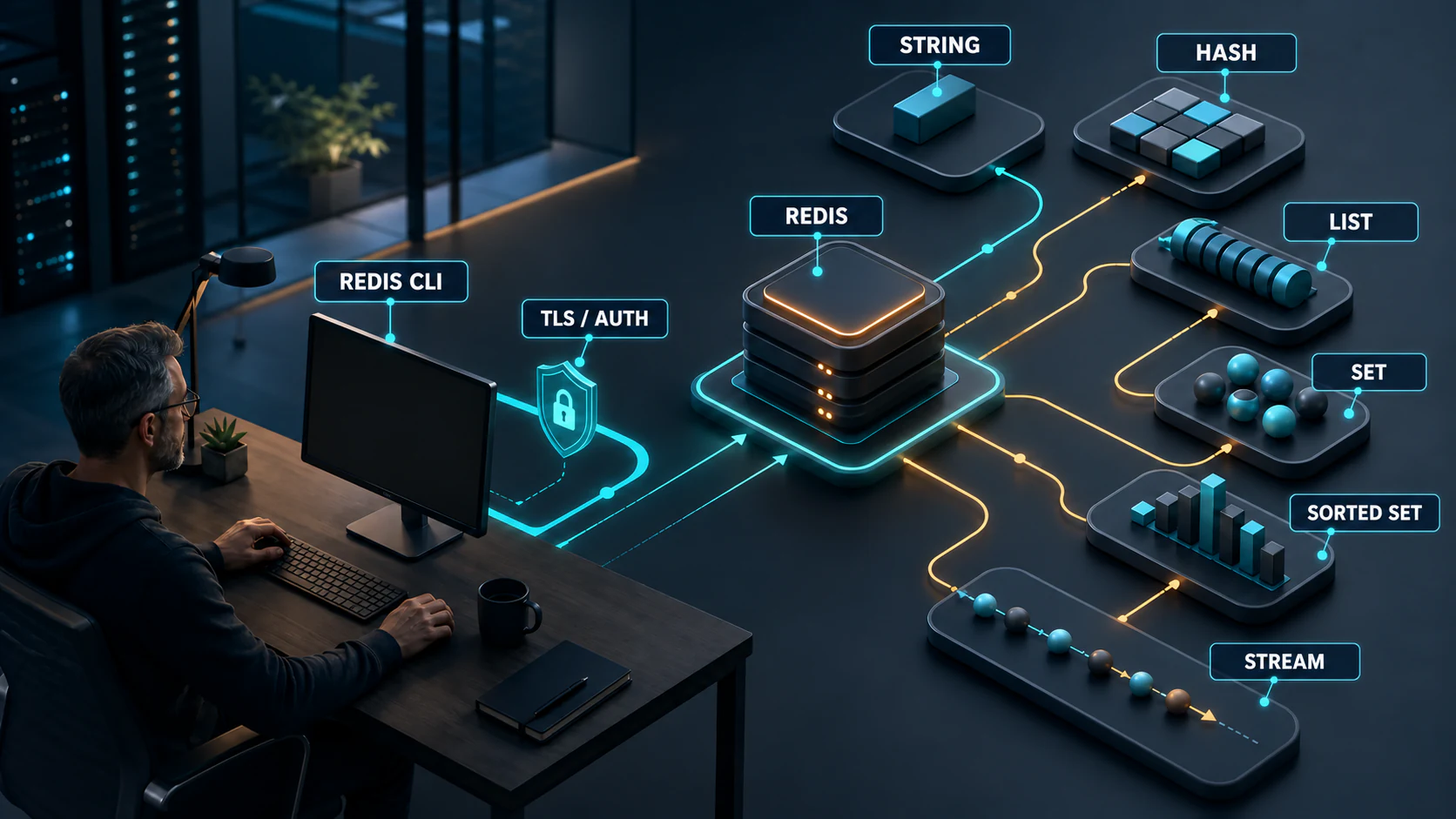
Redis Primary-Replica (Master-Slave) and Clustering

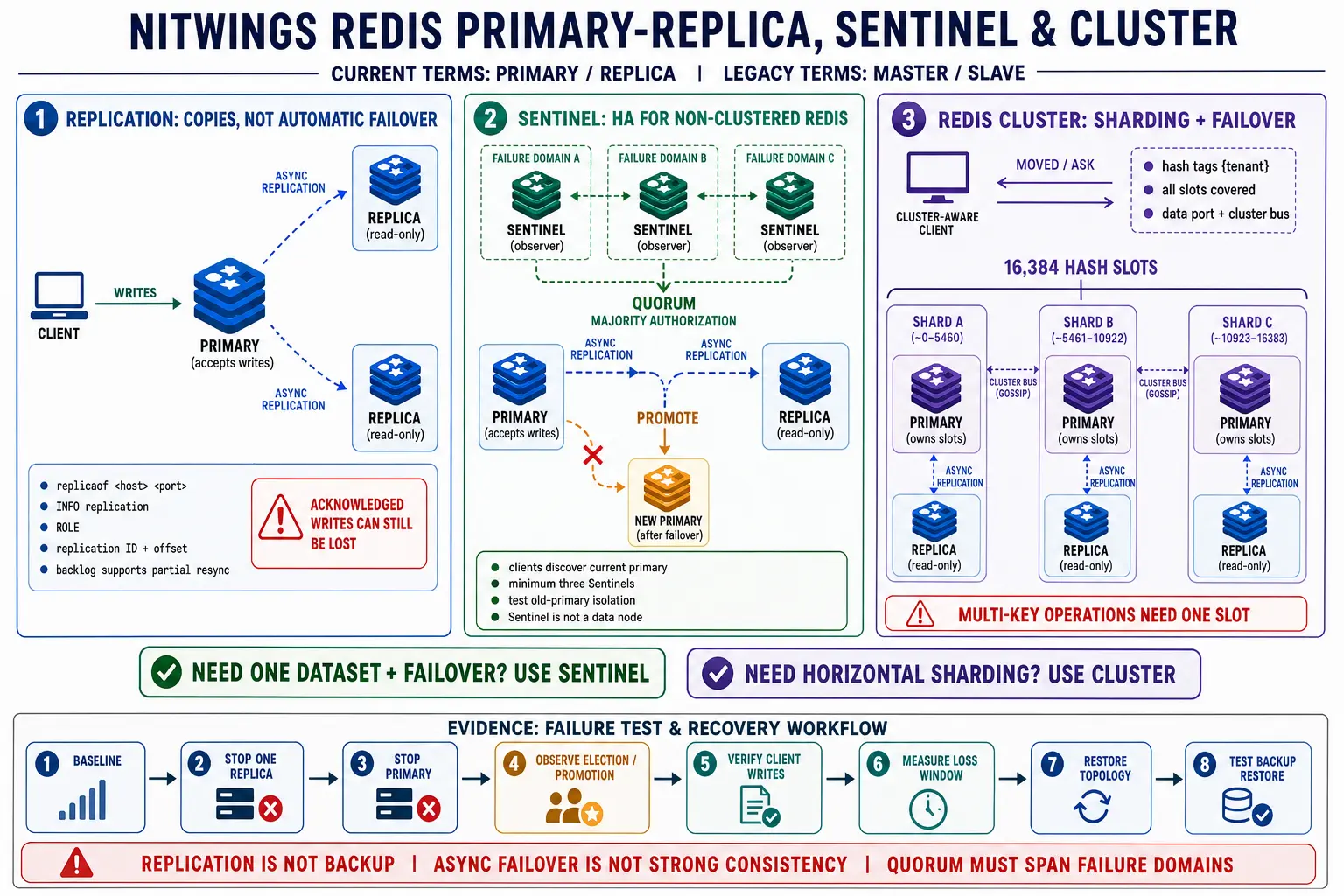
Redis replication, Sentinel, and Redis Cluster solve different problems. Replication maintains copies. Sentinel adds discovery and automatic failover for a non-clustered dataset. Redis Cluster shards the keyspace and adds shard-level failover. A reliable design begins by choosing the required behavior, not by enabling every directive with the word cluster or replica in it.
This guide uses primary and replica for roles. Older documentation, configuration directives, command output, and the owner’s familiar phrase “master-slave” may still use the legacy terms. The role semantics matter more than the label, but new operating documents should use current terminology.
Choose the topology from the workload contract
| Requirement | Likely topology | What it does not provide |
|---|---|---|
| One disposable cache with accepted downtime | Single Redis instance with tested rebuild | Node redundancy or automatic failover |
| A copy for read scaling or manual recovery | Primary plus one or more replicas | Automatic failover, client discovery, or backup |
| Automatic failover for one non-sharded dataset | Primary, replicas, and at least three Sentinels | Horizontal write sharding or strong consistency |
| Dataset or write load must span multiple primaries | Redis Cluster with primary shards and replicas | Cross-slot multi-key freedom, zero-loss failover, or backup |
Record the data role, recovery point objective, recovery time objective, write-loss budget, stale-read policy, client-library capabilities, failure domains, dataset growth, and maintenance model. If the application cannot tolerate the consistency and retry behavior of the selected topology, adding nodes will not fix the contract.
Step-by-step topology used in this runbook
The addresses below are examples. Replace them with private addresses from the approved inventory. Do not expose Redis data, Sentinel, or Cluster bus ports to the internet.
| Role | Example endpoint | Failure domain |
|---|---|---|
| Standalone primary | 10.20.31.11:6379 | Zone A |
| Standalone replica 1 | 10.20.32.11:6379 | Zone B |
| Standalone replica 2 | 10.20.33.11:6379 | Zone C |
| Sentinel 1 | 10.20.31.21:26379 | Zone A |
| Sentinel 2 | 10.20.32.21:26379 | Zone B |
| Sentinel 3 | 10.20.33.21:26379 | Zone C |
| Cluster nodes 1 through 6 | 10.20.41.11, 10.20.42.11, 10.20.43.11, 10.20.42.12, 10.20.43.12, 10.20.41.12, all on data port 6379 | Distributed across zones A, B, and C so a primary and its replica do not share a zone |
Build primary-replica and Sentinel together when one unsharded dataset needs automatic failover. Build Redis Cluster as a separate topology on empty instances when horizontal sharding is required. Do not enable Cluster on the standalone primary-replica nodes.
Important configuration options for replication, Sentinel, and Cluster
Keep the common security, memory, persistence, logging, and latency baseline identical across nodes, then add only the role-specific directives. Any node that can be promoted must already have the ACL users, TLS material, modules, persistence policy, and capacity required of a primary. Never use CONFIG SET as an improvised substitute for a topology change procedure.
| Directive | Where it belongs | Decision and validation |
|---|---|---|
replicaof | Replica redis.conf | Set the intended primary address and port. Verify master_host, link state, replication IDs, and offset convergence after restart. |
masteruser, masterauth | Replica redis.conf | Use a dedicated least-privilege replication ACL user and a protected secret. Confirm denials in ACL LOG before broadening permissions. |
replica-read-only yes | Every replica | Retain the misuse guard, but remember it is not an access-control boundary. ACLs and network policy must still block unintended clients. |
replica-serve-stale-data | Every replica | Choose whether a disconnected replica returns possibly stale data or rejects most data commands. Match it to the application’s stale-read contract and test first synchronization. |
replica-priority | Every replica | Express promotion preference only after failure-domain, capacity, persistence, and data freshness are correct. A value of zero prevents Sentinel promotion. |
repl-diskless-sync, repl-diskless-sync-delay | Primary and version-specific replica settings | Benchmark disk-backed versus diskless full sync using real dataset size, concurrent replicas, network, disk, fork memory, and recovery time. |
repl-backlog-size, repl-backlog-ttl | Potential primary | Size history from peak replication bytes per second, the intended disconnect window, and margin. Verify partial versus full sync counts after a controlled interruption. |
min-replicas-to-write, min-replicas-max-lag | Potential primary | Optionally reject writes when too few sufficiently current replicas remain. This trades write availability for a bounded redundancy condition, not synchronous durability. |
tls-replication yes | Data nodes using TLS replication | Configure the replica-to-primary TLS path and certificate trust explicitly. A TLS client listener alone does not enable it. |
cluster-enabled yes | Cluster nodes only | Enable only on empty, dedicated Cluster instances. Do not apply it to the existing Sentinel topology. |
cluster-config-file | Each Cluster node | Use one unique writable state file per instance. Redis owns and rewrites it; configuration management must not distribute a shared copy. |
cluster-node-timeout | All Cluster nodes | Test detection, false-failure behavior, election, client recovery, and network variance before changing it. Keep the value consistent. |
cluster-require-full-coverage | All Cluster nodes | Decide whether uncovered slots should stop all writes or only make affected slots unavailable. Test the business consequence, not just CLUSTER INFO. |
cluster-announce-ip, cluster-announce-port, cluster-announce-bus-port | Only when automatic address discovery is wrong | Advertise addresses every client and peer can actually reach. These are not a general workaround for unsupported NAT or incomplete routing. |
tls-cluster yes | Cluster nodes using a TLS bus | Protect the node-to-node cluster bus separately from client TLS and replication TLS, then test every node pair. |
Sentinel uses its own writable sentinel.conf. The core directives are sentinel monitor, sentinel auth-user, sentinel auth-pass, sentinel down-after-milliseconds, sentinel failover-timeout, and sentinel parallel-syncs. Quorum is the number of Sentinels that agree a primary is objectively down; a failover still requires authorization by a majority of the known Sentinels. Tune detection and recovery from measurements, not from a desire to make a demonstration fail faster.
For every role-specific change, edit the managed file, validate permissions and directories, roll through one non-primary node, verify its effective configuration and catch-up, and preserve healthy redundancy before continuing. Promote or fail over only through the documented runbook. After Sentinel changes, run SENTINEL CKQUORUM on all three observers. After Cluster changes, run redis-cli --cluster check and validate every shard.
Part A: build primary-replica replication
Step 1: complete the host and Redis preflight
- Install the same approved Redis release on all three data nodes using the procedure in Redis Installation and Tuning.
- Synchronize system clocks, configure hostnames and private DNS, verify forward and reverse resolution where used, and record each failure domain.
- Apply the same kernel, systemd, logging, monitoring, TLS, and persistence baseline to all nodes.
- Provision enough memory and disk for a full synchronization, fork copy-on-write peak, AOF rewrite or RDB save, and application traffic.
- Allow TCP 6379 only between approved application clients and data nodes, and between the Redis data nodes. Keep a tested administrative recovery path.
- Verify that no node contains unapproved data. A replica synchronization replaces its dataset.
redis-server --version
redis-cli --version
systemctl cat redis-server
ss -lntp
timedatectl status
Package unit names differ. Discover the real unit and configuration path rather than assuming every host uses redis-server.service.
Step 2: create ACL users on every data node
The replication user on the primary needs the minimum commands documented by Redis:
ACL SETUSER replica_agent on ><strong-secret> +psync +replconf +pingProvision the same application, monitoring, backup, and administration users on every data node because any replica may later become primary. Prefer an aclfile managed with restrictive permissions. If ACL state is stored in the main configuration instead, make persistence and deployment behavior explicit. Test permissions with ACL DRYRUN.
Do not paste a plaintext production secret into shell history. Generate and distribute it through the approved secret system. The placeholder above describes the ACL rule, not the delivery method.
Step 3: configure the primary
bind 127.0.0.1 10.20.31.11
protected-mode yes
port 6379
aclfile /etc/redis/users.acl

appendonly yes
appendfsync everysec

repl-backlog-size <measured-bytes>
repl-backlog-ttl 3600

min-replicas-to-write 1
min-replicas-max-lag 10
The backlog and minimum-replica values are planning examples, not universal settings. Size the backlog from peak replication bytes per second multiplied by the interruption window that should remain eligible for partial resynchronization, plus margin. min-replicas-to-write can deliberately reject writes when redundancy is degraded, so the application and availability objective must accept that behavior.
Validate the effective configuration, directories, ownership, disk space, and persistence status. Restart during an approved window, then verify application access and the intended private listener.
Step 4: configure each replica
Use the node’s own private bind address and point it to the primary:
bind 127.0.0.1 10.20.32.11
protected-mode yes
port 6379
aclfile /etc/redis/users.acl

replicaof 10.20.31.11 6379
masteruser replica_agent
masterauth <secret-from-protected-source>
replica-read-only yes
replica-priority 100

appendonly yes
appendfsync everysec
Use 10.20.33.11 on replica 2. Protect the configuration because masterauth is a credential. If TLS is required, configure and test the client, replication, and later Sentinel paths as separate controls.
Start one replica at a time. Watch the primary and replica logs, fork memory, disk, network, and application latency through the initial full synchronization.
Step 5: verify replication
redis-cli -h 10.20.31.11 --user redis_observer --askpass INFO replication
redis-cli -h 10.20.32.11 --user redis_observer --askpass INFO replication
redis-cli -h 10.20.33.11 --user redis_observer --askpass INFO replication

redis-cli -h 10.20.31.11 --user redis_observer --askpass ROLE
redis-cli -h 10.20.32.11 --user redis_observer --askpass ROLE
Confirm one primary, two online replicas, expected primary addresses, compatible replication IDs, and offsets that converge when writes stop. Check persistence on every node. Use an approved application key to test a write on the primary and a read on both replicas, then remove the test key through the application-safe procedure.
Step 6: test partial and full resynchronization
- Capture offsets, backlog size, full-sync count, partial-sync count, memory, latency, and traffic rate.
- Stop replica 1 only. Keep application traffic within the test boundary.
- Restart it before the planned backlog window expires. Verify a partial synchronization and catch-up.
- In a separate safe test, exceed the available history or rebuild a disposable replica to exercise full synchronization.
- Measure fork time, copy-on-write memory, bytes transferred, load time, application p99, and time until the replica is promotable.
Step 7: document manual recovery before adding Sentinel
Replication alone does not promote a replica. If the primary is permanently lost, an operator must choose the best replica from current offsets and persistence evidence, isolate the old primary, promote the selected replica with REPLICAOF NO ONE, re-point other replicas, and redirect clients. Rehearse that runbook in a lab. Sentinel automates much of this sequence, but understanding it is necessary for safe recovery.
Part B: add Sentinel automatic failover
Step 8: prepare three independent Sentinel hosts
Install the matching Redis package on the three Sentinel hosts. Each needs persistent storage for its rewritten configuration, a stable private address, synchronized time, monitoring, and independent failure placement. Allow Sentinel TCP 26379 among Sentinels and approved clients. Allow each Sentinel to reach TCP 6379 on every data node.
Running three Sentinel processes in three containers on one physical host does not survive loss of that host. The majority must remain reachable during the failures the design claims to tolerate.
Step 9: create the Redis user Sentinel uses on data nodes
Redis documents the following minimal control-command direction for a Sentinel user. Apply it consistently to the primary and every replica, using a protected secret:
ACL SETUSER sentinel_agent on ><strong-secret> allchannels \
  +multi +slaveof +ping +exec +subscribe +config|rewrite +role \
  +publish +info +client|setname +client|kill +script|kill
The ACL command retains +slaveof because that is the command identifier used by the documented rule even though operations use current primary/replica terminology. Validate the exact rule against the installed Redis version with ACL DRYRUN.
Step 10: create sentinel.conf on each Sentinel
bind 127.0.0.1 10.20.31.21
protected-mode yes
port 26379
dir /var/lib/redis-sentinel
logfile /var/log/redis/redis-sentinel.log

sentinel monitor cache-primary 10.20.31.11 6379 2
sentinel auth-user cache-primary sentinel_agent
sentinel auth-pass cache-primary <secret-from-protected-source>
sentinel down-after-milliseconds cache-primary 10000
sentinel failover-timeout cache-primary 180000
sentinel parallel-syncs cache-primary 1
Use each Sentinel host’s own bind address. The detection and timeout values are examples to test, not guarantees. Protect the file because it contains a credential. Make the file and directory writable by the Sentinel service because Sentinel rewrites state after discovery and failover. Configuration management must not replace the learned file with a stale template during normal operation.
Secure incoming Sentinel client access and Sentinel-to-Sentinel authentication as documented for the installed release. When Sentinel ACL is enabled, provision the same peer credentials on all Sentinels and configure sentinel sentinel-user and sentinel sentinel-pass. Give application clients only the Sentinel discovery commands they require.
Step 11: start Sentinel and verify discovery
systemctl enable --now redis-sentinel
systemctl status redis-sentinel --no-pager

redis-cli -h 10.20.31.21 -p 26379 --user sentinel_observer --askpass \
  SENTINEL MASTER cache-primary
redis-cli -h 10.20.31.21 -p 26379 --user sentinel_observer --askpass \
  SENTINEL REPLICAS cache-primary
redis-cli -h 10.20.31.21 -p 26379 --user sentinel_observer --askpass \
  SENTINEL SENTINELS cache-primary
redis-cli -h 10.20.31.21 -p 26379 --user sentinel_observer --askpass \
  SENTINEL CKQUORUM cache-primary
Run the checks through all three Sentinel endpoints. Confirm one monitored primary, two replicas, three Sentinels, quorum availability, majority authorization, persistent configuration, and no address that clients cannot reach.
Step 12: configure and test Sentinel-aware clients
Configure the application with the service name cache-primary, at least three Sentinel endpoints, the Sentinel discovery credential, the Redis application credential, TLS settings, connect and command timeouts, bounded retries, backoff, jitter, and pool refresh behavior. Do not configure only the original primary address.
From every application failure domain, ask Sentinel for the current primary, connect with the application library, perform a representative write and read, and record the connection target. Test loss of one Sentinel before testing data-node failover.
Step 13: run a controlled Sentinel failover
- Confirm both replicas are online, current, persistent, and in separate failure domains. Confirm all three Sentinels pass
CKQUORUM. - Create a versioned backup and record the application and replication baseline.
- First rehearse a planned promotion with
SENTINEL FAILOVER cache-primaryfrom an authorized Sentinel administration path. - Observe replica selection, promotion, configuration epoch, remaining-replica reconfiguration, and client rediscovery.
- Verify application writes, reads, TTL behavior, error rate, p99, ambiguous operations, and acknowledged-write loss.
- Confirm the former primary returns as a replica and fully synchronizes. Do not force it back to primary while it is stale.
- In a later game day, isolate or stop the active primary to test real failure detection and old-primary fencing.
- Restore three healthy data nodes and three healthy Sentinels, then test backup restore separately.
Part C: build a six-node Redis Cluster
Step 14: start with six empty, dedicated instances
Do not convert the populated Sentinel deployment by adding cluster-enabled yes. Build Cluster on six empty instances, validate it, then plan a separate data migration with application compatibility and rollback.
Install the same approved Redis release and modules on all six nodes. Apply the same ACL users, TLS policy, persistence, kernel, systemd, memory, disk, monitoring, and time baseline. Place the intended primary and its replica in different failure domains.
Step 15: configure Cluster mode on every node
bind 127.0.0.1 <this-node-private-ip>
protected-mode yes
port 6379
aclfile /etc/redis/users.acl

cluster-enabled yes
cluster-config-file nodes.conf
cluster-node-timeout 5000

appendonly yes
appendfsync everysec
dir /var/lib/redis
nodes.conf is generated and rewritten by Redis. Each instance needs its own local file and writable directory. Do not deploy one shared nodes.conf to all nodes. The 5-second node timeout is an example from the official tutorial; tune it only after measuring scheduling, network, and false-failure behavior.
Step 16: configure Cluster networking
- Allow approved application clients to reach data port 6379 on every Cluster node.
- Allow every Cluster node to reach every other node on data port 6379 for key migration.
- Allow every Cluster node to reach every other node on cluster bus port 16379, or the explicitly configured cluster port.
- Do not allow clients to use the cluster bus.
- Verify that every announced address and port is reachable without unsupported NAT or port remapping.
- Test TLS separately for the client, replication, and cluster-bus paths when enabled.
Step 17: start and preflight every empty node
systemctl enable --now redis-server
redis-cli -h <node-ip> --user redis_admin --askpass PING
redis-cli -h <node-ip> --user redis_admin --askpass DBSIZE
redis-cli -h <node-ip> --user redis_admin --askpass CLUSTER INFO
Confirm DBSIZE is zero on every logical database used, each node has a unique node ID, and no node belongs to another Cluster. If a node was previously clustered, follow the approved reset and data-removal procedure on that exact disposable node. Do not casually delete nodes.conf from an active Cluster.
Step 18: create the Cluster and review placement
redis-cli --cluster create \
  10.20.41.11:6379 10.20.42.11:6379 10.20.43.11:6379 \
  10.20.42.12:6379 10.20.43.12:6379 10.20.41.12:6379 \
  --cluster-replicas 1 \
  --user redis_admin --askpass
Read the proposed mapping before accepting it. Confirm three primaries, one replica for each, no primary sharing a failure domain with its replica, and all 16,384 slots assigned. If placement is wrong, stop and correct the inventory or use the supported reassignment procedure rather than accepting a weak design.
Step 19: validate the complete Cluster
redis-cli --cluster check 10.20.41.11:6379 \
  --user redis_observer --askpass

redis-cli -c -h 10.20.41.11 -p 6379 \
  --user redis_observer --askpass CLUSTER INFO

redis-cli -c -h 10.20.41.11 -p 6379 \
  --user redis_observer --askpass CLUSTER SHARDS
Confirm cluster_state:ok, all slots covered, expected primary and replica relationships, no failure flags, no stuck importing or migrating slots, compatible epochs, and reachable advertised endpoints. Inspect INFO replication and persistence on each node.
Step 20: prove client redirection and hash-tag behavior
SET cart:{customer-42}:items item-list
SET cart:{customer-42}:total 1250
CLUSTER KEYSLOT cart:{customer-42}:items
CLUSTER KEYSLOT cart:{customer-42}:total
MGET cart:{customer-42}:items cart:{customer-42}:total
Run the example through redis-cli -c or the actual cluster-aware application client. Both keys should map to one slot because they share the hash tag. Test a cross-slot multi-key command and confirm the application handles the error rather than retrying endlessly.
Step 21: test planned and unplanned shard failover
- Record the slot owner, its replica, offsets, application traffic, persistence, and backup state.
- Connect directly to the chosen replica and use the supported
CLUSTER FAILOVERprocedure for a planned takeover. - Verify new slot ownership, client slot-map refresh, writes, reads, errors, latency, and old-primary reconfiguration.
- Restore healthy redundancy and wait for full catch-up.
- In a separate game day, stop one primary unexpectedly and observe failure detection, election, promotion, and write-loss window.
- Test simultaneous loss of a primary and its replica in a disposable environment to document the unavailable-slot behavior and recovery runbook.
Step 22: rehearse adding, resharding, and removing nodes
redis-cli --cluster add-node <new-node> 10.20.41.11:6379 \
  --user redis_admin --askpass

redis-cli --cluster reshard 10.20.41.11:6379 \
  --user redis_admin --askpass

redis-cli --cluster check 10.20.41.11:6379 \
  --user redis_observer --askpass

redis-cli --cluster del-node 10.20.41.11:6379 <empty-node-id> \
  --user redis_admin --askpass
An added primary starts with no slots. Reshard a reviewed number of slots from named sources, watch migrations and client redirections, and validate after each batch. A primary must be empty before removal. Add a replica with the supported replica option and explicit primary ID when failure-domain placement matters.
Step 23: back up and restore Cluster by shard
A Cluster backup must cover every primary shard at a compatible recovery point, along with node, slot, version, module, ACL, and configuration metadata. One node's RDB or sealed file set is not a Cluster backup. The application must define whether writes can pause for a common boundary or whether recovery will reconcile independently captured shards.
Redis 8.10 online backup scenario
On Redis 8.10 or later, first verify COMMAND INFO BACKUP on every primary. Record CLUSTER SHARDS, the primary node IDs, slot ranges, replication offsets, and UTC time. Start the backup on each primary in a staggered sequence so all nodes do not fork at once:
redis-cli -h <primary-1> --user backup_agent --askpass BACKUP START
redis-cli -h <primary-2> --user backup_agent --askpass BACKUP START
redis-cli -h <primary-3> --user backup_agent --askpass BACKUP START
Watch BACKUP STATUS, INFO persistence, memory, fork time, disk latency, replication lag, and application p99 on every primary. Wait until all three backups are incrementing. At the approved application recovery boundary, quiesce or checkpoint writes as required by the data model, record the boundary, and seal every primary:
redis-cli -h <primary-1> --user backup_agent --askpass BACKUP SEAL
redis-cli -h <primary-2> --user backup_agent --askpass BACKUP SEAL
redis-cli -h <primary-3> --user backup_agent --askpass BACKUP SEAL
For each shard, run BACKUP LIST and copy its BASE, INCR, and manifest into a separate shard directory. Store one inventory that maps the shard directory to its source node ID, slot ranges, version, modules, configuration, ACL version, seal time, file sizes, and digests. Verify the off-host copies before running BACKUP CLEANUP on each primary. Older Redis releases use the tested per-shard RDB or multipart-AOF procedures in article 2.
Isolated Cluster recovery scenario
- Build an isolated recovery environment with compatible Redis binaries, modules, capacity, TLS, and no application traffic.
- Restore each shard's sealed manifest with the startup-only
preload-file aof:<copied-manifest-path>, or use the matching RDB or multipart-AOF procedure for that backup type. - Recreate and verify the intended slot ownership and replica placement through a rehearsed Cluster recovery procedure. Never copy an active node's
nodes.confblindly into a different topology. - Check every slot, shard key counts, representative hash tags, TTLs, streams, functions, module data, and application-level invariants.
- Measure the recovered point and elapsed time, reconcile writes outside the captured boundary, and perform a controlled client cutover test.
Independently sealed asynchronous shards do not form one globally atomic snapshot. If a business operation spans slots, the recovery plan needs an application checkpoint, an external transaction record, idempotent replay, or a documented reconciliation process. Define and test that limitation as part of the recovery point objective.
Advanced role and topology commands: valid but unsafe
These commands are useful in a reviewed failover, repair, or decommissioning procedure. They are not routine health checks. Confirm the exact endpoint, node ID, role, slot state, current backup, application impact, stop condition, and rollback before running one.
| Command example | Purpose | Safety boundary |
|---|---|---|
REPLICAOF 10.20.31.11 6379 | Makes the selected standalone node replicate the named primary. | Unsafe. Synchronization replaces the selected node's dataset. Verify the target, preserve evidence, and expect a full sync. |
REPLICAOF NO ONE | Promotes a standalone replica without Sentinel. | Unsafe. Fence the old primary first or split-brain writes can occur. Reconfigure clients and remaining replicas through the recovery plan. |
SENTINEL FAILOVER cache-primary | Requests a controlled Sentinel failover. | Unsafe. Confirm quorum, majority, healthy replicas, client discovery, backup, and the accepted write-loss window. |
SENTINEL RESET cache-primary | Resets Sentinel's state for matching monitored primaries. | Unsafe. It clears remembered state and discovers replicas again. Use only for a documented topology correction. |
CLUSTER FAILOVER | Promotes the selected Cluster replica through the coordinated failover protocol. | Unsafe. Run on the intended replica after checking its primary, offsets, persistence, slot ownership, and client impact. |
redis-cli --cluster fix <seed> | Attempts to repair certain Cluster configuration problems. | Unsafe. Run --cluster check first, preserve every node's state, and review the proposed slot changes before approval. |
CLUSTER FORGET <node-id> | Removes a node from another node's Cluster view. | Unsafe. Use a complete decommission procedure on every required node after slots and replicas have moved. |
CLUSTER RESET SOFT | Resets local Cluster state while retaining the node ID where supported. | Unsafe. Use only on an isolated, intentionally removed node with no required keys or slots. |
CLUSTER RESET HARD | Resets local Cluster state and generates a new node identity. | Unsafe and destructive to topology identity. Never run it on an active member. Verify that the exact node is empty, isolated, retired, and recoverable. |
Manual CLUSTER ADDSLOTS, CLUSTER SETSLOT, CLUSTER REPLICATE, and epoch-changing commands are valid advanced controls, but a wrong node ID or slot state can corrupt routing assumptions. Prefer reviewed redis-cli --cluster create, add-node, reshard, and del-node workflows. Use manual commands only when the installed-version recovery procedure explicitly requires them.
Step-by-step troubleshooting after the build
| Symptom | Checks in order | Do not do first |
|---|---|---|
| Replica link is down | Endpoint and DNS, firewall/TLS, masteruser and masterauth, ACL LOG, primary log, replica log, disk and memory | Delete the replica data or increase every timeout. |
| Replica performs repeated full syncs | Disconnect duration, write-byte rate, backlog size, replication ID changes, fork failure, diskless-sync state, network stability | Make the backlog arbitrarily huge without a memory budget. |
CKQUORUM fails | Known Sentinel count, peer authentication, 26379 routing, clocks, announced addresses, Sentinel logs, failure domains | Lower quorum until the command passes. |
| Sentinel promoted but clients still fail | Service name, Sentinel endpoints, client library support, Sentinel ACL, pool refresh, DNS cache, old connections, Redis ACL on new primary | Force the old primary writable. |
| Cluster state is fail | CLUSTER INFO, CLUSTER SHARDS, failed nodes, uncovered slots, importing/migrating state, bus reachability, majority | Delete nodes.conf from active nodes. |
MOVED repeats | Cluster-aware mode, advertised addresses, slot-map refresh, reshard state, client version and seeds | Retry forever against one seed node. |
CROSSSLOT | Run CLUSTER KEYSLOT for every key, inspect tags, redesign the business boundary | Use one constant hash tag for the entire application. |
| Replica will not promote | Replica priority, disconnection time, offsets, failure flags, persistence, Sentinel majority or Cluster election evidence | Issue role-change commands without isolating the old primary. |
Understand the asynchronous replication stream
A Redis primary sends the effects of writes, expirations, evictions, and other dataset changes to its replicas. The primary normally acknowledges a client write before a replica has durably stored it. Replicas acknowledge the replication offset they have processed, but base Redis replication remains asynchronous.
Every replication history is identified by a replication ID and byte offset. When a disconnected replica returns with a compatible history and the missing bytes remain in the primary’s replication backlog, Redis can perform a partial resynchronization. If the history is incompatible or the backlog no longer contains the gap, a full resynchronization is required.
INFO replication
ROLE
INFO persistence
INFO memory
Keep evidence for role, link state, replication offsets, backlog size, last I/O, synchronization state, and persistence. A green link at one instant does not prove that a replica can catch up during a real write burst or full synchronization.
Configure a replica deliberately
The basic persistent configuration on the replica points to the primary:
replicaof 10.20.30.11 6379
replica-read-only yes
masteruser replication_agent
masterauth <secret-from-protected-source>
The directives masteruser and masterauth retain legacy names in current configuration. Give the replication user only the permissions required by the installed Redis release. Protect the configuration or external secret source, and use TLS when the replication path is not fully trusted.
REPLICAOF can change the role at runtime, but an unrecorded runtime change is not an operating model. Persistent configuration, discovery, monitoring, restart behavior, and rollback must agree. Never aim a production replica at a new primary merely to test reachability. A successful synchronization replaces its dataset.
Size full and partial synchronization
A full synchronization creates or streams a dataset image and loads it on the replica. It consumes CPU, network, memory headroom, disk or diskless-sync resources, and time. Copy-on-write during a fork can increase memory pressure on the primary. The replica can be unavailable while loading the transferred dataset.
The replication backlog is a circular buffer on the primary. Size it from the measured write byte rate and the longest interruption that should still use partial resynchronization, then add operating margin. A backlog sized from command count alone misses large values. Confirm its actual memory cost and observe whether reconnects use partial or full synchronization.
Diskless replication can avoid writing an intermediate RDB file on the primary, but it changes network and synchronization behavior. Test it with the real replica count, bandwidth, latency, fork headroom, and failure domains. Do not enable it because the name sounds faster.
Treat replica reads as a consistency decision
Replicas are read-only by default, but a read can be stale because it trails the primary. During a disconnect, a replica may continue serving its last dataset depending on configuration. The application must decide which operations may tolerate that condition.
- Do not read a write from a replica unless the application accepts that it may not be visible yet.
- Keep authentication, authorization, balance, lock, and coordination decisions on an appropriate authoritative path.
- Measure replication lag in workload terms, not only seconds. Offset distance and write bytes matter.
- Bound retry and fallback behavior so a replica event does not stampede the primary.
- Do not send writes to a replica by disabling read-only protection. Fix role discovery.
Reduce loss probability without claiming strong consistency
The primary can be configured to stop accepting writes when fewer than a chosen number of replicas appear sufficiently current, using min-replicas-to-write and min-replicas-max-lag. This is a best-effort safety control. Network partitions, process timing, persistence, and failover selection still determine the real loss window.
The WAIT command asks how many replicas have acknowledged writes previously issued by the same client, within a timeout. It can reduce the probability of losing those writes, but it does not turn Redis into a strongly consistent system. Current releases also provide WAITAOF for waiting on AOF persistence conditions. Confirm release support, local and replica persistence configuration, latency impact, timeout behavior, and the application response when the requested acknowledgements are not reached.
Do not count a replica as a backup. Replication faithfully copies accidental deletion, corruption introduced by an application, and many operator mistakes. Maintain versioned off-host backups and test restore into an isolated environment.
Protect an ephemeral primary from empty-dataset replication
A primary without persistence can restart empty. If it returns before failover logic changes the topology, replicas can synchronize to that empty dataset. Redis documentation specifically warns about automatically restarting a non-persistent primary when replication is used for data safety.
Choose persistence from the data contract, coordinate service restart with the HA layer, and test the exact sequence. The safe response is not universal: a disposable cache may accept rebuilding, while authoritative state requires persistence, backup, application reconciliation, and a controlled recovery decision.
Know what Sentinel adds
Sentinel provides monitoring, notification, automatic failover, and configuration discovery for Redis deployments that are not using Redis Cluster. Sentinel processes do not store the application dataset. They observe the primary and replicas, exchange state, agree on objective failure, authorize one failover, select a replica, promote it, and reconfigure the remaining replicas.
Run at least three Sentinels in independent failure domains. Three processes on one host are three processes, not three failure votes. Place them where they experience connectivity similar to the clients and data nodes, while keeping the required Sentinel and Redis paths explicitly controlled.
Separate Sentinel quorum from majority authorization
In a directive such as:
sentinel monitor cache-primary 10.20.30.11 6379 2
sentinel down-after-milliseconds cache-primary 10000
sentinel failover-timeout cache-primary 180000
sentinel parallel-syncs cache-primary 1
The final 2 is the quorum used to agree that the primary is objectively down. A failover also requires authorization from a majority of known Sentinels. Quorum and majority can be the same number in a three-Sentinel design, but they are different concepts. Do not tune detection and election from a desired failover time alone. Measure normal pauses, network jitter, maintenance, host scheduling, and false-positive risk.
Sentinel rewrites its configuration as topology changes. The file must be writable by the Sentinel process and persisted across restart. Treat it as managed state: protect permissions, avoid overwriting learned state with a stale image, and retain enough evidence to understand a promotion.
Make clients discover the current primary
Automatic promotion is useless when applications keep writing to the old address. Use a client library with tested Sentinel support. Give it the Sentinel service name and multiple Sentinel endpoints, then verify that it discovers the primary, refreshes connections after promotion, limits retries, and does not direct writes to a replica.
DNS or a virtual IP can be part of a design, but it is not automatically equivalent to Sentinel-aware discovery. DNS caching, TTL enforcement, connection pooling, stale sockets, and propagation time affect recovery. Test the exact library and runtime rather than relying on architecture arrows.
NAT and port remapping can break auto-discovered addresses for Redis and Sentinel. Container or proxy designs must advertise reachable addresses and ports. Confirm discovery from the application network, not only from inside the Redis host.
Observe Sentinel before trusting it
SENTINEL MASTER cache-primary
SENTINEL REPLICAS cache-primary
SENTINEL SENTINELS cache-primary
SENTINEL CKQUORUM cache-primary
INFO sentinel
Monitor subjective and objective down events, election attempts, selected replica, promotion, replica reconfiguration, tilt mode, script failures, and configuration persistence. Authenticate and encrypt Sentinel paths where required, and give monitoring identities read-only access to the necessary commands.
Test a Sentinel failover as an application event
- Record the healthy primary, replicas, Sentinel set, offsets, application error rate, and latency baseline.
- Stop one replica. Confirm no promotion occurs and alerts identify the reduced redundancy.
- Restore it and verify partial or full synchronization, catch-up, and readiness.
- Fail the primary through the approved mechanism. Do not combine the test with unrelated network or package changes.
- Observe failure detection, quorum, authorization, replica selection, promotion, client rediscovery, and write recovery.
- Measure rejected or ambiguous writes, acknowledged-write loss, stale reads, retry volume, and total recovery time.
- Return the old primary as a replica, verify it cannot accept independent writes, and restore the intended redundancy.
- Run business-level data checks and a separate backup restore.
Use Redis Cluster only when sharding is required
Redis Cluster divides the keyspace into 16,384 hash slots. Each primary owns a range of slots, and replicas can replace a failed primary. Cluster is appropriate when the dataset or write workload must span multiple primaries and the application uses a cluster-aware client.
A minimal functional Cluster has three primaries. Current Redis guidance strongly recommends six nodes for a basic resilient deployment: three primaries and one replica for each. Place a primary and its replica in different failure domains. A shard is unavailable if its primary and all usable replicas are lost.
redis-cli --cluster create \
  10.20.31.11:6379 10.20.32.11:6379 10.20.33.11:6379 \
  10.20.31.12:6379 10.20.32.12:6379 10.20.33.12:6379 \
  --cluster-replicas 1
The command proposes a slot and replica layout before applying it. Review placement carefully. An automatically selected replica can land in the same failure domain as its primary when the tool cannot infer infrastructure boundaries.
Open the data port and cluster bus only where required
Every Cluster node needs a client data port and a node-to-node cluster bus port. By default, the bus port is the data port plus 10,000, although it can be configured explicitly. Clients use the data port. Cluster nodes use both required paths for migrations and cluster coordination. Never expose either port broadly to the internet.
Redis Cluster does not work correctly with arbitrary address or port remapping. Nodes announce addresses that clients and peers must reach. Validate the announced topology, firewall rules, TLS mode, DNS, and routing from every application and node failure domain.
Design keys for slots and multi-key operations
A key maps to one slot. Multi-key commands, transactions, and scripts that access several keys generally require all those keys to be in the same slot. Hash tags let the application choose the substring used for slot calculation:
cart:{customer-42}:items
cart:{customer-42}:totals
cart:{customer-42}:version
These keys share the {customer-42} tag and therefore share a slot. Do not put the same constant tag on every key, because that collapses the workload onto one shard. Choose a tag from the smallest business boundary that truly needs atomic multi-key behavior, then measure slot distribution and hot tenants.
Require a cluster-aware client
A client builds a slot map and sends each operation to the primary that owns its key. MOVED tells it that a slot belongs elsewhere and should refresh its map. ASK is a temporary redirection during slot migration. redis-cli -c follows these redirections for interactive work, but application libraries need their own correct topology refresh, pooling, timeout, retry, and authentication behavior.
Test initial discovery from more than one seed, node replacement, failover, resharding, TLS, DNS changes, and loss of a seed node. A client that works against one healthy local six-node lab is not yet production-proven.
Operate Cluster with evidence
redis-cli -c -h 10.20.31.11 -p 6379 --user redis_observer --askpass
redis-cli --cluster check 10.20.31.11:6379
redis-cli --cluster info 10.20.31.11:6379
On each node, inspect CLUSTER INFO, CLUSTER NODES, INFO replication, persistence, memory, clients, and logs. Verify that all 16,384 slots are assigned exactly as intended, no slot is stuck migrating or importing, each primary has the expected replica, and clients can reach every advertised address.
Resharding is a production data movement. Record source and target nodes, slot count, expected bytes, traffic boundary, stop condition, and rollback direction. Watch application latency, redirected requests, CPU, memory, network, persistence, and replica lag throughout. Do not remove a primary until its slots are empty and the intended topology is healthy.
Monitor topology as state transitions
Static “up” checks miss the conditions that make recovery unsafe. Monitor the role and relationships, then retain every transition with the deployment and incident timeline. An alert should identify the dataset or Cluster, node ID, expected role, observed role, failure domain, and the first runbook step.
| Area | Evidence | Condition that needs action |
|---|---|---|
| Replication link | Link status, last I/O, offsets, backlog, partial and full sync counts | Disconnect, repeated full sync, growing offset gap, or catch-up beyond the recovery objective |
| Replica usefulness | Role, priority, read-only state, persistence, memory, disk, failure domain | No promotable replica, replica in the same failure domain, or insufficient recovery capacity |
| Sentinel agreement | Known Sentinels, quorum check, subjective and objective down, election and tilt events | Loss of majority, disagreement about topology, repeated elections, or unwritable state file |
| Cluster coverage | Cluster state, assigned slots, migrating/importing slots, failed nodes, shard replicas | Uncovered or double-owned slot, stuck migration, failed shard, or missing usable replica |
| Client behavior | Errors, reconnects, pool wait, retries, redirections, p95 and p99 | Retry storm, stale slot map, writes to a replica, or recovery outside the application objective |
| Data protection | RDB/AOF status, backup age, backup digest, restore-test result | Persistence failure, expired backup objective, or restore that has not been proven |
Use rates and deltas for offsets, synchronization counts, redirections, and errors. A lifetime counter without the Redis uptime can hide a restart or make an old event look current. Keep node clocks synchronized so Sentinel events, Redis logs, client traces, and host evidence can be aligned.
Plan maintenance as a topology change
Patching one Redis process is not a one-node task when clients, replicas, Sentinels, slot ownership, and persistence depend on it. Begin with healthy redundancy and a recent tested backup. Confirm that the remaining nodes can carry the workload, then change one failure domain at a time.
For a replication or Sentinel deployment, upgrade a replica first, let it fully synchronize, validate it, then use the reviewed promotion or failover path before changing the old primary. Confirm version interoperability for the supported upgrade path. Do not leave the topology in an accidental mixed-version state longer than the plan permits.
For Cluster, begin with replicas, one at a time. Verify their relationship and catch-up before changing another node. Promote or fail over within one shard only through the supported procedure, then validate slot coverage, application operations, and persistence before moving to the next shard. Search and module features may have additional whole-cluster compatibility requirements.
Maintenance success requires more than all processes returning. Run representative reads and writes through the actual client, verify roles and replicas, compare key or business invariants, check background persistence, confirm latency and errors, and make sure every failure domain has returned to its designed redundancy. Keep an explicit rollback package and the data-file compatibility decision.
Design the network partition test before production
A process-stop test proves only one failure mode. A partition can leave the old primary alive but unreachable from some Sentinels or clients. That is where independent failure domains, majority authorization, client routing, and old-primary isolation become visible.
In a safe environment, partition one data node from the Sentinel majority while preserving observation from a controlled console. Record which side accepts writes, when promotion occurs, how clients rediscover, what happens when the old primary returns, and whether its divergent data is discarded during reconfiguration. Never improvise this test with broad production firewall rules.
For Cluster, isolate one primary, then separately test loss of a primary and its replica. Observe failure-state propagation, promotion, slot availability, client redirections, and the effect of losing a majority of primaries. Define stop conditions for error rate, write ambiguity, and recovery time. The test result should state the measured loss window, not simply “failover passed.”
Know the shared failure limits
| Claim | Reality to design for |
|---|---|
| “We have a replica, so writes cannot be lost.” | Replication is asynchronous. An acknowledged write may be absent from the promoted replica. |
| “Sentinel makes Redis strongly consistent.” | Sentinel automates failure detection and promotion. It does not replace the replication consistency model. |
| “Cluster means every node has every key.” | Primaries own different slot ranges. Replicas copy only their primary’s slots. |
| “Three Sentinels means three failure domains.” | Process count and failure-domain independence must both be designed and tested. |
| “A replica is our backup.” | Replication copies unwanted changes. Backups need independent retention and restore proof. |
| “Failover succeeded because PING works.” | Applications must rediscover, write, read correct data, and recover within error, loss, and latency objectives. |
Production acceptance checklist
- The selected topology maps to written RPO, RTO, stale-read, scaling, and consistency requirements.
- Primary, replicas, Sentinels, and Cluster shards span intentional failure domains.
- Replication users, Sentinel users, application users, TLS identities, and firewall paths are least privilege and tested.
- Backlog, full synchronization, fork memory, network, disk, persistence, and recovery time have measured capacity.
- Clients discover the current topology, handle redirections, bound retries, and expose pool and error evidence.
- Sentinel quorum and majority behavior are understood; Cluster slots, ports, and key tags are verified.
- Failover tests measure acknowledgement ambiguity, write loss, stale reads, error rate, p99, and return to redundancy.
- Versioned off-host backup and isolated restore are tested separately from replication.
- Every role or topology change has a stop condition, business verification, and rollback.
When topology, Linux, firewall, persistence, monitoring, and recovery need one owner, see MTA and Linux Server Management.