Gmail Purchases View in 2025: Transactional Email Outside the Standard Inbox
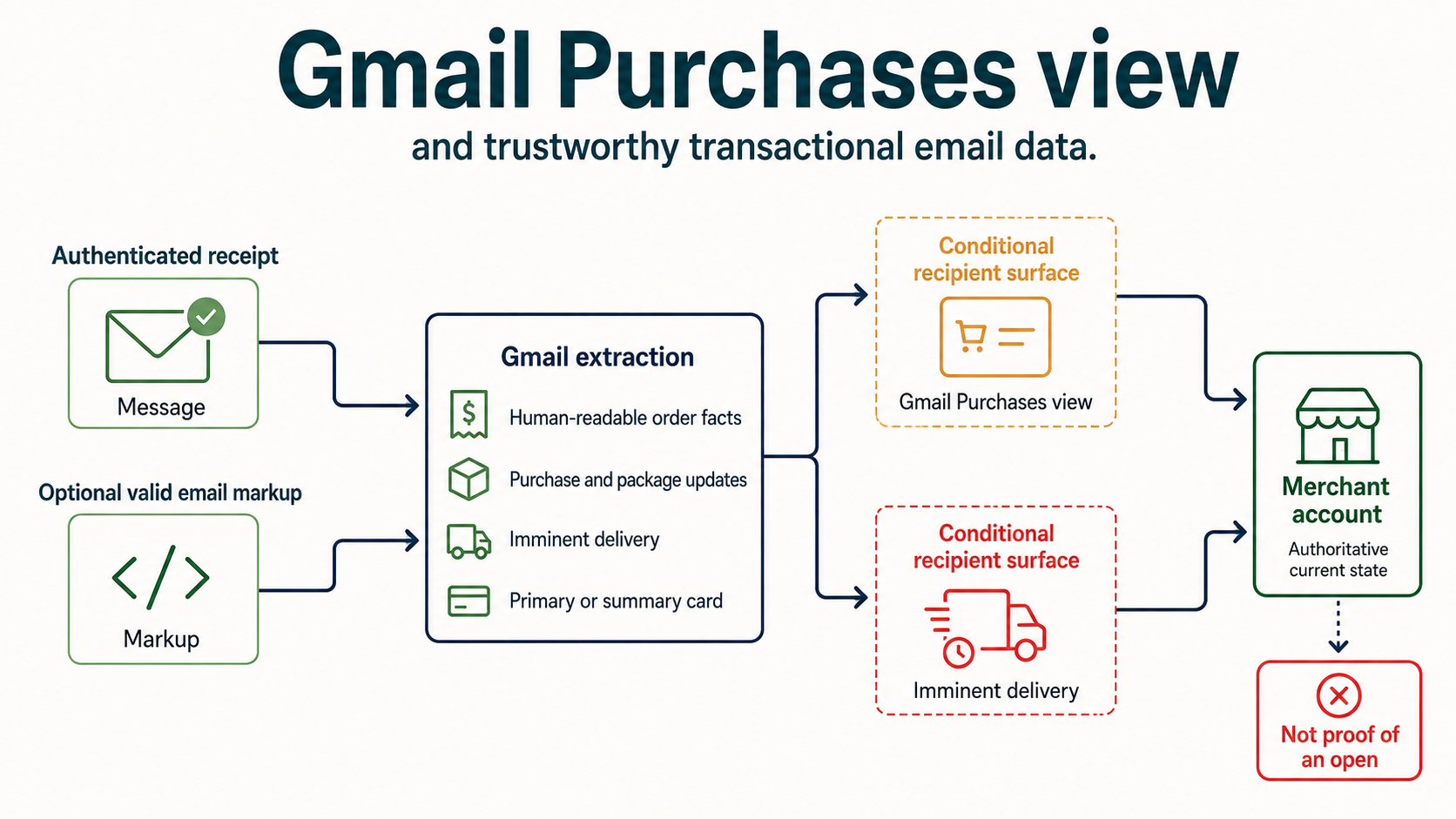
Google announced the Gmail Purchases view on September 11, 2025 for personal Google accounts on mobile and web. It brings purchase-related emails and package updates into one organized list while continuing to surface imminent deliveries in Primary and within message summary cards. This means a recipient can obtain useful order state without navigating the standard inbox sequence or opening each creative in the way a marketer expects. It does not mean every receipt is guaranteed a card, every package appears, or the mailbox view becomes the merchant’s system of record. Transactional mail must remain complete and human-readable, authentication must remain aligned, identifiers must be stable, and the destination site or application must provide the authoritative price, delivery, refund and support state.
The dated mailbox-provider change
| Event field | Verified value | Why it matters |
|---|---|---|
| Historical event date | September 11, 2025 | This is the provider-change date, not the NitWings publication date. |
| Mailbox provider | Gmail | The affected provider estate determines which recipient cohorts require separate evidence. |
| Change area | Commerce UX | This identifies whether the change altered authentication, filtering, visibility, measurement or sender operations. |
| Current status | available-to-supported-personal-google-accounts-on-mobile-and-web | Historical instructions are interpreted against the feature or standard that exists now. |
Gmail had developed purchase summary cards and package tracking over several years. The dedicated view consolidated the recipient experience across messages and order updates, increasing the value of consistent transactional data and the risk of contradictory notices.
This event is best understood as a change in one layer of the email system. Transport acceptance, authentication, placement, interface presentation and user action remain different states. The article therefore records what Gmail Purchases view changed and what it did not change.
How the system worked before the change
Recipients searched the inbox, opened individual receipts or relied on summary cards within messages. A merchant could send order confirmation, shipment, delay and delivery updates with inconsistent subjects, order IDs or tracking links, forcing the recipient to reconstruct state manually.
Sender-side acceptance logs alone could not prove the final recipient state, and shared domains often concealed which platform or message stream created the risk.
Before Gmail Purchases view, teams often had incomplete evidence because sender logs ended at SMTP acceptance while recipient-side behavior occurred inside Gmail personal accounts. That boundary matters: an accepted message can still be filtered, presented differently, ignored or acted upon later.
What changed on the provider side
The new view assembled purchase emails and delivery updates in one place. Packages due soon could still appear near the top of Primary, while summary cards remained in eligible messages. Presentation depended on Google’s extraction and account state, not a sender command.
The change added a provider-controlled decision or interface layer while leaving permission, authentication, reputation, security and honest message purpose in force.
The implementation of Gmail Purchases view created a new operating dependency, not a permanent entitlement. Senders still needed controlled rollout, supported fallbacks, reliable identity and evidence from the actual affected cohort.
Message path before and after
Before
Order system -> individual confirmation and shipment emails
Recipient searches inbox -> opens messages
Merchant site remains authoritative
After
Authenticated transactional stream -> clear visible order facts
Optional valid markup + Gmail extraction
Purchases view -> consolidated orders and package updates
Imminent delivery -> Primary or summary-card convenience
Merchant account -> authoritative current state
Who and what the change affected
| Traffic or stakeholder | What changed | Required interpretation |
|---|---|---|
| Recipients in the affected provider surface | Gmail Purchases view changed what the mailbox could display, infer or act upon. | Segment evidence by supported client, account and provider estate. |
| Permission-based senders | A new capability or recipient signal entered the message path. | Consent, expectation and normal filtering still apply. |
| Deliverability operators | Diagnosis gained another provider-controlled state. | Keep acceptance, placement, presentation and engagement separate. |
| Campaign and lifecycle teams | Message design or timing needed a compatible operating rule. | Protect transactional purpose, suppression and fallback behavior. |
| Data and analytics teams | Historical metrics could change meaning or coverage. | Version definitions and do not compare incompatible populations. |
| Security and privacy owners | The trust or data boundary changed. | Approve endpoints, access, retention and exception handling. |
Effect on delivery, placement and recipient visibility
Keep promotional acquisition out of essential receipts. A transaction message should deliver the expected order information even when images, CSS, markup or enhanced Gmail surfaces are unavailable.
Use consistent From identity, order number, merchant name, carrier and tracking destination. Never place sensitive customer data or bearer credentials in schema or URLs simply to improve extraction.
For Gmail Purchases view, Structured data gives the mailbox provider machine-readable facts, but the underlying message still needs correct human-readable order and shipment content. Schema must never hide the receipt, support path, refund terms or tracking link from clients that ignore annotations.
For Gmail Purchases view, The provider may extract information from markup, message content and its own models, then surface it outside the ordinary creative. That enhanced surface is conditional. Valid markup does not guarantee a receipt card, package alert, position or timing.
For Gmail Purchases view, Transactional streams should be isolated from promotions by purpose, domain and operational policy where appropriate. A receipt with unrelated acquisition content can confuse classification, user expectation and support diagnostics even when its schema validates.
Interpret Gmail Purchases view at the smallest defensible unit: provider, recipient domain, stream, sending domain, DKIM identity, IP pool, campaign and time window. Portfolio averages can hide both a provider-specific regression and an improvement limited to one eligible surface.
Effect on measurement and diagnosis
Do not count appearance in Purchases as an open unless Google explicitly supplies such evidence, which ordinary sender telemetry does not. Measure delivery, support contacts, tracking actions, successful self-service and order-state reconciliation.
Test controlled personal accounts with real lifecycle states: confirmation, shipment, delay, partial shipment, cancellation, refund and delivery. Validate both enhanced and plain-message paths.
When measuring Gmail Purchases view, Separate message delivery from enhanced-surface exposure. A package alert can be useful without an open, while an open does not prove that the alert rendered. Controlled test accounts, schema validation and order-state reconciliation provide better evidence.
When measuring Gmail Purchases view, Use order and shipment identifiers carefully. They are operational data, not campaign tracking tokens. Restrict log access, avoid leaking customer details into URLs and define retention around fulfilment and support needs.
Create an evidence contract before declaring the impact of Gmail Purchases view. Name the event, collection point, population, numerator, denominator, latency, privacy boundary and owner. If any of those are unknown, label the conclusion as directional rather than causal.
Advantages for email marketers
| Potential advantage | When the advantage is real | Evidence to verify |
|---|---|---|
| Clearer recipient experience | The message is expected, authenticated and supported. | User outcomes improve without complaint growth. |
| Better operational evidence | Provider and sender states remain separately observable. | Incidents can be isolated to a specific layer. |
| Stronger identity or control | Configuration matches the verified organizational domain. | Authentication and trust checks remain stable. |
| Safer optimization | A controlled cohort and complete window are used. | Clicks, conversions and complaints support the decision. |
| Repeatable deployment | Ownership, rollback and monitoring are documented. | A second team can reproduce the result. |
Disadvantages and operational risks
| Cost or risk | How it appears | Control |
|---|---|---|
| Capability is mistaken for allowlisting | Teams expect placement without reputation discipline. | State explicitly that normal filtering continues. |
| Unsupported clients receive a broken experience | Content or action disappears outside the target surface. | Maintain and test a complete fallback. |
| A proxy metric becomes business truth | A UI or collection change looks like performance. | Use named denominators and downstream outcomes. |
| Too many variables change together | No cause can be assigned after a regression. | Use a staged rollout with rollback thresholds. |
| Provider-specific behavior is generalized | One domain trend is applied to the full list. | Segment by recipient provider and supported surface. |
| Exceptions outlive their reason | Allow lists, access or configuration increase risk. | Assign an owner, expiry and periodic review. |
What email teams needed to do at the time
- Confirm the historical scope. Record the announced provider, date, clients and eligibility.
- Inventory affected traffic. Map recipient domains, streams, identities and sending platforms.
- Validate authentication. Check SPF, DKIM, DMARC alignment and TLS independently.
- Build a safe fallback. Keep the message useful when the new surface is unavailable.
- Test controlled mailboxes. Capture headers, screenshots, timestamps and outcomes.
- Define measurement. Name populations, denominators, latency and privacy limits.
- Stage the rollout. Change one bounded cohort and set stop conditions.
- Brief support teams. Give them expected behavior and an escalation evidence pack.
What email teams should do now
- Read the current provider documentation. Do not assume the 2020 to 2022 launch rules are unchanged.
- Reconfirm eligibility and support. Test the exact clients, accounts and sending identities in use.
- Keep authentication aligned. Monitor SPF, DKIM, DMARC and TLS as separate controls.
- Preserve permission evidence. A presentation feature does not repair weak acquisition.
- Segment provider traffic. Diagnose Gmail personal accounts separately before changing global policy.
- Protect suppressions and transactional streams. Do not let experimentation delay required state changes.
- Retain raw evidence. Store message IDs, timestamps, headers, configuration and test results.
- Use outcome metrics. Include clicks, conversions, complaints, opt-outs and support impact.
- Review security and privacy. Limit data, endpoints, credentials and exceptions.
- Maintain rollback. Name the owner and the threshold that returns traffic to the known-safe path.
Worked deliverability scenario
A marketplace sends a confirmation naming the marketplace, a shipment email naming only the seller and a carrier update with a different order reference. Gmail cannot reliably present a coherent thread, and recipients contact support. The team standardizes merchant and order identifiers, validates structured data, keeps every fact visible in HTML and text, and links to an authenticated order page that remains authoritative.
The decisive improvement for Gmail Purchases view is operational: the team separates provider evidence from assumptions, changes one controlled variable, records a rollback threshold and waits for a complete observation window. That prevents a visible interface change from becoming an excuse for unrelated domain, volume or creative changes.
Evidence and diagnostics
- Message identity: RFC 5322 From, envelope sender, DKIM domain and selector.
- Transport: connecting IP, TLS result, SMTP response and provider timestamp.
- Authentication: SPF, DKIM, DMARC and ARC results from the received header.
- Eligibility: provider registration, tenant setting, certificate or supported-client state.
- Rendering: raw MIME, fallback, screenshots and client version.
- Recipient scope: provider domain, account type, geography and app surface.
- Behavior: clicks, replies, conversions, complaints and unsubscribes.
- Change record: deployment time, owner, cohort, configuration diff and rollback threshold.
- Comparison: unaffected control cohort with the same purpose and acquisition source.
Failure modes and incorrect conclusions
- Equating SMTP acceptance with inbox placement. These are separate receiver decisions.
- Calling a provider UI change a reputation penalty. Verify transport and folder evidence first.
- Removing the fallback. Support and eligibility are never universal.
- Changing IP, domain, creative and cadence together. The test becomes uninterpretable.
- Trusting opens as the only outcome. Collection and privacy controls distort them.
- Ignoring the recipient denominator. Portfolio averages conceal provider-specific effects.
- Keeping permanent exceptions. Unowned allow lists and credentials accumulate risk.
- Using launch documentation as current policy. Recheck the maintained provider page.
Current status and superseding changes
The Purchases view remains a recipient-side organization feature for supported personal accounts. Gmail can change extraction and presentation. Current Gmail markup documentation and controlled tests should guide implementation, while the transactional message remains independently useful.
Current behavior for Gmail Purchases view must be checked again before a production change because provider documentation, client support and eligibility can evolve. The dated event remains useful as a historical control point, while the linked current documentation governs present operation.
A production runbook for Gmail Purchases view should contain more than a setup instruction. Record the business purpose, accountable owner, approved sending identities, affected recipient population, prerequisites, evidence sources, known unsupported paths, rollout cohort, stop threshold and rollback method. Attach a dated configuration export or DNS answer instead of relying on a screenshot with no timestamp. Review the runbook after an ESP, gateway, domain, certificate, mailbox client or provider policy changes.
Incident handling for Gmail Purchases view should begin with a narrow comparison. Select one affected message and one known-good message with the same stream and nearby time. Compare SMTP responses, authentication results, raw MIME, provider or tenant eligibility, client presentation and downstream action. Widen the query only after identifying the first state where their paths differ. This is faster and safer than changing sending IPs, From domains and creative together.
Ownership for Gmail Purchases view must cross organizational boundaries. Deliverability owns provider evidence and traffic controls; engineering owns MIME, APIs and event integrity; security owns trust and endpoint risk; privacy owns collection and retention; marketing owns permission, promise and cadence; support owns recipient-facing explanations. A launch is incomplete when any team lacks the evidence required to distinguish expected behavior from failure.
Evidence for Gmail Purchases view also needs a retention rule. Keep enough raw headers, configuration history and aggregate outcome data to investigate a delayed complaint or regression, but do not retain recipient-level data merely because it was convenient during launch. Limit access by role, document the permitted purpose, remove expired exports and preserve only the minimum artifacts needed to reproduce the operational conclusion.
Finally, retain a negative control for Gmail Purchases view. Send a technically valid message that is intentionally outside the feature’s eligible condition, while keeping purpose and audience comparable. The difference shows whether Gmail personal accounts is applying the feature where expected. It also prevents teams from interpreting an unrelated seasonal, audience or reputation shift as proof that the feature caused the result.
Operator checklist
- Record the exact historical event date and source.
- Document what changed and what explicitly did not change.
- Map affected providers, domains, clients and account types.
- Validate SPF, DKIM, DMARC alignment and TLS.
- Keep a complete, accessible fallback message.
- Test with raw headers and controlled recipient accounts.
- Separate acceptance, placement, presentation and action metrics.
- Name every numerator, denominator and observation window.
- Monitor complaints, opt-outs and downstream outcomes.
- Set rollout ownership and rollback thresholds.
- Revalidate the current provider requirement before deployment.
Primary and contemporaneous references
- Google Keyword: Purchase tracking view and relevant promotions: Primary evidence used to verify the dated event or current operating requirement.
- Google Keyword: Updated Gmail summary cards: Primary evidence used to verify the dated event or current operating requirement.
- Google Developers: Email markup: Primary evidence used to verify the dated event or current operating requirement.