
Configure Linux, Windows, SSH and WebSocket Agents
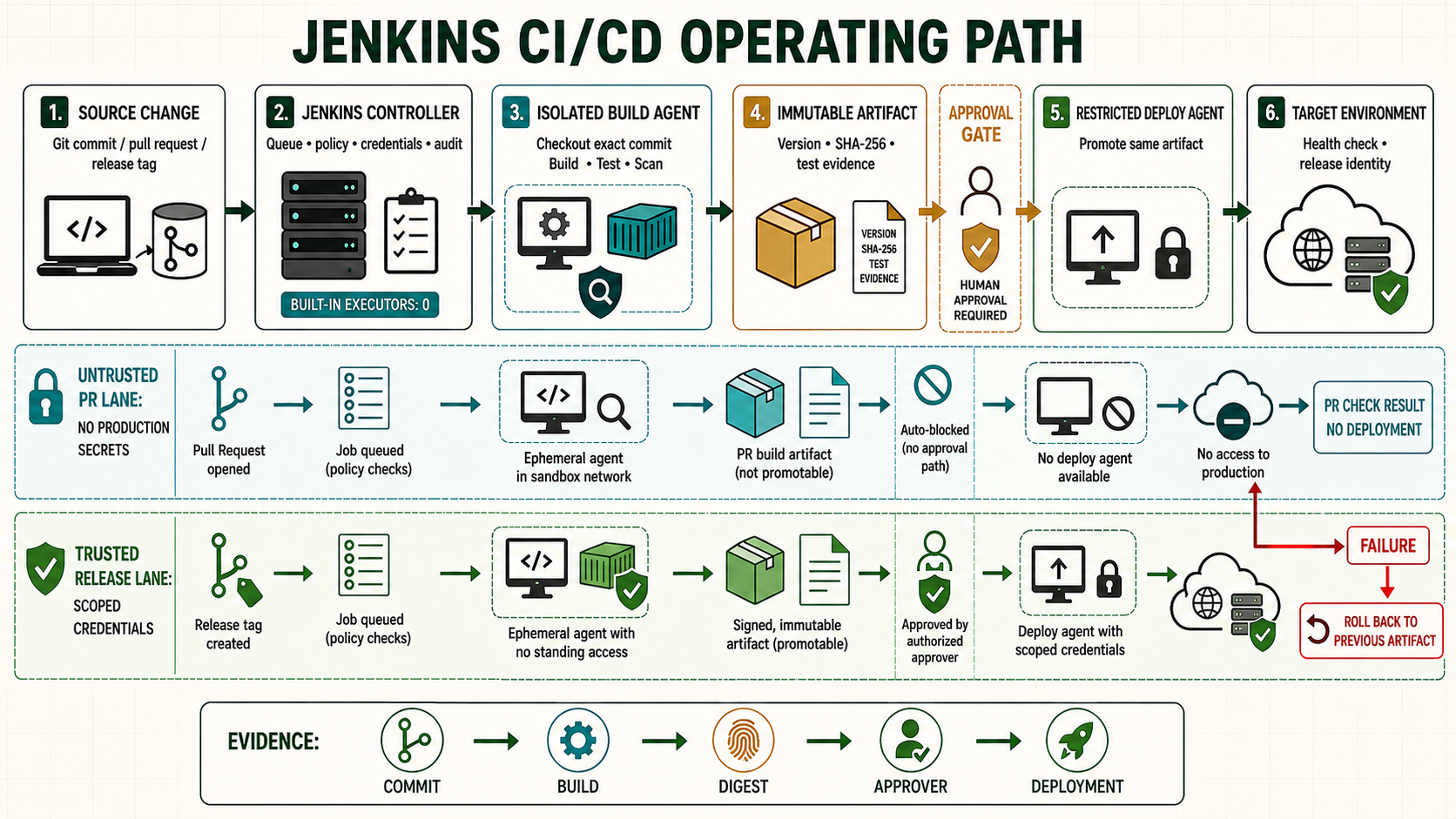
A reliable Jenkins installation separates orchestration from execution. The controller keeps configuration, credentials, queue state and Pipeline coordination; agents compile, test, package and deploy. This guide builds that boundary, connects a Linux agent over SSH and a Windows agent over WebSocket, then tests labels, tools and failure recovery.
Plan the controller and agent boundary
Set the controller's built-in executor count to 0 after at least one agent is available. Give each workload a label such as linux, windows, nodejs or deploy. A label describes capability or trust, not a hostname. Keep deployment agents separate from agents that build untrusted pull requests.
| System | Runs | Recommended access |
|---|---|---|
| Controller | Scheduling, UI, credentials, Pipeline state | No ordinary builds; private backend; administrator access only |
| Build agent | Checkout, compile, tests, packaging | Repository and artifact services; no production key |
| Deployment agent | Promotes an approved immutable artifact | Restricted target and environment-specific credential |
Prepare a Linux SSH agent
Install the Java version supported by the controller release plus the build tools required by this label. The controller and agent must have network reachability in the chosen direction.
sudo useradd --create-home --shell /bin/bash jenkins-agent
sudo install -d -o jenkins-agent -g jenkins-agent -m 0700 \
  /home/jenkins-agent/.ssh /srv/jenkins-agent
sudo apt-get update
sudo apt-get install -y openjdk-21-jre-headless git openssh-server
java -version
git --version
df -h /srv/jenkins-agent
On an administrator workstation, create a dedicated key. Protect the private key; install only the public key on the agent.
ssh-keygen -t ed25519 -a 100 -f ./jenkins-agent-ed25519 \
  -C 'jenkins-controller-to-agent'
ssh-copy-id -i ./jenkins-agent-ed25519.pub [email protected]
ssh -i ./jenkins-agent-ed25519 \
  [email protected] 'id; java -version'
Verify the host fingerprint through a trusted console or infrastructure inventory before Jenkins connects:
sudo ssh-keygen -lf /etc/ssh/ssh_host_ed25519_key.pub
ssh-keygen -lf /etc/ssh/ssh_host_rsa_key.pub
Create the Linux node in Jenkins
- Add an SSH Username with private key credential in the narrowest useful folder scope. Use username
jenkins-agentand paste the dedicated private key. - Open Manage Jenkins > Nodes > New Node. Create a permanent agent named
linux-build-01. - Set remote root to
/srv/jenkins-agent, executors to the measured safe concurrency, labels tolinux nodejs, and usage to jobs matching its labels. - Select Launch agents via SSH, the credential, and a host-key verification strategy that validates the known host key. Do not select a non-verifying strategy.
- Save, open the node log, and confirm that the remoting process connects with the expected Java runtime.
Connect a Windows agent over WebSocket
Create a dedicated, non-administrator Windows service account and a directory such as C:\JenkinsAgent. Install a controller-supported Java runtime and confirm java -version. Create a permanent node with label windows, select inbound launch, enable WebSocket when available, and copy the command shown by Jenkins rather than guessing the agent URL or secret.
New-Item -ItemType Directory -Force C:\JenkinsAgent
Set-Location C:\JenkinsAgent
java -version
# Download agent.jar from the authenticated node page, then use the
# exact WebSocket command generated for this node.
Run the agent as a managed Windows service with restricted file permissions. Treat the inbound secret as a credential, rotate it after exposure, and never place it in source control or a shared script.
Route and verify a Pipeline
pipeline {
  agent none
  stages {
    stage('Linux check') {
      agent { label 'linux' }
      steps {
        sh 'set -eu; id; java -version; git --version; pwd; df -h .'
      }
    }
    stage('Windows check') {
      agent { label 'windows' }
      steps {
        bat 'whoami && java -version && git --version && cd'
      }
    }
  }
}
If both stages pass, set Manage Jenkins > Nodes > Built-In Node > Configure > Number of executors to 0. Confirm that a new job remains queued when no matching agent exists instead of falling back to the controller.
Capacity, isolation and maintenance
- Start with one executor per CPU-intensive worker; increase only after measuring CPU, memory, disk I/O and build interference.
- Use separate operating-system users or ephemeral agents for teams with different trust. A workspace is not a security boundary.
- Pin tool versions per label, record agent images or configuration as code, and replace drifted agents.
- Mark an agent temporarily offline before maintenance and add a reason. Let active builds finish before restarting it.
- Do not grant the agent user unrestricted
sudo, Docker socket access, controller filesystem access or production credentials merely for convenience.
Troubleshoot agent failures
| Symptom | Check | Action |
|---|---|---|
| SSH connection refused | ss -lntp, firewall, route | Open only the required source-to-agent path and confirm SSH is running. |
| Host key rejected | Trusted fingerprint and saved key | Investigate an unexpected change; update only after verification. |
| Agent connects then drops | Agent log, Java, proxy idle timeout, disk | Use a supported Java runtime and fix the network or resource cause. |
| Job stays queued | Requested label, node status, executor count | Correct the label or restore suitable capacity. |
| Permission denied in workspace | Owner, mode, mount flags, security policy | Restore agent ownership; do not solve it with world-writable permissions. |
Unsafe commands you may encounter
Unsafe: automatic host-key enrollment can accept an attacker's key if DNS or the network is compromised. Keep the command visible for diagnosis or controlled bootstrap, but compare its output with a trusted fingerprint before saving it.
ssh-keyscan -H agent.example.com >> ~/.ssh/known_hostsUnsafe: chmod -R 777 /srv/jenkins-agent removes a useful access boundary. Correct the owner and minimum directory/file modes instead.
Acceptance checklist
- Controller executors are zero.
- Every label maps to a documented tool set and trust class.
- SSH host keys are verified and inbound secrets are protected.
- Agents use non-administrator accounts and restricted network access.
- Linux and Windows validation stages pass and offline behavior is tested.