
Secure the Jenkins Controller, Authentication and Authorization
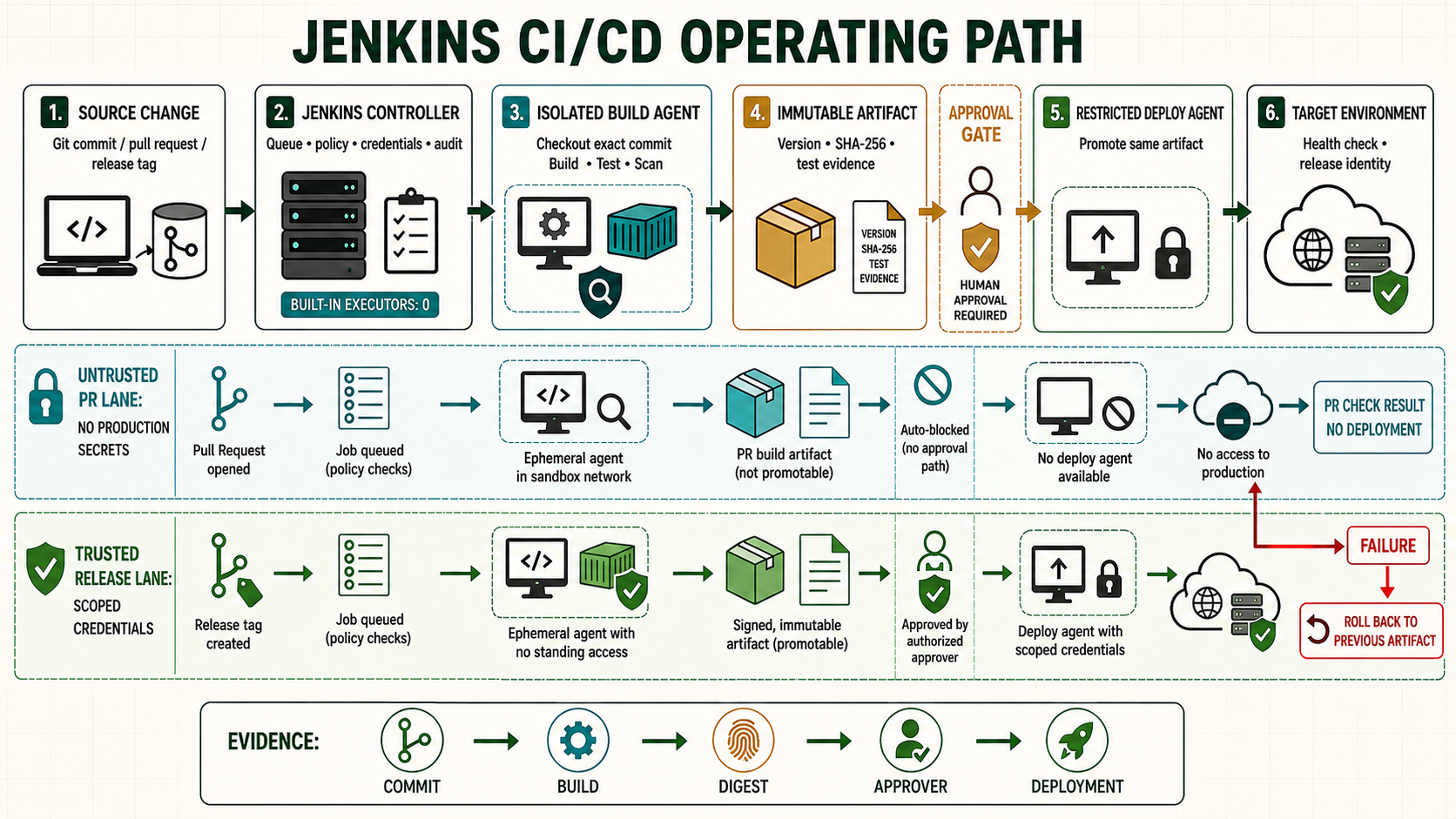
A Jenkins controller is a privileged automation control plane. Job configuration, trusted Jenkinsfiles, plugins and Script Console access can become code execution, so authentication alone is not a sufficient boundary.
Start from a known controller checkpoint
Use the accepted controller and agent checkpoint from the prior lesson. Record the Jenkins version, Java runtime, active configuration, plugin inventory and current Git revision before changing this boundary.
java -version
sudo systemctl is-active jenkins
sudo journalctl -u jenkins -n 50 --no-pager
curl -fsS http://127.0.0.1:8080/login >/dev/null
Understand the operating boundary
| Decision | Implementation | Evidence |
|---|---|---|
| Scope | Name the controller, folder, job, node and environment | The selected boundary is visible |
| Input | Use reviewed source and scoped credentials | Revision and credential ID are attributable |
| Execution | Set label, timeout and concurrency policy | Queue and node evidence match intent |
| Recovery | Preserve the last known working state | Rollback is rehearsed before promotion |
Prepare the lab
Create administrator, operator, developer and auditor lab identities. Keep host-console recovery open while changing permissions and back up the current security configuration.
sudo ss -lntp | grep ':8080'
sudo systemctl cat jenkins
sudo systemctl stop jenkins
sudo rsync -aHAX --numeric-ids /var/lib/jenkins/ /backup/jenkins-before-auth/
sudo systemctl start jenkins
curl -kI https://jenkins.example.test/login
Implement it step by step
- Bind Jenkins to loopback or a private interface and expose one HTTPS origin through a reviewed reverse proxy.
- Configure OIDC, LDAP or named local lab accounts; disable anonymous visibility unless intentionally required.
- Grant groups only the permissions needed at controller, folder and job scope. Overall/Administer belongs to the smallest platform group.
- Separate pull-request, trusted-build and deployment folders, nodes and credentials.
- Test both permitted and denied operations for every persona before closing recovery access.
Job/Configure is an execution permission because a user can change Pipeline code. Repository write access has the same concern when Jenkins trusts its Jenkinsfile. Folder credentials are narrower than global credentials, but any executable code trusted inside that folder may attempt to disclose them. Masking is log hygiene, not a security sandbox.
# Reverse-proxy essentials
proxy_pass http://127.0.0.1:8080;
proxy_set_header Host $host;
proxy_set_header X-Forwarded-Proto https;
proxy_set_header X-Forwarded-For $proxy_add_x_forwarded_for;

# systemd override
[Service]
Environment="JENKINS_LISTEN_ADDRESS=127.0.0.1"
Trace authorization from the outermost object inward. Overall visibility permits entry, then folder and item permissions decide whether a job can be read, built, cancelled or configured. Credential availability follows object scope, not the page where an administrator happened to create it. Agent labels select capacity but do not create network isolation; operating-system identity, namespaces, firewall rules and cloud templates enforce that promise.
Separate human sessions from automation access. Use individual API tokens with expiry and revocation policy instead of shared administrator passwords. A reverse proxy may add an identity boundary, but Jenkins must still receive the correct identity for permissions and audit. Test logout, expired sessions, removed group membership and disabled accounts alongside normal login.
Verify the positive path
Verify the listener, certificate and Jenkins URL, then exercise the access matrix. Developer may build the assigned folder but receives 403 for controller administration; auditor can read evidence but cannot configure jobs.
sudo ss -lntp | grep -E ':443|127.0.0.1:8080'
sudo nginx -t
curl --fail --user 'developer:API_TOKEN' https://jenkins.example.test/me/api/json
curl -sS -o /dev/null -w '%{http_code}\n' --user 'developer:API_TOKEN' https://jenkins.example.test/computer/api/json| Check | Expected evidence | Reject when |
|---|---|---|
| Configuration | Matches reviewed source | UI drift or unresolved placeholder remains |
| Execution | Runs on the intended isolated node | Controller or wrong trust zone executes code |
| Evidence | Revision, result and outputs are retained | Green status has no attributable output |
| Recovery | Known state can be restored and verified | Recovery depends on an improvised manual edit |
Recover a controlled administrator lockout
Inject a group-name mismatch in the lab. Preserve the rejected configuration and logs, stop Jenkins from host console, restore only the known authorization state and retest every persona. Do not expose the controller or casually disable security to regain access.
sudo sha256sum /var/lib/jenkins/config.xml
sudo systemctl stop jenkins
sudo cp -a /var/lib/jenkins/config.xml /backup/config.xml.lockout
sudo journalctl -u jenkins --since '-30 minutes' --no-pager
Troubleshoot by failed layer
| Symptom | Inspect | Correction |
|---|---|---|
| Queued or unavailable | Label, executor, node and network | Repair the failed scheduling or transport layer |
| Configuration rejected | Controller log, syntax and plugin ownership | Correct source; do not bypass validation |
| Job fails unexpectedly | First causal console error and agent logs | Fix one layer and rerun the smallest scope |
| Second run differs | Mutable dependency, workspace or UI drift | Pin inputs and remove hidden retained state |
Unsafe shortcuts
- Unsafe: granting administrator access to avoid designing a narrow permission removes accountability.
- Unsafe: binding protected secrets around untrusted repository code permits exfiltration despite masking.
- Unsafe: changing controller state without a verified backup and rollback turns a small error into an outage.
Operate, recover and retain evidence
Own the configuration, plugin and credential dependencies explicitly. Record the controller version, Git revision, immutable tool or artifact identity, initiator, approver and acceptance result. Rehearse the failure path on a disposable controller before adopting it as production procedure.
sudo systemctl stop jenkins
sudo rsync -aHAX --numeric-ids /backup/jenkins-known-good/ /var/lib/jenkins/
sudo restorecon -RF /var/lib/jenkins 2>/dev/null || true
sudo systemctl start jenkins
sudo journalctl -u jenkins -n 150 --no-pager
Worked use cases
| Situation | Design choice | Acceptance |
|---|---|---|
| Lab rollout | Apply to one disposable controller or folder | Positive, negative and recovery results are retained |
| Team rollout | Promote the same reviewed revision | Permissions and behavior remain consistent |
| Production change | Use backup, change window and acceptance | Failure stays bounded and rollback is tested |
Knowledge checks
Independent lab
- Capture the starting version, configuration and plugin evidence.
- Implement the change on a disposable controller or folder.
- Run one successful case and one controlled failure.
- Restore the accepted state and prove service behavior, not only process state.
- Repeat from a clean source checkout without relying on remembered UI actions.