
Connect GitHub, Webhooks and Multibranch Pipelines
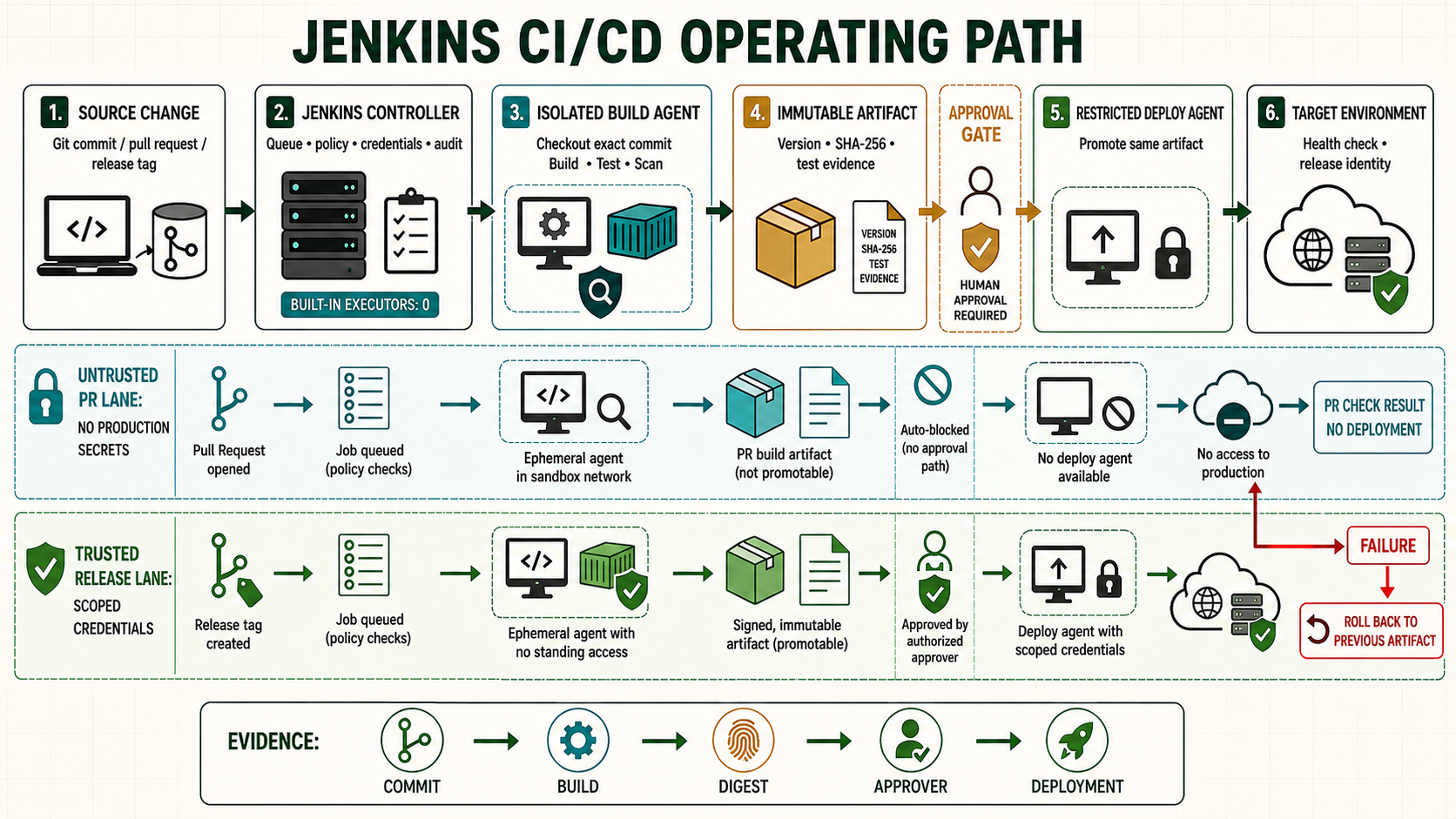
A useful Jenkins and GitHub integration discovers branches and pull requests, validates the repository's Jenkinsfile, reports status, and keeps untrusted changes away from protected credentials. This guide configures the connection with a GitHub App, a webhook and a Multibranch Pipeline.
Choose the integration model
| Method | Use | Credential boundary |
|---|---|---|
| GitHub App | Organization or repository integration | Fine-grained installation scope and short-lived installation tokens |
| Fine-grained personal access token | Small controlled integration when App setup is unavailable | Tied to a person; requires rotation and continuity planning |
| Deploy key | Git checkout for one repository | Repository-specific SSH key; does not provide full API integration |
Use a GitHub App for managed organization integration. Grant only the repository metadata, contents, pull-request, checks and webhook permissions actually required. Install it only on selected repositories during rollout.
Prepare Jenkins and its public endpoint
- Install and review the GitHub Branch Source, Pipeline and Credentials plugins.
- Publish Jenkins behind HTTPS through an approved reverse proxy. Set the Jenkins URL to the same external origin.
- Permit GitHub webhook traffic to the webhook endpoint without exposing the administration interface.
- Keep anonymous administrative and job-configuration access disabled.
The commonly used webhook endpoint is:
https://jenkins.example.com/github-webhook/Create and store the GitHub App credential
- In GitHub organization settings, create a GitHub App with a clear owner and callback/webhook URLs for this Jenkins service.
- Generate its private key and record the App ID. Store the downloaded key temporarily in a protected administrator location.
- Install the App on the selected organization and repositories.
- In Jenkins, add a GitHub App credential at folder scope. Supply the App ID and private key, then test the API connection.
- Delete the temporary key copy after the managed credential and recovery copy are confirmed.
Do not print the private key, installation token or webhook secret. Credentials masking reduces accidental disclosure but cannot make an untrusted shell step safe.
Create a Multibranch Pipeline
- Select New Item > Multibranch Pipeline.
- Add a GitHub branch source, choose the GitHub App credential, and select the repository.
- Configure branch and pull-request discovery for your review policy. Do not expose protected credentials to code from untrusted forks.
- Set the script path to
Jenkinsfileunless the repository intentionally uses another reviewed path. - Save and run Scan Multibranch Pipeline Now. Jenkins creates jobs for discovered branches containing a Jenkinsfile.
pipeline {
  agent { label 'linux' }
  options { skipDefaultCheckout(true) }
  stages {
    stage('Checkout') {
      steps { checkout scm }
    }
    stage('Verify revision') {
      steps {
        sh 'set -eu; git rev-parse HEAD; git status --porcelain'
      }
    }
    stage('Test') {
      steps { sh 'set -eu; ./ci/test.sh' }
    }
  }
  post { always { junit testResults: 'reports/*.xml', allowEmptyResults: true } }
}
Configure and test the webhook
Add or confirm the webhook created for the App. Use JSON, HTTPS and a secret. Send a test delivery, inspect its HTTP response, then push a test branch. A successful webhook should cause indexing or a build without giving the sender permission to change job configuration.
# Reverse-proxy examples: locate webhook requests and status codes.
sudo journalctl -u jenkins --since '-15 minutes' --no-pager
sudo tail -n 100 /var/log/nginx/access.log
sudo tail -n 100 /var/log/nginx/error.log
Protect pull-request builds
- Build untrusted pull requests on isolated agents without deployment, signing or production credentials.
- Require repository review and protected-branch checks before merge.
- Use separate jobs or explicit trusted-branch conditions for artifact publication and deployment.
- Remember that a pull request can modify the Jenkinsfile and any script it calls.
stage('Publish') {
  when {
    allOf {
      branch 'main'
      not { changeRequest() }
    }
  }
  steps { sh 'set -eu; ./ci/publish.sh' }
}
Troubleshooting map
| Problem | Evidence | Fix |
|---|---|---|
| Webhook receives 404 | GitHub delivery response and proxy path | Preserve /github-webhook/, host and HTTPS forwarding. |
| Webhook succeeds but no job appears | Multibranch scan log | Check App repository scope, discovery behavior and Jenkinsfile path. |
| API rate or authentication error | Credential test and GitHub App installation | Correct App ID/private key and install the App on the repository. |
| Status never reports | Plugin log and App permissions | Grant the specific checks/status permission and retest. |
| Duplicate builds | Webhook deliveries and configured polling | Remove duplicate hooks/triggers; retain periodic indexing only as a recovery control. |
Unsafe patterns
Unsafe: embedding a token in a repository URL leaks it through configuration, logs and process inspection:
https://USERNAME:[email protected]/OWNER/REPOSITORY.gitStore a scoped credential in Jenkins and select it by credential ID. Unsafe: running fork pull requests with production credentials allows changed repository code to exfiltrate them. Separate validation from trusted publication and deployment.
Prove webhook, discovery and checkout as separate paths
A GitHub App can be used by the controller for repository discovery, webhook management and status reporting, while checkout happens on an agent. Record these permissions separately. For public pull requests, assume the proposed repository contents and every invoked test script are hostile. Do not bind deployment, signing or registry-write credentials around that code. Use trusted-revision policies supported by the branch-source plugin and test a fork request before enabling organization-wide discovery. A webhook delivery returning HTTP success proves only that Jenkins accepted the request; branch indexing, Jenkinsfile retrieval, checkout and status publication can still fail later.
# Verify repository state inside the Multibranch run
git remote -v
git rev-parse HEAD
git show --no-patch --format='%H %P %cI %s' HEAD
# GitHub webhook endpoint
https://jenkins.example.test/github-webhook/
# Jenkins branch indexing log must show the same repository and head revision
Evidence and failure exercise
| Layer | Evidence | Failure response |
|---|---|---|
| Webhook | GitHub delivery ID, time and Jenkins HTTP result | Correct routing or signature/configuration; never expose admin UI |
| Indexing | Branch-source scan log and discovered head | Check App installation and API permissions |
| Checkout | Agent log and exact commit SHA | Correct checkout credential and ref policy |
| Status | Check context attached to the same commit | Repair App checks/status permission |
Create a branch and a fork-style pull request in the lab. Confirm the trusted branch can use only its approved build credential and the untrusted request cannot access any protected credential. Delete the branch and verify the orphaned-item retention policy eventually removes its job without erasing required audit evidence immediately.
Independent operating checks
- Redeliver one webhook and prove it does not create duplicate deployment.
- Rotate the GitHub App private key and confirm discovery plus checkout recover.
- Disable the App installation for one repository and identify the failing layer.
- Compare scan credentials with checkout credentials and justify each permission.