
Pipeline Types, Declarative and Scripted Jenkinsfiles
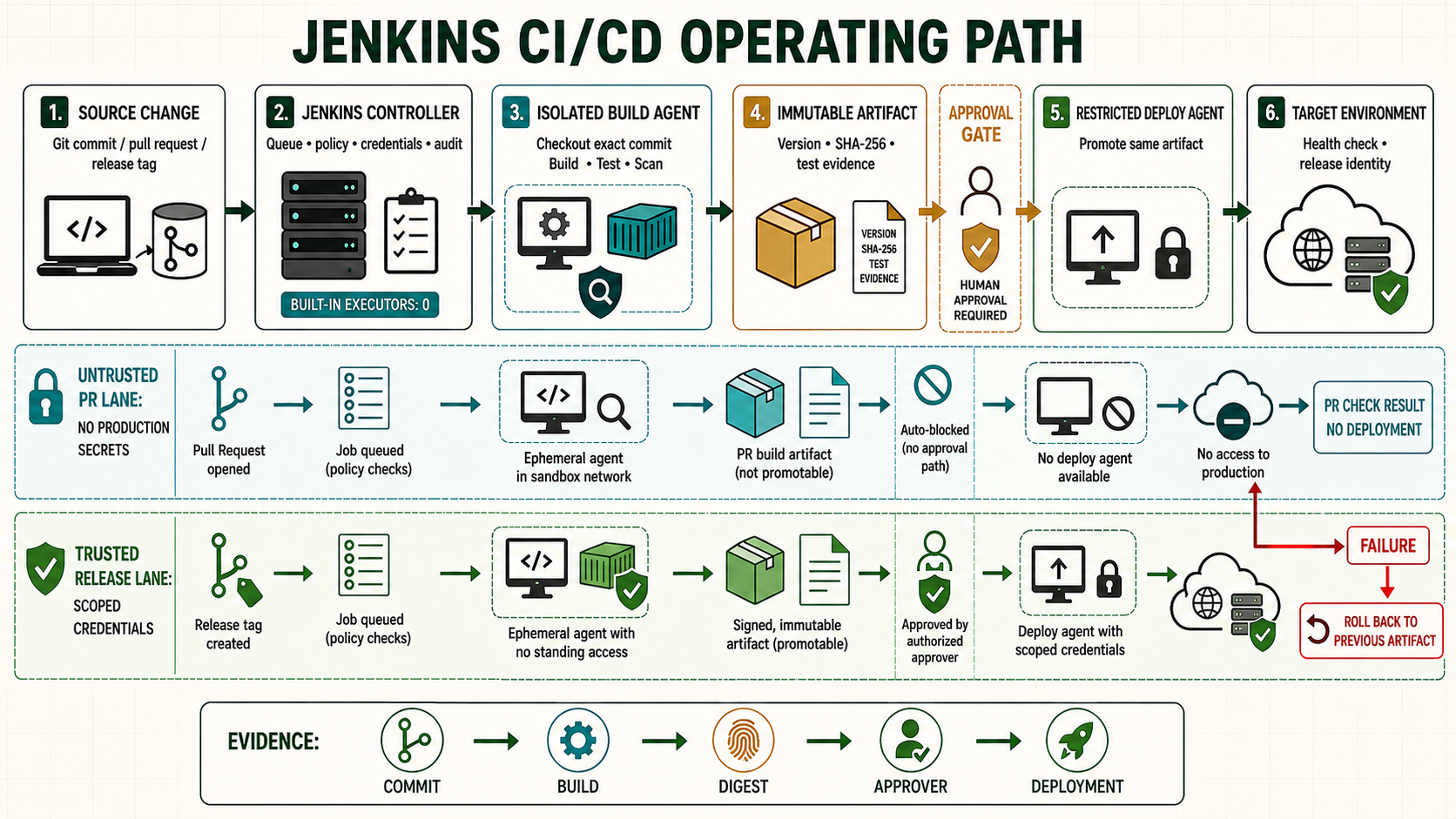
Jenkins uses the word Pipeline for both a delivery process and the code that describes it. Before writing a Jenkinsfile, choose the correct job model, syntax and source-control strategy. This lesson compares Freestyle, Pipeline, Multibranch Pipeline and Organization Folder jobs, then builds Declarative, Scripted, parallel and matrix examples.
Separate job type from Pipeline syntax
A Jenkins item type controls how Jenkins discovers and configures work. A Pipeline syntax controls how the delivery flow is expressed. For example, a Multibranch Pipeline item can run a Declarative Jenkinsfile or a Scripted Jenkinsfile.
| Jenkins item | Use it for | Source behavior | Recommendation |
|---|---|---|---|
| Freestyle project | Small integration or a simple command that cannot yet be moved | Steps primarily configured in the UI | Avoid for growing delivery workflows because review and reuse are weak. |
| Pipeline | One controlled Pipeline definition | Inline script or Pipeline script from SCM | Use SCM. Inline scripts are suitable only for small administration tasks. |
| Multibranch Pipeline | Branches, pull requests and tags with a Jenkinsfile | Discovers matching repository heads automatically | Default choice for an application repository. |
| Organization Folder | Many repositories owned by one GitHub organization | Discovers repositories and their branches/PRs | Use when governance is consistent across a repository fleet. |
| Folder | Ownership, permissions, credentials and naming boundaries | Contains other items | Use folder-scoped authorization and credentials for teams/environments. |
Declarative and Scripted Pipeline
| Characteristic | Declarative | Scripted |
|---|---|---|
| Top level | pipeline {} | node {} and Groovy control flow |
| Structure | Opinionated sections and directives | Flexible step-oriented program |
| Validation | Stronger syntax validation and visual stage model | More responsibility on the author |
| Typical use | Most CI/CD Pipelines | Dynamic behavior that Declarative cannot express cleanly |
| Mixing | script {} permits a small Scripted region | Can call ordinary Pipeline steps |
Prefer Declarative Pipeline for readability and policy. Use script {} for a bounded dynamic calculation, not to hide the entire Pipeline inside one Scripted block.
Read a Declarative Jenkinsfile in order
pipeline {
  agent none
  options {
    timestamps()
    timeout(time: 45, unit: 'MINUTES')
    disableConcurrentBuilds()
    buildDiscarder(logRotator(numToKeepStr: '30'))
  }
  parameters {
    choice(name: 'TARGET_ENV', choices: ['dev', 'staging'], description: 'Deployment target')
    booleanParam(name: 'RUN_SLOW_TESTS', defaultValue: false, description: 'Run extended tests')
  }
  environment {
    APP_NAME = 'example-api'
  }
  stages {
    stage('Build') {
      agent { label 'linux && nodejs' }
      steps {
        checkout scm
        sh 'set -euo pipefail; ./ci/build.sh'
      }
    }
    stage('Slow tests') {
      when { expression { params.RUN_SLOW_TESTS } }
      agent { label 'linux' }
      steps { sh 'set -euo pipefail; ./ci/slow-tests.sh' }
    }
  }
  post {
    always { junit testResults: 'reports/*.xml', allowEmptyResults: true }
    cleanup { deleteDir() }
  }
}
agent noneprevents one agent from being reserved for the whole run; each stage chooses the capability it needs.optionsdefines runtime policy. A stage-level timeout includes time waiting for that stage's agent.parametersbecomes the read-onlyparamsmap. Validate parameters again before using them in shell or deployment commands.environmentdefines non-secret values. Bind secrets only around the steps that need them.whendecides whether a stage runs. UsebeforeAgent truewhen a condition should be evaluated before provisioning an expensive stage agent.postpublishes evidence and performs result-specific or final cleanup.
Scripted Pipeline example
node('linux') {
  timestamps {
    try {
      stage('Checkout') { checkout scm }
      stage('Build') { sh 'set -euo pipefail; ./ci/build.sh' }
      stage('Test') { sh 'set -euo pipefail; ./ci/test.sh' }
    } catch (err) {
      currentBuild.result = 'FAILURE'
      throw err
    } finally {
      junit testResults: 'reports/*.xml', allowEmptyResults: true
      deleteDir()
    }
  }
}
Scripted syntax is not ordinary Groovy. Pipeline execution is transformed so it can pause and resume; calling unsupported methods, storing non-serializable objects across steps, or mixing Pipeline steps inside methods annotated @NonCPS causes difficult failures.
Sequential, parallel and matrix execution
stage('Quality') {
  parallel {
    stage('Unit') { steps { sh './ci/unit.sh' } }
    stage('Lint') { steps { sh './ci/lint.sh' } }
    stage('Security') { steps { sh './ci/security.sh' } }
  }
}
stage('Compatibility') {
  matrix {
    axes {
      axis { name 'NODE_VERSION'; values '22', '24' }
      axis { name 'PLATFORM'; values 'linux', 'windows' }
    }
    excludes {
      exclude {
        axis { name 'NODE_VERSION'; values '22' }
        axis { name 'PLATFORM'; values 'windows' }
      }
    }
    agent { label "${PLATFORM}" }
    stages {
      stage('Test') {
        steps { echo "Test Node ${NODE_VERSION} on ${PLATFORM}" }
      }
    }
  }
}
Parallel branches need independent directories, ports, test accounts and output names. A matrix is appropriate when the same stages run across combinations. Do not use parallel deployment to environments sharing one mutable database unless the release design supports it.
Branch, pull request, tag and change routing
stage('Deploy main') {
  when { allOf { branch 'main'; not { changeRequest() } } }
  steps { sh './ci/deploy-staging.sh' }
}
stage('Publish tag') {
  when { buildingTag() }
  steps { sh './ci/publish-tag.sh' }
}
stage('Service A') {
  when { changeset 'services/service-a/**' }
  steps { build job: 'service-a-ci', wait: true, propagate: true }
}
Local infrastructure Jenkinsfiles use this monorepo orchestration pattern: a root Pipeline detects changed paths and triggers component jobs. It reduces unnecessary work, but wait: false makes the parent succeed without knowing the child result. Use wait: true, propagate: true when the orchestrator must represent delivery success.
Use Shared Libraries for governed reuse
Move stable cross-repository behavior such as standard build, scan and deployment wrappers into a versioned Shared Library. Keep application-specific stages visible in the Jenkinsfile.
@Library('delivery-library@v3') _

pipeline {
  agent none
  stages {
    stage('Build') {
      steps { standardNodeBuild(nodeVersion: '24') }
    }
  }
}
Pin the library version for release Pipelines. A globally trusted library can execute outside the Groovy sandbox and is controller-trusted code; restrict its repository and reviewers accordingly.
Pipeline development and validation tools
- Use the Snippet Generator at
/pipeline-syntaxfor installed plugin steps. - Use the Declarative Directive Generator for
agent,when,matrixand other directives. - Validate in a non-production controller or folder with non-production credentials.
- Test success, failure, timeout, retry, cancelled approval, agent loss and restart behavior.
- Keep the Jenkinsfile and every invoked script under review in source control.
Unsafe design patterns
Unsafe: a single enormous script {} block defeats Declarative validation and makes restart behavior difficult to reason about. Unsafe: allowing untrusted pull requests to edit a Jenkinsfile that receives protected credentials enables credential theft. Unsafe: interpolating an unchecked parameter into sh can turn user input into a command.
Practice lab
- Create a Multibranch Pipeline from a training repository.
- Add Build, Test and Package stages using stage-level agents.
- Add a boolean parameter for slow tests and a main-branch-only publish stage.
- Run two quality checks in parallel and publish their results.
- Open a branch, change its Jenkinsfile, and confirm production credentials are unavailable.
- Use Replay only for diagnosis, then commit the final correction to source control.