
Manage Jenkins Credentials Without Leaking Secrets
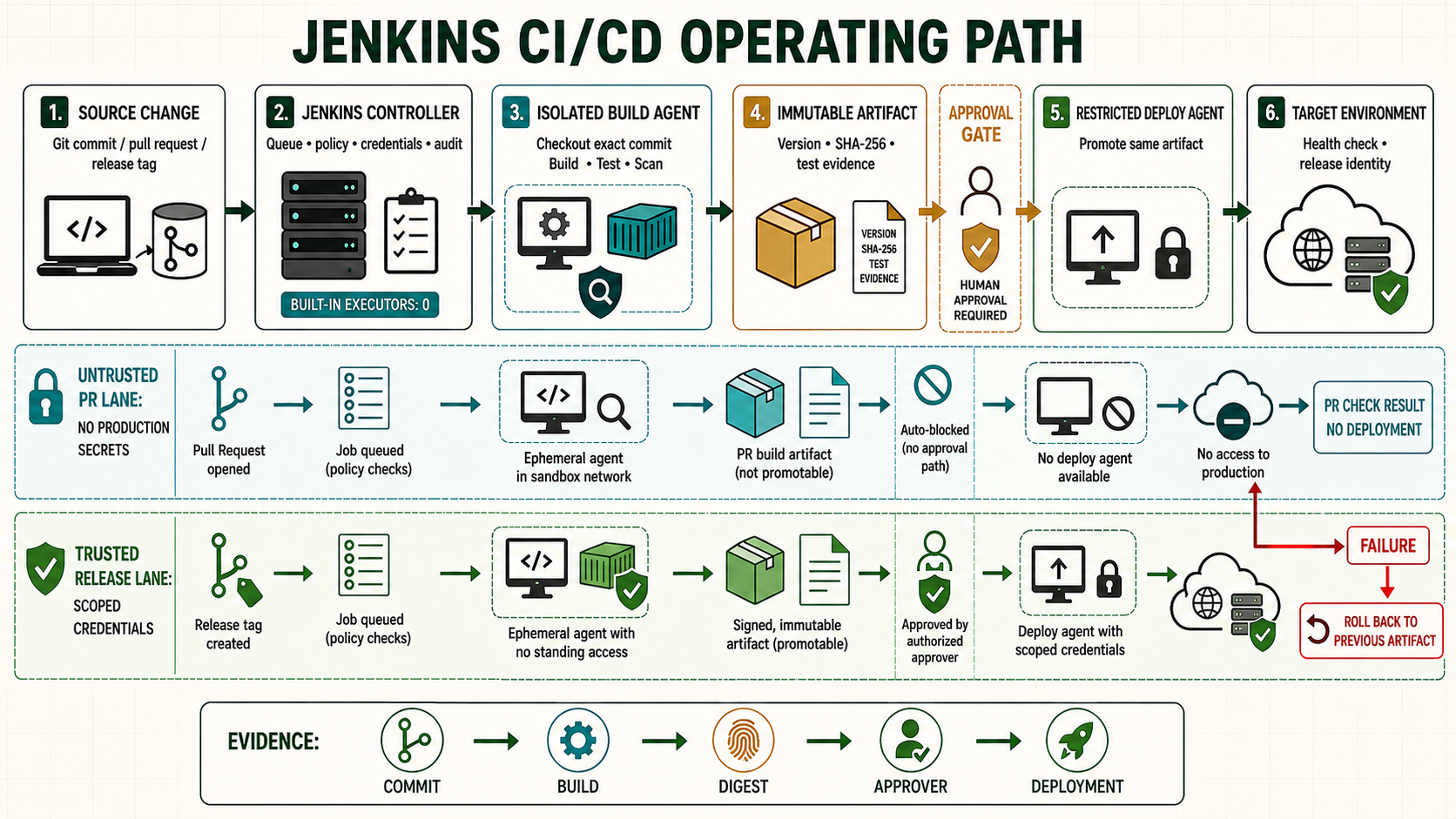
A credential in Jenkins is available to any build logic allowed to bind it. Because a Jenkinsfile and the scripts it calls are executable code, secret safety depends on authorization, folder design, Pipeline trust and agent isolation, not masking alone.
Choose the correct credential type
| Credential type | Use | Typical binding |
|---|---|---|
| Secret text | API token or webhook token | string |
| Username with password | Registry or service login | usernamePassword |
| SSH username with private key | Git checkout, agent launch or deployment | sshUserPrivateKey |
| Secret file | Certificate, configuration or service-account material | file |
| Certificate | PKCS#12 client identity | Plugin-specific |
| GitHub App | GitHub API and repository discovery | GitHub Branch Source configuration |
Use a workload identity or short-lived token when the target platform supports it. A long-lived static key creates rotation and theft risk even when stored correctly.
Understand credential scope
- System scope is for Jenkins internal functions such as agent connections; jobs should not consume it.
- Global scope is visible to jobs in that Jenkins scope and is often broader than necessary.
- Folder scope limits credentials to jobs under a team, product or environment folder and is normally the best default.
- Use separate credentials for build, staging and production. Read permission on source does not imply production deployment permission.
Bind a secret text safely
stage('Call protected API') {
  steps {
    withCredentials([string(credentialsId: 'staging-api-token', variable: 'API_TOKEN')]) {
      sh '''set +x
        curl --fail --silent --show-error \
          -H "Authorization: Bearer $API_TOKEN" \
          https://api.example.com/health
      '''
    }
  }
}
The single-quoted Groovy string lets the shell expand $API_TOKEN at runtime. A double-quoted Groovy string may expose the value to process arguments or Jenkins before masking. set +x prevents shell tracing, but command output can still disclose data.
Bind username/password and SSH key
withCredentials([usernamePassword(
  credentialsId: 'registry-publisher',
  usernameVariable: 'REGISTRY_USER',
  passwordVariable: 'REGISTRY_PASSWORD'
)]) {
  sh '''set +x
    printf '%s' "$REGISTRY_PASSWORD" | \
      docker login registry.example.com --username "$REGISTRY_USER" --password-stdin
    trap 'docker logout registry.example.com >/dev/null 2>&1 || true' EXIT
    docker push registry.example.com/example/app@"$IMAGE_DIGEST"
  '''
}

withCredentials([sshUserPrivateKey(
  credentialsId: 'production-deploy-key',
  keyFileVariable: 'SSH_KEY',
  usernameVariable: 'SSH_USER'
)]) {
  sh '''set -euo pipefail
    ssh -i "$SSH_KEY" -o IdentitiesOnly=yes -o StrictHostKeyChecking=yes \
      "[email protected]" /usr/local/sbin/deploy-status
  '''
}
Keep secret files outside browsable workspace paths
Binding a secret file after entering dir('subdir') can place the temporary secret beneath that subdirectory's workspace. Bind first, then change directories, or allocate a separate temporary workspace.
withCredentials([file(credentialsId: 'service-config', variable: 'CONFIG_FILE')]) {
  dir('service') {
    sh '''set -euo pipefail
      ./ci/test-config.sh "$CONFIG_FILE"
    '''
  }
}
Do not archive the workspace, use env or printenv, create a support bundle, or run untrusted code while a secret is bound.
Protect pull requests and shared agents
| Build context | Allowed credentials | Agent |
|---|---|---|
| Untrusted fork pull request | None, or isolated read-only public dependency access | Ephemeral untrusted validation pool |
| Trusted internal branch | Build and test credentials only | Build pool |
| Protected main branch | Artifact publishing credential after tests | Trusted publisher |
| Approved production promotion | Production deploy identity only | Restricted deployment agent |
Masking replaces matching strings in logs. It cannot stop a malicious step from encoding a secret, sending it over the network, reading another process, or leaving it in a file.
Rotation runbook
- Identify credential ID, owner, consumers, scope, target permissions and expiry.
- Create the replacement with equal or narrower privilege.
- Update a non-production folder and run checkout/build/deploy validation.
- Change remaining consumers without changing the stable credential ID where practical.
- Revoke the replaced credential and test that it no longer works.
- Record the rotation and next expiry; rotate immediately after suspected exposure.
Audit without printing values
- Find Jenkinsfiles referring to credential IDs and assign an owner to each ID.
- Review folder inheritance and who can configure jobs or approve trusted libraries.
- Search console logs and artifacts for credential formats using an authorized secret scanner.
- Check agents for abandoned temporary files and terminate persistent processes after builds.
- Alert on authentication from unexpected agents, networks or repositories.
Unsafe patterns
Unsafe: hardcoding a token in a Jenkinsfile, job parameter, URL or command exposes it in source, history or logs. Unsafe: putting a production credential in the global domain makes it selectable by unrelated jobs. Unsafe: storing a private key in a workspace file and archiving **/* publishes it. Keep these patterns visible in review checklists and reject them.
Incident response for a leaked Jenkins credential
- Revoke or disable the credential at its authority first.
- Stop affected jobs and isolate agents that may retain the value.
- Preserve authorized evidence: job, build, commit, user, time, agent and destination.
- Remove the secret from current configuration and rotate related secrets.
- Review access logs for misuse and rebuild affected agents.
- Do not assume deleting the Jenkins console log removes copies from browsers, log forwarding or backups.
Rotate a credential without exposing its value
Design credentials around workload and environment, not around a convenient global list. A production deployment identity should not be visible to pull-request jobs or ordinary build agents. When the target supports short-lived workload identity, prefer it over a static secret. For stored credentials, document owner, target, scope, rotation interval and revocation procedure. Bind only across the exact step requiring the value and avoid command interpolation by Groovy, which can place secrets in process arguments before the shell applies quoting. Masking does not prevent a trusted Pipeline from encoding or transmitting a secret.
withCredentials([string(credentialsId: 'staging-api', variable: 'API_TOKEN')]) {
  sh '''
    set +x
    curl --fail --silent --show-error \
      -H "Authorization: Bearer $API_TOKEN" \
      https://api.staging.example.test/health
  '''
}
# Never echo, archive or fingerprint the temporary secret material
Evidence and failure exercise
| Layer | Evidence | Failure response |
|---|---|---|
| Binding | Credential ID and bounded stage | Secret is available only while required |
| Agent | Trusted label and process ownership | Other workloads cannot inspect process/environment |
| Output | Log scan and artifact inventory | No plaintext, transformed value or secret file retained |
| Rotation | Old and new credential test plus revocation | No shared key remains indefinitely |
Create two lab tokens. Deploy with the first, replace the Jenkins credential under controlled change, test the second, revoke the first and prove it fails. Search console text, workspace, archived artifacts and temporary directories for a synthetic marker rather than a real secret.
Independent operating checks
- Test a pull request and confirm the protected credential is not bound.
- Use folder scope and prove a sibling folder cannot select the ID.
- Abort the job during the binding and inspect temporary-file cleanup.
- Record rotation without copying the value into the ticket.