
Deploy Immutable Releases Through SSH
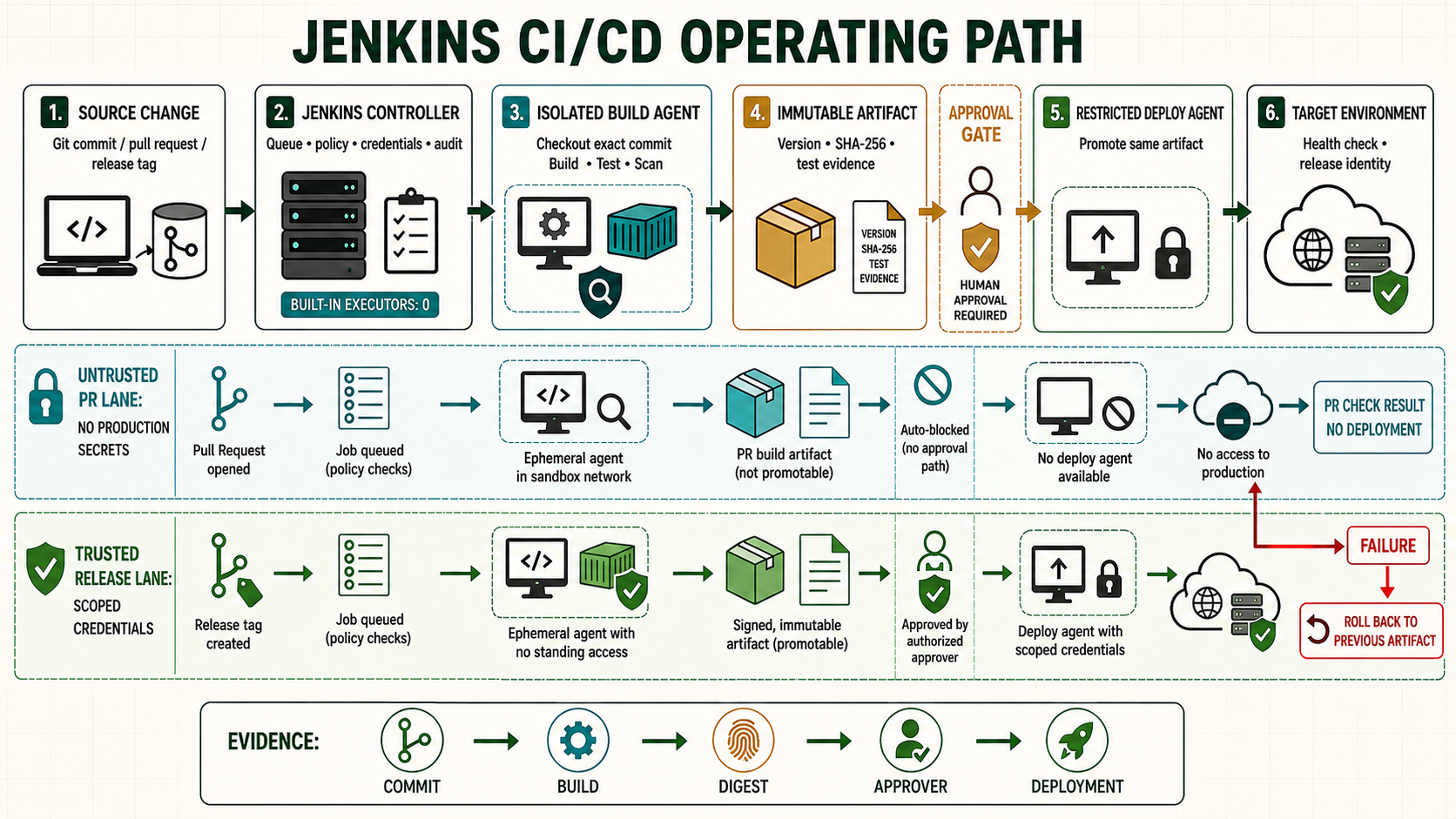
SSH deployment is dependable when Jenkins transfers one already-tested artifact, authenticates the server, runs a narrowly permitted release operation, checks the result and can restore the preceding release. This guide builds that flow without placing private keys in the repository.
Use a release-based deployment model
| Path | Purpose | Rule |
|---|---|---|
/srv/myapp/releases/BUILD_ID | Immutable extracted release | Never edit after promotion |
/srv/myapp/current | Symlink to active release | Switch atomically |
/srv/myapp/shared | Runtime state and environment files | Not stored in the artifact |
Prepare the deployment account
sudo useradd --create-home --shell /bin/bash deploy-myapp
sudo install -d -o deploy-myapp -g deploy-myapp -m 0750 \
  /srv/myapp/releases /srv/myapp/shared
sudo install -d -o deploy-myapp -g deploy-myapp -m 0700 \
  /home/deploy-myapp/.ssh
ssh-keygen -t ed25519 -a 100 -f ./jenkins-myapp-deploy \
  -C 'jenkins-myapp-deploy'
Install only the public key in authorized_keys. Store the private key in a folder-scoped Jenkins SSH Username with private key credential named myapp-staging-ssh. Use different credentials for staging and production.
Verify the server identity
# Run on the target through a trusted administrative channel.
sudo ssh-keygen -lf /etc/ssh/ssh_host_ed25519_key.pub

# On the Jenkins agent, save the independently verified public host key.
install -d -m 0700 ~/.ssh
install -m 0600 /dev/null ~/.ssh/known_hosts
printf '%s\n' 'deploy.example.com ssh-ed25519 VERIFIED_PUBLIC_KEY' \
  >> ~/.ssh/known_hosts
Build one verifiable artifact
stage('Package') {
  steps {
    sh '''set -eu
      tar --exclude=.git --exclude=dist -czf myapp-${BUILD_NUMBER}.tgz .
      sha256sum myapp-${BUILD_NUMBER}.tgz > myapp-${BUILD_NUMBER}.tgz.sha256
    '''
    archiveArtifacts artifacts: 'myapp-*.tgz*', fingerprint: true
  }
}
Deploy with a temporary key binding
stage('Deploy staging') {
  when { branch 'main' }
  steps {
    withCredentials([sshUserPrivateKey(
      credentialsId: 'myapp-staging-ssh',
      keyFileVariable: 'SSH_KEY',
      usernameVariable: 'SSH_USER'
    )]) {
      sh '''set -euo pipefail
        artifact="myapp-${BUILD_NUMBER}.tgz"
        sha256sum -c "${artifact}.sha256"
        scp -i "$SSH_KEY" -o IdentitiesOnly=yes -o StrictHostKeyChecking=yes \
          "$artifact" "${artifact}.sha256" \
          "[email protected]:/tmp/"
        ssh -i "$SSH_KEY" -o IdentitiesOnly=yes -o StrictHostKeyChecking=yes \
          "[email protected]" \
          "/usr/local/sbin/deploy-myapp '${BUILD_NUMBER}'"
      '''
    }
  }
}
Implement the server-side release script
#!/usr/bin/env bash
set -euo pipefail
build_id="${1:?build id required}"
case "$build_id" in (*[!0-9]*) echo 'invalid build id' >&2; exit 2;; esac
base=/srv/myapp
artifact="/tmp/myapp-${build_id}.tgz"
release="$base/releases/$build_id"
previous="$(readlink -f "$base/current" 2>/dev/null || true)"
test -f "$artifact"
test ! -e "$release"
install -d -m 0750 "$release"
tar -xzf "$artifact" -C "$release"
ln -sfn "$release" "$base/current.new"
mv -Tf "$base/current.new" "$base/current"
if ! systemctl --user restart myapp.service || \
   ! curl --fail --silent --show-error --max-time 10 \
      http://127.0.0.1:8080/health; then
  if test -n "$previous" && test -d "$previous"; then
    ln -sfn "$previous" "$base/current.rollback"
    mv -Tf "$base/current.rollback" "$base/current"
    systemctl --user restart myapp.service
  fi
  exit 1
fi
Allow the deployment account to execute only this reviewed script if privilege is required. Do not grant unrestricted passwordless sudo.
Manual rollback and evidence
ls -1dt /srv/myapp/releases/* | head
readlink -f /srv/myapp/current
ln -sfn /srv/myapp/releases/KNOWN_GOOD /srv/myapp/current.rollback
mv -Tf /srv/myapp/current.rollback /srv/myapp/current
systemctl --user restart myapp.service
curl --fail --show-error http://127.0.0.1:8080/health
Record revision, artifact checksum, Jenkins build, approver, destination, health result and rollback outcome. Retain enough releases for the recovery objective, then remove only releases that are neither current nor rollback candidates.
Unsafe commands
Unsafe: this accepts whatever host key the current network returns. It is included because it is common, but it must not replace independent fingerprint verification:
ssh-keyscan -H deploy.example.com >> ~/.ssh/known_hostsUnsafe: rm -rf /srv/myapp/* can destroy active releases and shared state. Use a validated release identifier and explicit retention script. Unsafe: StrictHostKeyChecking=no disables server authentication.
Troubleshoot
| Failure | Check | Response |
|---|---|---|
| Permission denied | Credential username, public key, file modes | Correct the scoped account and key; do not loosen all permissions. |
| Host key changed | Console fingerprint and change record | Stop and investigate before replacing the key. |
| Health check fails | Service logs, port, release configuration | Roll back the symlink and diagnose offline. |
| Transfer interrupted | Artifact checksum | Discard the partial file and resend. |
Constrain the remote deployment authority
The deployment account should not receive a general interactive root shell. Restrict it to an owned release command or narrowly reviewed sudo rules, separate staging and production keys, verify the server host key and prevent the build agent used for untrusted code from reaching the deployment network. Transfer an immutable artifact to a temporary name, verify its checksum on the target, extract into a new release directory and atomically switch the current symlink only after preflight passes.
scp -o BatchMode=yes -o StrictHostKeyChecking=yes \
  app.tgz app.tgz.sha256 deploy@target:/srv/myapp/incoming/
ssh -o BatchMode=yes deploy@target \
  'cd /srv/myapp/incoming && sha256sum -c app.tgz.sha256 && sudo /usr/local/sbin/promote-myapp app.tgz'
# Acceptance must report the deployed release identity
curl --fail https://app.example.test/version
Evidence and failure exercise
| Layer | Evidence | Failure response |
|---|---|---|
| Identity | Folder-scoped key and forced/narrow command | Key cannot open unrelated root shell |
| Server identity | Pinned verified host key | Changed key stops deployment for investigation |
| Artifact | Remote SHA-256 matches release record | Mismatch never reaches extraction |
| Promotion | Atomic symlink plus client acceptance | Rollback selects prior immutable release |
Use a deliberately wrong host key in the lab and prove deployment stops before authentication. Restore the independently verified key, then corrupt one byte of the transferred artifact and prove checksum verification stops promotion. Only the correct artifact may reach the release directory.
Independent operating checks
- Attempt a non-approved sudo command and retain the denial.
- Remove network access from the build-only agent to the target.
- Deploy a release whose health check fails and prove symlink rollback.
- Verify old release retention cannot fill the target disk.