Best SSH Clients

The best SSH client is the one that fits the access job, preserves server identity, keeps credentials inside an understood trust boundary, and gives an operator enough evidence to notice a wrong connection before making a production change. A polished session manager can improve daily work. It cannot compensate for ignored host-key warnings, uncontrolled key copies, stale software, or an unreviewed browser relay.
This guide was technically reviewed on 5 August 2026. It provides a current selection method for terminal work, secure file transfer, automation, network devices, mobile access, and shared connection inventories. Product capabilities and license terms can change, so verify the vendor documentation before standardizing a client. Keep the security criteria in this guide as the acceptance boundary.
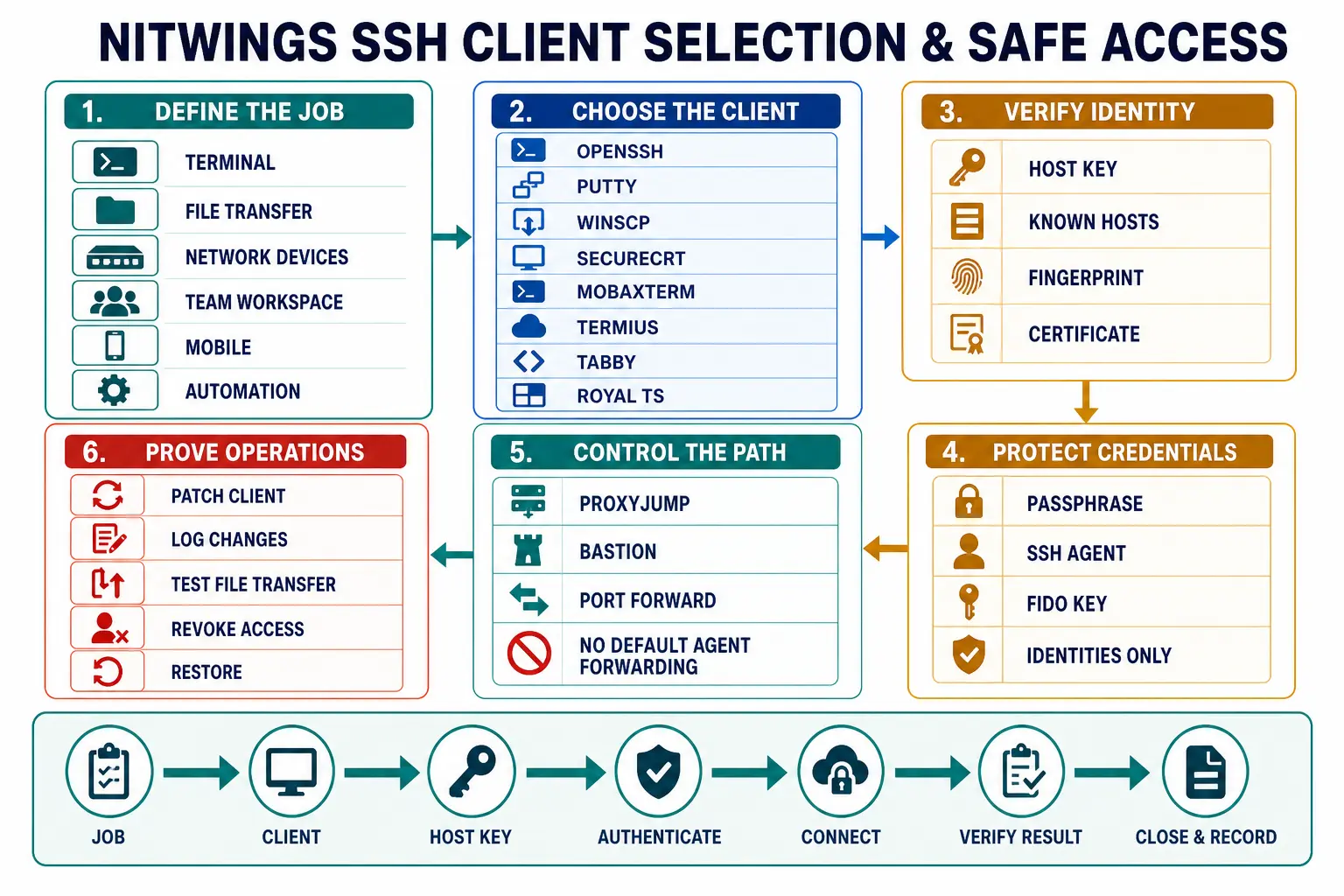
Start with the job, not the product list
SSH clients are often compared as if they all solve one problem. They do not. OpenSSH is a protocol toolset and automation baseline. PuTTY is a focused Windows terminal client with companion tools. WinSCP is primarily a secure file-transfer client. SecureCRT is a commercial terminal and session environment. MobaXterm is a broad Windows remote-operations toolbox. Termius combines clients with encrypted synchronization and team workflows. Tabby is a customizable cross-platform terminal. Royal TS and Royal TSX are multi-protocol connection managers.
Define the actual job before evaluating features:
- Interactive shell access to a small number of Linux servers.
- Repeatable automation from scripts, CI runners, or configuration tools.
- Graphical SFTP transfers with resume, synchronization, and an audit trail.
- Hundreds of saved network-device or server sessions.
- Access through a bastion, proxy, VPN, or short-lived certificate service.
- Cross-platform use across Windows, macOS, Linux, iOS, or Android.
- A shared inventory where connections can be distributed without sharing personal credentials.
- Emergency mobile access with a deliberately smaller privilege and action scope.
A team may legitimately choose more than one client. Keep the authentication source, host-key policy, naming, logging, and revocation process consistent across them.
Quick recommendations by use case
| Use case | Strong starting point | Useful alternative | Reason | Acceptance check |
|---|---|---|---|---|
| Terminal and automation baseline | OpenSSH | PuTTY tools on established Windows estates | Scriptable configuration, broad server interoperability, SFTP, jump hosts, forwarding, agents, and certificates. | Pin the supported release and inspect effective configuration with ssh -G. |
| Simple Windows terminal | Windows OpenSSH in Windows Terminal | PuTTY | Windows includes an OpenSSH client option, while PuTTY remains a focused graphical choice with saved sessions and Pageant. | Install only from Microsoft or the official PuTTY project distribution and test key format handling. |
| Windows graphical file transfer | WinSCP | MobaXterm | WinSCP is file-first, supports SFTP, scripting, synchronization, and Windows integration. | Prefer SFTP, verify the host key independently, and prove partial-transfer behavior. |
| Cross-platform commercial terminal | SecureCRT | Termius | Strong session management, terminal emulation, scripting, authentication, tunneling, and file-transfer capabilities. | Evaluate enterprise authentication, configuration export, stored credentials, logging, and update ownership. |
| Windows all-in-one operations | MobaXterm | Royal TS | SSH, SFTP, X11, tunnels, session management, and additional remote protocols in one desktop tool. | Reduce enabled protocols and stored secrets to the smallest required set. |
| Desktop and mobile continuity | Termius | SecureCRT where its supported platforms fit | Cross-device hosts, keys, vaults, SFTP, and team collaboration are central to the product model. | Complete a cloud-vault, account-recovery, device-loss, offboarding, and export assessment. |
| Cross-platform open-source GUI | Tabby | OpenSSH in the local terminal | Integrated SSH, SFTP, jump hosts, forwarding, tabs, panes, and an extensible terminal interface. | Control plugins, updates, configuration backup, and the secrets container. |
| Shared multi-protocol inventory | Royal TS or Royal TSX | SecureCRT | Connection documents, credential separation, tasks, gateways, and several remote protocols. | Prove that sharing a connection never silently shares a personal credential. |
These are starting points, not universal winners. A network engineer managing serial consoles and specialized terminal emulation may value SecureCRT differently from a developer who needs only OpenSSH and ~/.ssh/config. A file-operations team may correctly put WinSCP first even though it is not the strongest daily terminal.
Current SSH client comparison
| Client | Primary platforms | Main operating model | File transfer | License model | Best fit | Review closely |
|---|---|---|---|---|---|---|
| OpenSSH | Linux, macOS, BSD, Windows, and other packaged systems | Command-line client, configuration files, agents, certificates, jump hosts, and automation tools | sftp and scp | Open source | Automation baseline and direct terminal access | Operating-system package age, effective configuration, agent scope, and host-key distribution |
| PuTTY suite | Windows, with source and some Unix packaging | Focused GUI terminal plus Plink, PSFTP, PSCP, Pageant, and PuTTYgen | PSFTP and PSCP | Open source | Small, established Windows terminal workflows | Official download origin, saved sessions, PPK/OpenSSH key interoperability, and Pageant policy |
| Solar-PuTTY | Windows | Tabbed session console based on PuTTY with saved sessions, credentials, reconnect, and post-connection scripts | SCP, SFTP, and a graphical transfer view | Free proprietary tool | Operators wanting a no-install tabbed Windows console | Patch cadence, credential storage, post-connection scripts, and enterprise software approval |
| WinSCP | Windows | Graphical file manager plus command-line scripting and a .NET assembly | SFTP and SCP, plus non-SSH protocols | Open source | File-first operations, synchronization, and controlled transfer automation | SFTP versus SCP compatibility behavior, master-password policy, logs, and destructive synchronization scope |
| SecureCRT | Windows, macOS, and Linux, with a separate iOS offering | Commercial terminal, deep session manager, scripting, authentication, tunneling, and terminal emulation | SFTP and several terminal-oriented transfer methods; integrates with SecureFX | Commercial | Large mixed estates, network devices, and repeatable operator workspaces | Credential sets, multi-session command features, script review, obsolete protocol availability, and license lifecycle |
| MobaXterm | Windows | Tabbed terminal, session manager, Unix tools, X server, tunnels, and multi-protocol remote access | Graphical SFTP browser and other transfer tools | Free Home edition and commercial Professional edition | Windows operators who need SSH, SFTP, X11, and mixed remote tools together | Broad attack surface, saved passwords, macros, X11 forwarding, portable-copy governance, and edition terms |
| Termius | Windows, macOS, Linux, iOS, iPadOS, and Android | Cross-device SSH workspace with local connections, encrypted vaults, team sharing, snippets, and mobile clients | SFTP | Free and subscription plans | Mobile continuity and teams that want synchronized connection data | Vault cryptography, recovery, account controls, cloud synchronization, export, offboarding, and plan changes |
| Tabby | Windows, macOS, and Linux | Customizable terminal with built-in SSH profiles, panes, plugins, jump hosts, and a secrets container | SFTP and Zmodem | Open source | Cross-platform desktop users who want a modern GUI without a commercial terminal license | Electron and plugin supply chain, secret storage, agent forwarding, restored sessions, and update policy |
| Royal TS and Royal TSX | Windows and macOS, with compatible mobile document clients | Multi-protocol connection documents, credentials, tasks, dynamic data, and gateways | SFTP and SCP functions alongside other connection types | Shareware limits and commercial licenses | Shared inventories spanning SSH, RDP, VNC, web, and other operations | Document sharing, personal credential separation, external credential sources, tasks, gateways, and mobile scope |
The table intentionally separates client selection from cryptographic strength. A current, correctly configured client can negotiate a secure session. A convenient but stale client, a copied private key, or an accepted unknown host key can still create an unsafe operating path.
Use OpenSSH as the interoperability baseline
OpenSSH is the reference point even when a GUI is selected. Its suite includes ssh, sftp, scp, ssh-keygen, ssh-agent, ssh-add, and configuration controls shared by many automation tools. Microsoft ships OpenSSH as an optional Windows feature, and Windows Terminal can launch the built-in client. macOS and most Linux environments provide an OpenSSH-derived client through the operating system.
The current upstream release at this review is OpenSSH 10.4, released on 6 July 2026. That fact does not mean every supported operating system has 10.4. Vendors backport fixes and maintain their own packages. Record the client build actually deployed, subscribe to the operating-system and upstream security channels, and test changes against the servers in scope.
OpenSSH is strongest when a team treats ~/.ssh/config as controlled configuration instead of accumulating command history and one-off aliases. It also provides useful diagnostic boundaries:
ssh -V
ssh -G prod-app-01 | less
ssh -vv prod-app-01
ssh-keygen -F prod-app-01
ssh-add -l
ssh -G prints the effective client configuration after host and match rules. Review it before assuming which identity, proxy, known-hosts file, or forwarding setting will be used. Verbose output can expose hostnames, user names, paths, and authentication decisions, so collect it as controlled evidence and redact it before broad sharing.
Build explicit OpenSSH host profiles
A named host profile reduces typing, but its greater value is a reviewable access contract. Put specific host blocks before general defaults because OpenSSH uses the first obtained value for each parameter.
Host prod-bastion
    HostName bastion.example.net
    User ops
    IdentityFile ~/.ssh/id_ed25519_sk_prod
    IdentitiesOnly yes
    ForwardAgent no
    ServerAliveInterval 30
    ServerAliveCountMax 3
    ExitOnForwardFailure yes
    StrictHostKeyChecking yes

Host prod-app-01
    HostName 10.30.4.21
    User deploy
    ProxyJump prod-bastion
    IdentityFile ~/.ssh/id_ed25519_sk_prod
    IdentitiesOnly yes
    ForwardAgent no
    StrictHostKeyChecking yes

Host *
    ForwardAgent no
    AddKeysToAgent no
This example assumes the production host keys are distributed before connection. It also uses a security-key-backed identity as an example, not a universal mandate. Some fleets need OpenSSH user certificates, a platform identity broker, smart cards, a separate agent, or a compatibility key. Document the reason and the recovery path.
Do not copy this block without adapting names, known-hosts ownership, supported client versions, and the destination's authentication policy. A client configuration is code. Validate its expansion with ssh -G, test a non-production target, review permissions, and keep secrets out of the file.
Choose PuTTY for a focused Windows workflow
PuTTY remains useful when an operator wants a small Windows GUI, established saved sessions, serial access, or compatibility with a PuTTY-based environment. The suite also provides Plink for command-line connections, PSFTP and PSCP for transfer, Pageant as an authentication agent, and PuTTYgen for key work. Current official downloads at this review identify PuTTY 0.84, released on 22 May 2026.
Download PuTTY from Simon Tatham's official project distribution, not from a similarly named third-party site or a search advertisement. The domain putty.org explicitly states that it is unaffiliated with the PuTTY project and links visitors to the real project. For managed deployment, validate the publisher signature or published checksum and inventory the installed version.
Test whether your estate expects OpenSSH private keys, PuTTY PPK files, Pageant, Windows OpenSSH Agent, certificates, or hardware tokens. Conversion can solve format interoperability, but it can also create another persistent copy of a private key. Remove intermediate files securely, retain a recovery method, and avoid distributing one private key to many operators.
Place Solar-PuTTY behind the same controls
Solar-PuTTY adds tabs, graphical transfers, saved credentials, automatic reconnection, Windows Search integration, and post-connection scripts around a PuTTY-derived Windows experience. It can be convenient for a small session inventory and is still presented by SolarWinds as a free tool.
Convenience features increase the review surface. A post-connection script can run a valid command on the wrong server. A saved password or private key changes the impact of workstation compromise. Automatic reconnect can restore a tunnel or privileged session after the operator believes it has ended. Before approval, document where credentials are stored, how the tool updates, who can change scripts, how sessions are exported, and how an offboarded device is made useless.
Use WinSCP when the real job is file transfer
WinSCP is an open-source Windows file manager and transfer client with SFTP and SCP support, scripting, a command-line interface, a .NET assembly, directory synchronization, an integrated editor, transfer queues, logging, and PuTTY integration. Its own documentation describes file transfer as the primary focus and terminal access as basic.
Prefer SFTP for a normal SSH file workflow. SCP compatibility behavior has different protocol and server-shell dependencies, and a GUI label does not remove those differences. Define how interrupted uploads resume, whether a temporary name is used before atomic rename, how permissions and timestamps are handled, and whether synchronization may delete destination files.
| Transfer question | Required evidence | Failure to test |
|---|---|---|
| Did the client reach the intended server? | Verified SSH host key or host certificate tied to inventory | DNS change, reused IP address, replaced host, or first connection from a new workstation |
| Did the complete file arrive? | Expected byte count and a cryptographic checksum where the workflow requires it | Connection loss, disk full, quota, timeout, and truncated temporary file |
| Is the destination name atomic? | Upload to a controlled temporary name, validate, then rename on the destination filesystem | Consumer reads a partially uploaded object |
| Are owner and mode correct? | Destination-side owner, group, mode, ACL, and service-read test | Over-permissive file, unusable file, inherited ACL, or unexpected umask |
| Can the action be repeated safely? | Idempotency rule, duplicate detection, conflict policy, and rollback | Second upload, same name with different content, or a destination that changed independently |
For production automation, do not rely on recorded mouse actions. Use a supported command-line or API surface, close the input grammar, keep credentials outside arguments and logs, and test exit statuses. The Bash features and safe scripting guide covers the process and failure boundaries around such automation.
Choose SecureCRT for deep session operations
SecureCRT targets operators who live in a terminal and need organized sessions, terminal emulation, tab groups, command management, scripting, SFTP, tunnels, smart cards, OpenSSH certificates, agents, and mixed equipment. Version 9.7 is current in the vendor documentation reviewed for this article and supports Windows, macOS, and Linux.
Its power deserves deliberate controls. Sending one command to several sessions can be useful during a planned network change and destructive when a selection includes the wrong environment. Color and folder conventions help, but they are not authorization controls. Require an explicit target inventory, a read-only precheck, a bounded command, a rollback, and per-target result capture.
Review the need for obsolete protocols and algorithms. A client supporting an old protocol for equipment recovery does not mean it should be enabled in ordinary profiles. Separate compatibility access through a constrained jump environment, record the exception owner and end date, and prevent a compatibility setting from becoming the fleet default.
Choose MobaXterm for an integrated Windows toolbox
MobaXterm combines a tabbed SSH client, graphical SFTP browser, X server, Unix tools, tunnels, session management, macros, and several remote protocols in one Windows application. It is especially useful where an administrator needs SSH terminal access, X11 forwarding, file work, serial or remote-desktop connections, and a portable support environment.
The same integration creates a larger policy surface. Decide whether portable execution is allowed, whether plugins are approved, whether X11 forwarding is required, how the master password and stored sessions are protected, and whether macros may contain credentials or destructive commands. Do not leave Telnet, Rlogin, Rsh, FTP, or other plaintext protocols available merely because the application provides them.
MobaXterm offers Home and Professional editions. Confirm the current feature limits and commercial-use terms directly with the vendor. Standardization should name an edition, approved release channel, configuration baseline, and update owner rather than saying only “use MobaXterm.”
Choose Termius for cross-device and team workflows
Termius provides SSH clients for desktop and mobile platforms with host groups, keys, SFTP, port forwarding, snippets, encrypted personal and shared vaults, biometric or hardware-backed options, and team collaboration. Direct SSH connections do not require a vendor proxy, while synchronized connection data and vaults create a separate cloud account and cryptographic trust model.
Termius documents client-side encrypted vaults, a master-password-derived protection model, device storage, shared-vault key distribution, and account controls. Treat that documentation as the beginning of an assessment. Test master-password loss, organization recovery, member removal, device loss, offline access, export, regional or contractual requirements, and the exact fields placed in a shared vault.
A synchronized host inventory can reduce private spreadsheets and stale notes. It can also distribute a wrong address or over-broad credential quickly. Separate shared connection metadata from personal authentication where possible. Apply least privilege on both the vault and destination account. Keep a revocation path that does not depend on recovering the lost device.
Choose Tabby for an open-source cross-platform GUI
Tabby runs on Windows, macOS, and Linux and provides an integrated SSH client, connection profiles, SFTP, jump hosts, X11 and port forwarding, panes, tab restoration, key management, and an optional encrypted secrets container. It is a practical choice when operators want a modern interface and need more session organization than a bare terminal provides.
Tabby is extensible through plugins. That means the application, Electron runtime, plugins, and plugin update path all belong in the software inventory. Approve a small plugin set, remove abandoned extensions, validate configuration backup and restore, and test what happens when restored tabs reconnect. Simultaneous input and agent forwarding should be disabled unless a documented task requires them.
Choose Royal TS for a shared connection inventory
Royal TS on Windows and Royal TSX on macOS manage SSH terminals alongside RDP, VNC, web, file-transfer, and other connections. Their document model can separate connections from personal credentials, share inventories, use tasks, import dynamic data, and route through a secure gateway. Compatible document clients extend the inventory to mobile platforms.
The design question is not whether a document can be shared. It is what the document contains and what inheritance does. Inspect credentials, overrides, custom commands, key-sequence tasks, gateway assignments, external credential references, and environment-specific settings. A connection definition should identify a target without granting every reader the same identity.
Test document encryption, version control, concurrent edits, owner departure, export, and the behavior of a missing external credential source. The team should be able to revoke one operator without changing a shared document for everyone else.
Treat mobile SSH as an emergency surface
A mobile client is useful for observation, approval, and a small recovery action when a workstation is unavailable. It is a poor place for an unbounded root session, long unreviewed commands, or a broad private-key inventory. Touch keyboards, small screens, clipboard managers, notification previews, device backups, and shared devices all change the error and disclosure surface.
Define a mobile-specific role with short-lived authentication, limited destinations, strong device unlock, remote device removal, and destination-side logging. Prefer read-only diagnostics and a tested runbook action. Require a workstation or second operator for changes outside the mobile recovery envelope.
Do not confuse a browser terminal with local SSH
A web-based SSH product may connect through a vendor relay, run entirely in the browser, use a self-hosted gateway, or combine those models. The architecture determines who can observe metadata, where keys are decrypted, which code executes in the browser, how updates arrive, and what happens when the identity provider or control plane is unavailable.
Before approving browser SSH, document the full path from browser to target. Review origin isolation, content security policy, extension risk, WebSocket termination, gateway ownership, session recording, clipboard handling, downloads, key custody, administrative access, tenant isolation, log retention, data location, and break-glass behavior. “Encrypted” is not a sufficient architecture description.
Verify the server host key before credentials
SSH encryption protects a connection only after the client knows which server it reached. A host key or host certificate binds the server identity to the session. If an operator accepts an unexpected key without independent evidence, the client can establish a perfectly encrypted connection to the wrong endpoint.
Use one of these controlled patterns:
- Distribute known-host keys from a trusted inventory or configuration-management system.
- Use OpenSSH host certificates signed by a controlled host certificate authority.
- Verify a SHA-256 fingerprint through an authenticated out-of-band source during a bounded enrollment.
- Use SSHFP only with a deliberately validated DNSSEC design and supported client policy.
- Record planned key rotation before the old key is removed, then verify the new key path.
ssh-keyscan retrieves a presented public host key. It does not prove that the network endpoint is authentic by itself. Compare its output with an independent source. Never solve a changed-key warning by deleting the old entry and accepting the new one until the replacement, address reuse, load balancer, or possible interception has been explained.
| Host-key event | Safe response | Unsafe shortcut |
|---|---|---|
| First connection | Obtain the fingerprint or CA trust from inventory, provisioning evidence, or an authenticated owner. | Accept because the hostname looks familiar. |
| Additional host key offered | Use a supported rotation mechanism and confirm it arrived through an already trusted session. | Add every presented key without ownership evidence. |
| Host key changed | Stop, identify rebuild or rotation evidence, inspect DNS and address ownership, then update the record deliberately. | Disable checking or remove known_hosts. |
| Shared address or load balancer | Use host certificates, stable service identity, or a documented set of expected keys. | Train operators to ignore intermittent warnings. |
| Decommissioned host | Remove its inventory, DNS, host certificate, keys, accounts, tunnels, and monitoring together. | Leave a trusted key attached to a reusable name or address. |
Protect private keys and authentication agents
A private key should identify one operator or managed workload, not a whole department. Prefer hardware-backed FIDO keys, short-lived user certificates, platform-managed identities, or passphrase-protected keys with an agent when the server and client estate support them. Keep a compatible recovery route and do not strand critical access on one token.
ssh-keygen -t ed25519-sk -f ~/.ssh/id_ed25519_sk_prod
ssh-add -c -t 1h ~/.ssh/id_ed25519_sk_prod
ssh-add -l
The example requests a FIDO-backed Ed25519 security-key credential, adds it to the agent with per-use confirmation and a one-hour lifetime, then lists loaded identities. Hardware, middleware, operating systems, and servers vary. Test the exact path and keep the public key, not the private credential, in inventory.
IdentitiesOnly yes prevents a client from offering every identity available through an agent when a profile should use one selected key. This reduces authentication failures and unnecessary identity disclosure. It is not a substitute for agent locking, expiration, destination restrictions, or device security.
Disable agent forwarding by default
Agent forwarding makes a local authentication agent reachable from the remote host for the life of the forwarded session. The private key is not copied to that host, but a process with access to the forwarded socket may ask the agent to sign authentication requests. A compromised bastion or privileged remote user can abuse that opportunity.
Use ProxyJump or an equivalent direct transport through the bastion when the goal is to reach an internal host. The client then authenticates the final destination without exposing a forwarded agent to the bastion. If a workflow genuinely requires agent forwarding, restrict the destination, agent lifetime, key, remote account, and session duration, then monitor its use.
Control bastions, tunnels, and forwarding
Local, remote, and dynamic forwarding can expose services beyond their intended network boundary. A local forward bound to loopback is different from one listening on every interface. A remote forward can create an ingress path into the client network. A SOCKS proxy can carry traffic the firewall team did not expect.
ssh -N \
  -L 127.0.0.1:15432:db.internal.example:5432 \
  -o ExitOnForwardFailure=yes \
  prod-bastion
This creates no remote shell and binds the local listener to IPv4 loopback. It does not authorize database access, protect the database credential, guarantee the remote name resolves as intended, or close the tunnel after a business task. Record the owner, port, destination, duration, verification, and termination condition.
For managed access, prefer destination-side allow rules and short-lived credentials over a permanent tunnel hidden in a saved session. The Advanced Policy Firewall guide explains why a preserved administrative path, staged policy, and rollback are critical when remote-access controls change.
Separate connection metadata from credentials
Hostnames, ports, user names, environment labels, and jump paths are connection metadata. Passwords, private keys, tokens, certificate material, and recovery codes are credentials. A session manager may store both, but a team should decide whether it should.
| Data | Preferred owner | Sharing rule | Removal test |
|---|---|---|---|
| Host and environment inventory | Configuration or asset inventory | Share by role, with change review and source ownership. | Decommission removes every client entry and alias. |
| Personal private key | Hardware token, OS key store, or approved agent | Never share the private half. | Disable the public authorization or revoke its certificate. |
| Shared automation credential | Secrets manager and workload identity | Expose only to the named job at execution time. | Rotation stops the old job and enables the replacement predictably. |
| Short-lived certificate | Identity-aware certificate issuer | Issue for named principals, destinations, and a bounded lifetime. | Expiry and revocation prevent reuse; logs retain the identity. |
| Saved password | Prefer an enterprise credential manager where still required | Do not embed in exported session files or scripts. | Account rotation and user removal invalidate all cached copies. |
Keep production and non-production visually and cryptographically separate
Colors, folders, tab titles, and prompts reduce slips, but they do not prove destination identity. Use distinct host keys or host-certificate principals, accounts, certificate policies, bastions, and network paths for production. Make the server prompt and client inventory show the environment, and require a read-only identity check before a change.
printf 'host=%s user=%s kernel=%s\n' \
  "$(hostname -f)" "$(id -un)" "$(uname -sr)"

test -r /etc/environment-id
cat /etc/environment-id
Do not run a downloaded “verification” command from an untrusted source. The destination should expose a small, documented identity record or an equivalent inventory check. For a risky change, compare the session with the change ticket, peer approval, and monitoring target.
Patch the client and its dependencies
SSH clients parse network input before authentication completes and process terminal control sequences, file names, keys, certificates, configuration, and proxy data. Treat them as security-sensitive software. The current OpenSSH 10.4 release notes include client and file-transfer fixes, which is a practical reminder that “SSH is encrypted” does not remove client defects.
Inventory the complete path:
- Client product and exact release.
- Operating-system package source and vendor backport policy.
- Terminal emulator or Electron runtime.
- Plugins, macros, scripts, and external helpers.
- Authentication agent, hardware-token middleware, and credential store.
- Browser, extensions, gateway, and identity provider for web clients.
- Update channel, code signature or checksum verification, owner, and emergency patch procedure.
Test an update with representative host keys, authentication types, proxies, terminal applications, transfers, tunnels, and saved-session migrations. Keep rollback, but do not make rollback an excuse to keep a vulnerable release indefinitely.
Reject unsafe convenience defaults
| Convenience | Risk | Safer boundary |
|---|---|---|
| Accept every new or changed host key | Encrypted connection to an unverified endpoint | Pre-distributed trust, host certificates, or independent fingerprint enrollment |
| One private key on every device | Unclear attribution and expensive compromise response | Per-user, per-device, hardware-backed, or short-lived credentials |
| Agent forwarding on every profile | Remote use of the local agent while connected | ProxyJump and direct end-host authentication |
| Passwords or keys in session exports | Backups, tickets, chat, or source control become credential stores | External credential reference and sanitized export |
| Broadcast command to many sessions | Wrong-environment or partial-fleet changes | Target manifest, canary, bounded automation, per-host result, and rollback |
| Unrestricted clipboard and paste | Secret disclosure or accidental multi-line execution | Paste warning, bracketed paste, staged review, and a secrets-safe workflow |
| Permanent unattended tunnel | Hidden network path and lost ownership | Loopback bind, explicit destination, monitored lifetime, and managed service ownership |
Run a representative client evaluation
A feature checklist cannot prove an SSH client fits the estate. Build a small evaluation set with a Linux server, representative network device, bastion path, current and rotating host keys, supported user authentication, an SFTP transfer, a tunnel, a connection loss, and a revoked account.
- Install from the approved source and record signature, hash, version, and owner.
- Import or create one sanitized session without embedding a shared credential.
- Verify a first host key against trusted inventory.
- Reject an unexpected changed host key and capture the warning.
- Authenticate with the intended key, certificate, smart card, or hardware token.
- Confirm extra agent identities are not offered unexpectedly.
- Traverse the approved bastion without default agent forwarding.
- Transfer a file, interrupt it, resume or restart it, and validate content and permissions.
- Open a loopback-bound forward, prove the intended connection, then prove closure.
- Lose network connectivity and observe reconnect, command, and session-state behavior.
- Export configuration and verify that it contains no credential material.
- Remove the user or device and prove access, vault sync, cached credentials, and certificates no longer work.
Score failures as seriously as successful connections. A product that makes a wrong host obvious and refuses unsafe recovery may be a better operational choice than one with more tabs.
SSH client production acceptance checklist
- The exact access jobs, platforms, destinations, owners, and support lifetime are documented.
- The installer source, signature or checksum, package owner, update channel, and current release are known.
- Host keys or host certificates come from a trusted process, and changed-key warnings stop the workflow.
- Each human or workload has attributable authentication with a bounded privilege and revocation path.
- Private keys are not shared, embedded in session exports, or copied into scripts and tickets.
- Agent forwarding is off by default; exceptions name destinations, keys, duration, and monitoring.
- Bastions and tunnels have explicit endpoints, listener addresses, owners, duration, and termination checks.
- File transfers prove destination, completeness, atomic publication, owner, mode, repeat behavior, and rollback.
- Production and non-production use separate identities and paths, not only different colors.
- Team sync, cloud vault, recovery, export, device loss, and offboarding have been tested.
- Plugins, macros, scripts, browser extensions, and external credential sources are included in the trust review.
- Logs identify the operator, target, time, action, result, and change record without recording secrets.
- A replacement client or command-line recovery path is documented before the primary GUI is unavailable.
For help designing the client, bastion, Linux account, host-key, firewall, and recovery path as one access system, see Linux Server Support. When a remote session is used to operate a live data service, the evidence-first workflow in the Redis CLI troubleshooting guide is a useful model for read-only discovery before change.
Official SSH and client references
- OpenSSH release notes
- OpenSSH ssh client manual
- OpenSSH client configuration manual
- OpenSSH key-generation manual
- Microsoft OpenSSH for Windows overview
- Official PuTTY release downloads
- WinSCP introduction and capabilities
- SecureCRT product documentation
- MobaXterm feature documentation
- Termius security overview
- Tabby product and feature documentation
- Royal TS documentation