Redis CLI, Commands, Troubleshooting, and Cheat Sheet
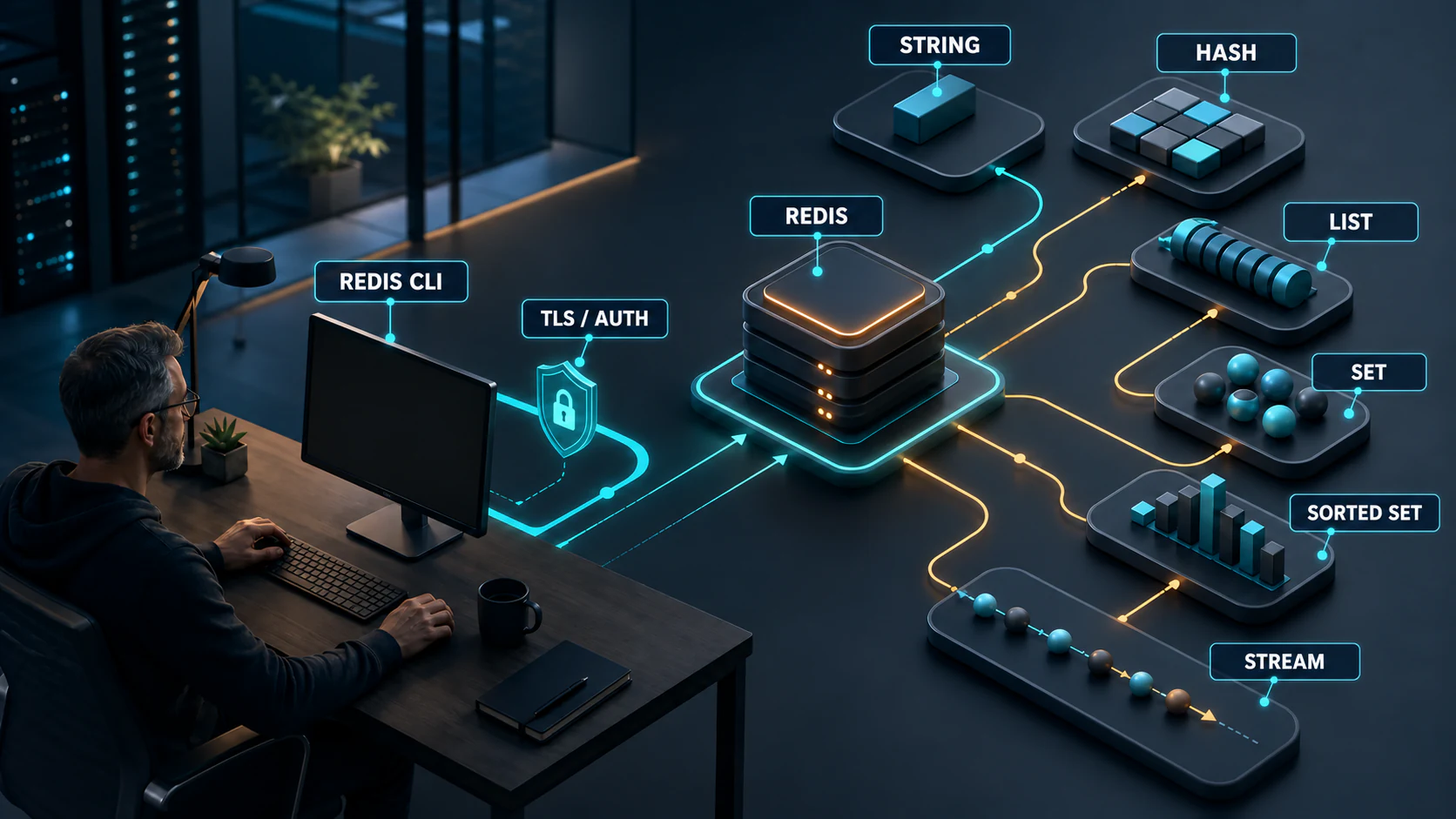
A Redis command cheat sheet is useful only when it helps an operator choose the right command, understand its cost, preserve evidence, and avoid turning an investigation into an outage. This guide treats redis-cli as a production instrument, not a bag of commands to paste into the busiest node.
The examples use Redis Open Source terminology and current command forms. Test every write against a disposable instance first, confirm the endpoint and role before running it, and adapt ACL permissions to the installed Redis release.
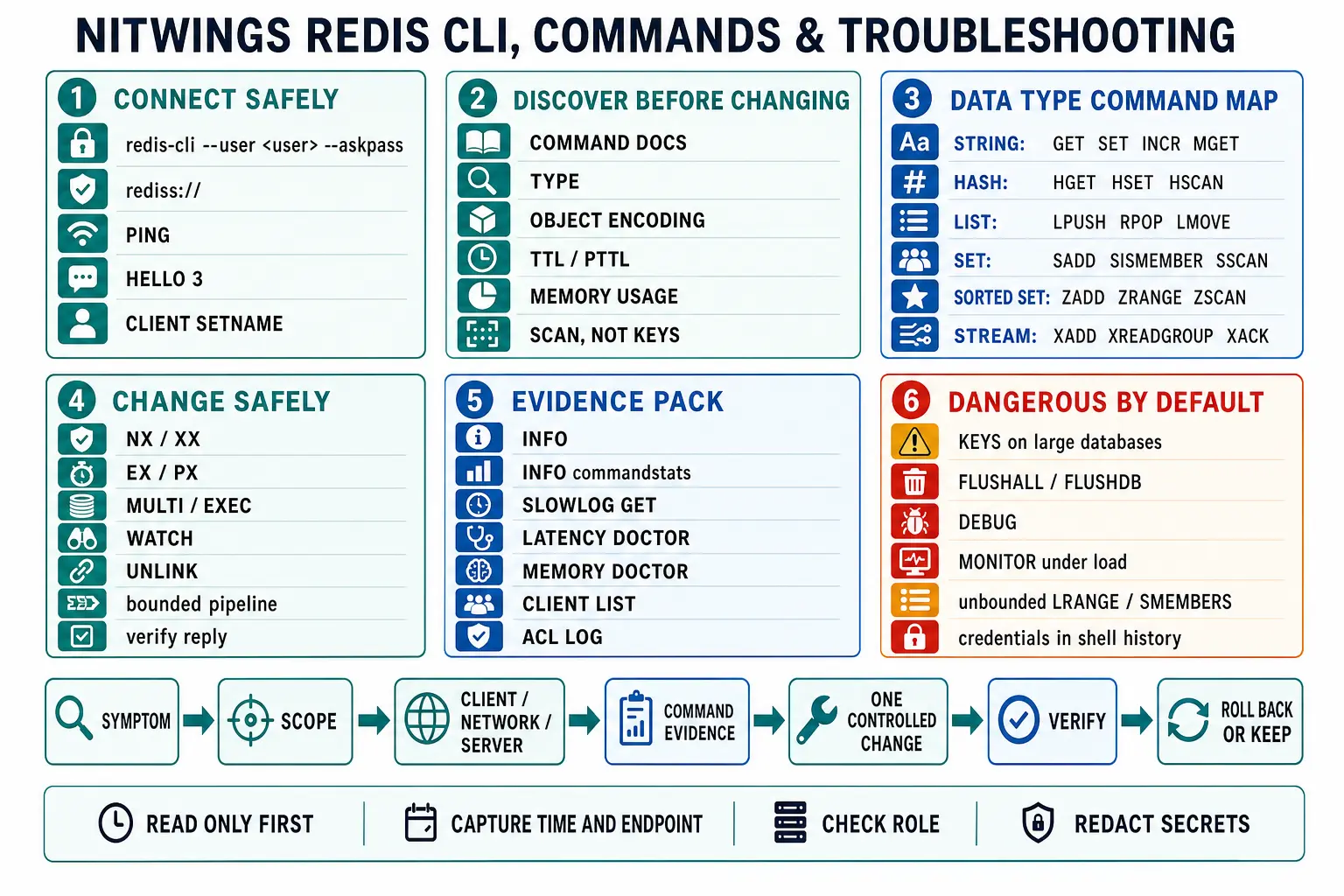
Begin every session with an identity and endpoint check
Many Redis mistakes begin before the first command. A shell history points to an old host, a port-forward targets the wrong environment, or the endpoint now belongs to a promoted primary. Write down the environment, endpoint, expected role, change ticket, and UTC start time. If the purpose is investigation, use an ACL user that cannot write.
redis-cli -h redis.internal -p 6379 --user redis_observer --askpass
redis-cli -u rediss://[email protected]:6379 --askpass

PING
HELLO 3
CLIENT SETNAME incident-4821-observer
INFO server
ROLE
--askpass prevents the password from appearing as a command-line argument. A URI containing a password can leak through shell history, process inspection, logs, or support bundles, so the examples omit it. REDISCLI_AUTH is available for automation, but it is still a secret-bearing environment variable and must be protected by the execution environment. Prefer a secret manager, short-lived job context, restricted service identity, and redacted logs.
Use rediss:// or the applicable TLS options when the server requires TLS. Validate the server name and trust chain. An encrypted connection to an unverified endpoint does not prove that the endpoint is the intended Redis service.
Make redis-cli output fit the job
| Mode | Use | Operator note |
|---|---|---|
| Interactive | redis-cli, then issue commands and use help | Good for deliberate exploration; record important commands separately because terminal history is not an incident log. |
| One command | redis-cli ... INFO replication | Best for a repeatable check and a meaningful exit status. |
| Raw | --raw | Removes human-oriented formatting for controlled text processing. Binary values still need a binary-safe workflow. |
| RESP3 | -3 or HELLO 3 | Use when testing RESP3 behavior. Confirm that parsers understand maps, sets, attributes, and nulls. |
| Cluster-aware | -c | Follows MOVED and ASK redirections for interactive Cluster work. |
| Fail on command error | -e | Useful in automation so a Redis error is reflected in the process exit code. Still validate the returned data. |
Do not parse the decorative interactive output when a machine-readable mode is available. Store the Redis and redis-cli versions with collected evidence because reply formats and available options can change across releases.
Ask Redis what a command does
A static cheat sheet cannot replace the command metadata on the installed server. Redis exposes arity, key positions, flags, ACL categories, and documentation. Check that metadata when a command is unfamiliar or when an ACL rule is being reviewed.
COMMAND INFO GET SET SCAN
COMMAND DOCS SET
COMMAND GETKEYS MSET key:1 one key:2 two
ACL CAT
ACL CAT dangerous
ACL DRYRUN redis_observer GET cache:user:42
ACL DRYRUN evaluates whether a user may execute a command without executing it. It is safer than discovering missing privileges during an incident by granting a broad command category. Command categories are convenient starting points, but a production ACL should be reviewed against actual keys and operations.
Redis administrator command map
Use separate ACL users for observation, backup, replication, Sentinel, controlled change, and break-glass administration. The commands below are not a recommendation to grant one user everything. They are an inventory to map to procedures and least-privilege roles.
| Administrative area | Commands and utilities | Operational use |
|---|---|---|
| Identity and server | PING, HELLO, INFO server, ROLE, TIME, DBSIZE, LASTSAVE | Confirm endpoint, protocol, role, process version, clock, logical key count, and last successful RDB save. |
| Configuration | CONFIG GET, CONFIG SET, CONFIG REWRITE, CONFIG RESETSTAT | Read effective settings, stage a reviewed runtime change, persist supported settings, or reset statistics at an agreed baseline. Never use broad wildcards in shared evidence without redaction. |
| Clients | CLIENT LIST, CLIENT INFO, CLIENT SETNAME, CLIENT KILL, CLIENT PAUSE, CLIENT UNPAUSE | Attribute connections and perform controlled client isolation. Kill or pause actions can create an outage and require a rollback path. |
| ACL and security | ACL USERS, ACL GETUSER, ACL DRYRUN, ACL LOG, ACL SETUSER, ACL SAVE, ACL LOAD | Audit identities, test permission, investigate denial, and apply reviewed user changes. Preserve access before disabling the current administrator. |
| Persistence | BGSAVE, LASTSAVE, BGREWRITEAOF, INFO persistence, redis-check-rdb, redis-check-aof | Create and verify background persistence, inspect state, and validate offline files. |
| Memory and keys | MEMORY STATS, MEMORY USAGE, MEMORY DOCTOR, MEMORY PURGE, SCAN, redis-cli --keystats | Measure dataset and allocator behavior. Purging the allocator is an active change, not routine monitoring. |
| Latency and commands | INFO commandstats, SLOWLOG, LATENCY, COMMAND DOCS, redis-cli --latency | Separate command execution, event history, network path, and command metadata. |
| Replication and HA | INFO replication, ROLE, REPLICAOF, WAIT, WAITAOF, SENTINEL | Observe roles and offsets, then use role-changing commands only through the topology runbook. |
| Cluster | CLUSTER INFO, CLUSTER NODES, CLUSTER SHARDS, CLUSTER KEYSLOT, redis-cli --cluster check | Inspect state, nodes, shard ownership, key slots, and whole-cluster consistency. |
| Data movement | DUMP, RESTORE, MIGRATE, redis-cli --rdb, redis-cli --pipe | Export a key or snapshot, restore into an isolated target, or run a controlled migration with explicit source-retention behavior. |
Important redis.conf options every administrator should review
There is no universal production redis.conf. The correct file depends on whether Redis is a disposable cache, a durable data service, a replica, a Sentinel-managed service, or a Cluster node. Begin with the example file shipped with the exact installed release, then keep a small reviewed configuration in version control. Do not paste a configuration from a different Redis major version and assume unknown or renamed directives will behave safely.
Network, process, and security options
| Directive | Production decision | Failure to avoid |
|---|---|---|
bind | List loopback and only the private service addresses Redis must use. | Listening on every interface and relying on authentication as the only network boundary. |
protected-mode yes | Keep the safety layer enabled even when ACLs and firewall rules are present. | Turning it off to work around an incomplete bind, ACL, or routing design. |
port, tls-port | Choose plaintext or TLS listeners deliberately. A TLS-only service normally uses port 0 and a reviewed tls-port. | Assuming TLS protects replication or the Cluster bus without configuring those paths. |
tls-ca-cert-file, tls-cert-file, tls-key-file | Use managed certificate paths, restricted key permissions, hostname validation, rotation, and an expiry alert. | Copying the private key into the main configuration or disabling peer validation during an incident. |
aclfile | Store named users in a protected file and deploy it consistently to every node that may become primary. | Using one all-powerful default user for applications, replication, Sentinel, backups, and operators. |
enable-protected-configs, enable-debug-command, enable-module-command | Keep these protected unless a version-specific, local, time-bounded procedure requires otherwise. | Opening powerful remote surfaces as a permanent troubleshooting shortcut. |
maxclients | Set it from application pool totals, failover bursts, monitoring, admin reserve, and the operating-system file-descriptor limit. | Raising Redis while the service unit or kernel still imposes a lower limit. |
tcp-backlog, tcp-keepalive, timeout | Align the accept backlog with kernel limits, retain dead-peer detection, and use idle disconnects only when client behavior is understood. | Using a short idle timeout that breaks pools, blocking commands, or pub/sub clients. |
client-output-buffer-limit | Budget normal, pub/sub, and replica buffers from measured fan-out and slow-consumer behavior. | Allowing an unbounded slow consumer to exhaust memory or setting limits that disconnect healthy replicas during synchronization. |
daemonize no, supervised systemd | Let the service manager own process lifetime, restart policy, logs, limits, and shutdown. | Double-daemonizing Redis so systemd tracks the wrong process. |
Persistence and recovery options
| Directive | Production decision | Evidence to monitor |
|---|---|---|
save | Define tested RDB trigger points, or explicitly disable scheduled snapshots with save "" when another persistence design replaces them. | rdb_last_save_time, save status, fork duration, copy-on-write memory, disk space. |
stop-writes-on-bgsave-error yes | Keep the visible failure boundary unless the availability contract deliberately accepts writes while snapshots are failing. | Rejected writes, filesystem permissions, disk and inode exhaustion, backup freshness. |
dir, dbfilename, appenddirname | Use explicit durable paths owned only by Redis, with capacity, backup, restore, and security controls. | Unexpected working directory, shared files between instances, ephemeral container storage. |
rdbcompression, rdbchecksum | Normally retain compression and integrity checking; benchmark before trading either for CPU. | Snapshot size, fork CPU, save duration, redis-check-rdb result. |
appendonly yes | Enable AOF when the recovery-point objective needs it. Redis 7 and later use a multipart AOF directory and manifest. | AOF enabled state, current and base sizes, rewrite status, last write and rewrite errors. |
appendfsync everysec | A common durability and performance balance. Test always or no only against an explicit loss window and storage behavior. | Delayed fsync count, disk latency, application tail latency, acknowledged-write loss test. |
no-appendfsync-on-rewrite | Understand the latency-versus-durability tradeoff before changing the default. | Fsync stalls during rewrite and the larger loss window if fsync is skipped. |
auto-aof-rewrite-percentage, auto-aof-rewrite-min-size | Set rewrite triggers from write rate, base size, available memory, disk throughput, and maintenance window. | Rewrite frequency, copy-on-write peak, AOF growth, rewrite failures. |
aof-use-rdb-preamble yes | Retain the compact hybrid base unless compatibility testing requires another format. | Restore compatibility with the exact Redis version and modules. |
Memory, latency, and observability options
| Directive | Production decision | Failure to avoid |
|---|---|---|
maxmemory | Reserve headroom for replication and client buffers, allocator fragmentation, modules, fork copy-on-write, the kernel, and sidecars. It is not the host RAM size. | Setting it to all available memory and discovering the missing reserve during BGSAVE or full sync. |
maxmemory-policy | Choose from the data contract: eviction for a cache, commonly noeviction for data that must not disappear. Test application handling. | Selecting an eviction policy without TTL coverage, hit-rate, and data-loss analysis. |
maxmemory-samples | Keep the default initially; benchmark higher sampling only when eviction quality justifies added CPU. | Tuning sampling before correcting unbounded keys or an incorrect policy. |
lazyfree-lazy-eviction, lazyfree-lazy-expire, lazyfree-lazy-server-del | Evaluate asynchronous freeing for large objects after measuring pending frees, CPU, and memory lag. | Assuming lazy freeing removes the memory immediately or fixes a poor key model. |
activedefrag | Enable only when the allocator and Redis build support it and fragmentation evidence justifies its CPU budget. | Enabling it because RSS is high without distinguishing dataset, buffers, allocator, and fork memory. |
slowlog-log-slower-than, slowlog-max-len | Choose a threshold that exposes harmful server execution time and retain enough entries for the response interval. | Treating slow log duration as network or reply-transfer time, or logging command arguments without a privacy review. |
latency-monitor-threshold | Set a nonzero millisecond threshold when using the latency monitor, then review event history and doctor output. | Enabling collection without an alert or retention procedure. |
notify-keyspace-events | Enable only the event classes a proven consumer needs and measure the added work. | Using notifications as a durable queue or enabling every class by default. |
hz, dynamic-hz | Retain dynamic defaults unless expiration, housekeeping, and CPU measurements show a real need. | Raising the event-loop frequency as a generic latency fix. |
io-threads, io-threads-do-reads | Benchmark on the actual CPU, traffic shape, TLS mode, and Redis release; treat thread-count changes as a deployment decision. | Expecting I/O threads to parallelize command execution or repair a slow data model. |
Valid but unsafe configuration examples
The following directives and values are accepted by current Redis releases, but acceptance does not make them safe. Keep them visible for command coverage, then choose values from the workload, service manager, recovery objective, and measured host limits.
| Valid example | What it does | Safety and current practice |
|---|---|---|
bind 0.0.0.0 | Listens on every IPv4 interface. | Unsafe. Bind only loopback and required private addresses, keep protected mode, ACLs, TLS where needed, and firewall the path. |
timeout 10 | Closes normal clients after ten idle seconds. | Unsafe for many pools, blocking operations, and interactive sessions. Use zero or a measured timeout and test each client type. |
daemonize yes with supervised no | Detaches Redis and disables service-manager supervision. | Unsafe for packaged systemd services. Use daemonize no and the package's supported supervision model. |
maxclients 102400 | Requests a very large connection ceiling. | Unsafe without a capacity model. Size pools, file descriptors, memory, output buffers, failover bursts, and reserved administrator access together. |
maxmemory 1gb and maxmemory-policy allkeys-lru | Caps the eviction dataset and permits eviction of any key using sampled LRU behavior. | Unsafe for authoritative or mixed data. Reserve process and fork headroom and select eviction from the application data contract. |
rdbcompression no | Disables RDB compression. | Unsafe as an assumed performance improvement. It can enlarge snapshots, I/O, transfer, and recovery time. Benchmark before changing the default. |
appendonly no | Disables normal AOF persistence. | Unsafe when the recovery point depends on AOF. Choose no persistence, RDB, AOF, or both from explicit RPO and RTO. |
aof-use-rdb-preamble no | Writes an AOF base without the compact RDB preamble. | Unsafe as a copied compatibility value. Keep the current default unless exact-version testing requires otherwise. |
client-output-buffer-limit normal 0 0 0 | Leaves normal-client output without this configured hard or soft limit. | Unsafe with unbounded replies or stalled consumers. Bound commands and responses, then size limits from observed client behavior. |
client-output-buffer-limit replica 0 0 0 | Removes configured replica output-buffer limits. | Unsafe. A disconnected or slow replica can consume unbounded memory. Use the current replica class name and size it from full-sync and lag tests. |
cluster-enabled yes | Starts an instance in Cluster mode. | Unsafe on a populated standalone or Sentinel node. Build empty dedicated Cluster instances and follow article 3. |
Specialized current options and renamed replacements
| Option | Purpose | Operator guidance |
|---|---|---|
pidfile, loglevel, logfile, databases, always-show-logo | Process metadata, logging, logical database count, and startup display. | Follow the package and systemd logging model. These do not tune data safety or throughput. Redis Cluster supports database zero only. |
appendfilename, appenddirname | Name the multipart AOF files and directory. | Keep valid basenames, discover the effective paths, and back up the manifest with every referenced file. |
aof-load-truncated yes | Allows loading a truncated final AOF segment in supported cases. | Monitor the warning and reconcile data. It does not make arbitrary AOF corruption safe. |
aof-rewrite-incremental-fsync yes | Spreads rewrite-file fsync work. | Keep the default initially and measure disk latency, rewrite duration, and tail latency before changing it. |
lua-time-limit 5000 | Marks long-running scripts for intervention after the configured milliseconds. | It does not automatically cancel a script. Bound script work, monitor latency, and reserve SCRIPT KILL or failover for a reviewed incident procedure. |
hash-max-listpack-entries, hash-max-listpack-value, list-max-listpack-size, zset-max-listpack-entries, zset-max-listpack-value | Control compact encodings for small hashes, lists, and sorted sets. | Use the current listpack names. Change only with object-size distribution, memory, CPU, upgrade, and latency benchmarks. |
set-max-intset-entries, set-max-listpack-entries, set-max-listpack-value | Control compact set encodings. | Validate member types and sizes. A larger threshold can save memory but increase conversion or command CPU. |
list-compress-depth | Keeps list nodes near the ends uncompressed while allowing interior compression. | Benchmark the actual list operations and CPU cost before changing it. |
hll-sparse-max-bytes | Controls the sparse HyperLogLog representation threshold. | Keep the documented limit and test memory and conversion behavior for the installed release. |
stream-node-max-bytes, stream-node-max-entries | Control the approximate size of stream macro nodes. | Tune only from stream entry shape, trimming, memory, and consumer latency evidence. |
activerehashing yes | Uses small periodic CPU slices to rehash Redis hash tables. | Keep enabled unless a measured latency experiment on the exact workload justifies a temporary change. |
repl-disable-tcp-nodelay no | Sends replication traffic with TCP_NODELAY behavior instead of deliberately combining more packets. | Keep the low-delay default unless measured bandwidth pressure justifies accepting additional replica delay. |
replica-lazy-flush no | Controls whether a replica frees its current dataset asynchronously during a full synchronization. | Test full-sync pause, pending frees, peak memory, and recovery time before enabling lazy flush. |
Replication, Sentinel, and Cluster settings are topology controls, not generic tuning switches. The next article gives a step-by-step deployment and a dedicated configuration matrix for replicaof, authentication, backlog sizing, write guards, Sentinel timeouts, and Cluster node state.
Change Redis configuration without losing the source of truth
- Record the Redis version, package, process command line, active configuration path, node role, persistence mode, and current values with narrowly scoped
CONFIG GETcalls. - Read the example
redis.confshipped with that exact release. Check module and managed-service restrictions. Back up the managed file and ACL file with permissions intact. - Write the proposed value, capacity calculation, impact, validation signal, and rollback. Test it against production-like data and traffic.
- When the installed release supports a runtime change, apply one reviewed option with
CONFIG SET, observe it, and update configuration management immediately. A runtime success does not make the change restart-safe. - Use
CONFIG REWRITEonly when Redis owns the local configuration lifecycle and the rewrite has been tested with includes. It does not rewrite included files, and directive order can cause a later include to override a rewritten value. - For startup-only, security, networking, TLS, threading, storage-path, or topology changes, deploy through configuration management and perform a rolling restart. Start with a replica or disposable node, prove health and catch-up, then proceed.
- After restart, compare effective values, logs, listeners, ACL behavior, persistence, memory, latency, clients, and role. Run the application smoke test and record the rollback result.
redis-cli --user redis_observer --askpass CONFIG GET maxmemory
redis-cli --user redis_observer --askpass CONFIG GET maxmemory-policy
redis-cli --user redis_observer --askpass CONFIG GET appendonly
redis-cli --user redis_observer --askpass CONFIG GET appendfsync
redis-cli --user redis_observer --askpass INFO persistence
redis-cli --user redis_observer --askpass INFO memory
Avoid CONFIG GET * in tickets or chat. Broad configuration output may expose paths, topology details, renamed commands, module settings, or secret-bearing values on some versions. Collect only the required directives and redact evidence before sharing it.
CONFIG SET changes runtime state. It is not automatically durable across restart. Update configuration management or use a reviewed CONFIG REWRITE where the package model supports it. Record the old value, new value, reason, validation, and rollback before applying any change.
Inspect the key before choosing the command
Redis commands are tied to data types. A key name does not tell you whether its value is a string, hash, stream, list, or module data type. Inspect type, lifetime, encoding, and approximate memory before requesting the whole value.
EXISTS cache:user:42
TYPE cache:user:42
TTL cache:user:42
PTTL cache:user:42
OBJECT ENCODING cache:user:42
MEMORY USAGE cache:user:42 SAMPLES 5
TTL returns -1 when the key exists without expiry and -2 when it does not exist. That distinction matters in cache incidents. MEMORY USAGE is an estimate of the bytes required for the key and value in RAM, including overhead represented by its sampling behavior. It is not the complete memory impact of the application or process.
Iterate with SCAN, not KEYS
KEYS * walks the keyspace in one server operation and can block useful work on a large database. SCAN is incremental. It spreads the work across calls, although a complete iteration still consumes CPU and can affect cache locality. Run it from the appropriate primary, throttle it, and observe latency.
redis-cli --scan --pattern 'cache:user:*' --count 200 -i 0.01
redis-cli --bigkeys -i 0.1
redis-cli --memkeys -i 0.1
redis-cli --keystats --top 20 -i 0.1
A SCAN iteration may return the same element more than once, and elements can appear or disappear while the dataset changes. Do not use it as a transactional snapshot. The COUNT argument is a work hint, not an exact page size. Deduplicate in the client when the action must be idempotent.
--bigkeys, --memkeys, and --keystats scan the database. They are diagnostic jobs, not free queries. Record their start time, throttle them, and stop if latency or CPU crosses the agreed boundary.
Command cheat sheet by data model
| Data model | Common commands | Production question |
|---|---|---|
| String | GET, SET, MGET, INCRBY, GETDEL | Is the value bounded, and must the write preserve or replace its TTL? |
| Hash | HGET, HMGET, HSET, HINCRBY, HSCAN | Can one logical object grow without a field-count or value-size limit? |
| List | LPUSH, RPUSH, LPOP, RPOP, LMOVE, LTRIM | What bounds the list, and what acknowledgement model prevents lost work? |
| Set | SADD, SREM, SISMEMBER, SCARD, SSCAN | Could full set reads or intersections become unbounded? |
| Sorted set | ZADD, ZSCORE, ZRANGE, ZPOPMIN, ZSCAN | Are rank and score semantics explicit, and are returned ranges bounded? |
| Stream | XADD, XREADGROUP, XACK, XPENDING, XAUTOCLAIM, XTRIM | Who owns pending messages, and what controls retention and replay? |
| Keyspace | EXISTS, EXPIRE, PERSIST, UNLINK, SCAN | Does the action preserve expiry and avoid synchronous deletion of large values? |
Always read the command’s time-complexity variables. O(N) is not automatically dangerous and O(1) is not automatically harmless. The actual N, value bytes, reply size, frequency, and interaction with other clients determine operational impact.
Use SET options to express the write contract
SET can encode useful preconditions directly:
SET lock:invoice:884 worker-17 NX PX 30000
SET cache:user:42 payload XX KEEPTTL
SET session:42 replacement GET EX 900NXwrites only when the key does not exist.XXwrites only when the key exists.EXandPXapply seconds or milliseconds of expiry.GETreturns the previous value as part of the operation.KEEPTTLretains the existing expiry.
A normal SET replaces the value and discards an existing TTL unless an option preserves or replaces it. This is a common cause of cache keys becoming persistent. For locks, a token and expiry are only part of a correct design. Release must verify ownership atomically, and the application must handle work that outlives the lease.
Use EXEC as the Redis commit, not COMMIT
Redis has no COMMIT command. MULTI begins queueing commands on one connection, EXEC is the commit-like action that runs the queue, and DISCARD abandons the queue before execution. Redis transactions do not provide a relational rollback. A command that fails during execution does not reverse successful commands around it.
WATCH account:42
GET account:42
MULTI
SET account:42 revised-value
EXEC
WATCH provides optimistic concurrency. If a watched key changes before EXEC, the transaction aborts and the client decides whether to retry. Bound retries and add jitter under contention. Lua scripts and Redis Functions can move an atomic decision to the server, but long-running logic blocks other command execution. Version, test, authorize, and observe it like application code.
Inspect every element returned by EXEC. A successful array reply can contain an error for one queued command while other commands have already changed data. A null reply with WATCH means the transaction did not execute because a watched key changed. If the connection is lost after sending EXEC, the client may not know whether the transaction ran, so recovery needs idempotency or a business-level reconciliation key.
Pipeline for round trips, not unlimited batches
Pipelining sends multiple commands before reading their replies. It can substantially improve throughput when network round-trip time dominates, but the server must queue replies until the client reads them. Use bounded batches, read every reply, and cap both request and response bytes. Ten thousand tiny increments and ten thousand multi-megabyte reads are not comparable batches.
A pipeline is not a transaction. Other clients can run commands between its operations. A partially broken connection can also leave the caller uncertain about which writes reached the server. Design idempotency and reconciliation where retry ambiguity matters.
Troubleshoot by symptom and boundary
| Symptom | Likely boundary | First checks |
|---|---|---|
| Connection refused or timeout | Endpoint, listener, route, firewall, TLS, saturation | Resolve the address, test the intended port, inspect service state and connection counts, compare from an approved client path. |
NOAUTH or WRONGPASS | User, secret, ACL state | Confirm the named user, secret source, enabled status, key pattern, and command permission. Inspect ACL LOG without exposing credentials. |
READONLY | Client reached a replica or topology changed | Run ROLE and INFO replication, then fix discovery or routing. Do not promote a node merely to make the error disappear. |
MOVED or ASK | Cluster redirection | Use a cluster-aware client or redis-cli -c; refresh the slot map and inspect Cluster health. |
CROSSSLOT | Multi-key operation spans slots | Calculate slots, review key design, and use a deliberate shared hash tag only for data that must be operated on together. |
OOM command not allowed | Memory boundary and eviction contract | Inspect INFO memory, maxmemory, policy, evictions, largest keys, buffers, and application handling. |
LOADING | Startup and dataset recovery | Inspect loading progress, persistence files, disk throughput, logs, and the expected recovery-time objective. |
BUSY | Long-running script or function | Identify the workload and owner, preserve evidence, and follow the reviewed interruption procedure. Do not use destructive recovery reflexively. |
| High application latency with quiet slow log | Pool wait, DNS, TLS, network, host scheduling, reply size | Compare application timing, pool metrics, network RTT, intrinsic latency, client retries, and response bytes. |
Collect an evidence pack before changing configuration
redis-cli ... INFO server
redis-cli ... INFO clients
redis-cli ... INFO memory
redis-cli ... INFO persistence
redis-cli ... INFO replication
redis-cli ... INFO commandstats
redis-cli ... SLOWLOG GET 20
redis-cli ... LATENCY LATEST
redis-cli ... LATENCY DOCTOR
redis-cli ... MEMORY DOCTOR
redis-cli ... CLIENT LIST
redis-cli ... ACL LOG 20
Replace the ellipsis with the reviewed connection profile. Capture UTC time, endpoint, role, Redis version, and the reason for collection. Redact client addresses, names, usernames, keys, and command arguments when they contain customer or security data.
The slow log measures server command execution time and excludes client I/O. LATENCY events reflect enabled latency monitoring. MEMORY DOCTOR offers heuristics, not a substitute for byte-level capacity evidence. CLIENT LIST can be large and sensitive. Interpret every source within its boundary.
Distinguish large keys, hot keys, and a large keyspace
These are different incidents. A large key contains many members or bytes and can create command, network, deletion, persistence, and replication costs. A hot key receives disproportionate traffic and can saturate a single execution path even when it is small. A large keyspace contains many keys and increases expiry, scanning, metadata, persistence, and recovery work even if every value is modest.
Start with the application namespace and a bounded time window. Compare key count, value or member count, memory estimate, command frequency, reply bytes, TTL, and growth. Do not fetch a suspected large value merely to prove that it is large. Use type-specific cardinality commands such as HLEN, LLEN, SCARD, ZCARD, and XLEN before requesting members.
Hot-key detection depends on the eviction policy and available tooling. The --hotkeys mode relies on LFU counters, so it is not a universal hot-key detector. Application tracing, client-side command metrics, proxy evidence, or controlled sampling may be required. Confirm that diagnostic sampling will not expose key names or customer identifiers.
When a key is too large, repair the producer and data model before deleting the symptom. Bound collection growth, trim streams and lists with explicit retention semantics, divide independently accessed data, and set expiry where the data contract permits. Deleting one key without controlling its writer simply schedules the next incident.
Read counters as rates and correlate one timeline
Most INFO counters accumulate across process lifetime. The value of evicted_keys, expired_keys, rejected_connections, keyspace_hits, or a command call counter is less useful than its change over a known interval. Capture two samples with timestamps and calculate a rate. Record the Redis uptime so a restart is not mistaken for a sudden improvement.
Put application releases, traffic changes, failovers, backups, snapshots, AOF rewrites, host pressure, network events, and configuration changes on the same UTC timeline. A rising application p99 with stable server execution time points away from slow commands. A latency event aligned with a background save, fork, or disk stall suggests a different experiment from a single expensive command.
Hit rate needs context. Calculate hits divided by hits plus misses over the same interval, then compare origin load and user latency. An improved hit rate can still be harmful when a few huge values increase network time or when aggressive caching makes invalidation unreliable. Treat every ratio as one part of the workload contract.
Automate checks without creating a second failure
A shell loop that runs a harmless command once can become expensive when a scheduler launches it on every node every second. Automation needs an explicit endpoint inventory, timeout, concurrency limit, retry budget, secret source, output limit, and owner. It must distinguish a connection failure from a Redis error and a valid empty result.
redis-cli -h redis.internal -p 6379 \
  --user redis_observer --askpass -e --raw \
  INFO replication
--askpass is interactive and therefore unsuitable for an unattended job. The example shows the desired operator behavior, not a complete scheduled script. For automation, inject a protected secret at runtime, prevent shell tracing, avoid printing the environment, and destroy the job context after use. Never commit a URI containing credentials.
Set a connection timeout appropriate to the check and apply an outer job timeout so a stuck socket does not accumulate processes. Bound returned bytes before passing output to another tool. Preserve stderr and the exit code separately from stdout. If the parser depends on a field or reply format, test it against every supported Redis release and RESP mode.
Do not automate remediation directly from a single Redis counter. Require corroborating evidence, a cooldown, a maximum action frequency, and a stop condition. A script that restarts Redis whenever latency rises can convert a recoverable client or network problem into repeated dataset loads and availability loss.
Select the backup method before writing a script
| Method | What it captures | Main operational concern |
|---|---|---|
| Copy a completed RDB | One point-in-time dataset file | Confirm BGSAVE success, fork headroom, file path, checksum, off-host transfer, retention, and restore. |
redis-cli --rdb | Remote RDB transferred to the client host | It behaves like a full synchronization and consumes server, network, and client storage resources. |
| Copy the Redis 7+ AOF directory | Manifest, base file, and incremental AOF files | Disable automatic rewrites and wait for any active rewrite before taking a consistent copy. |
DUMP and RESTORE | One serialized key at a time | Preserve TTL separately, handle binary output safely, and verify type, version compatibility, and destination overwrite policy. |
| Replica-based backup | RDB or AOF from a replica | Measure lag and full-sync impact. The replica is the backup source, not the backup itself. |
A backup is complete only when it has an owner, timestamp, source endpoint and role, Redis version, persistence mode, file inventory, size, digest, encryption decision, off-host destination, retention, alert for staleness, and a successful isolated restore result.
Use the Redis 8.10 online BACKUP workflow
Redis 8.10 adds the BACKUP command family. It creates a self-contained, online backup while writes continue and works whether or not normal AOF persistence is enabled. The sealed result contains a BASE snapshot, an incremental AOF file, and a standalone manifest. Keep the established RDB and multipart-AOF procedures below for Redis releases that do not provide this command family.
Confirm support and prepare the destination
redis-cli --user backup_agent --askpass INFO server
redis-cli --user backup_agent --askpass COMMAND INFO BACKUP
redis-cli --user backup_agent --askpass CONFIG GET dir backupdirname backup-sealed-ttl
redis-cli --user backup_agent --askpass BACKUP STATUS
Proceed only when the installed server reports the command and the backup state is idle. The directory named by backupdirname is resolved below the Redis working directory and must be empty before BACKUP START. Confirm free space, filesystem ownership, the off-host destination, encryption, retention, and the administrator ACL before opening the backup window.
Start, observe, seal, copy, and clean up
redis-cli --user backup_agent --askpass BACKUP START
redis-cli --user backup_agent --askpass BACKUP STATUS
redis-cli --user backup_agent --askpass BACKUP LIST

redis-cli --user backup_agent --askpass BACKUP SEAL
redis-cli --user backup_agent --askpass BACKUP STATUS
redis-cli --user backup_agent --askpass BACKUP LIST
Wait for the state to become incrementing before sealing. During that state, BACKUP LIST exposes the immutable BASE file so a controlled data plane can begin copying it. After BACKUP SEAL, list the files again and copy all three reported paths, including the manifest, to one versioned off-host backup set. Record the source endpoint and role, Redis version, UTC start and seal times, file sizes, digests, configuration and ACL versions, and application recovery point.
Verify every copied digest before cleanup. Then release the pinned server-side artifacts:
redis-cli --user backup_agent --askpass BACKUP CLEANUP
redis-cli --user backup_agent --askpass BACKUP STATUS
If a pending, snapshotting, or incrementing backup must be cancelled, use BACKUP ABORT, preserve the reported error, and correct the cause before retrying. A sealed backup uses BACKUP CLEANUP, not abort. A nonzero backup-sealed-ttl can remove sealed files automatically, so the copy job and failure alerts must complete within the reviewed retention window.
Restore the sealed set in isolation
Copy the BASE, INCR, and manifest into a protected restore directory on an isolated compatible Redis host. Verify the inventory and digests, then configure the startup-only preload path to the copied manifest:
preload-file aof:/restore-staging/appendonly.aof.manifestStart the isolated server with no application traffic, follow its log and INFO persistence through loading, and verify database size, representative keys and TTLs, modules, functions, and business invariants. Record the actual recovery point and restore time. Do not point preload-file at the active server-side backup directory, and do not make production the first restore test.
RDB backup script with success and integrity checks
The following example is intentionally strict. It expects the deployed data directory and RDB filename as protected job configuration rather than discovering paths with a broadly privileged Redis user. Inject REDISCLI_AUTH from the scheduler’s secret facility, never from a committed file. Test the script on a non-production instance and set a timeout that matches the real dataset.
#!/usr/bin/env bash
set -Eeuo pipefail
umask 077

: "${REDIS_HOST:?Set REDIS_HOST}"
: "${REDIS_PORT:=6379}"
: "${REDIS_USER:?Set REDIS_USER}"
: "${REDISCLI_AUTH:?Inject REDISCLI_AUTH securely}"
: "${REDIS_DATA_DIR:?Set REDIS_DATA_DIR}"
: "${REDIS_RDB_FILE:=dump.rdb}"
: "${BACKUP_ROOT:?Set BACKUP_ROOT to an explicit backup directory}"

redis=(redis-cli -h "$REDIS_HOST" -p "$REDIS_PORT" \
  --user "$REDIS_USER" --no-auth-warning --raw -e)

role="$("${redis[@]}" ROLE | sed -n '1p')"
test "$role" = master || {
  echo "Refusing backup: expected writable primary, found $role" >&2
  exit 1
}

before="$("${redis[@]}" LASTSAVE)"
"${redis[@]}" BGSAVE SCHEDULE

deadline=$((SECONDS + 900))
while :; do
  info="$("${redis[@]}" INFO persistence | tr -d '\r')"
  after="$("${redis[@]}" LASTSAVE)"
  if [ "$after" -gt "$before" ] \
    && grep -q '^rdb_bgsave_in_progress:0$' <<<"$info" \
    && grep -q '^rdb_last_bgsave_status:ok$' <<<"$info"; then
    break
  fi
  [ "$SECONDS" -lt "$deadline" ] || {
    echo "Timed out waiting for a successful BGSAVE" >&2
    exit 1
  }
  sleep 2
done

stamp="$(date -u +%Y%m%dT%H%M%SZ)"
destination="$BACKUP_ROOT/$stamp"
source_file="$REDIS_DATA_DIR/$REDIS_RDB_FILE"

install -d -m 0700 "$destination"
install -m 0600 "$source_file" "$destination/dump.rdb"
redis-check-rdb "$destination/dump.rdb"
sha256sum "$destination/dump.rdb" > "$destination/SHA256SUMS"
printf 'endpoint=%s:%s\nlastsave=%s\n' \
  "$REDIS_HOST" "$REDIS_PORT" "$after" > "$destination/METADATA"
The LASTSAVE pattern follows the Redis-documented way to confirm that a requested background save completed successfully. The script refuses an unexpected replica because a lagging copy can violate the intended recovery point. If the runbook intentionally backs up a replica, change the role guard only after adding offset and lag acceptance checks.
Copy the completed directory to the approved off-host destination, verify the digest again after transfer, apply retention only to the explicit backup root, and alert when the latest verified backup exceeds its age objective. Never delete old backups before the new one passes validation and transfer.
Create a remote RDB with redis-cli
umask 077
redis-cli -h redis.internal -p 6379 \
  --user backup_agent --askpass \
  --rdb redis-20260804T130000Z.rdb

redis-check-rdb redis-20260804T130000Z.rdb
sha256sum redis-20260804T130000Z.rdb
redis-cli --rdb is useful when the backup host cannot read the Redis data directory. It initiates an RDB transfer through the replication protocol, so treat it like a full synchronization: schedule it, monitor fork memory, CPU, network, persistence, latency, and competing replica syncs. The example uses --askpass interactively. An unattended job needs protected secret injection.
redis-cli --functions-rdb can retrieve an RDB containing functions without keys on supported releases. It is not a replacement for the dataset backup. Record the server and client versions for either mode.
Back up multipart AOF safely
Redis 7 and later store AOF state as multiple files in appenddirname. A valid backup needs the manifest and every referenced base and incremental file. Copying only a filename from an older tutorial is incomplete.
- Read and record
dir,appenddirname,appendonly, andauto-aof-rewrite-percentage. - Set
auto-aof-rewrite-percentage 0for the controlled backup window. Do not startBGREWRITEAOF. - Poll
INFO persistenceuntilaof_rewrite_in_progressis0. Also check the latest rewrite status. - Copy or archive the complete append directory, including its manifest. Keep paths, ownership, and permissions in the backup metadata.
- Restore the previous automatic rewrite percentage immediately and verify the effective value. Persist the temporary change only when the restart runbook requires it, then persist the restored value as well.
- Verify file inventory, sizes, digests, off-host transfer, and an isolated load test.
Hard-link staging can reduce the rewrite-disabled window on a compatible filesystem, as documented by Redis, but it needs a tested script and filesystem behavior. Do not assume that a copied directory is consistent if a rewrite overlapped it.
Validate RDB and AOF files before restore
redis-check-rdb /restore-staging/dump.rdb
redis-check-aof /restore-staging/appendonlydir/appendonly.aof.manifest
Run validation against a protected working copy, not the only backup. redis-check-rdb validates an RDB; it is not a magic data-repair tool. A successful file check proves format integrity, not that the snapshot contains the required business state.
Run redis-check-aof without --fix first and inspect the reported offset. Before any repair, preserve the complete original AOF set. redis-check-aof --fix can discard the AOF portion from an invalid point onward, which may cause substantial data loss. With multipart AOF, follow the exact installed-version procedure and keep the manifest with its referenced files. Prefer an isolated load and business reconciliation over blind in-place repair.
Restore an RDB or AOF step by step
- Create an isolated Redis target with the required Redis version, modules, configuration, filesystem capacity, and no application traffic.
- Preserve the target’s existing data directory before changing it. Confirm the exact directory, owner, group, permissions, RDB filename, AOF directory, and service unit.
- Validate the backup file inventory and digest. Run
redis-check-rdbor the applicable AOF validation against a working copy. - Stop the isolated target cleanly. Place the selected RDB or complete AOF set into the configured location with the Redis service ownership and restrictive permissions.
- Make persistence mode match the backup being restored. When both AOF and RDB are enabled, Redis loads AOF because it is normally more complete. Do not place an old AOF beside a desired RDB and expect the RDB to win.
- Start Redis and follow the service log and
INFO persistencethrough loading. Stop if Redis reports truncation, corruption, a missing module, or incompatible encoding. - Verify role, Redis version,
DBSIZEper logical database, representative key types and TTLs, stream pending state, functions, ACL expectations, and application-level invariants. - Measure restore time and record the actual recovery point. Only then plan a controlled application cutover, keeping the previous environment recoverable.
Never first-test a restore by replacing the active production data directory. A backup that has not loaded in isolation is an assumption.
Export, restore, and migrate individual keys
DUMP returns Redis’s serialized value for one key without its TTL. Capture TTL separately, then use a binary-safe transfer:
redis-cli -h source.internal --user migration_agent --askpass \
  -D "" --raw DUMP 'cache:user:42' > cache-user-42.dump

redis-cli -h target.internal --user migration_agent --askpass \
  -X dump_payload RESTORE 'cache:user:42' 900000 dump_payload REPLACE \
The 900000 TTL is milliseconds and is an example, not the original TTL. Capture PTTL immediately before export and decide how transfer time affects expiry. Omit REPLACE unless overwrite is explicitly approved. Verify type, value or cardinality, TTL, memory, and application behavior on the target.
MIGRATE transfers keys directly between Redis servers and, unless COPY is used, removes successfully transferred keys from the source. It can use authentication and multiple keys, but it is an active data move with timeout, TLS, routing, Cluster-slot, and partial-completion concerns. Use it only through a rehearsed migration plan with source and target evidence.
Use redis-cli --pipe for controlled mass insertion
redis-cli --pipe reads raw Redis protocol from standard input and sends commands efficiently. Plain lines copied from a terminal are not a robust mass-import format. Generate valid RESP with a tested producer, bound the batch, retain the source artifact and record count, and inspect the final error count.
generate_resp_from_reviewed_input \
  | redis-cli -h target.internal -p 6379 \
      --user import_agent --askpass --pipe --pipe-timeout 60
The placeholder producer must be implemented for the actual input schema and escaped bytes. Run the import against a disposable target first. Confirm key namespaces, slot tags, TTLs, duplicate policy, memory budget, eviction behavior, persistence load, replication lag, and rollback before production.
Additional Redis utilities for administrators
| Utility or mode | Purpose | Safety note |
|---|---|---|
redis-check-rdb | Validate an RDB file offline | Use a copy and still perform a real isolated restore. |
redis-check-aof | Inspect AOF integrity and optionally truncate damaged content | Back up first; --fix can discard valid later data. |
redis-benchmark | Generate controlled synthetic command load | Defaults rarely represent the application. Never point an unreviewed test at production. |
redis-sentinel | Run Redis in Sentinel mode | It requires persistent writable configuration, authentication, quorum design, and independent placement. |
redis-cli --stat | Show continuously updated server statistics | Choose an interval and preserve a timestamped sample for comparison. |
--latency, --latency-history, --latency-dist | Measure client-to-server latency from the CLI path | It does not replace application latency or intrinsic host latency. |
--intrinsic-latency | Measure host scheduling latency without contacting Redis | Run on the Redis host in an approved window because it is CPU intensive. |
--bigkeys, --memkeys, --keystats | Scan for high cardinality and high memory keys | They scan the database. Throttle, scope with a pattern, and watch latency. |
--hotkeys | Sample LFU counters for hot keys | It works only with an LFU maxmemory policy and is not a complete traffic profiler. |
--eval and Lua debugger modes | Execute and debug scripts | A long script blocks command execution. Use a lab for synchronous debugging. |
redis-server --test-memory | Exercise host memory for hardware diagnostics | It consumes the requested memory and CPU. Run offline or in a dedicated maintenance test. |
Reserve dangerous commands for controlled procedures
| Command or pattern | Why it is risky | Safer operating direction |
|---|---|---|
KEYS on a large database | Single blocking traversal and potentially huge reply | Use throttled SCAN and bound the result. |
FLUSHDB, FLUSHALL | Deletes a database or all databases | Remove permission from normal users and use an approved, verified destructive runbook. |
MONITOR | Streams every command and can materially reduce performance while exposing sensitive data | Use command statistics, slow log, tracing at the application, or a short controlled capture only when justified. |
Unbounded LRANGE, SMEMBERS, HGETALL | Large server work and large network reply | Use bounds or incremental scan forms and redesign unbounded collections. |
Large DEL | Synchronous memory reclamation may stall the server | Evaluate UNLINK, then observe asynchronous reclamation and memory pressure. |
DEBUG and administrative configuration commands | Can block, crash, expose, or materially change the service | Keep out of application ACLs and require a reviewed maintenance procedure. |
A repeatable CLI incident workflow
- State the symptom in application terms, including scope, start time, and affected operations.
- Confirm environment, endpoint, TLS mode, ACL user, database or Cluster, and current role.
- Collect read-only server, client, memory, persistence, replication, latency, and command evidence.
- Separate client pool, network, server execution, memory, persistence, and topology hypotheses.
- Choose one controlled change with an owner, expected signal, stop condition, and rollback.
- Run the same verification that exposed the problem, including application p99 and errors.
- Keep or reverse the change based on evidence, then preserve the commands and outputs in the incident record.
The best cheat sheet does not make commands faster to type. It makes the operator slower to assume, faster to isolate the real boundary, and less likely to damage evidence. Use the related Linux Server Support service when Redis, systemd, kernel, firewall, and host evidence must be reviewed together.