Create a CSR Using OpenSSL: Keys, SANs, Verification, and Deployment
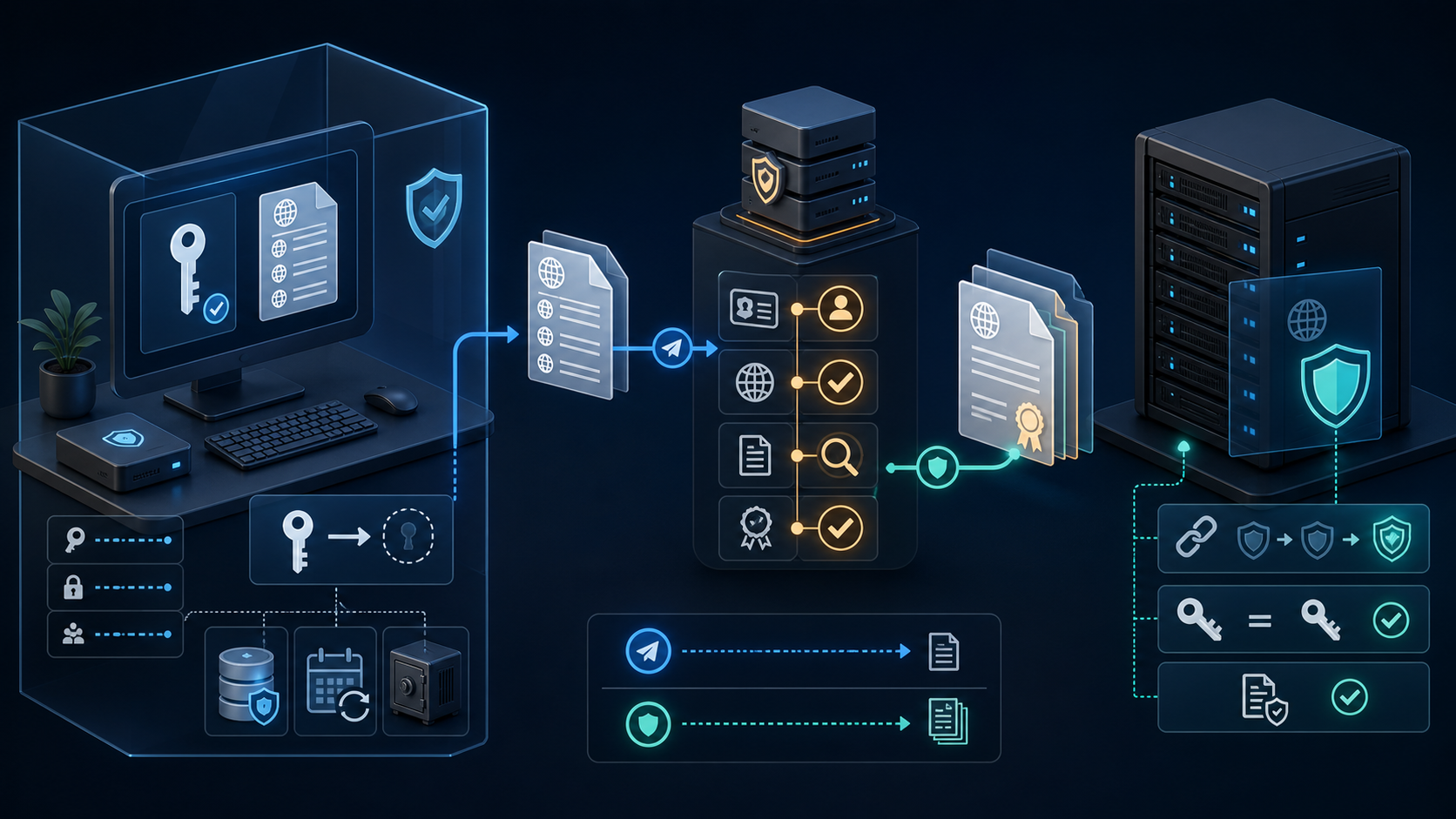
A certificate signing request is the handoff between a private key you control and a certificate authority that verifies the requested identity. The command is short. The work around it matters more: choosing every required name, protecting the key, checking the request before submission, and proving that the returned certificate belongs to that key.
This guide uses OpenSSL 3 commands and documentation names such as www.example.com. Run the workflow on an approved administrative host, not on a shared shell or an untrusted web form. A public certificate authority receives the CSR. It must never receive the private key.
Understand the four files before creating them
| Item | May be shared? | Purpose |
|---|---|---|
Private key, such as www.example.com.key | No | Proves control of the certificate's public key and enables the server to establish TLS sessions. |
CSR, such as www.example.com.csr | Yes, with the certificate authority | Contains the public key, requested subject information, requested extensions, and a signature made by the private key. |
| Issued leaf certificate | Yes | Binds the approved names to the public key for a defined validity period. |
| Intermediate certificate chain | Yes | Connects the leaf certificate to a root trusted by clients. A server normally sends the leaf and intermediate certificates, not the root. |
A CSR is not a certificate and has no usable certificate expiry date. Creating one does not prove control of a domain to a public CA, install TLS, or authorize every requested name. Those steps happen in the CA and deployment workflows.
Generate the key where TLS actually terminates
A familiar file path is not automatically the right place for a key. Find the component that presents the certificate to clients. It may be Apache or Nginx, but it may instead be a reverse proxy, hardware appliance, Kubernetes ingress controller, CDN, cloud load balancer, or managed application platform. Creating a key on the web server is pointless when a load balancer owns the TLS session.
| Termination model | Preferred key workflow | Important check |
|---|---|---|
| Apache or Nginx on a controlled host | Generate locally or deliver through the approved secrets system | The root-owned service process can read the key, while application users cannot. |
| Cloud load balancer or managed certificate service | Use the platform's certificate request, import, or managed issuance process | Know whether the platform generates a non-exportable key or requires a key and chain import. |
| Hardware security module or enterprise key manager | Generate the key inside the device and produce the CSR through its provider interface | Do not create a temporary software key that defeats the non-exportable-key requirement. |
| Kubernetes ingress | Use the approved certificate controller or secrets workflow | Restrict secret read access, encryption at rest, backup access, namespace access, and logs. |
| External CDN or security proxy | Follow its edge-certificate workflow and separately protect the origin certificate | Confirm both the public edge-to-client certificate and the CDN-to-origin trust path. |
Decide whether the key must be exportable before creating it. A non-exportable platform key can reduce theft risk but changes disaster recovery and migration. An exportable key requires a documented secret-storage, backup, access-review, rotation, and destruction process. Record which people and automation identities can retrieve it.
For high-availability servers, do not manually generate unrelated keys on every node unless the certificate design supports that model. The certificate installed on each endpoint must match its local key. Distribute one approved key through a secure secret system or issue separate certificates through controlled automation.
Inventory the names and certificate endpoint
Start from the application and load-balancer configuration. Record the exact DNS names clients use, where TLS terminates, who controls validation, whether a wildcard is justified, and which team owns renewal. Modern hostname matching uses the Subject Alternative Name extension, so put every required hostname in the SAN list.
| Requirement | Example | Decision |
|---|---|---|
| Apex name | example.com | Add it explicitly. A wildcard does not cover the apex. |
| Web hostname | www.example.com | Add it when users or redirects connect to this name. |
| Single-label wildcard | *.example.com | Use only when the CA and risk owner approve it. It covers names such as api.example.com, not v2.api.example.com. |
| Internal-only name | app.internal.example | Use an internal PKI or platform certificate workflow that owns this namespace. |
| IP address | 192.0.2.10 | Request it as an IP SAN only when the issuing CA supports the address and use case. |
Do not add unrelated production names “for later.” Every SAN expands the certificate's scope and validation burden. Separate certificates can give unrelated services smaller failure and key-compromise boundaries.
Check OpenSSL and create a protected workspace
openssl version -a
openssl req -help 2>&1 | grep -E -- '-addext|-noenc'

sudo install -d -m 0700 -o root -g root \
  /etc/pki/tls/private/www.example.com
cd /etc/pki/tls/private/www.example.com
umask 077
pwd
ls -ld .
The directory and umask protect newly created files from other local users. On a host where a deployment service owns TLS material, replace root:root with the approved account and the narrowest working permissions. Do not make a key world-readable just to solve a service startup error.
Unsafe: generating a new key over an existing filename can break the certificate currently in service. Before every run, confirm the target names are unused or create a dated working directory. Back up an existing key only into an encrypted, access-controlled secret store.
Choose an RSA or ECDSA key deliberately
RSA 2048 remains a broadly interoperable starting point. RSA 3072 provides a larger security margin with more CPU and larger handshakes. ECDSA with the P-256 curve produces smaller keys and signatures, but every client, TLS terminator, certificate authority, and operational tool in the path must support it. Follow the issuing CA and platform policy when it is stricter.
# RSA 2048 private key
openssl genpkey -algorithm RSA \
  -pkeyopt rsa_keygen_bits:2048 \
  -out www.example.com.key

# Alternative: ECDSA P-256 private key
openssl genpkey -algorithm EC \
  -pkeyopt ec_paramgen_curve:prime256v1 \
  -pkeyopt ec_param_enc:named_curve \
  -out www.example.com-ecdsa.key

chmod 0600 www.example.com.key
openssl pkey -in www.example.com.key -check -noout
Use one algorithm for the active workflow, not both commands blindly. The final check parses the private key and verifies its internal consistency. It does not prove that the file has been backed up, belongs to the intended service, or matches a certificate.
Encrypted key for an operator-controlled workflow
openssl genpkey -algorithm RSA \
  -aes-256-cbc \
  -pkeyopt rsa_keygen_bits:2048 \
  -out www.example.com-encrypted.key

chmod 0600 www.example.com-encrypted.key
openssl pkey -in www.example.com-encrypted.key -check -noout
An encrypted key is useful when a person or managed secret mechanism can supply the passphrase. An unattended web server may need a non-interactive key stored behind strict filesystem, host, and backup controls. Never place the passphrase in the command line, shell history, unit file, container image, source repository, or CSR.
Create a CSR with SANs on the command line
For a small, one-time request, -subj and -addext keep the request visible and avoid interactive typing mistakes.
openssl req -new -sha256 \
  -key www.example.com.key \
  -out www.example.com.csr \
  -subj '/C=IN/ST=Maharashtra/L=Mumbai/O=Example Pvt Ltd/OU=Web Operations/CN=www.example.com' \
  -addext 'subjectAltName=DNS:example.com,DNS:www.example.com' \
  -addext 'keyUsage=critical,digitalSignature,keyEncipherment' \
  -addext 'extendedKeyUsage=serverAuth'

chmod 0644 www.example.com.csr
The Common Name is kept for administrative clarity, but the SAN list carries the hostnames. Use organization fields that match the certificate type and CA instructions. Domain-validated certificates may not reproduce all subject fields in the issued certificate. Do not invent legal-entity information.
The RSA example requests keyEncipherment. An ECDSA server request normally uses digitalSignature without keyEncipherment. Some public CAs construct certificate extensions from policy rather than copying every requested extension, so treat the CSR as a request, then inspect the certificate that is actually issued.
Create the key and CSR in one current command
This is convenient for automation that intentionally uses an unencrypted service key. The -noenc option is explicit: the output key has no passphrase and therefore depends entirely on host and secret-storage controls.
umask 077
openssl req -new -newkey rsa:2048 -noenc -sha256 \
  -keyout www.example.com.key \
  -out www.example.com.csr \
  -subj '/C=IN/ST=Maharashtra/L=Mumbai/O=Example Pvt Ltd/OU=Web Operations/CN=www.example.com' \
  -addext 'subjectAltName=DNS:example.com,DNS:www.example.com' \
  -addext 'keyUsage=critical,digitalSignature,keyEncipherment' \
  -addext 'extendedKeyUsage=serverAuth'

chmod 0600 www.example.com.key
chmod 0644 www.example.com.csr
Unsafe if unmanaged: -noenc is useful for a service that must restart unattended, but anyone who obtains the file can use the private key. Restrict the directory, backups, configuration-management artifacts, support bundles, and administrator access. Prefer a platform key store, HSM, KMS-backed integration, or managed certificate service when the endpoint supports it.
Use a configuration file for repeatable SAN lists
A reviewed configuration file is easier to maintain when several names or environments are involved. Create www.example.com.cnf with these contents:
[ req ]
prompt = no
utf8 = yes
default_md = sha256
distinguished_name = subject
req_extensions = request_extensions

[ subject ]
C = IN
ST = Maharashtra
L = Mumbai
O = Example Pvt Ltd
OU = Web Operations
CN = www.example.com

[ request_extensions ]
subjectAltName = @alt_names
keyUsage = critical, digitalSignature, keyEncipherment
extendedKeyUsage = serverAuth

[ alt_names ]
DNS.1 = example.com
DNS.2 = www.example.com
# Add only when an approved wildcard is required:
# DNS.3 = *.example.com
# IP.1 = 192.0.2.10
chmod 0644 www.example.com.cnf
openssl req -new -sha256 \
-key www.example.com.key \
-out www.example.com.csr \
-config www.example.com.cnf
Number repeated SAN types as DNS.1, DNS.2, and so on. A repeated unnumbered key in one OpenSSL section can replace the earlier value. Keep production identities outside a public repository when the inventory itself is sensitive.
Use the interactive workflow when policy requires it
The original operational sequence remains valid as a manual workflow: make a protected directory, generate a key, restrict it, and then answer the Distinguished Name prompts.
sudo install -d -m 0700 \
  /etc/httpd/conf/ssl/csr/www.example.com
cd /etc/httpd/conf/ssl/csr/www.example.com
umask 077

openssl genpkey -algorithm RSA \
  -pkeyopt rsa_keygen_bits:2048 \
  -out www.example.com.key
chmod 0600 www.example.com.key

openssl req -new -sha256 \
  -key www.example.com.key \
  -out www.example.com.csr \
  -addext 'subjectAltName=DNS:example.com,DNS:www.example.com'
Enter the approved country, state, locality, organization, organizational unit, and common name when prompted. Leave challenge password and optional company fields empty unless the issuing CA explicitly requires them. A forgotten CSR challenge password can obstruct a CA workflow without adding useful protection to the private key.
Inspect and verify the CSR before submission
openssl req -in www.example.com.csr -noout -verify
openssl req -in www.example.com.csr -noout \
  -subject -nameopt RFC2253
openssl req -in www.example.com.csr -noout -text
Review the subject, public-key algorithm and size, signature algorithm, requested SAN extension, key usage, and extended key usage. The verify command proves that the CSR signature matches its embedded public key. It does not validate the domain or organization.
For a change record, save a public-key fingerprint rather than copying the private key:
openssl req -in www.example.com.csr -pubkey -noout \
  | openssl pkey -pubin -outform DER \
  | openssl dgst -sha256

openssl pkey -in www.example.com.key -pubout -outform DER \
  | openssl dgst -sha256
The two SHA-256 values must be identical. A passphrase-protected key will prompt securely when OpenSSL reads it. Do not automate the prompt by exposing its passphrase in a process argument.
Submit only the CSR
cat www.example.com.csrCopy the complete PEM block beginning with BEGIN CERTIFICATE REQUEST and ending with END CERTIFICATE REQUEST into the CA's approved portal or enrollment process. Preserve its line breaks. Sharing a CSR is expected, although it can reveal requested names and organization information.
Unsafe: never upload or paste www.example.com.key into a CA portal, ticket, chat, email, paste site, or “CSR decoder.” If a service says it must receive the private key merely to issue a certificate, stop and verify the workflow with the security owner.
Validate the issued certificate and its key
Save the returned leaf certificate as www.example.com.crt and the issuer-provided intermediate chain separately. Inspect what the CA issued rather than assuming it copied the CSR.
openssl x509 -in www.example.com.crt -noout \
  -subject -issuer -serial -dates -fingerprint -sha256
openssl x509 -in www.example.com.crt -noout \
  -ext subjectAltName -ext keyUsage -ext extendedKeyUsage

openssl x509 -in www.example.com.crt -pubkey -noout \
  | openssl pkey -pubin -outform DER \
  | openssl dgst -sha256

openssl pkey -in www.example.com.key -pubout -outform DER \
  | openssl dgst -sha256
The final two fingerprints must match. Confirm every required SAN, the issuer, validity window, key usage, signature algorithm, and certificate policy. Reject an unexpected name or key before deployment.
# Use the root supplied by the CA or your internal PKI for this explicit test.
openssl verify -purpose sslserver \
  -CAfile root-ca.pem \
  -untrusted intermediate-chain.pem \
  www.example.com.crt
For a public certificate, also test from clients that use normal operating-system and browser trust stores. A local root file can prove one chain while missing what actual clients trust.
Convert formats only when the endpoint requires it
PEM is text encoded between boundary lines and is common on Unix-like web servers. DER is a binary representation used by some appliances and APIs. PKCS#12 packages a certificate, private key, and optional chain into one encrypted file for platforms that import a bundle. Conversion does not repair a wrong key, missing SAN, or invalid chain, so perform the matching and verification checks first.
Convert a CSR between PEM and DER
openssl req -in www.example.com.csr \
  -outform DER -out www.example.com.csr.der

openssl req -inform DER -in www.example.com.csr.der \
  -outform PEM -out www.example.com-roundtrip.csr

openssl req -in www.example.com-roundtrip.csr \
  -noout -verify -subject
The DER CSR remains safe to submit, but it is not readable with cat. Name the format clearly in a ticket so an operator does not mistake a binary file for corruption.
Create an encrypted PKCS#12 deployment bundle
umask 077
openssl pkcs12 -export \
  -inkey www.example.com.key \
  -in www.example.com.crt \
  -certfile intermediate-chain.pem \
  -name www.example.com \
  -out www.example.com.p12

chmod 0600 www.example.com.p12
openssl pkcs12 -in www.example.com.p12 -info -noout
OpenSSL prompts for an export password and then prompts again during inspection. Transfer the password through a separate approved secret channel. A PKCS#12 file contains the private key, so protect it exactly like the original key and remove temporary copies after the receiving platform has been verified.
Unsafe: options that place passwords directly in commands can expose them through shell history, process inspection, logs, CI output, or monitoring. Do not use an empty export password merely to make an import convenient. If unattended automation is required, inject the secret through the platform's protected secret mechanism and ensure the command itself is not echoed.
Use self-signed certificates only inside an explicit trust design
A self-signed certificate can prove that a test server loads a key and speaks TLS. It is not a substitute for a publicly trusted certificate, and distributing ad hoc roots to users creates a long-lived trust problem. For an internal service, use an owned internal PKI with issuance policy, short validity, revocation or replacement procedures, protected CA keys, and managed trust distribution.
# Lab-only endpoint certificate, valid for seven days.
openssl req -new -x509 -days 7 -sha256 \
  -key www.example.com.key \
  -out www.example.com-lab.crt \
  -subj '/CN=www.example.com' \
  -addext 'subjectAltName=DNS:www.example.com' \
  -addext 'basicConstraints=critical,CA:FALSE' \
  -addext 'keyUsage=critical,digitalSignature,keyEncipherment' \
  -addext 'extendedKeyUsage=serverAuth'

openssl x509 -in www.example.com-lab.crt -noout \
  -subject -issuer -dates -ext subjectAltName
Unsafe outside the lab: browsers and normal clients will not trust this certificate unless someone installs it as trusted material. Do not disable client verification to hide that failure, and do not mark an endpoint certificate as CA:TRUE. Use the organization's PKI or a public CA for real users.
Install without exposing the key
Build the full chain in the order expected by the server and CA documentation. Do not append the private key or root certificate to the public chain file.
cat www.example.com.crt intermediate-chain.pem \
  > www.example.com-fullchain.pem
chmod 0644 www.example.com.crt www.example.com-fullchain.pem
chmod 0600 www.example.com.key

# Restore distribution security labels when SELinux is in use.
sudo restorecon -Rv /etc/pki/tls/private/www.example.com
Nginx
server {
    listen 443 ssl;
    server_name example.com www.example.com;

    ssl_certificate     /etc/pki/tls/private/www.example.com/www.example.com-fullchain.pem;
    ssl_certificate_key /etc/pki/tls/private/www.example.com/www.example.com.key;
}
sudo nginx -t
sudo systemctl reload nginx
Apache HTTP Server
<VirtualHost *:443>
    ServerName www.example.com
    ServerAlias example.com
    SSLEngine on
    SSLCertificateFile /etc/pki/tls/private/www.example.com/www.example.com-fullchain.pem
    SSLCertificateKeyFile /etc/pki/tls/private/www.example.com/www.example.com.key
</VirtualHost>
sudo apachectl configtest
sudo systemctl reload httpdDebian-family systems commonly use the apache2 service name. A load balancer, ingress controller, cloud certificate manager, or secrets operator has a different installation workflow; do not copy server files into a container image or source repository.
Test the deployed endpoint
openssl s_client \
  -connect www.example.com:443 \
  -servername www.example.com \
  -verify_hostname www.example.com \
  -verify_return_error \
  -showcerts </dev/null

curl -sS -I https://www.example.com/
Check the verification return code, hostname, leaf certificate, intermediate chain, validity, negotiated protocol, and application response. Repeat for every public hostname in the SAN list and from representative networks. SNI is essential when several certificates share one address.
Unsafe as an acceptance test: openssl s_client without -verify_return_error, or curl -k, can continue despite trust problems. Those modes can isolate a fault during an authorized investigation, but they do not prove a safe deployment.
Renew and rotate without losing rollback
Inventory expiry and renewal ownership before installation. For manually managed certificates, alert well before the CA's renewal window closes. ACME or a managed certificate service is usually safer for repeatable public certificate renewal than a calendar reminder and a copied CSR.
Whether to reuse a private key is a policy decision. A new key reduces the duration of one key's exposure but requires a careful key and certificate swap. If the key may be compromised, generate a new key and follow the issuer's revocation process immediately.
- Create the new key and CSR under new filenames.
- Verify the CSR, submit it, and validate the returned certificate and chain.
- Prove the new certificate matches the new key.
- Back up the active configuration and record its certificate fingerprint.
- Update configuration atomically, run the server's configuration test, and reload.
- Test externally before closing the change.
- Retain the prior certificate, key, and configuration in protected storage through the rollback window, then dispose of them under key-retention policy.
Unsafe: deleting or overwriting the active key before the new endpoint passes validation can turn a certificate change into an outage. A rollback needs the matching prior certificate and key, not either file by itself.
Troubleshoot from the exact boundary
| Symptom | Check | Likely cause |
|---|---|---|
unable to load Private Key | openssl pkey -in file.key -check -noout | Wrong path, permissions, passphrase, format, or damaged file |
| CSR verification failure | openssl req -in file.csr -noout -verify -text | Damaged CSR or invalid signature |
| SAN is missing | Inspect Requested Extensions in the CSR | -addext, req_extensions, section name, or config file was omitted |
| Certificate and key do not match | Compare DER public-key SHA-256 fingerprints | Wrong key selected or certificate returned for a different request |
| Browser reports name mismatch | Inspect issued SANs and the hostname in the URL | Required DNS name absent, wrong certificate served, or SNI routing error |
| Browser reports incomplete chain | s_client -showcerts and CA chain instructions | Intermediate missing, wrong order, or unrelated intermediate |
| Server cannot read a correct key | Service logs, ownership, mode, SELinux/AppArmor policy | Runtime access control rather than cryptographic failure |
| Reload succeeds but old certificate remains | Resolve DNS, inspect remote address and certificate fingerprint | Another load balancer, proxy, CDN, process, or virtual host terminates TLS |
Completion record
- The TLS termination point, owner, CA, validation method, renewal method, and rollback owner are recorded.
- Every required apex, host, wildcard, and IP identity has an explicit decision.
- The private key was generated in a protected location and never left the approved trust boundary.
- The CSR signature, subject, SANs, algorithm, key size, usage, and public-key fingerprint were checked.
- Only the CSR was submitted to the CA.
- The issued certificate's names, issuer, dates, usage, chain, policy, and key match were checked.
- The server configuration test passed before reload, and the deployed endpoint passed hostname and chain verification.
- Monitoring, renewal, revocation, key rotation, protected backup, and rollback are owned.