E-mail Infrastructure
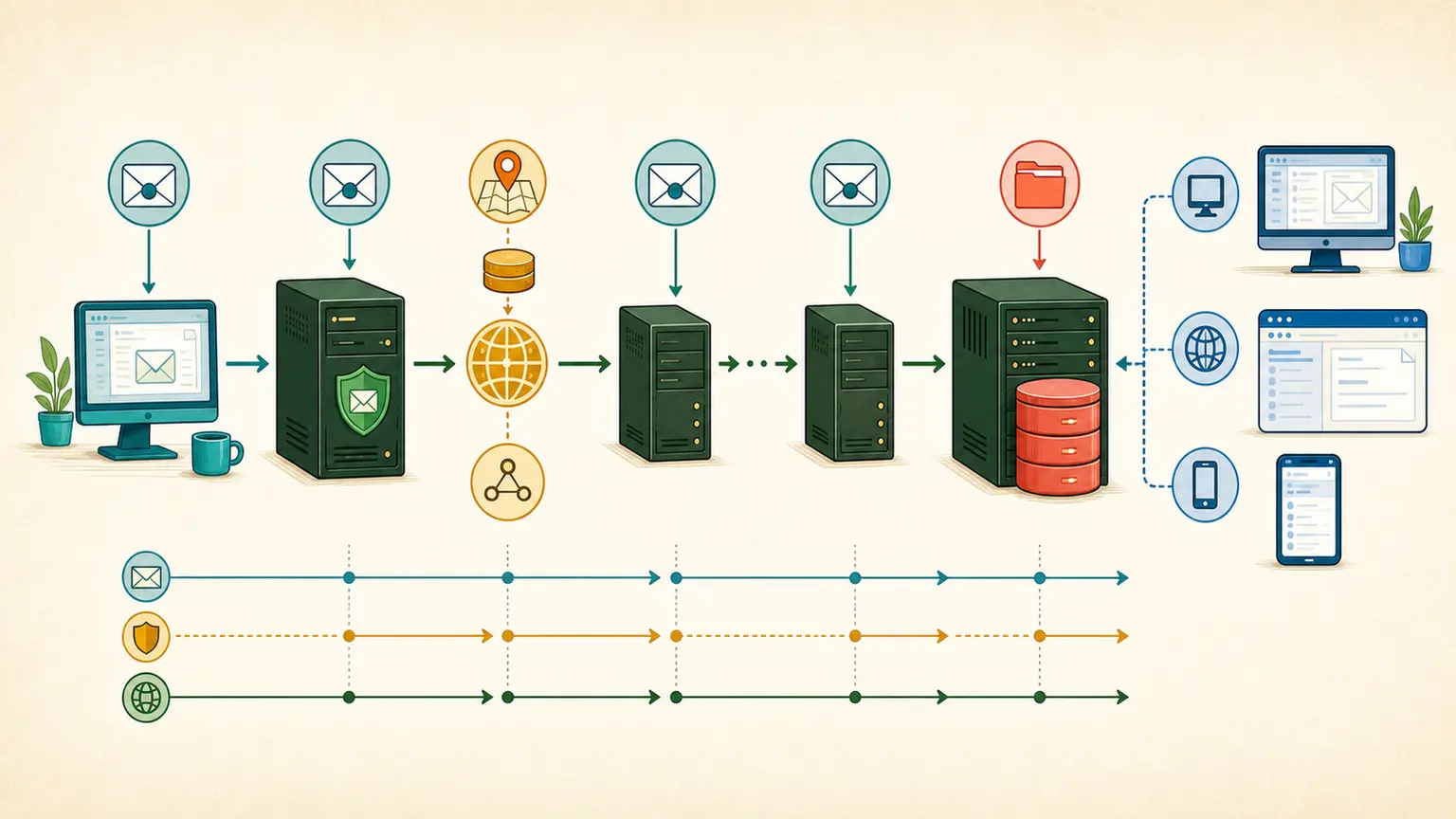
Email is not a direct connection between two people. It is a store-and-forward system built from mail clients, submission services, DNS, mail transfer agents, mailbox stores, access protocols, and message-format standards. Understanding those layers makes delivery failures, delays, security controls, and long-term message access much easier to diagnose.
How email moves from sender to recipient
When a user selects Send, the message normally passes through several independent systems. Each system accepts responsibility for a stage of the journey, records what happened, and either forwards the message, stores it, retries later, or reports a permanent failure.
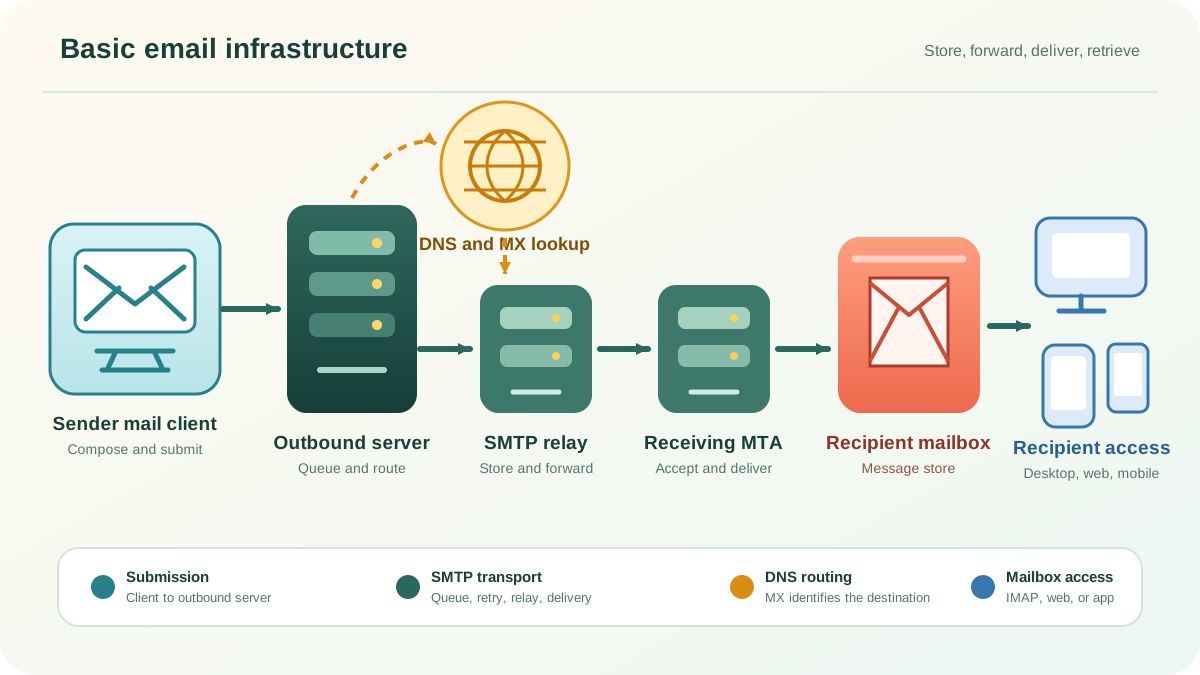
- Compose: The sender creates a message in a desktop client, mobile app, webmail interface, or business application.
- Submit: The client gives the message to a submission service. Authenticated message submission commonly uses SMTP submission rather than direct server-to-server delivery.
- Resolve: The outbound mail server queries DNS for the recipient domain and uses its MX records to identify the preferred destination mail servers.
- Transfer: One or more mail transfer agents use SMTP to move the message toward the destination. A relay can temporarily store the message, add trace information, and forward it to the next server.
- Deliver: The receiving system accepts the message and places it in a mailbox or passes it to another internal delivery component.
- Retrieve: The recipient reads or synchronizes the stored message through IMAP, a webmail application, a mobile app, or an integrated collaboration platform.
The process is asynchronous. A successful submission only confirms that the next system accepted responsibility for the message. It does not prove final delivery or inbox placement. Temporary problems can leave mail in a queue for later retry. A permanent failure normally produces a delivery status notification, although malformed systems, filtering decisions, or forged return addresses can complicate that feedback.
Email also operates across independently managed networks. The sending organization, DNS provider, relay operator, mailbox provider, security gateway, and recipient system may all have different availability, policy, and trust decisions. This is why timestamps, Received header fields, SMTP response codes, queue logs, and delivery notifications matter during an investigation.
Ways users access email
The transport system is mostly hidden from end users. What they see is an access layer. Three common access models sit on top of the same core mail infrastructure.
Desktop and mobile mail clients
A mail client submits outgoing messages to a mail submission service and synchronizes incoming messages from a mailbox server. IMAP keeps folders and message state on the server, which makes it suitable for using the same mailbox from several devices. POP3 is a simpler retrieval protocol that was designed primarily for downloading messages and offers far less server-side mailbox management.
Webmail
With webmail, the browser does not speak SMTP or IMAP directly. It connects to a web application over HTTPS. The webmail application then communicates with message submission, mailbox, directory, search, and storage services on behalf of the user.
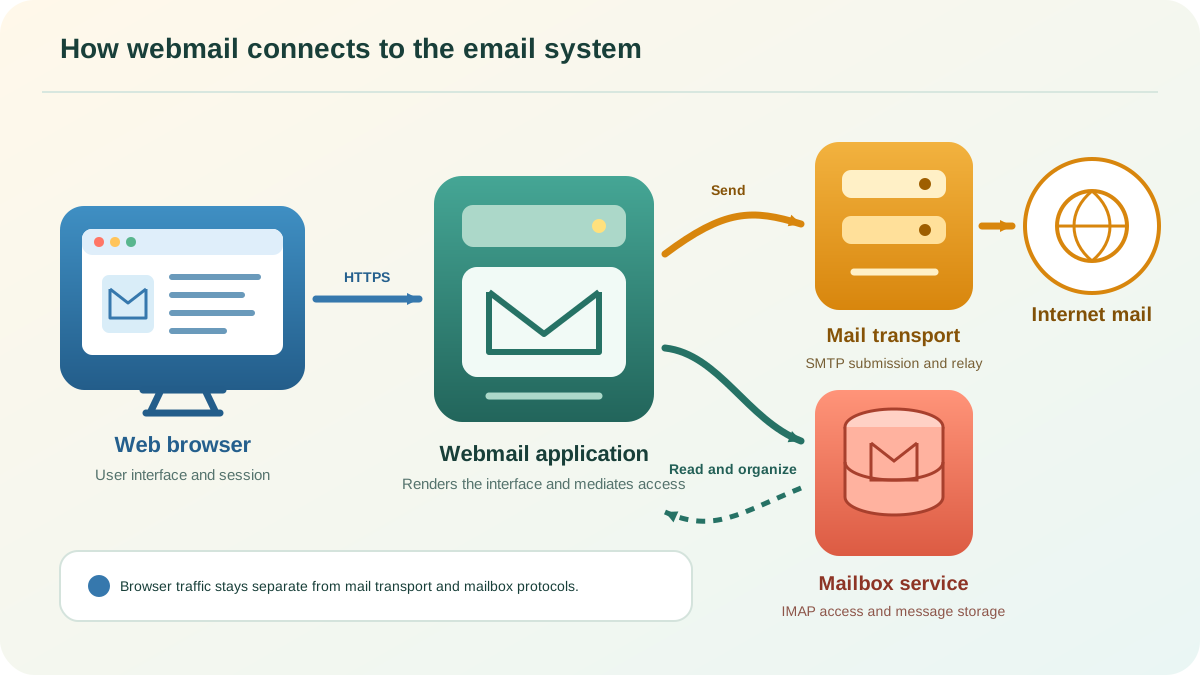
Keeping messages on the server allows a user to reach the same mailbox from different computers and phones. It also places more responsibility on the service for authentication, session security, storage, backup, search, retention, and capacity planning.
Integrated corporate systems
Organizations often combine email with calendars, contacts, directories, tasks, mobile synchronization, shared mailboxes, compliance controls, and retention. Users interact with one platform, while the platform coordinates several internal services and exchanges Internet mail through a controlled gateway.
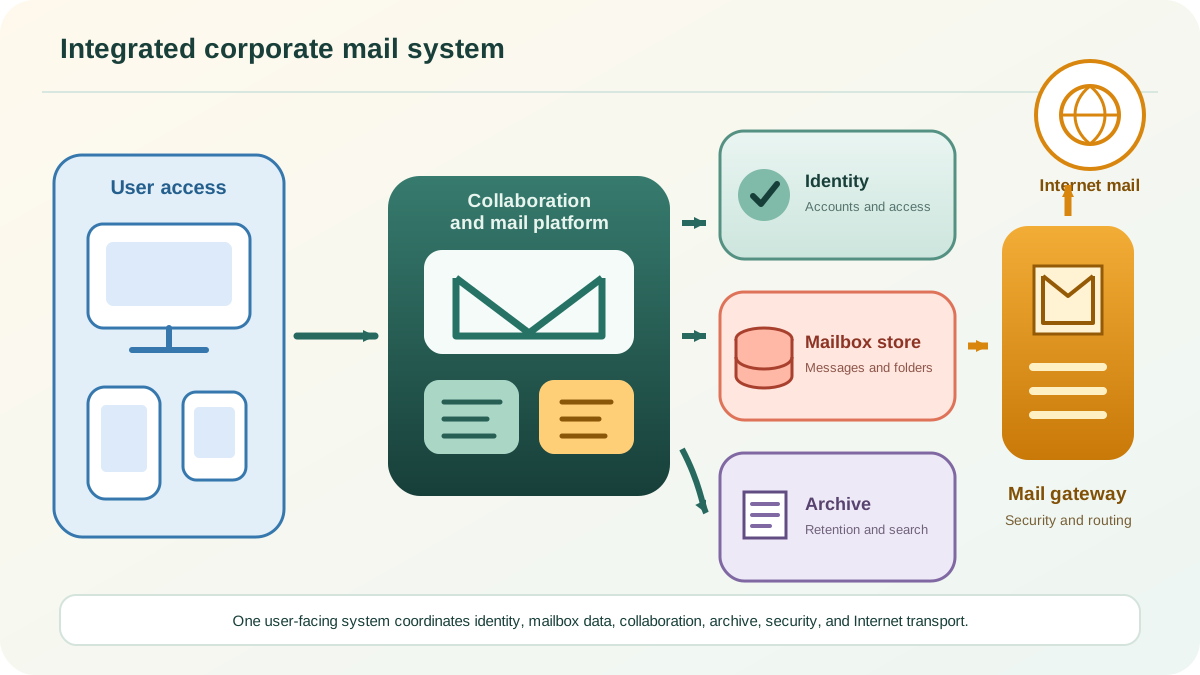
This model improves centralized administration and cross-device access, but it introduces more dependencies. Identity services, internal routing, mailbox databases, storage, certificates, gateways, archives, and client synchronization all become part of the operational path.
Interoperability between different systems
Email succeeds because independently built clients and servers agree on two broad sets of rules:
- Communication protocols define how systems identify themselves, issue commands, return status codes, transfer message data, retry work, and retrieve stored messages.
- Message formats define how headers and bodies are structured, how addresses and dates are represented, and how attachments and alternative content types are encoded.
Interoperability does not mean every product stores data internally in the same way. It means each boundary produces and accepts the standardized form required for communication. A proprietary mail application can use its own database and user interface while still exchanging an Internet Message Format message over standard transport.
Backward compatibility also matters. Mail systems routinely encounter messages, header conventions, MIME structures, and client behaviors created years apart. Good implementations preserve unknown fields, interpret standards conservatively, and avoid rewriting content unless a gateway function requires it.
How Internet email standards evolve
The Internet Engineering Task Force publishes technical specifications as Requests for Comments, or RFCs. An RFC number identifies a permanent document. A newer RFC can update or obsolete an earlier one, so the existence of an old RFC does not mean it remains the current specification.
This distinction is important in email because many familiar protocol names have decades of history. Modern documentation should follow the current specification and its updates instead of treating the first RFC associated with a protocol as the final definition.
Standards for email transmission
RFC 5321 specifies the base Simple Mail Transfer Protocol used for Internet email transport. It replaced RFC 2821, which had already replaced the original RFC 821. Modern SMTP includes an extension model, commonly called ESMTP, that lets a server advertise capabilities before a client attempts to use them.
Message submission is a distinct operational role. RFC 6409 describes how a mail user agent submits a message to a message submission agent. Separating submission from relay allows authentication, policy checks, address correction, and other controls to be applied at the appropriate boundary.
SMTP is store-and-forward transport. A server can accept a message, place it in a queue, and attempt the next hop later. DNS MX records help it select a destination. Each relay adds trace information, normally as Received header fields, so the path can be reconstructed during troubleshooting.
Transport encryption is another layer. STARTTLS can protect an SMTP connection when both systems negotiate it, but opportunistic TLS alone does not guarantee that every hop was encrypted or that a message reached the intended inbox. Enforced transport policies, certificate validation, routing security, and monitoring must be evaluated separately.
Standards for client and mailbox access
POP3
RFC 1939 defines POP3. It supports a compact model for listing, retrieving, and deleting messages. Its limited server-side folder and state model makes it less suitable than IMAP for a mailbox used concurrently from several devices.
IMAP
RFC 9051 defines IMAP4rev2. IMAP allows clients to manipulate server-side mailboxes, synchronize flags and folders, search, retrieve selected message parts, and reconnect after offline work. It governs mailbox access, not message submission.
Webmail and application access
A browser normally communicates with a webmail service using HTTPS. Behind that interface, the service may use IMAP, SMTP submission, vendor APIs, directory protocols, database calls, and internal messaging services. The web interface is therefore one component in the system, not a replacement for the underlying mail infrastructure.
Message format, MIME, and internationalized email
RFC 5322 defines the Internet Message Format, including the structure of header fields and the message body. SMTP defines transport behavior, while the message-format specification defines the object being transported. The SMTP envelope used for routing is related to, but separate from, visible message header fields such as From and To.
The Multipurpose Internet Mail Extensions, beginning with RFC 2045, add content types, multipart structure, transfer encodings, character sets, and attachments. MIME is why one message can carry plain text, HTML, images, documents, and alternative representations while remaining transferable through the email system.
Traditional Internet message syntax was built around ASCII. The internationalized email framework in RFC 6530 and related specifications extends the system so UTF-8 can be used in addresses and headers when the participating infrastructure advertises and supports the required capabilities.
Infrastructure does not equal deliverability
A technically valid transport path is necessary, but it is not enough to guarantee inbox placement. Reliable email operations treat several outcomes separately:
| Layer | What it proves | Typical evidence |
|---|---|---|
| Submission | The authorized client handed the message to the sending service. | Submission log, authenticated account, accepted queue ID |
| Transport | Mail servers routed, retried, accepted, or rejected the message. | DNS results, queue state, SMTP responses, Received fields |
| Mailbox delivery | The destination system accepted the message for a mailbox or internal filter. | Final SMTP status, delivery log, provider event |
| Authentication | The visible identity can be evaluated against SPF, DKIM, and DMARC policy. | Authentication-Results, DNS records, DKIM signature |
| Placement | The provider decided where the accepted message should appear. | Seed testing, recipient evidence, provider signals |
| Access and retention | The user or application can retrieve the stored message over time. | IMAP or application logs, storage health, archive validation |
An accepted SMTP transaction can still lead to spam-folder placement, quarantine, silent policy handling, or a user rule. Likewise, strong authentication does not compensate for poor list quality, complaint behavior, unsafe volume changes, or damaged reputation. Diagnosis works best when identity, transport, provider response, and mailbox outcome are reviewed as separate but connected layers.
Operational checks for a healthy email system
- Map every authorized sending source and the submission method it uses.
- Verify DNS ownership, MX routing, reverse DNS, HELO or EHLO identity, and authentication alignment.
- Monitor queue depth, message age, retry patterns, deferrals, permanent failures, and provider-level responses.
- Protect submission and administrative access with authentication, least privilege, and secure transport.
- Test mailbox synchronization, storage growth, backup, restore, retention, and archive readability.
- Keep timestamps synchronized so logs and Received fields can be correlated across systems.
- Retain enough delivery evidence to distinguish application, DNS, MTA, provider, placement, and access failures.
Use the path when you troubleshoot
Do not begin with a generic “email is down” label. Find the last boundary that behaved normally. Did the application create a queue ID? Did DNS return the intended MX? Did the next MTA accept the message? Did the destination return a final success response? Did authentication align? Did the mailbox store it? Did the client retrieve it?
That sequence narrows ownership without guessing. Keep the timestamps, responses, Received fields, queue events, and mailbox evidence from each handoff. One checker can confirm a record or connection; the message path explains the incident.