How E-mail Works: A Practical Introduction
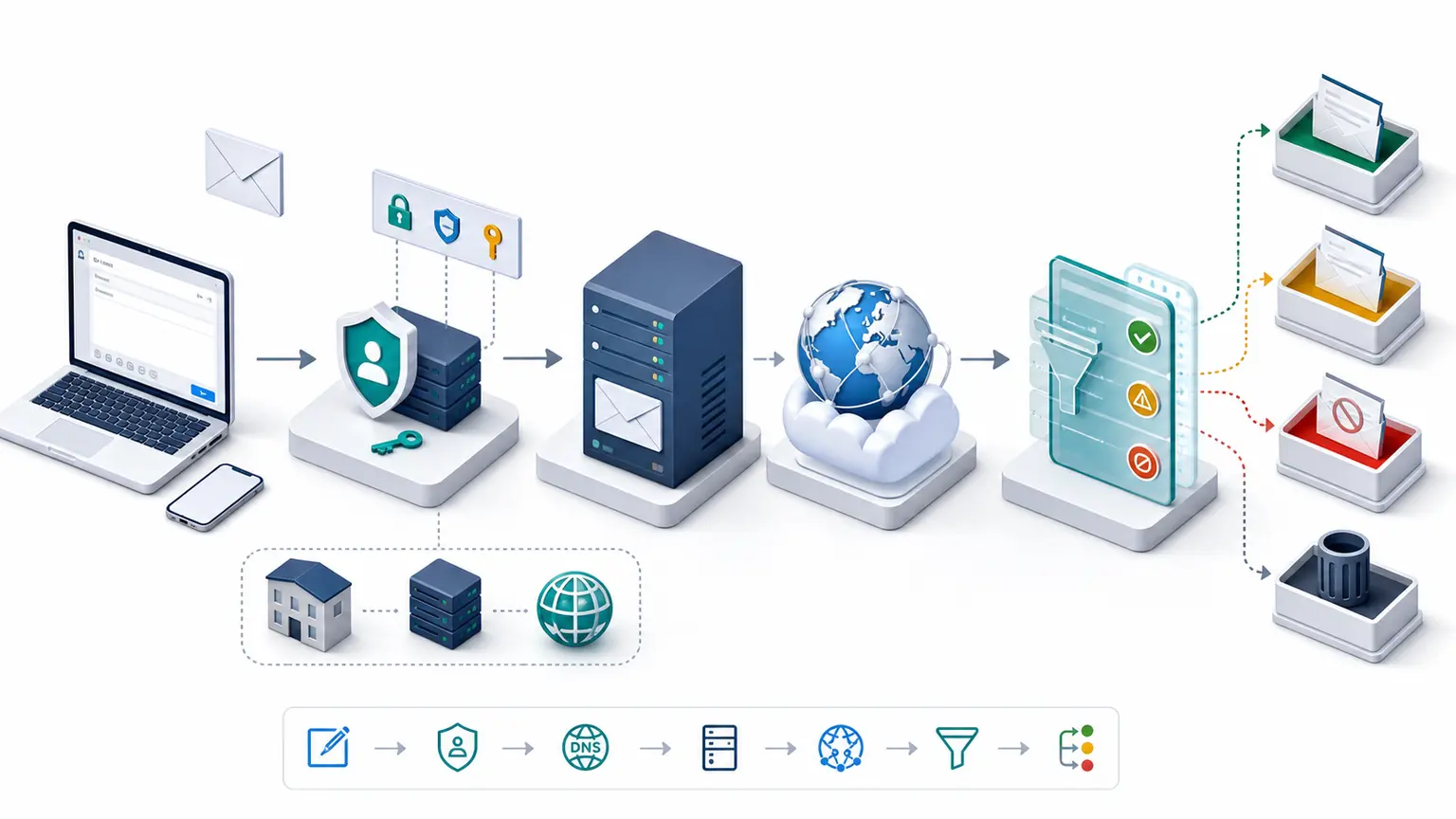
Clicking Send starts a handoff, not a direct trip to another person. The application gives the message to a submission service, mail servers find a route through DNS, the receiving provider makes its own policy decisions, and a mailbox stores the result for a client or web application to display. Each handoff leaves different evidence.
Send does not mean delivered
When a mail client reports success, it usually means the next system accepted responsibility for the message. That system may deliver it immediately, queue it for another attempt, route it through a security service, or reject it later. Final SMTP acceptance still does not tell you whether the message reached the inbox, spam folder, quarantine, or a user rule.
This is why one dashboard rarely answers a delivery question on its own. Application logs show submission. MTA logs show transport. Provider responses show acceptance or rejection. Authentication headers show identity checks. Placement tests and recipient evidence show where an accepted message appeared.
The addresses on screen are only part of the message path
The visible From, To, and Cc fields belong to the message. SMTP also uses an envelope sender and one or more envelope recipients for routing and delivery status. Those values can differ for legitimate reasons. A platform may use a dedicated bounce domain in the envelope while showing the organization domain in From.
Authentication connects these identities in different ways. SPF checks the SMTP identity. DKIM signs message data for a signing domain. DMARC checks whether a passing SPF or DKIM domain aligns with the visible From domain.
The normal path has several owners
- Compose: A person or application creates headers, body content, and attachments.
- Submit: The client authenticates to a submission service, which applies policy and places the message into a queue.
- Resolve: The outbound server looks up the recipient domain and its MX destinations in DNS.
- Transfer: SMTP moves the message across one or more relays. Each accepting server can add trace information.
- Filter: The destination evaluates connection behavior, identity, content, reputation, recipient state, and local policy.
- Store: Accepted mail is delivered to a mailbox, quarantine, folder, or another internal service.
- Access: A recipient reads or synchronizes the stored message through webmail, IMAP, a mobile client, or an application API.
The application owner, DNS team, MTA operator, mailbox provider, identity team, and recipient can all own different parts of one incident.
Delivery, placement, and reading are separate outcomes
| Outcome | What it tells you | Useful evidence |
|---|---|---|
| Submitted | The sending application handed the message to its next service. | Application event, submission log, queue ID |
| Accepted | A receiving SMTP system returned a success response. | Final SMTP response, delivery event, Received field |
| Placed | The provider put the message in an inbox, spam folder, quarantine, or another location. | Seed result, recipient evidence, provider signal |
| Read or acted on | A user or client displayed the message or followed an action. | Recipient confirmation, privacy-permitted engagement data |
Do not use “delivered” without saying which of these outcomes the data source actually measures.
Queues and retries are normal until they stop making progress
SMTP is store and forward. Temporary DNS failure, connection trouble, provider throttling, greylisting, or local resource pressure can leave a message in a queue for later retry. The useful measurements are oldest-message age, arrival and departure rate, destination, response code, and whether the dominant error group is shrinking.
A permanent failure normally produces a bounce or delivery status notification. That feedback can still be incomplete when the return address is wrong, a downstream system silently filters, or a provider accepts the message before applying another decision.
Keep the raw message when the path matters
A screenshot hides the envelope, trace, MIME boundaries, authentication details, and encoded attachments. Save the raw message when investigating delivery, security, rendering, or archival behavior. Pair it with the SMTP response, source logs, DNS answers, and a precise time window.
The next guides go deeper into the same path: E-mail Infrastructure covers the systems and protocols, Format and Structure of an E-mail Message explains headers and MIME, and E-mail Security and Privacy separates authentication, transport protection, content encryption, mailbox security, and privacy.