Email Preview Text: Control the Inbox Snippet
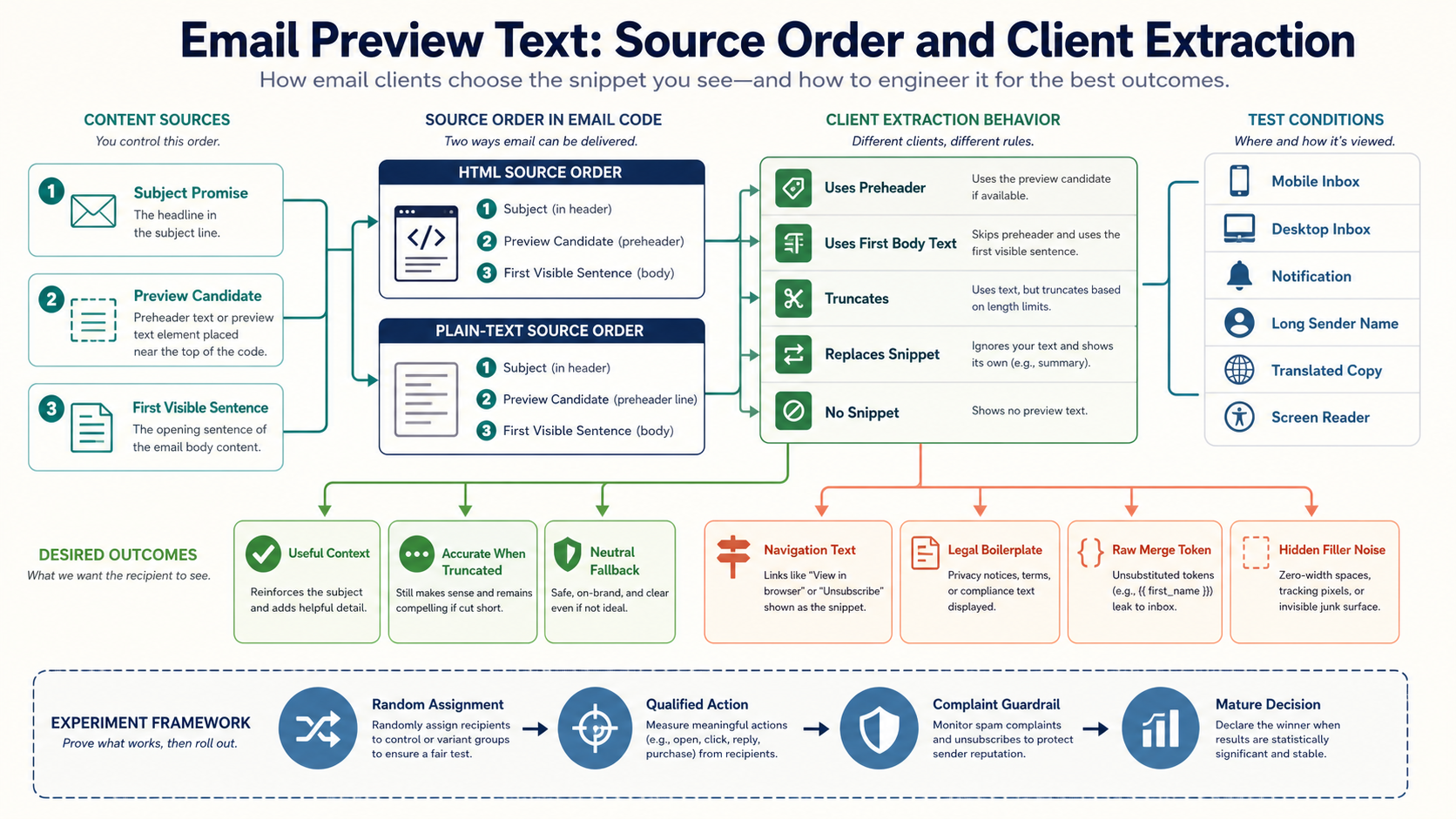
Preview text is the snippet many inboxes show near the subject. It is not a standardized header with guaranteed rendering. Clients may extract early body text, honor a placed preheader, truncate it, combine it with other content or replace it. The durable strategy is to make the beginning of the message useful in source order, then treat hidden preheader techniques as enhancements that must survive accessibility, localization and client testing.
Define the operating decision before choosing tactics
Choose opening context that supports the subject even when a client extracts, truncates or ignores the intended snippet.
For Email Preview Text, write the eligible population, excluded population, decision owner, effective time, expiry and expected recipient benefit before selecting software or creative. This prevents a dashboard metric from becoming the goal and gives reviewers a concrete standard for rejecting unsafe or irrelevant execution.
Separate adjacent problems that need different controls
| In scope | Separate decision | Why separation matters |
|---|---|---|
| Subject | Preview | Promise and context |
| Preview | First body line | Clients may use either |
| Hidden technique | Semantic content | Hiding must not create noise |
| Snippet | Notification | Surfaces truncate differently |
| Optimization | Accuracy | Snippet cannot contradict content |
Within Email Preview Text, a clean boundary keeps one favorable signal from overriding a harder requirement. Permission, suppression, identity, product state, provider acceptance and business outcome remain distinct even when one platform displays them together.
Choose the correct identity and decision unit
The primary Email Preview Text decision unit is a subject, preview candidate, first body content, language version and client condition. Define when person, address, account, household, device, order, campaign and receiving-provider state may be joined. Record the join source, confidence, effective time and collision behavior. A shared mailbox, forwarded message or security scanner must not silently become evidence about one individual.
Minimize downstream data for Email Preview Text. Rendering and dispatch systems usually need the selected treatment and reason code, not an unrestricted behavior history. When identity is uncertain, choose a neutral fallback or hold the action instead of forcing a match.
Build an effective-dated evidence contract
| Evidence | Operational use | Freshness or caution |
|---|---|---|
| Source order | Show extractable content | HTML and text |
| Client matrix | Record actual snippet | Client, version, date |
| Language inventory | Test expansion | No fixed limit |
| Message pair | Review subject and preview | Include first line |
| Accessibility result | Test hidden behavior | Assistive output |
Every Email Preview Text input needs an owner, timestamp, completeness watermark and null behavior. Keep occurrence time separate from ingestion time. A late source should produce an explicit unknown state; treating missing data as a negative signal creates confident but wrong decisions.
Represent the workflow as cancellable states
purpose -> subject promise
promise -> supporting preview
preview -> useful first body context
message -> client extraction
condition -> shown, truncated or replaced
evidence -> approve or revise
Each Email Preview Text transition needs an entry reason, earliest action, useful-until time, cancellation events and terminal state. Re-evaluate current permission, suppression and business state immediately before dispatch. A queue is not authorization to send after the original condition disappears.
Apply hard gates before optimization rules
| Gate | Pass condition | Failure response |
|---|---|---|
| Truth | Preview adds accurate context | Reject bait |
| Source order | First text is useful | Reorder |
| Accessibility | No hidden noise | Use visible fallback |
| Localization | Meaning survives truncation | Rewrite |
| Client coverage | Critical clients understandable | Hold |
Hard gates for Email Preview Text should be deterministic and observable. A model score, predicted revenue or creative winner cannot override a complaint, applicable unsubscribe, invalid destination, expired event or material data uncertainty. Reserve capacity only after eligibility passes, then release the reservation when the action is canceled.
Implement the system in bounded stages
- Write subject, preview and first sentence together.
- Place meaningful context before navigation or boilerplate.
- Treat hidden preheader markup as tested enhancement.
- Create short, long, empty, multilingual and dynamic fixtures.
- Capture inbox-list and notification behavior.
Promote the same versioned Email Preview Text rules, templates and schemas through test and production. Shadow evaluation before activation reveals population changes without contacting recipients. Start with a bounded cohort whose expected count and provider distribution have been reviewed.
Test data quality at the decision boundary
For Email Preview Text, reconcile source records to eligible, excluded, unknown, selected, canceled, attempted, accepted and completed states. Test duplicates, late arrivals, deletion, identity merges, timezone boundaries and one-to-many joins. Sample decisions immediately above and below every threshold.
The team should reproduce why one a subject, preview candidate, first body content, language version and client condition received or did not receive a treatment using the versions and watermarks available at that time. A current dashboard is not sufficient historical evidence for Email Preview Text.
Use positive, negative and adversarial fixtures
- Removing hidden preheader leaves useful text.
- Missing values expose no token.
- Screen readers announce no filler.
- Translations truncate accurately.
- Forwarding does not promote boilerplate.
Fixtures for Email Preview Text must assert both the selected output and the reason. Run them after changes to data mapping, templates, model versions, providers, links and destination pages. Include accessibility and plain-text behavior, not only a screenshot of the preferred desktop client.
Publish metrics with numerator, denominator and maturity
| Measure | Definition | Decision supported |
|---|---|---|
| Useful snippet coverage | Clients showing intended or good fallback | Compatibility |
| Truncation safety | Pairs accurate at cut points | Resilience |
| Qualified action | Human outcome with guardrails | Usefulness |
| Accessibility defects | Noise or duplication | Quality |
| Mature variant outcome | Stable privacy-aware result | Confidence |
Report Email Preview Text counts beside rates and expose data latency. Opens are not a reliable universal person-level outcome because images can be blocked or privacy-prefetched. Qualify automated clicks and allow enough time for conversion, cancellation, refund or repeat behavior before declaring business value.
Separate attribution from incrementality
For Email Preview Text, last-click and platform-attributed outcomes answer which recorded touch received credit; they do not prove that the treatment caused the outcome. Use randomized treatment and holdout where ethical and practical, keep assignment stable, and prevent equivalent exposure through another journey. If randomization is unavailable, document the comparison design and its remaining bias.
topic = Email Preview Text
incremental outcome = treatment outcome rate - holdout outcome rate
incremental value = mature net value in treatment - mature net value in holdout
guardrails = complaints + unsubscribes + support harm + provider failures
Operate by receiving provider and sending stream
For Email Preview Text, forecast attempted volume by receiving organization, hour, identity and message category. Monitor complete SMTP replies, queue age, deferrals, hard failures, complaint signals and authentication results without blending transactional and promotional streams. A healthy global acceptance rate can hide one damaged provider cohort.
Do not rotate domains or IP addresses to escape a Email Preview Text permission, targeting or content problem. Reduce the affected population, preserve evidence and correct the cause. Volume increases require stable provider evidence, not a calendar percentage.
Minimize personal data and protect decision artifacts
Collect only data needed for the declared Email Preview Text purpose, limit access, define retention and prevent live personal data from entering prompts, tickets, screenshots or test fixtures. Sensitive attributes and inferred vulnerability require stricter review. URLs, tracking parameters and template comments must not expose internal segments or private facts.
Protect Email Preview Text webhooks and feedback events with authentication, replay controls and idempotency. A forged conversion, complaint or preference event can select the wrong content or suppress the wrong person. Log decisions without logging secrets.
Make the complete experience understandable and operable
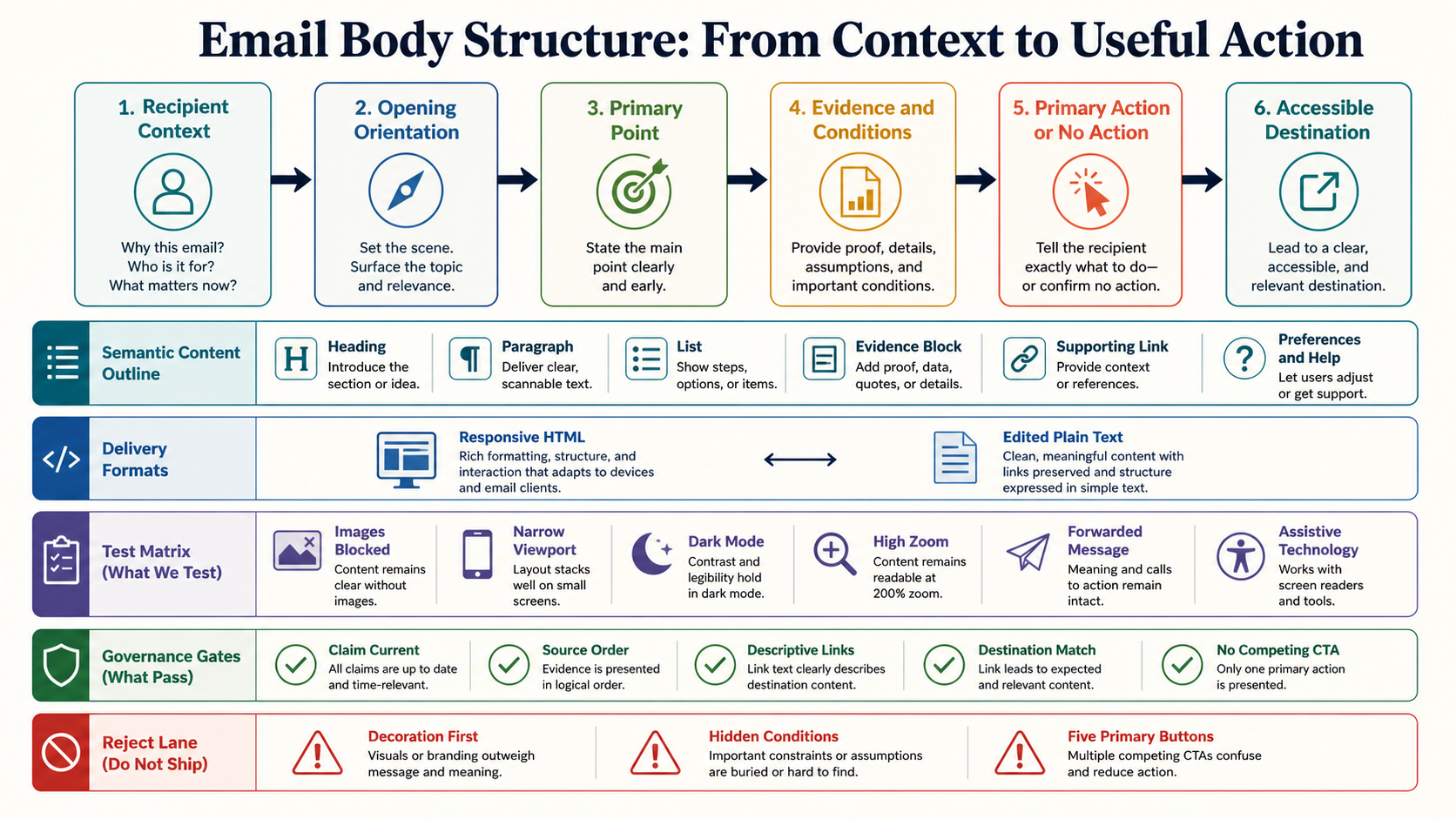
For Email Preview Text, use semantic structure, readable hierarchy, sufficient contrast, descriptive links, meaningful image alternatives and a useful plain-text MIME alternative. Keep material conditions and the primary action available without images. Test zoom, image blocking, dark mode, keyboard access to destinations and representative assistive technology.
The Email Preview Text accessibility review includes the landing page, preference center, form, checkout and cancellation path. A visually attractive message is not successful when the next step cannot be completed.
Diagnose recurring failure patterns
| Failure | Likely cause | First safe action |
|---|---|---|
| Navigation appears | Utility text is first | Reorder source |
| Filler is announced | Hiding leaks | Remove technique |
| Dynamic value blank | No fallback | Select neutral copy |
| Subject repeats | No supporting role | Rewrite context |
| Legal text appears | Extraction differs | Fix source order |
During a Email Preview Text failure, pause the narrowest unsafe cohort or rule. Preserve assignments, source watermarks, selected versions, provider acknowledgements and destination behavior before changing the system. Correct one boundary at a time so recovery evidence remains interpretable.
Scenario: order delay
The preview gives the revised window and the first visible sentence does the same job, so extraction remains useful if hidden content is ignored.
Scenario: multilingual newsletter
Each language receives editor-reviewed copy and client tests because visual width and truncation differ; translation is not cut to one arbitrary character target.
Scenario: missing personalization
A neutral approved summary replaces a missing account value without exposing a token, guessing a date or revealing private information.
Contain and recover from a bad release
- Pause the affected rule, cohort, template or route while preserving necessary service communication.
- Capture source watermarks, assignments, artifact versions, queued actions and downstream acknowledgements.
- Apply current complaints, unsubscribes, hard bounces and terminal business events before replay.
- Correct the causal boundary and run the full fixture suite in shadow mode.
- Cancel obsolete work instead of emptying the backlog through stale sends.
- Resume a bounded cohort under provider, complaint and business guardrails.
- Close only after delayed outcomes mature and counts reconcile.
The postmortem for Email Preview Text must identify the failed assumption, actual blast radius, customer correction, durable control and owner.
Keep a versioned catalog and decision ledger
Catalog the Email Preview Text audience, purpose, permission scope, inputs, precedence, content or rule versions, maximum exposure, experiment, owner, stop condition and retirement date. Detect copied workflows that no longer inherit the approved suppression and frequency policy.
Record each material Email Preview Text decision with hypothesis, evidence window, guardrails, uncertainty and resulting action. Expire claims, offers, models and exceptions. Retirement includes disabling triggers, canceling timers and confirming no regional or provider copy remains active.
Create an approval record that can survive an incident
The accountable Email Preview Text owner signs the intended recipient benefit, eligibility logic, data versions, message and destination, provider forecast, experiment, safety exclusions, monitoring window and rollback trigger. Data, legal or policy, accessibility, deliverability and business owners approve their boundaries rather than giving a generic campaign approval.
The Email Preview Text approval expires when a material audience, claim, source, provider, template, offer or destination changes. Emergency exceptions need a named owner, narrow scope, compensating control and expiry.
Email Preview Text release data contract
The release package must make the leading evidence relationship explicit: Source order; Show extractable content; HTML and text. Store the source snapshot, completeness watermark, decision timestamp, rule version, selected reason, exclusion reasons and downstream acknowledgement. Reconcile expected and actual counts before expanding exposure.
Document the owner for every field and what Email Preview Text does when the source is missing, late, duplicated or contradictory. The contract should be small enough to review and strong enough to reproduce a customer question months later without querying today current profile.
Email Preview Text uncertainty and review cadence
The primary measurement relationship is Useful snippet coverage; Clients showing intended or good fallback; Compatibility. Publish uncertainty, data latency and maturity beside it. During launch, review provider and safety evidence at a cadence fast enough to stop harm; after stabilization, move to scheduled drift and cohort reviews without losing alert ownership.
For Email Preview Text, compare observed distribution with the approved population and inspect boundary samples. A stable average does not excuse unexplained unknowns, one provider divergence or a small cohort with serious negative outcomes.
Email Preview Text capacity and economics
The first implementation priorities are Write subject, preview and first sentence together.; Place meaningful context before navigation or boilerplate.. Estimate data, engineering, creative, review, provider, support and incident cost before scaling. Capacity includes human review and customer support, not only messages per hour.
Measure marginal mature Email Preview Text value after variable cost and recipient harm. A treatment that increases attributed activity but overloads support, creates refunds or requires constant manual correction is not operationally successful. Record which constraint binds the next release.
Email Preview Text retirement and evidence closure
The leading failure pattern is Navigation appears; Utility text is first; Reorder source. Retirement should stop new selection, cancel obsolete actions, remove copied and regional triggers, disable dependent offers or models, and preserve the final artifact plus aggregate decision evidence. Apply retention and deletion policy to raw personal data.
Confirm that providers, CRM, warehouse, sales automation and preference systems no longer activate the treatment. Close the catalog entry with reason, effective time, owner and any replacement. A hidden orphaned workflow means Email Preview Text is still operational.
Email Preview Text completion checklist
- Pair is honest.
- First source text is meaningful.
- Rendering is not guaranteed.
- Dynamic values have fallbacks.
- Hidden text is accessible.
- HTML and text agree.
- Languages are reviewed.
- Truncation is accurate.
- Evidence is dated.
- Measurement includes harm.
The Email Preview Text implementation is ready only when the team can explain eligibility, treatment, evidence, cancellation and outcome for a real example without relying on a mutable dashboard or undocumented operator knowledge.
Treat extraction as client behavior
Message standards define subject and body, not one universal preview header. Interfaces decide what to show, and available width changes with device, sender name, font and notification settings.
Do not promise a fixed character limit.
Give subject and preview different jobs
The subject states the reason to open; preview adds consequence, context or next step. Repetition wastes space and unrelated urgency breaks expectation.
Review both with the first visible heading.
Use markup as progressive enhancement
Hidden preheaders rely on variable CSS and extraction behavior. Keep them concise and free of giant invisible-character runs.
Never hide material terms or the only message summary.
Protect dynamic preview content
Inbox snippets may appear on locked screens. Avoid private account, health or financial detail and apply freshness, encoding and fallback rules.
Log the selected variant without unnecessary personal copy.
Capture the inbox list, not only opened mail
Record sender, subject and snippet on desktop, mobile and notification surfaces. Include long sender names and representative languages.
Date evidence because behavior changes independently of templates.
Do not optimize on opens alone
Use randomized assignment where practical, qualified actions and complaint or unsubscribe guardrails. Privacy prefetch makes opens unstable at person level.
Accuracy remains a hard gate regardless of a winning metric.
Audit every token before the first heading
Render the template without styles and list the first text nodes in order. Logo alternatives, view-in-browser links, navigation, spacer characters, tracking notices and legal boilerplate can unexpectedly become the snippet. Decide whether each node should precede the message summary, then correct the shared template rather than patching individual campaigns.
Repeat this audit for text/plain. The text version should begin with useful context, not MIME-generation labels, a raw URL or a repeated subject.
Test complete inbox-list treatments
Randomize the subject and preview pair as a versioned treatment. Keep sender identity, audience eligibility, timing, content and destination constant when the question is specifically about the pair. Record client mix and privacy limitations, and predefine the mature primary outcome plus complaint and unsubscribe guardrails.
If several variants are compared repeatedly, control the decision process and stop rule. Selecting the largest early open-rate number after frequent peeking produces fragile conclusions.
Give localization a semantic contract
Translate the message purpose and required facts before compressing copy for the inbox surface. The localization brief should state which terms cannot be omitted, which dates and units need regional formatting, what private information is prohibited, and the neutral fallback when a dynamic phrase has no approved translation. A reviewer should see the subject, preview and opening together, not three isolated strings.
Test mixed scripts, right-to-left content, combining characters and long unbroken tokens. Counted characters do not predict displayed width, and mechanical truncation can remove a negation, deadline or qualifier that changes meaning.
Email Preview Text verification packet
Before approving Email Preview Text, assemble one dated packet containing the generated message or decision, source data watermark, identity and permission result, rule and content versions, destination proof, provider-route sample, expected counts, test outcomes, named approvals, monitoring window and rollback trigger. The leading evidence contract is: Source order | Show extractable content | HTML and text. The first hard gate is: Truth | Preview adds accurate context | Reject bait. Reviewers should be able to reject the release from this packet without opening a mutable campaign dashboard.
After launch, append selected, excluded, canceled, attempted and accepted counts plus the mature measurement relationship: Useful snippet coverage | Clients showing intended or good fallback | Compatibility. Sample decisions at each boundary and investigate the leading failure condition: Navigation appears | Utility text is first | Reorder source. Close the packet only after delayed outcomes mature, discrepancies reconcile, temporary exceptions expire and the owner records whether to retain, revise, pause or retire the implementation.