Plain Text vs HTML Email: Choose by Message and Constraints
Plain text versus HTML is not a contest between personal trust and inbox delivery. They are message representations with different capabilities, risks and testing needs. Most commercial email that looks simple is still multipart email containing a text part and an HTML part. The right choice follows message purpose, information hierarchy, accessibility, client support, content maintenance and measured recipient outcomes, while authentication, permission and reputation remain separate deliverability concerns.
Distinguish true text, simple HTML and multipart email
| Format | What is sent | Typical capability |
|---|---|---|
| True plain text | text/plain body | Text and visible URLs, no layout or images |
| HTML only | text/html body | Markup and styling but weak fallback |
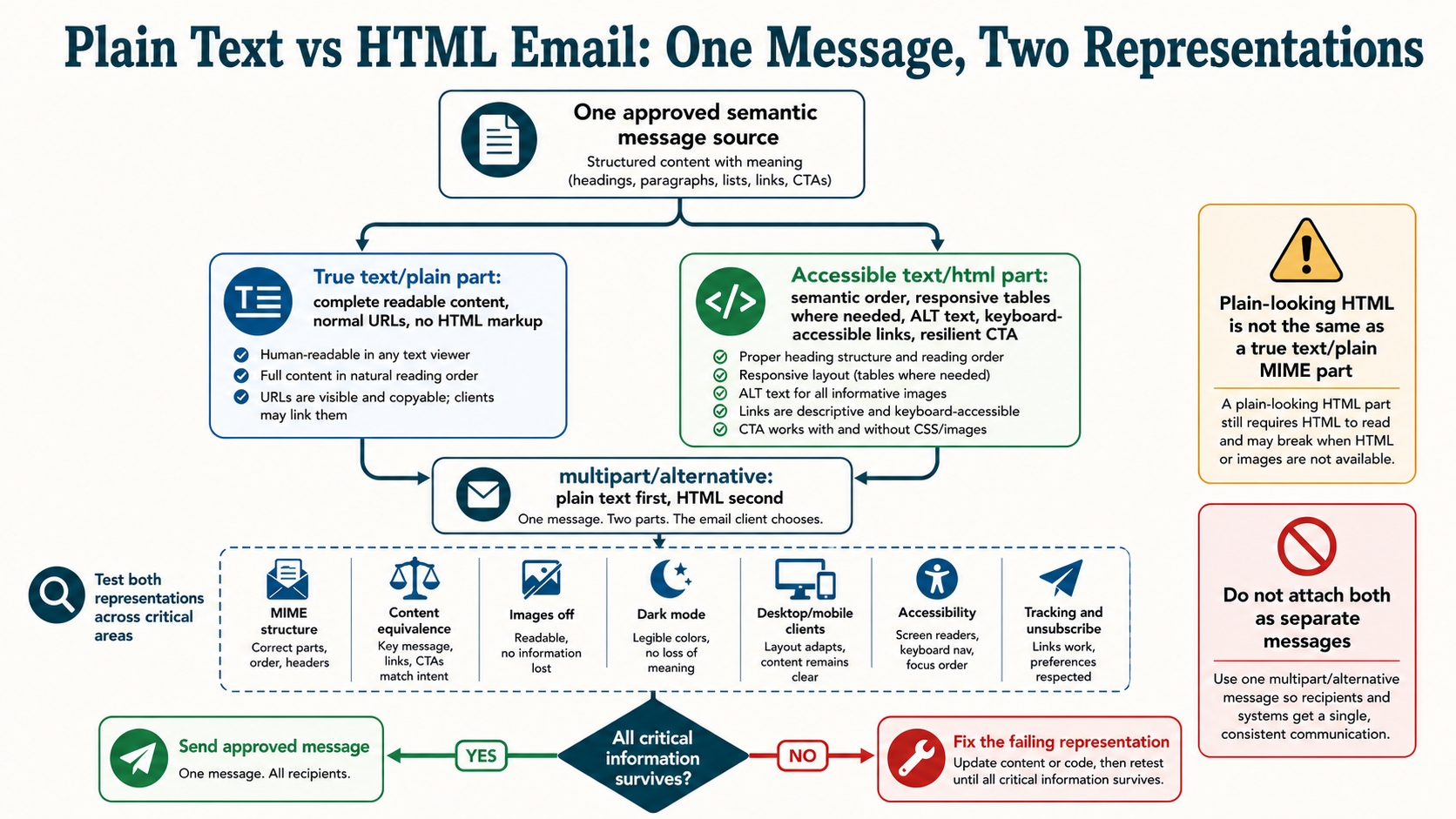
| Multipart alternative | text/plain plus text/html | Client chooses a supported representation |
| Simple-looking HTML | Minimal styled HTML in multipart | Human appearance plus tracked links and structure |
Visual appearance does not reveal MIME structure. Inspect the received source before calling a message plain text.
Build multipart alternative in the correct order
Content-Type: multipart/alternative; boundary="alt-42"

--alt-42
Content-Type: text/plain; charset=UTF-8

Useful text representation
--alt-42
Content-Type: text/html; charset=UTF-8

<html>Useful HTML representation</html>
--alt-42--
RFC 2046 defines multipart alternative for representations of the same information and places increasing faithfulness later, so text usually precedes HTML. Each part needs correct transfer encoding, charset and boundaries. The text part is not a place for unrelated or reduced content.
Choose format from the communication job
| Message job | Likely approach | Reason |
|---|---|---|
| Password or security action | Restrained multipart | Clear service content and robust fallback |
| Personal human outreach | True text or minimal multipart | Conversation and reply focus |
| Product catalog | Accessible responsive HTML | Visual comparison and structured actions |
| Technical alert | Multipart with complete text | Copyable facts and readable hierarchy |
| Editorial newsletter | Simple or rich multipart | Depends on information hierarchy |
The table is a starting point, not a deliverability guarantee.
Reject the claim that plain text automatically reaches inbox
Mailbox providers do not publish a rule that plain text receives preferred placement. Authentication, identity, reputation, complaints, recipient expectation, traffic behavior, content and proprietary signals all matter. An unsolicited plain-text message can be spam; wanted HTML can be delivered normally.
Format can indirectly affect outcomes through size, broken markup, deceptive content, tracking, accessibility or recipient response. Diagnose provider SMTP evidence and placement separately before blaming HTML. Switching format does not repair a purchased list or poor authentication.
Write a real text alternative
The text representation should preserve the message purpose, important facts, material terms, action URLs, sender identity and unsubscribe route where applicable. Convert headings into readable text, list items into clear lines and buttons into descriptive link labels followed by destinations. Avoid a dump of tracking URLs with no context.
Generate text from a semantic content model or review it independently. Automated HTML stripping can concatenate navigation, alt text and footer fragments into an unusable block. Test line wrapping, Unicode and URL length in actual clients.
Use semantic, resilient HTML
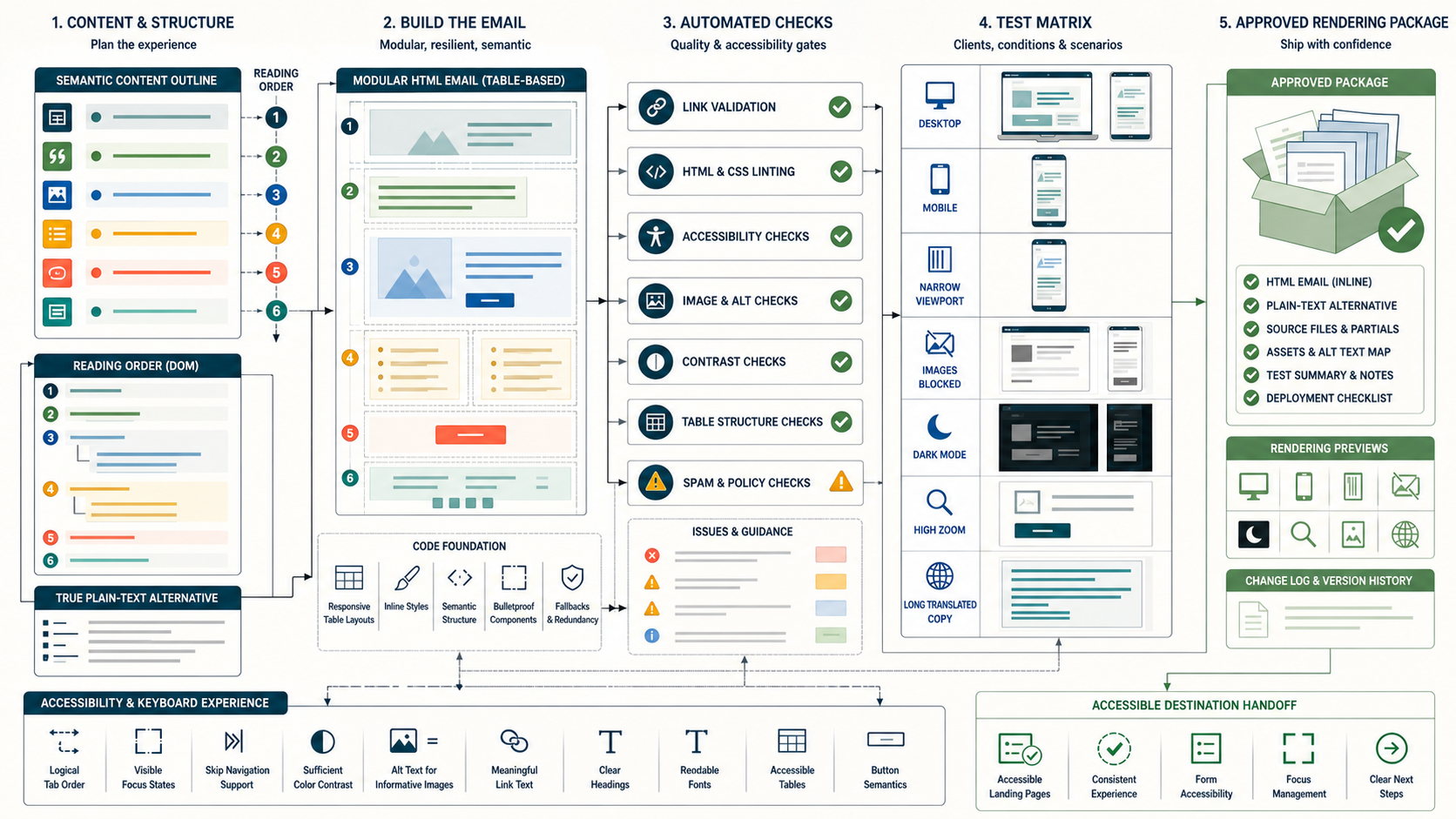
Email clients constrain HTML and CSS differently. Use a tested layout system, conservative responsive rules, semantic headings and meaningful source order. Provide alt text for informative images and null alt for decoration. Keep key information as live text and ensure links make sense outside visual context.
Use sufficient contrast, readable type, generous touch targets and layouts that survive zoom and reflow. Avoid hiding material content with CSS. A message can use tables for layout while still exposing a logical reading order and accessible content.
Design for blocked and privacy-prefetched images
Remote images may be blocked, cached or fetched by privacy services. Do not rely on them to communicate price, deadline, status or the only CTA. Set useful dimensions to reduce layout shift and optimize file weight. Avoid embedding a complete poster as one image.
Image requests do not reliably prove a person opened or read the email. Apple Mail Privacy Protection is one reason open metrics require qualification. Format decisions should use qualified actions, replies, conversions and accessibility outcomes rather than raw pixel loads.
Make links recognizable, safe and measurable
Use descriptive link text and a controlled HTTPS domain aligned with the sender. Validate redirect chains, destination status, regional behavior and certificate ownership. The plain-text part should expose understandable destinations without leaking sensitive tokens or excessive tracking parameters.
Security scanners can visit links before a human. Classify clicks using timing, user agent, network and downstream behavior under appropriate privacy controls. Do not use a clicked link as the sole proof of consent, purchase intent or identity.
Keep purpose clear regardless of format
A text-only upsell is still marketing, and a designed receipt can still be transactional when its primary purpose fits the relationship. Format does not change permission scope. Separate service and subscription streams operationally, and apply current unsubscribe requirements to promotional traffic.
Do not mix unrelated promotion into critical account, security or receipt messages to reach an audience that opted out. The recipient and actual content determine expectation more than an internal template label.
Control message weight and clipping risk
Track encoded message size, HTML size, image weight and header growth. Repeated CSS, hidden preview content, tracking parameters and excessive modules can create slow rendering or clipping behavior in some clients. A clipped footer may hide preference and unsubscribe access.
Set a tested internal budget based on the client population instead of repeating a universal byte threshold as a standard. Minify cautiously, preserve semantics and compare the received artifact after ESP transformation. A small message can still be poorly structured.
Test client transformations and dark mode
Clients may transform colors, invert backgrounds or ignore unsupported declarations. Test light and dark presentations for text, logos, icons, dividers and buttons. Avoid text baked into transparent images that disappears against a changed background. Provide borders or safe assets where needed.
Rendering platforms, physical devices and seed accounts complement one another. Preserve screenshots with client, version, mode and template checksum. A preview cannot prove all recipients see the same result, so prioritize robust fallback over pixel-perfect imitation.
Design reply and forwarding behavior
Conversation-oriented messages need a monitored Reply-To and context that survives quoting. Rich newsletters may route replies to support or editorial owners, but should not use an unmonitored address without explanation. Forwarding can break layouts, strip styles and expose personalized URLs.
Do not place sensitive account or behavioral details where a forwarded message creates harm. Test common forward and reply flows, and use authenticated account destinations for protected actions.
Plan for localization and variable content
Translated text can expand, wrap buttons and change reading direction. Dates, currency, addresses and plural forms require locale-aware formatting. The text and HTML representations must use the same approved translation and current terms.
Dynamic modules need typed fields, escaping, length limits and neutral missing-value behavior. If a product image or personalized block fails, the message should remain coherent. Test the longest realistic values, right-to-left content where supported and non-Latin domains and addresses as applicable.
Treat HTML and template systems as security boundaries
Escape untrusted values, restrict allowed markup and prevent template authors from inserting arbitrary scripts or unsafe redirects. Email clients remove many active features, but malformed HTML, tracking infrastructure and destination pages still create risk. Scope ESP credentials and require approval for sender, link-domain and template changes.
Do not put secrets or personal data in URLs, comments, hidden preview text or remote-image paths. Inspect the final MIME artifact after vendor processing for unexpected headers, links and encoded content.
Build a representative test matrix
| Layer | Checks |
|---|---|
| MIME | Boundaries, charset, transfer encoding, alternative order |
| Content | Purpose, claims, text parity, material terms |
| Accessibility | Reading order, links, alt, contrast, zoom |
| Clients | Mobile, desktop, webmail, images off, dark mode |
| Operations | Authentication, unsubscribe, reply, links, tracking |
| Destination | Status, message match, keyboard and mobile use |
Keep fixtures for missing images, long text, empty fields and unsupported CSS.
Compare formats with a controlled decision
Randomize eligible recipients and hold From identity, subject promise, offer, audience and timing stable where the format is the intended treatment. Preselect a qualified primary outcome and safety guardrails. A true-text variant and an HTML variant may require different link presentation, so document the treatment precisely.
format_test record:
  assignment_unit and eligible_population
  MIME and template checksum per variant
  qualified_reply, click or conversion outcome
  complaint, unsubscribe and accessibility feedback
  provider delivery evidence and maturity
Do not call an open-rate difference a format winner. Privacy fetching and image blocking directly affect that metric.
Worked example: the plain-text winner is measurement bias
A team compares a minimal multipart message with a rich HTML newsletter. The simple variant reports fewer opens but more clicks, while the rich version reports many privacy-prefetched opens. CTOR makes the minimal version look dramatically stronger because its open denominator behaves differently by client mix.
The analysis returns to assignment, provider acceptance, qualified clicks, conversion and complaints. After controlling for audience and client distribution, neither format has a meaningful conversion advantage; the rich version has accessibility defects on mobile. The decision is to repair structure and choose format by content job, not declare plain text a deliverability trick.
The test also preserves the received MIME artifacts so future ESP transformations can be compared.
Respond to a broken template release
- Pause the affected campaign or dynamic module.
- Preserve source template, ESP-rendered MIME, assignments and accepted messages.
- Identify whether failure is data, MIME, CSS, client rendering, link or destination.
- Keep current complaints and unsubscribes applied.
- Fix one reviewed artifact and rerun the matrix.
- Resume a small provider and client-representative cohort.
- Monitor qualified outcomes and support reports.
Do not resend automatically to everyone who received the broken message. Assess whether the correction is necessary and expected.
Plain-text versus HTML decision checklist
- The message purpose and audience are explicit.
- True text, HTML-only and multipart are not conflated.
- The text and HTML parts carry equivalent meaning.
- Key information works without images or styles.
- HTML supports accessibility, localization and client fallback.
- Links, reply and forwarding behavior are safe.
- Size and ESP transformations are measured.
- Service and marketing purpose remain correctly classified.
- The test matrix covers actual client constraints.
- Format experiments use qualified outcomes, not raw opens.
Choose the least complex representation that communicates the message well, then verify it in the real delivery and client path.
Validate the final received MIME, not only the editor preview
ESPs can rewrite transfer encoding, boundaries, links, images and headers after the template leaves the editor. Send through the production path to controlled accounts and save the raw received source. Parse every MIME part, confirm charset, alternative ordering, closing boundaries and Content-Transfer-Encoding, then compare the text and HTML meaning.
validation evidence:
  source template and checksum
  ESP-rendered message and message ID
  received raw MIME by representative provider
  parsed parts, links, headers and size
  rendering screenshots and accessibility findings
Test long Unicode text, quoted-printable line wrapping, base64, non-ASCII subjects, missing dynamic values and an attachment if the message type permits one. A visually correct web preview can still produce a broken text part or malformed boundary. Keep fixtures and fail release when the received artifact differs materially from the approved content.
Design CSS for progressive resilience
Start from semantic source order and readable live text, then add layout and responsive presentation. Use the subset supported by the target clients and inline or transform styles through a reviewed toolchain. Do not depend on a single advanced selector for access to key information. Unsupported styling should reduce decoration, not meaning.
Maintain a component catalog for headings, paragraphs, lists, buttons, dividers, cards and data tables. Each component needs image-off, dark-mode, zoom, narrow-screen and long-content behavior. Avoid adding arbitrary fixes for one client without regression tests elsewhere.
Track technical debt and client population. Retire workarounds only after evidence shows they are no longer required. A simpler HTML system can reduce failures, but minimal markup is not automatically accessible or visually coherent.
Keep tracking and outcomes comparable across formats
A true text message exposes direct URLs and may not load an open pixel; HTML may use rewritten tracking links and remote images. Those differences change measurement. Define whether the experiment tests format plus instrumentation or whether equivalent redirect and click classification can be used. Never interpret missing image requests as no reading.
| Event | Parity issue | Response |
|---|---|---|
| Open | HTML image request only | Do not use as primary format outcome |
| Click | Visible URL versus button redirect | Use controlled destinations and classifier |
| Reply | Reply path may differ by template | Keep monitored identity stable |
| Conversion | Tracking parameters or cookie loss | Use stable business event and assignment |
Migrate templates between ESPs without changing every variable
Inventory MIME structure, link tracking, image hosting, unsubscribe headers, List-ID, From and reply identities, dynamic fields, localization, webhooks and rendering transformations. Export source and received artifacts from the current system. Rebuild components in the new platform and compare them before moving production traffic.
Keep audience, subject, content and sending identity stable during a controlled route comparison where possible. Apply durable suppressions before any test. Validate provider authentication and unsubscribe behavior, then release by provider and message type. Do not use a vendor move to resend an old audience.
After cutover, reconcile accepted messages, click classification, replies, complaints and unsubscribes. Keep the old system read-only until retries and webhooks settle, then revoke credentials and stop all copied automations.
Govern formats as approved content products
Record each template family’s purpose, allowed components, MIME policy, accessibility owner, client matrix, size budget, dynamic fields, stream, unsubscribe treatment and retirement date. Require peer review for sender, link-domain, component and instrumentation changes. Preserve template and received-artifact versions with every material experiment.
Quarterly, sample service, editorial, promotional and automated messages across providers. Confirm text parity, current claims, accessible destinations, client resilience and reply handling. Review support feedback, complaint reasons and rendering incidents instead of relying only on screenshot automation.
Retire unused templates and vendor copies. A format strategy is successful when authors can choose a suitable approved pattern and operators can reproduce exactly what recipients received.
Author once from a semantic message model
Separate content meaning from visual rendering. Store heading, paragraph, list, image purpose, action label, destination, conditions and legal or preference modules as structured fields. Render reviewed text and HTML representations from that model, then allow controlled per-format adjustments where needed. This reduces divergence without trusting a crude HTML-stripper.
Validate required fields, allowed components and localization before rendering. Dynamic product or account data needs typed values, escaping and a safe missing state. A missing hero image should remove decoration; a missing price or security instruction should fail the message. Keep template, data schema and renderer versions together.
Authors should preview the real content in both representations and can override awkward text formatting under review. The goal is equivalent meaning, not character-for-character identity. Archive source model and received artifacts so a future migration can reproduce the message.
Monitor defects that aggregate engagement hides
Track malformed MIME, missing text part, empty dynamic field, broken link, clipped footer, inaccessible contrast, image-only meaning, unexpected size and client-specific layout failures. Connect support reports and screenshots to template and message IDs. One low-volume client defect can matter even when global clicks look normal.
Define severity by blocked task and message purpose. A broken decorative image is different from an unreadable password reset or hidden unsubscribe. Alert on sudden size and link-count changes before send. Maintain client coverage based on actual audience, while keeping a robust baseline for unknown clients.
Use incidents to update components and fixtures rather than add campaign-specific patches. Review unresolved defects and template exceptions on a schedule with accessibility, lifecycle and deliverability owners.
Approve format from purpose through received artifact
The final reviewer should compare the semantic source, text representation, HTML representation, encoded MIME and received messages. Confirm equivalent meaning, accessible structure, correct dynamic data, current links, sender identity, reply route and subscription controls. Attach the client matrix and known limitations. Approval expires when the renderer, ESP transformation, component library or message purpose changes materially.
Release a bounded production cohort and watch defects, provider outcomes, replies and support. Do not equate a successful preview with a successful communication path.
Retire templates completely
Stop triggers, cancel scheduled sends, remove authoring access and revoke obsolete image or redirect assets. Preserve the approved source and received examples for audit, but make the template unavailable for new campaigns. Confirm that regional and automated copies no longer reference it.
Primary references
- RFC 2046 MIME media types
- Gmail email sender guidelines
- Apple Mail Privacy Protection
- WCAG 2.2
- W3C writing for accessibility