Linux Ethernet Bonding: Active-Backup and LACP with NetworkManager
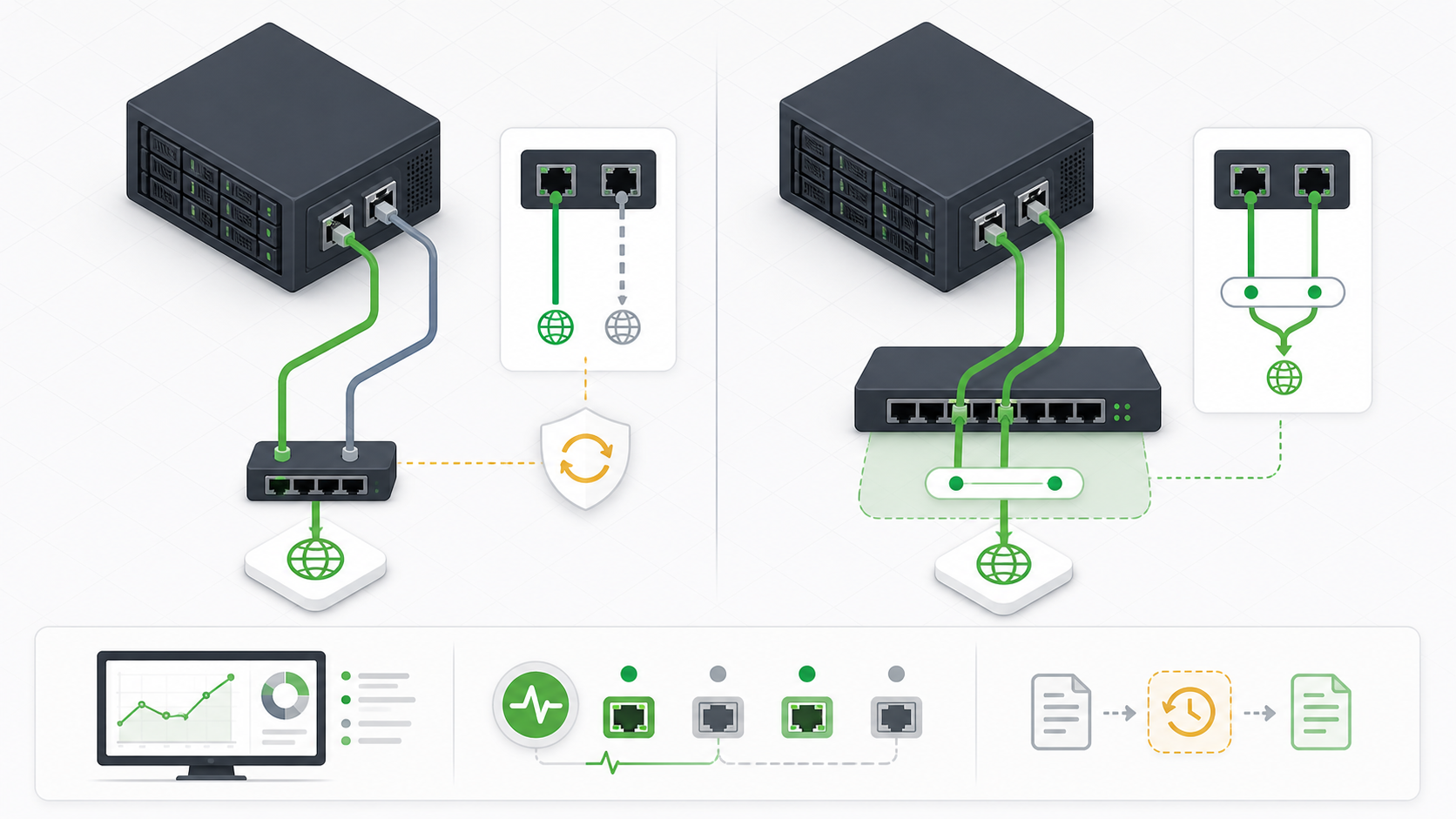
Linux Ethernet bonding combines two or more network interfaces behind one logical interface. Done well, it gives a server link redundancy, traffic distribution, or both. Done casually over SSH, it can remove the route you are using and leave the host unreachable.
This guide builds a bond with current NetworkManager commands, provides a Netplan alternative, explains every kernel bonding mode, and gives you a controlled test and rollback path. The examples use documentation addresses and the interfaces enp1s0 and enp2s0. Replace every sample with values confirmed on your host and switch.
Understand what a bond can and cannot provide
| Requirement | Suitable design | Important limit |
|---|---|---|
| Survive one NIC, cable, or switch-port failure | active-backup with link monitoring | A shared switch, power supply, upstream, or configuration remains a failure domain. |
| Use parallel links with switch coordination | 802.3ad with an LACP port channel | One flow normally follows one hash result and may not exceed one member link. |
| Connect through two independent switches | Active-backup, or LACP only when the switches provide one supported multi-chassis aggregation domain | Two unrelated LACP switches do not form one aggregator. |
| Increase application throughput | Bonding plus multiple flows, correct hashing, enough switch and upstream capacity | CPU, storage, remote peer, protocol, MTU, or upstream congestion may remain the bottleneck. |
| Protect against gateway or upstream failure | Routing, first-hop redundancy, multipath, or application failover in addition to bonding | Carrier monitoring alone proves the local link, not end-to-end service health. |
A bond is a Layer 2 interface. Put the host address, routes, and DNS behavior on the logical bond or on a VLAN or bridge above it. The physical ports should not retain competing addresses or default routes.
Choose the bonding mode before touching the host
| Mode | Kernel name | Behavior | Switch requirement | Typical use |
|---|---|---|---|---|
| 0 | balance-rr | Sends packets sequentially across available ports. | Static port channel | Specialized designs that tolerate packet reordering and have tested switch behavior |
| 1 | active-backup | One port carries traffic; another takes over after failure. | No port channel | Simple server redundancy and dual-switch designs |
| 2 | balance-xor | Selects a port from a configurable transmit hash. | Static port channel | Load distribution without LACP negotiation |
| 3 | broadcast | Sends every transmission on every port. | Static port channel | Narrow fault-tolerance cases where duplicate transmission is intentional |
| 4 | 802.3ad | Negotiates one dynamic link aggregation group and distributes flows. | LACP port channel | Redundancy plus aggregate capacity across many flows |
| 5 | balance-tlb | Distributes transmit load; one current port receives traffic. | No port channel | Selected single-switch environments after driver and workload testing |
| 6 | balance-alb | Adds IPv4 receive balancing to transmit load balancing. | No port channel | Selected IPv4 environments after peer, bridge, and driver testing |
Start with active-backup when the goal is availability and operational simplicity. Choose 802.3ad when the network team can configure and verify the matching LACP channel. Modes 0, 2, and 3 require a static channel, not an LACP-negotiated channel. Modes 5 and 6 have driver, peer, bridge, and traffic constraints that deserve a lab test before production.
Record the design and rollback contract
Before a change window, write down the host, management path, interface names and MAC addresses, current connection profiles, switch names and ports, VLANs, MTU, IP addresses, routes, DNS servers, bonding mode, monitoring method, expected active port, test owner, rollback owner, and maximum outage. Confirm that a console or out-of-band management session works.
| Evidence | Question it answers |
|---|---|
| Physical and virtual console test | Can the host be recovered if SSH and routing disappear? |
| Switch port and VLAN record | Are both ports in the correct Layer 2 domain, and is a port channel required? |
| Current addresses, routes, rules, and DNS | What must remain reachable after the IP moves to the bond? |
| NetworkManager profile backup | Can the exact pre-change persistent state be restored? |
| Application and cluster dependencies | Will a MAC, interface name, route, license, firewall, or quorum rule change? |
| Approved failure test | Which cable or switch port can be interrupted without expanding the outage? |
Unsafe: building the first bond through the only SSH path without a tested console and rollback timer can strand the server. A second SSH window is useful evidence, but it is not an out-of-band recovery channel.
Step 1: inventory the current network
sudo -v
hostnamectl
nmcli --version
nmcli general status
nmcli device status
nmcli -f NAME,UUID,TYPE,DEVICE,AUTOCONNECT connection show
ip -br link
ip -br address
ip route show table all
ip rule show
resolvectl status 2>/dev/null || cat /etc/resolv.conf
sudo ethtool enp1s0
sudo ethtool enp2s0
sudo journalctl -u NetworkManager -b --no-pager | tail -n 100
Do not assume interface names are eth0 and eth1. Confirm them from nmcli device status, ip -br link, MAC addresses, switch discovery, and the physical port record. Verify both ports have the intended speed, duplex, carrier, MTU, driver, and firmware.
If the server uses NetworkManager, keep one configuration authority. Do not simultaneously write Netplan, NetworkManager keyfiles, distribution-specific scripts, and direct sysfs values for the same bond.
Step 2: create a protected backup
change_id=$(date -u +%Y%m%dT%H%M%SZ)
sudo install -d -m 0700 "/root/network-change-backup/$change_id"
sudo cp -a /etc/NetworkManager/system-connections \
  "/root/network-change-backup/$change_id/"
sudo sh -c "nmcli -f all connection show >'/root/network-change-backup/$change_id/nmcli-connections.txt'"
sudo sh -c "ip address show >'/root/network-change-backup/$change_id/ip-address.txt'"
sudo sh -c "ip route show table all >'/root/network-change-backup/$change_id/ip-routes.txt'"
sudo sh -c "ip rule show >'/root/network-change-backup/$change_id/ip-rules.txt'"
sudo find "/root/network-change-backup/$change_id" -maxdepth 2 -type f -printf '%m %u:%g %p\n'
NetworkManager profiles can contain Wi-Fi keys, private keys, and other secrets. Keep this backup root-only and protect any copy taken off-host. Record the generated directory name in the change ticket instead of relying on shell history.
Step 3: verify the bonding driver
modinfo bonding | sed -n '1,30p'
sudo modprobe bonding
lsmod | awk '$1 == "bonding" {print}'
test -e /sys/class/net/bonding_masters && echo 'bonding driver ready'
modinfo confirms that the running kernel provides the module metadata. modprobe bonding loads it and reports a real failure. NetworkManager will create and persist the logical interface, so a manual module alias is normally unnecessary.
Unsafe: do not unload the bonding module on a host whose management or application traffic uses a bond. modprobe -r bonding can remove the live interface and every route above it.
Step 4: build an active-backup bond with NetworkManager
The sample creates bond0, uses MII carrier checks every 100 milliseconds, prefers enp1s0, and moves the IPv4 service address to the bond. RHEL 9.4 and later use the controller and port terminology shown here.
sudo nmcli connection add \
  type bond \
  con-name bond0 \
  ifname bond0 \
  bond.options 'mode=active-backup,miimon=100,primary=enp1s0'

sudo nmcli connection add \
  type ethernet \
  port-type bond \
  con-name bond0-port1 \
  ifname enp1s0 \
  controller bond0

sudo nmcli connection add \
  type ethernet \
  port-type bond \
  con-name bond0-port2 \
  ifname enp2s0 \
  controller bond0

sudo nmcli connection modify bond0 connection.autoconnect-ports 1
Profile names are not necessarily device names. Use the explicit names consistently. If either NIC already has an active profile, identify it before the change and decide whether it must be deactivated or retained for rollback. Do not delete it merely because another profile has a similar name.
Step 5: place IP, route, DNS, and MTU settings on the bond
sudo nmcli connection modify bond0 \
  ipv4.method manual \
  ipv4.addresses '192.0.2.11/24' \
  ipv4.gateway '192.0.2.254' \
  ipv4.dns '192.0.2.53 192.0.2.54' \
  ipv4.dns-search 'example.net' \
  ipv6.method disabled \
  802-3-ethernet.mtu 1500

sudo nmcli connection modify bond0-port1 \
  ipv4.method disabled ipv6.method disabled 802-3-ethernet.mtu 1500
sudo nmcli connection modify bond0-port2 \
  ipv4.method disabled ipv6.method disabled 802-3-ethernet.mtu 1500

nmcli -f connection.id,connection.interface-name,bond.options,ipv4.method,ipv4.addresses,ipv4.gateway,ipv4.dns,ipv6.method,802-3-ethernet.mtu connection show bond0
The addresses 192.0.2.0/24 are documentation examples. Replace them. If IPv6 is in service, configure its address, gateway, DNS, routes, and acceptance tests instead of disabling it. If VLAN tagging is required, normally build the bond first, create the VLAN above bond0, and place Layer 3 configuration on the VLAN. For a virtualization bridge, the usual order is physical ports, bond, optional VLAN, bridge, then the host IP.
Keep the same MTU throughout the effective path. A jumbo MTU on the bond with 1500-byte member ports, VLAN, bridge, switch, or upstream path produces failures that may look application-specific.
Step 6: inspect the profiles before cutover
nmcli -f NAME,UUID,TYPE,DEVICE,AUTOCONNECT connection show
nmcli connection show bond0
nmcli connection show bond0-port1
nmcli connection show bond0-port2

sudo NetworkManager --print-config
sudo journalctl -u NetworkManager -b --no-pager | tail -n 100

# Keep continuous evidence in a second session.
ping -D -i 0.2 192.0.2.254
ping -D -i 0.2 198.51.100.10
Confirm that only the bond will own the service address and default route. Check firewalls, monitoring, backup agents, cluster software, hypervisors, containers, licenses, and application allowlists for assumptions about the former device name or MAC address.
Step 7: activate with a NetworkManager checkpoint
sudo nmcli device checkpoint --timeout 120 bond0 enp1s0 enp2s0 -- \
  nmcli connection up bond0
NetworkManager asks you to confirm after the command. Confirm only after the local console, SSH path, gateway, DNS, application, and monitoring checks pass. If the remote session disappears and nobody confirms, the checkpoint restores the captured device state after the timeout.
Unsafe: a checkpoint is not a substitute for a tested console, profile backup, switch rollback, or application rollback. It covers NetworkManager device state, not an independent switch change or every external dependency.
Step 8: verify the active-backup state
nmcli device status
nmcli -f GENERAL.STATE,GENERAL.CONNECTION,IP4.ADDRESS,IP4.GATEWAY device show bond0
ip -br link show | grep -E '^(bond0|enp1s0|enp2s0)[[:space:]]'
ip -br address show bond0
ip route get 198.51.100.10
cat /proc/net/bonding/bond0
sudo ethtool bond0
sudo journalctl -u NetworkManager -b --no-pager | tail -n 100
The bond status should show Bonding Mode: fault-tolerance (active-backup), one currently active port, both expected ports, link-failure counters, MII status, speed, duplex, and polling interval. The service address and default route should reference bond0, not a member port.
| Layer | Acceptance evidence |
|---|---|
| Link | Both ports present with expected carrier, speed, duplex, MTU, and switch neighbor |
| Bond | Correct mode, active port, monitoring interval, and stable failure counters |
| Network | Expected address, route selection, gateway reachability, DNS, IPv4 and IPv6 behavior |
| Application | Real health endpoint, database or queue path, and client transaction succeed |
| Operations | Monitoring recognizes the bond and alerts on member degradation without declaring the healthy service down |
Configure 802.3ad LACP when aggregate capacity is required
The network team must first define the exact switch ports, LACP channel, VLAN membership, native VLAN behavior, MTU, speed, duplex, multi-chassis capability, and rollback. Both ports must join the same supported aggregation system. A host cannot turn two unrelated switches into one LACP peer.
sudo nmcli connection add \
  type bond \
  con-name bond0 \
  ifname bond0 \
  bond.options 'mode=802.3ad,miimon=100,lacp_rate=fast,xmit_hash_policy=layer3+4,min_links=1'

sudo nmcli connection add type ethernet port-type bond \
  con-name bond0-port1 ifname enp1s0 controller bond0
sudo nmcli connection add type ethernet port-type bond \
  con-name bond0-port2 ifname enp2s0 controller bond0
sudo nmcli connection modify bond0 connection.autoconnect-ports 1
Apply the same Layer 3 settings and controlled activation process used above. lacp_rate=fast requests one-second LACPDU transmission from the partner. xmit_hash_policy=layer3+4 can distribute different transport flows more usefully, but confirm switch policy, encapsulation, packet-order requirements, and kernel documentation. min_links=1 keeps carrier with one usable member; a service that requires a capacity floor may deliberately require more.
cat /proc/net/bonding/bond0
ip -s link show bond0
ip -s link show enp1s0
ip -s link show enp2s0
sudo journalctl -k -b | grep -iE 'bond|802.3ad|lacp'

# Run only between systems you are authorized to load-test.
iperf3 -c 198.51.100.20 -P 8 -t 30
Unsafe: an unrestricted iperf3 test can saturate a production path and interfere with customer traffic. Define the peer, duration, parallel-stream count, bandwidth ceiling, monitoring, abort condition, and change window before testing. One TCP connection is not proof that LACP is broken when it stays on one member.
Understand the important bond options
| Option | Meaning | Operating guidance |
|---|---|---|
miimon=100 | Checks member carrier every 100 milliseconds. | A practical starting point for local link failure. Carrier does not prove gateway or service health. |
arp_interval and arp_ip_target | Probe selected IPv4 peers and evaluate recent traffic. | Use a deliberate target and validation policy. Do not enable it alongside MII monitoring without understanding kernel behavior. |
downdelay | Waits before disabling a member after a detected failure. | Valid with MII monitoring and rounded to a multiple of miimon. |
updelay | Waits before returning a recovered member. | Use when a link needs time to become truly forwarding-ready. |
lacp_rate | Requests slow or fast LACPDU timing. | Applies only to 802.3ad; fast means approximately one second. |
xmit_hash_policy | Selects how eligible traffic maps to members. | Applies to balance-xor, 802.3ad, and TLB. Choose from traffic evidence, not assumed bandwidth. |
primary | Prefers one member when it is available. | Useful in active-backup when one path has preferred capacity or topology. |
min_links | Controls how many LACP members must be available before the bond asserts carrier. | Align with application capacity and cluster expectations. |
Use either MII carrier monitoring or a designed ARP monitoring policy. Without link monitoring, the driver can continue treating a failed member as available and lose traffic. If you need end-to-end service health, add routing, cluster, or application controls above the bond rather than stretching link monitoring into an application probe.
Build the same active-backup design with Netplan
Use this path on a host whose network configuration authority is Netplan. Confirm the renderer and installed Netplan version before editing. Keep the YAML file root-owned and use spaces, not tabs.
network:
  version: 2
  ethernets:
    enp1s0: {}
    enp2s0: {}
  bonds:
    bond0:
      interfaces:
        - enp1s0
        - enp2s0
      addresses:
        - 192.0.2.11/24
      routes:
        - to: default
          via: 192.0.2.254
      nameservers:
        search:
          - example.net
        addresses:
          - 192.0.2.53
          - 192.0.2.54
      mtu: 1500
      parameters:
        mode: active-backup
        primary: enp1s0
        mii-monitor-interval: 100ms
sudo install -d -m 0700 /root/network-change-backup/netplan
sudo cp -a /etc/netplan /root/network-change-backup/netplan/
sudo install -m 0600 /path/to/reviewed/60-bond0.yaml /etc/netplan/60-bond0.yaml
sudo netplan generate
sudo netplan try --timeout 120
sudo netplan status --all
cat /proc/net/bonding/bond0netplan try provides a confirmation window, but keep console access and the original YAML. Do not leave another file defining the same interfaces, addresses, or default route. For LACP, set mode: 802.3ad, lacp-rate: fast, transmit-hash-policy: layer3+4, and the intended min-links only after the matching switch channel is ready.
Test real failover safely
Administrative deactivation shows that the software can detach a member. It does not reproduce a cable, transceiver, switch-port, or upstream failure. Red Hat's current procedure recommends a controlled physical cable test while observing the bond.
watch -n 1 cat /proc/net/bonding/bond0

# In separate approved sessions:
ping -D -i 0.2 192.0.2.254
ping -D -i 0.2 198.51.100.10
sudo journalctl -kf | grep -iE 'bond|link|carrier'

# After the test:
ip -s link show bond0
ip -s link show enp1s0
ip -s link show enp2s0
cat /proc/net/bonding/bond0
Disconnect only the approved active link, confirm that traffic moves to the standby path, verify the application transaction, reconnect the link, and observe the recovery policy. Then test the other path. Record packet loss, recovery time, active-port changes, failure counters, switch events, and monitoring alerts.
Unsafe: pulling both cables, disabling an entire switch, or testing an unknown port can expand a narrow link test into a site outage. Mark the cables and ports, require a second operator for production, and define an immediate reconnect condition.
Monitor bonding without hiding degraded redundancy
cat /proc/net/bonding/bond0
ip -s link show bond0
ip -s link show enp1s0
ip -s link show enp2s0
nmcli -f GENERAL.STATE,GENERAL.CONNECTION device show bond0
sudo ethtool enp1s0
sudo ethtool -S enp1s0 | grep -iE 'err|drop|crc|miss|timeout'
sudo ethtool -S enp2s0 | grep -iE 'err|drop|crc|miss|timeout'
sudo journalctl -u NetworkManager --since '-15 minutes' --no-pager
Alert separately on service reachability and redundancy. A healthy bond with one failed member may keep the application online while having no remaining link fault tolerance. Track active member, member state, LACP aggregator identity, link-failure counts, carrier changes, speed and duplex, error and discard deltas, throughput per member, route reachability, and application health.
Troubleshoot from the first failing layer
| Symptom | Evidence to collect | Likely cause |
|---|---|---|
bond0 does not appear | modinfo, lsmod, NetworkManager logs, profile details | Driver unavailable, malformed option, profile not activated, or another manager owns the interfaces |
| Member remains disconnected | nmcli device, ethtool, switch port, MAC, VLAN, driver logs | Wrong interface, no carrier, profile conflict, switch shutdown, or hardware fault |
| Bond is up but host is unreachable | Addresses, routes, rules, ARP/neighbor table, firewall, VLAN, switch MAC table | IP left on a member, missing route, wrong VLAN, stale policy, or MAC movement problem |
| LACP shows no active aggregator | /proc/net/bonding/bond0, switch LACP state, partner system ID, keys, speed and duplex | Static-versus-LACP mismatch, ports in different channels, inconsistent VLAN/MTU, or unrelated switches |
| Only one member carries one test | Flow tuple, hash policy, parallel flows, switch counters | Expected per-flow hashing rather than a failed bond |
| Intermittent large transfers fail | Path MTU tests, interface MTU, VLAN/bridge MTU, counters | MTU mismatch or dropped fragmentation-needed signaling |
| Failover is slower than planned | miimon, delay options, switch forwarding state, application retry | Monitoring interval, recovery delay, switch convergence, neighbor update, or application timeout |
| Traffic flaps after recovery | Carrier events, optics, error counters, updelay, switch logs | Unstable link returned too quickly or physical fault remains |
Start with carrier and driver evidence, then bond state, switch state, VLAN and MTU, addresses and routes, firewall and policy routing, DNS, and finally the application. Repeatedly restarting NetworkManager destroys useful timing evidence and can create a larger outage.
Roll back without deleting evidence
If the cutover fails, use the NetworkManager checkpoint if it is still active. Otherwise work from the console, restore the known-good profiles, reload them, and activate the exact pre-change connection. Coordinate any LACP or VLAN reversal with the switch owner.
# Review before changing anything.
nmcli -f NAME,UUID,TYPE,DEVICE connection show
sudo ls -la /root/network-change-backup/CHANGE_ID/system-connections

# From console, restore the captured keyfiles for the approved change ID.
sudo cp -a /root/network-change-backup/CHANGE_ID/system-connections/. \
  /etc/NetworkManager/system-connections/
sudo chown -R root:root /etc/NetworkManager/system-connections
sudo chmod 0600 /etc/NetworkManager/system-connections/*
sudo nmcli connection reload
sudo nmcli connection up 'PRE_CHANGE_PROFILE_NAME'

ip -br address
ip route show
nmcli device status
sudo journalctl -u NetworkManager -b --no-pager | tail -n 100
Unsafe: nmcli connection delete, a blanket keyfile deletion, a NetworkManager restart, or a reboot is not a rollback plan. Those actions can remove the only usable profile, interrupt unrelated interfaces, and erase the state needed for diagnosis. Delete new bond profiles only after the recovered path is verified and the exact UUIDs are approved.
Practical deployment scenarios
| Scenario | Recommended starting design | Acceptance focus |
|---|---|---|
| Single server, one access switch, availability first | Active-backup with miimon=100 | Either cable can fail, monitoring reports degraded redundancy, application remains available. |
| Server connected to two independent switches | Active-backup with one port on each switch | MAC movement, VLAN consistency, spanning-tree edge settings, gateway path, and both failure directions. |
| High-throughput server on one managed switch pair | 802.3ad only when the pair presents one supported multi-chassis LACP domain | Partner identity, aggregator state, many-flow distribution, member loss, capacity floor, and switch failover. |
| Virtualization host with VLANs and a bridge | Bond at the bottom, VLAN or trunk policy next, bridge above, IP at the intended layer | Guest isolation, host management, MTU, MAC learning, multicast, and rollback without orphaning guests. |
| Cloud virtual machine | Use the cloud platform's supported multi-NIC and routing design | Provider anti-spoofing, source/destination checks, virtual switch behavior, address movement, and documented support. |
Sequence the production change by dependency
A bonding change crosses server, switch, routing, monitoring, and application boundaries. Give each transition one owner and one observable acceptance gate. Do not let the host and switch teams improvise both sides at once. The correct sequence depends on the selected mode.
| Phase | Active-backup action | 802.3ad action | Gate before continuing |
|---|---|---|---|
| 1. Protect access | Verify console, second operator, profile backup, checkpoint support, exact rollback commands, and change communications. | Console login and backup inspection succeed. | |
| 2. Prove inventory | Match host interfaces and MAC addresses to switch ports, VLANs, MTU, addresses, routes, firewall, monitoring, and service dependencies. | No unexplained interface, profile, route, or switch-port state remains. | |
| 3. Prepare switch | Keep ports as independent access or trunk ports with matching Layer 2 policy. | Create the approved LACP channel with consistent members, VLANs, MTU, and multi-chassis behavior. | The network owner verifies intended port state and has a timed reversal. |
| 4. Prepare host | Create the inactive bond and member profiles. | Create the inactive LACP bond and member profiles with matching mode and policy. | Profile review shows the service IP only on the logical interface. |
| 5. Cut over | Start continuous reachability evidence, activate through the NetworkManager or Netplan confirmation window, then test the management path. | Gateway, remote test address, DNS, SSH, and console remain healthy. | |
| 6. Prove service | Run a real read and write transaction where safe, check dependencies, and compare error, latency, route, and connection evidence. | Application owner accepts measured behavior, not only a successful ping. | |
| 7. Prove resilience | Interrupt the active link, verify takeover, restore it, then test the other link. | Interrupt one aggregator member, verify service and capacity, restore it, and repeat for the other member. | Both directions stay inside the loss and recovery objective. |
| 8. Close or reverse | Confirm persistent state, monitoring, switch record, host record, evidence, and backup retention. Otherwise execute the approved host and switch rollback. | Named owners accept the final state and the recovery window remains open. | |
For active-backup, the switch ports must not accidentally be bundled into a static or LACP channel. For 802.3ad, the host members must not forward as one aggregator until the switch channel is consistent. In a multi-chassis design, verify that the switches truly present one supported aggregation system and that the peer link, keepalive, split-brain behavior, orphan-port behavior, and software compatibility are included in the network test.
Keep a timestamped observation log during the cutover. Record the moment each profile activates, the active member changes, LACP selects an aggregator, the neighbor table updates, monitoring raises and clears alarms, and the application passes. This timeline turns “the network dropped for a few seconds” into evidence that can be compared with the service objective and used during a later incident.
Completion checklist
- The mode matches the availability and throughput objective, and its switch requirements are documented.
- Interface names, MACs, switch ports, VLANs, MTU, addresses, routes, DNS, firewall, and application dependencies are verified.
- Console access, a protected profile backup, NetworkManager checkpoint, switch rollback, and application rollback are ready.
- The bond owns Layer 3 configuration; member ports do not carry competing addresses or routes.
- Driver, bond, member, route, DNS, application, monitoring, and persistence checks pass before approval.
- Each approved physical failure path has been tested without exceeding the agreed blast radius.
- Monitoring distinguishes a healthy service from a bond that has lost redundancy.
- The final host and switch configurations, commands, timings, counters, test results, and rollback evidence are stored with the change.