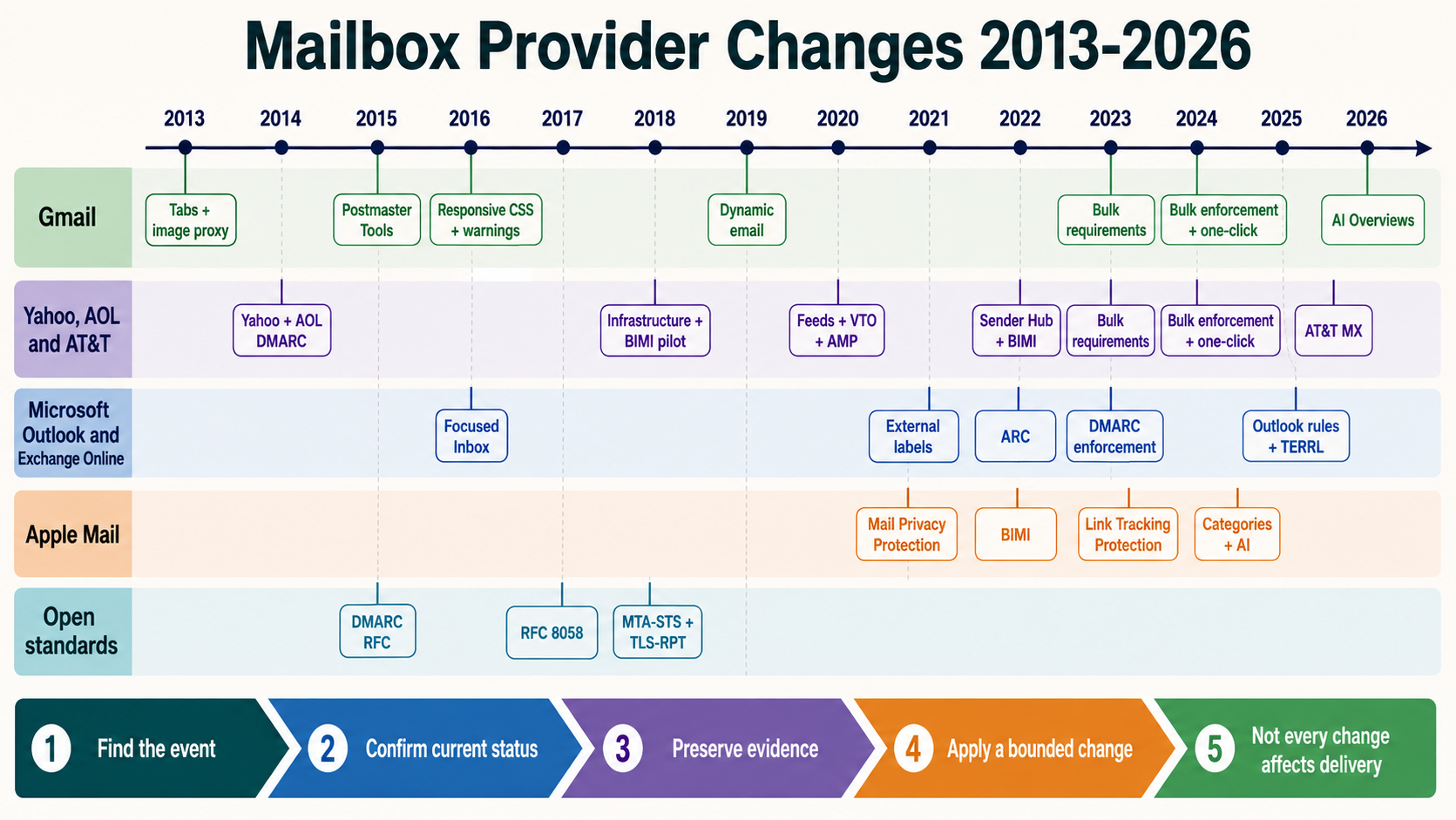
Gmail TLS and Authentication Warning Icons in 2016: Trust Became Visible
On February 9, 2016, Google announced two visible Gmail security indicators. A broken lock warned when mail transport to or from another service did not support TLS, and a question mark replaced the sender avatar when an incoming message could not be authenticated. The indicators made transport protection and sender identity visible to recipients, but they represented different security questions. TLS protects a connection in transit; SPF, DKIM and DMARC help evaluate identity. Neither one, by itself, proves that a message is wanted or safe.
The dated mailbox-provider change
| Event field | Verified value | Why it matters |
|---|---|---|
| Historical event date | February 9, 2016 | This is the provider-change date, not the NitWings publication date. |
| Mailbox provider | Gmail | The affected provider estate determines which recipient cohorts require separate evidence. |
| Change area | Authentication UX | This identifies whether the change altered authentication, filtering, visibility, measurement or sender operations. |
| Current status | authentication-warning-active-and-tls-policy-evolved | Historical instructions are interpreted against the feature or standard that exists now. |
The announcement arrived when opportunistic SMTP TLS was widely deployed but not universal. Gmail already attempted TLS automatically when the other mail service supported it. The new broken-lock indicator exposed some unencrypted paths to ordinary users before or after a message was sent.
Gmail also supported SPF and DKIM to combat impersonation. The question-mark avatar made an authentication problem visible without requiring the recipient to open raw headers. Google explicitly warned that affected mail was not necessarily dangerous, but advised greater care with replies and links.
For deliverability teams, this changed an infrastructure defect into a recipient-experience defect. A campaign could be accepted yet display a trust warning. Support tickets could arrive from recipients who saw the icon even when the ESP dashboard said “delivered.” Message-level headers, TLS logs and route ownership became essential evidence.
Current policy is stricter than the 2016 warning model. Gmail’s current sender guidelines require TLS for mail to personal Gmail accounts and require authentication based on sending volume. Google documents temporary and permanent codes for applicable non-TLS or unauthenticated bulk traffic. Historical warnings should therefore be explained alongside current enforcement, not copied as the whole operating rule.
How the system worked before the change
Before the visible indicators, most recipients could not easily distinguish an encrypted SMTP hop from an unencrypted one. The message still appeared in the interface, and the sending system’s logs might record only successful delivery unless an operator inspected TLS negotiation details.
Authentication evidence was also mostly hidden in technical headers and Gmail’s sender-detail view. A recipient saw a display name and From address that could look familiar even when the message lacked valid SPF or DKIM evidence. Spam and phishing filters operated behind the scenes, but the interface did not present the same prominent question-mark signal.
Senders often conflated several layers. A TLS-secured connection was described as an authenticated sender, or a DKIM pass was described as end-to-end encryption. In reality, SMTP TLS protects a hop between participating servers, while DKIM authenticates a signing domain and body/header integrity within its signature scope. DMARC relates aligned authentication to the visible From domain.
Successful SMTP acceptance could hide partial coverage. One region, relay, failover route or third-party service might negotiate TLS while another did not. An aggregate success rate could look healthy while a critical password-reset or invoice stream produced visible warnings.
What changed on the provider side
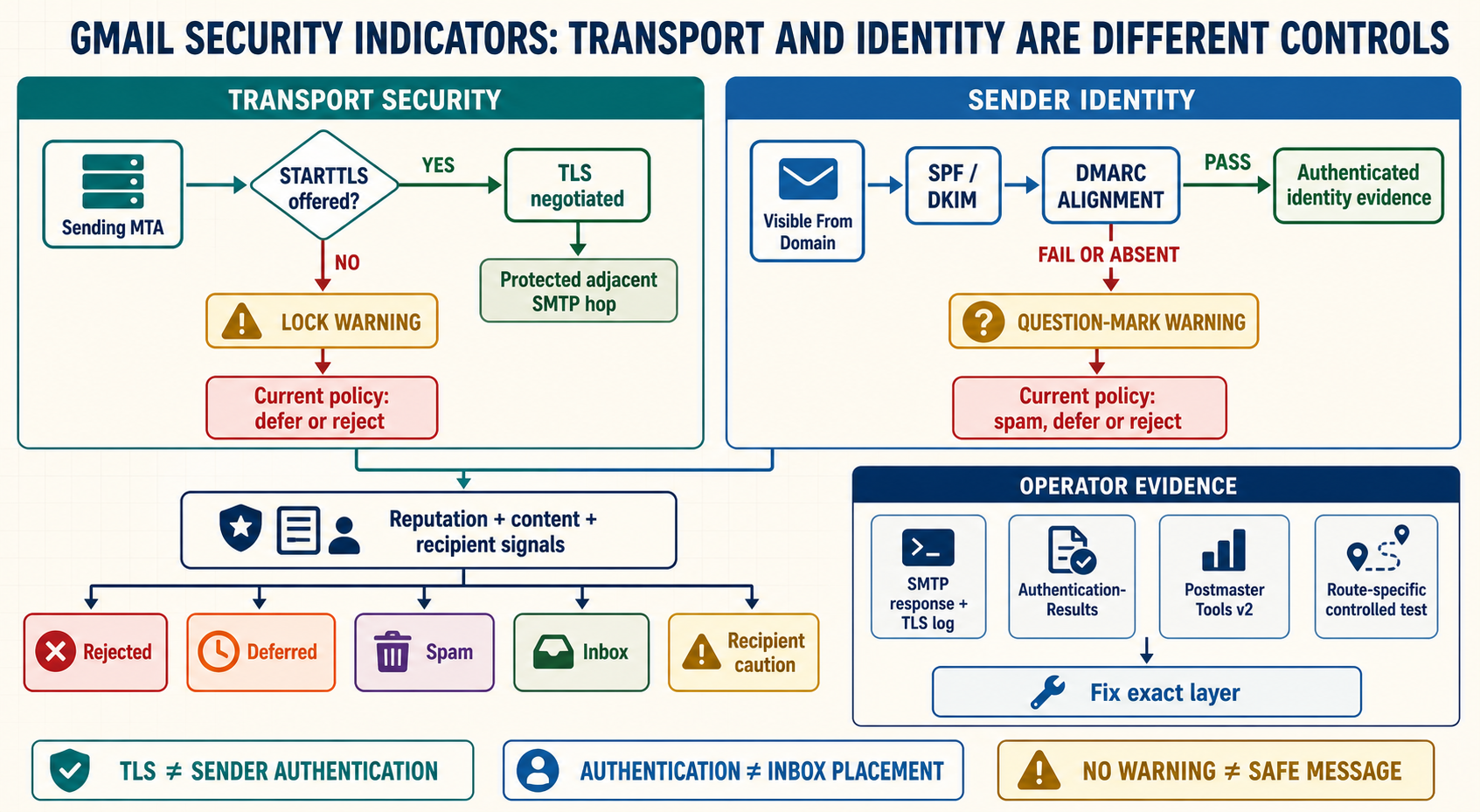
The first indicator addressed transport. Gmail showed a broken lock when a received message arrived without TLS or when a user was about to send to a service that did not support TLS. This warning described the adjacent mail-service path Gmail observed. It did not prove that every earlier or later hop was protected, and it was not message-content encryption.
The second indicator addressed authentication. Gmail displayed a question mark instead of the expected profile image, corporate logo or avatar when a message could not be authenticated. Current Gmail help still documents this question mark and tells recipients to use caution. Legitimate mailing lists and indirect paths can experience authentication problems, so the warning is evidence of uncertainty rather than a verdict of fraud.
The two indicators could appear independently. A message might travel over TLS but fail authentication. It might authenticate correctly while one transport hop lacked TLS. It might pass both and still be phishing from a compromised or attacker-controlled authenticated domain. Correct incident response therefore tests both branches and retains content, reputation and recipient context.
Current Gmail requirements turn some warnings into delivery-policy failures. Gmail lists TLS among requirements for all senders to personal Gmail accounts. Applicable traffic can receive 4.7.29 temporary failures or 5.7.29 permanent failures when TLS is absent. Bulk authentication defects have separate codes such as 4.7.27, 4.7.30, 5.7.27 and 5.7.30. The SMTP response, not an icon screenshot, determines queue behavior.
Message path before and after
Before
Sending MTA
    |
    +----> SMTP connection may negotiate TLS or remain plaintext
    |
    +----> SPF / DKIM evidence may pass, fail or be absent
    |
    v
Gmail filtering and recipient interface
    |
    v
Security state mostly hidden from ordinary recipient view
After
SMTP transport branch
    +----> TLS negotiated ----> protected adjacent hop
    +----> No TLS -----------> lock warning or current policy action

Identity branch
    +----> SPF or DKIM authentication evidence available
    +----> Authentication unavailable or fails ----> question-mark warning

Both branches + reputation + content + recipient signals
    |
    v
Reject, defer, spam, inbox or visible caution state
Who and what the change affected
| Traffic or stakeholder | What changed | Required interpretation |
|---|---|---|
| Direct senders to Gmail | TLS and authentication defects became visible and later enforceable. | Test every production route, not only the primary MTA. |
| Recipients | They gained a visible caution signal for insecure transport or uncertain identity. | Treat the indicator as a reason to inspect, not automatic proof of malicious intent. |
| ESPs and relay providers | Customer trust could be affected by route-level TLS or signing defects. | Expose TLS negotiation, signing identity and region-specific route evidence. |
| Mailing lists and forwarders | Indirect handling could break authentication despite legitimate origin. | Preserve DKIM, validate ARC and use list-aware identity behavior. |
| Security teams | Interface warnings could support phishing awareness. | Keep in mind that authenticated, TLS-protected phishing still exists. |
| Deliverability teams | Warnings added a recipient-visible symptom beyond SMTP status. | Correlate screenshots with exact message headers, logs and provider requirements. |
Effect on delivery, placement and recipient visibility
In 2016, a visible warning could reduce trust even when Gmail accepted the message. Recipients might hesitate to click, reply or download an attachment. Engagement could decline without a bounce, making the problem invisible to systems that stopped analysis at the 250 response.
Current enforcement increases direct delivery risk. Non-TLS bulk traffic can be temporarily or permanently rejected, and unauthenticated bulk traffic can receive its own policy codes. A queue must classify 4xx as retryable under controlled backoff and 5xx as permanent for that message, while retaining the enhanced status and diagnostic text.
TLS and authentication remediation are different. A TLS failure may involve protocol versions, certificates, STARTTLS advertisement, cipher compatibility, outbound route policy or an intermediate relay. An authentication failure may involve SPF authorization, DKIM signing or verification, DMARC alignment, DNS availability, body modification or wrong From identity.
Passing TLS does not improve authentication alignment. Passing DKIM does not encrypt the SMTP session. Passing both does not guarantee inbox placement because Gmail still evaluates sender requirements, complaints, reputation, content, malware, volume and recipient signals.
Failover paths are a common source of partial failure. A primary relay can negotiate modern TLS and sign correctly while a disaster-recovery host uses an expired certificate, missing signer or different envelope identity. Production tests need to exercise failover deliberately rather than wait for an outage to reveal the warning.
Effect on measurement and diagnosis
Start with message-level evidence. For transport, retain the exact sending route, remote MX, STARTTLS negotiation result, protocol, cipher, certificate validation state where the sender validates it, timestamp and SMTP response. A screenshot of a lock icon does not identify which relay or attempt created the condition.
For authentication, preserve the received message and Authentication-Results. Record the visible From domain, envelope sender, SPF result, every DKIM signing domain and selector, DMARC result and alignment. A green SPF result for an unrelated bounce domain is not the same as From alignment.
Postmaster Tools Encryption provides aggregate inbound and outbound TLS percentages for authenticated traffic. It is delayed, privacy-filtered and affected by forwarding or spoofed/replayed traffic. It can detect trends, but it does not replace a TLS transcript for the failing route.
Recipient-visible warnings require support telemetry. Record the recipient client, platform, timestamp, screenshot, full headers and message ID while minimizing personal information. Different Gmail surfaces can present security information differently, so a support description without the actual message can be ambiguous.
After repair, measure acceptance, warning disappearance in controlled accounts, authentication rates, TLS coverage, complaints, clicks and critical task completion. A cosmetic improvement alone does not prove that an underlying failover route, certificate or signer is fixed.
Advantages for email marketers
| Potential advantage | When the advantage is real | Evidence to verify |
|---|---|---|
| Visible security awareness | The warning accurately reflects missing transport or authentication evidence. | Recipient report matched to headers and route logs. |
| Faster route-defect discovery | Support and operations retain message identifiers and TLS data. | Affected relay, region and failure mode isolated. |
| Pressure for universal TLS | All production routes support current compatible TLS. | Negotiation success by route plus provider aggregate trend. |
| Stronger domain authentication | Every stream has stable authorized SPF or DKIM and appropriate DMARC. | Delivered Authentication-Results and Postmaster authentication data. |
| Clearer security education | Teams explain transport and identity as separate controls. | Runbooks and user guidance avoid claiming that one icon proves fraud. |
Disadvantages and operational risks
| Cost or risk | How it appears | Control |
|---|---|---|
| Warning treated as proof of phishing | A legitimate list or route has an authentication defect. | Investigate headers and route ownership before making an abuse conclusion. |
| No warning treated as proof of safety | A malicious sender authenticates its own domain and uses TLS. | Retain content, reputation, URL and recipient-risk controls. |
| Primary-route testing hides failover defects | Only disaster recovery produces warnings or rejection. | Exercise every region, relay and emergency route on a schedule. |
| TLS and authentication fixes are mixed | Teams change DNS to solve transport or certificates to solve alignment. | Use separate diagnostic branches and accountable owners. |
| Icons replace SMTP evidence | Operations react to screenshots without response codes. | Store full SMTP replies, TLS negotiation and message headers. |
| Broad rollback weakens security | TLS requirements or authentication are disabled to restore delivery. | Repair the exact route and use bounded, approved recovery. |
What email teams needed to do at the time
- Inventory every outbound route. Include ESPs, application relays, regional MTAs, appliances and failover hosts.
- Enable and test STARTTLS. Confirm actual negotiation with Gmail rather than relying on a configuration flag.
- Authenticate each sending stream. Publish SPF authorization and deploy DKIM with domains appropriate to the visible identity.
- Inspect warning examples. Collect full headers, message IDs, recipient surface and timestamps with privacy controls.
- Separate transport and identity incidents. Assign TLS and authentication defects to the correct engineering owner.
- Test mailing-list transformations. Determine whether original DKIM survives and whether From handling remains understandable.
- Use Postmaster evidence. Monitor encryption and authentication trends without treating aggregates as real time.
- Validate failover. Send controlled mail through backup routes before a production outage.
What email teams should do now
- Meet current Gmail sender requirements. Use TLS for all traffic and meet the applicable SPF, DKIM and DMARC rules.
- Capture current Gmail codes. Classify 4.7.29 and 5.7.29 TLS outcomes separately from authentication and reputation errors.
- Require modern transport on every route. Monitor protocol support, certificate lifecycle, STARTTLS negotiation and downgrade anomalies.
- Use aligned identity. Verify direct-mail From alignment with SPF or DKIM and maintain DMARC reporting.
- Prefer durable DKIM for indirect paths. Preserve signatures and use valid ARC evidence without assuming an override.
- Monitor Postmaster Tools v2. Correlate Encryption, Authentication, Compliance and Delivery Errors with local logs.
- Retain message-level tests. Exercise primary, regional and failover MTAs against controlled Gmail accounts.
- Educate support and security teams. A warning means caution and investigation; no warning does not guarantee safety.
- Keep TLS distinct from end-to-end encryption. Do not promise protection beyond the observed server-to-server hop.
- Use controlled rollback. Never disable authentication or accept plaintext broadly merely to clear a queue.
Worked deliverability scenario
A financial notification program receives screenshots showing a question mark beside its sender identity. Its ESP reports successful delivery and confirms that all connections used TLS. The marketing team initially asks the ESP to renew its TLS certificate.
Header review shows that transport is encrypted, but messages from one regional application are not DKIM-signed. SPF passes for an ESP bounce domain that does not align with the visible From domain. The problem belongs to authentication, not TLS. The regional deployment missed a customer-DKIM configuration secret.
Operations restore the region’s DKIM selector, send controlled tests through the exact route and confirm aligned DKIM and DMARC in Gmail’s Authentication-Results. They keep the TLS configuration unchanged, verify that failover uses the same signer, and monitor Postmaster Authentication after the expected delay.
The question-mark warning disappears in controlled tests. The team still measures acceptance, complaints and task completion because authentication does not promise inbox placement or recipient trust. The runbook now starts with two branches: transport negotiation evidence and authenticated identity evidence.
Evidence and diagnostics
- SMTP route: source host, IP, region, relay chain, remote Gmail MX and queue ID.
- TLS negotiation: STARTTLS advertisement, result, protocol, cipher, certificate state and timestamp.
- SMTP policy response: reply class, enhanced status, diagnostic text, retry behavior and final disposition.
- Visible identity: From address and organizational domain presented to the recipient.
- Authentication: SPF identity/result, every DKIM selector and domain, DMARC alignment and Authentication-Results.
- Indirect path: forwarding or list Received chain, message modification and ARC validation.
- Recipient surface: Gmail platform, warning type, screenshot, message ID and security-detail display.
- Provider aggregate: Postmaster Encryption, Authentication, Compliance and Delivery Error windows.
- Change evidence: configuration version, certificate or selector rollout, controlled test and rollback criteria.
Failure modes and incorrect conclusions
- Calling TLS sender authentication. TLS protects transport; it does not prove the visible author domain.
- Calling DKIM encryption. A DKIM signature authenticates scoped content and domain, not message confidentiality.
- Assuming the warning proves malicious intent. Legitimate indirect mail and configuration defects can trigger caution.
- Assuming no warning proves safety. Attackers can use TLS and authenticate domains they control.
- Testing only the primary MTA. Regional and failover paths frequently create partial warning patterns.
- Retrying a permanent policy failure indefinitely. Preserve the 5xx evidence and repair the route instead of amplifying traffic.
- Disabling security to restore throughput. Broad plaintext or unsigned fallbacks trade delivery pressure for identity and privacy risk.
Current status and superseding changes
The question-mark authentication indicator remains documented in current Gmail help. Google states that unauthenticated messages are not necessarily spam, but recipients should be careful. Current guidance also says authentication is required for correct classification and that authentication alone does not guarantee delivery.
Gmail’s encryption presentation has evolved beyond the exact 2016 announcement. Current Gmail documentation describes standard TLS protection and security details, while current sender requirements make TLS mandatory for senders to personal Gmail. Operators should use current policy pages and SMTP codes rather than depending on the historic icon alone.
Current enforcement includes temporary and permanent non-TLS codes for applicable bulk traffic, alongside separate SPF and DKIM enforcement codes. Postmaster Tools provides aggregate Encryption, Authentication, Compliance and Delivery Error evidence, subject to delay, privacy and scope limitations.
The durable lesson is separation of controls. TLS transport, authenticated domain identity, DMARC alignment, receiver policy, spam placement and recipient trust form different layers. A strong sender verifies every layer and does not claim that one successful icon state guarantees the next.
Operator checklist
- Record February 9, 2016 as the provider-change date.
- Use February 28, 2016 as this series publication date.
- Separate TLS transport from SPF, DKIM and DMARC identity.
- Test every primary, regional and failover sending route.
- Preserve full SMTP responses and TLS negotiation evidence.
- Inspect delivered Authentication-Results and identifier alignment.
- Classify current Gmail TLS and authentication codes separately.
- Use Postmaster aggregate data with message-level evidence.
- Treat warning icons as caution, not proof of malicious intent.
- Never treat absence of a warning as proof of safety or inbox placement.
- Verify indirect-mail DKIM and ARC behavior.
- Use bounded remediation and rollback without weakening security broadly.
Primary and contemporaneous references
- Google: Making email safer for you: Primary February 9, 2016 announcement.
- Google: Check if a Gmail message is authenticated: Current question-mark warning and authentication guidance.
- Google: Learn how Gmail encrypts your emails: Current Gmail transport-encryption explanation.
- Google: Email sender guidelines: Current TLS and authentication requirements.
- Google: Gmail SMTP errors and codes: Current temporary and permanent policy diagnostics.
- Google: Postmaster Tools dashboards: Current aggregate Encryption, Authentication and Delivery Error definitions.