Run Multiple MySQL Versions on One Server Safely
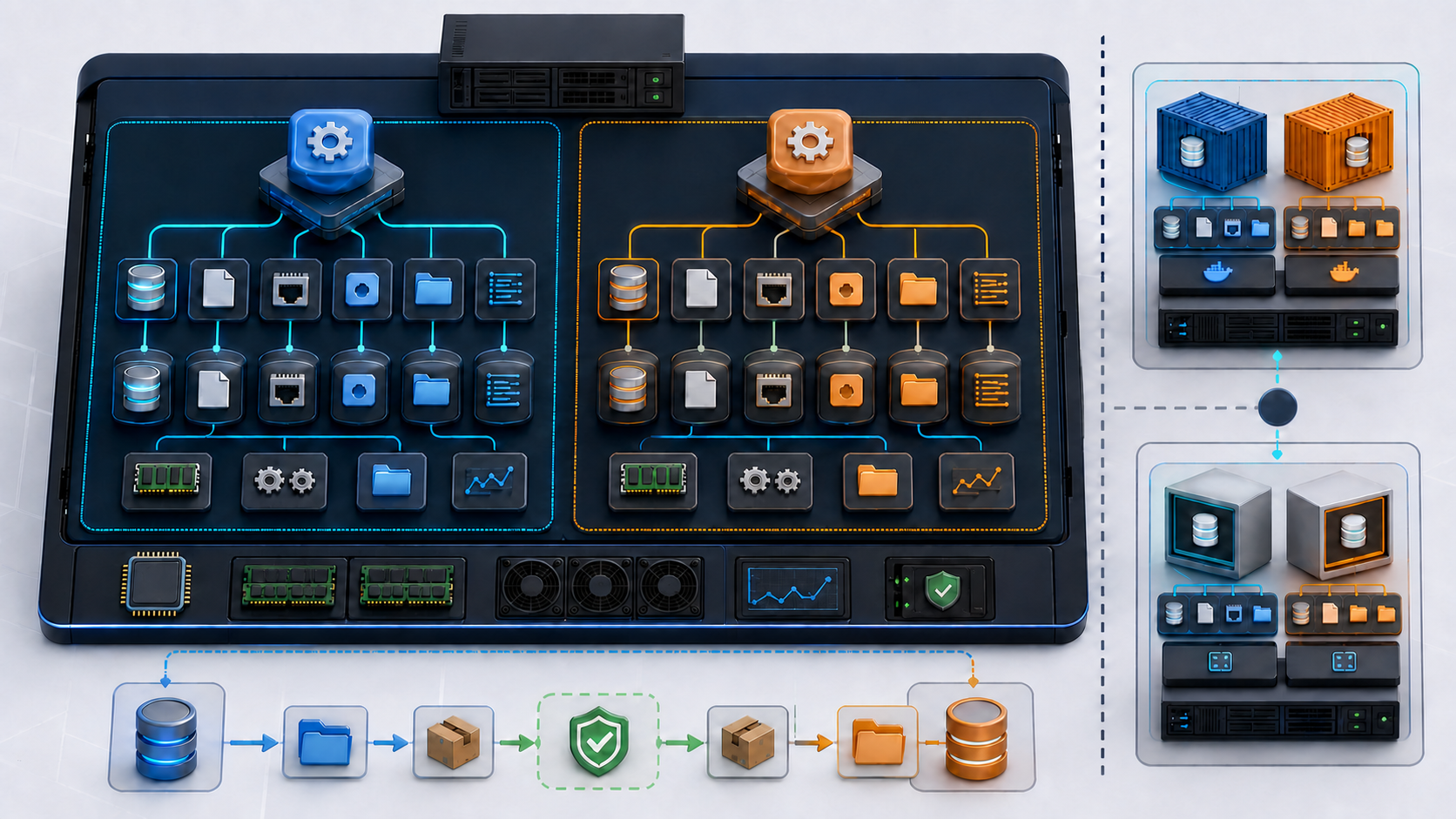
You can run multiple MySQL versions on one server, but each instance must behave as an independent database server. Give every instance its own binaries, data directory, configuration, port, Unix socket, runtime files, logs, credentials, backup, memory budget, monitoring identity, and service lifecycle. Never point two server processes or two different versions at the same data directory.
This guide builds MySQL 8.4 LTS beside MySQL 9.7 using two methods. The container method is the recommended path for development, compatibility testing, migration rehearsal, and many internal services. The native systemd method is for teams that require separate generic binary distributions on one Linux host. Both methods include validation, backups, upgrades, troubleshooting, and rollback.
Decide whether one host is the right design
| Requirement | Best fit | Reason |
|---|---|---|
| Application compatibility tests across server releases | Containers | Fast isolation, explicit image version, disposable data, and simple automation |
| Upgrade rehearsal with a production-sized copy | Separate VM or host | Resource behavior and failure impact are closer to production |
| Two small internal services with fixed versions | Containers or separate VMs | Clear ownership and controlled resource boundaries |
| Native plugin or operating-system integration test | Separate native binaries with systemd | Tests the actual binary and host integration |
| High availability | Different hosts and failure domains | Two processes on one host share power, kernel, storage, memory, and maintenance failures |
| Internet-facing unsupported server release | Do not deploy | No configuration restores missing security maintenance |
Multiple instances on one machine are not replicas, failover, or a backup. A host outage takes every instance with it. Use this design for isolation and controlled coexistence, not as a substitute for database availability architecture.
Choose LTS or Innovation deliberately
MySQL has Long-Term Support and Innovation tracks. MySQL 8.4 is an LTS series suited to environments that value a stable feature set and longer support. MySQL 9.7 is the current LTS line at the time of writing. Innovation releases move faster and remain supported only until the next Innovation release. Confirm the release model and exact supported version before deployment.
| Decision | LTS track | Innovation track |
|---|---|---|
| Primary goal | Stability and longer support | Earlier access to features and behavior changes |
| Change rate | Fixes within the LTS series | New features and possible application-visible changes |
| Testing requirement | Strong regression and upgrade testing | More frequent compatibility and performance testing |
| Upgrade planning | Follow supported LTS paths | Move through required LTS boundaries when major lines change |
Version tags in commands identify a series, but production should pin the exact tested image digest or binary release. Never use latest for a database you expect to reproduce.
Inventory every resource that must be unique
| Resource | Instance A example | Instance B example |
|---|---|---|
| Server binaries or container image | MySQL 8.4 | MySQL 9.7 |
| Data directory or volume | /var/lib/mysql-instances/mysql84 | /var/lib/mysql-instances/mysql97 |
| Configuration | /etc/mysql/instances/mysql84.cnf | /etc/mysql/instances/mysql97.cnf |
| Classic TCP port | 3307 | 3308 |
| X Protocol port | 33070 | 33080 |
| Unix socket | /run/mysql-mysql84/mysqld.sock | /run/mysql-mysql97/mysqld.sock |
| PID and runtime directory | /run/mysql-mysql84 | /run/mysql-mysql97 |
| Error and slow logs | Paths under the mysql84 data directory | Paths under the mysql97 data directory |
| Operating-system identity | mysql-mysql84 | mysql-mysql97 |
| Server ID if binary logging is used | 8401 | 9701 |
| Backup destination | /backup/mysql84 | /backup/mysql97 |
| Monitoring labels and alerts | mysql84 | mysql97 |
Also separate temporary and import/export directories when workload or security boundaries require it. The operating-system page cache and physical disks remain shared unless you provide separate devices or virtual machines.
Do not share a data directory
A MySQL data directory contains the data dictionary, InnoDB system files, redo and undo state, grant tables, binary logs, and version-dependent metadata. Starting another server process against it can corrupt data. Starting a newer version can perform an upgrade that prevents the earlier binary from reopening it.
Unsafe: never “test” another version by changing only the executable while keeping datadir unchanged. Never mount one Docker volume into two MySQL containers. Never copy a live data directory with ordinary cp and call it a backup. Use a supported physical backup method for the exact release or perform a consistent logical export and restore.
Plan ports, addresses, and client routing
Use loopback bindings unless remote access is required. A different TCP port is not an access control. If remote clients need one instance, bind to an assigned interface, restrict the host firewall to approved sources, require TLS, and create least-privilege database accounts.
# Confirm the planned ports and sockets are free.
sudo ss -lntp | grep -E ':(3307|3308|33070|33080)\b' || true
sudo find /run -maxdepth 3 -type s -name 'mysqld*.sock' -ls 2>/dev/null
Always tell the client which transport to use. With localhost, a client may choose a Unix socket and ignore the TCP port.
# Force TCP.
mysql --protocol=TCP --host=127.0.0.1 --port=3307 -u app_user -p

# Force the exact local socket.
mysql --protocol=SOCKET \
  --socket=/run/mysql-mysql84/mysqld.sock -u app_user -p
Capacity-plan the combined host
Each server has a global memory footprint plus per-connection allocations. Two instances can each appear reasonable and still trigger host swapping or the out-of-memory killer. Budget the sum of buffer pools, performance schema, caches, connection buffers, background work, backup processes, and operating-system needs.
| Capacity area | Check | Failure symptom |
|---|---|---|
| Memory | Combined steady and peak resident memory plus connection growth | Swap, latency spikes, killed server process |
| Storage capacity | Data, binary logs, relay logs, temporary files, backups, and growth | Read-only behavior, crash, failed backup, host exhaustion |
| Storage IOPS and latency | Peak foreground writes, checkpoints, backup, and restore overlap | Both instances slow even when one is lightly loaded |
| CPU | Concurrent query, compression, encryption, and maintenance load | Run queue growth and missed latency objectives |
| File descriptors | Tables, connections, logs, sockets, and backup tools | Open-file errors or connection refusal |
| Network | Client traffic, backups, replication, and monitoring | Timeouts and backup windows that never complete |
Do not copy very large per-session buffer values into both configurations. A setting such as a 120 MB sort buffer can be allocated per session and multiply under concurrency. Start from measured workload evidence and apply independent resource limits.
Method 1: use isolated containers
The following Docker Compose project publishes MySQL 8.4 on loopback port 3307 and MySQL 9.7 on loopback port 3308. Each service has a different volume, configuration file, root secret, health check, and memory limit.
install -d -m 0750 mysql-multi/config mysql-multi/secrets mysql-multi/backups
cd mysql-multi

openssl rand -base64 36 > secrets/mysql84-root.txt
openssl rand -base64 36 > secrets/mysql97-root.txt
chmod 0600 secrets/mysql84-root.txt secrets/mysql97-root.txt
Keep the secret directory out of source control and restrict its backup. For production orchestration, use the platform’s secret manager rather than long-lived files beside the Compose project.
Create separate container configurations
# config/mysql84.cnf
[mysqld]
bind_address=0.0.0.0
mysqlx=0
skip_name_resolve=ON
local_infile=OFF
max_connections=150
innodb_buffer_pool_size=768M
slow_query_log=ON
long_query_time=1
binlog_expire_logs_seconds=604800
# config/mysql97.cnf
[mysqld]
bind_address=0.0.0.0
mysqlx=0
skip_name_resolve=ON
local_infile=OFF
max_connections=100
innodb_buffer_pool_size=768M
slow_query_log=ON
long_query_time=1
binlog_expire_logs_seconds=604800
The container listens on all interfaces inside its private network, but the host publishes it only on 127.0.0.1. If another application container needs access, attach it to the internal network and use the Compose service name. Do not publish the port publicly merely to connect two containers.
Create the Compose project
# compose.yaml
services:
  mysql84:
    image: mysql:8.4
    restart: unless-stopped
    environment:
      MYSQL_ROOT_PASSWORD_FILE: /run/secrets/mysql84_root
    secrets:
      - mysql84_root
    ports:
      - "127.0.0.1:3307:3306"
    volumes:
      - mysql84_data:/var/lib/mysql
      - ./config/mysql84.cnf:/etc/mysql/conf.d/instance.cnf:ro
    mem_limit: 1536m
    cpus: 2.0
    healthcheck:
      test: ["CMD", "mysqladmin", "ping", "-h", "127.0.0.1", "--silent"]
      interval: 10s
      timeout: 5s
      retries: 12
      start_period: 45s

  mysql97:
    image: mysql:9.7
    restart: unless-stopped
    environment:
      MYSQL_ROOT_PASSWORD_FILE: /run/secrets/mysql97_root
    secrets:
      - mysql97_root
    ports:
      - "127.0.0.1:3308:3306"
    volumes:
      - mysql97_data:/var/lib/mysql
      - ./config/mysql97.cnf:/etc/mysql/conf.d/instance.cnf:ro
    mem_limit: 1536m
    cpus: 2.0
    healthcheck:
      test: ["CMD", "mysqladmin", "ping", "-h", "127.0.0.1", "--silent"]
      interval: 10s
      timeout: 5s
      retries: 12
      start_period: 45s

secrets:
  mysql84_root:
    file: ./secrets/mysql84-root.txt
  mysql97_root:
    file: ./secrets/mysql97-root.txt

volumes:
  mysql84_data:
  mysql97_data:
The series tags make the example readable. Before production, pull the approved images, scan them, record their platform-specific repository digests, and replace each tag with the tested digest.
docker pull mysql:8.4
docker pull mysql:9.7
docker image inspect --format '{{index .RepoDigests 0}}' mysql:8.4
docker image inspect --format '{{index .RepoDigests 0}}' mysql:9.7
Start and prove both container instances
docker compose config --quiet
docker compose pull
docker compose up -d
docker compose ps
docker compose logs --tail=100 mysql84
docker compose logs --tail=100 mysql97
mysql --protocol=TCP -h 127.0.0.1 -P 3307 -u root -p \
  -e 'SELECT VERSION(), @@port, @@datadir, @@server_uuid;'

mysql --protocol=TCP -h 127.0.0.1 -P 3308 -u root -p \
  -e 'SELECT VERSION(), @@port, @@datadir, @@server_uuid;'
Confirm the versions, ports, data directories, server UUIDs, character sets, authentication plugins, SQL modes, time zones, and application schemas independently. A green container health check proves process reachability, not application compatibility.
Create application accounts instead of using root
CREATE DATABASE app84 CHARACTER SET utf8mb4;
CREATE USER 'app84'@'%' IDENTIFIED BY 'replace-with-secret-manager-value';
GRANT SELECT, INSERT, UPDATE, DELETE ON app84.* TO 'app84'@'%';

SHOW GRANTS FOR 'app84'@'%';
Run an equivalent, independently named account on the other instance. Scope the host pattern to the real application network where possible. Do not reuse root or one application password across versions.
Back up each container independently
Create a dedicated backup account and a client option file delivered as a secret. The following example shows the shape of a logical backup command. Protect the option file because it contains credentials.
# secrets/mysql84-backup.cnf
[client]
user=backup_operator
password=replace-with-secret-manager-value
host=127.0.0.1
port=3306
backup_file="backups/mysql84-$(date -u +%Y%m%dT%H%M%SZ).sql"

docker compose exec -T mysql84 mysqldump \
  --defaults-extra-file=/run/secrets/mysql84_backup \
  --all-databases --single-transaction --routines --events --triggers \
  --hex-blob --set-gtid-purged=OFF > "$backup_file"

test -s "$backup_file"
sha256sum "$backup_file" > "${backup_file}.sha256"
Add the backup option file to the service’s secrets before using this command. A successful exit and nonempty file are not enough. Restore into an isolated test instance, run consistency and application checks, and record recovery time and result.
Stop or remove containers without deleting data
docker compose stop mysql97
docker compose start mysql97
docker compose down
Unsafe: docker compose down --volumes deletes the named data volumes for both instances. Keep the command visible in the runbook because an operator may encounter it, but do not use it as routine cleanup. Before any volume deletion, identify the exact volume, confirm ownership, verify a tested backup, capture approval, and remove one explicit target only.
Method 2: run separate native binaries with systemd
Use official generic binary distributions that support the host operating system and libraries. Download each exact release from MySQL, verify its published checksum and signature, and extract it into a versioned root-owned directory. The examples assume:
/opt/mysql/mysql-8.4/       # verified MySQL 8.4 binary distribution
/opt/mysql/mysql-9.7/       # verified MySQL 9.7 binary distribution
/opt/mysql-instances/mysql84/bin -> /opt/mysql/mysql-8.4/bin
/opt/mysql-instances/mysql97/bin -> /opt/mysql/mysql-9.7/bin
Do not replace a directory in place. Keep exact release directories so rollback can select a previously tested binary. Confirm shared-library requirements with ldd before initialization.
Create separate service identities and directories
sudo useradd --system --home-dir /nonexistent --shell /usr/sbin/nologin mysql-mysql84
sudo useradd --system --home-dir /nonexistent --shell /usr/sbin/nologin mysql-mysql97

sudo install -d -o root -g root -m 0755 /etc/mysql/instances
sudo install -d -o root -g root -m 0755 /opt/mysql-instances/mysql84
sudo install -d -o root -g root -m 0755 /opt/mysql-instances/mysql97
sudo ln -s /opt/mysql/mysql-8.4/bin /opt/mysql-instances/mysql84/bin
sudo ln -s /opt/mysql/mysql-9.7/bin /opt/mysql-instances/mysql97/bin

sudo install -d -o mysql-mysql84 -g mysql-mysql84 -m 0750 \
  /var/lib/mysql-instances/mysql84 /var/lib/mysql-instances/mysql84-files
sudo install -d -o mysql-mysql97 -g mysql-mysql97 -m 0750 \
  /var/lib/mysql-instances/mysql97 /var/lib/mysql-instances/mysql97-files
If the accounts or directories already exist, stop and inspect them. Do not recursively change ownership on an unknown data directory.
Configure the native MySQL 8.4 instance
# /etc/mysql/instances/mysql84.cnf
[client]
port=3307
socket=/run/mysql-mysql84/mysqld.sock

[mysqld]
basedir=/opt/mysql/mysql-8.4
datadir=/var/lib/mysql-instances/mysql84
port=3307
mysqlx_port=33070
bind_address=127.0.0.1
socket=/run/mysql-mysql84/mysqld.sock
pid_file=/run/mysql-mysql84/mysqld.pid
log_error=/var/lib/mysql-instances/mysql84/error.log
slow_query_log=ON
slow_query_log_file=/var/lib/mysql-instances/mysql84/slow.log
long_query_time=1
secure_file_priv=/var/lib/mysql-instances/mysql84-files
local_infile=OFF
skip_name_resolve=ON
server_id=8401
log_bin=/var/lib/mysql-instances/mysql84/binlog
binlog_expire_logs_seconds=604800
innodb_buffer_pool_size=768M
max_connections=150
Configure the native MySQL 9.7 instance
# /etc/mysql/instances/mysql97.cnf
[client]
port=3308
socket=/run/mysql-mysql97/mysqld.sock

[mysqld]
basedir=/opt/mysql/mysql-9.7
datadir=/var/lib/mysql-instances/mysql97
port=3308
mysqlx_port=33080
bind_address=127.0.0.1
socket=/run/mysql-mysql97/mysqld.sock
pid_file=/run/mysql-mysql97/mysqld.pid
log_error=/var/lib/mysql-instances/mysql97/error.log
slow_query_log=ON
slow_query_log_file=/var/lib/mysql-instances/mysql97/slow.log
long_query_time=1
secure_file_priv=/var/lib/mysql-instances/mysql97-files
local_infile=OFF
skip_name_resolve=ON
server_id=9701
log_bin=/var/lib/mysql-instances/mysql97/binlog
binlog_expire_logs_seconds=604800
innodb_buffer_pool_size=768M
max_connections=100
Protect each file so only root and its service group can read it:
sudo chown root:mysql-mysql84 /etc/mysql/instances/mysql84.cnf
sudo chown root:mysql-mysql97 /etc/mysql/instances/mysql97.cnf
sudo chmod 0640 /etc/mysql/instances/mysql84.cnf /etc/mysql/instances/mysql97.cnf
Initialize each data directory once
Initialization is for an empty directory. It is not an upgrade step. Capture the generated temporary password in a root-only evidence file without printing it into a shared terminal transcript.
sudo install -d -o root -g root -m 0700 /root/mysql-init-evidence

sudo sh -c 'umask 077; runuser -u mysql-mysql84 -- \
  /opt/mysql/mysql-8.4/bin/mysqld --no-defaults --initialize \
  --basedir=/opt/mysql/mysql-8.4 \
  --datadir=/var/lib/mysql-instances/mysql84 \
  2> /root/mysql-init-evidence/mysql84.log'

sudo sh -c 'umask 077; runuser -u mysql-mysql97 -- \
  /opt/mysql/mysql-9.7/bin/mysqld --no-defaults --initialize \
  --basedir=/opt/mysql/mysql-9.7 \
  --datadir=/var/lib/mysql-instances/mysql97 \
  2> /root/mysql-init-evidence/mysql97.log'
Unsafe: --initialize-insecure creates the initial local root account without a password. It can be appropriate only inside a tightly controlled automated bootstrap that sets the password before any network exposure. The secure default is --initialize.
Create a systemd template service
# /etc/systemd/system/[email protected]
[Unit]
Description=Isolated MySQL instance %i
After=network.target

[Service]
Type=simple
User=mysql-%i
Group=mysql-%i
RuntimeDirectory=mysql-%i
RuntimeDirectoryMode=0750
ExecStartPre=/usr/bin/test -x /opt/mysql-instances/%i/bin/mysqld
ExecStart=/opt/mysql-instances/%i/bin/mysqld --defaults-file=/etc/mysql/instances/%i.cnf
Restart=on-failure
RestartSec=5s
TimeoutStartSec=180s
TimeoutStopSec=180s
LimitNOFILE=65535
NoNewPrivileges=true
PrivateTmp=true
ProtectHome=true
ProtectSystem=strict
ReadWritePaths=/var/lib/mysql-instances/%i /var/lib/mysql-instances/%i-files /run/mysql-%i

[Install]
WantedBy=multi-user.target
Review hardening against the exact binary and host policy. SELinux or AppArmor must explicitly permit the custom binaries, data paths, sockets, and ports. Do not disable mandatory access control to make the service start.
Validate and start native instances one at a time
sudo systemd-analyze verify /etc/systemd/system/[email protected]
sudo systemctl daemon-reload

sudo systemctl start mysql-instance@mysql84
sudo systemctl status mysql-instance@mysql84 --no-pager
sudo journalctl -u mysql-instance@mysql84 -n 100 --no-pager

sudo systemctl start mysql-instance@mysql97
sudo systemctl status mysql-instance@mysql97 --no-pager
sudo journalctl -u mysql-instance@mysql97 -n 100 --no-pager
sudo ss -lntp | grep -E ':(3307|3308|33070|33080)\b'
sudo find /run/mysql-mysql84 /run/mysql-mysql97 -type s -ls

/opt/mysql/mysql-8.4/bin/mysql --protocol=SOCKET \
  --socket=/run/mysql-mysql84/mysqld.sock -u root -p
/opt/mysql/mysql-9.7/bin/mysql --protocol=SOCKET \
  --socket=/run/mysql-mysql97/mysqld.sock -u root -p
After setting new root passwords and creating administrative accounts, enable both services only if automatic startup is required:
sudo systemctl enable mysql-instance@mysql84 mysql-instance@mysql97
Use ALTER USER for account passwords
ALTER USER 'root'@'localhost' IDENTIFIED BY 'replace-with-generated-secret';
SELECT user, host, plugin, account_locked FROM mysql.user ORDER BY user, host;
Unsafe: do not update mysql.user password columns directly and do not use removed PASSWORD() patterns. Grant tables and authentication metadata are server-owned structures. Use CREATE USER, ALTER USER, GRANT, REVOKE, and DROP USER.
Keep password validation instead of weakening it
SHOW VARIABLES LIKE 'validate_password%';
Unsafe: setting password length and character counts to zero, switching policy to LOW for convenience, or uninstalling the password component weakens every account created under that policy. Generate a compliant secret and fix the provisioning workflow. If organizational policy differs, define and approve the intended controls rather than disabling validation during an incident.
Recover administrative access safely
First use documented credential recovery, local socket administration, or an approved initialization file while network access remains disabled. Preserve the error log and confirm that you are operating on the intended port, socket, configuration, data directory, and service unit.
Unsafe: --skip-grant-tables disables normal privilege enforcement. If an authorized recovery has no safer path, stop only the intended instance, block all network access, start it on its unique socket with networking disabled, reset the account, stop the recovery process, and restart through systemd with grants enabled. Never leave this mode running.
sudo systemctl stop mysql-instance@mysql84
sudo ss -lntp | grep ':3307\b' || true

# Unsafe recovery mode. Use only under an approved, isolated procedure.
sudo -u mysql-mysql84 /opt/mysql/mysql-8.4/bin/mysqld \
  --defaults-file=/etc/mysql/instances/mysql84.cnf \
  --skip-grant-tables --skip-networking
After recovery, stop that foreground process, confirm no process remains, start mysql-instance@mysql84, verify authentication, review accounts and grants, rotate any exposed credentials, and attach evidence to the change record.
Do not copy performance settings blindly
| Setting pattern | Risk | Current action |
|---|---|---|
| Huge sort/read buffers | Per-session allocation can exhaust host memory | Measure query plans and concurrency; size from evidence |
innodb_flush_log_at_trx_commit=0 | Committed transactions can be lost after crash | Use 1 when durable commit is required; document any exception |
| General log always enabled | Heavy I/O, storage growth, and sensitive statement capture | Enable briefly for scoped diagnosis and protect output |
Very high max_connect_errors | Can hide network or abuse problems | Investigate the source and monitor connection failures |
| Blanket replica error skipping | Creates silent data divergence | Stop, identify the transaction and root cause, repair and verify |
bind_address=0.0.0.0 | Listens on every interface | Bind to loopback or an assigned private address plus firewall and TLS |
Validate every option against the exact server version. An unknown or removed option can prevent only one instance from starting while the other remains healthy, which is why monitoring must identify instances separately.
Apply firewall and mandatory-access-control policy
# Example with firewalld: permit only an approved application subnet to 3307.
sudo firewall-cmd --permanent \
  --add-rich-rule='rule family=ipv4 source address=192.0.2.0/24 port port=3307 protocol=tcp accept'
sudo firewall-cmd --reload
sudo firewall-cmd --list-all
Do not open 3307 and 3308 globally. If a second instance is for local testing, keep it on loopback. On SELinux systems, assign approved database port types and file contexts using persistent policy, then verify denials. Do not solve a label problem with setenforce 0.
Monitor each instance independently
SELECT VERSION(), @@server_uuid, @@port, @@socket, @@datadir;
SHOW GLOBAL STATUS LIKE 'Uptime';
SHOW GLOBAL STATUS LIKE 'Threads_connected';
SHOW GLOBAL STATUS LIKE 'Aborted_connects';
SHOW GLOBAL STATUS LIKE 'Innodb_buffer_pool_reads';
SHOW GLOBAL STATUS LIKE 'Created_tmp_disk_tables';
Collect availability, query latency, connections, buffer-pool behavior, disk latency, free space, binary-log growth, backup age, restore-test age, replication state where applicable, and host memory pressure. Alert labels must include instance, version, port, data directory, and service owner.
Perform a logical migration between versions
- Confirm the supported upgrade path. Do not skip a required LTS or bugfix series.
- Run MySQL Shell Upgrade Checker against the source and resolve every relevant finding.
- Create and verify a backup that includes schemas, routines, events, triggers, users or a documented account rebuild, and required time-zone data.
- Restore into the isolated target instance, never into the source data directory.
- Run schema checks, row/count reconciliation, application tests, query-plan comparisons, performance tests, and backup/restore tests.
- Plan the final data-change freeze or a supported replication-based transition.
- Cut over connection configuration with an explicit rollback deadline and owner.
- Keep the source read-only and protected until acceptance, then retire it through approved retention.
Do not treat replication between different versions as automatically supported. Check exact source, target, topology, authentication, and feature constraints in the corresponding manuals.
Test application compatibility, not only server startup
| Area | Evidence |
|---|---|
| Authentication | Connector supports the target default plugin and TLS behavior |
| SQL syntax and reserved words | Full migrations and representative queries run |
| Character set and collation | Comparisons, ordering, uniqueness, and indexes behave as expected |
| SQL mode | Invalid or ambiguous data is handled intentionally |
| Data types and metadata | ORM schema validation and generated migrations pass |
| Query plans | Critical queries meet latency and resource objectives |
| Backup and restore | Target backup restores to another isolated target instance |
| Operational tools | Monitoring, backup, proxy, connector, and automation versions are compatible |
Handle unsupported 5.x data recovery as containment
MySQL 5.1 and 5.7 should not be deployed as internet-facing production services. If an organization must recover data from one of these releases, use a dedicated isolated VM, no inbound network, a verified archive from an authorized source, a snapshot before startup, strict resource limits, and socket-only access. Export logically, validate the export, move through supported upgrade boundaries, and destroy or archive the recovery environment according to policy.
Do not place an unsupported binary beside current production databases on the same host. Its libraries, authentication, file formats, and security exposure are a separate risk boundary.
Troubleshoot by symptom
| Symptom | Likely cause | Evidence |
|---|---|---|
| Second instance reports address in use | Duplicate classic, X Protocol, or admin port | ss -lntp, effective variables, service log |
| Client reaches the wrong version | localhost selected default socket or client option file overrode port | Force TCP/socket, inspect --print-defaults, query version and UUID |
| Server refuses to start after config edit | Unknown option, permission, path, or version mismatch | Journal, error log, binary --verbose --help, file labels |
| Both instances slow together | Shared memory, CPU, disk, or backup contention | Host pressure, cgroup metrics, storage latency, workload timeline |
| Permission denied on socket or data | Wrong OS owner, runtime directory, SELinux/AppArmor policy | Path traversal permissions and mandatory-access-control audit |
| Temporary password cannot be found | Initialization stderr captured elsewhere or wrong log inspected | Root-only initialization evidence and exact data-directory timestamps |
| Authentication works on one version only | Connector/authentication plugin or user-host mismatch | User/host/plugin rows, connector version, server error, TLS result |
| Container restarts repeatedly | Invalid config, incompatible volume, memory limit, or initialization failure | docker inspect, logs, volume identity, OOM state |
Prove which process owns which data
ps -eo pid,user,cmd | grep '[m]ysqld'
sudo ss -lntp | grep mysqld
sudo lsof -nP -c mysqld | grep -E 'mysql84|mysql97' | head -n 100

systemctl show mysql-instance@mysql84 \
  -p MainPID -p User -p FragmentPath -p ExecStart
systemctl show mysql-instance@mysql97 \
  -p MainPID -p User -p FragmentPath -p ExecStart
Inside SQL, confirm @@version, @@server_uuid, @@port, @@socket, and @@datadir. Never stop or kill a process based on a name alone.
Stop an instance safely
sudo systemctl stop mysql-instance@mysql97
sudo systemctl is-active mysql-instance@mysql97
sudo ss -lntp | grep ':3308\b' || true
sudo test ! -S /run/mysql-mysql97/mysqld.sock
Unsafe: killing the PID from a copied file can terminate the wrong process when the file is stale or paths are confused. Use the owning service manager and wait for clean shutdown. Use a signal only after proving the live PID, command, instance, data directory, and shutdown failure, and capture evidence before escalation.
Back up and restore native instances
Give every instance an independent backup job, destination, retention, encryption key, monitoring check, and restore test. A logical dump must connect to the exact port or socket. A physical backup tool must support the exact server product and release.
backup_dir='/backup/mysql84'
timestamp="$(date -u +%Y%m%dT%H%M%SZ)"
sudo install -d -o backup -g backup -m 0750 "$backup_dir"

mysqldump --defaults-extra-file=/etc/mysql/backup/mysql84.cnf \
  --protocol=SOCKET --socket=/run/mysql-mysql84/mysqld.sock \
  --all-databases --single-transaction --routines --events --triggers \
  --hex-blob --set-gtid-purged=OFF \
  > "${backup_dir}/all-${timestamp}.sql"

test -s "${backup_dir}/all-${timestamp}.sql"
sha256sum "${backup_dir}/all-${timestamp}.sql" \
  > "${backup_dir}/all-${timestamp}.sql.sha256"
Do not restore a dump into production as its first test. Restore into a new isolated instance, validate application behavior, and record the procedure and elapsed time.
Upgrade one instance without changing the other
- Identify the exact instance, binary, config, port, socket, data directory, backup, and owner.
- Verify the target is a supported upgrade from the current release.
- Run upgrade checks, application regression, performance tests, and a restore test.
- Stop only the targeted systemd unit or Compose service.
- Preserve the earlier binary and a tested pre-upgrade backup.
- Apply the tested image digest or versioned binary path.
- Start the target and inspect server upgrade messages before application traffic.
- Validate schemas, grants, queries, logs, backups, monitoring, and client behavior.
Downgrade is usually a logical restore into a fresh compatible instance, not swapping the earlier binary back onto an upgraded data directory. Define rollback before the upgrade starts.
Rollback the native service configuration
sudo systemctl stop mysql-instance@mysql84

# Restore the reviewed configuration backup for this instance only.
sudo install -o root -g mysql-mysql84 -m 0640 \
  /root/mysql-change-backup/mysql84.cnf \
  /etc/mysql/instances/mysql84.cnf

sudo systemctl start mysql-instance@mysql84
sudo systemctl status mysql-instance@mysql84 --no-pager
sudo journalctl -u mysql-instance@mysql84 -n 100 --no-pager
Unsafe: recursively restoring /etc/mysql, changing ownership across every instance, deleting a data directory, or stopping all database units is not a scoped rollback. Restore the exact file or binary reference owned by the failing change. Data rollback must use the tested pre-change backup and a documented recovery decision.
Production completion checklist
- Every instance has an approved purpose, owner, version track, support status, and retirement date.
- Binaries or images are exact, verified, scanned, and independently upgradable.
- Data directories, volumes, configs, ports, sockets, PID paths, logs, service users, server IDs, secure-file directories, and backups are unique.
- No two processes or containers can mount the same data directory.
- Loopback is the default bind; remote access has firewall, TLS, and least-privilege accounts.
- Combined memory, CPU, storage capacity, IOPS, file descriptors, and backup load have measured headroom.
- Service management uses systemd, Compose, or the platform supervisor rather than unmanaged background processes.
- Password validation remains intentional, root is not used by applications, and credentials live outside public configuration.
- Every instance has availability, latency, capacity, error, backup-age, and restore-test monitoring.
- Backups identify instance and version and are restored regularly into isolation.
- Upgrade paths, compatibility tests, cutover, rollback, and data-retention decisions are documented.
- The host is not presented as a high-availability design.
Primary references
- MySQL: running multiple instances on one machine
- MySQL: running multiple instances on Unix
- MySQL: managing multiple instances with systemd
- MySQL: initializing a data directory
- MySQL LTS and Innovation release model
- MySQL supported upgrade paths
- MySQL upgrade best practices
- MySQL upgrade checks and prerequisites
- MySQL Unix socket protection
- Docker Official Image for MySQL