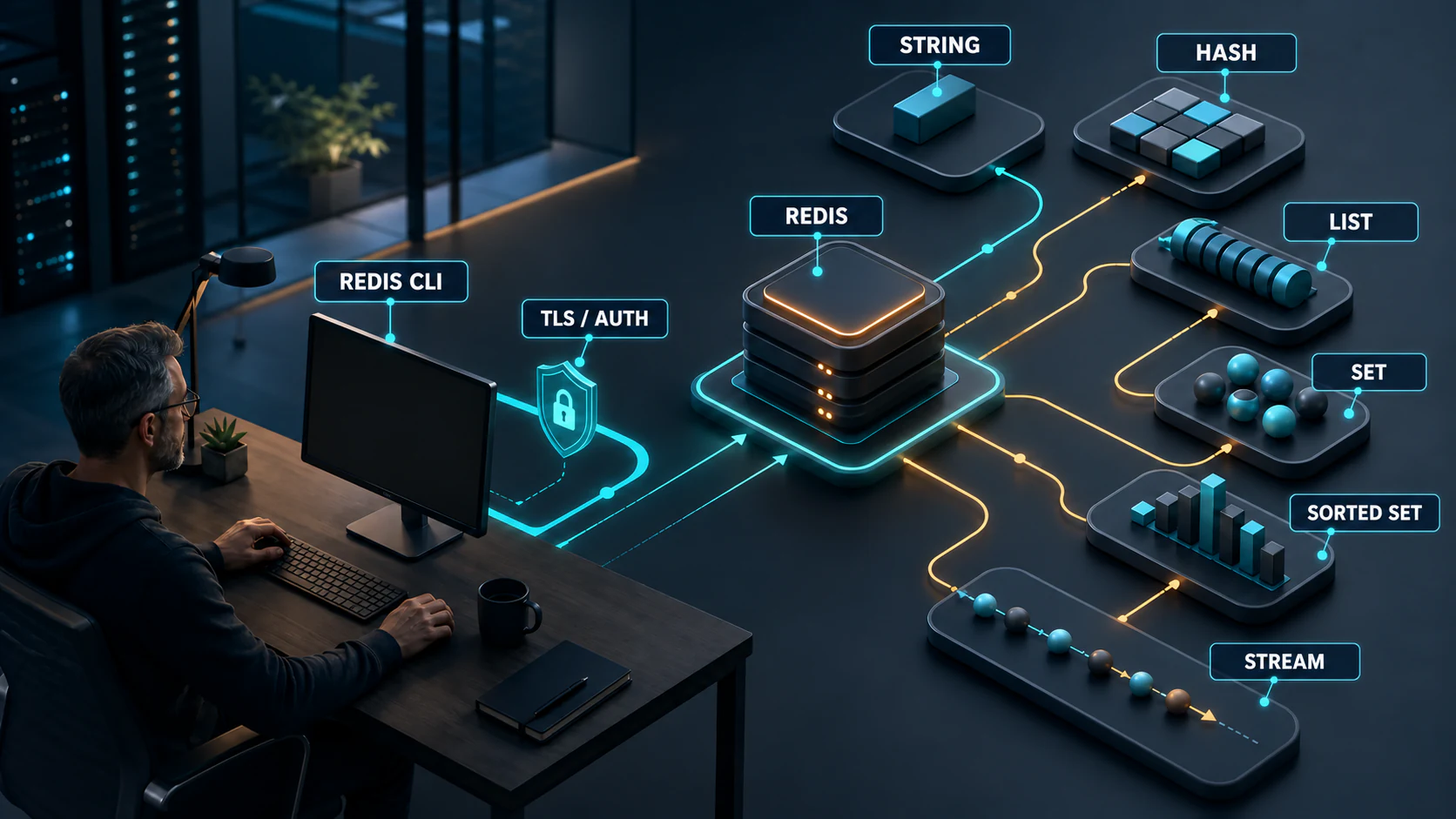
Redis Installation and Tuning

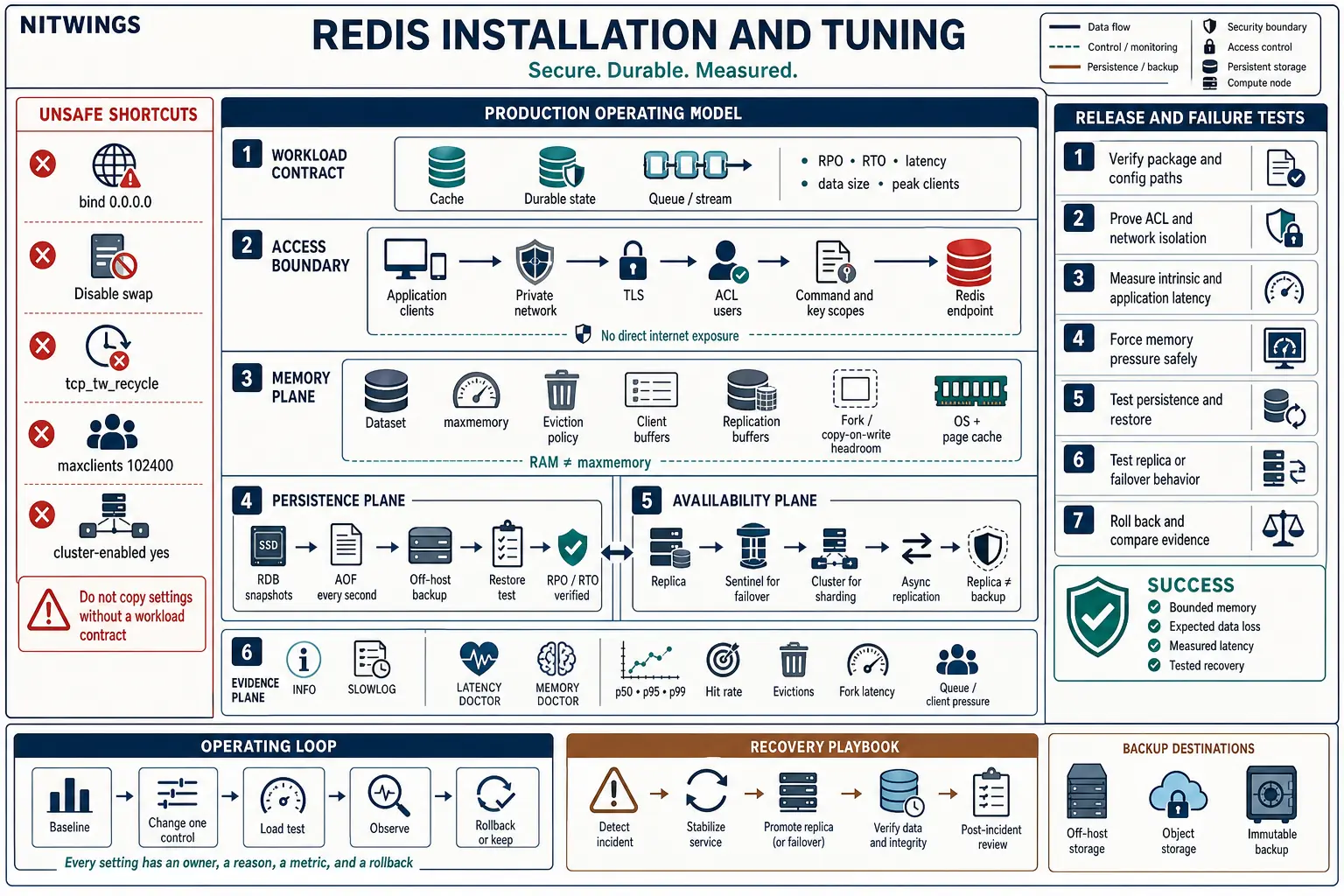
Redis tuning is not a block of kernel parameters copied from another server. It starts with the workload contract: what Redis is storing, how much data loss the application can accept, the latency objective, the largest values and commands, the connection peak, and what must happen when memory or a node is lost.
A fast installation with no memory boundary, recovery test, or access model is unfinished. This guide builds a production-shaped Redis Open Source service on Linux and explains the evidence behind each decision.
Start with the workload contract
Redis can be a disposable cache, a durable data store, a coordination service, or a stream and queue component. Those roles do not share one safe configuration. Decide the role before choosing persistence, eviction, replicas, or restart behavior.
| Question | Evidence to record | Configuration it controls |
|---|---|---|
| Can every key be rebuilt? | Source of truth, rebuild time, load placed on that source | Persistence, backup, eviction, and restart strategy |
| How much acknowledged data may be lost? | RPO in seconds or transactions | AOF policy, replication, application acknowledgement, backup frequency |
| How quickly must service return? | RTO, cold-load time, failover behavior | RDB/AOF choice, replica design, Sentinel or Cluster, runbook |
| What latency actually matters? | Application p50, p95, and p99 by operation | Command design, network path, persistence, host selection, alerting |
| What is the memory shape? | Dataset bytes, key count, largest keys, TTL distribution, growth | maxmemory, eviction, fragmentation headroom, fork capacity |
| How many clients are needed? | Peak connected, active, blocked, Pub/Sub, replica and admin clients | Connection pools, maxclients, file descriptors, output buffers |
A cache normally has a reconstructable source of truth and an explicit eviction policy. Durable state normally uses noeviction, persistence, backups, and an application response for out-of-memory errors. A queue or stream must define acknowledgement and trimming semantics. Calling all three “Redis” does not make their failure behavior equivalent.
Install from a traceable package source
Use a supported release from the distribution repository or the official Redis package repository. Record the repository, installed version, configuration path, service unit, data directory, and rollback package before changing production. Pin an approved release line when unattended upgrades would be unsafe.
Ubuntu or Debian with the official APT repository
sudo apt-get install lsb-release curl gpg
curl -fsSL https://packages.redis.io/gpg \
  | sudo gpg --dearmor -o /usr/share/keyrings/redis-archive-keyring.gpg
sudo chmod 0644 /usr/share/keyrings/redis-archive-keyring.gpg

echo "deb [signed-by=/usr/share/keyrings/redis-archive-keyring.gpg] https://packages.redis.io/deb $(lsb_release -cs) main" \
  | sudo tee /etc/apt/sources.list.d/redis.list

sudo apt-get update
apt-cache policy redis redis-server redis-tools
sudo apt-get install redis-server redis-tools
sudo systemctl enable --now redis-server
Rocky Linux or AlmaLinux
Use the current official RPM repository instructions for the operating-system major version, import the published signing key, and install with the native package manager. The service is commonly named redis on RPM systems:
sudo dnf install redis
sudo systemctl enable --now redis
sudo systemctl status redis --no-pager
redis-server --version
redis-cli --version
Package names and service units can differ. Discover them instead of editing the first file named redis.conf that a search returns:
systemctl show redis-server -p FragmentPath -p DropInPaths
systemctl cat redis-server
redis-cli INFO server
redis-cli CONFIG GET dir dbfilename appenddirname
On an RPM host, substitute the actual unit name. The systemd unit reveals the configuration file used by the running process. Keep the packaged service model: Redis should normally remain in the foreground while systemd supervises it. Do not add daemonize yes to a package that expects foreground operation.
Package and service command options
| Task | Command | Result and safety |
|---|---|---|
| Refresh Debian or Ubuntu package metadata | sudo apt update or sudo apt-get update | Both are valid for an interactive administrator. Scripts normally use apt-get for its more stable interface. |
| Install Redis packages | sudo apt install redis-server redis-tools or sudo dnf install redis | Installs the named packages from the configured repository. Confirm repository provenance and the candidate version first. |
| Start the service now | sudo systemctl start redis-server | Starts the Debian or Ubuntu unit for the current boot. Substitute the discovered redis unit on RPM systems. |
| Read service state and recent messages | sudo systemctl status redis-server --no-pager | Confirms process state but does not prove listener security, persistence, or application behavior. |
| Enable the service for later boots | sudo systemctl enable redis-server | Changes boot policy but does not necessarily start the service now. |
| Enable and start together | sudo systemctl enable --now redis-server | Combines the previous boot-policy and start operations. |
| Upgrade every RPM package | sudo dnf update | Unsafe as an unreviewed Redis installation step. It can upgrade the kernel, libraries, Redis, and unrelated services. Use the approved host patch procedure or install the exact reviewed Redis package. |
| Restart Redis | sudo systemctl restart redis-server | Unsafe on an active node. Confirm persistence, backup, topology, client retry behavior, maintenance approval, and rollback first. |
| Stop Redis | sudo systemctl stop redis-server | Unsafe on an active node. It removes service from that endpoint and may create a failover or outage. |
Verify your first local Redis instance
Complete this small exercise on a disposable lab host before changing memory, persistence, replication, or Cluster settings. Keep Redis bound to loopback during the exercise. The goal is to prove the installed service and learn the basic request cycle without exposing port 6379.
Step 1: prove the service and listener
sudo systemctl status redis-server --no-pager
sudo ss -lntp | grep ':6379'
redis-cli PING
redis-cli INFO server | sed -n '1,20p'
On an RPM system, use the discovered redis unit name instead of redis-server. A healthy local test returns PONG. The listener check should show only the addresses you intended. Stop and correct the bind and firewall configuration if Redis is unexpectedly reachable on a public address.
Step 2: write, read, expire, inspect, and remove one test key
redis-cli SET learning:welcome "hello Redis" EX 300
redis-cli GET learning:welcome
redis-cli TTL learning:welcome
redis-cli TYPE learning:welcome
redis-cli DEL learning:welcome
redis-cli EXISTS learning:welcome
The expected sequence is OK, the stored text, a positive remaining TTL, string, one deleted key, and then zero existing keys. This simple scenario proves connection, write, read, expiration metadata, type inspection, and cleanup. Use only a clearly disposable key prefix on a shared test system.
Step 3: prove one persistence and restart cycle
First inspect the active persistence paths and modes. Do not assume the file location from a tutorial:
redis-cli CONFIG GET save appendonly appendfsync dir dbfilename
redis-cli INFO persistence
For this bounded RDB exercise, create a test key and request a background snapshot:
redis-cli SET learning:persistence "survives restart"
redis-cli BGSAVE
redis-cli INFO persistence | grep -E '^rdb_(bgsave_in_progress|last_bgsave_status):'
redis-cli LASTSAVE
Wait until rdb_bgsave_in_progress:0 and rdb_last_bgsave_status:ok before restarting. If the status is not successful, inspect the Redis service log, data-directory permissions, and free disk space instead of continuing.
sudo systemctl restart redis-server
redis-cli PING
redis-cli GET learning:persistence
redis-cli DEL learning:persistence
The value should be present after restart and the final delete should return one. This proves only one local RDB save and reload. It is not an off-host backup, does not prove the required recovery time, and does not protect against host loss or operator deletion. Article 2 provides complete RDB, multipart AOF, remote backup, validation, and isolated restore procedures.
Secure the access path before adding clients
Redis is designed for trusted clients in a trusted environment. Do not expose TCP 6379 directly to the internet. Bind loopback and the required private address, keep protected mode enabled, restrict the network path with a host or cloud firewall, and require named ACL users.
bind 127.0.0.1 ::1 10.20.30.15
protected-mode yes
port 6379
aclfile /etc/redis/users.acl
The private address above is an example. Use the address owned by the service, then permit only application, monitoring, replica, and administration sources. Our Advanced Policy Firewall guide explains how to maintain a narrow Linux trust boundary when APF owns the host firewall.
Use ACL users instead of renamed commands
Use ACL rules for command and key access. Create separate application, monitoring, replication, and administrator users. Give each identity only the required key patterns and commands.
user default off
user cache_app on #<sha256-password-digest> ~cache:* \
  +get +mget +set +mset +del +unlink +expire +pexpire +ttl +pttl
user redis_monitor on #<sha256-password-digest> ~* \
  +ping +info +client|list +slowlog|get +latency|latest
Validate the exact command names and categories on the installed release. Redis command categories can evolve across major versions. Protect the ACL file with the Redis service account and restrictive file permissions. Use redis-cli --user <name> --askpass for an interactive check so a secret does not appear in the command line or shared shell history.
Authentication without encryption does not protect a password or data from network observation. Use Redis TLS when traffic crosses a network that is not fully trusted, and validate client, replication, and Cluster-bus requirements separately. A firewall, ACL, and TLS solve different problems; none replaces the other. For a broader server boundary review, see Linux Server Support.
Build a memory budget, not just maxmemory
maxmemory is a dataset control, not a promise that the Redis process will stay under that number. Redis also needs memory for client output buffers, replication backlog, AOF buffers, allocator fragmentation, module data, temporary command work, and copy-on-write pages during BGSAVE or BGREWRITEAOF. The kernel and page cache need their own capacity.
Use this planning model:
physical RAM
- operating system and monitoring
- page cache and disk-I/O headroom
- client and replication buffers
- allocator fragmentation allowance
- fork and copy-on-write peak
- emergency operating margin
= maximum safe dataset budget
Measure the real instance with:
redis-cli INFO memory
redis-cli MEMORY STATS
redis-cli MEMORY DOCTOR
redis-cli INFO clients
redis-cli INFO persistence
redis-cli INFO replication
Watch used_memory, used_memory_rss, mem_fragmentation_ratio, mem_not_counted_for_evict, connected clients, blocked clients, replication buffers, and the memory peak during a rewrite or snapshot. Ratios alone can mislead on small datasets, so retain bytes as well as percentages.
Choose eviction from application semantics
Set an explicit maxmemory-policy. “Allkeys LRU” is not a universal performance setting. It is a data-loss policy that may be correct for a reconstructable cache and unacceptable for durable state.
| Workload | Likely direction | Failure behavior to test |
|---|---|---|
| General cache | allkeys-lfu or allkeys-lru after workload testing | Hit-rate change, source-of-truth load, eviction latency, hot-key behavior |
| TTL-controlled cache | A volatile-* policy only if every evictable key has a TTL | What happens when non-TTL keys consume the budget |
| Durable or authoritative data | noeviction | Application handling of OOM write errors and capacity alerts |
| Mixed cache and durable data | Prefer separate instances or databases with independent failure policy | Whether cache pressure can evict or block authoritative writes |
Measure keyspace_hits, keyspace_misses, evicted_keys, expired_keys, source-database load, and application error rates together. A higher cache hit rate is not a success if p99 latency or origin saturation becomes worse.
Select persistence from RPO and RTO
Redis offers RDB snapshots, append-only files, both together, or no persistence. The right choice depends on the loss budget and restart objective.
| Mode | Operational property | Main risk to test |
|---|---|---|
| No persistence | Appropriate only when every key is disposable and rebuild capacity is proven | Cold-start load, cache stampede, time to repopulate |
| RDB | Compact point-in-time snapshots and usually faster large-dataset restarts | Loss since the last successful snapshot and fork latency |
AOF with everysec | Typically limits loss to roughly the latest second while retaining good throughput | Disk latency, rewrite behavior, truncated-file recovery |
| RDB plus AOF | Combines recovery options; Redis uses AOF on restart when both are enabled | Disk space, I/O contention, backup consistency, tested restore order |
Since Redis 7, AOF uses multiple files inside the configured append directory. Do not back up one expected filename and assume the result is complete. Follow the current backup procedure, prevent a rewrite from racing the copy, move backups off the host, verify size or digest, and perform an actual restore.
Monitor rdb_last_bgsave_status, rdb_bgsave_in_progress, aof_enabled, aof_last_bgrewrite_status, aof_rewrite_in_progress, disk free space, and fork duration. stop-writes-on-bgsave-error yes can protect durability, but the application must be ready for the resulting write failures.
Apply the Linux settings Redis actually needs
Begin with the Linux controls in current Redis administration guidance, then tune other limits only when logs and workload evidence require it.
Memory overcommit
vm.overcommit_memory = 1This permits background fork operations when the dataset is large relative to free memory. Persist it through the operating system’s configuration management, apply it with sysctl, and verify the effective value. It does not remove the need for copy-on-write headroom.
Transparent Huge Pages
Disable Transparent Huge Pages for the Redis host using the platform’s supported persistent method. Redis documents latency penalties after fork when THP is enabled. Verify both the boot-time configuration and the live kernel state after every restart.
Keep an emergency swap path
Do not blindly disable swap or set vm.swappiness=0. Current Redis administration guidance advises keeping swap available. Swapping Redis memory during steady operation is still a serious capacity and latency signal. Alert on swap-in and swap-out activity, memory pressure, major faults, and Redis RSS before the host reaches an out-of-memory kill.
Do not revive removed TCP settings
net.ipv4.tcp_tw_recycle is not a current Linux tuning control and must not be added. Do not raise socket buffers, SYN queues, or somaxconn from a copied list. If Redis reports that the configured TCP backlog is capped by the kernel, align the effective kernel limit with the measured connection burst and test it.
Review Linux network controls by evidence
Inspect host-wide network settings before changing them. Many Linux releases already enable selective acknowledgements, timestamps, window scaling, SYN cookies, and a suitable congestion-control algorithm. Redis does not require an arbitrary copied value for every setting.
sysctl vm.swappiness
sysctl net.ipv4.tcp_sack net.ipv4.tcp_timestamps
sysctl net.ipv4.tcp_window_scaling net.ipv4.tcp_syncookies
sysctl net.ipv4.tcp_congestion_control net.ipv4.tcp_available_congestion_control
sysctl net.ipv4.tcp_max_syn_backlog net.core.somaxconn
sysctl net.core.rmem_max net.core.wmem_max| Command or control | When it is useful | Safety boundary |
|---|---|---|
sudo sysctl -w vm.swappiness=0 | The command is still valid and changes the live host value. | Unsafe as a generic Redis rule. It removes normal swap preference headroom and affects every process. Keep an emergency swap path and choose a measured value through host policy. |
net.ipv4.tcp_sack, tcp_timestamps, tcp_window_scaling, tcp_syncookies | Confirm effective TCP behavior while investigating loss, handshake pressure, or path performance. | Unsafe to toggle as a tuning bundle. These are host-wide controls. Change one only with network evidence and a rollback. |
sudo sysctl -w net.ipv4.tcp_congestion_control=cubic | Selects CUBIC when it is available and the tested network requires it. | Unsafe on a shared host without testing. First read the active and available algorithms, then compare application latency and throughput. |
net.ipv4.tcp_max_syn_backlog, net.core.somaxconn | Investigate measured connection bursts, listen-queue overflow, or a Redis warning that tcp-backlog is capped. | Align Redis, kernel, firewall, and client reconnect behavior. A larger queue does not fix CPU exhaustion or a reconnect storm. |
net.core.rmem_max, net.core.wmem_max | Set ceilings for explicitly sized socket buffers when bandwidth-delay and application evidence require them. | Unsafe as arbitrary large values. They consume host memory and do not automatically tune each socket. |
net.ipv4.tcp_tw_recycle | No current use. The Linux control was removed. | Remove it from managed sysctl files. There is no replacement switch. Fix connection reuse, pooling, TIME_WAIT ownership, or address-translation behavior at the correct layer. |
To persist an approved Linux value, place only the reviewed assignment in a managed file such as /etc/sysctl.d/99-redis.conf, apply it with sudo sysctl --system, and read the effective value again. Record the prior value and rollback command. Do not use a broad sysctl file as a Redis installation shortcut.
Size clients and file descriptors together
Redis defaults to a finite client limit and reserves file descriptors for internal use. Setting maxclients 102400 does not create capacity. The service also needs a matching systemd LimitNOFILE, kernel allowance, memory for client state and output buffers, and an application reason for that many connections.
Start with measured concurrency:
- bound each application connection pool;
- reuse connections instead of reconnecting per request;
- give interactive, blocked, Pub/Sub, replica, monitoring, and failover clients separate allowances;
- set connect, command, and pool-wait timeouts from the service objective;
- use reconnect backoff and jitter so a restart does not cause a connection storm;
- set client names so
CLIENT LISTevidence can be attributed; - monitor
connected_clients,blocked_clients,rejected_connections, and output-buffer growth.
If the descriptor ceiling is too low, add a reviewed systemd override for the actual Redis unit, reload systemd, restart in a maintenance window, and verify the process limit. Keep the configured maxclients below the usable descriptor limit after Redis’s internal reservation.
Reduce round trips before tuning the kernel
For many workloads, client behavior has more effect than socket tuning. Keep connections alive. Use variadic commands such as MGET and MSET where semantics permit. Use bounded pipelining when several independent commands can share a round trip. Avoid unbounded batches that create large replies and monopolize processing.
Review command complexity against actual collection sizes. Commands described as O(N) are safe only when N is controlled. Avoid KEYS in production request paths; use incremental SCAN for operational iteration. Prefer UNLINK when asynchronously reclaiming large values is appropriate. Detect hot keys and large keys before they become latency incidents.
Lua scripts and functions can reduce round trips and provide atomic server-side logic, but a long-running script blocks other command execution. Version them, set time limits deliberately, and observe them in the slow log.
Measure latency at four different boundaries
One “Redis latency” number hides the source. Keep four measurements:
- Application latency: the real operation including pool wait, serialization, network, Redis, and response handling.
- Network latency: an observed client-to-server path with the same TLS and routing conditions.
- Redis command time: slow-log and command-stat evidence from the server.
- Host baseline: intrinsic scheduling latency on the Redis host.
redis-cli --intrinsic-latency 100
redis-cli --latency -h <private-endpoint> -p 6379
redis-cli SLOWLOG GET 20
redis-cli LATENCY LATEST
redis-cli LATENCY DOCTOR
redis-cli INFO commandstats
The intrinsic-latency test is CPU intensive and runs on the host without contacting Redis. Schedule it safely. Enable the Redis latency monitor with a threshold derived from the application objective, not a copied number. The slow log records command execution time, not client I/O, so correlate it with application and network evidence.
Fork pauses, AOF fsync, large-object deletion, expiration cycles, eviction, allocator behavior, noisy neighbors, CPU steal, NUMA placement, and disk contention can all create different latency signatures. Change one control, repeat the same load, and compare p50, p95, p99, throughput, CPU, RSS, persistence state, and errors.
Build alerts from failure signals, not generic percentages
A useful Redis alert tells the operator what is failing and what to inspect next. CPU at 80 percent, memory at 80 percent, or one slow command can be entirely normal in one workload and an incident in another. Establish a quiet baseline during normal peaks, then alert on a combination of Redis, host, and application evidence.
| Signal | Why it matters | First evidence to collect |
|---|---|---|
| Rejected connections or pool timeouts | Clients are reaching a descriptor, pool, network, or service boundary | INFO clients, process file descriptors, pool wait time, firewall logs |
| Evictions or OOM write errors | The dataset reached its configured contract | Memory bytes, key growth, TTL distribution, largest keys, origin load |
| Persistence failure or growing rewrite time | Recovery evidence is weakening before a restart exposes it | INFO persistence, disk latency, free space, fork duration, service log |
| Replication lag or link churn | Failover data loss and recovery time may be growing | INFO replication, network loss, backlog size, replica logs |
| Application p99 rises while slow log is quiet | The delay may be outside Redis command execution | Pool wait, DNS, TLS, network RTT, host scheduling, client retries |
Retain counters as rates, not just snapshots. A rising evicted_keys counter has a different meaning from its lifetime value. Keep deployment, restart, failover, snapshot, AOF rewrite, backup, and traffic-change events on the same timeline as latency and errors. That context often reduces a long investigation to one comparison.
Separate readiness from health. A process can answer PING while loading data, rejecting writes, missing its replica, or serving the wrong dataset. A production readiness check should reflect the application contract without running an expensive command on every probe. Monitor deeper durability and topology conditions out of band.
Finally, rehearse the alert. Trigger a controlled connection rejection, memory boundary, replica interruption, and failed backup in a safe environment. Confirm that the notification names the instance and role, includes the runbook, reaches the current owner, and clears for the right reason. An alert that has never been exercised is only a configuration file.
Choose Sentinel or Cluster for a reason
A replica is not a backup and replication alone is not automatic high availability. Redis replication is asynchronous, so an acknowledged write can be lost during a failure. The application’s consistency and loss model must account for that window.
| Topology | Use it when | Do not assume |
|---|---|---|
| Single instance | Development, disposable cache, or an explicitly accepted single failure domain | That systemd restart satisfies an HA objective |
| Primary plus replica | Read scaling or a promotion target with an external failover process | That replication protects against deletion, corruption, or operator error |
| Sentinel | Automatic failover for a non-clustered Redis service | That one Sentinel is sufficient or every client supports discovery correctly |
| Redis Cluster | Data must be sharded across multiple primaries and clients support Cluster redirection | That cluster-enabled yes converts one node into a resilient cluster |
Redis recommends at least three independently placed Sentinel processes for a robust Sentinel deployment. Test leader loss, replica promotion, client discovery, DNS or endpoint behavior, write loss, old-primary isolation, and return to normal. For Cluster, design slots, replicas, failure domains, client compatibility, resharding, backups, and the cluster bus before enabling it.
Benchmark the system you intend to run
redis-benchmark is useful for controlled comparisons, but its default payload, command mix, connection count, pipeline depth, and locality may have little relationship to the application. A high synthetic requests-per-second result does not prove a safe production configuration.
Build a repeatable test with:
- the real key and value-size distributions;
- the expected read, write, expiry, stream, and script mix;
- normal and burst connection behavior;
- the production network and TLS path;
- persistence, replicas, and backups enabled as planned;
- steady state, memory pressure, snapshot, AOF rewrite, failover, and recovery phases;
- application errors, p50/p95/p99, throughput, CPU, RSS, disk latency, evictions, hit rate, and fork duration.
Run the baseline first. Change one parameter. Repeat the same test and retain the raw results. If a change improves the median but damages the p99 or recovery behavior, it is not automatically an improvement.
Release with proof and a rollback
A production change should include the old file, the proposed file, the exact diff, owner, maintenance window, validation, and rollback. Do not rely on CONFIG SET alone; runtime changes can disappear after restart unless the persistent configuration is updated intentionally.
- Back up configuration, ACLs, and the current recoverable dataset.
- Verify package version, service unit, effective configuration path, directories, permissions, and disk space.
- Test the configuration and application against a non-production instance with comparable data shape.
- Apply kernel or systemd changes separately from Redis configuration where possible.
- Restart or fail over in the approved sequence and watch the complete recovery, not only
PONG. - Verify ACL denial as well as allowed commands, private-network isolation, persistence status, key count or business checks, memory budget, replication, and application latency.
- Roll back if the predefined error, latency, memory, or durability condition is breached.
For teams that need the host, service, firewall, monitoring, backup, and operating runbook managed together, see MTA and Linux Server Management.
Production acceptance checklist
- The workload role, RPO, RTO, latency objective, capacity owner, and growth model are written.
- The package source and version are approved, pinned where required, and covered by an upgrade plan.
- Redis is reachable only through approved private or local paths; protected mode, ACLs, firewall rules, and TLS are tested.
maxmemoryleaves measured headroom for buffers, fragmentation, fork, the kernel, and recovery.- The eviction policy matches the data contract, and the application handles eviction or
OOMbehavior. - Persistence matches RPO/RTO, background-save and rewrite status is monitored, and an off-host restore has passed.
- Linux memory overcommit and THP state are verified after reboot; swap activity and memory pressure are alerted.
- Client pools, timeouts, retry jitter, file descriptors, and output buffers are bounded and measured.
- Large keys, hot keys, slow commands, intrinsic latency, application p99, and fork latency have baselines.
- Replica, Sentinel, or Cluster behavior has been failure-tested with the real client library.
- Every changed setting has a reason, metric, owner, and rollback.
Official references
- Redis: Install Redis Open Source on Linux with APT
- Redis: Current installation methods
- Redis: Supported version management
- Redis: Production administration guidance
- Redis: Security, protected mode, ACLs, and TLS
- Redis: Access Control Lists
- Redis: RDB and AOF persistence
- Redis: Memory limits and eviction policies
- Redis: Client handling and maximum connections
- Redis: Diagnosing latency
- Redis: Latency monitoring
- Redis: High availability with Sentinel