Apple Private Email Relay: Source Registration, Authentication and Address Lifecycle
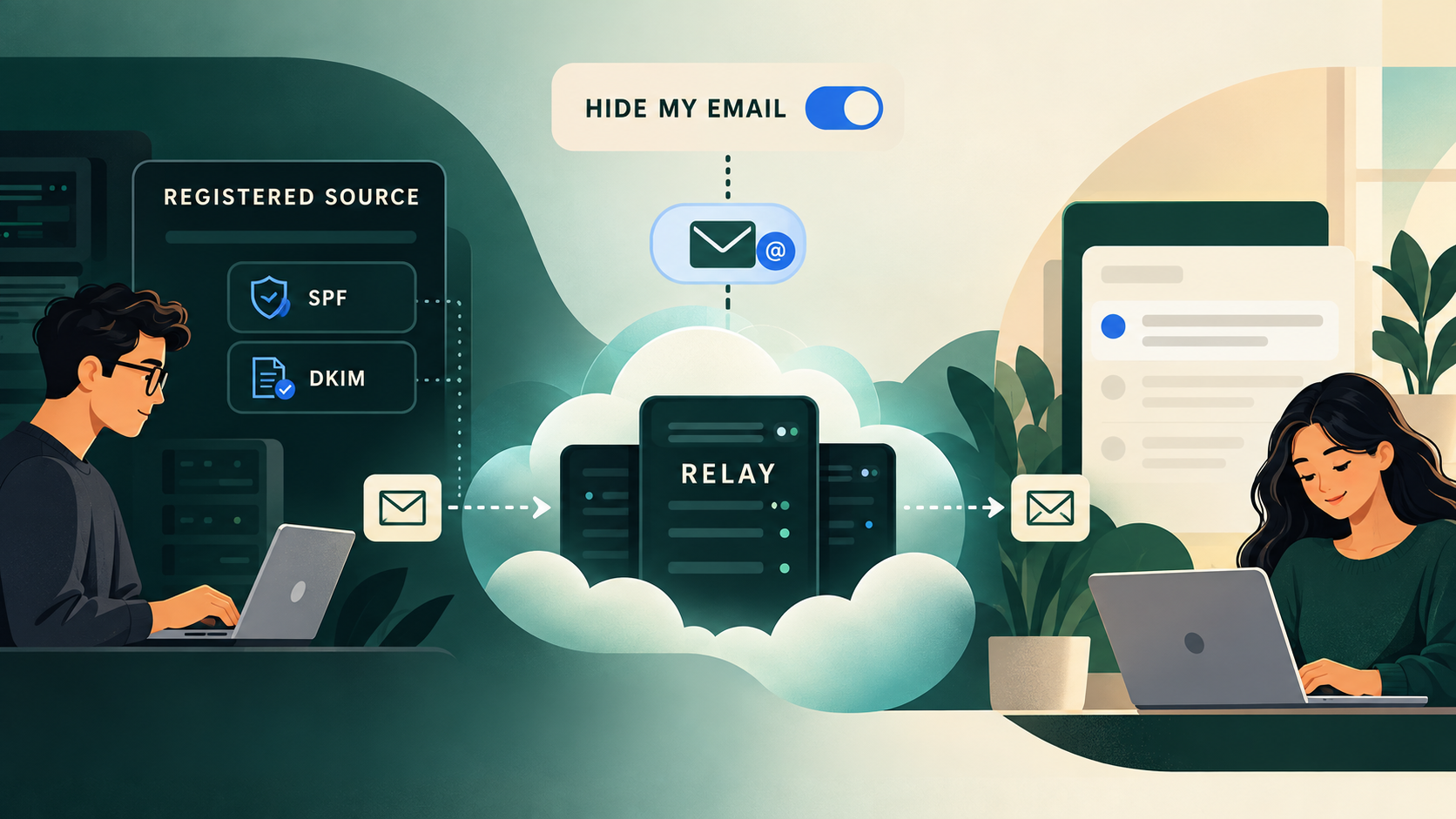
Apple Private Email Relay gives a user a forwarding email address to share with one app or developer instead of giving that business the user’s personal inbox address. The business can still send account messages, and Apple forwards accepted messages to the user’s real inbox without revealing that destination to the business.
Everyday example: booking an appointment without sharing a personal email address
- Priya creates an account on a booking website using Sign in with Apple.
- The website asks for an email address. Priya selects Hide My Email.
- Apple gives the website a relay address such as
[email protected]. The website never receives[email protected]. - The website sends the appointment confirmation to the relay address.
- Apple verifies that the message came from a sender registered by that developer and that the message passes the required authentication path.
- Apple forwards the accepted message to Priya’s verified personal inbox.
- Priya reads the confirmation in her normal mailbox. She does not need to open a separate Apple relay inbox because the relay is a forwarding service, not another mailbox.
- If Priya replies, Apple can route the reply back to the booking service while keeping the destination inbox private.
- If Priya later disables forwarding for that service, Apple stops forwarding future messages from that relationship. Priya does not need to change her personal email address.
This is the practical benefit: Priya receives the messages needed to use the service, but the booking website does not collect her personal destination address.
What changes for the user?
| Situation | Without Private Email Relay | With Private Email Relay |
|---|---|---|
| Account signup | The user gives the app a personal address such as [email protected]. | The user selects Hide My Email and the app receives an Apple relay address. |
| Address stored by the app | The app stores the personal address. | The app stores an address such as [email protected]. |
| Sending an account message | The app sends directly to the personal mailbox. | The app sends to the relay address and Apple forwards an accepted message to the personal mailbox. |
| Replying | The personal address may be visible in the conversation. | Apple can carry the reply through the relay so the personal destination remains hidden. |
| Stopping one app | The user may need to unsubscribe, filter messages or change the address shared with the app. | The user can disable forwarding for that Sign in with Apple relationship without changing the personal mailbox. |
| If the app database is exposed | The stored personal address may be exposed. | The stored relay address may be exposed, while the destination inbox remains undisclosed to the app. |
Who can see which address?
- The app or website sees: the Apple relay address supplied during Sign in with Apple.
- Apple knows: which verified address on the Apple Account should receive the forwarded message.
- The user sees: the forwarded message in the normal personal inbox.
- The app does not receive: the personal destination address merely because it sent a message or received a reply through the relay.
When is it useful?
It is useful when the user needs account verification, password or security notices, receipts, booking confirmations, order updates or support replies but prefers not to disclose a personal inbox to the service. It is also useful when the user wants the ability to stop one app’s forwarding relationship without changing the personal address used with family, work, banking and other services.
What does it not do?
- It does not create a second inbox that the user must check.
- It does not hide the user’s activity from Apple.
- It does not make the relay address anonymous data.
- It does not guarantee inbox placement.
- It does not give a business permission to send marketing.
- It does not replace unsubscribe and suppression controls.
- It is not the iCloud Private Relay feature used for web-network privacy.
What is Apple Private Email Relay?
When a person chooses Hide My Email during Sign in with Apple, Apple supplies a forwarding address instead of the person’s personal email address. Mail sent by an authorized developer source to that relay address is forwarded to a verified address on the person’s Apple Account. Replies can return through the relay without disclosing the personal address.
The relay alias is a contact route, not the account’s primary identity. Apple provides a separate team-scoped subject identifier for account identity.
What is Apple Private Email Relay used for?
Its practical purpose is to let an app or website maintain a working email relationship with a user without receiving the user’s personal destination address. The relay is useful when the service needs to send account verification, security alerts, receipts, booking updates or support responses, but the person chooses not to disclose a private inbox.
The app sends to the Apple relay address as the user supplied it. Apple authenticates and source-matches the developer’s message, then forwards an accepted message to the verified address associated with the user’s Apple Account. The personal destination address is not returned to the developer.
How does it help the user?
| User need | How the relay helps | Evidence boundary |
|---|---|---|
| Create an account without revealing a personal inbox | Apple gives the app a unique forwarding address. The app stores the relay address instead of the personal destination address. | The app still receives a reachable contact address and must protect it as personal data. |
| Receive essential service messages | Account verification, security notices, receipts, booking updates and support responses can be forwarded to the verified address on the Apple Account. | Forwarding does not prove marketing consent or guarantee delivery. |
| Reply without exposing the personal address | Replies can travel back through Apple so the developer can continue the conversation without learning the destination inbox. | Reply behavior must be tested with the production From, Reply-To and support platform. |
| Limit exposure if an application database is disclosed | The application holds the relay alias rather than the personal destination address. | The relay alias remains a user-linked identifier and is not anonymous data. |
| Reduce cross-service correlation | The same person receives different relay identities across unrelated developer teams. | Apps from the same developer team can share the same relay identity for that user. |
| Stop communication from one app or developer | The user can disable forwarding for the Sign in with Apple relationship without changing the personal mailbox address. | The sender must process the resulting rejection and suppress further attempts. |
The main benefit is control. The user can keep receiving useful account communication, reply when necessary and later disable forwarding for that app or developer relationship. The user does not need to change the personal mailbox address merely to stop one service from reaching it.
The privacy benefit is limited but meaningful. The app does not receive the destination inbox, and unrelated developer teams normally receive different relay identities. The relay address is still an identifier associated with the account, so developers must not describe it as anonymous or outside privacy obligations.
Practical examples
| Practical use | Example message | Why the relay is useful |
|---|---|---|
| Account creation | Verify your new account | The user can complete registration while keeping the personal address private. |
| Account security | New sign-in or password-change notice | The service retains a channel for important security communication. |
| Purchases and bookings | Receipt, reservation or delivery update | Operational messages reach the user without requiring disclosure of the destination inbox. |
| Customer support | Case update and user reply | Two-way communication can continue through the relay. |
| Optional subscriptions | Newsletter or product update | Technically possible only when the sender also has the required permission and provides working unsubscribe controls. |
Private Email Relay does not give the developer permission to send every type of message. A source can be technically authorized by Apple while a campaign still lacks consent, violates the user’s preferences or creates excessive frequency. Authentication, source registration, permission and content purpose are separate controls.
Simple message-flow example
App or website
  sends to: [email protected]
                         |
                         v
             Apple Private Email Relay
               authenticates the source
               checks source registration
                         |
                         v
       User's verified personal inbox remains hidden

User reply -> Apple relay -> developer sender or reply path
For example, a user signs up for a booking service with Sign in with Apple and selects Hide My Email. The service stores the Apple relay address and sends a booking confirmation from its registered authenticated domain. Apple forwards the message to the user’s verified inbox. If the user replies, the response can return through the relay without exposing the personal address to the booking service.
Do not confuse it with iCloud Private Relay
Sign in with Apple Private Email Relay forwards email. iCloud Private Relay is a network privacy feature for certain web traffic. They have different data paths, controls and troubleshooting methods. A mail bounce is not evidence about the user’s web-network setting.
Sign in with Apple relay and iCloud+ Hide My Email are related but distinct
Both protect a personal address through aliases, but Sign in with Apple addresses are associated with developer-team identity and source registration. iCloud+ Hide My Email aliases can be created for broader use. Application logic must not collapse every Apple-hosted alias into one product category.
Why the relay is needed
Without a relay, users would often have to choose between disclosing a personal address and losing important account communication. The relay separates the application-facing contact route from the private destination inbox. It preserves communication while reducing unnecessary disclosure.
How the complete relay flow works
1. The app requests the email scope during Sign in with Apple authorization.
2. The person chooses Share My Email or Hide My Email.
3. Apple returns a verified identity token with a team-scoped sub value.
4. If Hide My Email was selected, the email claim contains a relay address.
5. The app verifies token issuer, audience, signature, expiry and nonce/state as applicable.
6. The app stores sub as the account identity and stores the relay address as a contact route.
7. The developer registers every outbound domain, subdomain or individual address with Apple.
8. Outbound mail passes SPF and/or DKIM using Apple’s exact source-matching rules.
9. Apple authenticates and source-matches the message, then forwards it to the user’s verified inbox.
10. Replies traverse the relay back to the developer without exposing the personal address.
11. If the person disables forwarding, future mail to that alias is rejected and the sender suppresses it.
Use sub for identity and email for communication
| Value | Purpose | Use it for | Do not use it for |
|---|---|---|---|
| Sign in with Apple subject (sub) | Stable, team-scoped account identifier supplied in the verified identity token. | Primary internal account key and account linking within the same developer team. | Sending email or correlating the person across unrelated developer teams. |
| Private relay email address | Reachable forwarding alias chosen by the user instead of exposing a personal address. | Notifications, support replies and account communication. | Primary immutable identity, demographic inference or attempts to discover the personal inbox. |
| is_private_email | Token claim indicating that the supplied email uses Apple private relay. | Routing logic, validation and user-interface disclosure. | Proof that every later email value belongs to the same person. |
| Registered source domain or address | Apple Developer configuration authorizing a developer-controlled sending identity. | Relay source matching after SPF or DKIM authentication. | A replacement for SPF, DKIM, DMARC or permission to send marketing. |
Do not key the account only by email. A contact address can change, be disabled or be transformed during an application transfer. The verified sub claim is the team-scoped account identifier. Maintain explicit account-linking rules rather than merging records because two addresses look similar.
Verify the identity token before trusting claims
Validate Apple’s token signature and required claims, including issuer, audience and expiry, and validate state or nonce according to the authorization flow. Treat name input as user-provided data requiring validation. Store the email and private-email indicator only after token verification succeeds.
Persist first authorization data correctly
Design the sign-in callback to persist the account identifier and contact data when Apple supplies them. Do not depend on every later authorization response repeating all profile fields. Make account recovery depend on verified identity and supported Apple flows, not on asking the user to reveal a private address.
Register every outbound email source
In Certificates, Identifiers & Profiles, open Services and configure Sign in with Apple for Email Communication. Add every domain, subdomain or individual address that sends to relay recipients. Apple currently documents limits of 32 sources for individual memberships and 100 for organizations.
Registration is exact and operational. Registering example.com does not automatically document every independently used subdomain. Inventory visible From, Return-Path and DKIM identities from received production messages before registering sources.
How Apple authenticates and source-matches mail
| Authentication path | Identity Apple evaluates | Required match | Typical use |
|---|---|---|---|
| SPF | SMTP MAIL FROM, bounce or Return-Path domain | The registered source domain and envelope-sender domain match exactly, and SPF passes. | Direct sending infrastructure or an ESP using a customer-controlled bounce domain. |
| DKIM | DKIM d= domain and visible RFC 5322 From domain | DKIM verifies, signs the From header, and d= matches the visible From domain exactly; that source domain is registered. | An ESP uses its own envelope-sender domain but signs with the developer’s From domain. |
| SPF and DKIM | Both transport and visible author identities | Both paths satisfy their respective exact-match rules. | Recommended for resilience and normal deliverability hygiene. |
| DMARC | Alignment of visible From with a passing SPF or DKIM identity | Normal DMARC policy and alignment processing. | Strong ecosystem authentication, but source registration remains a separate Apple relay control. |
SPF path: envelope domain must match exactly
Apple evaluates the domain in SMTP MAIL FROM, also seen as the bounce or Return-Path domain. That domain must be registered, must match the registered source exactly and must pass SPF. Registering only the visible From domain does not fix a different unregistered bounce domain.
DKIM path: d= must match the visible From domain exactly
If an ESP uses its own envelope sender, sign with DKIM using the developer’s visible From domain. Apple states that the DKIM signature must verify, must cover the From header, and its d= domain must match the visible From domain exactly. Relaxed organizational alignment is not the same as Apple’s documented exact source match.
Use both SPF and DKIM when possible
Either path can satisfy relay authentication, but Apple recommends both. Dual authentication reduces dependence on one identity and improves ordinary mailbox-provider evidence. DMARC should also be configured appropriately, but DMARC does not replace Apple source registration.
DNS and received-header verification
# Inspect the exact envelope-sender domain used by production mail.
dig +short TXT bounce.example.com

# Inspect the visible From domain's DKIM selector.
dig +short TXT selector1._domainkey.example.com

# Inspect DMARC separately. Apple registration is not a DMARC substitute.
dig +short TXT _dmarc.example.com

# Capture the actual received message, then verify:
# Return-Path: bounce domain registered with Apple, or
# DKIM-Signature: passing d= exactly matches the visible From domain.
DNS presence is not enough. Send through the same production ESP, return path, From domain and selector used for relay recipients. Inspect Authentication-Results and the actual Return-Path because dashboards may hide identity substitutions.
Configure the ESP identities, not only its sending IPs
For SES, SendGrid, Mailchimp or another ESP, authorize the service through a valid SPF design and configure custom DKIM. Prefer a customer-controlled bounce domain where supported. Avoid adding multiple SPF records or exceeding SPF lookup limits while adding providers.
An ESP can change Return-Path domains by account, region, stream or feature. Test transactional, marketing and support streams separately. A successful test from one stream does not prove every source is registered.
Maintain a source-identity inventory
business_purpose,visible_from,envelope_sender,dkim_d,apple_registered_source
account alerts,[email protected],bounce.example.com,example.com,example.com + bounce.example.com
support,[email protected],bounces.help.example.com,help.example.com,help.example.com + bounces.help.example.com
receipts,[email protected],amazonses.com,example.com,example.com
Generate this inventory from received evidence and provider configuration. Review it when adding a subdomain, changing ESPs, enabling a new bounce domain, rotating DKIM selectors or moving support platforms.
Migrate email providers without breaking source authorization
Before changing an ESP, register the new envelope and DKIM identities, publish and verify DNS, and send controlled relay tests from the new path. Keep the old source authorized during a bounded overlap while delayed and retried messages remain in its queues. Remove it only after production evidence shows that no approved stream still uses it.
Do not assume a shared visible From address makes the old and new ESP paths equivalent. Return-Path domains, DKIM selectors, DKIM d= values and signing behavior can differ. Capture a received message from each stream and reconcile it against the Apple source inventory.
Handle developer-team and application transfers explicitly
Sign in with Apple user identifiers and private relay addresses are scoped to the developer team. An app transfer therefore needs Apple’s supported user-transfer workflow rather than copying email strings and treating them as permanent identities. Store transfer state, map the supported identifiers and retain an auditable reconciliation result.
During the migration, avoid duplicate accounts and do not send from the recipient team until its sources are registered and authenticated. Test existing users, newly transferred users, relay delivery, replies and disabled-forwarding behavior before ending the migration window.
Relay address domains in 2026
| Address family | Current role | Application action |
|---|---|---|
| @privaterelay.appleid.com | Existing Sign in with Apple relay addresses continue to operate. | Keep accepted, stored and routable. Do not migrate or rewrite existing values. |
| @private.icloud.com | Announced for new Sign in with Apple relay addresses later in 2026. | Add to validators, allowlists, schemas, test data and support runbooks. |
| @icloud.com | Used for ordinary iCloud mail and iCloud+ Hide My Email; Apple said that iCloud+ aliases remain here. | Do not classify every icloud.com address as a Sign in with Apple relay address. |
The 2019 event introduced addresses on privaterelay.appleid.com. Apple announced on August 24, 2026 that new Sign in with Apple relay addresses will move to private.icloud.com later in 2026, while existing addresses continue. This current change must not be backdated into the 2019 event.
Email validation must accept both relay domains
Remove hard-coded checks that accept only privaterelay.appleid.com. Ensure database columns, forms, importers, CRM connectors, suppression systems and customer-service search accept private.icloud.com. Do not rewrite one domain to the other.
Recommended account and contact storage
{
  "apple_sub": "TEAM_SCOPED_STABLE_IDENTIFIER",
  "contact_email": "[email protected]",
  "is_private_email": true,
  "email_source": "apple_identity_token",
  "relay_status": "active",
  "permission_state": "transactional-account-mail-only",
  "last_delivery_result": "accepted",
  "last_verified_at": "2026-11-02T10:00:00+05:30"
}
Keep identity, contact route, permission and delivery state separate. A relay alias being technically reachable does not itself establish marketing consent. Preserve suppression even if the person later signs in again.
How replies work
When the user replies, Apple routes the response back to the address used in the developer’s original message while preserving the person’s privacy. Test this with actual mailbox clients because Reply-To, From rewriting, ticketing ingestion and conversation threading can interact.
Do not expose rewritten relay addresses as account identifiers. Support systems should show the known customer alias and an order or case identifier rather than attempting to reveal the destination inbox.
Daily message limit
Apple currently documents a daily limit of 100 emails per private relay address, counting developer messages and user replies. Queue policy should prevent loops, repeated notifications and automated support exchanges from exhausting that allowance. A limit is not a recommended sending target.
When the user disables forwarding
The relay rejects future messages after the person disables communication for the app or developer relationship. Treat a confirmed permanent rejection as a suppression event. Do not search for, purchase or infer a personal replacement address.
Apple developer notifications
Apple can notify Account Holders and Admins when relay delivery failures are detected. Keep those notifications enabled for production teams, route them to an owned operational mailbox and correlate them with ESP bounce logs. They supplement message-level evidence rather than replacing it.
Bounce handling and diagnosis
| Observed failure | Likely evidence to inspect | Correct remediation |
|---|---|---|
| Registered source shows SPF failure | Current TXT record, DNS propagation, include chain, actual MAIL FROM domain and sending IP. | Correct SPF authorization and exact envelope-domain registration; do not add unrelated IP ranges. |
| Message bounces although SPF passes | Visible From, DKIM d=, DKIM verification, registered address or subdomain, and source quotas. | Register the exact source used or repair DKIM and From-domain matching. |
| Only one subdomain works | Apple source inventory for each From and Return-Path subdomain. | Register every sending domain or subdomain separately as Apple requires. |
| Replies do not reach support | Original developer sender address, Reply-To behavior, inbound routing and suppression state. | Preserve the original conversation identity and test two-way relay with a controlled user. |
| Previously working alias now rejects mail | User relay status, server-to-server account-change event, daily message count and bounce text. | Suppress after a permanent user-disable signal; do not replace the address with a guessed personal address. |
| New relay domain rejected by application | Address validator, database constraints, allowlists and customer-service tooling. | Accept private.icloud.com as well as existing privaterelay.appleid.com addresses. |
Retain the SMTP status, diagnostic text, queue ID, relay recipient domain, source identities and authentication results. Do not label every Apple relay rejection “invalid mailbox.” Registration, authentication, quota and user forwarding state require different actions.
Respect the user’s privacy choice
Apple’s interface guidance says not to ask for a personal address merely because the person supplied a relay address. Design support, receipts and account recovery to work with the alias. Ask for additional contact information only for a clear optional purpose and with transparent handling.
Source authorization is not content permission
Passing Apple’s relay controls means the message came from an authenticated registered source. It does not mean the recipient requested every campaign. Apply consent, unsubscribe, suppression, frequency and jurisdictional rules separately.
Security controls
- Verify Sign in with Apple tokens server side.
- Use sub as the account identifier.
- Protect Apple developer account roles and keys.
- Register only owned operational sources.
- Use SPF, DKIM and DMARC with monitored alignment.
- Prevent reply loops and source spoofing.
- Restrict raw headers and account-event logs.
- Process server-to-server account-change notifications where applicable.
Production acceptance tests
- Create or use a controlled Sign in with Apple relay recipient.
- Verify both old and new relay domains are accepted by application validation.
- Send from every production From and Return-Path combination.
- Confirm SPF envelope-domain exact matching.
- Confirm DKIM d= exact matching and From-header coverage.
- Test reply routing into the support or application workflow.
- Test disabled-forwarding bounce suppression.
- Test source-registration removal in a non-production account or controlled window.
- Confirm notifications reach Account Holders and Admins.
- Confirm rate controls prevent loops approaching the daily limit.
What a relay-readiness analyzer should report
- Relay address family without exposing the full local part.
- Visible From, envelope sender and DKIM d= domains.
- SPF and DKIM pass evidence with exact-match results.
- DMARC separately from Apple source registration.
- Every required domain and subdomain registration candidate.
- Old and new relay-domain compatibility.
- Bounce category and suppression recommendation.
- Reply-path and daily-limit evidence boundaries.
- Unknown registration state when Apple account evidence is unavailable.
Historical event and current status
The November 2019 white paper documents the introduction and privacy model. Current implementation must follow maintained Apple Developer guidance. In 2026 that includes updated source matching, limits and the announced private.icloud.com address family.
This guide was reviewed on November 9, 2026. Apple account interfaces, limits and domain rollout can change, so operational teams should retain a dated configuration export and recheck Apple’s maintained documentation.
Primary Apple sources
- Sign in with Apple White Paper, November 2019: Contemporaneous relay purpose, uniqueness, replies, source authorization and privacy model.
- Configure private email relay service: Current source registration, SPF, DKIM, limits and notifications.
- Communicating using the private email relay service: Current address behavior, reply routing, daily limit and user controls.
- Receiving a user identity token: Use of the team-scoped user identifier and private-email claims.
- New Sign in with Apple relay domain: 2026 transition to private.icloud.com for new relay addresses.