Apple private.icloud.com Relay Domain Migration Guide
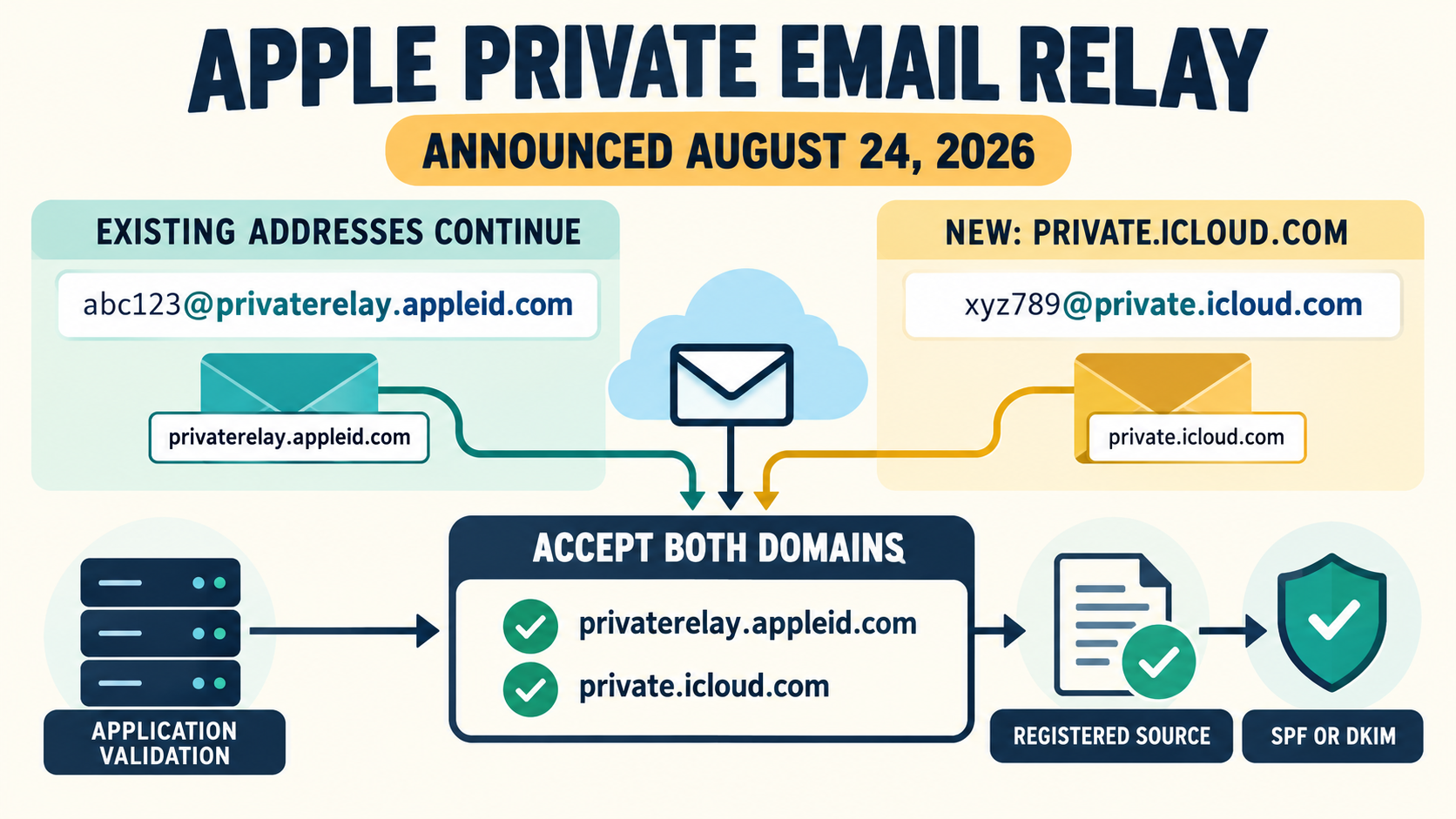
Apple announced on August 24, 2026 that new Sign in with Apple private relay addresses will move from privaterelay.appleid.com to private.icloud.com later in the year. Existing relay addresses continue to work. The safe migration is therefore additive: applications must accept both domains and must not rewrite, retire or merge existing addresses.
This guide is specifically for the 2026 domain transition. It covers validators, schemas, identity logic, integrations, messaging tests and rollout evidence. For the underlying relay model, Apple source registration, SPF/DKIM requirements, replies and account lifecycle, use the separate Apple Private Email Relay technical guide.
What Apple announced on August 24, 2026
Apple’s updated notice says new Sign in with Apple addresses, previously issued on privaterelay.appleid.com, will be issued on private.icloud.com starting later in 2026. Apple also says existing addresses continue forwarding without interruption.
The notice does not give an exact global cutover timestamp, promise that every new address changes simultaneously or instruct developers to convert old addresses. Treat issuance as a coexistence period and make compatibility independent of rollout timing.
Why the August update matters
An earlier June announcement discussed unifying Sign in with Apple and iCloud+ Hide My Email under the new domain. Apple’s August update narrowed that outcome: new Sign in with Apple addresses move to private.icloud.com, while iCloud+ Hide My Email addresses remain on icloud.com. Use the later Apple notice for current scope.
The three Apple address families must stay distinct
| Address family | Apple statement | Migration decision | Do not do |
|---|---|---|---|
| privaterelay.appleid.com | Existing Sign in with Apple relay addresses continue forwarding without interruption. | Keep every existing value valid, stored and deliverable. | Do not bulk-rewrite old addresses to the new domain. |
| private.icloud.com | New Sign in with Apple relay addresses will use this domain starting later in 2026. | Accept it everywhere a Sign in with Apple contact address can enter, move or be used. | Do not wait to observe production failures before allowing it. |
| icloud.com | Apple clarified that iCloud+ Hide My Email addresses remain on icloud.com. | Treat ordinary iCloud and Hide My Email addresses according to their actual product context. | Do not classify every icloud.com mailbox as a Sign in with Apple relay. |
This is an additive compatibility change
The migration introduces another valid recipient domain; it does not deprecate the original family. The correct rule is an exact set containing both domains. A replacement rule that swaps one suffix for the other will break returning users and can corrupt stored contact routes.
Make the change in the central email classification service first, then remove local copies from applications and connectors. Otherwise different parts of the same account journey can disagree about whether an address is valid.
How this page avoids duplicating the 2019 relay guide
| Question | Use this 2026 migration guide | Use the 2019 technical guide |
|---|---|---|
| Why did my validator reject private.icloud.com? | Yes. It covers dual-domain compatibility and migration defects. | Only for broader relay background. |
| Should old privaterelay.appleid.com values be converted? | Yes. This guide explains why they must remain unchanged. | It explains how existing aliases function. |
| How do I register outbound sources with Apple? | Only as a dependency check during migration. | Yes. The 2019 guide covers source registration and authentication in depth. |
| How does the relay protect the user? | Only enough context to understand the domain transition. | Yes. The 2019 guide covers purpose, identity and lifecycle. |
| How do I test schemas, CRMs and APIs for the new domain? | Yes. This is the central intent of this guide. | No. That is not the historical guide’s main task. |
The historical guide explains the service. This page assumes the organization already uses Sign in with Apple and needs to survive the 2026 address-domain change. That separation gives each URL one primary question and prevents two pages from competing for the same tutorial intent.
Find every old-domain assumption
| System surface | Legacy assumption to find | Required change | Evidence |
|---|---|---|---|
| Signup and authorization callback | Relay means the email ends with privaterelay.appleid.com. | Accept both announced Sign in with Apple relay domains without changing the supplied value. | Controlled new-account fixture and persisted callback record. |
| API and schema validation | A single-domain enum, regex or suffix rule. | Use ordinary email syntax validation plus a maintained relay-domain classification set. | Contract tests for both domains and unrelated addresses. |
| Database | Column constraint, generated flag or trigger tied to the old suffix. | Update constraints and derived classifications; preserve original address bytes. | Migration dry run, constraint tests and row-count reconciliation. |
| Identity and deduplication | Email is the immutable user key. | Continue using the verified Sign in with Apple subject as account identity. | No account merge or split caused by the domain family. |
| CRM, CDP and warehouse | Domain allowlist or relay segment contains one suffix. | Add private.icloud.com to ingest, export, model and reporting rules. | Round-trip fixture through each connector. |
| ESP and suppression platform | Recipient validator or import policy rejects an unfamiliar Apple domain. | Allow both domains and retain suppression against the exact address. | Accepted import plus controlled send and suppression test. |
| Customer support | Agents search only the old suffix or request a personal address. | Search both families and support the relay address supplied by the user. | Runbook review and representative case test. |
| Fraud and risk controls | All icloud.com-like addresses share one risk category. | Use verified account signals and product context, not domain novelty alone. | False-positive review before and after rollout. |
Search source code, infrastructure-as-code, database definitions, ETL mappings, SaaS configuration and operational documents. Useful search terms include the literal old domain, relay booleans, Apple-specific email enums and regex fragments. A code search alone will miss vendor-side allowlists and no-code workflow filters.
Start with a read-only data audit
-- Adapt syntax to your database and run read-only first.
SELECT LOWER(SUBSTRING_INDEX(contact_email, '@', -1)) AS domain,
       COUNT(*) AS records
FROM customer_contacts
WHERE contact_email IS NOT NULL
GROUP BY LOWER(SUBSTRING_INDEX(contact_email, '@', -1))
HAVING domain IN ('privaterelay.appleid.com', 'private.icloud.com');
Count the existing domain family across the system of record, replicas, CRM and warehouse. Before the new family appears, a zero count is not an error. After rollout, compare arrival through the authorization callback with persistence and connector counts to find loss between systems.
Validate syntax first, classify the exact domain second
Do not make an Apple-domain suffix check the general email validator. First validate the address using the application’s supported email-address rules. Then extract the domain after the final @, normalize that domain for case-insensitive comparison and compare it with an exact maintained set.
function appleRelayFamily(string $email): ?string
{
    $at = strrpos($email, '@');
    if ($at === false || $at === 0 || $at === strlen($email) - 1) {
        return null;
    }

    $domain = strtolower(substr($email, $at + 1));
    return match ($domain) {
        'privaterelay.appleid.com' => 'sign-in-with-apple-existing',
        'private.icloud.com' => 'sign-in-with-apple-new',
        default => null,
    };
}
The example deliberately does not claim to be a complete RFC email parser. It shows the classification boundary after ordinary validation. An address ending in private.icloud.com.example.org must not pass the Apple relay classification.
Required validator fixtures
| Input | Expected result | Reason |
|---|---|---|
| [email protected] | Accept and classify as existing Sign in with Apple relay. | Apple says existing addresses continue to work. |
| [email protected] | Accept and classify as new Sign in with Apple relay. | This is the announced new address family. |
| [email protected] | Accept as an email address, but do not automatically classify as Sign in with Apple relay. | iCloud mail and iCloud+ Hide My Email remain distinct. |
| [email protected] | Accept as an ordinary address if normal validation passes. | The migration must not narrow general email acceptance. |
| [email protected] | Do not classify as Apple relay. | Suffix-like text inside another domain is not an exact domain match. |
| [email protected] | Accept after domain comparison is normalized case-insensitively. | DNS domain comparison is case-insensitive; preserve the stored user value according to policy. |
| missing-at-private.icloud.com | Reject as malformed. | Adding a domain must not bypass ordinary email syntax checks. |
Never synthesize or rewrite a relay address
The local part and domain together form the contact route Apple supplied. Changing [email protected] into [email protected] does not migrate a user; it creates a different, unverified string. Store and use the exact verified value.
Do not guess that the same local part exists in both families. Do not use DNS success to manufacture an address. Only Apple’s verified authorization data or supported account-change workflow should update the user’s contact route.
The email domain is not the account identity
A Sign in with Apple implementation should map the verified, team-scoped subject to the internal account. The relay address is a contact channel. If email is used as the primary key, a domain transition can create a duplicate account, block login recovery or merge unrelated records.
During testing, assert that returning users keep the same internal account even when contact metadata is updated through a supported flow. Never merge two accounts solely because their relay local parts look similar.
Recommended data-model separation
| Field | Recommended meaning | Migration rule |
|---|---|---|
| apple_subject | Verified, team-scoped Sign in with Apple subject. | Keep as the account identity; do not derive it from email. |
| contact_email | Exact address supplied through the verified authorization flow. | Store the new domain unchanged and retain old values unchanged. |
| contact_kind | Ordinary, Apple Sign in relay, or another explicitly known category. | Add both relay domains to the same Sign in relay category. |
| relay_domain_family | Observed relay domain family for compatibility reporting. | Use old or new as an operational attribute, not as a user identity. |
| permission_state | Purpose-specific messaging permission or transactional scope. | Do not change because the domain changes. |
| suppression_state | Bounce, complaint, unsubscribe or user-disabled state. | Bind to the exact contact route and preserve during imports. |
| source_evidence | Verified token/callback event and recorded processing version. | Retain enough provenance to distinguish supplied data from guessed classification. |
{
  "apple_subject": "TEAM_SCOPED_VERIFIED_SUBJECT",
  "contact_email": "[email protected]",
  "contact_kind": "sign_in_with_apple_relay",
  "relay_domain_family": "private.icloud.com",
  "permission_state": "account_messages_only",
  "suppression_state": "active",
  "source": "verified_apple_authorization",
  "compatibility_rule_version": "apple-relay-domain-2026-01"
}
The values are illustrative. The record keeps identity, contact classification, permission and suppression separate. This prevents a new domain from accidentally granting marketing permission or clearing a previous suppression.
Database migration checks
Inspect CHECK constraints, domain types, triggers, generated columns, functional indexes and uniqueness rules. Verify the column can store the maximum address length already supported by your email policy; do not size it around one example alias.
Run the migration against a production-shaped copy, then test insert, update, backup, restore and replication. A successful application request is not enough if a downstream replica or change-data-capture job discards the value.
Update every API and event contract
Review JSON Schema patterns, OpenAPI examples, protobuf enums, webhook validators and mobile-client models. If a shared contract says only the old suffix is permitted, older clients or consumers may reject an otherwise successful server response.
Add a new-domain fixture to consumer-driven contract tests. Roll out backward-compatible server acceptance before any feature that depends on receiving a newly issued address.
CRM, CDP and warehouse compatibility
Many failures occur after the primary database accepts the address. Test connector imports, deduplication, identity resolution, audience building, reverse ETL, privacy exports and deletion. Preserve the exact address during CSV and spreadsheet round trips.
Update reports that classify Apple relay users. Keep a combined Sign in with Apple relay category with an optional old/new family dimension. Do not present the new family as a different customer type.
ESP and messaging-platform checks
Confirm the ESP accepts private.icloud.com recipients in UI imports, API calls, suppression tables and event webhooks. A recipient-domain allowlist used for testing or fraud control can reject the address before SMTP.
This compatibility work does not replace Apple’s registered-source and authentication requirements. If a controlled message bounces, preserve the SMTP response and verify the sending source, Return-Path, visible From, DKIM identity and user forwarding state before blaming the new recipient domain.
Customer-support workflows
Agents must be able to search the exact new relay address, locate the subject-linked account and reply through the approved support path. Do not ask the user to reveal a personal address merely because the relay suffix is unfamiliar.
Update macros, screenshots and knowledge-base entries so agents do not call the new domain fraudulent or mistype it as an ordinary iCloud mailbox. Use an order number or other supported account evidence where email search is insufficient.
Security and fraud controls
Do not globally trust an account because its domain equals private.icloud.com. Trust the verified Sign in with Apple flow, token validation and subject mapping. Conversely, do not penalize the domain simply because it is new or privacy-preserving.
Review domain-age, novelty and disposable-email features in risk models. Measure false positives against a controlled Sign in with Apple cohort before enforcing a rule that can block legitimate accounts.
Privacy and preference handling
The new relay address remains personal data associated with an account. Minimize logs, protect exports and honor applicable access and deletion workflows. The hidden destination mailbox does not become available to the developer through this migration.
A valid relay route does not establish marketing consent. Preserve purpose, consent, unsubscribe and suppression state independently of domain classification.
Layered migration test plan
| Test layer | Minimum cases | Pass condition |
|---|---|---|
| Unit | Both domains, mixed case, false suffix, malformed local part and ordinary email. | Classification is exact and syntax behavior is unchanged. |
| Database | Insert, update, unique constraint, index, export and restore. | Both domains round-trip without truncation, rewriting or constraint failure. |
| API contract | Signup response, profile update, webhook, bulk import and admin edit. | No endpoint rejects or strips the new address family. |
| Identity | Returning old-domain user, new-domain user and account-link flow. | The verified subject controls identity; no email-domain merge occurs. |
| Messaging | Transactional send, suppression, bounce, reply and support ingestion. | The new recipient is accepted and evidence reaches the correct workflow. |
| Analytics | Segment, warehouse load, report, privacy export and deletion. | Both families are represented without double-counting. |
| Rollback | Disable new issuance feature flag while retaining stored new-domain users. | Rollback stops risky behavior without locking out or silencing existing new-domain accounts. |
End-to-end acceptance gates
GATE 1  input accepted by authorization callback
GATE 2  exact email preserved in primary database
GATE 3  verified Apple subject remains the account key
GATE 4  CRM, warehouse and support tools round-trip the value
GATE 5  ESP accepts the recipient and suppression remains effective
GATE 6  controlled authenticated message follows the expected relay path
GATE 7  dashboards split old/new domain families without splitting users
GATE 8  rollback leaves already-created new-domain accounts usable
Use synthetic or controlled accounts and mask relay local parts in broad logs. Record evidence at each gate so a failure can be assigned to validation, storage, integration, messaging or reporting rather than described as a vague Apple issue.
Do not confuse fixtures with issuance evidence
A synthetic @private.icloud.com string is useful for application compatibility tests, but it does not prove Apple issued that address or that mail will forward. Keep syntax and pipeline tests separate from a controlled end-to-end relay test using an address supplied through Apple.
Safe deployment sequence
- Inventory all consumers and write failing fixtures for the new domain.
- Update the central classifier and shared contracts.
- Deploy database and backend acceptance before user-facing issuance can reach the system.
- Update connectors, ESP, CRM, warehouse and support tooling.
- Enable monitoring by domain family.
- Run a controlled end-to-end test.
- Release gradually while old-domain behavior remains unchanged.
A feature flag may control special classification or reporting, but basic email acceptance should not depend on a remote flag that can strand an already-created user.
Rollback without breaking new-domain users
Once the system has stored a legitimate private.icloud.com address, rollback must continue accepting, displaying and messaging it. Roll back the risky application feature or integration change, not the validity of data already received.
Keep database migrations backward-compatible and avoid destructive cleanup. A safe rollback can disable a new segmentation job while preserving login, support and transactional communication.
Monitor the transition with bounded metrics
| Metric | Segment | Interpretation boundary | Alert example |
|---|---|---|---|
| Authorization completion rate | Relay domain family and app version. | A difference identifies a migration path to inspect, not proof Apple caused it. | New-domain completion falls materially below ordinary and old-domain controls. |
| Validation rejection rate | Endpoint and normalized domain. | Should approach zero for syntactically valid new relay addresses. | Any exact private.icloud.com rejection after deployment. |
| Persistence completeness | Callback received versus contact stored. | A blank email may reflect scope/authorization behavior; verify the actual response. | Verified callback included email but database record omitted it. |
| Message acceptance and bounce | Recipient family, source identity and message stream. | Separate application rejection from Apple relay and final-mailbox outcomes. | New family produces a new SMTP diagnostic category. |
| Support contact success | Relay family and case workflow. | Measures the company workflow, not the hidden destination mailbox. | Cases cannot be found or replies cannot be attached. |
| Duplicate-account rate | Sign in with Apple subject and creation path. | Email-domain changes should not create a second identity. | Same verified subject maps to more than one active account. |
Use the old family, ordinary addresses and app-version cohorts as controls where appropriate. Avoid publishing a rollout percentage unless Apple provides it or the number is explicitly your own observed population.
Failure diagnosis
| Symptom | Likely migration defect | First evidence | Bounded correction |
|---|---|---|---|
| Signup fails after Apple authorization | Callback validator still allows one relay suffix. | Sanitized validation code, exact error and supplied domain. | Update the central classifier and deploy contract tests. |
| Account is created but email is blank | Mapping layer discards a value it does not recognize. | Verified token/callback fields and persistence logs. | Preserve the supplied address and repair the mapping rule. |
| Duplicate customer account | System keys or merges accounts by email. | Apple subject, developer team, account-link records and timestamps. | Restore subject-based identity and review the merge safely. |
| CRM import rejects records | Connector allowlist or schema enumeration is stale. | Connector rejection file and field contract. | Update the connector rule and replay only rejected records idempotently. |
| Message bounces | Could be sender registration/authentication, user forwarding state or recipient handling, not just the new domain. | SMTP diagnostic, Return-Path, From, DKIM, source registration and recipient domain. | Classify the actual failure before changing authentication or suppressing. |
| Support cannot locate the user | Search index or agent workflow assumes the old domain. | Exact stored alias, subject-linked account and search query. | Index the full value and teach search to accept both domains. |
| New domain reported as risky | Fraud model treats novelty or icloud.com text as abuse. | Feature contribution, cohort outcome and control population. | Remove the proxy feature and use stronger account evidence. |
DNS checks are supporting evidence, not issuance proof
DNS and SMTP observations can confirm that infrastructure exists at a point in time, but they do not prove a particular alias was issued or that every rollout cohort is active. The Apple announcement is the authoritative source for product scope; verified authorization data is the source for an individual account value.
Do not merge Sign in with Apple and iCloud+ Hide My Email
Apple’s August update says iCloud+ Hide My Email addresses remain on icloud.com. Do not move them to the new Sign in with Apple classification, and do not infer product type from an icloud.com suffix alone.
Product-specific classification should come from the known acquisition flow and verified metadata. Domain families help compatibility and reporting; they do not replace provenance.
Migration checklist
- Accept both Sign in with Apple relay domains through one maintained classifier.
- Preserve existing privaterelay.appleid.com values without rewriting.
- Keep the verified Apple subject as account identity.
- Test database, API, CRM, CDP, warehouse, ESP and support round trips.
- Preserve permission and suppression independently of domain family.
- Use exact-domain comparison and include false-suffix fixtures.
- Separate synthetic compatibility tests from Apple-issued end-to-end tests.
- Monitor validation, persistence, duplicates, messaging and support by family.
- Keep rollback compatible with new-domain users already stored.
- Recheck Apple’s maintained notice before changing production assumptions.
Current status as of November 14, 2026
Apple’s maintained August 24 notice says the new Sign in with Apple domain begins later in 2026 and that existing privaterelay.appleid.com addresses continue without interruption. The announcement does not provide a precise universal issuance timestamp. Systems should already support coexistence and should not make readiness depend on detecting the first live address.
Primary Apple sources
- Apple update: New domain for Sign in with Apple: August 24, 2026 scope, coexistence statement and developer action.
- Configure private email relay service: Maintained outbound source registration and authentication requirements.
- Configuring your environment for Sign in with Apple: Account integration, email sources and server-to-server notification context.
- Sign in with Apple human-interface guidance: Respecting a user-provided private relay address in product and support experiences.