Chef For Automation
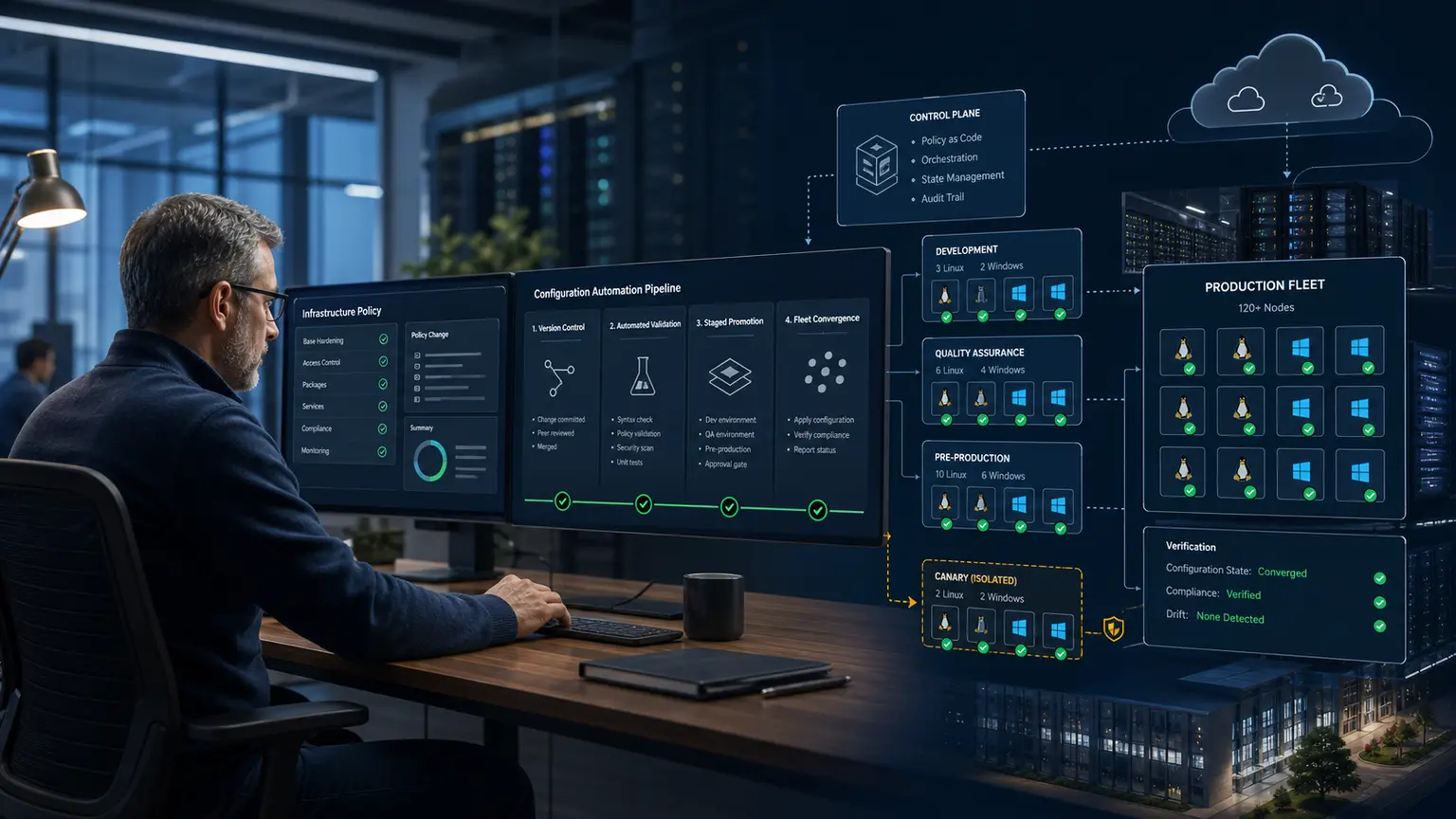
Chef turns reviewed infrastructure policy into repeatable system state. A useful Chef implementation is more than a recipe and a command: it has a supported control plane, traceable packages, a version-controlled repository, locked dependencies, safe node enrollment, staged promotion, convergence evidence, and a tested rollback.
This step-by-step guide was technically reviewed on 5 August 2026 for Chef Workstation 26, Chef Infra Client 19, Policyfiles, Linux and Windows nodes, and migration toward Chef 360 Platform. Chef Infra Server 15 reaches end of life on 30 November 2026, so new designs should start with the supported destination and existing Server estates need a dated migration plan.
Choose the supported Chef operating model first
Do not begin by installing a server. First decide where policy artifacts, node identities, reporting, and administration will live. Progress Chef now positions Chef 360 Platform as the current platform. Its Declarative State Management service stores policy and cookbook content for nodes that use Chef Infra Client. An existing Chef Infra Server 15 estate can continue only inside a documented migration window. Local development with Test Kitchen or chef-zero is useful for testing, but it is not a production control plane.
| Operating model | Use it for | What it does not replace | Decision boundary |
|---|---|---|---|
| Chef 360 Platform with Declarative State Management | Current managed policy distribution, node management, job automation, and related platform services | Your repository, code review, tests, identity design, network controls, backups, or operating runbooks | Preferred destination for a new or migrating managed estate. Confirm the current supported topology, licensing, and service requirements with Chef. |
| Existing Chef Infra Server 15 | Short-lived continuity while an organization completes an approved migration | A current long-term platform strategy | Deprecated and scheduled for end of life on 30 November 2026. Do not create a new long-lived dependency without a written exit plan. |
| Test Kitchen with chef-zero | Disposable local or CI convergence and InSpec verification | Production identity, policy distribution, inventory, audit, or fleet scheduling | Use for development gates and destroy test instances after evidence is captured. |
| Unattended node-side bootstrap | Images, autoscaling, private networks, or estates where an inbound SSH or WinRM bootstrap is inappropriate | Artifact integrity, first-boot identity, server trust, or secret delivery | Prefer it when the existing provisioning system can securely install and enroll the client. |
If you already run Chef Infra Server, treat migration as a project with backups, imported object validation, a node cutover plan, DNS or chef_server_url changes, monitoring, and rollback. If you are new to Chef, obtain the Chef 360 design and entitlement that matches your estate before following the endpoint examples below.
Understand how the current Chef components fit
Knife is an operator command-line client. During bootstrap it connects to a target, installs Chef Infra Client, registers the node, and starts the first run. After enrollment, Chef Infra Client normally connects directly to the configured Chef endpoint over HTTPS on its schedule. Ohai collects node facts for the Chef run; it is not the policy database.
| Component | Role | When it is used | Keep under control |
|---|---|---|---|
| Chef Workstation | Supported package containing development and operator tools | Authoring, resolving, testing, publishing, and administration | Version, license, package source, workstation access, updates, and credentials |
chef CLI | Generates repositories and cookbooks, resolves Policyfiles, and pushes locked policy | Development and release pipeline | Repository state, lock-file diff, target profile, and policy group |
| Knife | Calls Chef APIs and bootstraps or inspects nodes | Enrollment and bounded administration | Operator key, endpoint profile, node target, SSH or WinRM trust, and command output |
| Chef Infra Client | Evaluates resources and converges a node toward desired state | First boot and recurring runs on each managed node | Client version, identity key, server certificate, schedule, logs, and privileges |
| Ohai | Collects platform, network, filesystem, virtualization, cloud, and other node facts | At the beginning of a Chef Infra Client run | Plugin scope, sensitive facts, collection time, and node-data size |
| Cookbook | Versioned collection of recipes, templates, files, attributes, libraries, and tests | Authored and tested before a release | Ownership, dependencies, supported platforms, semantic version, and tests |
| Recipe and resource | Desired-state declarations such as package, file, directory, user, and service | Compiled and converged on a node | Idempotency, ordering, notifications, guards, secrets, and failure behavior |
Policyfile.rb | Human-authored policy name, run list, cookbook sources, and attributes | During policy resolution | Source trust, constraints, review, and environment-neutral intent |
Policyfile.lock.json | Resolved immutable cookbook set with content identifiers and revision ID | Testing, publication, promotion, and rollback | Commit it, test it, retain it, and never hand-edit it |
| Policy group | Pointer that assigns one locked policy revision to a group such as dev, canary, or production | Release promotion and node convergence | Change approval, canary size, promotion evidence, and rollback target |
| Node object and client identity | Inventory state and the cryptographic identity used by the client | Created at enrollment and updated during runs | Unique name, owner, lifecycle, revocation, duplicate records, and decommissioning |
Follow one evidence-led path
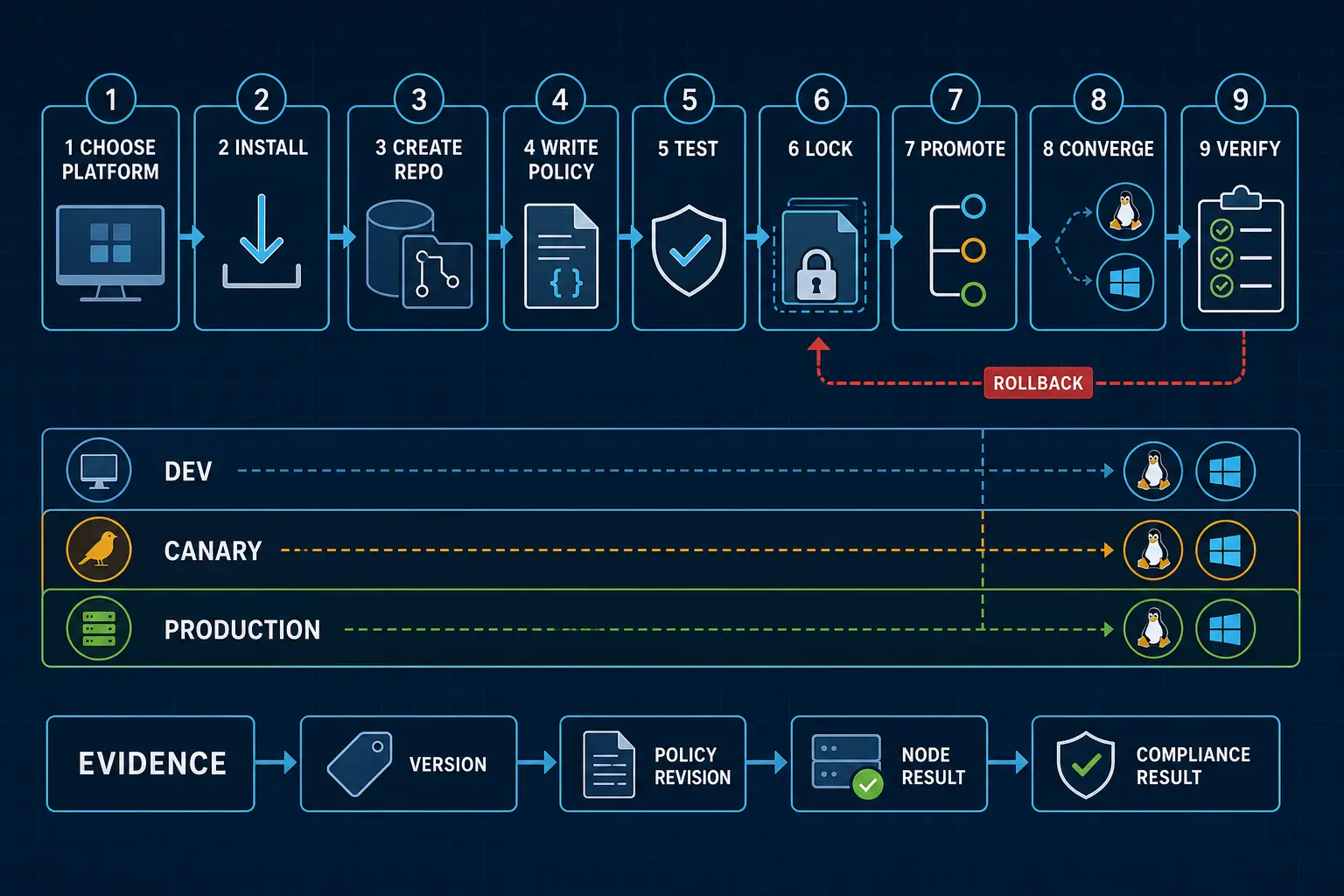
The steps below build a small Linux baseline cookbook, lock it in a Policyfile, test it locally, publish it to a development policy group, add Linux and Windows nodes, verify convergence, and promote the exact same revision. Replace example names and endpoints with approved values. Do not paste production keys, passwords, license identifiers, or secrets into a repository, shell history, ticket, or article.
- Record the platform, support, licensing, network, identity, and rollback contract.
- Download a stable Chef Workstation package through the approved channel and verify it.
- Install and inventory the Workstation toolchain.
- Create a Git repository and one cookbook.
- Write metadata, attributes, a recipe, template, and integration control.
- Resolve a Policyfile into a committed lock file.
- Lint, converge, and verify in a disposable test instance.
- Configure a protected endpoint profile and validate TLS before API use.
- Push the locked revision to a development group.
- Enroll a named Linux or Windows node using an approved connection path.
- Run and verify convergence twice, including the no-change second run.
- Promote the tested lock to canary and production, then retain rollback evidence.
Step 1: define the automation contract
A recipe is not the first deliverable. Start with a small written contract that names the systems, owners, desired state, maintenance window, failure boundary, and proof. For a first cookbook, choose a harmless baseline such as installing diagnostic packages, creating a managed configuration directory, and publishing an identification file. Do not begin with authentication, firewall, storage, or cluster membership changes.
| Decision | Record before work | Evidence after work |
|---|---|---|
| Fleet | Node names, operating systems, versions, architectures, networks, and business owners | Every intended node reported; no unintended node was targeted |
| Desired state | Files, packages, services, users, permissions, values, and exclusions | Resource results plus destination-side checks |
| Control plane | Chef 360 endpoint or existing Chef Infra Server, organization, certificate chain, and support owner | Authenticated API call and node check-in |
| Release path | Development, canary, production groups, approvers, canary size, and observation period | The same policy revision ID at each gate |
| Failure budget | Maximum failed nodes, maximum duration, and stop conditions | Run counts, failure signals, and a recorded stop or continue decision |
| Rollback | Last known good lock file, prior system state, and any irreversible changes | Rollback rehearsal or controlled proof before broad release |
| Removal | Who can stop scheduling, revoke identity, delete objects, and retain logs | Node cannot check in and both server-side records have been reconciled |
Also decide whether Chef is authoritative for each object. If a cloud-init script, domain policy, package platform, endpoint manager, and Chef all write the same file or service, convergence can become an endless fight. One state owner per object is the safer default.
Step 2: obtain licensing and download packages safely
Chef's commercial download workflows require the entitlement and license information that applies to your organization. Chef Workstation 26 uses the current Workstation product line, and Chef Infra Client 19 uses the current client product line. Obtain the license identifier through your organization's authorized Chef account or support channel. Acceptance of license terms is an organizational decision, not a command to add casually to unattended scripts.
Use stable packages for production unless Chef Support has directed you to a specific current build. At this review, Chef Workstation 26.1.0 is the current documented release and bundles Chef Infra Client 19.3.15. That release provides native Linux x86 RPM and DEB packages and a Windows x86 MSI. Platform and architecture coverage can change, so check the current package page before choosing an installer.
- Sign in to the official Chef download channel using an approved account.
- Select the stable Workstation release for the workstation operating system and architecture.
- Download the package and its published integrity information where available.
- Move it through the organization's software intake, malware scanning, signature, and change process.
- Record the product, release, package filename, hash, signer, source URL, download time, and owner.
sha256sum chef-workstation-enterprise-26.1.0-1.x86_64.rpm
rpm --checksig chef-workstation-enterprise-26.1.0-1.x86_64.rpm
Compare the SHA-256 result with an independently obtained approved value. A locally calculated hash only proves which bytes you received; it does not identify the expected bytes without a trusted comparison source.
Step 3: install Chef Workstation
Install an RPM package on supported Linux
Use the exact downloaded filename. Keep the local package in a controlled staging directory rather than piping an installer script from the internet into a privileged shell.
sudo dnf install ./chef-workstation-enterprise-26.1.0-1.x86_64.rpm
rpm -q chef-workstation-enterprise
Install a DEB package on supported Linux
sha256sum chef-workstation-enterprise_26.1.0-1_amd64.deb
sudo apt install ./chef-workstation-enterprise_26.1.0-1_amd64.deb
dpkg-query -W chef-workstation-enterprise
Install the MSI on Windows
Check the Authenticode result and signer before installation. Use the graphical installer for one workstation or an approved endpoint-management package for repeatable deployment.
$Package = 'C:\Install\chef-workstation-enterprise-26.1.0-1_x86_64.msi'
Get-FileHash -Algorithm SHA256 $Package
Get-AuthenticodeSignature $Package | Format-List Status, StatusMessage, SignerCertificate
Start-Process msiexec.exe -Wait -ArgumentList '/i', $Package, '/passive'
Do not assume a silent exit means success. Capture the endpoint-management result, Windows Installer log where required, installed product record, and version command output. Restart the terminal so its environment includes the installed Chef paths.
Step 4: verify every installed tool
Version output is the first evidence that the intended package is active instead of an older binary earlier in PATH. Record the output in the change or build record.
command -v chef chef-workstation knife ohai cookstyle kitchen inspec
chef-workstation -v
chef -v
knife --version
ohai --version
cookstyle --version
kitchen version
inspec version
At the reviewed 26.1.0 release, the bundled versions include Chef Infra Client 19.3.15, Knife 19.0.134, Ohai 19.1.40, Cookstyle 8.7.6, InSpec 7.1.7, and Test Kitchen Enterprise 2.0.15. Treat these as a dated reference, not a permanent pin. Your approved stable build may differ.
Check whether the workstation can resolve and reach the control-plane hostname on the required HTTPS port, but do not disable TLS validation to make a failed check pass. Also verify access to the cookbook sources, package mirror, test-instance provider, and source repository required by the workflow.
Step 5: create the repository and cookbook
Chef code should live in version control. Create one repository per operational ownership boundary, not one unreviewed directory shared by every administrator. The commands below create a policy-oriented repository and a baseline cookbook. Generator output can vary by Workstation release, so inspect the generated files before committing.
mkdir -p ~/src
cd ~/src
chef generate repo nitwings-chef-repo --policy
cd nitwings-chef-repo
git init
chef generate cookbook cookbooks/nitwings_baseline
find . -maxdepth 4 -type f -print | sort
Use lowercase cookbook names with underscores, a stable policy name, and environment-neutral cookbook logic. Put environment promotion in policy groups rather than creating nearly identical development and production cookbooks.
Step 6: know the basic Chef files and when they are read
| Path | Purpose | Read by | Repository rule |
|---|---|---|---|
Policyfile.rb | Policy name, run list, cookbook sources, constraints, and policy attributes | chef install and chef update | Commit and review |
Policyfile.lock.json | Resolved cookbook set, content identifiers, and revision ID | chef push, Test Kitchen, release jobs, and operators | Commit, preserve for rollback, never hand-edit |
cookbooks/nitwings_baseline/metadata.rb | Cookbook name, version, license, maintainer, dependencies, and supported platforms | Policy resolver and Chef Infra Client | Commit and update deliberately |
cookbooks/nitwings_baseline/recipes/default.rb | Ordered desired-state resources for the default recipe | Chef Infra Client during compile and converge | Commit, lint, test, and review |
cookbooks/nitwings_baseline/attributes/default.rb | Default values that callers may override at a documented precedence level | Chef Infra Client before recipes compile | Commit; never place secrets here |
cookbooks/nitwings_baseline/templates/default/baseline.conf.erb | Rendered text file with variables supplied by a template resource | Chef Infra Client on the node | Commit and test rendered content |
cookbooks/nitwings_baseline/files/default/ | Static files copied without ERB rendering | cookbook_file resources | Commit only approved non-secret content |
cookbooks/nitwings_baseline/test/integration/default/controls/baseline.rb | InSpec assertions for observable end state | kitchen verify or InSpec | Commit beside the policy change |
kitchen.yml | Disposable test driver, platform, provisioner, verifier, and suites | Test Kitchen | Commit portable settings; keep cloud secrets outside |
~/.chef/credentials | Operator profile containing endpoint, API identity name, and path to its private key | Chef and Knife commands | Never commit; mode 0600; separate profiles and privileges |
/etc/chef/client.rb or Windows equivalent | Node-side endpoint, certificate validation, schedule-related, logging, and client behavior | Chef Infra Client | Manage through approved provisioning or a controlled client configuration |
/etc/chef/client.pem or Windows equivalent | Node's private API identity key | Chef Infra Client | Never copy between nodes or into the repository; protect and revoke on removal |
The repository contains intent and release artifacts. The workstation profile contains operator access. The node contains its own identity and runtime configuration. Mixing these three scopes is a common source of credential leaks and accidental production changes.
Step 7: write cookbook metadata and defaults
Open cookbooks/nitwings_baseline/metadata.rb and make the ownership, release, and platform contract explicit. Increment the cookbook version only with a reviewed behavior change. The example supports current Debian-family and Enterprise Linux-family nodes, but your real list should be narrower when testing is narrower.
name 'nitwings_baseline'
maintainer 'NitWings Operations'
maintainer_email '[email protected]'
license 'Proprietary - All Rights Reserved'
description 'Applies the reviewed NitWings Linux baseline'
version '1.0.0'
chef_version '>= 19.0'

supports 'ubuntu'
supports 'debian'
supports 'redhat'
supports 'rocky'
supports 'almalinux'
Choose the license that actually applies to your code. Do not copy the example legal text into an open-source cookbook. Pin cookbook dependencies in metadata when one cookbook consumes another, then let the Policyfile produce the complete resolved set.
Put safe, non-secret defaults in attributes/default.rb:
default['nitwings_baseline']['owner'] = 'platform-team'
default['nitwings_baseline']['environment'] = 'development'
default['nitwings_baseline']['packages'] = %w(curl jq)
default['nitwings_baseline']['config_dir'] = '/etc/nitwings'
default['nitwings_baseline']['config_mode'] = '0644'
Attributes are configuration inputs, not a secret store. A value can appear in node data, policy JSON, debug output, or reports. Use an approved secrets integration and set sensitive resource behavior where applicable. Keep precedence simple: cookbook defaults, selected policy overrides, and facts derived by Ohai. Avoid normal and override attributes unless a reviewed dependency genuinely requires them.
Step 8: write an idempotent recipe
Replace the generated default recipe with a small, observable desired state. This example installs two diagnostic packages, creates a directory, renders a configuration file, and publishes a managed notice. It does not contain a password, force a service restart, execute an unguarded shell command, or depend on a mutable branch.
package node['nitwings_baseline']['packages']

directory node['nitwings_baseline']['config_dir'] do
  owner 'root'
  group 'root'
  mode '0755'
  recursive true
end

template '/etc/nitwings/baseline.conf' do
  source 'baseline.conf.erb'
  owner 'root'
  group 'root'
  mode node['nitwings_baseline']['config_mode']
  variables(
    owner: node['nitwings_baseline']['owner'],
    environment: node['nitwings_baseline']['environment']
  )
  verify do |path|
    content = ::File.read(path)
    content.include?('managed_by=chef') && content.include?('owner=')
  end
end

file '/etc/motd.d/50-nitwings-chef' do
  content "This system is managed by Chef. Changes require an approved workflow.\n"
  owner 'root'
  group 'root'
  mode '0644'
  only_if { ::Dir.exist?('/etc/motd.d') }
end
Chef resources compare current state with desired state and change only what differs. That is the idempotency target. A second run should normally report no updates. Idempotency does not mean harmlessness: an idempotent recipe can repeatedly enforce the wrong configuration. Code review, target selection, canaries, and verification remain necessary.
Use native resources before shell commands
| Need | Prefer | Review closely |
|---|---|---|
| Install or remove software | package | Repository trust, version pinning, locks, restart need, and downgrade behavior |
| Create folders or files | directory, file, cookbook_file, or template | Owner, group, mode, atomic update, validation, backup, and sensitive content |
| Manage a daemon | service or an appropriate custom resource | Platform service name, enablement, restart timing, dependencies, and health proof |
| Manage an account | user and group | UID and GID ownership, identity authority, home data, SSH keys, password hashes, and removal |
| Schedule work | cron or a platform-specific scheduler resource | Timezone, overlap, timeout, output, environment, retries, and ownership |
| Retrieve source | git with HTTPS or SSH and an immutable revision | Repository identity, commit or signed tag, submodules, destination ownership, and credentials |
| Run a command without a native resource | execute, bash, or a custom resource only with a state guard | Exit codes, timeout, retries, environment, input injection, secret output, and repeat behavior |
| Coordinate changes | Notifications with :delayed where safe | Resource identity, ordering, restart batching, failure behavior, and health check |
An execute resource always looks ready to run unless a guard gives it a state test. The following pattern is bounded, but a native package or file resource is still preferable when available:
execute 'initialize-example-state' do
  command '/usr/local/sbin/example-init --non-interactive'
  creates '/var/lib/example/.initialized'
  timeout 120
  sensitive true
end
The creates guard prevents repetition only if that file is reliable proof. If a partial command can create the marker before completion, use a stronger validation. Never use not_if 'some-command' without understanding the command's exit status.
Step 9: create the template and verify its output
Create cookbooks/nitwings_baseline/templates/default/baseline.conf.erb:
# Managed by Chef. Local changes will be replaced.
managed_by=chef
owner=<%= @owner %>
environment=<%= @environment %>
policy_name=<%= node['policy_name'] || 'local-test' %>
policy_group=<%= node['policy_group'] || 'local' %>
The recipe supplies @owner and @environment through the resource's variables property. Node attributes are available during rendering, but exposing arbitrary Ohai or policy data in files can disclose more than intended. Keep the template's input surface explicit.
The template resource stages new content, applies the verification block, and only then replaces the destination when validation succeeds. For a real service configuration, use the application's native validator against the staged path. Then notify the service only after a valid file is installed:
template '/etc/example/example.conf' do
  source 'example.conf.erb'
  owner 'root'
  group 'root'
  mode '0640'
  sensitive true
  verify '/usr/sbin/exampled --check-config %{path}'
  notifies :restart, 'service[exampled]', :delayed
end

service 'exampled' do
  action [:enable, :start]
end
Confirm that the validator really accepts an alternate path and that it validates included files. Many daemons need a complete staged configuration tree, not one isolated file. A successful syntax check also does not prove upstream reachability, permissions, capacity, or application behavior.
Step 10: add an InSpec integration control
Create cookbooks/nitwings_baseline/test/integration/default/controls/baseline.rb. Test externally observable state rather than repeating the recipe's implementation line by line.
control 'nitwings-baseline-1.0' do
  impact 1.0
  title 'NitWings baseline is installed and attributable'

  %w(curl jq).each do |package_name|
    describe package(package_name) do
      it { should be_installed }
    end
  end

  describe directory('/etc/nitwings') do
    it { should exist }
    its('owner') { should eq 'root' }
    its('mode') { should cmp '0755' }
  end

  describe file('/etc/nitwings/baseline.conf') do
    it { should exist }
    its('owner') { should eq 'root' }
    its('mode') { should cmp '0644' }
    its('content') { should match(/^managed_by=chef$/) }
    its('content') { should match(/^owner=platform-team$/) }
  end
end
If production can override owner, either pass that expected value into the test profile or assert an approved set. A hardcoded test that disagrees with the policy will create noise. Conversely, a test that accepts any non-empty string proves too little.
Step 11: define and lock the Policyfile
Create Policyfile.rb in the repository root:
name 'nitwings-baseline'
default_source :supermarket

run_list 'nitwings_baseline::default'

cookbook 'nitwings_baseline', path: './cookbooks/nitwings_baseline'

default['nitwings_baseline']['owner'] = 'platform-team'
default['nitwings_baseline']['environment'] = 'managed'
Resolve it once and inspect the resulting lock:
chef install Policyfile.rb
chef diff --git HEAD
git status --short
git add Policyfile.rb Policyfile.lock.json cookbooks/nitwings_baseline
git commit -m "Add locked NitWings baseline policy"
The first chef diff --git HEAD may not have a committed comparison and can report that condition. After the initial commit it becomes useful for later updates. The lock file is the release artifact: it identifies the exact cookbook content chosen by resolution. Do not push a newly resolved lock simply because dependency solving succeeded.
Why Policyfiles replace mutable upload workflows
A raw cookbook upload plus mutable roles and environment constraints can cause later server-side resolution to select a different cookbook set. A Policyfile resolves the set at the workstation and records it. Policy groups then point development, canary, or production nodes to an exact revision. This does not make the content correct, but it makes testing, promotion, and rollback attributable.
Step 12: lint and test before publishing
Run inexpensive static checks first, then use a disposable instance that represents each supported platform family. The generated kitchen.yml is a starting point. Select a driver your organization supports, keep provider credentials outside the file, cap cost and lifetime, and never point Test Kitchen at an existing production node.
cookstyle cookbooks/nitwings_baseline
chef exec ruby -c cookbooks/nitwings_baseline/metadata.rb
chef exec ruby -c cookbooks/nitwings_baseline/attributes/default.rb
chef exec ruby -c cookbooks/nitwings_baseline/recipes/default.rb
kitchen list
kitchen create
kitchen converge
kitchen verify
kitchen converge
kitchen destroy
The second converge is deliberate. Review its output and require zero unexpected resource changes. If a resource changes on every run, find the unstable input, template content, command guard, package behavior, or platform fact before release.
| Gate | Pass evidence | Stop condition |
|---|---|---|
| Cookstyle | No unresolved correctness or style offenses in the owned scope | Suppression added without reason or unsafe code pattern |
| Ruby syntax | Every authored Ruby file parses | Syntax error, unreviewed dynamic evaluation, or generated secret |
| First converge | Only expected resources change and the run exits successfully | Unexpected package, file, user, service, reboot, or network action |
| InSpec verify | Observable state satisfies every required control | Skipped or waived control without approved exception |
| Second converge | No unexpected resource changes | Persistent drift or an unguarded command |
| Destroy | Test instance, credentials, volumes, addresses, and temporary rules removed | Orphan cost or retained access path |
Test Kitchen Enterprise and InSpec versions and entitlements are part of the current Workstation distribution. Confirm the license and driver requirements for your environment. A green local Linux test does not certify Windows or another Linux family that was never converged.
Step 13: configure an operator profile safely
The control-plane administrator should provide a least-privileged API identity, its private key through an approved secret-delivery path, the exact organization endpoint, and the trusted certificate chain. Do not share one administrator PEM among operators. Do not store the PEM in the Chef repository.
install -d -m 0700 ~/.chef ~/.chef/trusted_certs
install -m 0600 /secure/intake/operator.pem ~/.chef/operator.pem
install -m 0644 /secure/intake/chef.example.net.crt \
  ~/.chef/trusted_certs/chef.example.net.crt
touch ~/.chef/credentials
chmod 0600 ~/.chef/credentials
Create ~/.chef/credentials with a named profile. Confirm the exact Chef 360 or existing Chef organization URL with its administrator:
[nitwings-dev]
chef_server_url = "https://chef.example.net/organizations/nitwings"
client_name = "operator_name"
client_key = "~/.chef/operator.pem"

[nitwings-production]
chef_server_url = "https://chef.example.net/organizations/nitwings"
client_name = "release_operator_name"
client_key = "~/.chef/release-operator.pem"
A profile name helps prevent wrong-endpoint commands, but it is not access control. Give the development identity only development rights. Protect production publication behind a separate identity, release job, approval, or short-lived authorization supported by the platform.
Validate TLS before trusting API output
Obtain the server or issuing CA certificate through a trusted administrator or enterprise trust distribution. knife ssl fetch can copy a presented certificate, but fetching over an untrusted first connection does not authenticate it. Compare the fingerprint through an independent channel before adding trust.
openssl x509 -in ~/.chef/trusted_certs/chef.example.net.crt \
  -noout -subject -issuer -dates -fingerprint -sha256
knife ssl check --profile nitwings-dev
knife status --profile nitwings-dev
Stop on hostname mismatch, expiry, unknown issuer, changed fingerprint, 401, or 403. Do not set certificate verification to none, use --winrm-no-verify-cert, or copy an arbitrary certificate merely to remove an error.
Step 14: push the tested lock to development
Publish the exact lock that passed the test gates. The chef push syntax is the policy group followed by the Policyfile or lock file. Use the intended profile explicitly.
CHEF_PROFILE=nitwings-dev chef push dev Policyfile.lock.json
CHEF_PROFILE=nitwings-dev chef show-policy nitwings-baseline dev
Capture the local Git commit, Policyfile revision ID, policy group, command identity, endpoint, time, and command result. The policy group is now ready, but no node should be added until its owner, access path, backup state, maintenance window, and unique node name are confirmed.
Step 15: prepare a Linux node for enrollment
A Linux bootstrap needs a reachable FQDN or IP address, an approved SSH account, privilege elevation, outbound access to the required Chef package source or internal mirror, DNS, correct time, and HTTPS reachability to the Chef endpoint. Pre-enroll the server's SSH host key from trusted provisioning evidence.
ssh-keygen -F linux-canary-01.example.net
ssh -o StrictHostKeyChecking=yes \
  -i ~/.ssh/chef-bootstrap-ed25519 \
  [email protected] \
  'hostname -f; id; sudo -n true; getent hosts chef.example.net'
The command should show the intended hostname and account, successful non-interactive privilege if that is the approved design, and correct endpoint resolution. If sudo requires interactive authentication, design that explicitly instead of placing its password in a command. The SSH client guide explains host-key, key, bastion, and agent controls in more depth.
Before bootstrap, verify that the proposed node name does not already belong to another machine:
knife node show linux-canary-01 --profile nitwings-dev
knife client show linux-canary-01 --profile nitwings-dev
A not-found result is expected for a new node. If either object exists, stop and reconcile its owner, identity, last check-in, hostname, and decommission record. Never approve an overwrite prompt simply because the name looks correct.
Step 16: add the Linux node with validatorless bootstrap
Current Chef bootstrap uses the operator's API identity by default when validator settings are absent. Validatorless bootstrap avoids distributing one organization-wide validator credential. Chef Infra Client 19 requires Chef Workstation 26 or later for this workflow.
knife bootstrap linux-canary-01.example.net \
  --profile nitwings-dev \
  --node-name linux-canary-01 \
  --connection-user chef-bootstrap \
  --ssh-identity-file ~/.ssh/chef-bootstrap-ed25519 \
  --host-key-verify \
  --sudo \
  --policy-name nitwings-baseline \
  --policy-group dev \
  --node-ssl-verify-mode peer \
  --node-verify-api-cert \
  --chef-license-key "$CHEF_LICENSE_KEY"
Set CHEF_LICENSE_KEY in a protected, short-lived process environment supplied by your approved secret system. Avoid shell tracing and do not print the variable. Environment variables can still be exposed through process inspection or diagnostic collection, so use the current Chef-supported secure delivery route for your execution environment.
The default bootstrap host-key verification is enabled. This command states it explicitly to make the boundary visible. It also requires peer verification for the node's Chef HTTPS connection. If a private package mirror or custom CA is required, provide the approved bootstrap configuration through a reviewed method. Do not bypass the verification controls.
During bootstrap, Knife connects over SSH, installs Chef Infra Client if needed, creates the uniquely named client and node, writes node-side configuration and identity material, and begins the first Chef run. After that, the client connects to the control plane directly. Remove or disable the temporary bootstrap account when the node's normal operating path no longer needs it.
Step 17: prepare and add a Windows node
Windows can be bootstrapped through WinRM or enrolled unattended through an existing software-management path. Prefer the existing trusted management plane when it can install the MSI, establish the node identity, deploy the CA chain, and run first boot safely. For direct WinRM, use HTTPS on port 5986 with a trusted certificate, restrict the firewall source, and use an attributable temporary account.
Prepare WinRM on the target
Run the organization's approved Windows remoting configuration, not a broad internet example. At minimum, verify that PowerShell remoting is enabled, the HTTPS listener certificate matches the node FQDN, the firewall allows only the bootstrap workstation or management subnet, and the chosen authentication method fits the domain design.
Enable-PSRemoting -Force
Get-ChildItem WSMan:\localhost\Listener
Get-NetFirewallRule -DisplayGroup 'Windows Remote Management' |
  Select-Object DisplayName, Enabled, Profile, Direction, Action
Test-NetConnection chef.example.net -Port 443
Enable-PSRemoting changes listener, service, and firewall state. Run it only inside the approved policy. Do not expose WinRM 5985 or 5986 broadly. Do not enable Basic authentication over HTTP. A domain can instead use Kerberos or Negotiate according to its security standard.
Run a bounded WinRM bootstrap
The current unified Knife command selects WinRM with --connection-protocol winrm. The example below deliberately leaves password handling out. Add the approved authentication flags at execution time from a protected runner or use Kerberos. Supplying a password on the command line can expose it in process listings and logs.
knife bootstrap windows-canary-01.example.net \
  --profile nitwings-dev \
  --connection-protocol winrm \
  --connection-port 5986 \
  --connection-user 'EXAMPLE\\chef-bootstrap' \
  --ca-trust-file ~/.chef/windows-bootstrap-ca.pem \
  --node-name windows-canary-01 \
  --policy-name nitwings-baseline \
  --policy-group dev \
  --node-ssl-verify-mode peer \
  --node-verify-api-cert \
  --chef-license-key "$CHEF_LICENSE_KEY"
The Linux baseline cookbook in this guide is not Windows compatible because it manages /etc. Create and test a Windows-specific policy before pointing the Windows node at it, or make the cookbook's platform behavior explicit with separate tested resources. The command illustrates enrollment mechanics, not permission to run the Linux recipe on Windows.
After enrollment, remove temporary WinRM firewall scope and bootstrap privilege that are no longer required. Keep the recurring Chef client path outbound to the approved HTTPS endpoint. A permanent administrative WinRM opening is not a required consequence of running Chef.
Step 18: verify the first converge and the node identity
Do not treat a zero exit status from Knife as complete evidence. Verify server-side objects, node-side files, the policy assignment, the client log, and the managed state.
knife node show linux-canary-01 --profile nitwings-dev
knife client show linux-canary-01 --profile nitwings-dev
knife search node 'name:linux-canary-01' --profile nitwings-dev
CHEF_PROFILE=nitwings-dev chef show-policy nitwings-baseline dev
On the Linux node, verify the client configuration and managed files without printing the private key:
sudo chef-client --version
sudo stat -c '%U %G %a %n' /etc/chef/client.rb /etc/chef/client.pem
sudo chef-client --why-run
sudo chef-client
sudo chef-client
sudo cat /etc/nitwings/baseline.conf
sudo stat -c '%U %G %a %n' /etc/nitwings /etc/nitwings/baseline.conf
--why-run predicts many resource actions, but it cannot guarantee that a real change will succeed and custom resources may not model every side effect. Use it as one precheck. The following real run proves convergence; the second real run should show no unexpected updates.
| Evidence | Expected result | Investigate when |
|---|---|---|
| Node name | Matches the inventory's unique stable name | FQDN, cloned image, or reused name created a duplicate identity |
| Policy | nitwings-baseline in the intended group and revision | Node has an unexpected run list, wrong group, or unintended revision |
| Client identity | One protected node key, unique to this machine | Key is missing, world-readable, copied, expired, or unexpectedly replaced |
| First converge | Only reviewed baseline resources update | Unexpected package, user, file, service, reboot, or command appears |
| Second converge | Zero unexpected updates | Template, command, package, timestamp, or dynamic attribute changes on every run |
| Managed state | Package, directory, file, content, owner, and mode match the policy | Run succeeded but the application outcome is absent or unusable |
| Reporting | Run time, status, revision, and node appear in the approved evidence system | The node converges but operations cannot detect failure or staleness |
Step 19: promote the exact lock through canary and production
Promotion changes a policy-group pointer to the same tested lock. It does not resolve dependencies again. Push the committed lock to canary, assign a small representative node set, observe it for the declared period, then push that identical lock to production.
git status --short
sha256sum Policyfile.lock.json
CHEF_PROFILE=nitwings-production chef push canary Policyfile.lock.json
CHEF_PROFILE=nitwings-production chef show-policy nitwings-baseline canary
knife node policy set linux-canary-01 canary nitwings-baseline \
  --profile nitwings-production
After the canary passes application health, convergence, security, and observation gates:
CHEF_PROFILE=nitwings-production chef push production Policyfile.lock.json
CHEF_PROFILE=nitwings-production chef show-policy nitwings-baseline production
Move nodes to the production policy only through the approved inventory or automation process. knife node policy set NODE POLICY_GROUP POLICY_NAME is appropriate for a bounded change, but an unreviewed loop over search results can retarget a fleet. Export and review the exact node list first.
Define the promotion gate
- The Git commit and lock-file SHA-256 are immutable and attributable.
- Cookstyle, syntax, Kitchen convergence, InSpec, and second-converge checks passed.
- The canary nodes represent important operating-system, region, network, and workload variants.
- No unexpected resource updated and no application health signal regressed.
- The client failure and staleness dashboards are working before broad convergence.
- The prior lock file and revision ID remain available for rollback.
- The operator, approver, maintenance window, stop conditions, and communication path are recorded.
Step 20: update a policy without losing rollback
Change cookbook code or a dependency constraint on a branch, increment the cookbook version, add or update tests, then resolve the Policyfile. chef update can change the lock, so run it only as a deliberate release action and inspect the diff before testing.
git switch -c change/baseline-1-1-0
chef update Policyfile.rb
chef diff --git HEAD
git diff -- Policyfile.rb Policyfile.lock.json cookbooks/nitwings_baseline
cookstyle cookbooks/nitwings_baseline
kitchen test
Archive the tested lock with its Git commit and release evidence. Promotion should use that artifact, not regenerate it in each environment. A dependency solver can legitimately choose newer content on another day when constraints permit it.
Roll back by repointing the policy group
If a release fails, stop further promotion, preserve logs and affected-node inventory, then push the last known good lock to the affected policy group:
sha256sum releases/2026-08-05-good/Policyfile.lock.json
CHEF_PROFILE=nitwings-production chef push production \
  releases/2026-08-05-good/Policyfile.lock.json
CHEF_PROFILE=nitwings-production chef show-policy \
  nitwings-baseline production
Nodes receive the restored policy on their next successful run, or through a bounded manual run. Policy rollback cannot automatically reverse lost data, incompatible database changes, removed accounts, package migrations, or external API effects. Such changes need their own forward and reverse plan.
Step 21: schedule recurring Chef Infra Client runs
A successfully bootstrapped node is not managed unless Chef Infra Client continues to run and failures are observed. Use the supported service or scheduled-task mechanism for the node platform. A common interval is 30 minutes with a randomized splay, but choose values based on load, change urgency, platform scale, and recovery objectives.
log_level :info
ssl_verify_mode :verify_peer
verify_api_cert true
interval 1800
splay 300
These client.rb settings ask the client to verify HTTPS peers, run every 1,800 seconds, and add up to 300 seconds of randomized delay. Do not add scheduling settings blindly if systemd, a Windows scheduled task, or a wrapper already controls execution. Two schedulers can overlap runs or distort reporting.
Monitor at least last successful check-in, run duration, failed runs, policy name and group, policy revision, updated resource count, client version, certificate errors, and nodes past the expected interval plus splay. Alerting on logs alone is insufficient if the client service never starts.
Step 22: keep secrets out of recipes and node data
Do not put plaintext passwords, tokens, private keys, license identifiers, or database credentials in recipes, attributes, Policyfiles, templates, data-bag JSON, bootstrap arguments, or test fixtures. Chef Infra Client supports current secret-store integrations, including major cloud secret managers and HashiCorp Vault. Choose one that matches the organization's identity and audit model.
| Secret boundary | Safer pattern | Proof required |
|---|---|---|
| Workstation API identity | One protected key or supported short-lived identity per operator or release job | Permissions, attribution, rotation, revocation, and no repository copy |
| Node API identity | Unique client.pem generated or delivered at enrollment | One node, one identity; restrictive mode; revoked at decommission |
| Application credential | Fetch at runtime from an approved secret manager using node or workload identity | Least privilege, audit, rotation, failure behavior, and cache lifetime |
| Rendered secret file | sensitive true, restrictive owner and mode, atomic rendering, and destination validation | No value in logs, reports, diffs, backups, or support bundles |
| Bootstrap credential | Short-lived, attributable account delivered by protected runner or identity system | Expiry or removal after enrollment and no shell-history exposure |
| License identifier | Authorized secret store or protected job input | Access log, minimal scope, no code or ticket copy, and lifecycle owner |
sensitive true reduces resource logging, but it does not encrypt a value in a cookbook or remove it from process arguments, files, backups, crash dumps, or the destination application. Model the whole secret path from source through runtime and rotation.
Step 23: troubleshoot from the failed boundary
Classify the failure before changing configuration. A download failure, SSH trust failure, WinRM authentication failure, Chef API authorization error, TLS error, policy resolution error, converge exception, application-health failure, and missing report require different evidence.
| Symptom | First evidence | Likely boundary | Do not do |
|---|---|---|---|
| Workstation command not found | Package inventory, PATH, shell restart, and exact binary path | Installation or conflicting old package | Download another unverified installer |
| Policy resolution fails | Policyfile.rb, cookbook metadata, source reachability, constraints, and full solver output | Dependency or source contract | Delete the lock and accept arbitrary newer content |
| Chef API returns 401 | Profile, identity name, key path, key permissions, endpoint, and server time | Authentication | Replace all keys or use a shared admin key |
| Chef API returns 403 | Authenticated identity plus requested object and action | Authorization | Grant blanket administrator rights |
| TLS verification fails | Hostname, chain, issuer, validity, fingerprint, client trust path, and clock | Endpoint identity or trust distribution | Set verification to none |
| SSH changed-key warning | Provisioning and rebuild record, DNS, IP ownership, and trusted fingerprint | Target identity | Delete known_hosts and retry |
| WinRM cannot connect | FQDN, 5986 path, listener, certificate, firewall source, domain auth, and event logs | Remote management path | Expose 5985 broadly or enable Basic over HTTP |
| Bootstrap says node exists | Node and client objects, owner, last check-in, hostname, and decommission evidence | Name lifecycle | Approve overwrite automatically |
| Converge fails on a resource | Resource name, exception, platform facts, staged file, command exit, and prior state | Recipe or target precondition | Rerun across the fleet without a bounded correction |
| Run succeeds but application fails | Destination health check, logs, sockets, dependencies, permissions, and traffic | Acceptance test gap | Treat resource success as service success |
| Resource updates every run | Diff, computed attributes, template bytes, package version, timestamps, and guard result | Idempotency | Ignore it as harmless noise |
| Node stops reporting | Client service or task, local logs, DNS, time, TLS, disk, process, and endpoint reachability | Scheduling or runtime path | Assume no report means no drift |
Use debug or trace logging for the smallest possible reproduction and duration. It can expose paths, headers, attributes, commands, and values. Protect the result, redact before sharing, return log level to normal, and record the evidence used to close the incident.
Step 24: remove a node safely
Node removal is a lifecycle operation, not two delete commands. First establish why the machine is leaving, whether it might return, who owns its logs and data, and whether the name or address can be reused. Then stop recurring Chef runs and revoke the node's ability to authenticate before deleting inventory objects.
- Confirm the exact node name, machine identity, owner, environment, and decommission approval.
- Capture the final node object, client record, policy assignment, last check-in, and recent run evidence.
- Remove the node from traffic and automation targets according to the service runbook.
- Stop and disable its Chef client service or scheduled task.
- Remove or protect
client.pemas part of the system decommission process. - Delete or revoke the server-side client identity so the revoked key cannot authenticate.
- Delete the node inventory object only after retention and recovery requirements are met.
- Remove temporary bootstrap accounts, WinRM rules, SSH keys, DNS, monitoring, and related secrets.
- Verify that check-in fails, inventory no longer targets the node, and the decommission record is complete.
Review the exact object interactively before each destructive command:
knife node show linux-canary-01 --profile nitwings-production
knife client show linux-canary-01 --profile nitwings-production

knife client delete linux-canary-01 --profile nitwings-production
knife node delete linux-canary-01 --profile nitwings-production
Do not add -y by default. The confirmation prompt is one last target check. If deletion is automated, require an immutable reviewed input list, an exact environment guard, backups, per-object output, bounded concurrency, and reconciliation.
Step 25: migrate an existing Chef Infra Server estate
Chef documents a migration path from on-premises Chef Infra Server to Chef 360 Declarative State Management. Its backup and import flow can move organizations, users, cookbooks, policies, roles, environments, data bags, and nodes. Migration is not only an object copy. Nodes must trust and reach the destination, point to it through DNS or chef_server_url, authenticate, retrieve policy, converge, and report inside the rollback window.
- Inventory organizations, users, clients, nodes, cookbooks, policy groups and revisions, roles, environments, data bags, credentials, integrations, DNS, certificates, and reporting dependencies.
- Remove or reconcile stale nodes, duplicate client names, unused administrator keys, unsupported client versions, and abandoned policy objects.
- Upgrade or replace Chef Infra Client versions outside support before cutover. Do not combine an untested client upgrade, policy change, and endpoint migration on the same broad wave.
- Back up the source with Chef's documented tool and protect the archive as sensitive operational data.
- Build the Chef 360 destination, organization mapping, identities, certificates, networking, licensing, monitoring, and retention controls.
- Import into a non-production destination or controlled migration scope and reconcile counts, names, permissions, content, policies, and dependencies.
- Test representative Linux and Windows nodes against the destination without changing their application policy.
- Choose a small canary wave. Update controlled DNS or the node's
chef_server_url, then verify authentication, policy retrieval, convergence, and reporting. - Observe for at least the normal client interval plus splay and any workload-specific window. Chef's default interval is commonly 30 minutes, but use the actual estate schedule.
- Expand in bounded waves with failure thresholds and a source-endpoint rollback path.
- Freeze source changes during the final delta, reconcile again, and record the authority cutover.
- Retain the source and backups for the approved recovery period, then decommission keys, DNS, certificates, integrations, hosts, and data through a separate change.
Existing roles and environments may import, but use the migration to plan Policyfile adoption rather than preserving mutable resolution forever. Convert one bounded workload, lock it, prove its behavior, then promote it through named groups.
Chef controls for production automation
| Control area | Required current practice | Reason |
|---|---|---|
| Package selection | Select the supported stable Chef Workstation package for the exact platform, verify it, and record its source and checksum. | The build remains attributable and follows the intended support channel. |
| Control plane | Design new deployments for Chef 360 or another documented supported service, and give every existing Chef Infra Server dependency a dated migration plan. | The operating lifetime and migration responsibility remain explicit. |
| Operator and node path | Use Knife for operator API actions and enrollment. Let Chef Infra Client connect directly to its configured endpoint after enrollment. | Trust, firewall, authentication, and monitoring follow the real runtime path. |
| Enrollment | Use validatorless bootstrap with an attributable operator identity or a supported unattended enrollment flow. | Each enrollment is attributable and does not depend on one shared organization credential. |
| Policy promotion | Resolve, test, commit, and promote an exact Policyfile.lock.json through named policy groups. | The cookbook set stays visible, repeatable, and reversible. |
| Secrets | Use the approved identity authority or secret manager and protect the value through templates, node data, logs, backups, and rotation. | A secret is safe only when its complete handling path is controlled. |
| Resources and idempotency | Prefer native resources and give unavoidable command resources a timeout, accepted exit behavior, and reliable state guard. | A second convergence should make no unintended changes. |
| Source control | Use authenticated HTTPS or SSH and pin a reviewed commit or signed release. | Transport and source revision remain attributable. |
| Node removal | Inspect, back up, revoke, delete interactively, and reconcile node and client objects. | Identity revocation, inventory removal, retention, and name reuse remain controlled. |
| Acceptance | Verify application state, run a second convergence, monitor reporting, and retain policy-revision evidence. | Resource success alone does not prove a useful or safe service result. |
Chef automation production acceptance checklist
- The control plane is supported for the intended lifetime, and any Chef Infra Server dependency has a dated migration plan.
- The exact Workstation and Client releases, packages, hashes, signatures, licenses, owners, and update channels are recorded.
- The repository includes cookbook metadata, recipes, attributes, templates or files, InSpec controls, Policyfile, lock file, and documented ownership.
- No key, password, token, license identifier, or production endpoint credential is committed or printed.
- Native resources are used where possible; every command resource has bounded input, exit behavior, timeout, and a reliable state guard.
- Templates validate staged content where the application supports it, and service notifications are delayed and health-checked.
- Cookstyle, Ruby syntax, first convergence, integration controls, second convergence, and test-instance cleanup all pass.
- The operator profile has least privilege, separate development and production authority, protected key files, and verified TLS trust.
- Each node has a unique name, one identity, an attributable owner, a verified bootstrap path, and direct HTTPS reachability to the endpoint.
- Linux SSH host keys and Windows WinRM certificates are authenticated; verification is not disabled.
- The exact tested policy revision moves through development, canary, and production without re-resolution.
- Canary scope, observation period, stop conditions, application health, client failures, and stale-node detection are documented.
- The last known good lock, prior system state, irreversible-change boundary, and rollback commands are available before promotion.
- Recurring runs have one scheduler, appropriate interval and splay, protected logs, and alerts for failure and missing check-ins.
- Node removal revokes the client identity, stops scheduling, reconciles both objects, removes temporary access, and retains required evidence.
Chef works best when it is treated as a release system for infrastructure state. The resource declaration is the smallest part. The durable value comes from a known artifact, a known target, controlled promotion, repeat convergence, and evidence that the resulting service still works.
NitWings can help design the repository, policy model, node lifecycle, Linux controls, deployment gates, and observability around this workflow through DevOps Services and Linux Server Support.
Official Chef references
- Chef product versions and lifecycle status
- Chef Workstation release notes
- Chef Infra Client release notes
- Chef Workstation 26 documentation
- Install Chef Workstation 26
- Chef Workstation getting started guide
- Chef package channels and downloads
- Chef licensing documentation
- Chef Policyfile documentation
- Bootstrap a node with Chef Infra Client 19
- Current Knife bootstrap reference
- Knife node and policy assignment reference
- Chef Infra Client 19 resource reference
- Chef template resource reference
- Chef execute resource reference
- Test Kitchen Enterprise documentation
- Chef 360 Declarative State Management documentation
- Chef Infra Server to Chef 360 migration guide