Comcast.net Email Migration to Yahoo Mail: Technical Guide
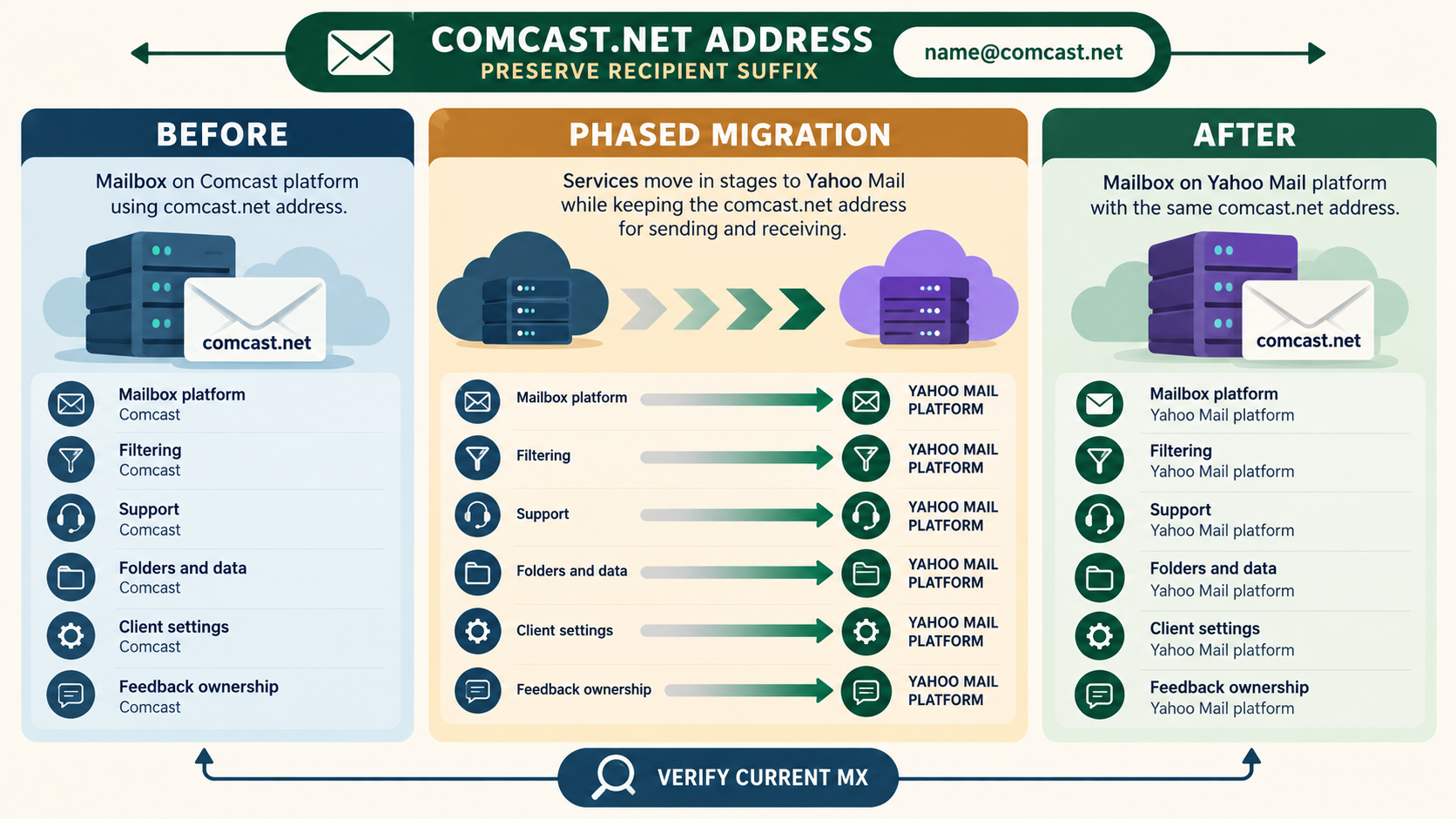
Comcast began inviting active comcast.net mailbox users to move their mailbox experience to Yahoo Mail in June 2025, with invitations rolling out gradually through 2026. The user keeps the same @comcast.net address, but after accepting Yahoo’s terms for that mailbox, Yahoo becomes the access provider. The migration is per mailbox, not one universal domain cutover, and it does not automatically preserve every message, contact, filter, forwarding rule, password relationship or third-party client setting.
What is verified about the migration?
| Fact | Verified provider statement | Operational meaning |
|---|---|---|
| Rollout | Invitations began in June 2025 and roll out gradually through 2026. | Do not assign one universal cutover date to every comcast.net mailbox. |
| Eligibility | Active comcast.net accounts, including current and former Xfinity customers, can be invited. Xfinity defines active as signed in within the past two years. | Activity and invitation evidence belong to the mailbox, not the recipient domain as a whole. |
| Activation | The user signs in at connect.xfinity.com and accepts Yahoo terms when prompted. | An unsolicited email link alone is not the trusted activation path. |
| Multiple accounts | Every active comcast.net mailbox is treated separately and must accept the terms separately. | One migrated address does not prove that another address under the same Xfinity account migrated. |
| Address continuity | The comcast.net email address remains the same. | Senders should not rewrite recipients to yahoo.com or create replacement addresses. |
| Provider after acceptance | Yahoo Mail becomes the email provider and the user accesses the mailbox through Yahoo. | The visible address and underlying mailbox platform become separate facts. |
Xfinity’s current documentation describes an offered upgrade and a phased invitation process. It does not establish that every active mailbox moved on the same date. An article should therefore say “migration through 2026,” not claim a completed domain-wide switch without later provider evidence.
What changes and what stays the same?
| Layer | Before acceptance | After acceptance | What does not follow automatically |
|---|---|---|---|
| Email address | [email protected] | [email protected] | No conversion to [email protected]. |
| Webmail | Xfinity Email access. | Yahoo Mail access. | Old webmail remains unavailable after acceptance. |
| Mailbox data | Messages, folders and contacts held in Xfinity Email. | Most eligible data is migrated to Yahoo Mail. | Items outside documented limits need separate handling. |
| Third-party client | Configured for Xfinity mail service. | Must use Yahoo IMAP, POP or SMTP details. | Old server settings are not expected to keep working. |
| Filters and preferences | User-managed Xfinity settings. | User configures the preferred Yahoo experience. | Filters, forwarding and other settings are not retained. |
| Password administration | Xfinity password process applies. | Yahoo password process applies to the migrated mailbox. | A later Yahoo mailbox-password change does not change the Xfinity account password. |
| Sender delivery | Sender resolves current comcast.net routing and receives provider responses. | Sender still addresses [email protected] and follows current DNS and SMTP responses. | The sender cannot determine acceptance of Yahoo terms from the address alone. |
The most visible continuity is the address. Contacts can continue sending to [email protected]. The important discontinuity is administration: webmail, account recovery, mailbox settings and external-client endpoints follow Yahoo after acceptance.
This is a per-mailbox transition
Xfinity says every active mailbox is treated separately. A household or former customer can have several comcast.net addresses with different invitation or acceptance states. Support records, testing and migration inventories must therefore name the exact mailbox without publishing its local part unnecessarily.
Do not infer state from another family member’s experience, from one test recipient, or from the domain’s public MX record. Those observations answer different questions.
Mailbox migration flow
Per-mailbox migration path

Active [email protected] mailbox
        |
        v
Invitation appears after secure connect.xfinity.com sign-in
        |
        v
User reviews and accepts Yahoo terms for this mailbox
        |
        +---- not accepted ----> mailbox remains on its current pre-migration path
        |
        v
Eligible messages, folders and contacts are copied or transformed
        |
        v
Yahoo Mail becomes the access provider
        |
        +---- webmail: mail.yahoo.com
        +---- clients: Yahoo IMAP, POP and SMTP settings
        +---- filters and forwarding: rebuild when still required
Which mailboxes are eligible?
Xfinity describes all active comcast.net accounts as eligible, including accounts used by current and former Xfinity customers. Its migration FAQ defines active as having signed in within the previous two years. That is a provider eligibility definition, not a sender permission rule and not proof that a subscriber still wants commercial email.
A sender should never use migration eligibility to revive an inactive marketing recipient. Consent, expectation, suppression and recent meaningful engagement remain independent controls.
How a user should identify the real invitation
Xfinity states that the reliable prompt appears after the user securely signs in at connect.xfinity.com. Its safety guidance says migration emails come from [email protected], and official messages show the Xfinity verified-email logo in Xfinity webmail. A logo is supporting interface evidence, not permission to disclose credentials.
The user should navigate to Xfinity independently rather than follow a surprising urgent link. Xfinity says it will not ask the user to reply with a password or sensitive information. Terms acceptance occurs after secure Xfinity sign-in and redirection to Yahoo’s official site.
Mailbox data does not migrate without limits
| Migration item | Documented limit or behavior | User action before acceptance |
|---|---|---|
| Messages with attachments over 25 MB | They are not migrated. Xfinity says affected mail is placed separately and the user is given 30 days to retrieve it. | Download and preserve required messages before the deadline. |
| Unformatted messages | Xfinity states that unformatted messages are not moved. | Identify and export any required exceptional mail. |
| Folders | Up to 4,100 folders move; excess folders are consolidated. | Reduce or consolidate excessive folder structures and document important paths. |
| Folder-name length | Names longer than 240 characters are truncated. | Shorten names where the exact name has operational meaning. |
| Contacts | Up to 10,000 contacts move; contacts above the limit are lost from the migration. | Export, deduplicate and reduce contacts before migration. |
| Names matching Yahoo system folders | User-created folders such as Sent or Drafts can be renamed. | Record expected folders and verify their post-migration names. |
| Filters and forwarding | They do not migrate. | Export or document each rule and rebuild only still-needed behavior in Yahoo Mail. |
“Messages, folders and contacts stay the same” is a useful summary but incomplete without the documented exceptions. A pre-migration inventory protects the user from discovering the limits only after the old access path is gone.
Messages with large attachments
Xfinity says messages whose attachments total more than 25 MB are not moved. It describes a separate Xfinity Email folder and a 30-day retrieval period for affected items. Users should download required messages and verify local files before acceptance rather than assume an export succeeded because a filename exists.
Preserve the complete message where possible, not only the attachment. Headers, sender identity, dates and thread context can be important for legal, financial or support records.
Folders and contacts need a count before migration
Yahoo’s migration path accepts up to 4,100 folders and 10,000 contacts per mailbox according to Xfinity. Excess folders can be consolidated and excess contacts can be lost. Folder names longer than 240 characters are truncated, while names conflicting with Yahoo system folders can be renamed.
Record total counts and a small set of critical folder names before migration. After migration, compare totals, search for known messages and inspect renamed system-folder conflicts. Count equality alone does not prove content equality, but a large difference identifies where to investigate.
Filters and forwarding do not migrate
Xfinity explicitly says email settings, including filters and forwarding, are not retained. Forwarding stops after upgrade unless the user creates a new rule in Yahoo Mail. This can look like lost mail when the real failure is an access automation that no longer exists.
Before migration, document each necessary filter and destination. After migration, rebuild only rules that are still required, verify the destination, send controlled tests and protect the destination account with strong authentication.
Third-party mail clients must be reconfigured
| Function | Yahoo setting documented for migrated Comcast mail | Security note |
|---|---|---|
| Username | Full comcast.net email address. | Do not substitute a yahoo.com address. |
| IMAP incoming | imap.mail.yahoo.com on port 993 with SSL/TLS. | Use IMAP when mailbox state should remain synchronized across devices. |
| POP incoming | pop.mail.yahoo.com on port 995 with SSL/TLS. | POP behavior can download or remove copies depending on client settings. |
| SMTP outgoing | smtp.mail.yahoo.com on port 465 or 587 with authentication and encryption. | Use authenticated submission, not direct unauthenticated port 25 delivery. |
| Credential | The mailbox password or, when needed, a generated Yahoo app password. | Never send an app password by email or reuse it outside the named client. |
Outlook, Apple Mail, iOS Mail, Android mail apps and other clients can continue to access the comcast.net mailbox only after their service settings are changed to Yahoo. The full comcast.net address remains the username and email identity.
Reference client configuration
[identity]
email = [email protected]
username = [email protected]

[imap]
server = imap.mail.yahoo.com
port = 993
encryption = SSL/TLS

[pop]
server = pop.mail.yahoo.com
port = 995
encryption = SSL/TLS

[smtp]
server = smtp.mail.yahoo.com
port = 465 or 587
authentication = required
encryption = required

[credential]
value = mailbox password or Yahoo-generated app password when required
storage = operating-system credential store, not a shared document
The example records provider-documented values, not a client-specific click path. Menu labels vary by operating system and app version. Prefer modern OAuth where the supported client offers it. When Yahoo requires an app password, generate a separate credential for the client and revoke it when the device or app is retired.
Password ownership changes after acceptance
Before acceptance, Xfinity account recovery governs the mailbox. After acceptance, Xfinity directs the user to Yahoo’s password-reset process. Xfinity also states that changing the migrated Yahoo mailbox password no longer changes the Xfinity account password.
This creates two credentials with different scopes. Store them separately, enable available multi-factor protection, avoid password reuse and update recovery information before an emergency.
The support boundary moves too
Xfinity directs users who have not migrated to Xfinity support and migrated users to Yahoo support. A useful support ticket must state whether terms were accepted, whether Yahoo webmail works, which client fails, the UTC test time and the exact error without including passwords or app passwords.
What changes for senders?
Sender path for [email protected]

Campaign or transactional system
        |
        v
Resolve current MX for comcast.net
        |
        v
Connect to returned public MX over SMTP and negotiate TLS
        |
        v
Submit RCPT TO:<[email protected]>
        |
        +---- 250 accepted --> retain delivery event, await downstream evidence
        +---- 4xx deferred --> queue and retry with controlled backoff
        +---- 5xx permanent -> classify exact code before suppression

The sender never changes the recipient to @yahoo.com.
The MX route does not reveal whether one user accepted Yahoo terms.
Senders do not migrate the address. Their MTA resolves the current MX for comcast.net and submits to the returned infrastructure. Hard-coded Comcast or Yahoo receiving hosts are unsafe because DNS is the routing authority and can change during a phased transition.
MX records cannot identify one mailbox’s migration state
MX applies to the recipient domain, while acceptance of Yahoo terms is per mailbox. Comcast and Yahoo can operate internal routing that directs different users through different states behind the public edge. A sender-side DNS observation proves the route advertised at that time, not a subscriber’s terms acceptance or webmail platform.
Record resolver, UTC time, MX target, preference and TTL. During changes, cached answers can differ until TTLs expire. That does not by itself prove a fault.
Interpret sender evidence carefully
| Sender observation | Safe conclusion | Unsafe conclusion |
|---|---|---|
| Current MX answer for comcast.net | The public receiving route selected for that DNS observation. | That every mailbox has accepted Yahoo terms. |
| 250 SMTP acceptance | The receiving system accepted responsibility for that recipient transaction. | Inbox placement, reading, or permanent mailbox migration completion. |
| 4xx deferral | The receiver asks the sender to retry according to queue policy. | The address is invalid or should be suppressed immediately. |
| 5xx invalid-recipient response | That recipient transaction failed permanently under the returned code. | All comcast.net recipients are invalid. |
| Yahoo-style filtering or headers | The observed message may have passed through Yahoo-operated infrastructure. | The user completed every migration step or retained all settings. |
| User confirms Yahoo webmail access | That user can access the migrated mailbox through Yahoo. | That forwarding, filters, contacts, and every historical message migrated correctly. |
Yahoo filtering can change outcomes without changing the address
After mailbox processing moves to Yahoo, provider filtering, reputation interpretation, complaint handling and user-interface placement can reflect Yahoo systems. A sender may observe a distribution change even though the recipient address and campaign stayed the same.
Do not respond by rotating IPs, domains or creative simultaneously. Segment comcast.net recipients, preserve one known-good control, inspect authentication and exact SMTP responses, and compare a complete observation window.
Yahoo sender requirements still apply on their own terms
Mailbox migration is not allowlisting. Senders still need permission-based acquisition, valid forward and reverse DNS, TLS, RFC-compliant messages, aligned SPF and DKIM under DMARC, low complaint rates and easy unsubscribe for applicable marketing mail. Current Yahoo Sender Hub documentation is the authority for the applicable sender program.
Passing authentication proves authorized identities for the observed message. It does not prove that recipients asked for the message, that reputation is healthy or that mail reached Inbox.
Keep comcast.net reporting as its own recipient cohort
Even when Yahoo operates the mailbox platform, retain the original recipient domain in analytics. Combining comcast.net directly into yahoo.com can hide acquisition age, subscriber expectations and a migration-specific outcome shift.
Track attempted, accepted, deferred, permanently rejected, complained, unsubscribed, clicked and converted events with named denominators. Missing provider feedback is unknown, not zero.
Do not rewrite bounce classifications because of the migration
A 4xx is a temporary receiver response and should stay in a bounded queue with controlled backoff. A 5xx must be classified from its enhanced status and text. Suppress a recipient for a confirmed permanent address failure according to policy, but do not suppress the whole comcast.net domain because one mailbox fails.
Retain queue ID, recipient domain, MX, connecting IP, TLS result, SMTP code, response text, attempt time and final outcome. A dashboard label such as “Yahoo bounce” is not enough when the raw response is available.
Evidence and allowed conclusions
| Evidence | What it proves | What remains unknown |
|---|---|---|
| Official invitation shown after secure Xfinity sign-in | That Xfinity offered migration to that signed-in mailbox. | Whether the user completed acceptance and data movement. |
| Yahoo terms acceptance confirmation | That the account crossed the documented service boundary. | Completeness of every message, contact and setting. |
| Pre and post mailbox inventory | Observed counts and named folders on both platforms. | Items not visible or exported by the chosen inventory method. |
| Third-party client connection log | The client authenticated to the stated Yahoo IMAP or SMTP service. | Webmail behavior and delivery placement for other messages. |
| Sender DNS and SMTP log | Resolved MX, target, TLS, response, queue and retry evidence. | The recipient’s UI, invitation, terms status or local filters. |
| Complete received EML | The route and provider-generated headers for one delivered message. | All recipients, messages, folders and future filtering decisions. |
Troubleshoot the first failed boundary
First failed boundary investigation

Cannot see invitation
  -> verify correct mailbox, active status and secure Xfinity sign-in

Accepted terms but webmail fails
  -> use Yahoo account recovery and Yahoo support boundary

Webmail works but Outlook or phone fails
  -> replace Xfinity servers with Yahoo servers, full address and app password

Mail arrives but forwarding stopped
  -> forwarding did not migrate; create and test a new Yahoo forwarding rule

Folders or contacts are missing
  -> compare pre-migration inventory with documented limits and renamed folders

Sender sees deferrals
  -> preserve exact MX, TLS and SMTP response; do not blame migration from timing alone
Changing several layers at once destroys diagnosis. Confirm webmail first, then account credentials, then one third-party client, then filters and forwarding. Sender-side incidents follow a separate route from DNS through SMTP and final mailbox evidence.
Mailbox-owner migration checklist
- Sign in at connect.xfinity.com directly and confirm the invitation for the exact mailbox.
- Inventory messages with large attachments, folders, contacts, filters and forwarding.
- Export critical messages and contacts before acceptance.
- Record devices and applications using the mailbox.
- Review Yahoo terms and accept them only through the secure provider flow.
- Verify Yahoo webmail access with the unchanged comcast.net address.
- Compare critical folders, messages and contacts against the inventory.
- Rebuild required filters and forwarding.
- Update clients to Yahoo endpoints and use an app password when required.
- Test inbound, outbound, Sent, Drafts, attachments, search and forwarding.
- Store recovery information and credentials securely.
- Contact the correct provider according to migration state.
Sender and deliverability checklist
- Preserve comcast.net as a distinct recipient-domain cohort.
- Use current DNS MX answers and remove hard-coded receiving routes.
- Verify SPF, DKIM, DMARC alignment, PTR and TLS on real samples.
- Retain exact SMTP replies and classify 4xx and 5xx separately.
- Compare outcomes before, during and after observed routing changes.
- Keep permission, suppression and one-click unsubscribe controls active.
- Do not infer mailbox migration from MX, headers or one test recipient alone.
- Change one bounded variable at a time when remediating.
- Monitor complaints and engagement by original recipient domain.
- Recheck current Yahoo Sender Hub requirements before a large send.
Common misconceptions
- “The address becomes yahoo.com” is false; Xfinity says the comcast.net address stays.
- “All mailboxes changed on one date” conflicts with the gradual invitation and per-mailbox acceptance model.
- “All mailbox data moves” ignores attachment, folder, contact and naming limits.
- “Forwarding continues” conflicts with Xfinity’s statement that forwarding does not migrate.
- “Old Outlook settings keep working” ignores the required Yahoo client configuration.
- “MX proves this user migrated” confuses domain routing with mailbox state.
- “Yahoo now accepts every Comcast message” confuses infrastructure migration with filtering and reputation.
- “A 250 response proves Inbox delivery” overstates SMTP acceptance.
Current status and review boundary
As reviewed on November 11, 2026, Xfinity’s official page still describes invitations beginning in June 2025 and rolling out gradually through 2026. The process remains mailbox-specific and requires the user to accept Yahoo terms. This article does not claim that every comcast.net mailbox has migrated.
Provider instructions, client endpoints and security controls can change. Users and operators should verify the maintained Xfinity and Yahoo pages immediately before a migration or troubleshooting action.
Primary provider references
- Xfinity: Upgrade your comcast.net email experience to Yahoo Mail: Official rollout, eligibility, per-mailbox acceptance, retained address, migration limits, settings, forwarding, password and support boundaries.
- Yahoo Help: Comcast.net email accounts moving to Yahoo Mail: Official Yahoo setup instructions for webmail, third-party clients, IMAP, POP, SMTP and app passwords.
- Xfinity: Identify official migration emails: Official sender, secure sign-in, verified-logo and anti-phishing guidance for the migration.
- Yahoo Sender Hub: Sender best practices: Current sender-side authentication, infrastructure, complaint and unsubscribe guidance.