Email Design and Layout: Responsive, Accessible and Testable
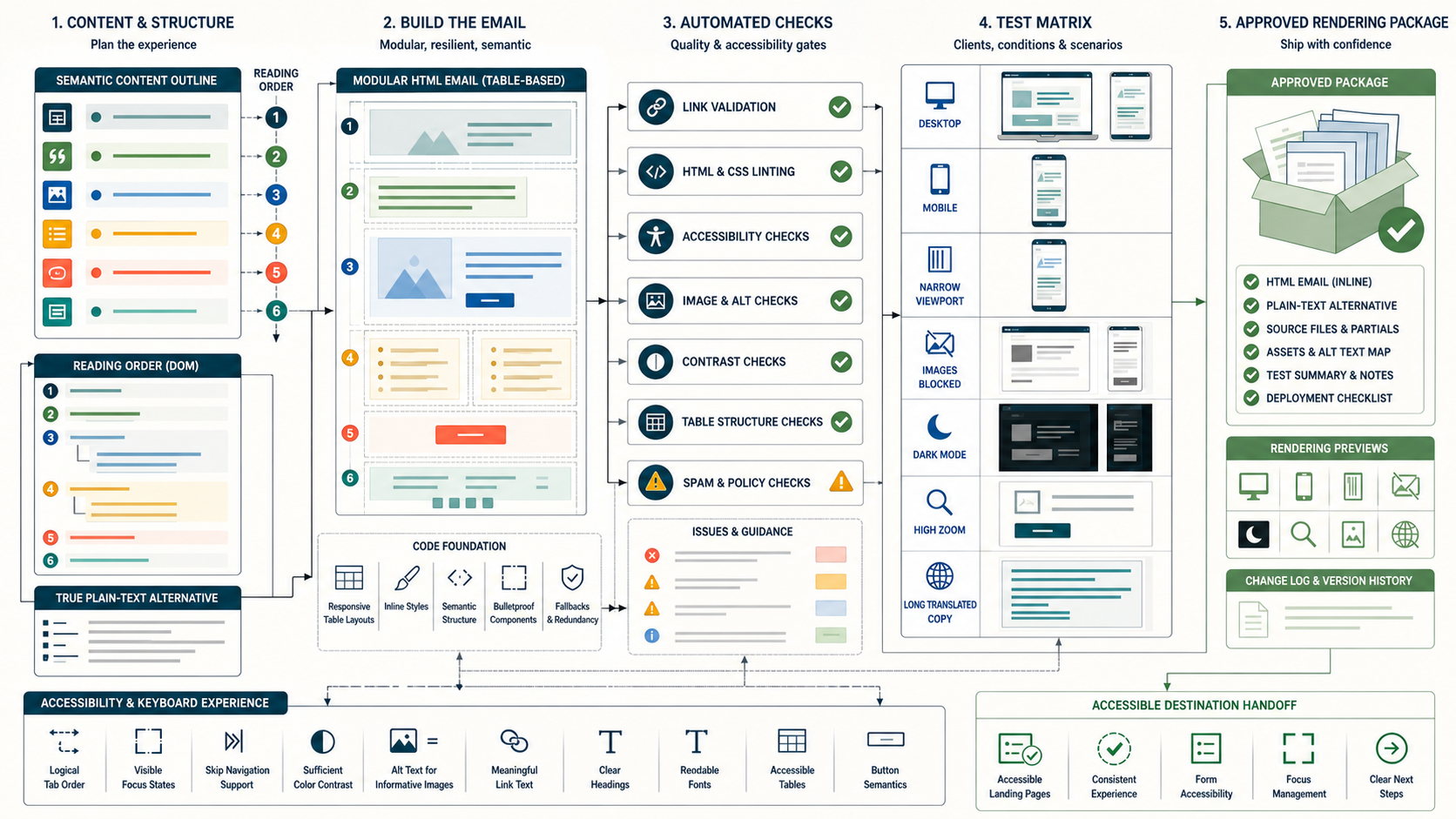
Email design is the engineering of meaning under constrained and inconsistent client support. A layout should remain understandable on a narrow screen, with images blocked, in dark mode, under zoom and through assistive technology. That requires semantic content order, resilient table-based structure where needed, live text, accessible contrast, meaningful alternatives, reliable links, a complete plain-text part and a test matrix based on the real audience.
Define the operating decision before choosing tactics
Choose and validate a layout system that communicates the message hierarchy and action correctly across the supported mailbox-client and accessibility matrix.
For Email Design and Layout, write the eligible population, excluded population, decision owner, effective time, expiry and expected recipient benefit before selecting software or creative. This prevents a dashboard metric from becoming the goal and gives reviewers a concrete standard for rejecting unsafe or irrelevant execution.
Separate adjacent problems that need different controls
| In scope | Separate decision | Why separation matters |
|---|---|---|
| Visual mockup | Email implementation | Web CSS support cannot be assumed |
| Responsive | Mobile app scaling | True reflow differs from shrinking |
| Dark mode | Brand palette | Clients may transform colors differently |
| Alt text | Image replacement | Alternatives convey purpose, not every pixel |
| Rendering test | Inbox placement | A correct layout does not prove delivery |
Within Email Design and Layout, a clean boundary keeps one favorable signal from overriding a harder requirement. Permission, suppression, identity, product state, provider acceptance and business outcome remain distinct even when one platform displays them together.
Choose the correct identity and decision unit
The primary Email Design and Layout decision unit is an exact HTML and plain-text message artifact rendered through a defined client, viewport and accessibility test case. Define when person, address, account, household, device, order, campaign and receiving-provider state may be joined. Record the join source, confidence, effective time and collision behavior. A shared mailbox, forwarded message or security scanner must not silently become evidence about one individual.
Minimize downstream data for Email Design and Layout. Rendering and dispatch systems usually need the selected treatment and reason code, not an unrestricted behavior history. When identity is uncertain, choose a neutral fallback or hold the action instead of forcing a match.
Build an effective-dated evidence contract
| Evidence | Operational use | Freshness or caution |
|---|---|---|
| Audience client matrix | Prioritize supported environments | Use current aggregate and program data |
| Semantic content outline | Preserve reading order | Independent of visual columns |
| Component version | Reproduce markup and styles | Immutable per artifact |
| Rendered captures and assertions | Observe representative clients | Label platform and time |
| Accessibility review | Evaluate perceivable and operable path | Include destination |
Every Email Design and Layout input needs an owner, timestamp, completeness watermark and null behavior. Keep occurrence time separate from ingestion time. A late source should produce an explicit unknown state; treating missing data as a negative signal creates confident but wrong decisions.
Represent the workflow as cancellable states
message brief -> semantic outline
outline -> modular resilient components
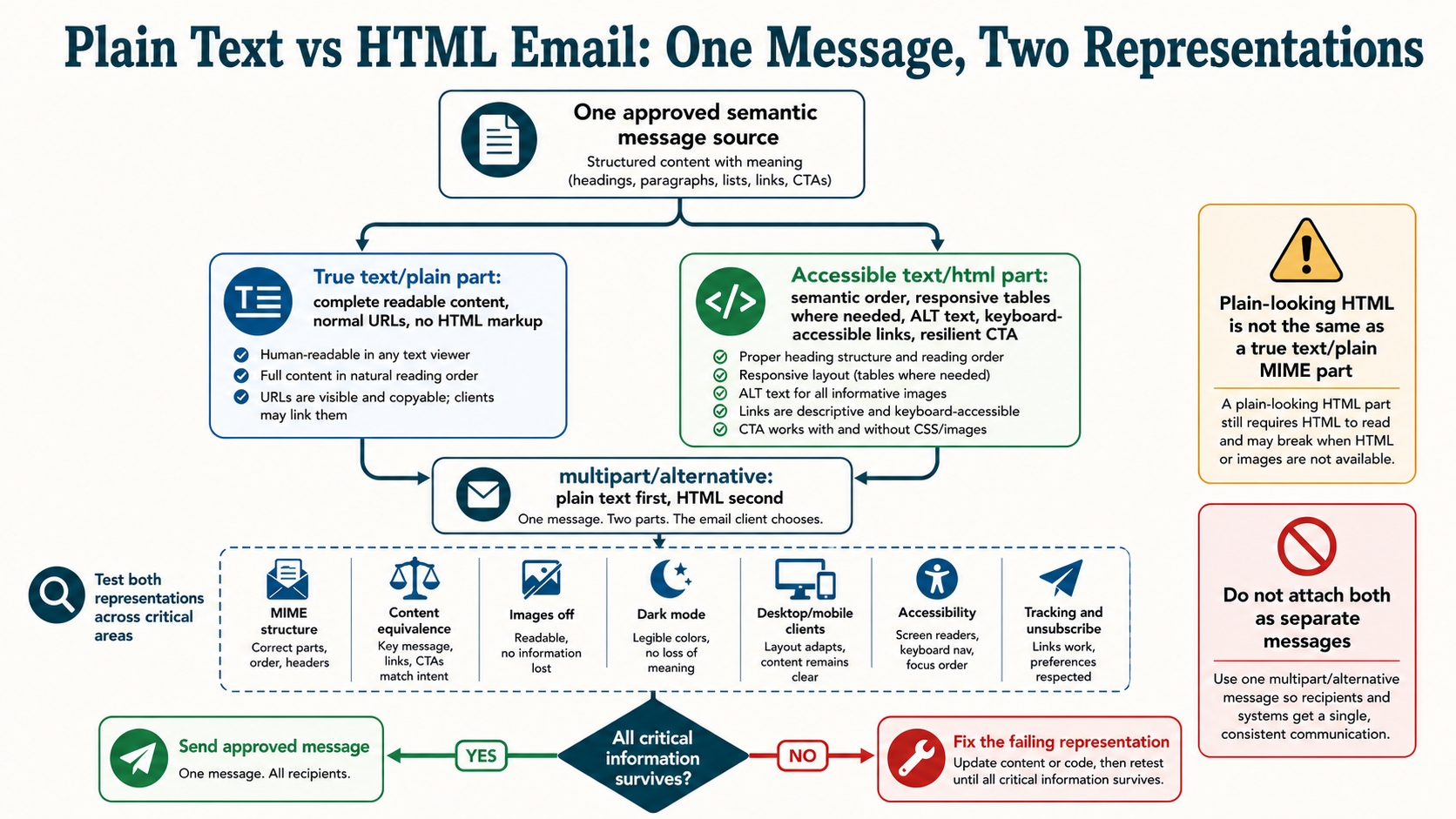
components -> HTML + true plain-text alternative
artifact -> lint, link and accessibility checks
seed -> client, viewport, images-off and dark-mode matrix
approved render -> controlled release and defect monitoring
Each Email Design and Layout transition needs an entry reason, earliest action, useful-until time, cancellation events and terminal state. Re-evaluate current permission, suppression and business state immediately before dispatch. A queue is not authorization to send after the original condition disappears.
Apply hard gates before optimization rules
| Gate | Pass condition | Failure response |
|---|---|---|
| Content hierarchy | Reading order works without styling | Return to outline |
| Markup validity | Required structure and links pass | Fix component |
| Accessibility | Contrast, alternatives and semantics pass | Block release |
| Client coverage | Critical clients complete primary task | Fix or document bounded fallback |
| Destination | Action path is responsive and accessible | Do not ship email alone |
Hard gates for Email Design and Layout should be deterministic and observable. A model score, predicted revenue or creative winner cannot override a complaint, applicable unsubscribe, invalid destination, expired event or material data uncertainty. Reserve capacity only after eligibility passes, then release the reservation when the action is canceled.
Implement the system in bounded stages
- Start from a text outline with one H1-like message heading, logical sections, lists and a clear primary action.
- Use a tested component library for wrapper, columns, spacing, buttons, dividers and images instead of copying arbitrary campaign HTML.
- Keep important copy as live text and provide meaningful alt text or empty alternatives for decorative images.
- Inline or place CSS according to tested client support, with safe widths, reflow and touch targets.
- Generate a genuine plain-text alternative from the same semantic source and review it as content.
Promote the same versioned Email Design and Layout rules, templates and schemas through test and production. Shadow evaluation before activation reveals population changes without contacting recipients. Start with a bounded cohort whose expected count and provider distribution have been reviewed.
Test data quality at the decision boundary
For Email Design and Layout, reconcile source records to eligible, excluded, unknown, selected, canceled, attempted, accepted and completed states. Test duplicates, late arrivals, deletion, identity merges, timezone boundaries and one-to-many joins. Sample decisions immediately above and below every threshold.
The team should reproduce why one an exact HTML and plain-text message artifact rendered through a defined client, viewport and accessibility test case received or did not receive a treatment using the versions and watermarks available at that time. A current dashboard is not sufficient historical evidence for Email Design and Layout.
Use positive, negative and adversarial fixtures
- The message is complete at narrow viewport and 200 percent zoom without horizontal task loss.
- Images off preserves sender, value, conditions and action.
- Dark-mode transformation retains readable text, boundaries and logo alternatives.
- Screen-reader reading order follows the intended semantic sequence.
- Long translations and fallback fonts do not overlap or truncate material copy.
Fixtures for Email Design and Layout must assert both the selected output and the reason. Run them after changes to data mapping, templates, model versions, providers, links and destination pages. Include accessibility and plain-text behavior, not only a screenshot of the preferred desktop client.
Publish metrics with numerator, denominator and maturity
| Measure | Definition | Decision supported |
|---|---|---|
| Critical render pass rate | Passing client-fixture pairs divided by required matrix | Release readiness |
| Defect escape rate | Production layout incidents divided by releases | System quality |
| Qualified task completion | Valid destination task divided by accepted exposure | End-to-end usability |
| Accessibility defects | Severity-weighted findings by component | Inclusive quality |
| Template reuse and drift | Messages on current component versions | Maintainability |
Report Email Design and Layout counts beside rates and expose data latency. Opens are not a reliable universal person-level outcome because images can be blocked or privacy-prefetched. Qualify automated clicks and allow enough time for conversion, cancellation, refund or repeat behavior before declaring business value.
Separate attribution from incrementality
For Email Design and Layout, last-click and platform-attributed outcomes answer which recorded touch received credit; they do not prove that the treatment caused the outcome. Use randomized treatment and holdout where ethical and practical, keep assignment stable, and prevent equivalent exposure through another journey. If randomization is unavailable, document the comparison design and its remaining bias.
topic = Email Design and Layout
incremental outcome = treatment outcome rate - holdout outcome rate
incremental value = mature net value in treatment - mature net value in holdout
guardrails = complaints + unsubscribes + support harm + provider failures
Operate by receiving provider and sending stream
For Email Design and Layout, forecast attempted volume by receiving organization, hour, identity and message category. Monitor complete SMTP replies, queue age, deferrals, hard failures, complaint signals and authentication results without blending transactional and promotional streams. A healthy global acceptance rate can hide one damaged provider cohort.
Do not rotate domains or IP addresses to escape a Email Design and Layout permission, targeting or content problem. Reduce the affected population, preserve evidence and correct the cause. Volume increases require stable provider evidence, not a calendar percentage.
Minimize personal data and protect decision artifacts
Collect only data needed for the declared Email Design and Layout purpose, limit access, define retention and prevent live personal data from entering prompts, tickets, screenshots or test fixtures. Sensitive attributes and inferred vulnerability require stricter review. URLs, tracking parameters and template comments must not expose internal segments or private facts.
Protect Email Design and Layout webhooks and feedback events with authentication, replay controls and idempotency. A forged conversion, complaint or preference event can select the wrong content or suppress the wrong person. Log decisions without logging secrets.
Make the complete experience understandable and operable
For Email Design and Layout, use semantic structure, readable hierarchy, sufficient contrast, descriptive links, meaningful image alternatives and a useful plain-text MIME alternative. Keep material conditions and the primary action available without images. Test zoom, image blocking, dark mode, keyboard access to destinations and representative assistive technology.
The Email Design and Layout accessibility review includes the landing page, preference center, form, checkout and cancellation path. A visually attractive message is not successful when the next step cannot be completed.
Diagnose recurring failure patterns
| Failure | Likely cause | First safe action |
|---|---|---|
| Desktop looks right, mobile breaks | Fixed widths or unsupported CSS | Use responsive tested components |
| Text disappears in dark mode | Color transformation conflict | Add robust color and boundary treatment |
| Screen reader reads columns wrong | Visual order differs from DOM | Rebuild semantic order |
| Button absent images-off | Image-based CTA | Use live linked text |
| Test vendor passes, user fails | Coverage gap or destination defect | Add fixture and inspect end-to-end |
During a Email Design and Layout failure, pause the narrowest unsafe cohort or rule. Preserve assignments, source watermarks, selected versions, provider acknowledgements and destination behavior before changing the system. Correct one boundary at a time so recovery evidence remains interpretable.
Scenario: a two-column promotion reflows badly
The visual design puts price before product name in the DOM to achieve desktop alignment. On mobile and screen readers, meaning breaks. The component is rebuilt with logical source order and progressive desktop positioning.
Scenario: dark mode removes the action
A client changes the button background but not nearby text, causing poor contrast. The team adds tested color declarations, border and live-text treatment, then validates representative clients. It does not embed the whole button as an image.
Scenario: plain text reveals hidden complexity
The generated text alternative lists thirty tracking and navigation URLs before the primary action. Editorial review reduces nonessential links and writes a curated text part with headings, concise labels and the same material terms.
Contain and recover from a bad release
- Pause the affected rule, cohort, template or route while preserving necessary service communication.
- Capture source watermarks, assignments, artifact versions, queued actions and downstream acknowledgements.
- Apply current complaints, unsubscribes, hard bounces and terminal business events before replay.
- Correct the causal boundary and run the full fixture suite in shadow mode.
- Cancel obsolete work instead of emptying the backlog through stale sends.
- Resume a bounded cohort under provider, complaint and business guardrails.
- Close only after delayed outcomes mature and counts reconcile.
The postmortem for Email Design and Layout must identify the failed assumption, actual blast radius, customer correction, durable control and owner.
Keep a versioned catalog and decision ledger
Catalog the Email Design and Layout audience, purpose, permission scope, inputs, precedence, content or rule versions, maximum exposure, experiment, owner, stop condition and retirement date. Detect copied workflows that no longer inherit the approved suppression and frequency policy.
Record each material Email Design and Layout decision with hypothesis, evidence window, guardrails, uncertainty and resulting action. Expire claims, offers, models and exceptions. Retirement includes disabling triggers, canceling timers and confirming no regional or provider copy remains active.
Create an approval record that can survive an incident
The accountable Email Design and Layout owner signs the intended recipient benefit, eligibility logic, data versions, message and destination, provider forecast, experiment, safety exclusions, monitoring window and rollback trigger. Data, legal or policy, accessibility, deliverability and business owners approve their boundaries rather than giving a generic campaign approval.
The Email Design and Layout approval expires when a material audience, claim, source, provider, template, offer or destination changes. Emergency exceptions need a named owner, narrow scope, compensating control and expiry.
Email Design and Layout release data contract
The release package must make the leading evidence relationship explicit: Audience client matrix; Prioritize supported environments; Use current aggregate and program data. Store the source snapshot, completeness watermark, decision timestamp, rule version, selected reason, exclusion reasons and downstream acknowledgement. Reconcile expected and actual counts before expanding exposure.
Document the owner for every field and what Email Design and Layout does when the source is missing, late, duplicated or contradictory. The contract should be small enough to review and strong enough to reproduce a customer question months later without querying today current profile.
Email Design and Layout uncertainty and review cadence
The primary measurement relationship is Critical render pass rate; Passing client-fixture pairs divided by required matrix; Release readiness. Publish uncertainty, data latency and maturity beside it. During launch, review provider and safety evidence at a cadence fast enough to stop harm; after stabilization, move to scheduled drift and cohort reviews without losing alert ownership.
For Email Design and Layout, compare observed distribution with the approved population and inspect boundary samples. A stable average does not excuse unexplained unknowns, one provider divergence or a small cohort with serious negative outcomes.
Email Design and Layout capacity and economics
The first implementation priorities are Start from a text outline with one H1-like message heading, logical sections, lists and a clear primary action.; Use a tested component library for wrapper, columns, spacing, buttons, dividers and images instead of copying arbitrary campaign HTML.. Estimate data, engineering, creative, review, provider, support and incident cost before scaling. Capacity includes human review and customer support, not only messages per hour.
Measure marginal mature Email Design and Layout value after variable cost and recipient harm. A treatment that increases attributed activity but overloads support, creates refunds or requires constant manual correction is not operationally successful. Record which constraint binds the next release.
Email Design and Layout retirement and evidence closure
The leading failure pattern is Desktop looks right, mobile breaks; Fixed widths or unsupported CSS; Use responsive tested components. Retirement should stop new selection, cancel obsolete actions, remove copied and regional triggers, disable dependent offers or models, and preserve the final artifact plus aggregate decision evidence. Apply retention and deletion policy to raw personal data.
Confirm that providers, CRM, warehouse, sales automation and preference systems no longer activate the treatment. Close the catalog entry with reason, effective time, owner and any replacement. A hidden orphaned workflow means Email Design and Layout is still operational.
Email Design and Layout completion checklist
- Semantic content order precedes visual layout.
- Critical information is live text.
- Component support is tested, not assumed.
- Mobile reflow preserves meaning and action.
- Contrast and non-color cues are adequate.
- Images have purposeful or empty alternatives.
- Dark mode, zoom and image blocking are tested.
- Plain text is complete and intentionally edited.
- Client matrix reflects actual audience and risk.
- Destination accessibility is part of approval.
The Email Design and Layout implementation is ready only when the team can explain eligibility, treatment, evidence, cancellation and outcome for a real example without relying on a mutable dashboard or undocumented operator knowledge.
Choose a resilient content width and reflow model
A centered single-column reading area is the most robust base. Multi-column layouts need logical source order, defined stacking and enough space for translated text. Avoid fixed heights and absolute positioning. Use presentation tables only where client support requires them and mark them appropriately for assistive technology.
Viewport meta behavior and mobile apps vary, so test actual clients rather than relying on browser resize.
Use typography that survives fallback
Choose readable sizes, line height and measure with safe font stacks. Keep important text outside images. Do not depend on a web font loading. Use headings, paragraphs and lists to expose structure where client support permits, while preserving a coherent fallback.
Test bold, links and small legal text for contrast. Material conditions should not be reduced to barely readable copy.
Use images as content with reliable alternatives
Informative images need concise alternatives describing their purpose or information; linked functional images need text describing the action. Decorative images should use an empty alternative. Provide dimensions to reduce layout shift and responsive sizing to avoid overflow.
Optimize file size and format for the supported matrix. Never place a full offer, code or required instruction only inside an image.
Build accessible calls to action
Use a semantic anchor with live descriptive text, an HTTPS destination, sufficient contrast, spacing and a robust clickable area. Keep the same action available in plain text. Avoid generic labels when context may be lost.
Test Outlook-family rendering, Gmail clients, Apple clients and representative mobile environments. A bulletproof pattern still needs destination and tracking validation.
Treat dark mode as a transformation matrix
Some clients respect declared schemes, some partially invert colors and others apply broad transformations. Use transparent assets carefully, add appropriate padding or outlines where identity could disappear, and avoid color pairs that collapse under inversion.
Do not promise pixel identity. Define acceptable readable states and test screenshots plus programmatic contrast where practical.
Build a risk-based client test matrix
Use actual audience client data where reliable, plus business-critical and accessibility cases. Cover desktop, webmail, mobile, narrow viewport, images blocked, dark mode, zoom, long locale, plain text, forwarding and common security rewriting. Record client version and test date.
Automated screenshots find differences; human and programmatic assertions decide whether the message remains understandable and operable.
Primary references
- WCAG 2.2
- W3C Designing for Web Accessibility
- W3C Images Tutorial
- RFC 2046 multipart alternative
- RFC 5322 Internet Message Format