Exchange Online Plus Addressing: Routing, Configuration and Hybrid Limits
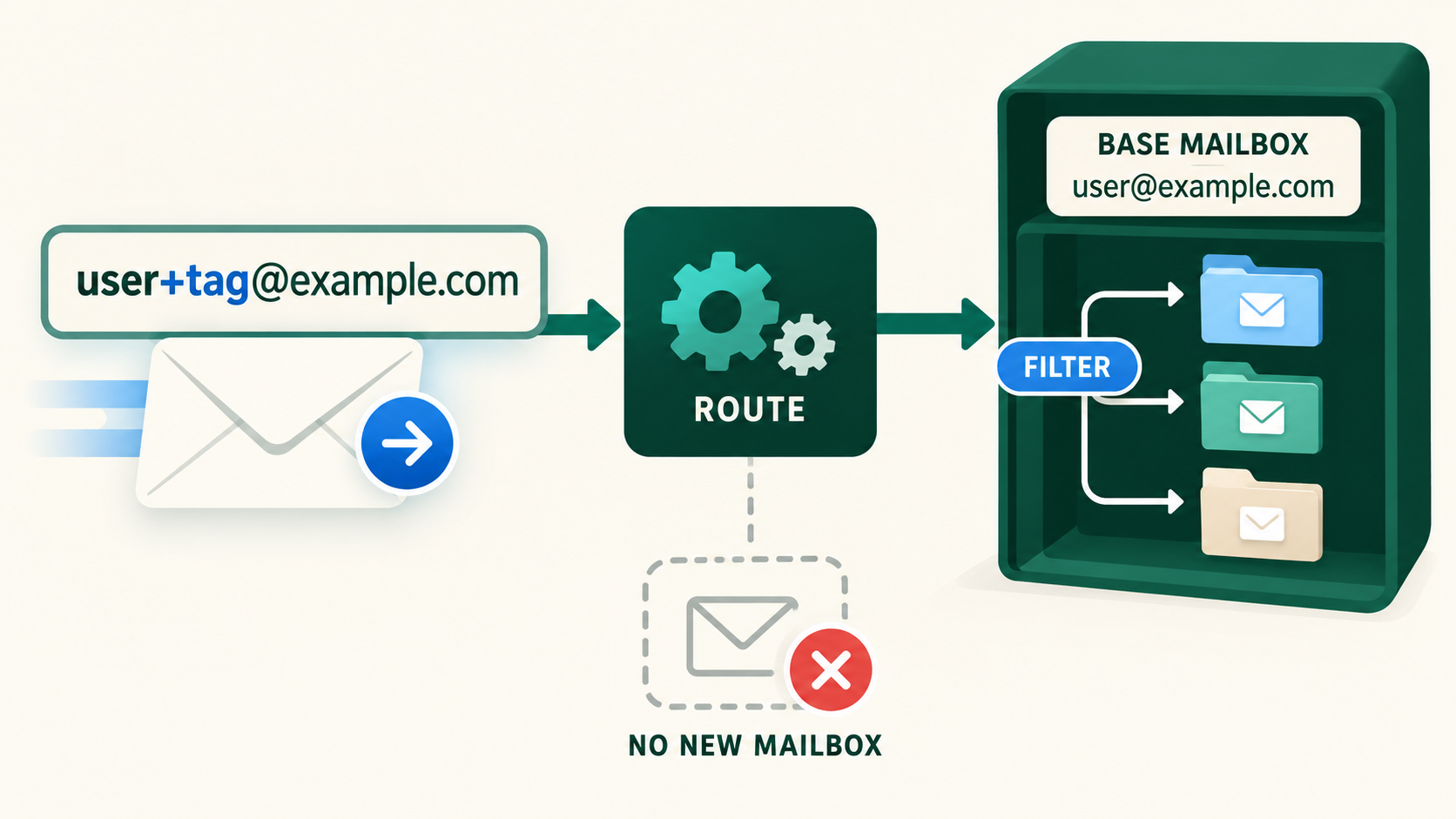
Exchange Online plus addressing lets a mailbox receive mail at dynamically tagged addresses such as [email protected] without an administrator creating each address. Exchange first tries the complete address. If it does not exist as a configured recipient, Exchange can remove the plus sign and tag and deliver to [email protected]. The tag helps users sort or identify incoming mail, but it is not a mailbox, alias or sender identity.
Everyday example: separate newsletters without creating aliases
- Sean already has the Exchange Online mailbox
[email protected]. - He registers with a newsletter using
[email protected]. - No administrator creates that tagged address in Exchange.
- The newsletter sends to the complete tagged address.
- Exchange Online first checks whether the complete address belongs to a known recipient.
- If no exact recipient exists, Exchange removes
+newsletterand resolves[email protected]. - The message reaches Sean's existing mailbox.
- An Inbox rule can move messages addressed to the tagged address into a Newsletter folder.
The practical benefit: one mailbox can use many receive-only labels without provisioning many aliases. Sean can tell which tagged address a sender used and can organize the resulting mail.
What is plus addressing?
Plus addressing, also called subaddressing, appends a plus sign and a tag to the local part of an existing address. The general form is local-part+tag@domain. The base address must already resolve. The tag can be chosen dynamically, subject to normal address-character restrictions, and does not create a separate mailbox object.
Microsoft describes Exchange Online plus addresses as dynamic, disposable recipient addresses. In this context, disposable means that a user can choose and stop using a tag without asking an administrator to provision another proxy address. It does not mean Exchange automatically blocks, expires or suppresses a tag.
Why would a user use it?
The feature has three practical uses. First, it lets a user create recognizable addresses for registrations, such as [email protected]. Second, it supports Inbox rules based on the recipient address. Third, a business workflow can place a bounded identifier such as a support case number in the tag.
A unique tag can help investigate where an address was used, but it is not conclusive leak attribution. A recipient, forwarder, browser extension, compromised account or copied message can expose the tagged address. Treat it as evidence for investigation, not proof against a particular company.
What Microsoft changed in 2020
Microsoft announced Exchange Online plus-addressing availability on October 27, 2020 after introducing the capability as an opt-in feature. The contemporary Exchange Team announcement highlighted user filtering and case-tracking systems as the main uses. Newer tenants received the capability by default, and Microsoft later moved the service to a default-enabled model while retaining an organization control to turn it off.
The historical launch state and the current tenant state are different facts. An old runbook using AllowPlusAddressInRecipients should not be copied into current operations. Current Microsoft documentation uses DisablePlusAddressInRecipients.
How Exchange Online resolves a plus address
| Step | Exchange Online action | Observed result | Why it matters |
|---|---|---|---|
| 1. Exact lookup | Try to resolve [email protected] as a known complete address. | If an exact recipient exists, deliver to that object. | A literal address containing a plus sign can take precedence. |
| 2. Plus fallback | If exact lookup fails and plus addressing is enabled, remove +newsletter and resolve [email protected]. | Deliver to the base mailbox when it exists. | The tag is routing metadata, not another mailbox. |
| 3. Failure | If neither complete nor base address resolves, reject according to normal recipient resolution. | No valid recipient is found. | A plus sign does not make an unknown base mailbox deliverable. |
| Hybrid boundary | Resolve against recipients known to Exchange Online before routing onward. | Unknown on-premises recipients can fail or be transformed incorrectly. | Directory synchronization and accepted-domain routing are part of the feature boundary. |
The exact-address lookup is important. Administrators historically could have literal proxy addresses containing a plus sign. Exchange does not blindly strip every tag first. It attempts the full address, then uses plus fallback if that resolution fails and the feature is available.
Resolution flow
Internet sender
  RCPT TO:<[email protected]>
                    |
                    v
            Exchange Online
                    |
        1. Resolve complete address
           [email protected]
                    |
             exact match found?
              /            \
            yes             no
             |               |
    deliver exact object     | 2. remove +newsletter
                             v
                     resolve [email protected]
                        /             \
                      found          not found
                        |               |
                 deliver to base      reject
                    mailbox
Plus address, alias and mailbox are not the same
| Address type | Example | Provisioned object | Receive | Send as | Best use |
|---|---|---|---|---|---|
| Primary address | [email protected] | Yes, on the mailbox | Yes | Yes | Normal mailbox identity. |
| Configured alias | [email protected] | Yes, as a proxy address | Yes | Subject to Exchange configuration and permissions | Stable alternate business identity. |
| Plus address | [email protected] | No | Yes when plus addressing applies | No | Dynamic receive-only tagging and filtering. |
| Shared mailbox address | [email protected] | Yes, as a separate recipient object | Yes | With assigned permissions | Team-owned correspondence and workflow. |
Use a configured alias when the address must be stable, visible in address books, governed by administrators or available as an approved From identity. Use a shared mailbox when a team owns the correspondence. Use a plus address when one existing mailbox needs receive-only tags that do not require object provisioning.
A plus address is receive-only
Microsoft explicitly states that users cannot send from plus addresses. The plus address is not added to the mailbox as a proxy address and does not become an authenticated sending identity. A client may allow text to be entered in a From field, but that does not mean Exchange Online will authorize or preserve it.
If replies must visibly come from [email protected], configure an appropriate alias, shared mailbox or other supported sender identity and assign the necessary permissions. Do not build a workflow that expects a different plus tag to act as a different sender.
Use Inbox rules to filter tagged mail
Microsoft documents the Inbox-rule condition Recipient address includes for acting on messages sent to a particular plus address. Test the exact client and rule representation because address display in the To or CC field may not resolve to a friendly mailbox name. The plus address is not an Outlook directory object.
Retain one received sample and its raw headers when validating a rule. A visible To field can differ from the SMTP envelope recipient after mailing-list expansion, BCC delivery or forwarding. Message trace and transport evidence identify the recipient path more reliably than the rendered header alone.
Practical uses and required evidence
| Use case | Address supplied | Rule or workflow | Evidence to retain |
|---|---|---|---|
| Newsletter sorting | [email protected] | Move mail where recipient address includes the complete plus address. | Received To or Delivered-To evidence and matching Inbox rule. |
| Account registration | [email protected] | Use a distinct tag for one service. | Exact address submitted, verification event and consent purpose. |
| Support case tracking | [email protected] | Extract the bounded case tag after recipient resolution. | Original envelope recipient, case mapping and rejected-tag handling. |
| Testing a mail path | [email protected] | Route controlled messages into a test folder. | Message-ID, timestamp, recipient, headers and folder observation. |
| Source investigation | [email protected] | Compare unexpected mail with the address issued to one service. | The address is a clue, not proof that the named service disclosed it. |
Current tenant setting and PowerShell
Plus addressing is enabled by default in Exchange Online. Administrators can turn it off in the Exchange admin center under Settings > Mail flow, or use Exchange Online PowerShell. Observe the current value before changing it, inventory literal addresses containing plus signs, and test hybrid recipient visibility.
# Connect with an authorized Exchange Online administrator account.
Connect-ExchangeOnline

# Observe the current organization setting. False means plus addressing is not disabled.
Get-OrganizationConfig | Format-List DisablePlusAddressInRecipients

# Disable plus addressing after conflict and hybrid testing.
Set-OrganizationConfig -DisablePlusAddressInRecipients $true

# Enable it again.
Set-OrganizationConfig -DisablePlusAddressInRecipients $false

# Inspect the base mailbox and its configured proxy addresses.
Get-EXORecipient -Identity [email protected] |
  Format-List DisplayName,PrimarySmtpAddress,EmailAddresses,RecipientTypeDetails
A setting change can take time to propagate. Record the command output, administrator, UTC change time, tenant, test recipients and rollback decision. Do not call the feature active from configuration alone. Confirm it with a controlled message and the resulting trace.
Hybrid Exchange needs directory evidence
If inbound internet mail for an on-premises organization passes through Exchange Online, plus addressing can work for on-premises mailboxes only when Exchange Online knows the recipient addresses. Unknown recipients that are blindly routed through a connector do not provide the same resolution boundary.
Before enabling or relying on plus addressing in hybrid routing, verify accepted-domain behavior, directory synchronization, primary and proxy addresses, connector routing and a controlled tagged recipient on every relevant domain. Preserve the exact Exchange Online trace and the final on-premises delivery evidence.
Audit literal plus addresses before changing the setting
Some organizations created actual proxy addresses containing a plus sign before the dynamic feature was available. Because Exchange tries an exact match first, those objects can interact with fallback behavior. Inventory them before changing tenant configuration and test each conflict explicitly.
Do not remove a literal proxy address merely because its syntax resembles a tag. Determine its owner, business purpose, dependencies, forwarding path and replacement plan. A rushed cleanup can break a published support or application address.
Application validation and storage
Web forms and APIs should not reject an address solely because its local part contains a plus sign. Store the exact address the user submitted. Stripping the tag can redirect verification, merge accounts, detach consent evidence or bypass a user's filtering design.
If an application wants to identify duplicate accounts, email-string normalization is not proof that two registrations belong to one person. Use verified account-linking, risk controls and an explicit policy. Keep the original address, verified state, purpose, collection source and suppression state available for audit.
Consent and unsubscribe remain attached to the submitted address
A plus address does not grant marketing permission. If a person subscribes as [email protected], the sender should retain that submitted address and its permission evidence. It should not silently rewrite the record to [email protected] and apply consent to other tagged identities.
Unsubscribe and complaint processing must prevent another send through the affected subscription or approved broader scope. Because several tags can route to one mailbox, suppression design should include the exact recipient and the organization's documented person-level or account-level policy without assuming equivalence from string manipulation.
Security and abuse boundaries
Plus addressing can help categorize registrations, but it is not a security boundary. Anyone who knows the base address can construct tags. Do not use possession of a particular tag as authentication, authorization, password recovery proof or access to a support case.
Support workflows that include case identifiers must prevent enumeration and information disclosure. Use random or access-controlled case tokens where needed, validate the authenticated user separately and avoid placing confidential data directly in the address.
Controlled SMTP evidence
S: 220 receiving-service.example ESMTP
C: EHLO controlled-sender.example
S: 250 receiving-service.example
C: MAIL FROM:<[email protected]>
S: 250 2.1.0 Sender accepted
C: RCPT TO:<[email protected]>
S: 250 2.1.5 Recipient accepted
C: DATA
S: 354 Start mail input
C: [controlled test message with unique Message-ID]
S: 250 2.6.0 Message accepted for delivery

Allowed conclusion: this tested route accepted this plus recipient at this time.
Not allowed: the message reached Inbox, the person read it, or every plus tag will work.
Recipient probing must be authorized, rate limited and designed to stop before message content unless a controlled delivery test is approved. A single SMTP response can be inconclusive because anti-enumeration, catch-all routing, directory edge blocking and temporary policy can alter replies.
Troubleshooting matrix
| Symptom | Likely layer | Evidence to collect | Bounded action |
|---|---|---|---|
| Plus address returns 550 recipient unknown | Tenant setting, base recipient, accepted domain or hybrid directory visibility | Exact SMTP reply, tenant setting, recipient object and synchronized proxy addresses | Correct the proven resolution defect; do not create random aliases. |
| Mail reaches Inbox but rule does not run | Rule condition or header representation | Message trace, raw headers and rule configuration | Match the recipient condition Microsoft documents and retest. |
| User cannot send from the plus address | Expected product boundary | Client From value and server response | Use a configured alias or approved mailbox identity instead. |
| A legacy literal plus address routes differently | Exact-match precedence and tenant migration | Recipient inventory containing + and before-change routing tests | Resolve the conflict before changing the tenant setting. |
| Website says address is invalid | Application validation | Submitted string, validation rule and API error | Permit standards-compatible plus characters or explain the product restriction accurately. |
| Two tagged registrations are merged | Application normalization or deduplication | Original submitted addresses and account-link audit | Preserve tags and require explicit verified account linking. |
Acceptance tests before production use
- Confirm the tenant setting from an authorized administrative session.
- Inventory configured recipient addresses that contain a literal plus sign.
- Verify the base mailbox, accepted domain and all required proxy addresses.
- Test one exact literal plus address if any exist.
- Test one dynamic tag against an Exchange Online mailbox.
- For hybrid mailboxes, prove recipient visibility in Exchange Online and final on-premises delivery.
- Capture message trace, raw headers, Message-ID, UTC time and final folder.
- Verify Inbox-rule behavior using the documented recipient-address condition.
- Confirm that sending from a plus address is not offered as a supported capability.
- Test web forms, CRM, suppression, exports and imports without tag stripping.
- Verify unsubscribe behavior for the exact submitted address.
- Document rollback and support guidance before changing the tenant setting.
What a successful test proves
A controlled accepted and delivered message proves that the tested tenant, route, base recipient and tag worked at that time. It does not prove that every hybrid object is synchronized, every website accepts plus syntax, every message reaches Inbox or the recipient read the message.
Keep configuration evidence, SMTP evidence, message trace, received headers and mailbox observation as separate layers. When one is unavailable, label the result unknown rather than turning absence into a pass.
Current operating conclusion
As reviewed on November 9, 2026, Microsoft documents plus addressing as enabled by default in Exchange Online and provides a tenant control to disable it. Plus addresses remain dynamic, receive-only extensions of an existing address. They are not configured aliases and cannot be used as From identities.
The safe operating model is simple: preserve the complete submitted address, understand exact-match precedence, verify the base recipient and tenant setting, test hybrid visibility, and never treat the tag as identity proof or automatic consent.
Primary and contemporaneous references
- Microsoft Learn: Plus Addressing in Exchange Online: Current syntax, default state, resolution order, hybrid boundary, receive-only limitation, filtering and tenant controls.
- Exchange Team: Plus Addressing Now Available in Exchange Online: Contemporaneous October 27, 2020 announcement and original use cases.
- Microsoft Learn: Set-OrganizationConfig: Current Exchange Online organization-configuration command reference.