Exchange Online SMTP AUTH: OAuth Migration and 2026 Timeline
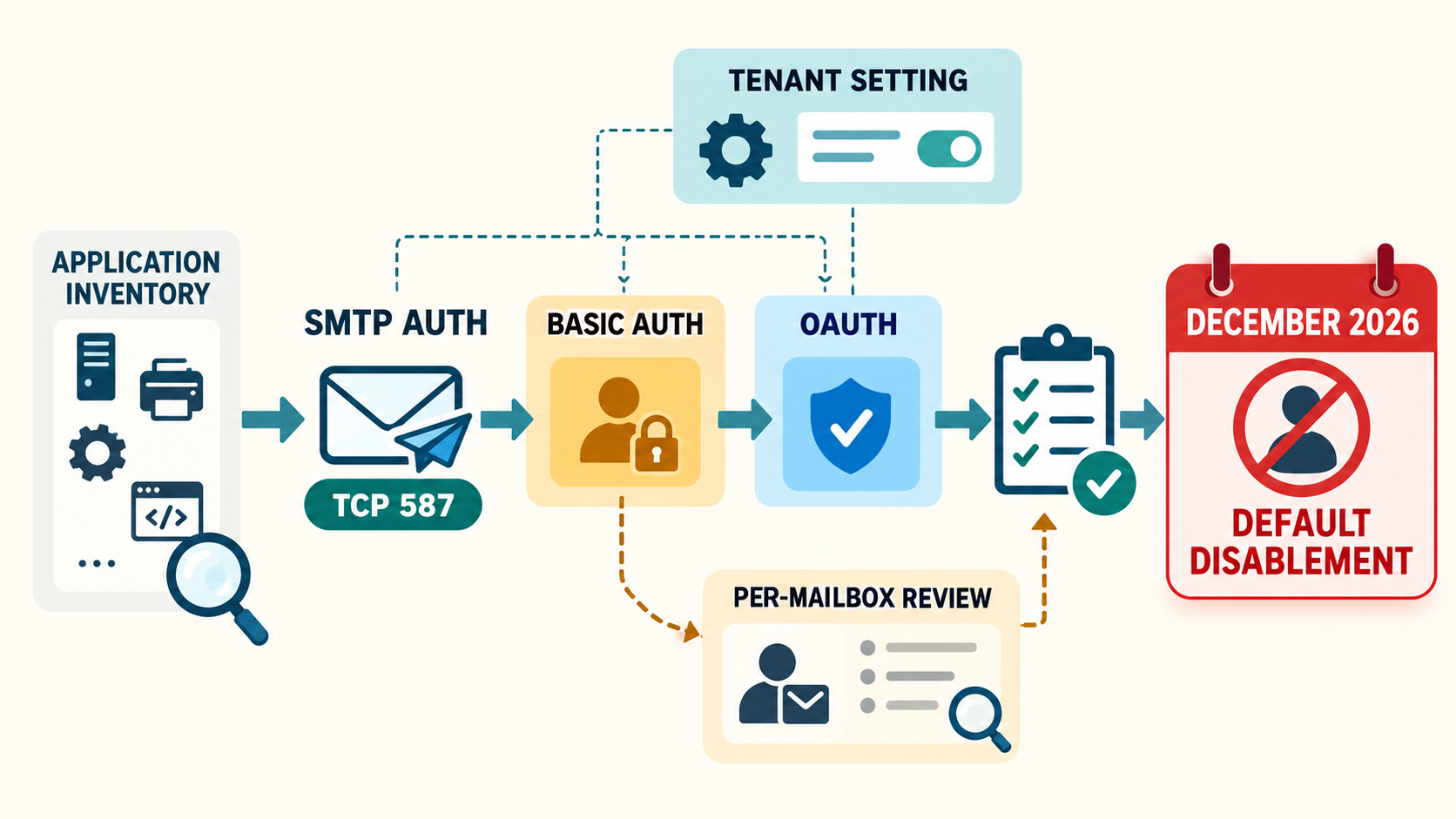
Microsoft did not remove SMTP AUTH Basic authentication in January 2026. Its January 27, 2026 revision says behavior remains unchanged through December 2026, Basic authentication is scheduled to be disabled by default for existing tenants at the end of December, new tenants created afterward start without it, and Microsoft plans to announce a final removal date in the second half of 2027. The correct project is not a date-only password replacement: inventory every sender, choose the right transport architecture, implement OAuth or a controlled relay, test received evidence, and then remove the legacy exception.
What Microsoft actually announced
| Milestone | Microsoft position | Operational meaning | Evidence to retain |
|---|---|---|---|
| Through December 2026 | SMTP AUTH Basic authentication behavior remains unchanged. | Existing password-based workflows are not automatically safe or future-ready; inventory and migration should already be under way. | Tenant setting, mailbox override, authentication policy, sign-in evidence and application owner. |
| End of December 2026 | Basic authentication is scheduled to be disabled by default for existing tenants. | An administrator can still enable it temporarily where Microsoft permits, but this is an exception window rather than a migration design. | Approved exception, business owner, expiry, compensating controls and tested rollback. |
| Tenants created after December 2026 | Basic authentication is unavailable by default; OAuth is the supported authentication method. | New deployments must not assume that a username and password against smtp.office365.com will work. | OAuth app registration, consent, Exchange authorization and received-message test. |
| Second half of 2027 | Microsoft plans to announce the final removal date. | The January 2026 announcement did not set the final removal date. | Current Microsoft announcement reviewed at each change gate. |
The end-of-December milestone is default disablement, not the final protocol-removal date. Administrators should not turn that distinction into an indefinite exception. Password-based unattended senders have weak credential lifecycle, broad replay value and poor workload identity. Build and test the replacement while rollback remains possible.
Inventory before changing any setting
Start from evidence, not a list of known printers. Search Microsoft Entra sign-in logs for legacy authentication, inspect Exchange reporting, application secrets, device configurations, Postfix or application logs, firewall flows to smtp.office365.com, and mailbox SMTP AUTH overrides. Record owner, sender address, host, source IP, recipients, external-delivery need, average and peak volume, attachment size, retry capability, TLS version, current authentication, business criticality and replacement option.
A mailbox with SMTP AUTH enabled does not prove it is used. A successful SMTP login does not prove the message reached the intended recipient. Keep configuration, authentication, submission, Exchange trace and received-copy evidence separate.
Choose the correct sending architecture
| Method | Internet recipients | Identity or trust | Port | Best fit and boundary |
|---|---|---|---|---|
| SMTP AUTH with OAuth | Yes | Licensed mailbox plus delegated or app-only OAuth authorization | 587, or documented 25 submission path | Applications that can acquire, protect and renew tokens and need a mailbox sender identity. |
| Microsoft 365 SMTP relay | Yes | Inbound connector authenticated by certificate or static public IP | 25 | On-premises MTA, scanners or applications with a stable trusted egress. Not a public open relay. |
| Direct Send | No, internal Microsoft 365 recipients only | Destination MX and sender-domain controls; no mailbox authentication | 25 | Internal-only devices. It is not a substitute when external delivery is required. |
| High Volume Email | Internal-recipient use case documented by Microsoft | HVE account with supported authentication | 587 | High-volume internal traffic; evaluate current limits and product status separately. |
| Third-party transactional service | Yes | Provider API or authenticated submission | Provider-specific | Cloud applications or campaigns where a purpose-built service, suppression and telemetry are required. |
Application needs to send mail
              |
              v
Does it support Microsoft OAuth and safe token renewal?
       / yes                              \ no
      v                                    v
Choose delegated or app-only       Is there a controlled on-premises
SMTP AUTH architecture             relay with certificate/static IP?
      |                              / yes                 \ no
      v                             v                       v
Acquire token for Exchange      Microsoft 365 SMTP     Internal recipients only?
Online SMTP resource            relay connector          / yes       \ no
      |                             |                     v            v
      v                             v                 Direct Send   Purpose-built
STARTTLS to smtp.office365.com:587, authenticate                    service/API
with SASL XOAUTH2, then submit only as an authorized sender
Do not force every device through mailbox OAuth. A long-running application that can securely renew tokens is a good SMTP OAuth candidate. A Postfix relay or scanner fleet with stable egress may be better served by a certificate- or IP-authenticated Microsoft 365 connector. Direct Send cannot deliver to external recipients. Bulk marketing should not be hidden behind a user mailbox submission path.
Understand the five independent control layers
| Control | Scope | True or enabled effect | Important interaction |
|---|---|---|---|
| TransportConfig SmtpClientAuthenticationDisabled | Exchange Online organization | True disables SMTP AUTH for mailboxes that inherit the organization value. | This disables the SMTP AUTH protocol path, not only password authentication. |
| CASMailbox SmtpClientAuthenticationDisabled | Individual mailbox | True disables and False enables SMTP AUTH for that mailbox; null inherits organization policy. | Mailbox value overrides the organization setting. |
| Security defaults | Microsoft Entra tenant | Microsoft documents SMTP AUTH as disabled when security defaults is enabled. | Do not weaken tenant-wide security merely to preserve one legacy device; choose another mail path. |
| Exchange authentication policy | Assigned users | Can block Basic authentication for SMTP. | Enabling SMTP AUTH at tenant and mailbox level does not override a policy that blocks Basic authentication. |
| OAuth authorization | Application and mailbox scope | Allows the approved application to request a token and submit as an authorized identity. | A valid token still needs Exchange-side authorization and an enabled SMTP AUTH path. |
Evaluate these controls in order. First confirm the endpoint and TLS. Then determine whether SMTP AUTH is enabled for the mailbox after tenant and mailbox precedence. Next determine whether Basic authentication is blocked. For OAuth, verify token audience, permission, consent and Exchange authorization. Finally verify that the authenticated principal may submit as the selected sender.
Delegated OAuth implementation
Use delegated OAuth when a signed-in mailbox user is part of the application model. Register the application in Microsoft Entra, configure the exact redirect URI, add the delegated Exchange Online SMTP permission https://outlook.office.com/SMTP.Send, and request offline_access only when the application genuinely needs a refresh token. Use authorization-code flow with PKCE for interactive public clients where applicable, or Microsoft's documented device flow for constrained approved clients.
The application exchanges the authorization result for an access token, stores refresh material in an operating-system or managed secret store, renews before expiry, and submits through SASL XOAUTH2. Never log authorization codes, access tokens, refresh tokens or client secrets. Conditional Access and user lifecycle remain part of this model: disabling the user or revoking consent can stop the workload.
App-only OAuth for unattended services
Use client credentials when no interactive user exists and the product supports app-only SMTP OAuth. In Microsoft Entra, add the Office 365 Exchange Online application permission SMTP.SendAsApp and grant administrator consent. Register the enterprise application service principal in Exchange Online and scope it to only the sender mailbox or approved Exchange application role assignment. Do not grant tenant-wide mail access merely because a sample does.
# In Microsoft Entra, grant the Office 365 Exchange Online application
# permission SMTP.SendAsApp and grant administrator consent first.

# Then register the Entra enterprise application's service principal in
# Exchange Online. Use the enterprise application service-principal Object ID,
# not the similarly named app-registration Object ID.
Connect-ExchangeOnline
New-ServicePrincipal `
  -AppId 11111111-2222-3333-4444-555555555555 `
  -ObjectId aaaaaaaa-bbbb-cccc-dddd-eeeeeeeeeeee `
  -DisplayName 'Contoso SMTP OAuth sender'

$exoSp = Get-ServicePrincipal -Identity 'Contoso SMTP OAuth sender'

# Grant SendAs only for the mailbox the application is allowed to use.
Add-RecipientPermission -Identity [email protected] `
  -Trustee $exoSp.Identity -AccessRights SendAs -Confirm:$false

# Verify the Exchange registration and sender permission.
Get-ServicePrincipal -Identity $exoSp.Identity
Get-RecipientPermission -Identity [email protected] |
  Where-Object { $_.Trustee -eq $exoSp.Identity }
Microsoft documentation distinguishes the application ID from object IDs. The New-ServicePrincipal ObjectId is the enterprise application service-principal object ID. Using the app-registration object ID is a common cause of a configuration that appears correct in Entra but fails in Exchange.
Prefer a certificate or managed workload identity where the supported application architecture permits it. If a client secret is unavoidable, store it in a managed secret service, assign a named owner, monitor expiry, rotate it before expiration, test overlap, and revoke the previous credential after successful validation. The SMTP process should receive only the credential material it needs at runtime. Source repositories, command histories, application logs, screenshots, support tickets and copied configuration files are not secret stores.
Token request and XOAUTH2 wire flow
For client credentials, request the Exchange Online resource using https://outlook.office365.com/.default. The resulting access token is placed in the SASL XOAUTH2 payload; it is not used as the SMTP password in a Basic AUTH command. Establish STARTTLS, verify the server certificate, issue EHLO again inside TLS, and only then authenticate.
POST https://login.microsoftonline.com/<tenant-id>/oauth2/v2.0/token
Content-Type: application/x-www-form-urlencoded

client_id=<application-id>
&client_secret=<secret-held-in-a-secret-store>
&grant_type=client_credentials
&scope=https%3A%2F%2Foutlook.office365.com%2F.default

SASL XOAUTH2 clear text before Base64 encoding:
[email protected]^Aauth=Bearer <access-token>^A^A

SMTP evidence flow:
S: 220 ...
C: EHLO app.contoso.com
S: 250-STARTTLS
C: STARTTLS
S: 220 2.0.0 SMTP server ready
... complete TLS negotiation, then EHLO again ...
C: AUTH XOAUTH2 <base64-encoded-sasl-payload>
S: 235 2.7.0 Authentication successful
C: MAIL FROM:<[email protected]>
C: RCPT TO:<[email protected]>
C: DATA
The control characters shown as ^A are byte 0x01. Encode the complete payload with Base64 without inserting line breaks. Use an OAuth-capable SMTP library rather than hand-building production authentication. A successful 235 proves authentication for that transaction; preserve the resulting queue ID or Message-ID and continue through trace and received-copy checks.
Exchange Online tenant and mailbox configuration
# Connect with an authorized Exchange Online administrator.
Connect-ExchangeOnline

# Record the organization-wide SMTP AUTH state.
Get-TransportConfig |
  Format-List SmtpClientAuthenticationDisabled

# Record the mailbox override. Null means inherit the organization value.
Get-CASMailbox -Identity [email protected] |
  Format-List PrimarySmtpAddress,SmtpClientAuthenticationDisabled

# Enable SMTP AUTH only for one approved mailbox when the organization
# setting is disabled. False means SMTP AUTH is enabled for this mailbox.
Set-CASMailbox -Identity [email protected] `
  -SmtpClientAuthenticationDisabled $false

# Return the mailbox to organization-level control after migration.
Set-CASMailbox -Identity [email protected] `
  -SmtpClientAuthenticationDisabled $null

# Disable the protocol organization-wide after all approved dependencies move.
Set-TransportConfig -SmtpClientAuthenticationDisabled $true
Use a mailbox override only as a bounded exception. Record why it exists and when it expires. If security defaults or an authentication policy blocks the old method, do not disable broad protection without a security review. OAuth migration does not require turning Basic authentication back on, but the SMTP AUTH protocol must be enabled for the mailbox using that submission path.
Postfix and legacy device implementation
Postfix is an MTA, not an interactive mailbox client. Although OAuth-capable SASL helpers exist, token acquisition, renewal, secret storage and failure handling must be engineered and supported. Do not place a short-lived token in sasl_passwd and call the migration complete. For an on-premises Postfix relay with stable identity, evaluate a Microsoft 365 inbound connector authenticated by a TLS certificate or dedicated static public IP.
Restrict relay clients with mynetworks, SASL or another explicit policy; never create an open relay. Route to the tenant MX/connector destination on port 25 as Microsoft documents, use TLS, publish correct SPF for the egress where applicable, preserve queue retries, and test internal and external recipients separately. A cloud-hosted workload may not satisfy Microsoft's connector restrictions; use OAuth SMTP submission, Azure Communication Services Email or another approved service instead.
Phased migration and rollback
- Discover: map every sender and prove current use.
- Classify: select OAuth submission, connector relay, Direct Send, HVE or another service by requirements.
- Build: create least-privilege identity, consent, Exchange scope, secret storage and monitoring.
- Pilot: move one low-risk sender and compare headers, trace, latency, failures and visible identity.
- Parallel validation: keep the old path available for a bounded window without sending duplicates.
- Cut over: change one workload group at a time and monitor queues and token errors.
- Remove: delete stored passwords, revoke obsolete secrets and return mailbox overrides to policy.
- Enforce: disable Basic authentication exceptions and, where appropriate, SMTP AUTH itself.
Rollback means restoring the previously tested route for the affected workload while preserving queued mail and evidence. It does not mean reopening SMTP AUTH tenant-wide. Define stop conditions such as sustained authentication failure, queue age, external-recipient rejection, sender mismatch or loss of trace correlation.
Acceptance evidence
- Configuration export showing tenant and mailbox SMTP AUTH state.
- App registration, permission type, admin consent and Exchange service-principal identity.
- Secret or certificate expiry monitoring without exposing secret material.
- TLS negotiation and successful XOAUTH2 authentication for the intended endpoint.
- Controlled internal and external recipient tests where the method permits them.
- Exchange message trace tied to Message-ID and UTC submission time.
- Received EML from Microsoft 365 and another target showing From, Return-Path, SPF, DKIM, DMARC and route evidence.
- Negative test proving an unauthorized sender identity is rejected.
- Token-expiry or renewal test and application retry behavior.
- Rollback test that preserves queued messages and avoids duplicates.
Troubleshooting by evidence layer
| Symptom | Likely layer | Evidence | Bounded correction |
|---|---|---|---|
| 535 5.7.3 Authentication unsuccessful | Wrong token audience or scope, missing consent, expired token, wrong SASL construction or Exchange authorization | Decoded token metadata without exposing the token, SMTP transcript, app ID, tenant ID and Exchange service-principal mapping | Correct the proven mismatch; never paste an access token into a ticket. |
| 5.7.57 Client not authenticated to send mail | SMTP AUTH disabled, wrong endpoint, failed authentication or sender not permitted | Tenant and mailbox settings, endpoint, port, TLS and server response | Separate protocol enablement from OAuth and SendAs authorization. |
| Authentication works but From is rejected | Authenticated identity lacks SendAs for the visible sender | Authenticated principal, MAIL FROM, RFC 5322 From and recipient-permission output | Grant only the required sender permission or use the authorized mailbox identity. |
| Works interactively but fails unattended | Delegated flow depends on user interaction or refresh-token lifecycle | Grant type, refresh-token storage, consent and conditional-access result | Use a supported delegated refresh flow or correctly scoped app-only architecture. |
| Printer supports only username and password | Device capability boundary | Model, firmware, TLS and OAuth capability | Use a controlled relay or replace/upgrade the workflow; do not disable broad security controls casually. |
| Postfix queues after smart-host change | Token helper, connector, TLS, DNS or port reachability | Postfix log, queue ID, SMTP reply, connector match and network test | Use an MTA-appropriate relay design and preserve queue retry behavior. |
Do not diagnose every 535 as a bad secret. Check the token resource, permission type, consent, tenant, Exchange service-principal registration, sender authorization, mailbox protocol state and XOAUTH2 bytes. Redact tokens and recipient data before sharing logs.
OAuth does not solve deliverability
OAuth changes how the submitting workload authenticates. It does not automatically correct SPF, DKIM, DMARC, reverse DNS, content, consent, complaints, list quality or mailbox-provider reputation. Verify the final received message. If Exchange Online signs DKIM for the accepted domain, confirm the expected d= identity and DMARC alignment rather than assuming that OAuth creates authentication alignment.
Current operating conclusion
As reviewed on November 11, 2026, Microsoft's January announcement keeps Basic authentication behavior unchanged through December 2026, schedules default disablement at the end of December, and defers announcement of the final removal date to the second half of 2027. Treat dates as a planning boundary, not permission to delay. The durable design uses OAuth or an architecture appropriate to the sending workload, least privilege, tested token or connector lifecycle, and received evidence.
Primary Microsoft references
- Microsoft Exchange Team: Updated SMTP AUTH Basic Authentication Deprecation Timeline: January 27, 2026 schedule, December default-disablement distinction and 2027 final-date announcement plan.
- Microsoft Learn: Enable or disable authenticated client SMTP submission: Tenant and mailbox controls, precedence, security-default and authentication-policy boundaries.
- Microsoft Learn: Authenticate IMAP, POP or SMTP using OAuth: Delegated and client-credentials permissions, Exchange service principal and SASL XOAUTH2 construction.
- Microsoft Learn: Set up a multifunction device or application to send email: Comparison of OAuth client submission, SMTP relay, Direct Send and HVE with operational limitations.