Exchange Online SMTP DANE and DNSSEC: Configuration and Operations
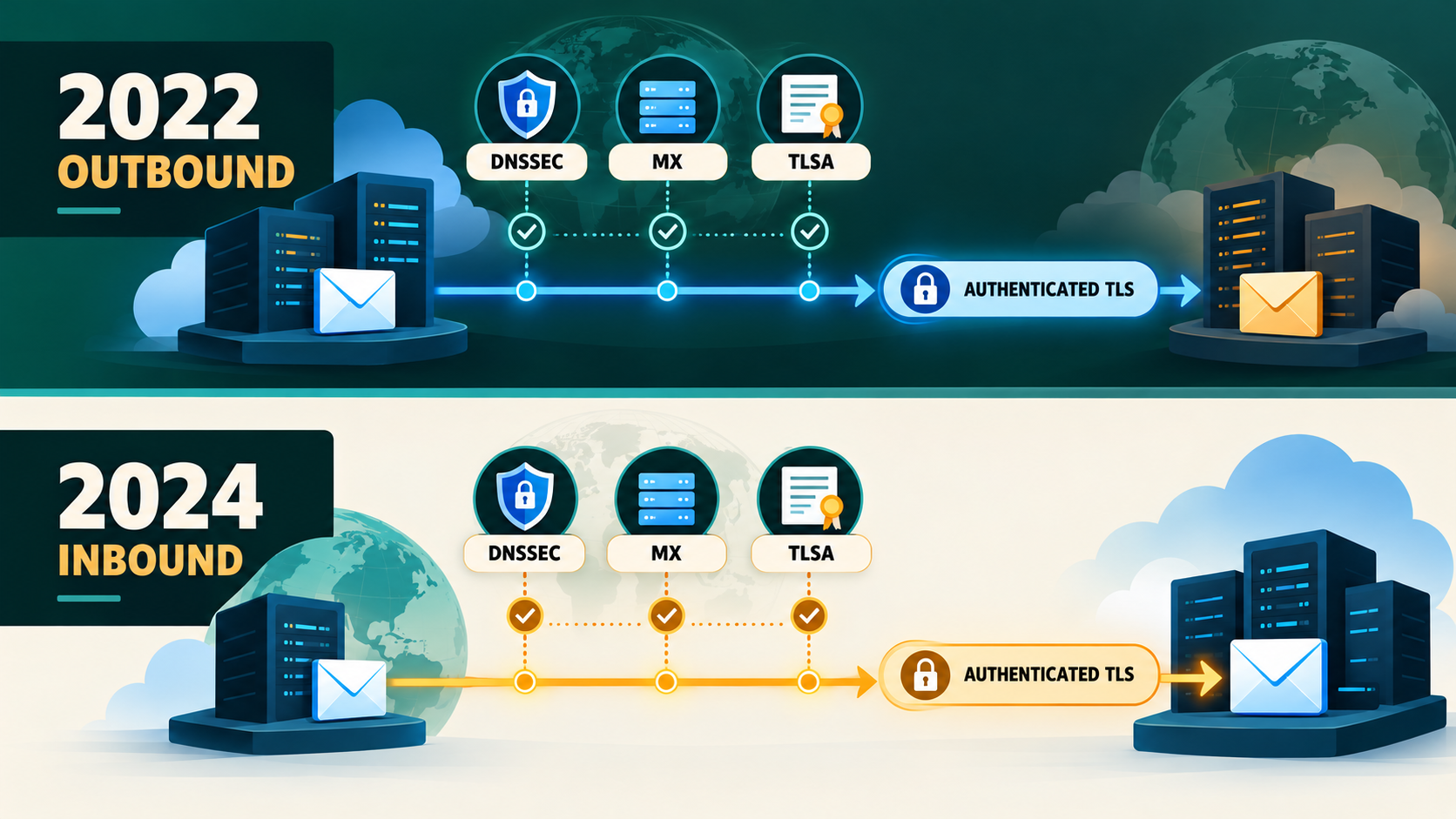
Exchange Online SMTP DANE with DNSSEC protects SMTP transport against forged DNS, STARTTLS downgrade and certificate substitution. Outbound validation has been enabled by Microsoft for all Exchange Online customers since 2022 and needs no tenant switch. Inbound protection became generally available in 2024, but it requires a staged MX migration to a Microsoft-provided mx.microsoft target, DNSSEC validation, inbound DANE enablement and verification of Microsoft-provisioned TLSA records.
Why ordinary opportunistic TLS is not enough
| Weakness | What can happen with opportunistic TLS | What DNSSEC and DANE add | Remaining boundary |
|---|---|---|---|
| STARTTLS downgrade | An attacker interferes with SMTP capability negotiation so the sender falls back to clear text. | An authenticated TLSA policy makes TLS mandatory when DANE applies. | Only DANE-aware senders obtain this enforcement. |
| MX redirection | Tampered DNS points the sender to an attacker-controlled SMTP host. | DNSSEC authenticates MX and address records before connection. | The validating resolver and complete DNSSEC chain must work. |
| Certificate substitution | The sender accepts a certificate without a domain-authenticated binding to the intended MX service. | TLSA associates the MX service with expected certificate or public-key data. | Certificate and TLSA rotation must overlap correctly. |
| Silent insecure fallback | A TLS or certificate problem can be bypassed to preserve delivery. | DANE converts authenticated policy failure into retry and eventual non-delivery. | Intentional enforcement can delay mail during a bad deployment. |
| Unknown transport state | SMTP acceptance proves delivery but not authenticated encryption. | DNSSEC, TLSA, TLS session and SMTP result can be recorded separately. | DANE is hop-to-hop and does not encrypt stored message content end to end. |
SMTP was designed to deliver mail across independently operated systems. STARTTLS added encryption, but many senders use it opportunistically: try TLS when offered and continue without it when unavailable. That delivery-first behavior permits an active attacker to suppress STARTTLS or redirect DNS unless the sender has an authenticated policy saying TLS and a specific service identity are required.
DANE does not encrypt the message end to end. It authenticates and encrypts one SMTP hop. The receiving mailbox provider can still process and store the message, and another onward relay needs its own transport protection.
DNSSEC, DANE, TLSA and TLS have different jobs
- DNSSEC authenticates DNS data and authenticated denial of data through a chain of trust.
- MX identifies the SMTP destination hosts for a recipient domain.
- TLSA publishes the certificate or public-key association for a service such as SMTP on port 25.
- STARTTLS negotiates encryption on the SMTP connection.
- DANE validation combines authenticated DNS and the TLS service identity, then defines failure behavior.
One successful STARTTLS connection is not DANE. One TLSA record without DNSSEC authentication is not trusted DANE policy. DNSSEC without a usable TLSA record authenticates DNS but does not create a DANE certificate association.
How is DANE different from buying an SSL certificate?
A public certificate gives the SMTP server a cryptographic identity issued through the public certification ecosystem. By itself, it does not protect the MX lookup and does not force an opportunistic sender to reject clear-text fallback. DANE adds a DNSSEC-authenticated statement that binds the SMTP service to expected certificate or public-key material.
For Exchange Online inbound DANE, Microsoft operates the receiving certificates and provisions the TLSA records for the returned mx.microsoft service. The tenant administrator does not generate a self-signed certificate or manually hash Microsoft's certificate. The customer changes the accepted-domain configuration and MX routing, while Microsoft controls the service certificate and its TLSA rotation.
Outbound and inbound DANE are separate deployments
| Direction | Who validates | Customer configuration | Who publishes TLSA | Protected hop |
|---|---|---|---|---|
| Exchange Online outbound | Exchange Online validates the destination domain and MX service. | None in the sending tenant; outbound DANE is on by default. | The external receiving organization. | Exchange Online to a DANE-enabled external destination. |
| Exchange Online inbound direct MX | External DANE-aware sending systems validate Microsoft's receiving service. | Migrate to the returned mx.microsoft MX target, enable inbound DANE and verify DNS. | Microsoft provisions TLSA records for the Exchange Online target. | External sender to Exchange Online Protection. |
| Inbound through third-party gateway | External senders validate the third-party gateway, not Exchange Online. | The gateway needs its own DNSSEC and DANE for the internet-facing hop. | The gateway operator for its MX service. | Internet sender to gateway. Microsoft feature can protect gateway-to-Exchange only if the gateway validates DANE. |
| Outbound through third-party gateway | The gateway selected by the connector validates final destinations. | Depends on gateway DANE support and routing. | Each external receiving organization. | Gateway to final destination, not automatically Exchange Online to gateway. |
Exchange Online outbound DANE
Exchange Online outbound DANE is on by default. A tenant does not publish a TLSA record for its sending domain and does not run an enable command. When the external recipient domain provides DNSSEC-authenticated routing and usable TLSA records, Exchange Online validates those records and the destination certificate before transmitting mail.
If the destination does not advertise DANE through usable authenticated TLSA data, Exchange Online uses its ordinary transport behavior. The sending tenant cannot opt out of Microsoft's outbound DNSSEC and DANE validation. Problems are diagnosed from message trace, NDR details and destination evidence.
Outbound validation flow
Exchange Online sends to recipient.example
        |
        v
Validate DNSSEC chain for recipient MX and address data
        |
        +---- bogus or SERVFAIL ----> defer, retry, then NDR if unresolved
        |
        v
Query _25._tcp.<mx-host> TLSA
        |
        +---- authenticated absence ----> ordinary SMTP TLS behavior
        |
        +---- usable authenticated TLSA present
                         |
                         v
             Connect to MX and require STARTTLS
                         |
                         v
             Match certificate against TLSA
                 /                     \
              match                   fail
                |                       |
          send over TLS          defer and retry
Exchange Online inbound DANE
Inbound DANE allows external senders that implement RFC 7672 to authenticate the Microsoft receiving service for the tenant's domain. The domain's MX changes from a legacy target such as contoso-com.mail.protection.outlook.com to the exact mx.microsoft target returned by Exchange Online PowerShell.
The external sender follows the customer domain's MX to the Microsoft target, validates the DNSSEC chain for the routing data, queries TLSA at _25._tcp.<mx-host>, starts TLS and verifies the presented Microsoft certificate against at least one usable TLSA association.
Inbound validation flow
External DANE-aware sender sends to contoso.com
        |
        v
DNSSEC-authenticated MX lookup
contoso.com MX 0 contoso-com.o-v1.mx.microsoft
        |
        v
DNSSEC-authenticated TLSA lookup
_25._tcp.contoso-com.o-v1.mx.microsoft
        |
        v
Connect to Microsoft Exchange Online Protection on port 25
        |
        v
Require STARTTLS and match Microsoft certificate to TLSA
        |
        +---- valid ----> encrypted authenticated SMTP delivery
        |
        +---- invalid --> sender defers or fails according to RFC 7672
Understand the 3 1 1 TLSA model
| TLSA field | Recommended value | Meaning | Operational effect |
|---|---|---|---|
| Certificate Usage | 3 | DANE-EE, match the end-entity service certificate. | The DNSSEC-authenticated TLSA association is the service identity. |
| Selector | 1 | Use SubjectPublicKeyInfo rather than the complete certificate. | A certificate renewal can retain the same key, although planned rotation is still required. |
| Matching Type | 1 | SHA-256 digest of the selected SPKI data. | DNS stores a bounded digest rather than the complete key object. |
| Association Data | SHA-256 digest | Expected digest calculated from the selected certificate public-key information. | At least one usable authenticated TLSA association must match the presented service certificate. |
The TLSA owner name encodes the service port, transport and MX hostname. For SMTP on TCP port 25, it is _25._tcp.mx-host.example. It is not normally placed at _25._tcp.example.com merely because that is the recipient domain.
Exchange Online publishes multiple TLSA records for resilience and rotation. Microsoft documents that some individual associations can fail while another valid association matches. The correct decision is based on the usable authenticated set, not a requirement that every published association match the one certificate observed during one connection.
Prerequisites before touching DNS
- The custom domain is verified in Microsoft 365.
- The domain exists as a healthy Exchange Online Accepted Domain.
- Current authoritative MX records and TTLs are documented.
- Every fallback or secondary MX is understood.
- Inbound and outbound third-party gateways are mapped.
- MTA-STS policy, mode, max_age, MX patterns and TLS-RPT are recorded.
- An Exchange Online administrator can run the required cmdlets.
- The DNS owner can change MX safely and restore the exact legacy value.
- Controlled external sender and recipient mailboxes are available.
- Message trace, NDR and DNS monitoring owners are assigned.
Microsoft's standard procedure assumes one current MX at priority 0 or 10 and no fallback MX. A secondary route can bypass the protected service or complicate cutover. Do not apply the standard sequence blindly when the domain has multiple MX targets.
Safe deployment phases
| Phase | Change | Pass evidence | Stop or rollback trigger |
|---|---|---|---|
| Inventory | Record accepted domain, current MX, fallback MX, MTA-STS, gateways and DNS owner. | Approved dependency map and rollback owner. | Unknown gateway, secondary MX or DNS authority. |
| Prepare | Lower current MX TTL, wait old TTL, set MTA-STS to testing and wait max_age. | Observed low TTL and refreshed policy ID. | Old caches or enforcing MTA-STS still point only to legacy MX. |
| Provision DNSSEC target | Run Enable-DnssecForVerifiedDomain and add returned mx.microsoft target at priority 20. | New target accepts controlled mail while legacy remains preferred. | New target fails inbound SMTP or domain status is unhealthy. |
| Cut over MX | Set new target priority 0 and legacy target priority 30. | Authoritative and public resolvers prefer the new target; mail flow passes. | Unexpected queue, routing or gateway failure. |
| Remove legacy route | Delete legacy MX after TTL and observation window. | Only expected mx.microsoft MX remains. | Required fallback or third-party path still depends on legacy name. |
| Enable DANE | Run Enable-SmtpDaneInbound. | TLSA propagates and at least one association validates. | No usable TLSA, certificate mismatch or DNSSEC failure. |
| Enforce MTA-STS | Add new MX pattern, restore enforce mode and rotate policy ID. | Policy fetch and MX match succeed. | Policy excludes active MX or report volume shows failures. |
Coordinate MTA-STS before changing MX
If MTA-STS is in enforce mode and lists only the legacy Exchange Online MX, a sender honoring that cached policy can reject the new mx.microsoft target. Microsoft instructs administrators to change MTA-STS to testing, rotate the TXT policy ID and wait the existing max_age before the MX migration.
Add the new MX hostname to the policy file, rotate the policy ID again, validate mail flow, and only then restore enforce mode. Keep TLS-RPT active so policy failures remain visible. MTA-STS and DANE can coexist, but their policy discovery and trust models are different.
What about Gmail and Yahoo?
Publishing inbound DANE for Exchange Online does not block senders that lack DANE support. Gmail, Yahoo and another ordinary SMTP sender can still resolve the new MX, connect and deliver using STARTTLS or their own transport policy. The additional authentication benefit exists only when the sending MTA validates DNSSEC and the TLSA association.
Microsoft documents Exchange Online outbound DANE explicitly. In contrast, the current public Gmail sender guidance reviewed for this article requires TLS but does not promise outbound SMTP DANE validation, and the reviewed Yahoo public guidance likewise does not provide an outbound DANE guarantee. Therefore the article does not mark Gmail or Yahoo as DANE pass or fail without transaction evidence.
| Sending provider | Publicly documented transport position reviewed | What happens when sending to DANE-enabled Exchange Online | Safe conclusion |
|---|---|---|---|
| Exchange Online | Microsoft explicitly documents outbound DNSSEC and SMTP DANE validation as enabled by default. | Exchange Online validates DNSSEC, TLSA, STARTTLS and the destination certificate when usable DANE policy is advertised. | DANE enforcement can be diagnosed through Microsoft message trace and DANE-specific NDR codes. |
| Gmail and Google Workspace | Google publicly requires TLS for covered sender traffic, but the reviewed public Gmail guidance does not document outbound SMTP DANE validation. | Mail can still reach the mx.microsoft endpoint. If Google does not validate DANE for that transaction, the hop uses Google's own TLS policy rather than proof from the TLSA record. | A TLS Received header proves TLS was used, not that Google validated DNSSEC and TLSA. |
| Yahoo Mail and AOL | Yahoo publicly documents TLS and authenticated submission, but the reviewed public sender and help guidance does not state an outbound SMTP DANE guarantee. | Mail can still use the Exchange Online MX and STARTTLS. DANE protection applies only if the Yahoo sending MTA performs RFC 7672 validation. | Do not label Yahoo traffic DANE-protected without provider documentation or sender-side validation evidence. |
| Self-hosted Postfix, Exim or another MTA | Capability depends on resolver, MTA build and explicit configuration. | A correctly configured sender can validate the Microsoft TLSA set and enforce authenticated TLS. | Retain software version, resolver validation, TLSA trace and delivery log for the tested message. |
A received header such as with ESMTPS or a provider TLS dashboard shows that encryption was negotiated. It does not reveal whether the sender authenticated the MX and TLSA data through DNSSEC. Conclusive DANE evidence normally resides at the sending MTA: DNS validation logs, TLSA selection, certificate-match result and failure policy.
How to test Gmail, Yahoo and other providers
- Send controlled messages from each provider to the DANE-enabled Exchange Online domain.
- Record Message-ID, UTC send time, sending provider and recipient.
- Confirm arrival and inspect the complete Received chain for TLS use.
- Check Exchange Online message trace for the receiving event.
- Do not infer DANE validation merely from successful delivery.
- For a sender you administer, capture DNSSEC, TLSA and certificate-match logs.
- For a hosted provider, use an official DANE statement or provider-side diagnostic evidence if available.
- Keep results provider-specific and date-stamped because transport implementations can change.
Step 1: lower MX TTL and wait
Lower the existing MX TTL to the lowest value supported by the DNS provider, but not below Microsoft's documented 30-second floor. Wait at least the previous TTL before changing routing. Lowering a TTL does not invalidate already cached answers.
Capture authoritative and public-resolver answers before the change. Record UTC time, resolver, answer, TTL and DNSSEC status. These form the rollback baseline.
Step 2: provision the DNSSEC-capable MX target
Connect to Exchange Online PowerShell and run Enable-DnssecForVerifiedDomain for the accepted domain. The command returns a tenant-specific DnssecMxValue, such as contoso-com.o-v1.mx.microsoft. Use the returned value exactly.
# Connect with an Exchange Online administrator account.
Connect-ExchangeOnline

# Confirm that the custom domain is verified and is an accepted domain.
Get-AcceptedDomain -Identity contoso.com |
  Format-List Name,DomainName,DomainType,Default

# Provision the DNSSEC-capable Exchange Online MX target.
$dnssec = Enable-DnssecForVerifiedDomain -DomainName contoso.com
$dnssec | Format-List Result,DnssecMxValue,ErrorData

# Record the exact DnssecMxValue. Publish that value as instructed,
# test it at lower MX preference, then complete the MX cutover.

# After DNSSEC and MX validation, enable inbound SMTP DANE.
Enable-SmtpDaneInbound -DomainName contoso.com

# Inspect the DNSSEC feature status and expected MX value.
Get-DnssecStatusForVerifiedDomain -DomainName contoso.com
Add the returned target as a new MX record with priority 20 while the legacy MX remains preferred. This creates a testable route without immediately moving normal inbound traffic. Verify that the new endpoint accepts controlled mail and that Exchange Online recognizes the expected MX.
Step 3: cut over MX in two stages
After the lower-priority target passes, set the new mx.microsoft record to priority 0 and move the legacy MX to priority 30. Observe authoritative DNS, public resolvers, Microsoft Remote Connectivity Analyzer, message trace and controlled inbound mail.
After the relevant TTL and observation window, delete the legacy MX and set the new MX TTL to the normal operational value, which Microsoft illustrates as 3,600 seconds. Do not leave an unprotected secondary MX that accepts mail outside the intended DANE route.
Step 4: enable inbound SMTP DANE
Once DNSSEC and the MX migration are validated, run Enable-SmtpDaneInbound -DomainName contoso.com. Microsoft provisions the TLSA records for the Exchange Online endpoint. Allow for provisioning and DNS cache time before evaluating the result.
Verify the exact TLSA owner name and ensure at least one usable authenticated association matches the certificate presented by the Microsoft endpoint. A TXT record or screenshot claiming DANE is enabled is not sufficient evidence.
DNS and TLS validation commands
# Observe the customer domain's active MX target.
dig +dnssec MX contoso.com

# Resolve and validate the Microsoft-provided MX host.
dig +dnssec A contoso-com.o-v1.mx.microsoft
dig +dnssec AAAA contoso-com.o-v1.mx.microsoft

# Query SMTP TLSA at port 25 using the MX host, not the customer domain.
dig +dnssec TLSA _25._tcp.contoso-com.o-v1.mx.microsoft

# Inspect the complete DNSSEC delegation and denial path when available.
delv MX contoso.com
delv TLSA _25._tcp.contoso-com.o-v1.mx.microsoft

# Inspect the presented SMTP certificate and STARTTLS negotiation.
openssl s_client -starttls smtp \
  -connect contoso-com.o-v1.mx.microsoft:25 \
  -servername contoso-com.o-v1.mx.microsoft \
  -showcerts
The AD flag from a recursive resolver is evidence about that resolver's validation, not a complete trace by itself. Use a validating resolver or delv and retain DS, DNSKEY, RRSIG and denial evidence when diagnosing a failure.
Third-party gateway architecture
If the public MX points to a third-party security gateway, internet senders connect to that gateway. Enabling Exchange Online inbound DANE does not protect that first hop. The gateway must publish and operate its own DNSSEC and TLSA policy for the public MX service.
The gateway-to-Exchange Online hop can use the new target only if the gateway supports DNSSEC and SMTP DANE validation. Microsoft states that the gateway should use DNS lookup and the returned mx.microsoft hostname rather than a stale hard-coded legacy target. Test connector restrictions, certificates and resubmission paths separately.
Exchange Online DANE and DNSSEC errors
| Enhanced status | Meaning | Evidence to inspect | Likely owner |
|---|---|---|---|
| 4/5.7.321 | STARTTLS is required but unavailable. | EHLO response, MX host, port 25 reachability and TLS capability. | Destination SMTP operator. |
| 4/5.7.322 | Presented certificate is expired. | Certificate chain, notBefore, notAfter and selected MX endpoint. | Destination SMTP operator. |
| 4/5.7.323 | Authenticated TLSA data did not validate the service. | TLSA set, certificate or SPKI digest, usage, selector and matching type. | Destination DNS and SMTP operators. |
| 4/5.7.324 | DNSSEC validation failed. | DS, DNSKEY, RRSIG, denial-of-existence and resolver response. | Destination DNS operator or DNS provider. |
| 4/5.7.325 | Remote certificate name does not match the expected hostname. | MX hostname and certificate SAN or CN evidence. | Destination SMTP operator. |
| 4/5.4.312 | Generic DNS query failure that can currently conceal a DNSSEC issue. | Remote Connectivity Analyzer and authoritative DNS trace. | Destination DNS operator after evidence confirms cause. |
Preserve the leading 4 or 5 status class. A temporary response means the sender can retry; a permanent response leads to non-delivery. Do not remove DNSSEC or TLSA policy merely because one queued message exists. First prove which destination, record and certificate produced the failure.
Retry and failure behavior
Microsoft documents retries after a DANE authentication failure at approximately 15 minutes, another 15 minutes, then hourly for up to 24 hours. If the failure persists, the message expires and an NDR is generated. This strict behavior is the security property, not an accidental availability defect.
The deployment objective is not to avoid every failure by falling back insecurely. It is to prevent bad DNS, stale TLSA data or certificate mismatch from reaching production through staged records, overlap and monitoring.
Certificate and TLSA rotation
With DANE-EE SPKI SHA-256, a certificate renewed with the same public key can continue to match the same association. A key rotation changes the SPKI digest. Safe rotation publishes associations for both old and new keys before the service starts presenting the new key, waits for DNS caches, rotates the certificate, then removes the old association after all paths and caches have aged out.
Exchange Online performs this service-side rotation for its inbound DANE endpoints. Customers still need monitoring because an external sender can observe a transient mismatch, stale resolver or network path that the Microsoft control plane does not expose directly in the tenant.
What to monitor after enablement
- Authoritative and validating-resolver MX answers.
- DNSSEC chain validity and RRSIG expiration.
- TLSA presence, usability and certificate match.
- STARTTLS support and negotiated TLS version.
- Exchange Online message-trace DANE results.
- NDR counts by enhanced status code and destination.
- Inbound volume by MX target during cache transition.
- MTA-STS TLS reports and policy failures.
- Third-party gateway queues and connector errors.
- Controlled inbound and outbound test messages.
Rollback procedure
# 1. Stop DANE enforcement for the accepted domain.
Disable-SmtpDaneInbound -DomainName contoso.com

# 2. Re-add the legacy MX value supplied in Microsoft 365 Admin Center
#    at lower numeric priority, test it, then make it priority 0.
#    Perform this DNS operation at the authoritative DNS provider.

# 3. Confirm inbound mail through the restored legacy MX.
#    Use Microsoft Remote Connectivity Analyzer and controlled messages.

# 4. Disable the Exchange Online DNSSEC feature after legacy flow is proven.
Disable-DnssecForVerifiedDomain -DomainName contoso.com

# 5. Remove the mx.microsoft MX only after cached use and tests are complete.
# 6. Restore MTA-STS policy to the verified active MX set and rotate its ID.
Rollback must preserve mail flow and policy consistency. Disabling DANE does not automatically restore the legacy MX. Restoring MX does not automatically fix a cached MTA-STS policy. Every layer has its own cache and control plane, so rollback needs an ordered runbook and explicit validation.
Current limitations and non-claims
- Initial
onmicrosoft.comdomains are not supported for inbound enablement. - Self-service or viral sign-up domains are not supported.
- Third-party gateways change which hop receives DANE protection.
- DANE does not replace SPF, DKIM, DMARC, ARC or malware filtering.
- DANE does not prove Inbox placement or recipient reading.
- A TLSA lookup without DNSSEC authentication is not enforceable DANE evidence.
- One successful MX does not prove every fallback path is protected.
- Outbound Exchange Online DANE has no tenant opt-out.
Production acceptance checklist
- Accepted Domain is verified and healthy.
- Dependency inventory includes every MX, gateway and connector.
- Old TTL and MTA-STS max_age have expired before routing changes.
- The exact returned DnssecMxValue is recorded and published.
- The new target passes while lower preference than legacy MX.
- MX preference cutover is observed from multiple resolvers.
- The legacy MX is removed after the controlled window.
- Inbound DANE enablement succeeds for the correct domain.
- At least one authenticated TLSA association validates.
- STARTTLS and certificate evidence pass against the active MX.
- MTA-STS is updated and returned to enforce only after validation.
- Message trace and NDR monitoring have accountable owners.
- Third-party gateways prove each protected hop separately.
- Rollback is rehearsed with exact legacy MX and policy values.
What changed from 2022 through 2024?
Exchange Online outbound SMTP DANE with DNSSEC became generally available in 2022, making destination validation part of Microsoft's outbound service without per-tenant configuration. Inbound capability followed as a separate project because Microsoft needed a DNSSEC-capable receiving namespace, TLSA provisioning, customer MX migration and safe certificate operations.
Microsoft announced general availability of inbound SMTP DANE with DNSSEC on October 28, 2024. The correct timeline statement is therefore not that one switch enabled DANE in both directions. Outbound validation and inbound publication have different owners, prerequisites and evidence.
Current operating conclusion
As reviewed on November 9, 2026, Exchange Online outbound SMTP DANE remains on by default. Inbound DANE is available for supported verified accepted domains through the documented MX migration and Exchange Online PowerShell workflow.
The safest implementation treats it as a transport-security migration: inventory first, lower TTL and coordinate MTA-STS, provision and test the new MX, cut over gradually, enable DANE, validate TLSA and certificate evidence, monitor errors, and keep an ordered rollback.
Primary and contemporaneous references
- Microsoft Learn: How SMTP DANE works: Current Exchange Online outbound behavior, inbound prerequisites, deployment procedure, errors, limitations and rollback.
- Microsoft Exchange Team: Inbound SMTP DANE general availability: Contemporaneous October 28, 2024 general-availability announcement.
- Microsoft Learn: Enable-DnssecForVerifiedDomain: Current cmdlet and returned MX-value behavior.
- Microsoft Learn: Enable-SmtpDaneInbound: Current accepted-domain inbound DANE enablement command.
- RFC 7672: SMTP Security via Opportunistic DANE TLS: Standards definition of SMTP DANE discovery, certificate use and failure behavior.
- Google: Gmail email sender guidelines: Current public Gmail TLS requirement used to bound, not overstate, Google transport claims.
- Yahoo Help: SMTP settings: Current public Yahoo TLS guidance used to bound, not overstate, Yahoo transport claims.